

Microsoft announced new AI features for Microsoft 365 Education on June 24, 2026, including Unit Plans in Teach, Student AI Guidelines in Assignments, Learning Activities, Copilot Notebooks, Study and Learn, and expanded Learning Zone classroom experiences. The launch is not merely another Copilot feature drop; it is Microsoft’s clearest attempt yet to make AI part of the default operating system of schooling. For educators, the pitch is time saved and standards alignment. For administrators and IT teams, the harder question is whether Microsoft has just made AI governance a first-class education workload.
The company is moving at exactly the moment schools are no longer debating whether students and teachers use generative AI. They are debating whether institutional systems can channel that use into something safer, more consistent, and more educationally defensible than a browser tab pointed at whichever chatbot is popular this semester. Microsoft’s answer is predictable, ambitious, and strategically sharp: bring AI inside the productivity suite schools already license, manage, audit, and train around.
The most important thing about Microsoft’s education announcement is not any single feature. It is the way the features connect. Unit planning, assignment rules, study guides, flashcards, quizzes, live lessons, and student tutoring are not isolated classroom conveniences; together, they form a workflow that stretches from curriculum planning to homework to revision.
That is a very Microsoft move. The company has rarely won education technology by being the flashiest vendor in the room. It wins by making the boring connective tissue unavoidable: identity, documents, Teams, OneDrive, administrative controls, compliance posture, and now AI.
For schools already invested in Microsoft 365 Education, this matters because AI stops looking like a procurement category and starts looking like a platform update. A district that might hesitate to adopt a standalone AI tutoring product may feel very differently about a Copilot feature governed through existing Microsoft accounts. A university that has already standardized on Teams and Microsoft 365 can pilot AI study and assignment tools without introducing yet another vendor into the data-handling chain.
That does not make the decision risk-free. It makes it administratively legible. Microsoft is betting that in education, where budgets are constrained and oversight is intense, legibility may matter more than novelty.
That sounds mundane until you remember how much of teaching happens before a teacher ever stands in front of students. Unit planning is where curriculum standards, local pacing guides, classroom realities, assessment schedules, and differentiated instruction collide. It is also where teachers spend hours turning broad requirements into something teachable.
Microsoft is not claiming to replace that judgment. Its pitch is that AI can produce a first draft quickly enough for teachers to spend their time refining rather than starting from a blank page. That distinction is politically important, but practically fragile. A weak AI-generated unit plan still takes time to evaluate, correct, and adapt; a strong one can compress hours of clerical and structural work into minutes.
The real advantage is not that Copilot can write a plan. Many AI tools can do that. The advantage is that Teach is being placed inside the Microsoft 365 Copilot app, tied to standards coverage, language preferences, and saved educator settings. Microsoft is trying to make AI-generated planning feel less like a prompt-engineering exercise and more like using Word templates or Outlook rules: institutional, repeatable, and boring enough to trust.
The expansion of standards support is critical here. Microsoft says Teach supports academic standards from more than 50 countries and territories, with broader coverage coming around ISTELive 2026. That kind of localization is not glamorous, but it is exactly what separates a classroom demo from a school-system deployment. Teachers do not simply need “a lesson on fractions.” They need material that maps to the standards they are accountable for, in the language and grade structure their institution recognizes.
That is a pragmatic response to a problem schools have been mishandling for two years. Blanket bans on AI are increasingly unenforceable. Blanket permission is pedagogically lazy. The realistic middle ground is assignment-level policy: AI may be inappropriate for a reflective essay but useful for brainstorming, language support, revision, practice questions, or debugging code.
Microsoft’s four-level model gives teachers a vocabulary for that middle ground. It also gives institutions a way to normalize expectations without forcing every teacher to invent policy language from scratch. In practice, that could matter as much as the AI itself.
The company’s own research underscores why this is necessary. Microsoft’s 2026 AI in Education Special Report found that academic integrity remains one of the top concerns for both students and educators. That concern is not going away because a vendor adds a settings menu. But the settings menu changes the burden of proof: instead of students guessing whether AI is allowed, the assignment itself can say so.
For administrators, this is where the WindowsForum audience should pay attention. AI policy is moving from PDF handbooks and faculty meetings into product UI. That means IT, curriculum leaders, legal teams, and teachers are going to need shared language about what those toggles mean. A control is only as good as the institutional process around it.
That framing is smart because it targets the central contradiction of AI in education. Students already use AI because it is fast, available, and often good enough. Schools want AI to slow students down in the right ways: prompting recall, explaining misconceptions, encouraging revision, and building fluency rather than bypassing it.
Study and Learn is Microsoft’s attempt to make that slower path productized. It is available for students aged 13 and older, with institutional controls over access. In K-12 contexts, that control is not a detail; it is the entire deployment story. Districts will need to decide which students can use Copilot Chat, under what policies, with what data protections, and with what teacher visibility.
Learning Activities extends the same idea into teacher-created practice. Educators can generate flashcards, quizzes, matching exercises, and fill-in-the-blank activities, while students can create study materials from documents and PDFs shared by teachers. This is the kind of feature that will be easy to underestimate because it resembles countless edtech utilities. But inside Microsoft 365, it becomes more powerful because the source material is already where the class work lives.
Copilot Notebooks pushes further in that direction. Students can collect lecture notes, slides, handouts, and other files into a single AI-assisted study space that generates summaries, flashcards, quizzes, and study guides. Microsoft says future updates will support creating Word documents, Excel spreadsheets, and PowerPoint presentations from that context.
That is useful, but it also raises a subtle educational risk. The more effective the notebook becomes, the more it may reshape what students consider studying to be. If study becomes “upload everything and generate a guide,” educators will need to design assessments that reward understanding, not just efficient synthesis.
This is where the announcement becomes more than productivity software. Live classroom AI pushes into the real-time dynamics of teaching: who is stuck, who is racing ahead, which concept is failing to land, and whether the teacher should pause, regroup, or extend. That is potentially powerful, especially in hybrid, one-to-one device, and multilingual classrooms.
But it is also operationally complicated. Real-time classroom tooling depends on device availability, network reliability, identity management, accessibility support, and teacher confidence. Microsoft can make Learning Zone available on Windows 11 devices and include it with education licenses, but a school still has to make it work across messy classrooms with uneven hardware and uneven training.
The language story matters here too. Learning Zone currently supports lesson generation in English and Spanish, with French, Italian, Portuguese, and Japanese expected to expand support around the back-to-school window. Microsoft has also emphasized broader language support across the Learning Zone experience. For international schools, multilingual districts, and classrooms with language learners, this is not a convenience feature. It is part of whether AI can be inclusive rather than merely efficient.
There is a Windows angle hiding in plain sight. Microsoft says the Learning Zone lesson generation trial on Windows 11 devices will remain available through August 2027. That gives schools time to test the feature through multiple academic cycles, but it also reinforces a familiar Microsoft pattern: Windows is not just the client OS; it is the delivery surface for cloud-connected education services.
Those figures should be read carefully. Vendor-sponsored research is not neutral, and self-reported AI usage does not tell us much about quality, frequency, or educational value. But the broad direction is not hard to believe. The AI adoption battle in education is largely over; the governance battle is just beginning.
That is why Microsoft’s announcement feels timed less like a product update and more like a land grab for institutional trust. If students are already using AI, Microsoft wants schools to prefer the AI they can administer. If teachers are already experimenting with prompts, Microsoft wants that experimentation to happen inside Teach. If administrators are worried about integrity and compliance, Microsoft wants to be the vendor that turns those worries into controls.
The report also says large shares of educators and students want regular AI training, and that most respondents believe responsible AI use will be a critical future skill. Again, the exact percentages matter less than the direction. Schools are discovering that AI literacy is not a one-time professional development session. It is becoming a standing operational need.
For IT departments, that means AI enablement is going to resemble cybersecurity awareness more than software rollout. Training will need refreshers. Policies will need revision. Misuse will happen. Teachers will ask for exceptions. Students will find edge cases. Administrators will want dashboards. Parents will ask what data is being processed. The technology may arrive as a feature update, but the institution absorbs it as a governance program.
That footprint is the strategy. By embedding AI into Microsoft 365 Education, Teams for Education, Copilot, Assignments, and Learning Zone, Microsoft is making the argument that schools do not need a separate AI layer. They already have one, if they accept Microsoft’s.
This is classic bundling, but with an education-specific twist. The company is not merely bundling software; it is bundling governance comfort. A school choosing between a specialized AI study tool and Copilot Notebooks is not only comparing pedagogy. It is comparing data-processing agreements, account provisioning, admin controls, support models, and whether the feature will survive the next budget cycle.
That does not mean Microsoft will automatically build the best tools. Education software history is littered with large platforms that satisfied procurement while frustrating teachers. The danger for Microsoft is that AI tools become technically impressive but pedagogically generic. A teacher does not need a unit plan that looks polished; a teacher needs one that works with a specific class, calendar, curriculum, and set of constraints.
Still, Microsoft’s advantage is that it can afford iteration. If Unit Plans are mediocre at launch, Microsoft can improve them. If Student AI Guidelines need more nuance, Microsoft can add more policy states. If Learning Zone integrations are thin, Microsoft can deepen them over time. The platform does not have to be perfect on day one if the institution already lives inside it.
The strongest case for Microsoft’s tools is not that they replace teaching. It is that they reduce the clerical drag around teaching. Drafting a quiz, adapting a reading passage, building a unit structure, generating practice questions, or creating a revision guide are all tasks where AI can be useful when supervised by a professional.
But the deskilling risk is real. If early-career teachers rely heavily on AI-generated unit structures, will they develop the same planning instincts? If students rely on generated study guides, will they learn how to identify importance on their own? If administrators mistake AI-produced alignment for genuine instructional quality, will evaluation become more superficial?
The answer depends less on the model than on the culture around it. AI can scaffold expertise, or it can substitute for it badly. A teacher who uses Unit Plans as a starting point may become more effective. A teacher pressured to produce more curriculum faster because AI exists may simply become more overloaded in a new way.
That is the labor story underneath the productivity story. Whenever software promises to save time, organizations are tempted to reclaim that time as more output. Schools should resist that instinct. If AI genuinely reduces administrative burden, the win should be more human attention for students, not simply more documents, more metrics, and more deliverables.
Microsoft’s Student AI Guidelines feature points toward a different model: integrity by design. Instead of relying only on after-the-fact detection, the assignment can declare acceptable use upfront. Students see expectations where they do the work. Teachers can align AI rules with learning goals.
That approach is healthier than pretending AI can be banned from student life. It also fits the reality that AI use is not inherently dishonest. Asking Copilot to explain a concept, generate practice questions, critique a draft, or help organize notes may support learning. Asking it to produce the final submission may undermine it. The difference is contextual.
The hard part is that contextual rules are harder to scale. A four-level guideline system is a beginning, not an ethics curriculum. Schools will still need examples, teacher training, student orientation, and disciplinary processes that distinguish confusion from misconduct.
Microsoft’s role here is powerful but limited. It can expose the controls. It can shape defaults. It can offer language and telemetry. But it cannot decide what a ninth-grade history teacher, a university composition department, and a vocational training program should each consider acceptable AI use. That remains an educational judgment.
That creates new operational responsibilities. IT teams will need to understand which features are available under A1, A3, and A5 licenses; which student age groups can access Copilot experiences; how K-12 defaults are configured; what data is stored or processed; and how third-party LMS integrations behave. These are not optional details when AI is generating learning materials and guiding student study.
The security and privacy stakes are especially high in education because the users include minors. Any AI deployment must account for data minimization, retention, access control, auditability, and regional compliance obligations. Microsoft’s enterprise posture may reassure some institutions, but reassurance is not due diligence.
There is also a support problem. When AI-generated content is wrong, biased, too advanced, too simple, or misaligned to standards, who gets the ticket? The teacher? The curriculum team? The IT helpdesk? The vendor? Schools should define those pathways before the feature rollout, not after the first parent complaint.
Microsoft’s advantage is that many of these institutions already have Microsoft governance muscle. The danger is complacency. Familiar vendor does not mean familiar risk.
Teachers are being asked to evaluate AI output, explain AI rules to students, redesign assignments, protect academic integrity, personalize instruction, and somehow remain current as features change. That is a substantial professional burden. A tool that saves time only after hours of training may not feel like a gift.
The best training will not be generic prompt-writing theater. Educators need discipline-specific examples, grade-level scenarios, and clear boundaries. A chemistry teacher, a primary school literacy specialist, a university lecturer, and a special education coordinator do not need the same AI workshop.
Students need training too. If Microsoft wants Study and Learn to be a learning companion rather than an answer machine, students must be taught how to use it that way. “Use AI responsibly” is not instruction. Students need to see examples of productive use, misuse, citation expectations, revision workflows, and when to stop outsourcing effort.
Administrators need a different kind of literacy: procurement, risk, governance, labor impact, and measurement. The wrong metric will distort the rollout. If schools measure success by how many AI-generated activities teachers create, they may incentivize quantity over learning. If they measure only time saved, they may miss whether students actually understand more.
Some schools will embrace a tightly governed model, with standardized AI guidelines, approved templates, and centralized training. Others will allow faculty-led experimentation. Universities may adopt different norms by department. K-12 districts may face more parental scrutiny and tighter age-based access policies.
None of those approaches is automatically right. The mistake would be adopting the tools without making the choices explicit. If Microsoft 365 Education simply lights up new AI capabilities and schools drift into usage, policy will be written by habit, not intention.
There is also an equity issue. AI-enhanced learning may help students who need extra practice, language support, or alternative explanations. But if access depends on device quality, home connectivity, account configuration, or teacher comfort, it may widen gaps. Microsoft can lower the cost barrier by including tools in education licenses, but implementation still determines who benefits.
The same is true for educators. Teachers with time, support, and confidence may use AI to improve lessons. Teachers under pressure may use it to survive workload. Those are not the same outcome.
The company is moving at exactly the moment schools are no longer debating whether students and teachers use generative AI. They are debating whether institutional systems can channel that use into something safer, more consistent, and more educationally defensible than a browser tab pointed at whichever chatbot is popular this semester. Microsoft’s answer is predictable, ambitious, and strategically sharp: bring AI inside the productivity suite schools already license, manage, audit, and train around.
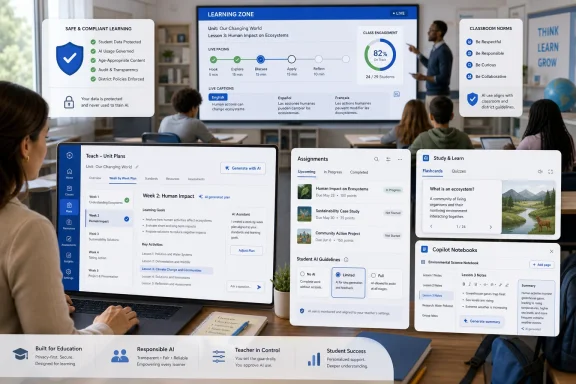 Microsoft Is Turning the School Day Into a Copilot Workflow
The most important thing about Microsoft’s education announcement is not any single feature. It is the way the features connect. Unit planning, assignment rules, study guides, flashcards, quizzes, live lessons, and student tutoring are not isolated classroom conveniences; together, they form a workflow that stretches from curriculum planning to homework to revision.That is a very Microsoft move. The company has rarely won education technology by being the flashiest vendor in the room. It wins by making the boring connective tissue unavoidable: identity, documents, Teams, OneDrive, administrative controls, compliance posture, and now AI.
For schools already invested in Microsoft 365 Education, this matters because AI stops looking like a procurement category and starts looking like a platform update. A district that might hesitate to adopt a standalone AI tutoring product may feel very differently about a Copilot feature governed through existing Microsoft accounts. A university that has already standardized on Teams and Microsoft 365 can pilot AI study and assignment tools without introducing yet another vendor into the data-handling chain.
That does not make the decision risk-free. It makes it administratively legible. Microsoft is betting that in education, where budgets are constrained and oversight is intense, legibility may matter more than novelty.
The Unit Plan Is the Trojan Horse
The headline educator feature is Unit Plans in Teach, which allows teachers to enter information such as subject, grade level, language, standards, and teaching duration, then generate a structured instructional unit. Microsoft says the generated drafts can include curriculum overviews, learning objectives, essential questions, and week-by-week instructional sequences.That sounds mundane until you remember how much of teaching happens before a teacher ever stands in front of students. Unit planning is where curriculum standards, local pacing guides, classroom realities, assessment schedules, and differentiated instruction collide. It is also where teachers spend hours turning broad requirements into something teachable.
Microsoft is not claiming to replace that judgment. Its pitch is that AI can produce a first draft quickly enough for teachers to spend their time refining rather than starting from a blank page. That distinction is politically important, but practically fragile. A weak AI-generated unit plan still takes time to evaluate, correct, and adapt; a strong one can compress hours of clerical and structural work into minutes.
The real advantage is not that Copilot can write a plan. Many AI tools can do that. The advantage is that Teach is being placed inside the Microsoft 365 Copilot app, tied to standards coverage, language preferences, and saved educator settings. Microsoft is trying to make AI-generated planning feel less like a prompt-engineering exercise and more like using Word templates or Outlook rules: institutional, repeatable, and boring enough to trust.
The expansion of standards support is critical here. Microsoft says Teach supports academic standards from more than 50 countries and territories, with broader coverage coming around ISTELive 2026. That kind of localization is not glamorous, but it is exactly what separates a classroom demo from a school-system deployment. Teachers do not simply need “a lesson on fractions.” They need material that maps to the standards they are accountable for, in the language and grade structure their institution recognizes.
AI Assignment Rules Are Microsoft’s Most Important Governance Move
Student AI Guidelines in Microsoft Education Assignments may be the least flashy feature in the announcement, but it could be the most consequential. The feature allows educators to define how AI may be used on a specific assignment, ranging from no AI use to limited, controlled, or full use of Copilot Chat.That is a pragmatic response to a problem schools have been mishandling for two years. Blanket bans on AI are increasingly unenforceable. Blanket permission is pedagogically lazy. The realistic middle ground is assignment-level policy: AI may be inappropriate for a reflective essay but useful for brainstorming, language support, revision, practice questions, or debugging code.
Microsoft’s four-level model gives teachers a vocabulary for that middle ground. It also gives institutions a way to normalize expectations without forcing every teacher to invent policy language from scratch. In practice, that could matter as much as the AI itself.
The company’s own research underscores why this is necessary. Microsoft’s 2026 AI in Education Special Report found that academic integrity remains one of the top concerns for both students and educators. That concern is not going away because a vendor adds a settings menu. But the settings menu changes the burden of proof: instead of students guessing whether AI is allowed, the assignment itself can say so.
For administrators, this is where the WindowsForum audience should pay attention. AI policy is moving from PDF handbooks and faculty meetings into product UI. That means IT, curriculum leaders, legal teams, and teachers are going to need shared language about what those toggles mean. A control is only as good as the institutional process around it.
The Student Tools Try to Make AI Less Like an Answer Machine
Microsoft is also leaning hard into the idea that student-facing AI should coach rather than complete. The Study and Learn Agent inside Microsoft 365 Copilot is designed to guide students through concepts using flashcards, quizzes, step-by-step prompts, and feedback. The company is explicitly positioning it against the common fear that generative AI simply hands students the answer.That framing is smart because it targets the central contradiction of AI in education. Students already use AI because it is fast, available, and often good enough. Schools want AI to slow students down in the right ways: prompting recall, explaining misconceptions, encouraging revision, and building fluency rather than bypassing it.
Study and Learn is Microsoft’s attempt to make that slower path productized. It is available for students aged 13 and older, with institutional controls over access. In K-12 contexts, that control is not a detail; it is the entire deployment story. Districts will need to decide which students can use Copilot Chat, under what policies, with what data protections, and with what teacher visibility.
Learning Activities extends the same idea into teacher-created practice. Educators can generate flashcards, quizzes, matching exercises, and fill-in-the-blank activities, while students can create study materials from documents and PDFs shared by teachers. This is the kind of feature that will be easy to underestimate because it resembles countless edtech utilities. But inside Microsoft 365, it becomes more powerful because the source material is already where the class work lives.
Copilot Notebooks pushes further in that direction. Students can collect lecture notes, slides, handouts, and other files into a single AI-assisted study space that generates summaries, flashcards, quizzes, and study guides. Microsoft says future updates will support creating Word documents, Excel spreadsheets, and PowerPoint presentations from that context.
That is useful, but it also raises a subtle educational risk. The more effective the notebook becomes, the more it may reshape what students consider studying to be. If study becomes “upload everything and generate a guide,” educators will need to design assessments that reward understanding, not just efficient synthesis.
Learning Zone Moves AI From Homework Into the Room
Learning Zone is Microsoft’s attempt to make AI part of live instruction rather than just preparation and study. The expanded experience includes educator-led live lessons, classroom pacing controls, visibility into student activity, and aggregated progress insights that can help teachers adjust instruction during a lesson.This is where the announcement becomes more than productivity software. Live classroom AI pushes into the real-time dynamics of teaching: who is stuck, who is racing ahead, which concept is failing to land, and whether the teacher should pause, regroup, or extend. That is potentially powerful, especially in hybrid, one-to-one device, and multilingual classrooms.
But it is also operationally complicated. Real-time classroom tooling depends on device availability, network reliability, identity management, accessibility support, and teacher confidence. Microsoft can make Learning Zone available on Windows 11 devices and include it with education licenses, but a school still has to make it work across messy classrooms with uneven hardware and uneven training.
The language story matters here too. Learning Zone currently supports lesson generation in English and Spanish, with French, Italian, Portuguese, and Japanese expected to expand support around the back-to-school window. Microsoft has also emphasized broader language support across the Learning Zone experience. For international schools, multilingual districts, and classrooms with language learners, this is not a convenience feature. It is part of whether AI can be inclusive rather than merely efficient.
There is a Windows angle hiding in plain sight. Microsoft says the Learning Zone lesson generation trial on Windows 11 devices will remain available through August 2027. That gives schools time to test the feature through multiple academic cycles, but it also reinforces a familiar Microsoft pattern: Windows is not just the client OS; it is the delivery surface for cloud-connected education services.
The Adoption Numbers Explain the Urgency
Microsoft’s 2026 AI in Education Special Report found that AI use is already widespread among students, educators, and education leaders. According to the company, 92 percent of students and education administrators surveyed, along with 88 percent of educators, said they had used AI for school or college-related activities. The survey covered 3,345 respondents across the United States, the United Kingdom, Australia, Brazil, Japan, and Saudi Arabia between February and March 2026.Those figures should be read carefully. Vendor-sponsored research is not neutral, and self-reported AI usage does not tell us much about quality, frequency, or educational value. But the broad direction is not hard to believe. The AI adoption battle in education is largely over; the governance battle is just beginning.
That is why Microsoft’s announcement feels timed less like a product update and more like a land grab for institutional trust. If students are already using AI, Microsoft wants schools to prefer the AI they can administer. If teachers are already experimenting with prompts, Microsoft wants that experimentation to happen inside Teach. If administrators are worried about integrity and compliance, Microsoft wants to be the vendor that turns those worries into controls.
The report also says large shares of educators and students want regular AI training, and that most respondents believe responsible AI use will be a critical future skill. Again, the exact percentages matter less than the direction. Schools are discovering that AI literacy is not a one-time professional development session. It is becoming a standing operational need.
For IT departments, that means AI enablement is going to resemble cybersecurity awareness more than software rollout. Training will need refreshers. Policies will need revision. Misuse will happen. Teachers will ask for exceptions. Students will find edge cases. Administrators will want dashboards. Parents will ask what data is being processed. The technology may arrive as a feature update, but the institution absorbs it as a governance program.
Microsoft’s Education Strategy Is Also a Platform Defense
There is a competitive story here that Microsoft does not need to say out loud. Education is crowded with AI startups, LMS vendors, tutoring platforms, writing tools, assessment systems, and classroom engagement apps. Many of them can move faster than Microsoft on individual features. Few can match Microsoft’s footprint across identity, productivity, collaboration, device management, and institutional procurement.That footprint is the strategy. By embedding AI into Microsoft 365 Education, Teams for Education, Copilot, Assignments, and Learning Zone, Microsoft is making the argument that schools do not need a separate AI layer. They already have one, if they accept Microsoft’s.
This is classic bundling, but with an education-specific twist. The company is not merely bundling software; it is bundling governance comfort. A school choosing between a specialized AI study tool and Copilot Notebooks is not only comparing pedagogy. It is comparing data-processing agreements, account provisioning, admin controls, support models, and whether the feature will survive the next budget cycle.
That does not mean Microsoft will automatically build the best tools. Education software history is littered with large platforms that satisfied procurement while frustrating teachers. The danger for Microsoft is that AI tools become technically impressive but pedagogically generic. A teacher does not need a unit plan that looks polished; a teacher needs one that works with a specific class, calendar, curriculum, and set of constraints.
Still, Microsoft’s advantage is that it can afford iteration. If Unit Plans are mediocre at launch, Microsoft can improve them. If Student AI Guidelines need more nuance, Microsoft can add more policy states. If Learning Zone integrations are thin, Microsoft can deepen them over time. The platform does not have to be perfect on day one if the institution already lives inside it.
The Classroom Benefit Is Real, but So Is the Deskilling Risk
It would be easy to write off these tools as another wave of AI hype. That would be a mistake. Teachers spend enormous amounts of time planning, adapting materials, generating practice, responding to student needs, and translating institutional requirements into classroom activity. If AI can reduce even part of that workload, the practical benefit could be significant.The strongest case for Microsoft’s tools is not that they replace teaching. It is that they reduce the clerical drag around teaching. Drafting a quiz, adapting a reading passage, building a unit structure, generating practice questions, or creating a revision guide are all tasks where AI can be useful when supervised by a professional.
But the deskilling risk is real. If early-career teachers rely heavily on AI-generated unit structures, will they develop the same planning instincts? If students rely on generated study guides, will they learn how to identify importance on their own? If administrators mistake AI-produced alignment for genuine instructional quality, will evaluation become more superficial?
The answer depends less on the model than on the culture around it. AI can scaffold expertise, or it can substitute for it badly. A teacher who uses Unit Plans as a starting point may become more effective. A teacher pressured to produce more curriculum faster because AI exists may simply become more overloaded in a new way.
That is the labor story underneath the productivity story. Whenever software promises to save time, organizations are tempted to reclaim that time as more output. Schools should resist that instinct. If AI genuinely reduces administrative burden, the win should be more human attention for students, not simply more documents, more metrics, and more deliverables.
Academic Integrity Is Becoming a Design Problem
For years, academic integrity was treated as a policy and enforcement issue. Schools wrote rules, teachers designed assignments, and plagiarism tools tried to catch violations after the fact. Generative AI has weakened that model because the boundary between assistance and authorship is harder to detect and harder to define.Microsoft’s Student AI Guidelines feature points toward a different model: integrity by design. Instead of relying only on after-the-fact detection, the assignment can declare acceptable use upfront. Students see expectations where they do the work. Teachers can align AI rules with learning goals.
That approach is healthier than pretending AI can be banned from student life. It also fits the reality that AI use is not inherently dishonest. Asking Copilot to explain a concept, generate practice questions, critique a draft, or help organize notes may support learning. Asking it to produce the final submission may undermine it. The difference is contextual.
The hard part is that contextual rules are harder to scale. A four-level guideline system is a beginning, not an ethics curriculum. Schools will still need examples, teacher training, student orientation, and disciplinary processes that distinguish confusion from misconduct.
Microsoft’s role here is powerful but limited. It can expose the controls. It can shape defaults. It can offer language and telemetry. But it cannot decide what a ninth-grade history teacher, a university composition department, and a vocational training program should each consider acceptable AI use. That remains an educational judgment.
IT Departments Are About to Own More of the Classroom Than They Expected
For sysadmins, Microsoft’s education AI push is a reminder that classroom technology is no longer just devices, accounts, and licenses. AI tools touch curriculum, assessment, student data, staff training, acceptable-use policy, and family communication. The admin console is becoming a policy surface.That creates new operational responsibilities. IT teams will need to understand which features are available under A1, A3, and A5 licenses; which student age groups can access Copilot experiences; how K-12 defaults are configured; what data is stored or processed; and how third-party LMS integrations behave. These are not optional details when AI is generating learning materials and guiding student study.
The security and privacy stakes are especially high in education because the users include minors. Any AI deployment must account for data minimization, retention, access control, auditability, and regional compliance obligations. Microsoft’s enterprise posture may reassure some institutions, but reassurance is not due diligence.
There is also a support problem. When AI-generated content is wrong, biased, too advanced, too simple, or misaligned to standards, who gets the ticket? The teacher? The curriculum team? The IT helpdesk? The vendor? Schools should define those pathways before the feature rollout, not after the first parent complaint.
Microsoft’s advantage is that many of these institutions already have Microsoft governance muscle. The danger is complacency. Familiar vendor does not mean familiar risk.
Training Is the Feature Microsoft Cannot Ship for You
Microsoft is expanding educator training, certification, and AI literacy initiatives alongside the tools. That is necessary because the biggest adoption barrier may not be access. It may be confidence.Teachers are being asked to evaluate AI output, explain AI rules to students, redesign assignments, protect academic integrity, personalize instruction, and somehow remain current as features change. That is a substantial professional burden. A tool that saves time only after hours of training may not feel like a gift.
The best training will not be generic prompt-writing theater. Educators need discipline-specific examples, grade-level scenarios, and clear boundaries. A chemistry teacher, a primary school literacy specialist, a university lecturer, and a special education coordinator do not need the same AI workshop.
Students need training too. If Microsoft wants Study and Learn to be a learning companion rather than an answer machine, students must be taught how to use it that way. “Use AI responsibly” is not instruction. Students need to see examples of productive use, misuse, citation expectations, revision workflows, and when to stop outsourcing effort.
Administrators need a different kind of literacy: procurement, risk, governance, labor impact, and measurement. The wrong metric will distort the rollout. If schools measure success by how many AI-generated activities teachers create, they may incentivize quantity over learning. If they measure only time saved, they may miss whether students actually understand more.
The Most Important Settings Will Be Cultural, Not Technical
Microsoft’s announcement gives schools new controls, but the central implementation choices will happen outside the software. Institutions will need to decide where AI belongs in learning, where it does not, and how much variation individual teachers should have.Some schools will embrace a tightly governed model, with standardized AI guidelines, approved templates, and centralized training. Others will allow faculty-led experimentation. Universities may adopt different norms by department. K-12 districts may face more parental scrutiny and tighter age-based access policies.
None of those approaches is automatically right. The mistake would be adopting the tools without making the choices explicit. If Microsoft 365 Education simply lights up new AI capabilities and schools drift into usage, policy will be written by habit, not intention.
There is also an equity issue. AI-enhanced learning may help students who need extra practice, language support, or alternative explanations. But if access depends on device quality, home connectivity, account configuration, or teacher comfort, it may widen gaps. Microsoft can lower the cost barrier by including tools in education licenses, but implementation still determines who benefits.
The same is true for educators. Teachers with time, support, and confidence may use AI to improve lessons. Teachers under pressure may use it to survive workload. Those are not the same outcome.
The Copilot Classroom Comes With a Short Checklist
Microsoft’s education AI push is big enough that schools should treat it as a program, not a feature rollout. The near-term work is less about marveling at generated flashcards and more about deciding what kind of AI-mediated learning environment the institution is willing to operate.- Schools should define assignment-level AI use policies before enabling broad student access, because ambiguity will produce conflict faster than the tools produce efficiency.
- Educators should treat AI-generated unit plans and activities as drafts that require professional review, not as standards alignment guarantees.
- IT teams should map feature availability, age controls, license requirements, data handling, and LMS integrations before pilots expand.
- Students should receive explicit instruction on how to use Study and Learn, Copilot Notebooks, and generated study materials without outsourcing the thinking those tools are supposed to support.
- Administrators should measure AI adoption by instructional quality and student understanding, not by the volume of AI-generated classroom artifacts.
- Schools should plan for continuous training because Microsoft’s education AI stack is likely to change faster than traditional professional development cycles.
References
- Primary source: Entrepreneur India
Published: 2026-06-29T07:12:11.701160
Loading…
www.entrepreneurindia.com - Official source: news.microsoft.com
- Official source: microsoft.com
Loading…
www.microsoft.com - Official source: learningzone.microsoft.com
Microsoft Learning Zone
Design interactive lessons that engage every learner with an AI powered app for Copilot+ PCslearningzone.microsoft.com - Official source: info.microsoft.com
Loading…
info.microsoft.com - Official source: techcommunity.microsoft.com
Loading…
techcommunity.microsoft.com

