

Microsoft’s shift from single‑user assistants to coordinated, enterprise‑grade agents is no longer a roadmap prediction — it’s a production reality IT teams must plan for now. Copilot Studio’s multi‑agent orchestration and the growing “Agent Store” transform Microsoft 365 from a suite of productivity apps into a platform for composable, auditable automation, where multiple AI agents can route, escalate, and execute cross‑departmental workstreams that once required complex human handoffs.
Microsoft introduced Copilot as a personal productivity assistant in 2023. Since then, the product roadmap has accelerated toward agentic automation — systems that do more than answer questions: they plan, act, call APIs, and collaborate with other agents. At Microsoft Build 2025 the company announced key primitives for that shift: Copilot Studio enhancements, multi‑agent orchestration, Copilot Tuning, the Agent Store, and identity and governance integrations intended to make agents manageable at enterprise scale. These are public‑facing platform primitives, not one‑off demos. The consequences for IT are material. Where earlier waves of automation (Power Automate, Power Apps) lowered the barrier to single‑task automation, the new era promises agents that can chain multiple workflows, interact with desktop UIs where APIs are absent (the “computer use” capability), and be deployed and governed tenant‑wide via Entra and Purview controls. That combination opens high‑value automation scenarios — and a larger surface area for governance, data protection, and operational risk.
In short, Microsoft 365 is no longer just a collection of productivity apps; it’s becoming a programmable platform for next‑generation automation. The upside for organizations that govern and operationalize agents deliberately is huge: faster processes, fewer handoffs, and measurable productivity gains. The downside for teams that ignore governance is equally real: token theft, data leakage, and unmanaged operational debt. The prudent path is clear — pilot fast, lock down controls, and harden winners into your standard ALM and compliance practices before they scale.
Source: BizTech Magazine How to Build Next-Generation Automation in Microsoft 365
 Background / Overview
Microsoft introduced Copilot as a personal productivity assistant in 2023. Since then, the product roadmap has accelerated toward agentic automation — systems that do more than answer questions: they plan, act, call APIs, and collaborate with other agents. At Microsoft Build 2025 the company announced key primitives for that shift: Copilot Studio enhancements, multi‑agent orchestration, Copilot Tuning, the Agent Store, and identity and governance integrations intended to make agents manageable at enterprise scale. These are public‑facing platform primitives, not one‑off demos. The consequences for IT are material. Where earlier waves of automation (Power Automate, Power Apps) lowered the barrier to single‑task automation, the new era promises agents that can chain multiple workflows, interact with desktop UIs where APIs are absent (the “computer use” capability), and be deployed and governed tenant‑wide via Entra and Purview controls. That combination opens high‑value automation scenarios — and a larger surface area for governance, data protection, and operational risk. What’s new: core platform capabilities
Multi‑agent orchestration: agents that collaborate
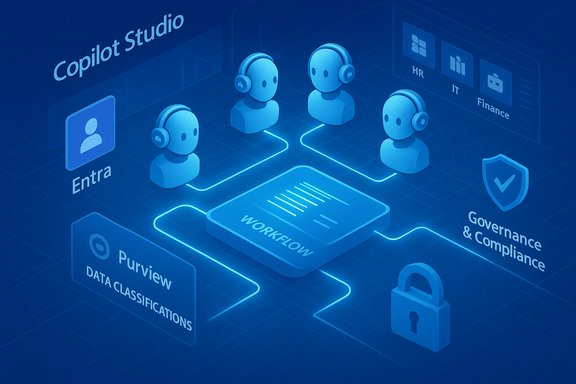
Multi‑agent orchestration lets specialized agents exchange data, delegate subtasks, and combine strengths (for example, an HR onboarding agent, an IT provisioning agent, and a facilities coordinator working together). This feature was highlighted in Microsoft’s Build 2025 announcements and is rolling into public preview in stages. The architecture is intended to provide explicit handoffs, shared context, and audit trails so human approvers remain in the loop as needed. Key capabilities:- Agents can call each other, pass structured inputs, and choose models or connectors for subtasks.
- Orchestrations are visible and auditable to provide compliance evidence.
- Entra Agent ID gives agents a first‑class identity for permissioning and least‑privilege access.
Copilot Studio: low‑code to pro‑code bridge
Copilot Studio is the authoring and governance surface. It supports:- Natural‑language agent authoring for citizen makers,
- A pro‑code path via Azure AI Foundry and SDKs for complex integrations,
- Agent flows and App Builder / Workflows for rapid prototyping inside Copilot chat.
Agent Store and Marketplace evolution
Microsoft exposed prebuilt and partner agents in an Agent Store surfaced inside Copilot experience during the 2025 wave, enabling organizations to discover, test, and pin agents (Researcher and Analyst were among early examples). Microsoft later consolidated earlier marketplaces into a single Microsoft Marketplace to streamline procurement, provisioning, and security reviews. The early Agent Store rollout in mid‑2025 set the stage for a wider marketplace strategy later in the year.“Computer use” and UI automation
When no API exists, agents can now operate websites and desktop apps via a “computer use” capability that mimics human interactions (clicks, typing, navigation). This significantly broadens automation reach but also raises reliability and security questions because UI automation can be brittle and can interact with third‑party pages in unpredictable ways. Independent reviews and hands‑on testing show the feature opens new scenarios but requires cautious design and monitoring.Why this matters for Microsoft 365 customers
- Speed to value: Natural‑language authoring and in‑Copilot prototyping collapse weeks of design work into minutes for simple apps and flows. This accelerates idea‑to‑prototype cycles across departments.
- Composability: Agents are reusable building blocks that can be combined to orchestrate complex end‑to‑end processes.
- Governance surfaces: Microsoft is exposing the controls (Agent inventory, telemetry, Entra identities, Purview info protection), enabling centralized oversight — assuming organizations apply the controls.
Practical implementation: a step‑by‑step IT playbook
Adopting agentic automation requires a deliberate program. The following plan reflects early best practices drawn from vendor guidance and independent operational playbooks.1. Establish a focused pilot (2–4 weeks)
- Select 2–3 predictable, low‑risk processes with measurable KPIs (meeting recaps, weekly status trackers, routine approvals).
- Limit builder access to a trained maker set and use templates to reduce variability.
- Run the pilot in a test tenant or a tenant‑scoped preview ring where possible.
2. Lock down connectors and DLP
- Whitelist only necessary connectors; block or require IT approval for external connectors.
- Extend Purview and DLP policies to include agent actions and generated artifacts.
- Apply least‑privilege scopes and require consent flows where user data is accessed.
3. Define agent lifecycle and operational controls
- Require metadata: owner, cost center, connectors, data sources, test plan, and rollback procedures.
- Enforce periodic reviews (for example, 90‑day owner re‑validation) and retention/deprovisioning playbooks.
- Export telemetry to SIEM/Defender to detect anomalous agent activity or unexpected connector calls.
4. Build validation and approval gates
- For flows that send messages or change records, require at least one human sign‑off step during the pilot.
- Use the full Copilot Studio or Power Platform pathway to harden automations selected for production.
5. Train and certify citizen developers
- Run short workshops on prompt design, guardrail usage, and output validation.
- Publish a curated internal “Agent Catalog” of approved templates to reduce shadow IT.
6. Integrate with ALM and monitoring
- Migrate production‑grade automations into standard ALM pipelines (Git, CI/CD, staging).
- Instrument agents with telemetry (usage, errors, connector calls) and integrate logs into compliance reporting.
Security and privacy: new threats, known mitigations
Agentic automation introduces novel risks that IT and SecOps must treat as first‑class concerns.Token theft and malicious agent deception
Researchers have demonstrated attack patterns where maliciously crafted Copilot Studio assets trick users into granting OAuth consent or authorizing attacker scopes (a technique reported in industry security coverage). These “CoPhish” style attacks exploit legitimate service flows to obtain tokens that unlock tenant data. Mitigations include restricting app consent, enforcing admin approval for third‑party app registrations, conditional access and MFA, and tightly scoping agent creation and publishing rights.Data leakage, hallucination, and external connectors
Agents that read mail, files, chats, or SharePoint content can inadvertently expose sensitive data if DLP is misconfigured or if agents call external connectors unsafely. Additionally, generative outputs can “hallucinate” actions or formulas that appear correct but are legally or operationally incorrect. Key mitigations:- Enforce Purview classifications for data grounding,
- Require human verification for outputs that affect compliance or financials,
- Limit or vet external connectors and third‑party agent code.
Auditability and non‑repudiation
Design agent orchestrations so each action has an auditable record: who initiated the agent, what data it read, what model routed the decision, and which connectors were invoked. Microsoft’s Agent 365/Agent Store model and Entra identities aim to support this, but tenants must enable logging and retention policies to make audit trails usable for legal or incident response.Cost and licensing considerations (practical guidance)
Microsoft’s Copilot and Copilot Studio features operate under a mix of seat‑based licensing, tenant‑wide Copilot add‑ons, and metered Copilot Studio credits for agent workloads. While public pricing frequently changes and organizations should confirm details with their Microsoft account team, plan for:- Per‑user Copilot add‑ons for interactive Copilot experiences,
- Copilot Studio credit packs or pay‑as‑you‑go metering for agent runtime and high‑volume tasks,
- Azure hosting costs for custom models or external model hosting through Azure AI Foundry.
Use cases that deliver measurable ROI
These are practical, achievable scenarios where agent orchestration yields rapid returns:- HR onboarding orchestration: an onboarding agent coordinates paperwork, an IT agent schedules device provisioning and conditional access, and a facilities agent arranges workspace access — cutting manual coordination time by weeks.
- Sales development pipeline automation: agents research leads, validate contact info across external data sources, and create prioritized outreach tasks — freeing sellers to focus on conversions rather than manual data wrangling.
- Finance close support: an Analyst agent performs data cleaning and an Excel agent executes auditable formula transformations inside the workbook; the result is a draft reconciliation with visible step outputs for reviewer sign‑off.
- IT service triage: a helpdesk agent collects diagnostics, an automation agent runs remediation scripts with logged outcomes, and a human keeps final approval for impactful changes. This reduces mean time to resolution while preserving control.
Governance checklist — what to configure now
- Agent creation rights: limit to approved makers; require publishing approval for tenant‑wide agents.
- DLP & Purview: include agent activities and generated artifacts in policy definitions; classify and protect Dataverse content used by agents.
- Connector policy: whitelist only necessary connectors and require least‑privilege.
- Identity & access: enable Entra Agent ID and conditional access for agent identities to prevent token misuse.
- Logging & SIEM integration: export agent telemetry to Defender and SIEM for anomaly detection.
- Lifecycle & audits: require scheduled reviews, versioning, decommissioning playbooks, and exportable audit logs.
Tradeoffs and risks every CIO should weigh
- Rapid prototyping vs. enterprise rigor: App Builder and Workflows let non‑developers build functional automations quickly, but these prototypes must be hardened for scale and compliance. Treat in‑Copilot authoring as a prototyping layer, not the final ALM home for critical systems.
- Innovation velocity vs. shadow IT: Easy agent creation increases the risk of unmanaged tools accessing sensitive data. A curated agent catalog and creator training help mitigate this.
- Local UI automation vs. reliability: “Computer use” opens new automations but introduces brittleness when external UI changes. Use it for high‑value, monitored tasks and prefer API‑based connectors for long‑running, high‑reliability flows.
- Vendor & supply‑chain risk: Third‑party agents or marketplace components must be vetted for code signing, review, and security controls. The unified Microsoft Marketplace model increases discoverability but also necessitates stronger vetting in procurement.
Operational maturity model — where to focus by stage
- Discovery: catalog repetitive tasks and identify 5–10 pilot candidates. Train 5–10 makers.
- Pilot: run 2–4 week pilots, validate AI credit usage and connector behavior, lock governance policies.
- Scale: publish curated templates and migrate hardened automations into Power Platform ALM.
- Govern: integrate agent telemetry into compliance reporting, run quarterly risk reviews, and enforce lifecycle controls.
Final verdict and next steps for IT leaders
Copilot Studio’s multi‑agent orchestration is a genuine inflection point: it turns AI assistants into composable, auditable workforce extensions that can tackle multi‑step, cross‑functional work. The platform’s strengths are clear — natural‑language speed, deep Microsoft 365 integration, and a developer path to hardened production deployments. Microsoft’s official blog and Copilot product announcements provide the roadmap and primitives; independent reporting confirms both the potential and the early emergence of security threats that require immediate operational responses. Actionable next steps:- Run a controlled pilot with a small maker cohort and measurable KPIs.
- Update DLP and Purview policies to include agent behaviors and generated artifacts.
- Restrict connector approvals and require admin consent for new agent publishing flows.
- Instrument agent telemetry and integrate with security monitoring to detect anomalous consent or token activity.
In short, Microsoft 365 is no longer just a collection of productivity apps; it’s becoming a programmable platform for next‑generation automation. The upside for organizations that govern and operationalize agents deliberately is huge: faster processes, fewer handoffs, and measurable productivity gains. The downside for teams that ignore governance is equally real: token theft, data leakage, and unmanaged operational debt. The prudent path is clear — pilot fast, lock down controls, and harden winners into your standard ALM and compliance practices before they scale.
Source: BizTech Magazine How to Build Next-Generation Automation in Microsoft 365
