

Microsoft confirmed on Monday, June 1, 2026, that some users could not open files in Office for the web or Microsoft Teams, with the incident tracked in the Microsoft 365 admin center as MO1329446 and later marked resolved. The outage was not the longest or broadest Microsoft cloud failure of the year, but it landed on the most sensitive nerve in modern work: the file. When Teams chat, Excel in the browser, SharePoint-backed documents, and Office web apps fail together, the problem is no longer “an app is down.” It is a reminder that Microsoft 365 has become the operating system for many businesses, and operating systems are judged most harshly when the basics stop working.
The interesting thing about this Microsoft 365 incident is not that a cloud service had an outage. Cloud services have outages; hyperscale engineering reduces them, routes around them, and apologizes for them, but it does not abolish them. The interesting thing is where this failure surfaced: in the moment a user tried to open a document.
That is the mundane transaction on which Microsoft’s modern productivity empire rests. A spreadsheet in Teams is not just a spreadsheet. It is an identity check, a SharePoint object, a browser session, a file-rendering service, a collaboration layer, a policy engine, and often a compliance boundary pretending to be a familiar green Excel icon.
When Microsoft said it was investigating reports that some users were unable to open files in Office for the web or Microsoft Teams, the statement sounded narrow. But for many organizations, “unable to open files” means unable to review invoices, update forecasts, join project handoffs, approve contracts, or respond to customers with the artifact everyone is discussing. Chat is useful; meetings are unavoidable; email is eternal. But the document is still where the work hardens into something the business can act on.
The outage reportedly affected multiple Office web applications, including Excel for the web, and users saw errors indicating that Office Online services were not available. Microsoft later said service telemetry showed a sharp increase in error rates across Office web apps. That sequence matters because it frames the incident less as a front-end nuisance and more as a systemic failure in the shared substrate beneath Microsoft’s web productivity stack.
That integration is the sales pitch. It is also the blast radius.
When a Word or Excel file in Teams will not open, many users do not distinguish between a Teams outage, an Office outage, a SharePoint outage, or a tenant-specific policy issue. They experience one thing: the place where they work is broken. For IT teams, that ambiguity is operationally expensive because the first wave of tickets rarely arrives with useful diagnostic boundaries.
The June 1 incident illustrates why Teams has become such a delicate dependency. Microsoft’s bundling of chat, meetings, file access, and app surfaces has made Teams a practical front door to Microsoft 365. If the front door works but the rooms behind it do not, users still perceive the building as closed.
That distinction matters for administrators trying to communicate during an outage. “Teams is up” is not a meaningful reassurance if users cannot open the files attached to Teams conversations. Likewise, “Office for the web is degraded” may not capture the business impact if the affected files are embedded in Teams channels and used as the shared memory of a department.
In this case, the early signal was simple: users may be unable to open files in Office for the web or Microsoft Teams. Later, Microsoft’s analysis pointed to increased error rates across Office web applications. Eventually, the company said the issue was resolved and that it would continue monitoring for stability.
For customers, that is useful but incomplete. It tells administrators what users are seeing and whether Microsoft believes the problem is over. It does not, at least in the public-facing summary, explain why the underlying failure occurred, how widespread it was by region, or what engineering control prevented recurrence.
That gap is where frustration grows. Enterprises do not necessarily expect perfection from Microsoft 365, but they do expect enough detail to update risk registers, justify continuity planning, and answer executives who ask whether the business was lucky or protected. A status message can close an incident; it cannot by itself close the organizational lesson.
Microsoft’s telemetry-driven language is especially revealing. The company did not initially describe a human-visible outage as a single failed component. It described a sharp increase in errors across web apps. That is the vocabulary of distributed systems, and it is a reminder that users experience cloud failures as discrete events even when providers observe them as statistical deviations across fleets, regions, dependencies, and code paths.
The June 1 outage was described in several reports as global or worldwide in user experience, while Microsoft’s own public phrasing was more measured. That difference is not necessarily a contradiction. A cloud incident can produce reports from multiple regions without affecting every region equally, every tenant continuously, or every workload identically.
This is where outage coverage often becomes sloppy. A spike in Downdetector reports, a flood of social posts, and a vendor status update are all evidence, but they are not the same kind of evidence. Microsoft’s admin center incident ID gives administrators the most actionable anchor, while user reports help establish the practical disruption and the degree to which the issue was visible outside one customer environment.
For IT pros, the lesson is to avoid arguing semantics while users are blocked. Whether an incident is “global,” “regional,” “intermittent,” or “service-specific” matters for root cause analysis. During the outage window, the more important operational question is whether affected users have a viable alternate path to the file, the meeting, or the approval workflow.
But every successful platform eventually becomes infrastructure. Microsoft 365 is no longer just a subscription to Office apps. It is identity, storage, collaboration, device management, compliance, security telemetry, and increasingly AI-assisted work. The more Microsoft pulls into that orbit, the more any incident becomes a business continuity event rather than an application hiccup.
This is the uncomfortable part of the cloud bargain. Organizations outsourced a great deal of complexity to Microsoft, but they did not outsource accountability to their own customers, regulators, boards, or employees. When Teams cannot open a spreadsheet, the user calls internal IT, not Redmond.
That is not an argument to flee Microsoft 365. For many organizations, there is no practical alternative that offers the same breadth. It is an argument to stop pretending that “Microsoft handles it” is a complete continuity strategy. Microsoft handles the platform; the customer still owns the business process that depends on it.
That is a major win for manageability. It reduces endpoint complexity, supports shared and unmanaged devices, and fits the reality of hybrid work. It also means that failures can look strangely thin from the endpoint. The laptop is online. The browser loads. The user is authenticated. Teams opens. Then the document does not.
That kind of failure is frustrating because every visible layer appears healthy until the final action. It creates a gap between user perception and technical diagnosis. A local app crash has a familiar shape; a cloud-rendered document failing inside a collaboration surface has too many possible causes.
This is why browser-based productivity requires different troubleshooting instincts. Clearing cache, switching browsers, testing desktop apps, checking service health, and confirming tenant-wide reports all become part of the first response. The help desk script that once began with “restart Word” now begins with “which path did you use to open the file?”
But desktop Office is not a magic escape hatch from Microsoft 365 dependency. If the file lives in SharePoint or OneDrive and the user does not have a local copy, cloud access still matters. If the workflow depends on co-authoring, sensitivity labels, conditional access, or Teams context, the desktop app may only solve part of the problem.
The more modern the organization, the less “open it locally” resembles a universal workaround. Files are not always emailed as attachments anymore. They are links, live objects, shared records, and collaborative canvases wrapped in permissions. That model is better in many ways, but it changes what resilience means.
The practical answer is not nostalgia for mapped drives. It is deliberate fallback design. Critical documents should have owners, offline expectations, and alternate communication paths. Teams channels should not be the only place where urgent operational instructions exist. A continuity plan that depends on users improvising under pressure is not a plan; it is a wish.
The right instinct is to triangulate. Check the Microsoft 365 admin center service health page, the public service status page, known incident IDs, tenant-specific advisory messages, and user reports from multiple departments. The goal is not to prove Microsoft is at fault as quickly as possible. The goal is to decide whether local troubleshooting should continue or whether the organization should shift into outage communications.
That distinction saves time. If a file-opening failure is tenant-wide and matches a Microsoft advisory, reimaging laptops and resetting user profiles wastes effort. If only one department is affected, the cause may still be permissions, conditional access, endpoint security, or a local network path. Outage discipline means resisting both extremes: blaming Microsoft for everything and blaming the endpoint for everything.
The June 1 incident also reinforces the value of prewritten communications. Users do not need a dissertation during an outage. They need to know what is affected, what is not affected, what workaround exists, when the next update will arrive, and whether they should stop filing duplicate tickets. That clarity is easier to deliver if the template exists before the outage.
AI features may sell the future, but file access keeps the present alive. A Copilot summary is not useful if the underlying document cannot open. An intelligent meeting recap does not help if the team cannot reach the spreadsheet driving the decision. The glamorous layer depends on the boring layer.
That is why incidents like this carry reputational weight beyond their duration. Microsoft can resolve the technical problem in hours and still leave customers with the impression that the stack is becoming too concentrated. When the same platform hosts the files, the conversations, the meetings, the compliance controls, and the AI assistant, reliability stops being a service-level metric and becomes a trust metric.
The company knows this. Its entire commercial cloud strategy depends on convincing organizations that consolidation reduces friction without creating unacceptable dependency. Every Microsoft 365 incident tests that argument in miniature.
Microsoft has improved its service health communications over the years, especially inside the admin center where tenant-relevant advisories can provide more detail than public status pages. But the public pattern remains familiar: investigation, telemetry, mitigation, resolution, monitoring. That is operationally useful, yet it often leaves a post-incident vacuum.
The industry should treat transparency as part of reliability. A provider that explains failures well helps customers build better defenses. A provider that gives only minimal closure forces customers to infer, speculate, or overcorrect.
There is a balance to strike. Microsoft cannot always disclose sensitive infrastructure details, and early incident updates should not pretend to know more than engineers have verified. But after resolution, customers benefit from plain-English explanations of scope, cause category, mitigation, and recurrence prevention. The cloud is shared infrastructure; shared infrastructure needs shared understanding.
That is not user failure. It is the design working as intended until it does not. Microsoft has spent years abstracting away file locations because users should not have to think like file-system administrators. The price of that convenience is that, during an outage, the abstraction can leave people with fewer clues.
This is where organizations can make small, practical improvements. Critical files should be organized in ways that humans can describe outside Teams. Project owners should know where authoritative documents live. Departments should avoid building processes in which a single pinned Teams tab becomes the only obvious route to a business-critical artifact.
None of this requires abandoning modern collaboration. It requires remembering that convenience layers are not the same as durable process design. When the convenience layer fails, the organization should still know where its work is.
Microsoft 365 incidents in recent years have affected sign-in, Exchange Online, Teams, SharePoint, Outlook, Defender, Purview, Office web apps, and browser-specific access paths at different times. The details vary, but the recurring lesson is that deeply integrated cloud productivity produces deeply integrated disruption.
The risk is not that Microsoft 365 is uniquely unreliable. The risk is that it is uniquely central. When a smaller app fails, a team routes around it. When Microsoft 365 fails, the detour may run through the same identity system, the same files, the same browser session, or the same admin portal.
That concentration is not accidental. It is the product strategy. Microsoft wants the work graph, the security graph, the identity layer, and the productivity surface to reinforce one another. Customers buy into that because it is powerful. Incidents remind them that power and dependency arrive in the same box.
The incident also argues for more realistic user education. Employees do not need to understand every backend dependency in Microsoft 365. They do need to know what to do when a Teams file will not open, where to check for internal outage updates, and when to stop trying the same broken action over and over.
There is a cultural piece here as well. Organizations often rehearse disaster recovery for data centers and line-of-business systems, then assume productivity tools will simply be available. But in a SaaS-first company, losing file access for a few hours can be more disruptive than losing a legacy server no one touches during the workday.
The better posture is boring and effective: define critical workflows, identify cloud dependencies, provide alternate access paths where possible, and communicate early. The point is not to defeat every Microsoft outage. The point is to prevent a temporary service incident from becoming an internal coordination failure.
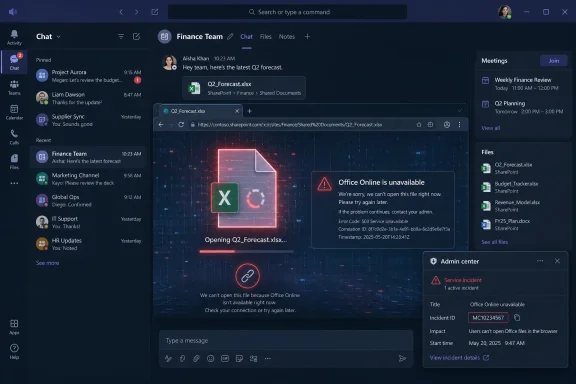 The Cloud Office Failed at the Point Where Work Becomes Real
The interesting thing about this Microsoft 365 incident is not that a cloud service had an outage. Cloud services have outages; hyperscale engineering reduces them, routes around them, and apologizes for them, but it does not abolish them. The interesting thing is where this failure surfaced: in the moment a user tried to open a document.That is the mundane transaction on which Microsoft’s modern productivity empire rests. A spreadsheet in Teams is not just a spreadsheet. It is an identity check, a SharePoint object, a browser session, a file-rendering service, a collaboration layer, a policy engine, and often a compliance boundary pretending to be a familiar green Excel icon.
When Microsoft said it was investigating reports that some users were unable to open files in Office for the web or Microsoft Teams, the statement sounded narrow. But for many organizations, “unable to open files” means unable to review invoices, update forecasts, join project handoffs, approve contracts, or respond to customers with the artifact everyone is discussing. Chat is useful; meetings are unavoidable; email is eternal. But the document is still where the work hardens into something the business can act on.
The outage reportedly affected multiple Office web applications, including Excel for the web, and users saw errors indicating that Office Online services were not available. Microsoft later said service telemetry showed a sharp increase in error rates across Office web apps. That sequence matters because it frames the incident less as a front-end nuisance and more as a systemic failure in the shared substrate beneath Microsoft’s web productivity stack.
Teams Is No Longer Just the Chat App in the Corner
Microsoft Teams used to be easy to describe as a collaboration tool. That description now undersells both its reach and its failure modes. In many companies, Teams is where conversations happen, files are stored, meetings launch, workflow apps are pinned, and users expect Office documents to open without ever thinking about SharePoint, OneDrive, or browser-based rendering.That integration is the sales pitch. It is also the blast radius.
When a Word or Excel file in Teams will not open, many users do not distinguish between a Teams outage, an Office outage, a SharePoint outage, or a tenant-specific policy issue. They experience one thing: the place where they work is broken. For IT teams, that ambiguity is operationally expensive because the first wave of tickets rarely arrives with useful diagnostic boundaries.
The June 1 incident illustrates why Teams has become such a delicate dependency. Microsoft’s bundling of chat, meetings, file access, and app surfaces has made Teams a practical front door to Microsoft 365. If the front door works but the rooms behind it do not, users still perceive the building as closed.
That distinction matters for administrators trying to communicate during an outage. “Teams is up” is not a meaningful reassurance if users cannot open the files attached to Teams conversations. Likewise, “Office for the web is degraded” may not capture the business impact if the affected files are embedded in Teams channels and used as the shared memory of a department.
The Status Page Told the Truth, but Not the Whole Story
Microsoft’s public cloud status communications tend to be careful, terse, and progressively more specific as telemetry firms up. That is not unique to Microsoft. Large providers usually begin with user-impact language, then add affected services, then describe mitigation steps, and only sometimes disclose a root cause in detail.In this case, the early signal was simple: users may be unable to open files in Office for the web or Microsoft Teams. Later, Microsoft’s analysis pointed to increased error rates across Office web applications. Eventually, the company said the issue was resolved and that it would continue monitoring for stability.
For customers, that is useful but incomplete. It tells administrators what users are seeing and whether Microsoft believes the problem is over. It does not, at least in the public-facing summary, explain why the underlying failure occurred, how widespread it was by region, or what engineering control prevented recurrence.
That gap is where frustration grows. Enterprises do not necessarily expect perfection from Microsoft 365, but they do expect enough detail to update risk registers, justify continuity planning, and answer executives who ask whether the business was lucky or protected. A status message can close an incident; it cannot by itself close the organizational lesson.
Microsoft’s telemetry-driven language is especially revealing. The company did not initially describe a human-visible outage as a single failed component. It described a sharp increase in errors across web apps. That is the vocabulary of distributed systems, and it is a reminder that users experience cloud failures as discrete events even when providers observe them as statistical deviations across fleets, regions, dependencies, and code paths.
“Some Users” Can Still Mean a Bad Day for Everyone in the Room
Cloud providers often use the phrase “some users” because it is technically accurate. The service may not be down globally. The impact may depend on tenant location, authentication path, network route, browser, workload, or a backend partition. But “some users” is a maddening phrase inside a business where the affected “some” happen to include finance, legal, sales operations, or the executive team.The June 1 outage was described in several reports as global or worldwide in user experience, while Microsoft’s own public phrasing was more measured. That difference is not necessarily a contradiction. A cloud incident can produce reports from multiple regions without affecting every region equally, every tenant continuously, or every workload identically.
This is where outage coverage often becomes sloppy. A spike in Downdetector reports, a flood of social posts, and a vendor status update are all evidence, but they are not the same kind of evidence. Microsoft’s admin center incident ID gives administrators the most actionable anchor, while user reports help establish the practical disruption and the degree to which the issue was visible outside one customer environment.
For IT pros, the lesson is to avoid arguing semantics while users are blocked. Whether an incident is “global,” “regional,” “intermittent,” or “service-specific” matters for root cause analysis. During the outage window, the more important operational question is whether affected users have a viable alternate path to the file, the meeting, or the approval workflow.
Microsoft 365 Has Quietly Become the Business Continuity Plan—and the Risk
A decade ago, many organizations treated cloud productivity as a resilience upgrade. Exchange Online, OneDrive, SharePoint Online, and Teams reduced the burden of maintaining local servers and gave users access from anywhere. For most companies, that trade has been rational. The uptime, security investment, and feature velocity of Microsoft 365 are difficult to replicate on premises.But every successful platform eventually becomes infrastructure. Microsoft 365 is no longer just a subscription to Office apps. It is identity, storage, collaboration, device management, compliance, security telemetry, and increasingly AI-assisted work. The more Microsoft pulls into that orbit, the more any incident becomes a business continuity event rather than an application hiccup.
This is the uncomfortable part of the cloud bargain. Organizations outsourced a great deal of complexity to Microsoft, but they did not outsource accountability to their own customers, regulators, boards, or employees. When Teams cannot open a spreadsheet, the user calls internal IT, not Redmond.
That is not an argument to flee Microsoft 365. For many organizations, there is no practical alternative that offers the same breadth. It is an argument to stop pretending that “Microsoft handles it” is a complete continuity strategy. Microsoft handles the platform; the customer still owns the business process that depends on it.
The Browser Made Office Easier to Deploy and Harder to Explain
Office for the web is one of Microsoft’s most consequential shifts because it changes the deployment model of productivity software. Users do not need a full desktop app to review, edit, and collaborate on documents. A browser tab can now carry work that once required a locally installed Office suite and a file share.That is a major win for manageability. It reduces endpoint complexity, supports shared and unmanaged devices, and fits the reality of hybrid work. It also means that failures can look strangely thin from the endpoint. The laptop is online. The browser loads. The user is authenticated. Teams opens. Then the document does not.
That kind of failure is frustrating because every visible layer appears healthy until the final action. It creates a gap between user perception and technical diagnosis. A local app crash has a familiar shape; a cloud-rendered document failing inside a collaboration surface has too many possible causes.
This is why browser-based productivity requires different troubleshooting instincts. Clearing cache, switching browsers, testing desktop apps, checking service health, and confirming tenant-wide reports all become part of the first response. The help desk script that once began with “restart Word” now begins with “which path did you use to open the file?”
Desktop Apps Are Not a Time Machine
Whenever Office for the web fails, someone will argue that the desktop Office apps are the real answer. There is truth in that. A locally installed Word, Excel, or PowerPoint app can be a useful fallback when web rendering or browser access is impaired. Cached files, synced libraries, and offline editing can keep some users moving.But desktop Office is not a magic escape hatch from Microsoft 365 dependency. If the file lives in SharePoint or OneDrive and the user does not have a local copy, cloud access still matters. If the workflow depends on co-authoring, sensitivity labels, conditional access, or Teams context, the desktop app may only solve part of the problem.
The more modern the organization, the less “open it locally” resembles a universal workaround. Files are not always emailed as attachments anymore. They are links, live objects, shared records, and collaborative canvases wrapped in permissions. That model is better in many ways, but it changes what resilience means.
The practical answer is not nostalgia for mapped drives. It is deliberate fallback design. Critical documents should have owners, offline expectations, and alternate communication paths. Teams channels should not be the only place where urgent operational instructions exist. A continuity plan that depends on users improvising under pressure is not a plan; it is a wish.
Admins Need Better Outage Muscle Memory Than Refreshing X
For administrators, the first minutes of a Microsoft 365 incident are often the most chaotic. Users report symptoms before the status page updates. The admin center may show nothing yet. Social media may show panic, jokes, false claims, and legitimate reports in equal measure.The right instinct is to triangulate. Check the Microsoft 365 admin center service health page, the public service status page, known incident IDs, tenant-specific advisory messages, and user reports from multiple departments. The goal is not to prove Microsoft is at fault as quickly as possible. The goal is to decide whether local troubleshooting should continue or whether the organization should shift into outage communications.
That distinction saves time. If a file-opening failure is tenant-wide and matches a Microsoft advisory, reimaging laptops and resetting user profiles wastes effort. If only one department is affected, the cause may still be permissions, conditional access, endpoint security, or a local network path. Outage discipline means resisting both extremes: blaming Microsoft for everything and blaming the endpoint for everything.
The June 1 incident also reinforces the value of prewritten communications. Users do not need a dissertation during an outage. They need to know what is affected, what is not affected, what workaround exists, when the next update will arrive, and whether they should stop filing duplicate tickets. That clarity is easier to deliver if the template exists before the outage.
The AI Era Raises the Cost of Boring Reliability
Microsoft has spent the past several years pushing Microsoft 365 from productivity suite to AI-assisted work platform. Copilot is not a sidecar in that vision; it is meant to sit across documents, meetings, messages, and business data. The more Microsoft asks customers to trust the cloud with higher-level reasoning, the more old-fashioned availability becomes strategically important.AI features may sell the future, but file access keeps the present alive. A Copilot summary is not useful if the underlying document cannot open. An intelligent meeting recap does not help if the team cannot reach the spreadsheet driving the decision. The glamorous layer depends on the boring layer.
That is why incidents like this carry reputational weight beyond their duration. Microsoft can resolve the technical problem in hours and still leave customers with the impression that the stack is becoming too concentrated. When the same platform hosts the files, the conversations, the meetings, the compliance controls, and the AI assistant, reliability stops being a service-level metric and becomes a trust metric.
The company knows this. Its entire commercial cloud strategy depends on convincing organizations that consolidation reduces friction without creating unacceptable dependency. Every Microsoft 365 incident tests that argument in miniature.
Outage Transparency Is Becoming a Competitive Feature
Enterprise customers are increasingly sophisticated about cloud incidents. They do not merely want to know whether a service is red, yellow, or green. They want to know what failed, how Microsoft detected it, why automated mitigation did or did not work, and what changed afterward.Microsoft has improved its service health communications over the years, especially inside the admin center where tenant-relevant advisories can provide more detail than public status pages. But the public pattern remains familiar: investigation, telemetry, mitigation, resolution, monitoring. That is operationally useful, yet it often leaves a post-incident vacuum.
The industry should treat transparency as part of reliability. A provider that explains failures well helps customers build better defenses. A provider that gives only minimal closure forces customers to infer, speculate, or overcorrect.
There is a balance to strike. Microsoft cannot always disclose sensitive infrastructure details, and early incident updates should not pretend to know more than engineers have verified. But after resolution, customers benefit from plain-English explanations of scope, cause category, mitigation, and recurrence prevention. The cloud is shared infrastructure; shared infrastructure needs shared understanding.
The Real Outage Was the Vanishing of Local Context
The most revealing user experience in a Microsoft 365 outage is the loss of context. A document link in Teams usually carries everything with it: where the file lives, who has access, what conversation surrounds it, and which meeting or project made it relevant. When that link stops working, users often do not know the underlying file path, the SharePoint site, or the document owner.That is not user failure. It is the design working as intended until it does not. Microsoft has spent years abstracting away file locations because users should not have to think like file-system administrators. The price of that convenience is that, during an outage, the abstraction can leave people with fewer clues.
This is where organizations can make small, practical improvements. Critical files should be organized in ways that humans can describe outside Teams. Project owners should know where authoritative documents live. Departments should avoid building processes in which a single pinned Teams tab becomes the only obvious route to a business-critical artifact.
None of this requires abandoning modern collaboration. It requires remembering that convenience layers are not the same as durable process design. When the convenience layer fails, the organization should still know where its work is.
The June 1 Incident Was Short, but the Pattern Is Long
Microsoft’s June 1 disruption appears to have been resolved relatively quickly, with access restored to affected Office web apps, Teams file access, SharePoint web experiences, and Excel for the web. That is good news for users and a credit to the engineers who mitigated the problem. But a short outage can still be a useful warning.Microsoft 365 incidents in recent years have affected sign-in, Exchange Online, Teams, SharePoint, Outlook, Defender, Purview, Office web apps, and browser-specific access paths at different times. The details vary, but the recurring lesson is that deeply integrated cloud productivity produces deeply integrated disruption.
The risk is not that Microsoft 365 is uniquely unreliable. The risk is that it is uniquely central. When a smaller app fails, a team routes around it. When Microsoft 365 fails, the detour may run through the same identity system, the same files, the same browser session, or the same admin portal.
That concentration is not accidental. It is the product strategy. Microsoft wants the work graph, the security graph, the identity layer, and the productivity surface to reinforce one another. Customers buy into that because it is powerful. Incidents remind them that power and dependency arrive in the same box.
The Practical Lesson Is Smaller Than the Platform and Bigger Than the Error Message
For WindowsForum readers, the sensible takeaway is not panic. It is preparation. Microsoft 365 remains the default productivity platform for good reasons, but administrators should treat web Office and Teams file access as critical infrastructure, not as conveniences that can fail without consequence.The incident also argues for more realistic user education. Employees do not need to understand every backend dependency in Microsoft 365. They do need to know what to do when a Teams file will not open, where to check for internal outage updates, and when to stop trying the same broken action over and over.
There is a cultural piece here as well. Organizations often rehearse disaster recovery for data centers and line-of-business systems, then assume productivity tools will simply be available. But in a SaaS-first company, losing file access for a few hours can be more disruptive than losing a legacy server no one touches during the workday.
The better posture is boring and effective: define critical workflows, identify cloud dependencies, provide alternate access paths where possible, and communicate early. The point is not to defeat every Microsoft outage. The point is to prevent a temporary service incident from becoming an internal coordination failure.
The File-Opening Failure That Should Rewrite the Runbook
The June 1 Microsoft 365 outage should leave administrators with a few concrete actions, not just another entry in the long memory of cloud interruptions. The incident was narrow enough to study and broad enough to matter, which makes it useful as a runbook test.- Organizations should document whether critical teams can continue working if Office for the web cannot open files inside Teams.
- Administrators should make sure help desks know the difference between Teams being unavailable and Teams being unable to launch Office-backed files.
- Users should have a clear internal status channel that does not depend entirely on the same Microsoft 365 surfaces under investigation.
- Business-critical SharePoint and OneDrive locations should be understandable without relying on a Teams tab or a recent chat message.
- Desktop Office, local sync, and alternate browsers should be treated as partial fallbacks, not guaranteed solutions.
- Post-incident reviews should focus on the business process that stopped, not only on the Microsoft service that failed.
References
- Primary source: zamin.uz
Published: 2026-06-01T18:42:06.593011
Loading…
zamin.uz - Related coverage: bleepingcomputer.com
Loading…
www.bleepingcomputer.com - Related coverage: windowsforum.com
Loading…
windowsforum.com - Related coverage: sqmagazine.co.uk
Loading…
sqmagazine.co.uk - Related coverage: techradar.com
A major Microsoft 365 outage left users without access to emails and files
A Microsoft 365 enterprise outage has been fixedwww.techradar.com
- Related coverage: crn.com

Microsoft Copilot Outage Disrupts Users, Company Investigates
Users report Microsoft Copilot outage as the company works to identify root cause and restore service. www.crn.com
- Related coverage: windowscentral.com
Microsoft 365 and Outlook are back to normal following outage
Outlook, Teams and Microsoft 365 are no longer experiencing issues www.windowscentral.com
- Official source: learn.microsoft.com

How to check Microsoft 365 service health - Microsoft 365 Enterprise
View the health status of Microsoft 365 services before you call support to see if there's an active service interruption.learn.microsoft.com - Related coverage: windowsreport.com
Loading…
windowsreport.com - Related coverage: status.ndus.edu
Intermittent Issues with SharePoint, Teams, and M365 Admin Center | March 2026 | History | NDUS CTS Status
User Impact: Some users may notice they are unable to access SharePoint sites, Teams, and Microsoft 365 admin... status.ndus.edu
- Official source: status.cloud.microsoft
Microsoft service health status
status.cloud.microsoft
- Related coverage: newsweek.com
Loading…
www.newsweek.com - Related coverage: hungerford.tech
Loading…
www.hungerford.tech - Related coverage: feministfutures.socialsciences.ucsb.edu
Loading…
feministfutures.socialsciences.ucsb.edu - Official source: techcommunity.microsoft.com
Loading…
techcommunity.microsoft.com