

Microsoft is rolling out a new People Skills removal and deletion control for Microsoft 365 administrators, creating a tenant-wide offboarding path for organizations that no longer want to use People Skills data in Copilot, Viva, profile cards, and related experiences. The feature is significant because it goes beyond hiding a feature or disabling access: it provides a way to permanently delete the organization’s skills library and associated user skill records.
For IT teams navigating AI governance, data minimization, regional privacy requirements, or a changing HR technology strategy, this is an important administrative addition. People Skills can aggregate confirmed, AI-inferred, and imported data into a skills profile intended to improve discovery and skills-based Microsoft 365 experiences. But the usefulness of that data also makes its lifecycle management critical. A deployment needs a defined beginning, operational controls during use, and now, finally, a clear endpoint.
The new control is rolling out under Microsoft 365 Roadmap ID 565905 for worldwide, standard multi-tenant environments. It is a web-based, generally available Microsoft 365 capability and is explicitly administrator-driven. Organizations will not be automatically opted out of People Skills, nor will existing data disappear merely because the new option becomes available.
The most important distinction in this update is between disabling an experience and deleting the underlying People Skills service and its data.
Microsoft 365 already offers several ways to control how People Skills operates. Administrators can limit user access, restrict AI inferencing, govern the visibility of skills on profile cards, and control sharing with certain connected Microsoft 365 services. Those controls are useful for phased deployment, regional rollout, pilot programs, and privacy-sensitive use cases.
The new removal and deletion setting serves a different purpose. It is designed for organizations that have made a more definitive decision: they want to stop using People Skills altogether and remove the associated tenant data.
When deletion is confirmed, Microsoft indicates that the following information is permanently removed:
That permanence is both the feature’s greatest strength and its greatest operational risk.
In a typical deployment, skills can appear in user-facing experiences such as the Microsoft 365 profile card. The data can also support people discovery, Copilot-related searches and experiences, Viva scenarios, learning recommendations, and workforce intelligence features where enabled.
Confirmed skills are skills a user has explicitly added, reviewed, or validated. In practice, these are the most intuitive records: a person identifies a capability, then makes it part of their skills profile.
Inferred skills are generated by Microsoft’s AI-based skills inferencing capabilities. These records are especially important from a governance standpoint because they may represent Microsoft’s interpretation of a person’s work patterns and organizational context rather than a direct declaration by that employee.
Imported skills are skills brought into Microsoft 365 from outside systems. An organization might import skill information from an HR platform, talent marketplace, learning system, or another internal data source. Imported data can be valuable because it connects existing talent investments to Microsoft 365 experiences, but it also creates additional data ownership and accuracy considerations.
The new deletion control covers all three categories. That breadth matters because deleting only visible profile card entries would not satisfy the same data governance objective as removing the library, user records, and imported information together.
For a large enterprise, custom skills may capture highly specific job functions, certifications, technical platforms, client methodologies, product knowledge, internal programs, or business processes. In other words, a skills library can become an important semantic asset that reflects how the organization describes its workforce.
Deleting it removes more than individual user profile entries. It removes the shared vocabulary that underpins People Skills across the tenant.
Skills should no longer appear on Microsoft 365 user profile cards, and the information will no longer be used in skills-based experiences across Microsoft 365. This includes relevant Copilot and Viva scenarios that depend on People Skills data.
That immediate experience change is useful from a compliance and communications perspective. Organizations do not need to wait for every backend deletion operation to finish before the feature is removed from general user visibility.
There is one important exception: skill data connected with Viva Learning can take up to one week to be fully removed. The Viva Learning skills experience is turned off immediately, but administrators should not interpret an immediate user-interface change as proof that every related data deletion task has completed.
This distinction should be built into internal compliance documentation. A deletion event may have several timestamps:
That is the correct approach for enterprise software. Skills data can support real business workflows, including employee discovery, staffing, learning, and Copilot-assisted people queries. Automatically deleting it would be disruptive and could create its own governance problem.
Instead, the organization must make the decision and an appropriately authorized administrator must execute it.
The removal process is available to:
For a People Skills decision, the Knowledge Administrator or AI Administrator role may be more appropriate when the organization’s role design permits it. This narrows the operational blast radius while allowing stakeholders responsible for AI, knowledge management, or workforce data governance to carry out approved actions.
However, a narrower role does not eliminate the need for governance. Role assignment itself should be reviewed before the deletion event. An organization should confirm:
The most direct route is generally:
The exact labels and layout can evolve as Microsoft refines the admin center, but the underlying design is clear: this is a dedicated setting within People Skills management, not a PowerShell-only command or a buried retention setting.
This may sound obvious, but it matters during audits. Enterprises with multiple Microsoft 365 tenants, subsidiaries, test environments, or acquired organizations should inventory each tenant separately. A feature’s existence in one tenant does not establish that it was configured, populated, or used in another.
These controls solve different problems and should be selected based on the organization’s actual objective.
Turning off the user experience removes historical user-level skills data for affected users. However, it does not deprovision or delete the skills library itself. The tenant can retain its configured library and potentially continue using People Skills for other scoped populations.
This is the better fit for a regional pause, a pilot rollback, a workforce segment that should be excluded, or a staged deployment redesign.
That approach is less destructive than full People Skills deletion. Users may still be able to manage or confirm skills manually, depending on the organization’s broader configuration.
This is particularly relevant for organizations that value self-declared expertise but are not comfortable with AI interpretation of employee activity or context.
An organization might retain People Skills data while making it private by default or scoped to specific populations. That can be appropriate when the issue is discoverability rather than data retention.
Still, visibility controls are not deletion controls. Data retained in the tenant remains subject to the organization’s governance responsibilities, even when it is not broadly displayed.
The practical hierarchy is straightforward:
Many enterprise AI discussions focus on how data is collected, analyzed, secured, and displayed. Far fewer focus with equal rigor on how a service is retired. Yet retirement is a core part of responsible administration.
This is especially valuable for skills datasets because they can be personally relevant, professionally sensitive, and potentially influential in how employees are found or evaluated.
A removal control means that the response does not need to be limited to “turn it off and revisit later.” The tenant can be deliberately cleaned up when permanent offboarding is required.
This makes the product easier to govern than a system where administrators must manually identify and remove each category of data through separate interfaces.
If a company deletes People Skills and later relaunches it, it must repeat the setup process. Its previous organization-specific library, user confirmations, inferred records, and imported data will not reappear.
That means the organization could lose substantial work, including curated custom terminology, skill mappings, employee validation activity, and integration effort.
A future reimplementation could require:
Organizations should not treat deletion as a purely back-office task. A concise employee communication plan should explain:
This prevents a common mistake: using a permanent deletion tool to solve a temporary policy dispute.
A deletion may technically succeed while unexpectedly disrupting an informal staffing or mentoring workflow.
The central principle is simple: retain only what is authorized, necessary, and governed.
If the taxonomy has value beyond People Skills, it should be preserved through an approved process before the tenant service is removed.
A second-person review is advisable for a permanent tenant-wide deletion, even if the product interface does not enforce it.
Microsoft 365 Copilot is most useful when it can work with well-governed organizational context. Skills data can enrich people search, help surface relevant expertise, and support targeted learning or workforce intelligence. But organizations may reasonably conclude that the value is not sufficient for every tenant, geography, employee population, or deployment phase.
The new option gives IT leaders greater confidence that adopting People Skills does not create a one-way door. It remains a significant commitment while in use, but it is no longer an open-ended one.
The answer is now clear. Authorized administrators can permanently delete the tenant’s skills library and all confirmed, inferred, and imported user skills. Those records cease to appear in profile cards and are no longer used across Microsoft 365 skills-based experiences, including relevant Copilot and Viva scenarios.
The capability should be seen as a governance mechanism rather than a routine configuration switch. It is powerful precisely because it is final. Organizations that use it with careful approvals, clear communications, documented evidence, and realistic expectations about the lack of restoration will gain a cleaner and more defensible way to manage the People Skills lifecycle.
For IT teams navigating AI governance, data minimization, regional privacy requirements, or a changing HR technology strategy, this is an important administrative addition. People Skills can aggregate confirmed, AI-inferred, and imported data into a skills profile intended to improve discovery and skills-based Microsoft 365 experiences. But the usefulness of that data also makes its lifecycle management critical. A deployment needs a defined beginning, operational controls during use, and now, finally, a clear endpoint.
The new control is rolling out under Microsoft 365 Roadmap ID 565905 for worldwide, standard multi-tenant environments. It is a web-based, generally available Microsoft 365 capability and is explicitly administrator-driven. Organizations will not be automatically opted out of People Skills, nor will existing data disappear merely because the new option becomes available.
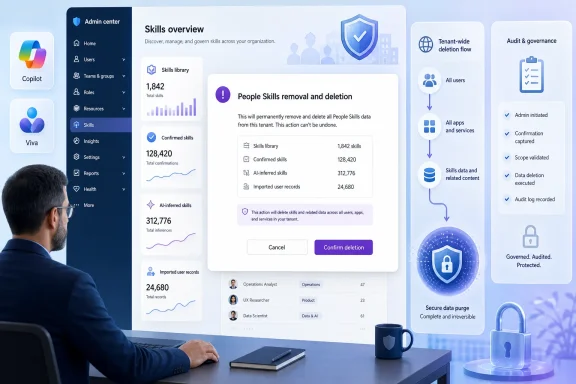 A Tenant-Level Exit Strategy for People Skills
The most important distinction in this update is between disabling an experience and deleting the underlying People Skills service and its data.Microsoft 365 already offers several ways to control how People Skills operates. Administrators can limit user access, restrict AI inferencing, govern the visibility of skills on profile cards, and control sharing with certain connected Microsoft 365 services. Those controls are useful for phased deployment, regional rollout, pilot programs, and privacy-sensitive use cases.
The new removal and deletion setting serves a different purpose. It is designed for organizations that have made a more definitive decision: they want to stop using People Skills altogether and remove the associated tenant data.
When deletion is confirmed, Microsoft indicates that the following information is permanently removed:
- The organization’s entire skills library
- Out-of-the-box library selections maintained for the tenant
- Custom skills created or imported by the organization
- All confirmed user skills
- All AI-inferred skills
- All imported skills associated with users
That permanence is both the feature’s greatest strength and its greatest operational risk.
Why People Skills Data Matters in Microsoft 365
People Skills is Microsoft’s skills intelligence layer for Microsoft 365. It is designed to help organizations represent employee expertise in a more structured and discoverable manner, using a combination of user confirmation, administrative imports, and AI-generated inferences.In a typical deployment, skills can appear in user-facing experiences such as the Microsoft 365 profile card. The data can also support people discovery, Copilot-related searches and experiences, Viva scenarios, learning recommendations, and workforce intelligence features where enabled.
The Three Major Categories of Skill Data
Understanding what is being deleted requires understanding how People Skills data can enter a tenant.Confirmed skills are skills a user has explicitly added, reviewed, or validated. In practice, these are the most intuitive records: a person identifies a capability, then makes it part of their skills profile.
Inferred skills are generated by Microsoft’s AI-based skills inferencing capabilities. These records are especially important from a governance standpoint because they may represent Microsoft’s interpretation of a person’s work patterns and organizational context rather than a direct declaration by that employee.
Imported skills are skills brought into Microsoft 365 from outside systems. An organization might import skill information from an HR platform, talent marketplace, learning system, or another internal data source. Imported data can be valuable because it connects existing talent investments to Microsoft 365 experiences, but it also creates additional data ownership and accuracy considerations.
The new deletion control covers all three categories. That breadth matters because deleting only visible profile card entries would not satisfy the same data governance objective as removing the library, user records, and imported information together.
The Skills Library Is More Than a Reference List
The organization’s skills library is the foundation of People Skills. It can include selections from Microsoft’s broad out-of-the-box skills catalog as well as custom organizational terms.For a large enterprise, custom skills may capture highly specific job functions, certifications, technical platforms, client methodologies, product knowledge, internal programs, or business processes. In other words, a skills library can become an important semantic asset that reflects how the organization describes its workforce.
Deleting it removes more than individual user profile entries. It removes the shared vocabulary that underpins People Skills across the tenant.
What Changes After Deletion Begins
Once an authorized administrator confirms the People Skills removal and deletion action, the practical effects begin immediately from the user experience perspective.Skills should no longer appear on Microsoft 365 user profile cards, and the information will no longer be used in skills-based experiences across Microsoft 365. This includes relevant Copilot and Viva scenarios that depend on People Skills data.
That immediate experience change is useful from a compliance and communications perspective. Organizations do not need to wait for every backend deletion operation to finish before the feature is removed from general user visibility.
Expected Deletion Timing
Microsoft describes the removal as an automated process after confirmation. Most People Skills data is expected to be deleted within 48 to 72 hours.There is one important exception: skill data connected with Viva Learning can take up to one week to be fully removed. The Viva Learning skills experience is turned off immediately, but administrators should not interpret an immediate user-interface change as proof that every related data deletion task has completed.
This distinction should be built into internal compliance documentation. A deletion event may have several timestamps:
- The administrator authorizes the deletion.
- User-facing People Skills experiences are disabled.
- Most tenant-level and user-level data is removed.
- Connected Viva Learning skill data completes deletion.
No Automatic Deletion, No Surprise Service Removal
The feature does not automatically remove People Skills from existing tenants. Microsoft is adding an administrative control, not changing the default posture of the service.That is the correct approach for enterprise software. Skills data can support real business workflows, including employee discovery, staffing, learning, and Copilot-assisted people queries. Automatically deleting it would be disruptive and could create its own governance problem.
Instead, the organization must make the decision and an appropriately authorized administrator must execute it.
Who Can Remove People Skills
The control is not intended for ordinary users or delegated help desk staff. Microsoft limits the action to privileged administrative roles.The removal process is available to:
- Global Administrators
- Knowledge Administrators
- AI Administrators
Least Privilege Still Applies
A Global Administrator can perform the action, but organizations should avoid treating that as the default path. Global Administrator accounts have broad authority across the Microsoft 365 environment and should remain tightly controlled, strongly protected, and reserved for exceptional needs.For a People Skills decision, the Knowledge Administrator or AI Administrator role may be more appropriate when the organization’s role design permits it. This narrows the operational blast radius while allowing stakeholders responsible for AI, knowledge management, or workforce data governance to carry out approved actions.
However, a narrower role does not eliminate the need for governance. Role assignment itself should be reviewed before the deletion event. An organization should confirm:
- Which employees hold the relevant administrative roles
- Whether those accounts are active and properly secured
- Whether multifactor authentication and privileged-access controls are in place
- Whether the deletion action requires change-management approval
- Who owns the formal decision to retire the People Skills service
Where Administrators Will Find the Control
Microsoft places the option in the Microsoft 365 admin center’s People Skills management area. Administrators can reach the service through the Copilot settings path or through the Viva data management path.The most direct route is generally:
- Open the Microsoft 365 admin center.
- Navigate to Copilot.
- Select Settings and locate People Skills in Microsoft 365 Copilot.
- Open the People Skills management experience.
- Select Settings.
- Choose People Skills removal and deletion.
- Review the confirmation dialog and complete the required confirmation steps.
- Select Delete People Skills.
The exact labels and layout can evolve as Microsoft refines the admin center, but the underlying design is clear: this is a dedicated setting within People Skills management, not a PowerShell-only command or a buried retention setting.
A Prerequisite That Can Be Overlooked
The removal option is relevant only when People Skills has already been set up in the tenant. An organization that never deployed the service will not need a deletion process because the associated People Skills environment and dataset do not exist in the same way.This may sound obvious, but it matters during audits. Enterprises with multiple Microsoft 365 tenants, subsidiaries, test environments, or acquired organizations should inventory each tenant separately. A feature’s existence in one tenant does not establish that it was configured, populated, or used in another.
Deletion Is Not the Same as Existing People Skills Controls
The People Skills removal feature should not be confused with the controls Microsoft already provides for access, inferencing, visibility, or specific data categories.These controls solve different problems and should be selected based on the organization’s actual objective.
Turning Off People Skills User Experiences
The People Skills user experiences control can turn the experience off for an entire organization, a group, or an individual. This is useful when an enterprise wants to stop a selected audience from using the feature.Turning off the user experience removes historical user-level skills data for affected users. However, it does not deprovision or delete the skills library itself. The tenant can retain its configured library and potentially continue using People Skills for other scoped populations.
This is the better fit for a regional pause, a pilot rollback, a workforce segment that should be excluded, or a staged deployment redesign.
Disabling AI Skills Inferencing
The Skills AI Inferencing control governs whether Microsoft can infer skills and add them to user profiles. If the concern is that AI-derived skill information should not be generated, organizations can disable inferencing without necessarily removing confirmed or imported skills.That approach is less destructive than full People Skills deletion. Users may still be able to manage or confirm skills manually, depending on the organization’s broader configuration.
This is particularly relevant for organizations that value self-declared expertise but are not comfortable with AI interpretation of employee activity or context.
Restricting Skills Visibility and Sharing
The Skills profile visibility setting controls whether skills are visible to colleagues on profile cards and whether skills data is shared with connected Microsoft 365 experiences.An organization might retain People Skills data while making it private by default or scoped to specific populations. That can be appropriate when the issue is discoverability rather than data retention.
Still, visibility controls are not deletion controls. Data retained in the tenant remains subject to the organization’s governance responsibilities, even when it is not broadly displayed.
Removing the Entire Service
The new People Skills removal and deletion setting is the complete exit option. It is intended for organizations that no longer want the skills library, the profiles, or the connected Microsoft 365 skills experiences.The practical hierarchy is straightforward:
- Use visibility controls when the challenge is who can see data.
- Use inferencing controls when the challenge is how data is created.
- Use user experience controls when the challenge is which populations can use the feature.
- Use full deletion when the decision is to retire People Skills and permanently remove its data.
The Governance Benefits Are Substantial
The biggest benefit of the new control is that it gives organizations a direct, documented way to act on the principle of data lifecycle management.Many enterprise AI discussions focus on how data is collected, analyzed, secured, and displayed. Far fewer focus with equal rigor on how a service is retired. Yet retirement is a core part of responsible administration.
Stronger Data Minimization
If an organization concludes that it no longer needs a People Skills deployment, retaining detailed skill records indefinitely may conflict with internal data minimization standards. A true deletion workflow allows IT teams to reduce the retained data footprint rather than leaving unused information in a dormant service.This is especially valuable for skills datasets because they can be personally relevant, professionally sensitive, and potentially influential in how employees are found or evaluated.
Better Support for Compliance and Policy Changes
Organizations may alter their posture because of a new regional requirement, a labor consultation, a privacy impact assessment, a corporate policy update, an acquisition, or a change in HR systems.A removal control means that the response does not need to be limited to “turn it off and revisit later.” The tenant can be deliberately cleaned up when permanent offboarding is required.
Clearer Separation Between Feature Management and Data Removal
IT administrators often face a frustrating gap between disabling an application and proving that its data has been handled correctly. The People Skills deletion control helps close that gap by explicitly pairing feature removal with deletion of the central library and user-level skills data.This makes the product easier to govern than a system where administrators must manually identify and remove each category of data through separate interfaces.
The Risks of Permanent Removal
A feature designed for irreversible deletion naturally demands careful planning. The risks are not primarily technical; they are organizational.No Native Restoration Path
Microsoft’s guidance is clear: deleted People Skills data is not restored simply because the organization decides to set up the service again later.If a company deletes People Skills and later relaunches it, it must repeat the setup process. Its previous organization-specific library, user confirmations, inferred records, and imported data will not reappear.
That means the organization could lose substantial work, including curated custom terminology, skill mappings, employee validation activity, and integration effort.
Imported Data May Need to Be Rebuilt
Imported skills may originate in another system of record, which can make reimporting possible in principle. But possible is not the same as easy.A future reimplementation could require:
- Revalidating the source dataset
- Reviewing data quality and consent assumptions
- Rebuilding import files and mappings
- Re-establishing administrative procedures
- Reconfiguring user access policies
- Retesting visibility and inferencing settings
- Communicating a new rollout to affected users
Employee Trust and Communication
Users may notice that skills disappear from their profile cards or no longer inform familiar Microsoft 365 experiences. For some, this will be welcome. For others, it may remove a valued way to present expertise or discover colleagues.Organizations should not treat deletion as a purely back-office task. A concise employee communication plan should explain:
- What is changing
- When skills will stop appearing
- Whether users need to take action
- Whether skill information will remain available elsewhere
- Which teams own the decision
- How the change affects learning, staffing, or people discovery workflows
A Practical Pre-Deletion Checklist
Before selecting the final deletion option, administrators should conduct a structured review. The irreversible nature of the action justifies more preparation than an ordinary feature toggle.1. Confirm the Business Decision
Obtain a documented decision from the service owner, privacy team, HR technology owner, security leadership, or other appropriate governance body. The decision should state whether the goal is a temporary restriction, a scoped shutdown, or permanent removal.This prevents a common mistake: using a permanent deletion tool to solve a temporary policy dispute.
2. Inventory Connected Experiences
Identify where People Skills is being used in the tenant. Review profile cards, Copilot-related people experiences, Viva capabilities, learning scenarios, imported datasets, analytics use cases, and any internal processes that depend on skills information.A deletion may technically succeed while unexpectedly disrupting an informal staffing or mentoring workflow.
3. Export What Can Legitimately Be Retained
If organizational policy permits and there is a legitimate business need, evaluate available export options before deletion. Exports should not become a way to evade a deletion obligation; they should be managed under the same retention, privacy, and access rules as any other workforce data.The central principle is simple: retain only what is authorized, necessary, and governed.
4. Review Custom Skills Carefully
Custom skills can be difficult to reconstruct because they often encode institutional knowledge. Before deletion, determine whether the skills taxonomy is needed elsewhere, such as an HR platform, learning catalog, competency framework, or documentation repository.If the taxonomy has value beyond People Skills, it should be preserved through an approved process before the tenant service is removed.
5. Validate Administrative Roles and Change Controls
Confirm that the individual executing the action has the appropriate role and that the operation is logged in the organization’s normal change-management system.A second-person review is advisable for a permanent tenant-wide deletion, even if the product interface does not enforce it.
6. Allow for the Full Completion Window
Do not schedule an immediate reimplementation of People Skills. Microsoft recommends allowing at least a week before setting it up again, ensuring the previous environment has been fully removed, including the longer Viva Learning cleanup window.What This Means for Copilot and Viva Strategy
The People Skills deletion control arrives at a time when organizations are becoming more selective about the data they expose to AI-enabled experiences.Microsoft 365 Copilot is most useful when it can work with well-governed organizational context. Skills data can enrich people search, help surface relevant expertise, and support targeted learning or workforce intelligence. But organizations may reasonably conclude that the value is not sufficient for every tenant, geography, employee population, or deployment phase.
The new option gives IT leaders greater confidence that adopting People Skills does not create a one-way door. It remains a significant commitment while in use, but it is no longer an open-ended one.
A More Mature Administration Model
The availability of both granular controls and full deletion gives People Skills a more mature operational model:- Organizations can deploy selectively.
- Users and groups can be governed differently.
- AI inferencing can be constrained.
- Visibility can be reduced or changed.
- Imported data can be managed.
- The entire service can be permanently removed when needed.
A Necessary Control, Not a Casual Button
Microsoft’s People Skills removal and deletion feature is a welcome addition for Microsoft 365 administrators who need stronger control over skills data. It provides a direct answer to a difficult but necessary question: What happens when an organization wants to fully exit the service?The answer is now clear. Authorized administrators can permanently delete the tenant’s skills library and all confirmed, inferred, and imported user skills. Those records cease to appear in profile cards and are no longer used across Microsoft 365 skills-based experiences, including relevant Copilot and Viva scenarios.
The capability should be seen as a governance mechanism rather than a routine configuration switch. It is powerful precisely because it is final. Organizations that use it with careful approvals, clear communications, documented evidence, and realistic expectations about the lack of restoration will gain a cleaner and more defensible way to manage the People Skills lifecycle.