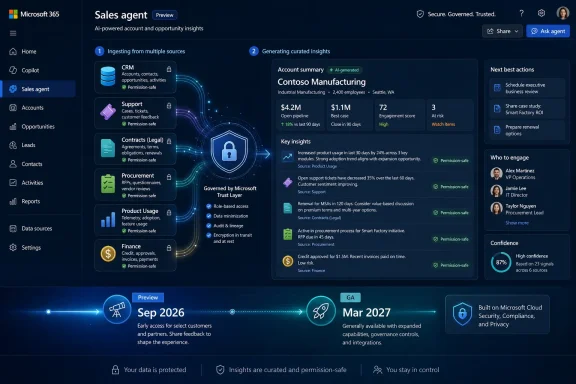
Microsoft is developing Roadmap ID 567003 for Microsoft 365 Copilot on the web: a Sales agent enhancement that will enrich meeting preparation with more data sources, including service tickets. Microsoft lists the feature as in development, with Preview planned for September 2026 and General Availability planned for March 2027 for the Worldwide Standard Multi-Tenant cloud.
The practical takeaway is simple: sellers may eventually get more operational customer context before meetings, not just traditional sales context. Between Preview and GA, admins and sales leaders should treat this as a planning window. They should review which service-ticket data is suitable for sales meeting preparation, check permissions and account mapping, and prepare pilots that test whether the right issues surface for the right people without exposing sensitive support detail.
The Microsoft 365 Roadmap entry is terse, as roadmap entries usually are. The feature, listed as “Microsoft Copilot (Microsoft 365): Enrich Sales agent meeting prep with more data sources,” is marked “In development,” applies to Microsoft Copilot in Microsoft 365 on the web, and targets the Worldwide Standard Multi-Tenant cloud. Microsoft lists both Preview and General Availability release rings, with Preview scheduled for September 2026 and General Availability scheduled for March 2027.
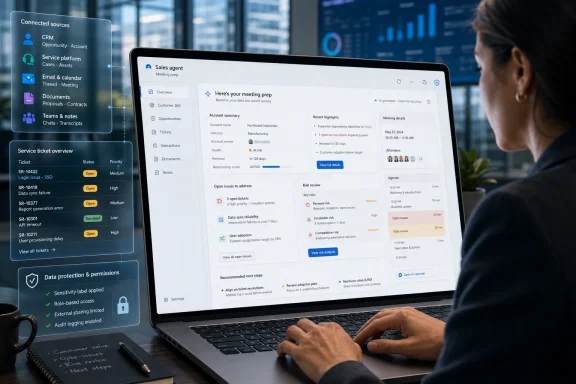
The practical promise is more interesting than the metadata. Microsoft says incomplete context before customer meetings can cause missed risks, overlooked issues, and weak conversations. Its example of richer data is service tickets — the kind of signal that often sits outside the traditional sales rhythm but can dominate the actual customer relationship.
That matters because sales meeting prep has historically been biased toward the seller’s system of record: accounts, contacts, opportunities, prior conversations, meeting history, and pipeline state. Those are useful, but they are not the whole customer truth. If a buyer’s support case has been open for weeks, if an implementation is blocked, or if an executive sponsor has been dragged into an unresolved escalation, the seller who walks in with only opportunity-stage data may be missing the issue that will define the meeting.
Microsoft’s roadmap framing is practical rather than dramatic: richer prep data can help users spot open issues and opportunities before the conversation starts. That is a narrow claim, but an important one. It does not promise perfect account intelligence. It suggests that meeting preparation could become more aware of the operational realities customers bring into sales conversations.
Service tickets are not just another document type. They are a different kind of customer signal: time-stamped, status-heavy, often emotionally charged, and frequently owned by a separate department. A support case may reveal friction that never appears in a sales opportunity. It may also contain sensitive details that should not be broadly summarized without clear permissions and data handling.
That distinction is why the feature deserves more attention than its roadmap line might suggest. CRM data tells a seller what the company hopes will happen. Recent communications tell the seller what people have recently said. Service tickets can help indicate what the customer is experiencing. When those streams disagree, the meeting prep brief becomes much more valuable — and much more sensitive.
The table should be read narrowly. It restates the roadmap facts: planned Preview in September 2026, planned General Availability in March 2027, web platform, Worldwide Standard Multi-Tenant cloud, and in-development status. It does not, by itself, confirm tenant-by-tenant rollout timing, embedded experience behavior, licensing details, administrative setup requirements, or specific source-system support.
A CRM opportunity may say the account is in expansion. A customer-success note may say adoption is uneven. A support ticket may say the customer cannot complete a key workflow. A finance system may show a billing dispute. A Teams thread may show the account team trying to get engineering attention. Each system is a partial map of the same relationship.
By naming service tickets in the roadmap text, Microsoft is acknowledging a common enterprise problem: sellers may enter meetings without the operational facts that customers care about most. That is not always because sellers are careless. It is because support systems, CRM systems, project systems, and collaboration systems are often connected more by human effort than by coherent workflow design.
The value of enriched meeting prep is clearest in a simple example. A seller preparing for a renewal conversation sees that a high-priority service ticket is still open and tied to a deployment blocker. Instead of opening with expansion language, the seller can begin by acknowledging the unresolved issue, confirming ownership, and aligning the conversation around resolution before discussing next steps. That is a different posture, and it is more likely to match the customer’s reality.
It also changes what “good” AI output looks like. A useful prep brief is not just a summary of every open support item. It needs to separate noise from relationship risk. A minor password reset ticket should not carry the same weight as a production outage, a stalled deployment, or a recurring defect tied to a renewal blocker. Microsoft’s roadmap language does not explain how that ranking will work, so organizations should not assume the feature will automatically understand every business nuance. The quality of the experience will likely depend on source hygiene, permissions, ticket metadata, and how consistently customer records are represented across systems.
The business logic is straightforward. If a seller can save time by getting a better account summary, that is useful. If a seller can avoid walking into an executive meeting unaware of a major unresolved support issue, that is potentially more important. The roadmap item is aimed at the second kind of value: preventing avoidable blind spots before the meeting begins.
Still, the feature should not be described as a complete enterprise AI strategy or as proof of a sweeping product ambition beyond what the roadmap confirms. The supported fact is narrower: Microsoft is planning to enrich Sales agent meeting preparation in Microsoft 365 Copilot on the web with additional data sources, including service tickets. The analysis is that this could make Sales agent more useful at the moment when sellers most need accurate, concise customer context.
The risk is that cross-system synthesis is also where AI-assisted workflows can fail visibly when permissions, metadata, or data quality are wrong. A bad email draft is annoying. A meeting prep brief that omits a critical open case, overstates a minor issue, or surfaces stale information as urgent can damage trust quickly. For this feature, the margin for plausible-but-wrong is narrow.
Adding service-ticket-style data increases the number of places where reality can diverge from expectation. Does the ticketing system consistently identify the customer account? Are subsidiaries and parent accounts normalized? Are severities meaningful, or does every ticket look urgent? Are closed cases clearly marked? Are internal-only notes safe to expose in sales prep? Are customer-facing summaries written clearly enough to help someone outside support understand the issue?
Those are not theoretical questions. Support systems often contain sensitive information: customer complaints, contractual friction, security details, internal escalation commentary, product defects, and candid notes from service teams. A seller may need to know that an issue exists and that it is unresolved. The seller may not need every private troubleshooting note, internal owner comment, or root-cause hypothesis.
Preview should therefore be treated as a governance exercise. The success metric is not simply whether Copilot can mention service tickets. It is whether the organization can define which ticket fields are appropriate for meeting prep, which users should see them, and how the agent should describe uncertainty.
The best early pilots will not necessarily be the broadest pilots. They will involve a small set of accounts where support, sales, customer success, and IT can compare enriched meeting prep against known account reality. The question should be asked plainly after each pilot meeting: did the agent surface the issue a competent account team would expect it to surface?
September 2026 — Microsoft plans Preview availability for the Microsoft 365 Copilot web feature.
March 2027 — Microsoft plans General Availability for the feature in the Worldwide Standard Multi-Tenant cloud.
Service-ticket enrichment adds an operational layer to sales preparation. The organization must decide whether support context is part of the seller’s normal working set or a controlled signal that requires tighter filtering. That decision should be made before broad adoption, not after sellers discover sensitive or confusing information in a meeting-prep experience.
This is where many AI-assisted deployments become uncomfortable. AI does not usually create the underlying permission problem; it reveals it. A support queue that has been over-permissive for years may not have caused obvious harm when few people knew where to look. Once summaries and prep insights can make that information easier to discover, dormant access decisions become visible business risk.
The same applies to data quality. If ticket titles are vague, severity is inconsistently applied, account matching is unreliable, or “temporary” workarounds live forever in internal notes, AI-generated meeting prep may become a mirror held up to messy process design. That can be useful, but only if IT and business owners are prepared for what it shows.
The right response is not to block the feature reflexively. It is to treat the Preview window as a chance to harden the information architecture around customer context. Sales, service, and IT should agree on which ticket signals belong in meeting prep: open critical issues, aging high-priority cases, recurring incidents, recent escalations, unresolved implementation blockers, and customer-visible commitments. They should also agree on what does not belong there.
For sales managers, the benefit is consistency. Today, the quality of pre-meeting preparation varies widely by rep, account complexity, and available time. Some sellers build excellent briefs from CRM, email, Teams, support portals, and customer-success notes. Others skim the opportunity record five minutes before the call. A richer Sales agent brief could raise the floor, especially for complex accounts where important signals live outside the opportunity record.
The bigger organizational impact is that sales teams may be nudged toward a more honest account view. Enterprise customers experience vendors as one company, even when the vendor internally divides the relationship among sales, service, support, engineering, billing, and success. A seller who has appropriate support context is better positioned to represent the whole company.
That also creates accountability. Once service issues appear in meeting prep, they become harder for account teams to ignore. A ticket that previously lived in a support queue may become part of a renewal discussion. A recurring complaint may become a product-management escalation. A stalled case may become a customer-success priority.
This is where AI-assisted meeting prep becomes less about novelty and more about operating discipline. The agent is not just answering questions; it is changing which facts travel across departmental boundaries. That is why admins and business leaders should care about this roadmap item even if they are skeptical of broader AI marketing.
A meeting prep summary with a few crisp highlights can feel authoritative. Once service tickets are folded into the experience, the agent’s editorial choices matter. What gets highlighted? What gets suppressed? How fresh is the underlying data? How does the agent handle conflicting signals? Does it distinguish a resolved technical case from an unresolved relationship concern? Does it show enough context for the seller to ask a smart question without exposing details that should remain inside support?
Consider a customer with one severe open ticket, five minor closed cases, and a recently resolved escalation that still has lingering executive frustration. A simple recency sort might overemphasize the closed noise. A simple severity sort might miss the political aftershock. A simple summary might say the issue is resolved, while the account owner knows trust has not yet recovered.
That is why human review remains essential. The goal should not be to let sellers outsource judgment to Copilot. The goal should be to let Copilot shorten the path to the facts a good seller would have looked for anyway. The best implementation will make the seller more prepared, not more passive.
Microsoft’s roadmap language uses careful phrasing: richer data can help users spot open issues and opportunities before the conversation starts. That is the right level of claim. It does not promise perfect customer truth. It promises better pre-meeting visibility. Whether that becomes a competitive advantage or another ignored AI panel will depend on execution, data readiness, and trust.
The supported claim is narrow: Roadmap ID 567003 is listed for Microsoft 365 Copilot on the web. The roadmap entry does not, by itself, confirm the same enriched meeting-prep experience across every Microsoft 365 app, embedded Copilot surface, CRM integration, or mobile scenario. Until Microsoft publishes more detailed implementation guidance, rollout communications should avoid promising sellers that the same experience will appear everywhere Copilot is available.
That distinction matters for user training. If sellers expect enriched meeting prep in every place they encounter Copilot, disappointment is possible. If the richest experience is tied to a specific web workflow, sales operations teams will need to make that workflow part of the standard meeting-prep motion once the feature is available.
For IT, the web platform may simplify communication in one sense: there is a defined platform field in the roadmap item. But it may complicate habit formation. Sellers already move among Outlook, Teams, CRM, browser tabs, call notes, and documents. If enriched prep is centered on Microsoft 365 Copilot on the web, organizations will need to explain where to go, when to use it, and how to validate what it shows.
That is not impossible. But adoption will require more than a feature announcement. Sales operations teams should be ready to update playbooks, meeting-prep checklists, and manager coaching if the Preview proves useful.
The first phase should be discovery. Organizations need to identify which ticketing systems, support queues, customer-success platforms, and CRM fields are relevant to the meeting-prep scenario. They should also document where account identifiers diverge. If support cases are tied to domains, contracts, tenants, subscriptions, or contact emails while CRM uses account hierarchies, coherent prep may depend on mapping work done outside the AI layer.
The second phase should be permissions and policy. Sales teams may argue that more context is always better. Security, support, and legal teams may disagree, especially if service tickets contain confidential diagnostics, regulated data, or internal commentary. The compromise should be specific, not ideological. Sellers may need visibility into ticket existence, status, severity, age, owner, customer-facing summary, and next step. They may not need raw internal notes.
The third phase should be pilot validation. Pick accounts with known support complexity. Compare what Sales agent surfaces against what account teams know manually. Track false positives and false negatives. A false positive wastes time. A false negative can embarrass the seller in front of the customer.
The fourth phase should be adoption design. If the feature works, make it part of the operating rhythm. Managers should ask whether sellers reviewed enriched meeting prep before strategic calls. Customer-success teams should know when support context is likely to appear in sales conversations. Support leaders should understand that ticket hygiene may affect not only case resolution but also revenue discussions.
Sales is an especially demanding test case because the pain is obvious. Sellers are overloaded with systems and under pressure to personalize every conversation. They need to know what changed, what broke, who cares, what was promised, and what should happen next. They do not need another generic dashboard. They need a usable account briefing that helps them walk into the meeting with better judgment.
The roadmap item does not confirm every detail of how Microsoft will deliver that experience. It does confirm the direction for this specific feature: enrich Sales agent meeting prep in Microsoft 365 Copilot on the web with more data sources, including service tickets, with Preview planned for September 2026 and General Availability planned for March 2027.
That is enough for serious planning. Trust will depend on accurate grounding, timely updates, and predictable permission behavior. If sellers cannot tell whether a ticket summary is current, whether a key case was omitted, or whether the agent is blending similar customers, they will revert to manual checks. If they catch the agent missing important issues too often, they will stop treating it as a prep tool and start treating it as another AI novelty.
The opportunity is equally clear. If enriched meeting prep reliably surfaces important open issues, sellers can enter customer conversations with more humility and precision. That does not replace account management skill. It supports it.
Between September 2026 Preview and March 2027 General Availability, admins should use the time to ask hard questions. Which ticket data should sellers see? Which fields should remain private? How reliable is account matching? How current are ticket statuses? How will sellers report incorrect or misleading summaries? Who owns the decision when support context becomes part of a sales conversation?
Those questions are not blockers. They are the work required to make the feature useful. If organizations answer them early, enriched meeting prep could help sellers avoid avoidable surprises and improve the quality of customer conversations. If they wait until GA and treat the feature as a simple switch, the first lesson may come from a seller who trusts the wrong summary in the wrong meeting.
The practical takeaway is simple: sellers may eventually get more operational customer context before meetings, not just traditional sales context. Between Preview and GA, admins and sales leaders should treat this as a planning window. They should review which service-ticket data is suitable for sales meeting preparation, check permissions and account mapping, and prepare pilots that test whether the right issues surface for the right people without exposing sensitive support detail.
 Microsoft Is Teaching Sales Agent to See Past the CRM
The Microsoft 365 Roadmap entry is terse, as roadmap entries usually are. The feature, listed as “Microsoft Copilot (Microsoft 365): Enrich Sales agent meeting prep with more data sources,” is marked “In development,” applies to Microsoft Copilot in Microsoft 365 on the web, and targets the Worldwide Standard Multi-Tenant cloud. Microsoft lists both Preview and General Availability release rings, with Preview scheduled for September 2026 and General Availability scheduled for March 2027.The practical promise is more interesting than the metadata. Microsoft says incomplete context before customer meetings can cause missed risks, overlooked issues, and weak conversations. Its example of richer data is service tickets — the kind of signal that often sits outside the traditional sales rhythm but can dominate the actual customer relationship.
That matters because sales meeting prep has historically been biased toward the seller’s system of record: accounts, contacts, opportunities, prior conversations, meeting history, and pipeline state. Those are useful, but they are not the whole customer truth. If a buyer’s support case has been open for weeks, if an implementation is blocked, or if an executive sponsor has been dragged into an unresolved escalation, the seller who walks in with only opportunity-stage data may be missing the issue that will define the meeting.
Microsoft’s roadmap framing is practical rather than dramatic: richer prep data can help users spot open issues and opportunities before the conversation starts. That is a narrow claim, but an important one. It does not promise perfect account intelligence. It suggests that meeting preparation could become more aware of the operational realities customers bring into sales conversations.
The Roadmap Entry Is Short Because the Context Is the Story
The official roadmap item gives only a narrow slice of the implementation: Sales agent meeting prep will be enriched with more data sources, with service tickets cited as the example. Even without additional implementation detail, that is enough to make the item worth watching.Service tickets are not just another document type. They are a different kind of customer signal: time-stamped, status-heavy, often emotionally charged, and frequently owned by a separate department. A support case may reveal friction that never appears in a sales opportunity. It may also contain sensitive details that should not be broadly summarized without clear permissions and data handling.
That distinction is why the feature deserves more attention than its roadmap line might suggest. CRM data tells a seller what the company hopes will happen. Recent communications tell the seller what people have recently said. Service tickets can help indicate what the customer is experiencing. When those streams disagree, the meeting prep brief becomes much more valuable — and much more sensitive.
| Release stage | Availability window | Platform | Cloud instance | Status |
|---|---|---|---|---|
| Preview | September 2026 | Web | Worldwide Standard Multi-Tenant | In development |
| General Availability | March 2027 | Web | Worldwide Standard Multi-Tenant | In development |
Service Tickets Change the Meeting From a Pitch to a Risk Review
Sales teams often talk about “account context” as if it were a neutral thing. It is not. What counts as context depends on what the seller is trying to do, which department owns the data, and which signals the organization rewards.A CRM opportunity may say the account is in expansion. A customer-success note may say adoption is uneven. A support ticket may say the customer cannot complete a key workflow. A finance system may show a billing dispute. A Teams thread may show the account team trying to get engineering attention. Each system is a partial map of the same relationship.
By naming service tickets in the roadmap text, Microsoft is acknowledging a common enterprise problem: sellers may enter meetings without the operational facts that customers care about most. That is not always because sellers are careless. It is because support systems, CRM systems, project systems, and collaboration systems are often connected more by human effort than by coherent workflow design.
The value of enriched meeting prep is clearest in a simple example. A seller preparing for a renewal conversation sees that a high-priority service ticket is still open and tied to a deployment blocker. Instead of opening with expansion language, the seller can begin by acknowledging the unresolved issue, confirming ownership, and aligning the conversation around resolution before discussing next steps. That is a different posture, and it is more likely to match the customer’s reality.
It also changes what “good” AI output looks like. A useful prep brief is not just a summary of every open support item. It needs to separate noise from relationship risk. A minor password reset ticket should not carry the same weight as a production outage, a stalled deployment, or a recurring defect tied to a renewal blocker. Microsoft’s roadmap language does not explain how that ranking will work, so organizations should not assume the feature will automatically understand every business nuance. The quality of the experience will likely depend on source hygiene, permissions, ticket metadata, and how consistently customer records are represented across systems.
This Is a Cross-System Meeting-Prep Bet
This roadmap item is best understood as a cross-system meeting-prep enhancement, not as a replacement for CRM, support platforms, or human account judgment. Microsoft is saying that Sales agent meeting preparation will draw on richer data sources, and it names service tickets as an example. That is enough to indicate a broader meeting-prep direction: sellers need more than pipeline data when they are preparing for customer conversations.The business logic is straightforward. If a seller can save time by getting a better account summary, that is useful. If a seller can avoid walking into an executive meeting unaware of a major unresolved support issue, that is potentially more important. The roadmap item is aimed at the second kind of value: preventing avoidable blind spots before the meeting begins.
Still, the feature should not be described as a complete enterprise AI strategy or as proof of a sweeping product ambition beyond what the roadmap confirms. The supported fact is narrower: Microsoft is planning to enrich Sales agent meeting preparation in Microsoft 365 Copilot on the web with additional data sources, including service tickets. The analysis is that this could make Sales agent more useful at the moment when sellers most need accurate, concise customer context.
The risk is that cross-system synthesis is also where AI-assisted workflows can fail visibly when permissions, metadata, or data quality are wrong. A bad email draft is annoying. A meeting prep brief that omits a critical open case, overstates a minor issue, or surfaces stale information as urgent can damage trust quickly. For this feature, the margin for plausible-but-wrong is narrow.
The September Preview Should Be Treated as an Integration Test, Not a Demo
The planned Preview date of September 2026 gives customers time to prepare, but only if they understand what kind of preparation is required. This is not the sort of feature where organizations should focus only on whether a new card appears in a Copilot experience. The real test is whether the right service-ticket data reaches the right seller, at the right level of detail, with the right permissions and business meaning.Adding service-ticket-style data increases the number of places where reality can diverge from expectation. Does the ticketing system consistently identify the customer account? Are subsidiaries and parent accounts normalized? Are severities meaningful, or does every ticket look urgent? Are closed cases clearly marked? Are internal-only notes safe to expose in sales prep? Are customer-facing summaries written clearly enough to help someone outside support understand the issue?
Those are not theoretical questions. Support systems often contain sensitive information: customer complaints, contractual friction, security details, internal escalation commentary, product defects, and candid notes from service teams. A seller may need to know that an issue exists and that it is unresolved. The seller may not need every private troubleshooting note, internal owner comment, or root-cause hypothesis.
Preview should therefore be treated as a governance exercise. The success metric is not simply whether Copilot can mention service tickets. It is whether the organization can define which ticket fields are appropriate for meeting prep, which users should see them, and how the agent should describe uncertainty.
The best early pilots will not necessarily be the broadest pilots. They will involve a small set of accounts where support, sales, customer success, and IT can compare enriched meeting prep against known account reality. The question should be asked plainly after each pilot meeting: did the agent surface the issue a competent account team would expect it to surface?
Timeline
July 8, 2026 — Microsoft created and last updated Roadmap ID 567003, marking the Sales agent meeting-prep enrichment as in development.September 2026 — Microsoft plans Preview availability for the Microsoft 365 Copilot web feature.
March 2027 — Microsoft plans General Availability for the feature in the Worldwide Standard Multi-Tenant cloud.
Admins Need to Audit the Data Before Sellers Audit the AI
The feature’s biggest hidden dependency is not the model. It is the tenant’s information architecture. Copilot-assisted meeting prep can only be as useful as the data relationships it is allowed to traverse and the access model it is required to respect.Service-ticket enrichment adds an operational layer to sales preparation. The organization must decide whether support context is part of the seller’s normal working set or a controlled signal that requires tighter filtering. That decision should be made before broad adoption, not after sellers discover sensitive or confusing information in a meeting-prep experience.
This is where many AI-assisted deployments become uncomfortable. AI does not usually create the underlying permission problem; it reveals it. A support queue that has been over-permissive for years may not have caused obvious harm when few people knew where to look. Once summaries and prep insights can make that information easier to discover, dormant access decisions become visible business risk.
The same applies to data quality. If ticket titles are vague, severity is inconsistently applied, account matching is unreliable, or “temporary” workarounds live forever in internal notes, AI-generated meeting prep may become a mirror held up to messy process design. That can be useful, but only if IT and business owners are prepared for what it shows.
The right response is not to block the feature reflexively. It is to treat the Preview window as a chance to harden the information architecture around customer context. Sales, service, and IT should agree on which ticket signals belong in meeting prep: open critical issues, aging high-priority cases, recurring incidents, recent escalations, unresolved implementation blockers, and customer-visible commitments. They should also agree on what does not belong there.
Forward-looking admin checklist
If your organization plans to evaluate this feature during Preview, consider the following preparation steps before broad seller exposure:- Inventory the service-ticket systems and queues that could be relevant to sales meeting preparation.
- Review account matching between CRM records and service-ticket records before the September 2026 Preview window.
- Audit permissions for support cases, internal notes, escalations, and sensitive customer data.
- Define which ticket fields may be appropriate for sales meeting preparation and which should remain service-only.
- Identify pilot accounts where sales, service, customer success, and IT can compare enriched prep against known account reality.
- Create a feedback process for missing, stale, overexposed, or misleading meeting-prep insights.
- Prepare seller guidance that explains how to treat AI-generated prep as a starting point, not as the final account truth.
- Decide how managers will evaluate whether enriched meeting prep is improving meeting quality without encouraging sellers to rely on it blindly.
The Seller Benefit Is Obvious; the Organizational Benefit Is More Subtle
For individual sellers, the pitch is straightforward. Better meeting prep means fewer surprises, sharper questions, and more credible customer conversations. If a seller can see that a service ticket is still open, they can avoid tone-deaf expansion talk and instead coordinate the meeting around resolution, reassurance, and next steps.For sales managers, the benefit is consistency. Today, the quality of pre-meeting preparation varies widely by rep, account complexity, and available time. Some sellers build excellent briefs from CRM, email, Teams, support portals, and customer-success notes. Others skim the opportunity record five minutes before the call. A richer Sales agent brief could raise the floor, especially for complex accounts where important signals live outside the opportunity record.
The bigger organizational impact is that sales teams may be nudged toward a more honest account view. Enterprise customers experience vendors as one company, even when the vendor internally divides the relationship among sales, service, support, engineering, billing, and success. A seller who has appropriate support context is better positioned to represent the whole company.
That also creates accountability. Once service issues appear in meeting prep, they become harder for account teams to ignore. A ticket that previously lived in a support queue may become part of a renewal discussion. A recurring complaint may become a product-management escalation. A stalled case may become a customer-success priority.
This is where AI-assisted meeting prep becomes less about novelty and more about operating discipline. The agent is not just answering questions; it is changing which facts travel across departmental boundaries. That is why admins and business leaders should care about this roadmap item even if they are skeptical of broader AI marketing.
The Feature Also Raises the Cost of Bad Context
The central danger is not that Copilot will give sellers too much information. It is that it may give them selectively convincing information.A meeting prep summary with a few crisp highlights can feel authoritative. Once service tickets are folded into the experience, the agent’s editorial choices matter. What gets highlighted? What gets suppressed? How fresh is the underlying data? How does the agent handle conflicting signals? Does it distinguish a resolved technical case from an unresolved relationship concern? Does it show enough context for the seller to ask a smart question without exposing details that should remain inside support?
Consider a customer with one severe open ticket, five minor closed cases, and a recently resolved escalation that still has lingering executive frustration. A simple recency sort might overemphasize the closed noise. A simple severity sort might miss the political aftershock. A simple summary might say the issue is resolved, while the account owner knows trust has not yet recovered.
That is why human review remains essential. The goal should not be to let sellers outsource judgment to Copilot. The goal should be to let Copilot shorten the path to the facts a good seller would have looked for anyway. The best implementation will make the seller more prepared, not more passive.
Microsoft’s roadmap language uses careful phrasing: richer data can help users spot open issues and opportunities before the conversation starts. That is the right level of claim. It does not promise perfect customer truth. It promises better pre-meeting visibility. Whether that becomes a competitive advantage or another ignored AI panel will depend on execution, data readiness, and trust.
Why the Web Platform Detail Matters
The roadmap lists the platform as Web. That may sound like a minor deployment detail, but it is one of the few concrete scope details Microsoft provides in the roadmap entry. Organizations should therefore be careful not to overstate where the capability will appear.The supported claim is narrow: Roadmap ID 567003 is listed for Microsoft 365 Copilot on the web. The roadmap entry does not, by itself, confirm the same enriched meeting-prep experience across every Microsoft 365 app, embedded Copilot surface, CRM integration, or mobile scenario. Until Microsoft publishes more detailed implementation guidance, rollout communications should avoid promising sellers that the same experience will appear everywhere Copilot is available.
That distinction matters for user training. If sellers expect enriched meeting prep in every place they encounter Copilot, disappointment is possible. If the richest experience is tied to a specific web workflow, sales operations teams will need to make that workflow part of the standard meeting-prep motion once the feature is available.
For IT, the web platform may simplify communication in one sense: there is a defined platform field in the roadmap item. But it may complicate habit formation. Sellers already move among Outlook, Teams, CRM, browser tabs, call notes, and documents. If enriched prep is centered on Microsoft 365 Copilot on the web, organizations will need to explain where to go, when to use it, and how to validate what it shows.
That is not impossible. But adoption will require more than a feature announcement. Sales operations teams should be ready to update playbooks, meeting-prep checklists, and manager coaching if the Preview proves useful.
Preview in 2026, GA in 2027: The Calendar Gives Enterprises a Planning Window
Microsoft’s dates create a roughly six-month runway between planned Preview in September 2026 and planned General Availability in March 2027. For a feature involving customer-support context and sales preparation, that gap should be used deliberately.The first phase should be discovery. Organizations need to identify which ticketing systems, support queues, customer-success platforms, and CRM fields are relevant to the meeting-prep scenario. They should also document where account identifiers diverge. If support cases are tied to domains, contracts, tenants, subscriptions, or contact emails while CRM uses account hierarchies, coherent prep may depend on mapping work done outside the AI layer.
The second phase should be permissions and policy. Sales teams may argue that more context is always better. Security, support, and legal teams may disagree, especially if service tickets contain confidential diagnostics, regulated data, or internal commentary. The compromise should be specific, not ideological. Sellers may need visibility into ticket existence, status, severity, age, owner, customer-facing summary, and next step. They may not need raw internal notes.
The third phase should be pilot validation. Pick accounts with known support complexity. Compare what Sales agent surfaces against what account teams know manually. Track false positives and false negatives. A false positive wastes time. A false negative can embarrass the seller in front of the customer.
The fourth phase should be adoption design. If the feature works, make it part of the operating rhythm. Managers should ask whether sellers reviewed enriched meeting prep before strategic calls. Customer-success teams should know when support context is likely to appear in sales conversations. Support leaders should understand that ticket hygiene may affect not only case resolution but also revenue discussions.
Customer Meetings Are Where Context Either Works or Fails
This roadmap item points to a practical truth about enterprise software: information matters most when it changes what someone says or does next. A support ticket sitting in a queue is one kind of data. A support issue surfaced before a customer meeting is another. The same fact can have very different value depending on whether it reaches the right person at the right time.Sales is an especially demanding test case because the pain is obvious. Sellers are overloaded with systems and under pressure to personalize every conversation. They need to know what changed, what broke, who cares, what was promised, and what should happen next. They do not need another generic dashboard. They need a usable account briefing that helps them walk into the meeting with better judgment.
The roadmap item does not confirm every detail of how Microsoft will deliver that experience. It does confirm the direction for this specific feature: enrich Sales agent meeting prep in Microsoft 365 Copilot on the web with more data sources, including service tickets, with Preview planned for September 2026 and General Availability planned for March 2027.
That is enough for serious planning. Trust will depend on accurate grounding, timely updates, and predictable permission behavior. If sellers cannot tell whether a ticket summary is current, whether a key case was omitted, or whether the agent is blending similar customers, they will revert to manual checks. If they catch the agent missing important issues too often, they will stop treating it as a prep tool and start treating it as another AI novelty.
The opportunity is equally clear. If enriched meeting prep reliably surfaces important open issues, sellers can enter customer conversations with more humility and precision. That does not replace account management skill. It supports it.
The Signals IT Should Not Miss
The roadmap entry is not long, but it says enough to justify early planning. Microsoft is adding operational customer context to a sales workflow, doing it through Microsoft 365 Copilot on the web, and giving enterprises a Preview-to-GA window that should be used for governance rather than passive waiting.- Roadmap ID 567003 is in development for Microsoft 365 Copilot on the web.
- Preview is planned for September 2026, with General Availability planned for March 2027.
- The feature targets the Worldwide Standard Multi-Tenant cloud.
- Microsoft’s stated example of richer meeting-prep data is service tickets.
- The main business value is earlier visibility into open issues and relationship risks before customer meetings.
- The main IT risk is exposing messy, stale, sensitive, or poorly mapped support context in a workflow sellers may treat as authoritative.
- The right preparation is not just enablement; it is data governance, permission review, pilot design, and seller training.
Between September 2026 Preview and March 2027 General Availability, admins should use the time to ask hard questions. Which ticket data should sellers see? Which fields should remain private? How reliable is account matching? How current are ticket statuses? How will sellers report incorrect or misleading summaries? Who owns the decision when support context becomes part of a sales conversation?
Those questions are not blockers. They are the work required to make the feature useful. If organizations answer them early, enriched meeting prep could help sellers avoid avoidable surprises and improve the quality of customer conversations. If they wait until GA and treat the feature as a simple switch, the first lesson may come from a seller who trusts the wrong summary in the wrong meeting.
References
- Primary source: Microsoft 365 Roadmap
Published: 2026-07-08T23:10:57.8991775Z
Microsoft 365 Roadmap | Microsoft 365
The Microsoft 365 Roadmap lists updates that are currently planned for applicable subscribers. Check here for more information on the status of new features and updates.www.microsoft.com
- Official source: learn.microsoft.com
Set up Sales agent in Microsoft 365 Copilot | Microsoft Learn
Learn how to set up Sales agent, a conversational agent in Microsoft 365 Copilot that helps sellers access and act on sales data from their CRM system.learn.microsoft.com - Official source: support.microsoft.com
Prepare for your meeting with Copilot | Microsoft Support
Learn how Copilot in Outlook can help you arrive prepared for your meeting by summarizing key information such as summaries of meeting-related emails and documents, your tasks, and a recap of the previous meeting.support.microsoft.com - Official source: techcommunity.microsoft.com
- Official source: enablement.microsoft.com
Sales scenario: Improve customer meetings (Copilot Scenario Library) – Microsoft Adoption
Summarize recent customer communications across emails, chats, and documents. Create a customer meeting brief using your CRM information using Copilot for Salesenablement.microsoft.com - Official source: news.microsoft.com
- Official source: pulse.microsoft.com
AI Powered Customer Experiences Transform your sales marketing and service with Dynamics 365 Copilot komprimiert
PDF documentpulse.microsoft.com
- Official source: download.microsoft.com
- Official source: cdn-dynmedia-1.microsoft.com
- Related coverage: dynamicscon.com