

Microsoft’s push to make agentic AI a practical engineering discipline arrived in force this year with the public preview of the Microsoft Agent Framework and a coordinated set of platform pieces—local SDKs for Python and .NET, VS Code authoring tools, and a managed cloud runtime in Azure AI Foundry—that together promise a clear path from prompt-driven prototypes to auditable, long‑running production agents. This article summarizes what the Agent Framework is, how it changes the developer story, what enterprises must verify before adopting it, and what attendees at local workshops titled “Building AI Agents with the Microsoft Agent Framework” should expect to learn and prepare for.
The Microsoft Agent Framework is an open‑source SDK and runtime designed to unify ideas and patterns from prior projects—most notably Semantic Kernel (enterprise‑focused abstractions and connectors) and AutoGen (research patterns for multi‑agent orchestration)—into a single developer experience for building AI agents and multi‑agent workflows. The framework ships official, first‑class SDKs and examples for both Python and .NET, and Microsoft explicitly positions it as the successor foundation for agentic applications going forward. Two complementary pieces make the story practical for organizations:
That said, the platform is not a magic wand. It reduces certain kinds of friction—especially for teams invested in Microsoft/Azure tooling—but it also adds new operational complexity and risk surfaces that must be managed with discipline: identity design, tool isolation, adversarial testing, and clear human oversight policies. Workshops geared toward “Building AI Agents with the Microsoft Agent Framework” are valuable entry points, but attendees should expect to leave with working prototypes and a healthy list of follow‑ups rather than a complete production plan. Validate any event details with the organizer, and treat sample code and preview features as starting points for careful, security‑minded pilots.
Source: Seacoastonline.com Things To Do in Portsmouth NH - Portsmouth Herald
 Background / Overview
The Microsoft Agent Framework is an open‑source SDK and runtime designed to unify ideas and patterns from prior projects—most notably Semantic Kernel (enterprise‑focused abstractions and connectors) and AutoGen (research patterns for multi‑agent orchestration)—into a single developer experience for building AI agents and multi‑agent workflows. The framework ships official, first‑class SDKs and examples for both Python and .NET, and Microsoft explicitly positions it as the successor foundation for agentic applications going forward. Two complementary pieces make the story practical for organizations:- A local-first, open‑source SDK and samples that let developers prototype agents, orchestration patterns, and tools on their workstation.
- A managed runtime and platform (Azure AI Foundry and its Agent Service) to host, observe, and govern agent fleets at scale.
What the Microsoft Agent Framework actually is
Core concept
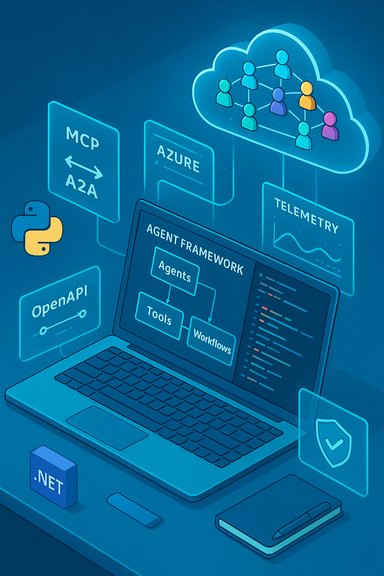
At its core, the framework exposes a small set of consistent developer primitives:- Agents — encapsulated roles or actors with instructions, model bindings, and tool access.
- Tools — first‑class connectors to external capabilities (OpenAPI endpoints, MCP servers, code interpreters, browser automation).
- Workflows — graph‑based orchestration constructs that sequence agents and tools, support checkpointing, parallelism, and human‑in‑the‑loop steps.
- Threads / Conversations — durable state objects so multi‑step tasks can resume, be audited, or be handed off.
Languages, packages and getting started
The Framework provides official packages and sample code for both major ecosystems:- Python packages (installable via pip) and a pre‑release line for early experimentation. Example installation guidance in the README suggests
pip install agent-framework --pre. - .NET packages on NuGet with sample package names documented for .NET consumers (examples show packages like Microsoft.Agents.AI and provider‑specific packages). A typical .NET onboarding uses
dotnet add packagecommands and Azure CLI authentication when targeting Azure resources.
How it fits with Azure AI Foundry, Copilot Studio and the platform
Azure AI Foundry: the managed runtime
Azure AI Foundry provides the cloud hosting, orchestration, telemetry and governance surfaces that teams need to operate agents in production. Key platform features include:- Managed Agent Service for orchestrating and hosting stateful multi‑agent workflows.
- Visual authoring and debugging capabilities surfaced via VS Code extensions and the Foundry portal.
- Enterprise controls for identity (Entra), auditing, and telemetry sinks (Application Insights / OpenTelemetry).
Copilot Studio, VS Code toolchain and the prompt‑first flow
Microsoft’s developer story emphasizes prompt‑first authoring inside VS Code and Copilot Studio. The idea is to let developers describe the agent’s purpose in natural language, have tooling generate agent manifests and prompt templates, and then refine behavior with integrated testing and tracing inside the IDE. This bridges prompt engineering and software engineering in the same environment. The Framework and its VS Code DevUI tie into a Model Catalog and an interactive Playground so developers can swap models and validate behavior before deployment.Technical anatomy: standards, protocols and orchestration patterns
Open standards that matter
Microsoft is shipping the Agent Framework with a standards‑first posture to lower vendor lock‑in and enable cross‑runtime interoperability:- Model Context Protocol (MCP) — a specification for exposing tools and context to models in a structured way (the “USB‑C” of agent tool integrations). Agents can call MCP servers to access retrieval services, functions, and memory stores with consistent I/O contracts.
- Agent2Agent (A2A) — a messaging pattern/specification for runtime‑level agent discovery and interaction: discovery cards, task lifecycle semantics, streaming, and delegation primitives for multi‑runtime collaboration.
Orchestration patterns
The framework documents and supports common multi‑agent patterns:- Manager/orchestrator (Magnetic) — a manager agent coordinates specialist worker agents.
- Group chat — a shared channel where multiple agents debate or synthesize.
- Sequential, concurrent, handoff patterns — deterministic workflow constructs for business processes.
- Graph‑based workflows — explicit DAG-like orchestration with durable checkpoints and human‑in‑the‑loop transitions.
Observability, security and governance features
Observability and auditing
The Framework includes built‑in OpenTelemetry integration and spans for model calls, tool invocations, and inter‑agent handoffs. This design makes it possible to reconstruct decision paths for auditing or incident investigation, a capability enterprises repeatedly cite as a prerequisite for production adoption. When agents run in Azure AI Foundry, traces map into Azure monitoring backends for centralized analysis.Identity, RBAC and lifecycle controls
Production scenarios require strong identity and least‑privilege controls. Microsoft’s integration with Entra (Azure AD) enables agent identities, tenant governance, and admin approval flows for agent templates. Roadmap items and documentation discuss the concept of agents as directory entities—“Agentic Users”—that can be provisioned and governed like service accounts in the tenant. These capabilities are deliberate responses to enterprise concerns about auditability and access control.Safety controls and content filters
The platform introduces preview features such as:- Task‑adherence checks to keep agents aligned with an assigned remit,
- Prompt shields and spotlighting to detect and mitigate prompt injection, and
- PII detection to prevent obvious data leakage.
These are helpful but currently in preview; teams must validate behavior against their threat models and regulatory requirements.
Practical getting‑started steps (what a workshop will cover)
A hands‑on workshop titled “Building AI Agents with the Microsoft Agent Framework” typically includes these concrete steps and learning outcomes. Note: specific local event details should be verified with the organizer—public event pages are sometimes restricted or blocked from crawlers and may change. The guidance below is based on the framework’s public docs and samples.- Environment setup
- Install Python packages:
pip install agent-framework --pre(or install selected subpackages). - For .NET: add the required NuGet packages, e.g.,
dotnet add package Microsoft.Agents.AI --prerelease. - Authenticate to Azure if you plan to integrate with Azure services:
az login+ set environment variables for Azure OpenAI endpoints or other provider credentials. - Create a simple agent
- Define an agent persona and instructions, bind to a model provider (Azure OpenAI, OpenAI, or Azure AI), and run a simple prompt (the samples include a “haiku” example).
- Add a tool
- Connect an OpenAPI‑based tool or an MCP server so the agent can call structured endpoints (for example: a company API, a retrieval service, or a code interpreter).
- Build a workflow
- Assemble agents and tools into a graph workflow: add checkpointing, retries, and a human approval step for an action that triggers a downstream system.
- Debugging and observability
- Learn how OpenTelemetry spans appear for agent runs, inspect traces for model and tool calls, and practice replaying or pausing long‑running threads.
- Deploy to Foundry (optional demo)
- Package the agent manifest and deploy to Azure AI Foundry Agent Service for scale, observability, and governance.
Use cases and early adopters
Microsoft’s materials and community writeups describe enterprise scenarios and early adopters that favor agentic automation where tasks are multi‑step, require coordination across services, and benefit from auditable decisions. Typical use cases include:- Customer support orchestration (triage → retrieval → human escalation).
- Finance and procurement workflows (invoice extraction → validation → approval).
- Industry examples where organizations have started to run dozens of agents (e.g., logistics and port operations) demonstrate that the platform can be used to operationalize domain‑specific agent fleets; these case sketches show real‑world complexity—connectivity, governance, and human workflows—are central concerns.
Strengths and what matters for Windows and .NET developers
- Multi‑language support lets C#/.NET teams build agents without forcing a Python migration. Official .NET packages and examples exist to reduce friction.
- Enterprise integrations (Entra, Application Insights, OpenTelemetry) fit existing Microsoft‑centric stacks, simplifying operations for organizations already invested in Azure.
- Structured orchestration and manifests lower surprising emergent behavior by making tool calls contract‑driven (OpenAPI / MCP), improving auditability.
- Dev tooling (VS Code DevUI, prompt‑first flows, Model Catalog) accelerates prototyping and helps make prompts repeatable engineering artifacts instead of throwaway text.
Risks, operational pitfalls and what to validate
The Agent Framework is powerful, but it introduces several operational, security, and governance risks that organizations must address before deploying agents that take actions on real systems.Key risks
- Data egress and compliance: Agents often call external models or tools. Organizations must explicitly validate where data flows, what is logged, and whether data leaves controlled geographies or compliance scopes. Microsoft warns that using third‑party servers introduces data residency/retention risks.
- Prompt injection and emergent behavior: Even with prompt shields and task adherence checks, agents that call tools can be manipulated or drift from intended behaviors. Treat safety features as defense in depth, not a guarantee.
- Attack surface from tools: Capabilities such as Browser Automation, Computer Use, or code execution significantly increase risk if not isolated. Isolate high‑privilege tools in ephemeral, sandboxed runtimes and require human approval for destructive actions.
- Operational complexity: The new primitives (A2A, MCP, distributed traces, durable threads) create a more complex stack to operate and secure than single‑turn assistants. Teams must budget people and processes to run agent fleets. Community notes emphasize the need for a dedicated “agents workforce” combining domain experts, security, and platform engineers.
What to validate in pilots
- End‑to‑end data flows and retention for all model calls and tool invocations.
- Failure modes for long‑running workflows (restarts, retries, partial failures).
- Adversarial testing (prompt injection, malicious tool responses).
- Identity model and least‑privilege enforcement for MCP endpoints and agent identities.
A practical checklist before deploying agents to production
- Prototype locally with test datasets and no production credentials.
- Integrate OpenTelemetry spans early so every LLM call and tool call is traceable.
- Enforce least privilege for tool identities; prefer ephemeral tokens and JIT approvals for high‑impact actions.
- Isolate high‑risk capabilities (browser automation, remote shell) into monitored sandboxes with no production secrets.
- Define and test human‑in‑the‑loop approval gates for transactions with legal or monetary impact.
- Include legal/compliance reviews early: models, data retention, and third‑party hosting require agreement.
The local event listing: what to expect and verification note
You referenced a local event page titled “Building AI Agents with the Microsoft Agent Framework” hosted on a community events site. Attempts to crawl that specific event page may be blocked by robots rules, and event listings can change without notice; therefore, the exact logistics, target audience, prerequisites, and agenda for that specific event could not be programmatically verified here. Confirm the event’s date, location (for example, Portsmouth, NH), registration rules, and any prework requirements directly with the organizer or the event listing prior to attending. The typical workshop agenda—based on public samples and training modules—will include environment setup, a guided lab to build a simple agent, connecting an OpenAPI tool or MCP service, observing traces, and a discussion of safety and operational controls. If you plan to attend a hands‑on session, bring:- A laptop with admin rights to install Python or .NET SDKs.
- An Azure subscription or test credentials if the workshop includes Foundry or Azure OpenAI demos.
- Patience for credential and tenant configuration—these steps commonly take the most time in workshops.
Critical analysis: strengths, realistic expectations and suggested next steps
What Microsoft got right
- Unification and migration path: Merging the research patterns of AutoGen with Semantic Kernel’s enterprise features into a single framework addresses real developer friction. It gives organizations a documented migration path rather than forcing different toolchains for experimentation and production.
- Standards‑first interoperability: Embracing MCP and A2A—alongside OpenAPI—reduces bespoke connector work and increases portability. If the ecosystem embraces these specs, it will be a net gain.
- Enterprise readiness features: Observability, identity integration, and manifest‑driven deployments reflect requirements raised by regulated industries; these are not afterthoughts.
Where realism is required
- Not turnkey: The platform still requires substantial engineering: secure MCP servers, sandboxed tool runtimes, telemetry pipelines, and robust adversarial testing frameworks. The framework provides primitives, but operational maturity must be built. Community writeups and early enterprise pilots indicate the operational burden is real.
- Preview features and maturity: Several governance and safety controls are in preview. Organizations must treat them as evolving capabilities and validate behavior under their own compliance and threat models.
- Ecosystem adoption matters: Interoperability is only as useful as ecosystem adoption of MCP/A2A and available connectors for your critical systems (ERPs, SaaS apps, proprietary APIs). Evaluate connector availability early in a pilot.
Suggested next steps for IT leaders and Windows developers
- Run a short, bounded pilot that focuses on a single, well‑scoped workflow (for example: document triage that ends in a human approval). Measure observability, recovery, and governance controls.
- Validate the identity and data residency model for any model provider you use. If using third‑party model endpoints, confirm legal/retention implications.
- Invest in threat modeling for agent flows and treat new capabilities like Browser Automation as high risk until hardening and sandboxing are in place.
Conclusion
The Microsoft Agent Framework represents a pragmatic attempt to turn the promise of agentic AI into an enterprise engineering practice: open‑source SDKs, cross‑language support, and a managed Foundry runtime are all pieces that enterprises asked for. The combination of structured orchestration (workflows), standards (MCP, A2A), and enterprise capabilities (observability, Entra integration) addresses many of the operational concerns that previously made agentic systems risky for production.That said, the platform is not a magic wand. It reduces certain kinds of friction—especially for teams invested in Microsoft/Azure tooling—but it also adds new operational complexity and risk surfaces that must be managed with discipline: identity design, tool isolation, adversarial testing, and clear human oversight policies. Workshops geared toward “Building AI Agents with the Microsoft Agent Framework” are valuable entry points, but attendees should expect to leave with working prototypes and a healthy list of follow‑ups rather than a complete production plan. Validate any event details with the organizer, and treat sample code and preview features as starting points for careful, security‑minded pilots.
Source: Seacoastonline.com Things To Do in Portsmouth NH - Portsmouth Herald
