
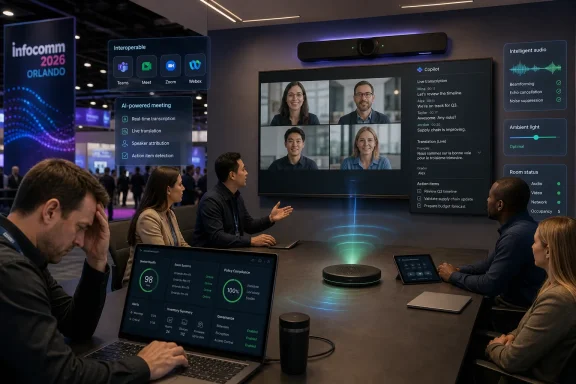
At InfoComm 2026 in Orlando, Microsoft used its first keynote at the AV industry’s flagship North American show to push Teams, Copilot, and AI-enabled rooms into the center of the workplace technology conversation. That matters because InfoComm has historically been where displays, cameras, audio systems, and control gear took the spotlight, while unified communications had its own stages elsewhere. The shift is not simply that Microsoft showed up; it is that the meeting room has become one of the most contested computing environments in the enterprise. AV is no longer the furniture around the call. It is becoming the interface for AI-mediated work.
For years, Enterprise Connect was the natural venue for the big UC narrative. That was where cloud calling, messaging platforms, contact center tie-ins, and collaboration roadmaps felt most at home. InfoComm, by contrast, was the place where rooms were treated as physical systems: lenses, mounts, beamforming microphones, DSPs, switching, signage, and the practical craft of making spaces work.
Microsoft’s InfoComm keynote signals that those boundaries have collapsed. Teams Rooms, Copilot, intelligent cameras, spatial audio, transcription, translation, and device management are not separable categories anymore. They are all part of the same enterprise workflow stack, and the room has become the place where that stack has to prove it works for real people under fluorescent lights.
That is why Neil Fluester’s point in the UC Today interview lands. If Microsoft is taking a keynote slot at InfoComm, the show is no longer merely an AV exhibition with a UC track attached. It is becoming a workplace technology battleground where the dominant collaboration platforms, the device makers, the integrators, and the AI vendors are all trying to define what a “meeting room” is supposed to be in 2026.
The answer, increasingly, is not a room where video calls happen. It is a managed edge of the enterprise collaboration cloud.
That sounds simple, but it has quietly rewritten the procurement logic. A camera bar is not judged only by sensor size or field of view. A microphone is not judged only by pickup range. A Teams Rooms or Zoom Rooms device is not judged only by whether it supports a platform badge. The core question is whether the whole system reduces cognitive load.
This is where the AV and IT cultures still sometimes talk past each other. AV professionals care deeply about environmental quality because bad acoustics, glare, camera placement, and display height ruin meetings before software ever enters the picture. IT teams care about identity, patching, compliance, device enrollment, telemetry, security baselines, and lifecycle management. Modern meeting rooms need both disciplines, and neither can pretend the other is optional.
The new room is therefore a hybrid object: part workplace design, part Windows endpoint, part cloud appliance, part AI sensor array. That makes InfoComm an obvious venue for Microsoft, not an odd one. Microsoft is not just selling a collaboration app; it is trying to make Teams and Copilot the operating layer for hybrid work.
In the room, that means live transcription, speaker attribution, background noise suppression, camera framing, language translation, action item extraction, and context-aware assistance. After the meeting, it means searching across conversations, generating follow-ups, populating CRM records, creating project artifacts, or triggering business processes. The room is no longer just where people talk; it is where organizational knowledge is captured, structured, and routed.
That is a powerful promise, but it also changes the risk profile. The more intelligent the room becomes, the more it sees, hears, infers, and stores. A bad webcam used to be an annoyance. A misconfigured AI meeting system can become a compliance problem.
Microsoft’s Copilot strategy amplifies that tension. The company’s pitch is that AI becomes more valuable when it is grounded in the Microsoft 365 graph: calendar, chat, files, meetings, mail, identities, and permissions. That is also why customers will ask harder questions about retention, auditability, data residency, licensing boundaries, and which users are entitled to which AI experiences.
The meeting room is the friendliest possible demo environment for Copilot. It is also one of the least forgiving deployment environments for administrators.
A company may standardize internally on Teams, while its agencies use Zoom, its legal counsel uses Webex, its suppliers use Google Meet, and its executives join investor calls from whatever platform appeared in the calendar invite. The old answer was to install a workaround, buy a gateway, keep a laptop and HDMI cable in the room, or ask everyone to change platforms. None of those answers feels acceptable to users who can join a meeting from a phone in seconds.
That is why the recent Google Meet and Microsoft Teams Rooms interoperability push matters. Two-way joining between ChromeOS-based Google Meet hardware and Windows-based Microsoft Teams Rooms is not the end of the multi-platform problem, but it is a meaningful admission from two giants that customer reality has outrun platform purity.
Interoperability is not glamorous. It rarely makes for a dazzling keynote demo because the best version of it looks like nothing happened: the meeting just starts. But for enterprise buyers, that boring reliability is exactly the point. The room should not require a negotiation between identity systems, calendar formats, device modes, browser hacks, and panicked users five minutes after the meeting was supposed to begin.
This is also where Logitech’s position is strategically useful. Hardware vendors that sell across Teams, Zoom, Google Meet, and other ecosystems can talk about interoperability without sounding like they are betraying their own walled garden. Their incentive is to make the room estate flexible enough that customers keep buying devices even as software allegiances shift.
In the past, a buyer might have focused heavily on whether a device had a particular camera resolution, microphone array, codec support, or connectivity option. Those details still matter, especially in complex rooms. The difference is that they now sit inside a broader evaluation: does the system work consistently, integrate with the chosen platforms, support remote management, preserve security posture, and improve the experience for both in-room and remote participants?
That is a much tougher standard. A device can look excellent in a lab and still fail the enterprise if firmware updates are erratic, admin controls are weak, interoperability is brittle, or users cannot understand the interface. Conversely, a less flashy system can win if it is reliable, manageable, and invisible in daily use.
This is the consumerization of meeting-room expectations, but with enterprise consequences. Employees expect the room to behave like an appliance. Administrators know it is actually a fleet of networked endpoints that need governance. The winning vendors are the ones that can satisfy both illusions at once.
For WindowsForum readers, the Windows angle is obvious. Microsoft Teams Rooms on Windows is not just a meeting experience; it is a managed Windows deployment category. That means patching, driver stability, peripheral certification, Intune policy, account hardening, update rings, and the same operational anxieties that follow every other endpoint. The prettier the room interface becomes, the more important the plumbing gets.
In a traditional video call, the meeting existed in the moment unless someone recorded it or took notes. In an AI-enabled room, capture becomes ambient. Transcription, summarization, translation, speaker recognition, and meeting intelligence all depend on converting human interaction into machine-processable data. That can be transformative for productivity, but it forces organizations to define policies they may have avoided.
Can a confidential HR meeting be summarized by default? Should a sales call be analyzed automatically? Are external participants warned clearly enough? Can privileged legal discussions be excluded? What happens when a user asks Copilot to retrieve context from prior meetings that included sensitive material? These are not theoretical concerns; they are the inevitable consequence of making AI useful.
Microsoft’s answer is likely to emphasize permissions, tenant controls, compliance features, and the fact that Copilot operates within Microsoft 365 security boundaries. That is the right direction, but it does not absolve customers from governance design. A tool can respect permissions and still expose organizational messiness because the permissions were wrong in the first place.
This is where many AI deployments will succeed or fail. Not on model quality, not on whether summaries are elegant, but on whether the enterprise has done the dull work of information architecture, identity hygiene, retention policy, labeling, and user education. Copilot in a meeting room is only as clean as the tenant behind it.
This is uncomfortable but unavoidable. A conference room that once depended on signal flow diagrams now also depends on cloud service health, identity provider configuration, endpoint management, and AI policy. When something fails, users will not care whether the cause was acoustic echo, a Windows update, a certificate issue, a Teams service incident, or a misbehaving USB peripheral. They will simply say the room is broken.
That changes the support model. AV teams and IT teams need shared observability, shared escalation paths, and shared ownership. The days when room technology could be handed over as a finished installation are fading. The room is now a living system, updated continuously by platform vendors that do not wait for a facilities refresh cycle.
For integrators, this is a threat and an opportunity. The threat is commoditization: more certified kits, more appliance-like deployments, more software-defined experiences. The opportunity is that enterprises still need people who understand the messy physical reality of rooms and can connect it to the administrative discipline of IT operations.
The best integrators will stop selling “conference room systems” and start selling operational confidence.
Rooms are heterogeneous by nature. They contain third-party cameras, bars, displays, control panels, microphones, scheduling panels, touch consoles, PCs, Android appliances, network gear, furniture, lighting, and human habits. Microsoft can certify and influence, but it cannot fully dictate the environment.
That is why alliances matter. Logitech, Crestron, Lenovo, Yealink, Poly, Cisco, Google, Zoom, and the broader ecosystem all shape whether the Microsoft experience feels seamless or fragile. A Teams meeting that fails because of a peripheral issue is still experienced by the user as a Teams failure. Platform power does not eliminate dependency; it multiplies it.
Copilot adds another layer. If AI features depend on high-quality audio, clear speaker identification, consistent room metadata, and reliable capture, then the physical quality of the room becomes part of the AI product. A poor microphone is no longer just bad audio. It is bad input data.
That should make Microsoft more interested in the AV world, not less. The AI layer needs the room layer to be excellent.
Meeting technology has always carried a social contract. When a camera automatically frames participants, when a microphone captures every aside, when a transcript records the conversation, and when an AI assistant turns discussion into action items, people need to understand what is happening. They also need confidence that the system is serving the meeting rather than monitoring the room for some opaque corporate purpose.
This is especially important because hybrid work has already made meetings emotionally loaded. Remote participants worry about being ignored. In-room participants worry about technology getting in the way. Managers worry about productivity. Employees worry about surveillance. AI can reduce some of that friction, but it can also intensify it if rolled out carelessly.
The industry often talks about making technology disappear into the background. That is a worthy goal for usability, but not for accountability. The best AI meeting rooms will feel effortless while remaining transparent about what they are doing.
That means knowing which rooms are Windows-based, which are Android-based, which are ChromeOS-based, which peripherals are certified, which firmware versions are deployed, and which policies apply. It means tracking service dependencies and planning updates. It means deciding whether interoperability features are enabled globally or room by room. It means documenting fallbacks when the calendar join experience fails.
Many organizations still manage meeting rooms through a patchwork of facilities tickets, AV vendor contracts, local admin knowledge, and occasional executive escalations. That model does not survive AI. Once rooms become intelligent endpoints in the collaboration graph, they need the same seriousness applied to laptops, phones, and servers.
This does not mean turning every AV decision into a six-month IT governance exercise. It means recognizing that the room is now part of the productivity and security fabric. If the organization would not deploy an unmanaged PC in a conference room, it should not deploy an unmanaged meeting appliance that records, transcribes, and connects to the collaboration tenant.
The room may look like furniture to the user. To IT, it is increasingly infrastructure.
That is why the next phase of UC competition will be less about headline features and more about defaults. Which platform joins most reliably? Which device recovers gracefully from failure? Which admin portal exposes the right signals? Which AI assistant creates value without requiring users to become prompt engineers? Which vendor respects the fact that meeting rooms are shared spaces, not personal devices?
The vendors that win will be the ones that make the room feel calm. Not magical, not futuristic, not overloaded with animated AI branding. Calm.
That may be the most mature vision of meeting-room technology: not the room that shows off the most intelligence, but the room that uses intelligence to remove itself from the user’s attention.
The practical lessons are already visible:
 Microsoft Moves the UC Center of Gravity Onto the AV Floor
For years, Enterprise Connect was the natural venue for the big UC narrative. That was where cloud calling, messaging platforms, contact center tie-ins, and collaboration roadmaps felt most at home. InfoComm, by contrast, was the place where rooms were treated as physical systems: lenses, mounts, beamforming microphones, DSPs, switching, signage, and the practical craft of making spaces work.Microsoft’s InfoComm keynote signals that those boundaries have collapsed. Teams Rooms, Copilot, intelligent cameras, spatial audio, transcription, translation, and device management are not separable categories anymore. They are all part of the same enterprise workflow stack, and the room has become the place where that stack has to prove it works for real people under fluorescent lights.
That is why Neil Fluester’s point in the UC Today interview lands. If Microsoft is taking a keynote slot at InfoComm, the show is no longer merely an AV exhibition with a UC track attached. It is becoming a workplace technology battleground where the dominant collaboration platforms, the device makers, the integrators, and the AI vendors are all trying to define what a “meeting room” is supposed to be in 2026.
The answer, increasingly, is not a room where video calls happen. It is a managed edge of the enterprise collaboration cloud.
The Meeting Room Is Becoming a Software Endpoint With Furniture
The old AV model treated rooms as bespoke installations. Each room had a design, a bill of materials, a control surface, a display strategy, and a support contract. UC did not erase that complexity, but it changed where value was perceived: the room now succeeds or fails by how quickly a user can join, be heard, be seen, and get back to work.That sounds simple, but it has quietly rewritten the procurement logic. A camera bar is not judged only by sensor size or field of view. A microphone is not judged only by pickup range. A Teams Rooms or Zoom Rooms device is not judged only by whether it supports a platform badge. The core question is whether the whole system reduces cognitive load.
This is where the AV and IT cultures still sometimes talk past each other. AV professionals care deeply about environmental quality because bad acoustics, glare, camera placement, and display height ruin meetings before software ever enters the picture. IT teams care about identity, patching, compliance, device enrollment, telemetry, security baselines, and lifecycle management. Modern meeting rooms need both disciplines, and neither can pretend the other is optional.
The new room is therefore a hybrid object: part workplace design, part Windows endpoint, part cloud appliance, part AI sensor array. That makes InfoComm an obvious venue for Microsoft, not an odd one. Microsoft is not just selling a collaboration app; it is trying to make Teams and Copilot the operating layer for hybrid work.
AI Has Escaped the Meeting Recap
The easiest way to misunderstand AI in UC is to reduce it to automated notes. Meeting summaries are useful, but they are the entry-level feature — the thing users can understand quickly and vendors can demo safely. The more consequential shift is that AI is being positioned as a participant in the workflow before, during, and after the meeting.In the room, that means live transcription, speaker attribution, background noise suppression, camera framing, language translation, action item extraction, and context-aware assistance. After the meeting, it means searching across conversations, generating follow-ups, populating CRM records, creating project artifacts, or triggering business processes. The room is no longer just where people talk; it is where organizational knowledge is captured, structured, and routed.
That is a powerful promise, but it also changes the risk profile. The more intelligent the room becomes, the more it sees, hears, infers, and stores. A bad webcam used to be an annoyance. A misconfigured AI meeting system can become a compliance problem.
Microsoft’s Copilot strategy amplifies that tension. The company’s pitch is that AI becomes more valuable when it is grounded in the Microsoft 365 graph: calendar, chat, files, meetings, mail, identities, and permissions. That is also why customers will ask harder questions about retention, auditability, data residency, licensing boundaries, and which users are entitled to which AI experiences.
The meeting room is the friendliest possible demo environment for Copilot. It is also one of the least forgiving deployment environments for administrators.
Interoperability Has Become the New Minimum Standard
The most interesting thing about the current UC market is not that every vendor wants customers to live inside its platform. That has always been true. The interesting part is that vendors are now being forced to accommodate the reality that customers do not.A company may standardize internally on Teams, while its agencies use Zoom, its legal counsel uses Webex, its suppliers use Google Meet, and its executives join investor calls from whatever platform appeared in the calendar invite. The old answer was to install a workaround, buy a gateway, keep a laptop and HDMI cable in the room, or ask everyone to change platforms. None of those answers feels acceptable to users who can join a meeting from a phone in seconds.
That is why the recent Google Meet and Microsoft Teams Rooms interoperability push matters. Two-way joining between ChromeOS-based Google Meet hardware and Windows-based Microsoft Teams Rooms is not the end of the multi-platform problem, but it is a meaningful admission from two giants that customer reality has outrun platform purity.
Interoperability is not glamorous. It rarely makes for a dazzling keynote demo because the best version of it looks like nothing happened: the meeting just starts. But for enterprise buyers, that boring reliability is exactly the point. The room should not require a negotiation between identity systems, calendar formats, device modes, browser hacks, and panicked users five minutes after the meeting was supposed to begin.
This is also where Logitech’s position is strategically useful. Hardware vendors that sell across Teams, Zoom, Google Meet, and other ecosystems can talk about interoperability without sounding like they are betraying their own walled garden. Their incentive is to make the room estate flexible enough that customers keep buying devices even as software allegiances shift.
The Death of the Spec Sheet Is Overstated, but the Buyer Has Changed
Neil Fluester is right that buyers increasingly care less about isolated specifications and more about meeting outcomes. But the spec sheet is not dead. It has simply been demoted.In the past, a buyer might have focused heavily on whether a device had a particular camera resolution, microphone array, codec support, or connectivity option. Those details still matter, especially in complex rooms. The difference is that they now sit inside a broader evaluation: does the system work consistently, integrate with the chosen platforms, support remote management, preserve security posture, and improve the experience for both in-room and remote participants?
That is a much tougher standard. A device can look excellent in a lab and still fail the enterprise if firmware updates are erratic, admin controls are weak, interoperability is brittle, or users cannot understand the interface. Conversely, a less flashy system can win if it is reliable, manageable, and invisible in daily use.
This is the consumerization of meeting-room expectations, but with enterprise consequences. Employees expect the room to behave like an appliance. Administrators know it is actually a fleet of networked endpoints that need governance. The winning vendors are the ones that can satisfy both illusions at once.
For WindowsForum readers, the Windows angle is obvious. Microsoft Teams Rooms on Windows is not just a meeting experience; it is a managed Windows deployment category. That means patching, driver stability, peripheral certification, Intune policy, account hardening, update rings, and the same operational anxieties that follow every other endpoint. The prettier the room interface becomes, the more important the plumbing gets.
Copilot Makes the Room a Governance Problem
The AI meeting room raises a simple administrative question with no simple answer: who is allowed to let the room remember?In a traditional video call, the meeting existed in the moment unless someone recorded it or took notes. In an AI-enabled room, capture becomes ambient. Transcription, summarization, translation, speaker recognition, and meeting intelligence all depend on converting human interaction into machine-processable data. That can be transformative for productivity, but it forces organizations to define policies they may have avoided.
Can a confidential HR meeting be summarized by default? Should a sales call be analyzed automatically? Are external participants warned clearly enough? Can privileged legal discussions be excluded? What happens when a user asks Copilot to retrieve context from prior meetings that included sensitive material? These are not theoretical concerns; they are the inevitable consequence of making AI useful.
Microsoft’s answer is likely to emphasize permissions, tenant controls, compliance features, and the fact that Copilot operates within Microsoft 365 security boundaries. That is the right direction, but it does not absolve customers from governance design. A tool can respect permissions and still expose organizational messiness because the permissions were wrong in the first place.
This is where many AI deployments will succeed or fail. Not on model quality, not on whether summaries are elegant, but on whether the enterprise has done the dull work of information architecture, identity hygiene, retention policy, labeling, and user education. Copilot in a meeting room is only as clean as the tenant behind it.
AV Integrators Are Being Pulled Into IT’s Blast Radius
The convergence of AV and UC has been discussed for years, but AI accelerates it because the room is now part of the data estate. That pulls integrators into conversations that used to sit firmly with IT: authentication, device compliance, network segmentation, privacy, telemetry, and software lifecycle.This is uncomfortable but unavoidable. A conference room that once depended on signal flow diagrams now also depends on cloud service health, identity provider configuration, endpoint management, and AI policy. When something fails, users will not care whether the cause was acoustic echo, a Windows update, a certificate issue, a Teams service incident, or a misbehaving USB peripheral. They will simply say the room is broken.
That changes the support model. AV teams and IT teams need shared observability, shared escalation paths, and shared ownership. The days when room technology could be handed over as a finished installation are fading. The room is now a living system, updated continuously by platform vendors that do not wait for a facilities refresh cycle.
For integrators, this is a threat and an opportunity. The threat is commoditization: more certified kits, more appliance-like deployments, more software-defined experiences. The opportunity is that enterprises still need people who understand the messy physical reality of rooms and can connect it to the administrative discipline of IT operations.
The best integrators will stop selling “conference room systems” and start selling operational confidence.
Microsoft’s Presence Also Reveals Its Vulnerability
It is tempting to view Microsoft’s InfoComm keynote as a pure show of strength. Teams is deeply embedded in Microsoft 365, Windows remains the default enterprise desktop, and Copilot gives Redmond a powerful AI narrative that competitors must answer. But Microsoft’s presence at InfoComm also reveals a vulnerability: the company cannot win the room alone.Rooms are heterogeneous by nature. They contain third-party cameras, bars, displays, control panels, microphones, scheduling panels, touch consoles, PCs, Android appliances, network gear, furniture, lighting, and human habits. Microsoft can certify and influence, but it cannot fully dictate the environment.
That is why alliances matter. Logitech, Crestron, Lenovo, Yealink, Poly, Cisco, Google, Zoom, and the broader ecosystem all shape whether the Microsoft experience feels seamless or fragile. A Teams meeting that fails because of a peripheral issue is still experienced by the user as a Teams failure. Platform power does not eliminate dependency; it multiplies it.
Copilot adds another layer. If AI features depend on high-quality audio, clear speaker identification, consistent room metadata, and reliable capture, then the physical quality of the room becomes part of the AI product. A poor microphone is no longer just bad audio. It is bad input data.
That should make Microsoft more interested in the AV world, not less. The AI layer needs the room layer to be excellent.
The Human Side Is Not a Soft Topic
The UC Today interview’s reference to the AVIXA Women’s Breakfast could seem like a separate human-interest note, but it belongs in the center of the story. Trust, authentic leadership, and human connection are not ornamental themes in an AI-driven workplace. They are the conditions under which adoption happens.Meeting technology has always carried a social contract. When a camera automatically frames participants, when a microphone captures every aside, when a transcript records the conversation, and when an AI assistant turns discussion into action items, people need to understand what is happening. They also need confidence that the system is serving the meeting rather than monitoring the room for some opaque corporate purpose.
This is especially important because hybrid work has already made meetings emotionally loaded. Remote participants worry about being ignored. In-room participants worry about technology getting in the way. Managers worry about productivity. Employees worry about surveillance. AI can reduce some of that friction, but it can also intensify it if rolled out carelessly.
The industry often talks about making technology disappear into the background. That is a worthy goal for usability, but not for accountability. The best AI meeting rooms will feel effortless while remaining transparent about what they are doing.
Windows Rooms Need the Same Discipline as Windows Fleets
For administrators, the practical lesson from InfoComm 2026 is that Teams Rooms and similar systems should not be treated as exotic AV endpoints outside normal governance. They are enterprise devices. They need standards.That means knowing which rooms are Windows-based, which are Android-based, which are ChromeOS-based, which peripherals are certified, which firmware versions are deployed, and which policies apply. It means tracking service dependencies and planning updates. It means deciding whether interoperability features are enabled globally or room by room. It means documenting fallbacks when the calendar join experience fails.
Many organizations still manage meeting rooms through a patchwork of facilities tickets, AV vendor contracts, local admin knowledge, and occasional executive escalations. That model does not survive AI. Once rooms become intelligent endpoints in the collaboration graph, they need the same seriousness applied to laptops, phones, and servers.
This does not mean turning every AV decision into a six-month IT governance exercise. It means recognizing that the room is now part of the productivity and security fabric. If the organization would not deploy an unmanaged PC in a conference room, it should not deploy an unmanaged meeting appliance that records, transcribes, and connects to the collaboration tenant.
The room may look like furniture to the user. To IT, it is increasingly infrastructure.
The Useful Room Will Be the One Nobody Has to Think About
The paradox of this entire market is that vendors are adding enormous complexity in pursuit of simplicity. AI, interoperability, device certification, cloud management, identity integration, and cross-platform joining are all complicated under the hood. The user’s desired experience, however, remains brutally simple: walk in, start the meeting, be understood, get useful output, leave.That is why the next phase of UC competition will be less about headline features and more about defaults. Which platform joins most reliably? Which device recovers gracefully from failure? Which admin portal exposes the right signals? Which AI assistant creates value without requiring users to become prompt engineers? Which vendor respects the fact that meeting rooms are shared spaces, not personal devices?
The vendors that win will be the ones that make the room feel calm. Not magical, not futuristic, not overloaded with animated AI branding. Calm.
That may be the most mature vision of meeting-room technology: not the room that shows off the most intelligence, but the room that uses intelligence to remove itself from the user’s attention.
The Orlando Signal Is Bigger Than a Keynote Slot
InfoComm 2026 is telling enterprise buyers that the AV and UC purchasing lanes have merged. The Microsoft keynote is the headline symbol, but the deeper story is the convergence of platform strategy, hardware design, AI governance, and workplace operations.The practical lessons are already visible:
- Organizations should treat meeting rooms as managed collaboration endpoints, not as one-off AV installations.
- AI meeting features should be evaluated for governance, privacy, and workflow impact, not just demo appeal.
- Interoperability between Teams, Meet, Zoom, Webex, and other platforms is becoming a baseline expectation for enterprise rooms.
- Hardware choices matter more, not less, because AI quality depends on reliable capture, audio clarity, and room context.
- AV and IT teams need shared ownership models because users experience room failure as one problem, regardless of which layer caused it.
- Buyers should judge vendors by the everyday meeting experience they produce, not by the longest feature checklist.
References
- Primary source: UC Today
Published: 2026-06-19T20:42:07.085217
Loading…
www.uctoday.com - Related coverage: techradar.com
Microsoft makes Copilot Cowork open to everyone, and wants to help you tackle even the trickiest work tasks | TechRadar
Copilot Cowork gets an upgrade as it opens to all userswww.techradar.com - Related coverage: windowscentral.com
Google Meet and Microsoft Teams cross the streams in the meeting room
Google is adding interoperability with Microsoft Teams, allowing hardware from the opposite company to join the respective video conferencing platforms. www.windowscentral.com
- Related coverage: workspaceupdates.googleblog.com
Loading…
workspaceupdates.googleblog.com - Related coverage: avnetwork.com
InfoComm 2026 Microsoft Keynote: Bukshteyn Talks How AI Is Impacting Teams | AVNetwork
Find out if AI is a tool or a collaborator—and how this is impacting the company's cloud-based platform.www.avnetwork.com - Related coverage: heise.de
Loading…
www.heise.de
- Related coverage: ravepubs.com
Loading…
ravepubs.com - Official source: blogs.microsoft.com
Announcing Copilot leadership update - The Official Microsoft Blog
Satya Nadella, Chairman and CEO, and Mustafa Suleyman, Executive Vice President and CEO of Microsoft AI, shared the below communications with Microsoft employees this morning. SATYA NADELLA MESSAGE I want to share two org changes we’re making to our Copilot org and superintelligence effort. It’s...blogs.microsoft.com - Official source: learn.microsoft.com
- Official source: techcommunity.microsoft.com
Loading…
techcommunity.microsoft.com - Related coverage: its.fsu.edu