

Microsoft has clarified that Microsoft Authenticator’s new jailbreak and root detection policy applies to Microsoft Entra work and school credentials, not personal Microsoft accounts or ordinary third-party one-time-password codes stored in the app. That distinction matters because the same blue Authenticator icon now carries very different consequences depending on whether it is protecting a consumer login, a university account, or a company tenant. The policy is not really about Authenticator as a generic 2FA vault; it is about Microsoft tightening the device-trust boundary around enterprise identity.
The clarification should calm some users and annoy others in roughly equal measure. If you use Authenticator only to generate codes for a personal Microsoft account, GitHub, Discord, a bank, or some other standard 2FA setup, Microsoft is not currently saying those codes will be disabled because your phone is rooted or jailbroken. But if the account is tied to Microsoft Entra — the identity platform behind work and school Microsoft 365, Teams, Outlook, Azure, Intune, SharePoint, and OneDrive for Business sign-ins — the phone itself is now part of the security decision.
The important clarification is deceptively simple: Microsoft is drawing the line at Entra credentials. In plain language, that means the work or school accounts many people still casually call “Office 365 accounts,” “company Microsoft accounts,” or “Azure AD accounts.” The old Azure Active Directory name may be fading from Microsoft’s branding, but the underlying reality remains familiar to admins: Entra is the identity layer that decides whether a user gets into corporate resources.
That means Authenticator is not becoming unusable on every modified device in every scenario. A rooted Android phone or jailbroken iPhone may still open the app and display ordinary time-based codes for third-party services. For many hobbyists, developers, and privacy-focused users, that is the difference between a nuisance and a disaster.
But the principle behind the move is broader than the immediate affected population. Microsoft is saying that, for enterprise identity, the integrity of the mobile operating system is no longer a negotiable detail hidden below the authentication ceremony. The device presenting the MFA prompt or storing the credential must itself meet a minimum trust bar.
That is a significant shift because Authenticator has long occupied an odd middle ground. It is a consumer app, distributed through consumer app stores, often installed on personally owned phones, but it increasingly functions as critical enterprise infrastructure. Microsoft is now treating that infrastructure more like a managed security component and less like a neutral code generator.
The distinction also matters for third-party accounts. If Authenticator is simply storing a six-digit rotating code for a service that uses a normal 2FA secret, Microsoft has not said those codes will be blocked under this policy. Those entries are not Entra credentials, even if they happen to live inside Microsoft’s app.
The confusion begins when a “third-party” service is really using Microsoft identity behind the scenes. If an app, vendor portal, or SaaS platform relies on “Sign in with Microsoft” through an organization’s Entra tenant, the sign-in path may still be governed by the new restriction. The user may experience this as a third-party app problem, but the authentication transaction is still passing through the corporate Microsoft identity stack.
That ambiguity is where help desks will feel the pain. Users do not think in terms of Entra tenants, conditional access boundaries, attestation signals, and credential types. They think, “Authenticator works for this account but not that one,” and then they open a ticket.
That warning phase is more than a courtesy. It is Microsoft’s attempt to create a migration window before users are stranded outside their work or school accounts. A persistent banner then keeps the issue visible inside Authenticator, reminding the user that the device no longer satisfies the expected security state.
The final phase is where the policy stops being advisory. At that point, users on affected devices can be blocked from creating new credentials or signing in with existing Entra credentials through Microsoft Authenticator. To regain access, the user must remove the jailbreak or root state, move the account to another supported device, or use an alternate authentication method made available by the organization.
Microsoft’s stated rollout timing has moved through a familiar enterprise cadence: announced ahead of enforcement, phased by platform and tenant exposure, and now expected to complete around mid-2026, with many affected users seeing changes by the end of July. That timing is important because administrators cannot treat this as a speculative future change. For tenants that depend heavily on Authenticator, the practical preparation window is now.
From Microsoft’s point of view, that makes sense. A security control that can be disabled tenant by tenant is easier to fit into enterprise change management, but it also creates uneven protection and support complexity. If Microsoft believes modified mobile operating systems cannot be trusted to hold or present Entra credentials, allowing a switch to bypass the check undermines the premise.
From the customer side, the absence of an opt-out changes the politics. This is not an IT department choosing to block rooted phones through a conditional access policy after a risk assessment. It is the platform vendor making that decision upstream and pushing the result into every affected environment.
That distinction will matter in organizations with unusual device populations. Security researchers, mobile developers, accessibility testers, privacy advocates, and users of alternative Android builds may have legitimate reasons to operate outside the default iOS and Android assumptions. Microsoft’s policy does not ask whether the user rooted a phone for malware, modding, debugging, carrier freedom, or philosophical control. Detection is detection.
The result is a governance burden that Microsoft’s product language tends to understate. Organizations still have to explain the change, identify affected users, provision alternatives, and decide whether personal devices are acceptable for corporate authentication. Microsoft removes the opt-out, but not the operational responsibility.
That creates a strange overlap between identity, device posture, and app behavior. A user’s phone may not be enrolled in Intune. The organization may not manage the device at all. The device may still become ineligible for Authenticator-based work or school sign-in if it is detected as rooted or jailbroken.
For administrators, that is both useful and awkward. Useful, because it closes a gap where highly privileged authentication flows could rely on a device whose operating system protections were deliberately bypassed. Awkward, because it can affect users outside the neat boundaries of a managed-device fleet.
This is especially relevant in bring-your-own-device environments. Many companies have spent years encouraging employees to use personal phones for MFA because it is cheaper and easier than issuing hardware tokens or corporate phones. Once the personal phone becomes a gatekeeper for work access, Microsoft’s policy effectively reaches into the user’s device choices — even when the organization never formally took ownership of the device.
Authenticator is not just a convenience app in modern Microsoft 365 environments. It can approve sign-ins, participate in passwordless flows, store account registrations, and act as a factor in protecting access to email, files, administrative portals, cloud resources, and internal applications. If an attacker can compromise the device that handles those flows, MFA becomes less of a shield and more of a doorbell.
The threat model also looks different in 2026 than it did when MFA apps were mostly code generators. Attackers have learned to exploit push fatigue, token theft, session hijacking, malicious OAuth consent, and weaknesses in user registration flows. Microsoft has been steadily hardening Authenticator and Entra sign-in behavior because identity is now the front line of enterprise compromise.
That makes the root-blocking policy part of a larger identity-security campaign, not an isolated app tweak. Microsoft has also pushed number matching, stronger registration controls, passkeys, and conditional access improvements. The direction is clear: authentication is becoming less tolerant of ambiguous device state, casual enrollment, and weak user confirmation.
Rooting and jailbreaking have long been associated with power users who want deeper control over their hardware. On Android, that may mean custom ROMs, advanced backup tools, kernel-level utilities, ad-blocking, de-Googled configurations, or development workflows. On iOS, jailbreaking has historically enabled customization, research, and capabilities Apple does not expose through normal APIs.
Security people can reasonably reply that intent does not restore the platform trust model. A device modified for benign reasons may still weaken assumptions that enterprise apps depend on. But users can also reasonably reply that a blanket block treats all modification as compromise and all vendor-approved configurations as inherently safer than they sometimes are.
That tension is particularly sharp for communities that use hardened or alternative Android distributions. Some users choose nonstandard operating systems precisely because they distrust mainstream telemetry and vendor ecosystems. If Authenticator flags those environments as rooted or unsupported, Microsoft may be forcing a security trade-off rather than simply eliminating risk.
The article’s uncomfortable truth is that both sides have a point. Enterprise identity systems need trustworthy endpoints. Users increasingly resent being told that access to work or school requires surrendering control over personal hardware. Microsoft’s clarification narrows the blast radius, but it does not resolve that philosophical collision.
For IT departments, the practical question is not whether Microsoft’s detector is theoretically justified. It is what happens at 8:55 a.m. when an employee cannot approve a sign-in before a meeting. If the help desk has no override and the user has no backup factor, the policy becomes an availability incident.
That is why the phased rollout matters. Warnings should not be treated as informational noise. They are early evidence of future lockout. If an organization waits until the final blocking phase to inventory affected users, it has squandered the only forgiving part of Microsoft’s design.
Admins should also be careful about communication. Telling users “Microsoft Authenticator is blocking rooted phones” is accurate but incomplete. Telling them “your personal 2FA codes are going away” may be wrong. The message needs to explain which accounts are affected, what users should do, and how to set up a backup method before the hard wall arrives.
Schools, universities, nonprofits, and small businesses may have a harder time. Many of them rely heavily on personal phones for MFA because dedicated devices and tokens cost money. Their users may include students, contractors, part-time staff, researchers, and adjuncts who do not fit neatly into corporate device standards.
Universities are a particularly interesting case. Academic environments often contain exactly the users most likely to run experimental, rooted, or jailbroken devices: computer science students, security researchers, mobile developers, and privacy-conscious faculty. Those same users may need access to Microsoft 365 mail, Teams classes, SharePoint files, Azure labs, or administrative portals.
The policy therefore creates a local decision even without a Microsoft opt-out. Institutions need to decide whether to provide alternate authentication methods for affected users, require supported phones, or formalize exceptions through hardware keys and other phishing-resistant options. Microsoft has made the Entra credential decision; the institution still has to decide how humane and resilient the transition will be.
That evolution has benefits. A modern authenticator should not blindly approve sensitive sign-ins from compromised environments. It should resist automation, phishing tricks, push fatigue, and credential replay. It should make attackers work harder than simply stealing a password and pestering a user into tapping “approve.”
But the evolution also concentrates power. If one app becomes the required path into work, school, cloud administration, email, chat, and file storage, changes to that app can instantly affect millions of users. The more critical Authenticator becomes, the less it can behave like a passive utility.
This is where Microsoft’s product strategy and security strategy intersect. Entra is Microsoft’s identity control plane. Authenticator is one of its most visible endpoints. Blocking rooted and jailbroken devices is a predictable move for a company trying to make identity assurance more complete, but it also reminds customers that convenience MFA was never a neutral layer.
Organizations should review which users depend on Microsoft Authenticator for Entra sign-ins, which alternate methods are permitted, and whether those alternatives are actually registered. A backup method that exists only in policy but not in the user’s account is not a backup. A recovery process that requires the same blocked authenticator is a loop, not a plan.
Hardware security keys deserve renewed attention here. So do platform passkeys where they fit the environment, temporary access passes for recovery, and carefully governed help-desk reset procedures. None of these are magic, and each has its own lifecycle burden, but they reduce the odds that a mobile app posture decision becomes an identity outage.
The worst approach is to tell users to “just unroot” or “just use another phone” without giving them a path. That may be fine for a corporate-owned handset. It is less fine for a student on a tight budget, a contractor using a personal device, or a developer whose rooted phone is part of their work.
That precision should shape user communications. The message should say that personal Microsoft accounts are not currently covered by this policy. It should say that ordinary third-party 2FA codes stored in Authenticator are not the target. It should say that work and school sign-ins through Microsoft 365, Teams, Outlook work accounts, Azure, Intune, SharePoint, OneDrive for Business, and related Entra-backed services may be blocked.
The word “may” is important because rollout timing and detection results can differ. Some users may see warnings before enforcement. Some may never be affected because their devices are not modified. Some may discover that a previously modified device is still being detected in a way they did not expect.
That is the kind of nuance users usually do not get until after the help-desk queue fills up. Microsoft has given organizations enough specificity to do better, if they act before the final phase lands broadly.
That may prove to be the correct call for many organizations. Identity compromise is expensive, and attackers have grown very good at turning weak MFA implementations into speed bumps. If Authenticator is going to serve as a front door to business data, Microsoft has a defensible reason to care about the condition of the phone holding the key.
Still, the implementation exposes an unresolved bargain. For years, businesses saved money and friction by leaning on employees’ personal phones for authentication. Now those same businesses may need to tell users that their personal phone is not acceptable because Microsoft’s identity stack does not trust its software state.
That is not just a security update. It is a reminder that BYOD was always a compromise with a long tail.
The clarification should calm some users and annoy others in roughly equal measure. If you use Authenticator only to generate codes for a personal Microsoft account, GitHub, Discord, a bank, or some other standard 2FA setup, Microsoft is not currently saying those codes will be disabled because your phone is rooted or jailbroken. But if the account is tied to Microsoft Entra — the identity platform behind work and school Microsoft 365, Teams, Outlook, Azure, Intune, SharePoint, and OneDrive for Business sign-ins — the phone itself is now part of the security decision.
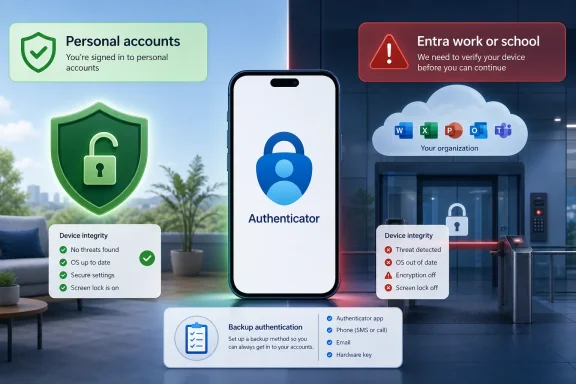 Microsoft Narrows the Blast Radius, but Not the Principle
The important clarification is deceptively simple: Microsoft is drawing the line at Entra credentials. In plain language, that means the work or school accounts many people still casually call “Office 365 accounts,” “company Microsoft accounts,” or “Azure AD accounts.” The old Azure Active Directory name may be fading from Microsoft’s branding, but the underlying reality remains familiar to admins: Entra is the identity layer that decides whether a user gets into corporate resources.That means Authenticator is not becoming unusable on every modified device in every scenario. A rooted Android phone or jailbroken iPhone may still open the app and display ordinary time-based codes for third-party services. For many hobbyists, developers, and privacy-focused users, that is the difference between a nuisance and a disaster.
But the principle behind the move is broader than the immediate affected population. Microsoft is saying that, for enterprise identity, the integrity of the mobile operating system is no longer a negotiable detail hidden below the authentication ceremony. The device presenting the MFA prompt or storing the credential must itself meet a minimum trust bar.
That is a significant shift because Authenticator has long occupied an odd middle ground. It is a consumer app, distributed through consumer app stores, often installed on personally owned phones, but it increasingly functions as critical enterprise infrastructure. Microsoft is now treating that infrastructure more like a managed security component and less like a neutral code generator.
The Consumer Escape Hatch Is Real, but Easy to Misread
The most reassuring part of Microsoft’s clarification is that personal Microsoft accounts are not currently in scope. A user who signs into a personal Outlook.com account or keeps standard 2FA codes in Authenticator should not assume the new Entra restriction will automatically break those flows. That matters because early readings of the policy made it sound like Microsoft was preparing to blacklist modified phones from the entire Authenticator app.The distinction also matters for third-party accounts. If Authenticator is simply storing a six-digit rotating code for a service that uses a normal 2FA secret, Microsoft has not said those codes will be blocked under this policy. Those entries are not Entra credentials, even if they happen to live inside Microsoft’s app.
The confusion begins when a “third-party” service is really using Microsoft identity behind the scenes. If an app, vendor portal, or SaaS platform relies on “Sign in with Microsoft” through an organization’s Entra tenant, the sign-in path may still be governed by the new restriction. The user may experience this as a third-party app problem, but the authentication transaction is still passing through the corporate Microsoft identity stack.
That ambiguity is where help desks will feel the pain. Users do not think in terms of Entra tenants, conditional access boundaries, attestation signals, and credential types. They think, “Authenticator works for this account but not that one,” and then they open a ticket.
The Phased Rollout Is a Soft Landing With a Hard Wall
Microsoft is not flipping the switch in a single instant. The policy is being phased in, with warnings appearing before full blocking. In the first stage, Authenticator can tell the user that the device appears to be rooted or jailbroken while still allowing them to continue.That warning phase is more than a courtesy. It is Microsoft’s attempt to create a migration window before users are stranded outside their work or school accounts. A persistent banner then keeps the issue visible inside Authenticator, reminding the user that the device no longer satisfies the expected security state.
The final phase is where the policy stops being advisory. At that point, users on affected devices can be blocked from creating new credentials or signing in with existing Entra credentials through Microsoft Authenticator. To regain access, the user must remove the jailbreak or root state, move the account to another supported device, or use an alternate authentication method made available by the organization.
Microsoft’s stated rollout timing has moved through a familiar enterprise cadence: announced ahead of enforcement, phased by platform and tenant exposure, and now expected to complete around mid-2026, with many affected users seeing changes by the end of July. That timing is important because administrators cannot treat this as a speculative future change. For tenants that depend heavily on Authenticator, the practical preparation window is now.
No Opt-Out Turns a Security Feature Into a Governance Decision
The most consequential phrase in Microsoft’s position is not “rooted” or “jailbroken.” It is “no opt-out.” Microsoft describes the feature as enabled by default for affected customers, with no administrator control to disable the jailbreak and root detection policy.From Microsoft’s point of view, that makes sense. A security control that can be disabled tenant by tenant is easier to fit into enterprise change management, but it also creates uneven protection and support complexity. If Microsoft believes modified mobile operating systems cannot be trusted to hold or present Entra credentials, allowing a switch to bypass the check undermines the premise.
From the customer side, the absence of an opt-out changes the politics. This is not an IT department choosing to block rooted phones through a conditional access policy after a risk assessment. It is the platform vendor making that decision upstream and pushing the result into every affected environment.
That distinction will matter in organizations with unusual device populations. Security researchers, mobile developers, accessibility testers, privacy advocates, and users of alternative Android builds may have legitimate reasons to operate outside the default iOS and Android assumptions. Microsoft’s policy does not ask whether the user rooted a phone for malware, modding, debugging, carrier freedom, or philosophical control. Detection is detection.
The result is a governance burden that Microsoft’s product language tends to understate. Organizations still have to explain the change, identify affected users, provision alternatives, and decide whether personal devices are acceptable for corporate authentication. Microsoft removes the opt-out, but not the operational responsibility.
Root and Jailbreak Detection Is Not the Same as Device Management
It is tempting to treat this as just another mobile device management story. It is not quite that. Traditional MDM and mobile application management systems give admins policy levers: require a PIN, block copy and paste, demand encryption, enforce app protection rules, or mark a device noncompliant. Microsoft Authenticator’s new behavior is more fundamental because the app itself is evaluating whether the device can be trusted for Entra credentials.That creates a strange overlap between identity, device posture, and app behavior. A user’s phone may not be enrolled in Intune. The organization may not manage the device at all. The device may still become ineligible for Authenticator-based work or school sign-in if it is detected as rooted or jailbroken.
For administrators, that is both useful and awkward. Useful, because it closes a gap where highly privileged authentication flows could rely on a device whose operating system protections were deliberately bypassed. Awkward, because it can affect users outside the neat boundaries of a managed-device fleet.
This is especially relevant in bring-your-own-device environments. Many companies have spent years encouraging employees to use personal phones for MFA because it is cheaper and easier than issuing hardware tokens or corporate phones. Once the personal phone becomes a gatekeeper for work access, Microsoft’s policy effectively reaches into the user’s device choices — even when the organization never formally took ownership of the device.
The Security Case Is Stronger Than the Messaging
Microsoft’s argument is straightforward: rooted and jailbroken devices can bypass platform protections, making them riskier places to store or use enterprise credentials. That is not a fringe security position. Once a device’s operating system trust model has been weakened, apps can have a harder time relying on sandboxing, secure storage, anti-tamper checks, and the expected behavior of system APIs.Authenticator is not just a convenience app in modern Microsoft 365 environments. It can approve sign-ins, participate in passwordless flows, store account registrations, and act as a factor in protecting access to email, files, administrative portals, cloud resources, and internal applications. If an attacker can compromise the device that handles those flows, MFA becomes less of a shield and more of a doorbell.
The threat model also looks different in 2026 than it did when MFA apps were mostly code generators. Attackers have learned to exploit push fatigue, token theft, session hijacking, malicious OAuth consent, and weaknesses in user registration flows. Microsoft has been steadily hardening Authenticator and Entra sign-in behavior because identity is now the front line of enterprise compromise.
That makes the root-blocking policy part of a larger identity-security campaign, not an isolated app tweak. Microsoft has also pushed number matching, stronger registration controls, passkeys, and conditional access improvements. The direction is clear: authentication is becoming less tolerant of ambiguous device state, casual enrollment, and weak user confirmation.
The User-Control Argument Is Not Going Away
The strongest objection to Microsoft’s policy is not that rooted or jailbroken devices are risk-free. They are not. The stronger objection is that modified devices are not all modified for the same reason, and detection systems are not perfect arbiters of actual risk.Rooting and jailbreaking have long been associated with power users who want deeper control over their hardware. On Android, that may mean custom ROMs, advanced backup tools, kernel-level utilities, ad-blocking, de-Googled configurations, or development workflows. On iOS, jailbreaking has historically enabled customization, research, and capabilities Apple does not expose through normal APIs.
Security people can reasonably reply that intent does not restore the platform trust model. A device modified for benign reasons may still weaken assumptions that enterprise apps depend on. But users can also reasonably reply that a blanket block treats all modification as compromise and all vendor-approved configurations as inherently safer than they sometimes are.
That tension is particularly sharp for communities that use hardened or alternative Android distributions. Some users choose nonstandard operating systems precisely because they distrust mainstream telemetry and vendor ecosystems. If Authenticator flags those environments as rooted or unsupported, Microsoft may be forcing a security trade-off rather than simply eliminating risk.
The article’s uncomfortable truth is that both sides have a point. Enterprise identity systems need trustworthy endpoints. Users increasingly resent being told that access to work or school requires surrendering control over personal hardware. Microsoft’s clarification narrows the blast radius, but it does not resolve that philosophical collision.
False Positives Will Be the Support Story Nobody Wants
Any detection system that operates across the messy Android and iOS ecosystem will eventually produce edge cases. Some users have already reported warnings on devices they say are no longer jailbroken, previously modified, restored, or running configurations that Authenticator interprets as suspect. Microsoft has good reasons not to disclose its exact detection methods, but opacity is cold comfort to the user staring at a blocked sign-in.For IT departments, the practical question is not whether Microsoft’s detector is theoretically justified. It is what happens at 8:55 a.m. when an employee cannot approve a sign-in before a meeting. If the help desk has no override and the user has no backup factor, the policy becomes an availability incident.
That is why the phased rollout matters. Warnings should not be treated as informational noise. They are early evidence of future lockout. If an organization waits until the final blocking phase to inventory affected users, it has squandered the only forgiving part of Microsoft’s design.
Admins should also be careful about communication. Telling users “Microsoft Authenticator is blocking rooted phones” is accurate but incomplete. Telling them “your personal 2FA codes are going away” may be wrong. The message needs to explain which accounts are affected, what users should do, and how to set up a backup method before the hard wall arrives.
Schools and Small Businesses Will Feel This Differently Than Large Enterprises
Large enterprises usually have the machinery to absorb this kind of change. They can publish advisories, run reports, update onboarding instructions, procure hardware tokens, issue managed phones to high-risk users, and tune conditional access policies around the new baseline. The change may be annoying, but it fits into an existing identity governance apparatus.Schools, universities, nonprofits, and small businesses may have a harder time. Many of them rely heavily on personal phones for MFA because dedicated devices and tokens cost money. Their users may include students, contractors, part-time staff, researchers, and adjuncts who do not fit neatly into corporate device standards.
Universities are a particularly interesting case. Academic environments often contain exactly the users most likely to run experimental, rooted, or jailbroken devices: computer science students, security researchers, mobile developers, and privacy-conscious faculty. Those same users may need access to Microsoft 365 mail, Teams classes, SharePoint files, Azure labs, or administrative portals.
The policy therefore creates a local decision even without a Microsoft opt-out. Institutions need to decide whether to provide alternate authentication methods for affected users, require supported phones, or formalize exceptions through hardware keys and other phishing-resistant options. Microsoft has made the Entra credential decision; the institution still has to decide how humane and resilient the transition will be.
Authenticator Is Becoming Less Like an App and More Like a Security Boundary
The deeper story is that Microsoft Authenticator has outgrown its mental model. Many users still think of it as a place where six-digit codes live. In Microsoft’s enterprise ecosystem, it is increasingly a policy-enforcing security boundary with its own assumptions about device integrity, user interaction, registration, and credential trust.That evolution has benefits. A modern authenticator should not blindly approve sensitive sign-ins from compromised environments. It should resist automation, phishing tricks, push fatigue, and credential replay. It should make attackers work harder than simply stealing a password and pestering a user into tapping “approve.”
But the evolution also concentrates power. If one app becomes the required path into work, school, cloud administration, email, chat, and file storage, changes to that app can instantly affect millions of users. The more critical Authenticator becomes, the less it can behave like a passive utility.
This is where Microsoft’s product strategy and security strategy intersect. Entra is Microsoft’s identity control plane. Authenticator is one of its most visible endpoints. Blocking rooted and jailbroken devices is a predictable move for a company trying to make identity assurance more complete, but it also reminds customers that convenience MFA was never a neutral layer.
The Real Preparation Is Backup Authentication
For administrators, the right response is not to argue with the final phase after it arrives. The right response is to make sure nobody’s access depends on a single mobile app on a single questionable device. That was good practice before this policy; Microsoft’s rollout simply makes the cost of ignoring it more visible.Organizations should review which users depend on Microsoft Authenticator for Entra sign-ins, which alternate methods are permitted, and whether those alternatives are actually registered. A backup method that exists only in policy but not in the user’s account is not a backup. A recovery process that requires the same blocked authenticator is a loop, not a plan.
Hardware security keys deserve renewed attention here. So do platform passkeys where they fit the environment, temporary access passes for recovery, and carefully governed help-desk reset procedures. None of these are magic, and each has its own lifecycle burden, but they reduce the odds that a mobile app posture decision becomes an identity outage.
The worst approach is to tell users to “just unroot” or “just use another phone” without giving them a path. That may be fine for a corporate-owned handset. It is less fine for a student on a tight budget, a contractor using a personal device, or a developer whose rooted phone is part of their work.
Microsoft’s Clarification Gives Admins a Cleaner Script
The clarification does help. Instead of warning every Authenticator user that the app is about to break, administrators can be precise. The affected population is users with Microsoft Entra work or school credentials in Authenticator on devices detected as rooted or jailbroken.That precision should shape user communications. The message should say that personal Microsoft accounts are not currently covered by this policy. It should say that ordinary third-party 2FA codes stored in Authenticator are not the target. It should say that work and school sign-ins through Microsoft 365, Teams, Outlook work accounts, Azure, Intune, SharePoint, OneDrive for Business, and related Entra-backed services may be blocked.
The word “may” is important because rollout timing and detection results can differ. Some users may see warnings before enforcement. Some may never be affected because their devices are not modified. Some may discover that a previously modified device is still being detected in a way they did not expect.
That is the kind of nuance users usually do not get until after the help-desk queue fills up. Microsoft has given organizations enough specificity to do better, if they act before the final phase lands broadly.
The July Deadline Is Really a Trust Deadline
The concrete story is about a mid-2026 rollout. The bigger story is about who gets to define trust in a mixed personal-and-enterprise device world. Microsoft is not merely saying that rooted and jailbroken devices are risky. It is saying they are too risky for Entra credentials in Authenticator, and that customers do not get a switch to disagree.That may prove to be the correct call for many organizations. Identity compromise is expensive, and attackers have grown very good at turning weak MFA implementations into speed bumps. If Authenticator is going to serve as a front door to business data, Microsoft has a defensible reason to care about the condition of the phone holding the key.
Still, the implementation exposes an unresolved bargain. For years, businesses saved money and friction by leaning on employees’ personal phones for authentication. Now those same businesses may need to tell users that their personal phone is not acceptable because Microsoft’s identity stack does not trust its software state.
That is not just a security update. It is a reminder that BYOD was always a compromise with a long tail.
The Narrow Clarification Leaves a Wide Checklist
Microsoft’s latest clarification should reduce panic, but it should not reduce urgency. The policy is narrow enough that ordinary consumer Authenticator use should continue, yet broad enough to affect the accounts that matter most during the workday.- Microsoft Authenticator’s jailbreak and root detection policy applies to Microsoft Entra work and school credentials, not ordinary third-party 2FA codes.
- Personal Microsoft accounts are not currently the target of this enforcement.
- Work and school sign-ins for Microsoft 365, Teams, Outlook, Azure, Intune, SharePoint, and OneDrive for Business can be affected when they rely on Entra credentials.
- A third-party service can still fall into scope if the sign-in path uses a company or school Microsoft Entra account.
- The rollout is phased, with warnings before final blocking, but Microsoft says there is no opt-out for affected customers.
- Organizations should register backup authentication methods before users discover the policy during a failed sign-in.
References
- Primary source: Windows Report
Published: 2026-06-30T08:12:12.022674
Loading…
windowsreport.com - Official source: support.microsoft.com
Loading…
support.microsoft.com - Related coverage: windowslatest.com
Microsoft warns Authenticator now blocks rooted Android and jailbroken iOS, verify if you're affected
Microsoft warns Authenticator will block rooted Android and jailbroken iOS, verify if your phone is affected. www.windowslatest.com
- Official source: learn.microsoft.com
Loading…
learn.microsoft.com - Related coverage: botbeat.news
Loading…
botbeat.news - Related coverage: theregister.com
Loading…
www.theregister.com
- Official source: techcommunity.microsoft.com
Loading…
techcommunity.microsoft.com - Related coverage: thedailyperspective.org
Loading…
thedailyperspective.org - Related coverage: techbooky.com
Microsoft Authenticator Blocks Rooted and Jailbroken Devices
Microsoft is rolling out a significant update to the Authenticator app that will detect and eventually block access from rootedwww.techbooky.com - Related coverage: supersimple365.com
Loading…
supersimple365.com - Related coverage: abit.ee
Loading…
abit.ee - Related coverage: techradar.com
Microsoft is introducing Entra passkeys to Windows – so tough luck if your device is jailbroken, as your credentials will soon be gone forever | TechRadar
Microsoft is making signing in easier and more securewww.techradar.com - Related coverage: jornada365.cloud
- Official source: cdn-dynmedia-1.microsoft.com