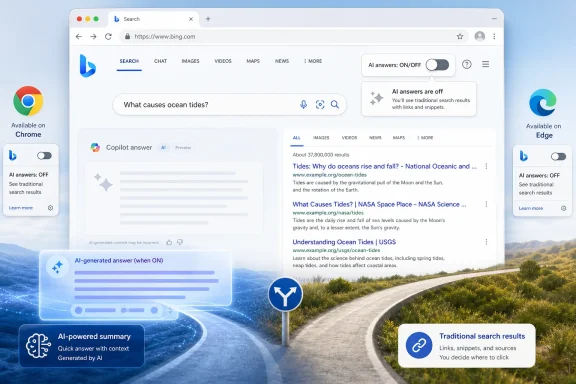
Microsoft Bing added a preview opt-out for Copilot-style AI answers in search results in early June 2026, giving Chrome and Edge users a browser extension toggle and letting anyone append “-ai” to a Bing query to suppress AI-generated responses. That is a small product change with a much larger admission inside it. After three years of treating generative AI as the future of search, Microsoft is now conceding that the future needs an off switch. For Windows users, publishers, and IT administrators, the interesting part is not that Bing can hide AI answers; it is that Microsoft chose a workaround before it chose a setting.
Bing’s new AI opt-out arrives at a strange moment for web search. Microsoft, Google, Perplexity, and a growing cast of AI-first challengers have spent the last few years collapsing search into answer engines, pushing generated summaries above the old list of links and betting that users want fewer clicks, fewer tabs, and more machine-written synthesis.
That bet was never as universal as the marketing implied. Search is not one task. It is a bundle of habits: navigation, fact checking, shopping, troubleshooting, research, source comparison, and sometimes idle curiosity. AI answers can be useful in some of those contexts and deeply annoying in others.
Microsoft’s new Bing extension is therefore less a retreat than a pressure release valve. Jordi Ribas, Microsoft’s head of search, framed it as a way to let people toggle “AI chat-like features” on or off with one click. That phrasing matters. Microsoft is not saying AI search failed. It is saying that user confidence now depends on visible control.
For a company that has spent the Copilot era embedding AI into Windows, Edge, Office, Bing, and nearly every enterprise pitch deck, that is a notable tonal shift. The question is no longer whether AI belongs in search. The question is whether users trust Microsoft enough to decide when it belongs there.
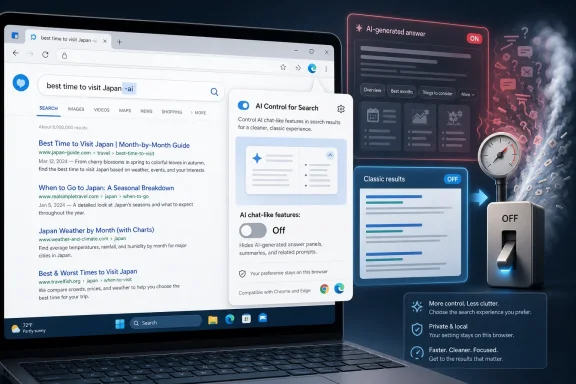
That is wonderfully old-school. Search operators have always been the power user’s lever: quotes for exact phrases, minus signs for exclusions, site operators for domain-specific digging. “-ai” turns the AI layer itself into something users can subtract from the page.
It is also commercially awkward. If a feature needs a query suffix to make the results page tolerable for some users, that suggests the default experience is doing too much. The modifier gives users an escape hatch, but it also makes the escape visible. Every time someone types “-ai,” they are effectively telling Bing: not this time.
The browser extension solves a different problem. Instead of remembering a search operator, users can flip a persistent control in Chrome or Edge. That sounds friendly, but it is a peculiar place to put a core search preference. Search settings traditionally live in the service, the account, or the browser’s search configuration. An extension feels like an experiment, not a finished product.
Microsoft’s Michael Schechter reportedly described the preview extension as a way to understand what interested users actually want before integrating the function more broadly. That explanation is plausible. It is also revealing. Microsoft is testing the shape of refusal.
But for administrators and privacy-minded users, browser extensions are a messy answer to a policy problem. Extensions add another component to manage, audit, approve, and support. In enterprise environments, they may be blocked by default or require review. In regulated settings, “install this preview add-on to alter search output” is not the same as “set this policy and know what your users will see.”
That distinction matters because Bing is not just a consumer search engine. It is tied into Edge, Windows search surfaces, Microsoft accounts, Microsoft 365 identity, and the broader Copilot strategy. A toggle hidden in a preview extension does little for IT teams trying to standardize user experience across fleets of managed Windows PCs.
It also does little for users outside the extension’s supported browsers. The “-ai” operator is cross-browser in spirit, but it is manual, search-by-search, and easy to forget. If Microsoft believes AI-free search is a legitimate user preference, the durable form is an account setting, a browser policy, and a clear UI control on the results page.
The extension is therefore best understood as a pilot balloon. Microsoft is not merely asking whether people want less AI. It is asking how much friction they will tolerate to get it.
When AI summaries appear above traditional results, they change what search is for. The user is nudged to consume an answer rather than inspect sources. Publishers are pushed lower. Advertisers get a different surface. Search engines get more control over interpretation.
That is why opt-outs matter. A feature that can be disabled is experienced differently from a feature that must be endured. The same AI answer that feels helpful when requested can feel invasive when it appears between the query and the web.
Microsoft knows this because it has lived through several waves of default backlash. Windows users remember browser prompts, Edge nags, Start menu web results, lock screen promotions, and the slow creep of cloud-connected features into what once felt like local operating system surfaces. Even when the individual feature is defensible, the pattern trains users to look for the escape hatch first.
Bing’s “-ai” option fits directly into that history. It is a pressure-sensitive response to a default that not everyone wants. The company can keep promoting Copilot as the future while letting dissenters carve out a more conventional results page.
That may be smart product management. It may also be the first visible sign that AI search has crossed from novelty into clutter.
That is not just contrarian branding. It reflects a real user segment. Some people do not want AI summaries for political reasons, copyright reasons, privacy reasons, or accuracy reasons. Others simply find them slow and visually intrusive. For many search tasks, the old interface remains faster: type a query, scan a few snippets, open the source.
Microsoft’s move suggests it sees that segment too. The company does not want to concede “AI-free search” as a rival’s differentiator. So Bing is trying to have it both ways: AI-first when Microsoft wants to showcase Copilot, AI-optional when users push back.
There is nothing inherently wrong with that. Mature software often works this way. Features graduate from mandatory experiments to configurable preferences once the vendor has enough data and enough complaints. The problem is that search is unusually sensitive because it mediates the user’s path to everything else.
If users start choosing search engines based on whether AI can be removed, the industry’s assumptions change. The competitive advantage may no longer be who has the most capable answer box. It may be who offers the most trustworthy control over when that box appears.
A user-side opt-out does not solve the publisher problem. It gives individual searchers a way to avoid generated summaries, but it does not give sites broad control over how their content is used or summarized. Nor does it clarify how traffic, attribution, and monetization will work as answer engines become more aggressive.
Still, the optics matter. When Microsoft adds a way to suppress AI answers, it is implicitly acknowledging that these answers are not neutral decoration. They alter the search relationship among user, engine, advertiser, and publisher.
That acknowledgment comes as regulators and lawmakers are also paying closer attention to AI search. The old search bargain was imperfect but legible: engines crawled pages, indexed them, showed snippets, and sent traffic. AI summaries complicate that bargain by extracting more value into the results page itself.
Microsoft can argue that Copilot answers improve usability. Publishers can argue that the same feature erodes the open web that makes search valuable. Both claims can be true. The tension is not going away because one browser extension exists.
That means Bing’s AI controls are a preview of a broader Windows UX question: how much AI should be baked into default workflows, and how easy should it be to turn off? Microsoft has spent the last two years making Copilot feel like a platform layer. Users have responded with a mix of curiosity, fatigue, and, in some corners, open hostility.
The company’s challenge is that Copilot is not one feature. It is a brand stretched across consumer chat, enterprise assistance, developer tooling, Office automation, Windows shell integration, and web search. A user who likes Copilot in Word may not want it in search results. A developer who uses GitHub Copilot all day may still prefer traditional web search for debugging. An administrator who values AI-assisted documentation may not want unsanctioned answer boxes shaping employee research.
Granular control is the only sane answer. But Microsoft’s implementation history often starts with broad exposure and then adds control after backlash. The Bing extension looks like that familiar second phase.
For consumers, the immediate advice is simple: if Bing’s AI answers get in your way, try the “-ai” modifier or the preview extension if you are comfortable installing it. For organizations, the answer is less satisfying: watch the feature, test behavior across managed browsers, and wait to see whether Microsoft turns this into a policy-backed setting.
That second question is harder. A generated summary can be accurate and still unwelcome. It can be well sourced and still slow the user down. It can answer the literal query and still obscure the diversity of available sources.
Search has always involved judgment. Users scan, compare, and decide which result deserves trust. AI summaries partially automate that judgment. Sometimes that is helpful; sometimes it short-circuits the very process the user came to perform.
For technical users, this is especially important. When troubleshooting a Windows error, a driver conflict, a PowerShell issue, or a Group Policy setting, the source often matters as much as the answer. Is the information from Microsoft Learn, a vendor advisory, a forum post, a stale blog, or a generated blend of all four? AI can summarize the surface, but it can also flatten the provenance.
That is why a toggle is not a minor convenience. It restores the user’s ability to decide whether they want synthesis or source hunting. In technical work, that choice is not aesthetic. It is operational.
Microsoft’s language around the Bing preview suggests it understands this. Ribas emphasized confidence and choice. Schechter reportedly framed the extension as a feedback mechanism. Those are not triumphalist words. They are calibration words.
That calibration is overdue. AI has moved from optional destination to ambient interface at unusual speed. In Microsoft’s ecosystem, Copilot is no longer just a chat site you visit. It is a button, sidebar, pane, subscription, enterprise SKU, and marketing promise. The result is a consent problem: users may accept AI in one context while rejecting it in another.
Bing’s opt-out is a small correction. It says, in effect, that not every search query is an invitation to generate. That should have been obvious, but software companies often need user resistance to rediscover obvious boundaries.
The risk for Microsoft is that an extension looks too tentative. If the company truly wants users to feel in control, the control should be native, visible, and persistent. Anything less invites suspicion that the off switch is experimental while the on switch is permanent.
A real administrative model would include browser policies for Edge, documented behavior for Bing results, account-level controls for work and school identities, and clarity about how AI responses interact with commercial data protection. It would also need change management discipline. If the default behavior of search results changes, administrators need to know before help desks start fielding tickets.
That is not merely bureaucratic caution. Search results influence security behavior. Employees searching for software downloads, registry fixes, command-line snippets, compliance guidance, and vulnerability details may act on what appears first. If an AI-generated answer is wrong, ambiguous, or stripped of context, the result can be more than inconvenience.
Microsoft has the enterprise machinery to do this properly. Edge has policy controls. Microsoft 365 has admin centers. Windows has management channels. The question is whether Bing’s AI search controls will be treated as a serious enterprise setting or left as a consumer preview experiment.
If Microsoft wants Copilot to be trusted inside organizations, it cannot treat opt-outs as a hobbyist feature. Enterprise trust is built on predictability. A preview extension is not predictability.
Microsoft has an opportunity here precisely because Bing is not Google. It can differentiate on control. It can present itself as the search engine willing to make AI optional without abandoning AI investment. That is a narrow path, but it is a real one.
The danger is that Microsoft merely copies the industry’s AI maximalism while offering a symbolic escape route. Users are good at sensing when a setting is grudging. If the opt-out is hard to find, inconsistent, or limited to preview extensions, it will not build much trust.
The better strategy would be to make Bing’s AI controls boring. Put them in settings. Put them near the result. Make them account-aware. Document them. Expose policy controls. Let users decide per query, per session, and by default.
That kind of control would not weaken Copilot. It would make Copilot feel less imposed. In an era of AI fatigue, restraint may be a stronger product signal than another demo.
 Microsoft Discovers That Choice Is Now a Search Feature
Bing’s new AI opt-out arrives at a strange moment for web search. Microsoft, Google, Perplexity, and a growing cast of AI-first challengers have spent the last few years collapsing search into answer engines, pushing generated summaries above the old list of links and betting that users want fewer clicks, fewer tabs, and more machine-written synthesis.That bet was never as universal as the marketing implied. Search is not one task. It is a bundle of habits: navigation, fact checking, shopping, troubleshooting, research, source comparison, and sometimes idle curiosity. AI answers can be useful in some of those contexts and deeply annoying in others.
Microsoft’s new Bing extension is therefore less a retreat than a pressure release valve. Jordi Ribas, Microsoft’s head of search, framed it as a way to let people toggle “AI chat-like features” on or off with one click. That phrasing matters. Microsoft is not saying AI search failed. It is saying that user confidence now depends on visible control.
For a company that has spent the Copilot era embedding AI into Windows, Edge, Office, Bing, and nearly every enterprise pitch deck, that is a notable tonal shift. The question is no longer whether AI belongs in search. The question is whether users trust Microsoft enough to decide when it belongs there.
The “-ai” Switch Is Elegantly Nerdy and Commercially Awkward
The cleanest part of Bing’s new control is not the browser extension. It is the query modifier. Add “-ai” to a Bing search, and the AI response is suppressed, according to the Search Engine Roundtable report and Microsoft comments circulating around the launch.That is wonderfully old-school. Search operators have always been the power user’s lever: quotes for exact phrases, minus signs for exclusions, site operators for domain-specific digging. “-ai” turns the AI layer itself into something users can subtract from the page.
It is also commercially awkward. If a feature needs a query suffix to make the results page tolerable for some users, that suggests the default experience is doing too much. The modifier gives users an escape hatch, but it also makes the escape visible. Every time someone types “-ai,” they are effectively telling Bing: not this time.
The browser extension solves a different problem. Instead of remembering a search operator, users can flip a persistent control in Chrome or Edge. That sounds friendly, but it is a peculiar place to put a core search preference. Search settings traditionally live in the service, the account, or the browser’s search configuration. An extension feels like an experiment, not a finished product.
Microsoft’s Michael Schechter reportedly described the preview extension as a way to understand what interested users actually want before integrating the function more broadly. That explanation is plausible. It is also revealing. Microsoft is testing the shape of refusal.
A Browser Extension Is a Vote, Not a Policy
There is a practical reason Microsoft may like the extension route. Extensions are measurable. They attract people with strong preferences. They create a test population that is more committed than a casual settings toggle user. For product managers, that is cleaner signal.But for administrators and privacy-minded users, browser extensions are a messy answer to a policy problem. Extensions add another component to manage, audit, approve, and support. In enterprise environments, they may be blocked by default or require review. In regulated settings, “install this preview add-on to alter search output” is not the same as “set this policy and know what your users will see.”
That distinction matters because Bing is not just a consumer search engine. It is tied into Edge, Windows search surfaces, Microsoft accounts, Microsoft 365 identity, and the broader Copilot strategy. A toggle hidden in a preview extension does little for IT teams trying to standardize user experience across fleets of managed Windows PCs.
It also does little for users outside the extension’s supported browsers. The “-ai” operator is cross-browser in spirit, but it is manual, search-by-search, and easy to forget. If Microsoft believes AI-free search is a legitimate user preference, the durable form is an account setting, a browser policy, and a clear UI control on the results page.
The extension is therefore best understood as a pilot balloon. Microsoft is not merely asking whether people want less AI. It is asking how much friction they will tolerate to get it.
AI Search Has Become a Defaults War
The controversy around AI answers has never been only about accuracy. Hallucinations, stale information, and poor sourcing are real issues, but they are not the whole fight. The deeper conflict is about defaults.When AI summaries appear above traditional results, they change what search is for. The user is nudged to consume an answer rather than inspect sources. Publishers are pushed lower. Advertisers get a different surface. Search engines get more control over interpretation.
That is why opt-outs matter. A feature that can be disabled is experienced differently from a feature that must be endured. The same AI answer that feels helpful when requested can feel invasive when it appears between the query and the web.
Microsoft knows this because it has lived through several waves of default backlash. Windows users remember browser prompts, Edge nags, Start menu web results, lock screen promotions, and the slow creep of cloud-connected features into what once felt like local operating system surfaces. Even when the individual feature is defensible, the pattern trains users to look for the escape hatch first.
Bing’s “-ai” option fits directly into that history. It is a pressure-sensitive response to a default that not everyone wants. The company can keep promoting Copilot as the future while letting dissenters carve out a more conventional results page.
That may be smart product management. It may also be the first visible sign that AI search has crossed from novelty into clutter.
DuckDuckGo Turned Absence Into a Product
The timing is hard to ignore. DuckDuckGo has been drawing attention for its explicitly AI-free search option and reportedly saw a surge in usage around that positioning. In a market where Google and Microsoft are racing to place generated answers more prominently, DuckDuckGo found a simpler pitch: search without the chatbot layer.That is not just contrarian branding. It reflects a real user segment. Some people do not want AI summaries for political reasons, copyright reasons, privacy reasons, or accuracy reasons. Others simply find them slow and visually intrusive. For many search tasks, the old interface remains faster: type a query, scan a few snippets, open the source.
Microsoft’s move suggests it sees that segment too. The company does not want to concede “AI-free search” as a rival’s differentiator. So Bing is trying to have it both ways: AI-first when Microsoft wants to showcase Copilot, AI-optional when users push back.
There is nothing inherently wrong with that. Mature software often works this way. Features graduate from mandatory experiments to configurable preferences once the vendor has enough data and enough complaints. The problem is that search is unusually sensitive because it mediates the user’s path to everything else.
If users start choosing search engines based on whether AI can be removed, the industry’s assumptions change. The competitive advantage may no longer be who has the most capable answer box. It may be who offers the most trustworthy control over when that box appears.
Publishers See the Off Switch Differently
For publishers, Bing’s opt-out is both welcome and insufficient. AI answers can reduce the need to click through to source material, especially when the generated response sits above organic results and compresses multiple pages into one synthesized paragraph. That has made AI search one of the most consequential traffic questions facing the web.A user-side opt-out does not solve the publisher problem. It gives individual searchers a way to avoid generated summaries, but it does not give sites broad control over how their content is used or summarized. Nor does it clarify how traffic, attribution, and monetization will work as answer engines become more aggressive.
Still, the optics matter. When Microsoft adds a way to suppress AI answers, it is implicitly acknowledging that these answers are not neutral decoration. They alter the search relationship among user, engine, advertiser, and publisher.
That acknowledgment comes as regulators and lawmakers are also paying closer attention to AI search. The old search bargain was imperfect but legible: engines crawled pages, indexed them, showed snippets, and sent traffic. AI summaries complicate that bargain by extracting more value into the results page itself.
Microsoft can argue that Copilot answers improve usability. Publishers can argue that the same feature erodes the open web that makes search valuable. Both claims can be true. The tension is not going away because one browser extension exists.
For Windows Users, This Is About More Than Bing
WindowsForum readers will recognize the larger Microsoft pattern. Bing is rarely just Bing. It is part of the plumbing that connects Edge, Windows Search, Microsoft Start, Widgets, Copilot, and Microsoft account services.That means Bing’s AI controls are a preview of a broader Windows UX question: how much AI should be baked into default workflows, and how easy should it be to turn off? Microsoft has spent the last two years making Copilot feel like a platform layer. Users have responded with a mix of curiosity, fatigue, and, in some corners, open hostility.
The company’s challenge is that Copilot is not one feature. It is a brand stretched across consumer chat, enterprise assistance, developer tooling, Office automation, Windows shell integration, and web search. A user who likes Copilot in Word may not want it in search results. A developer who uses GitHub Copilot all day may still prefer traditional web search for debugging. An administrator who values AI-assisted documentation may not want unsanctioned answer boxes shaping employee research.
Granular control is the only sane answer. But Microsoft’s implementation history often starts with broad exposure and then adds control after backlash. The Bing extension looks like that familiar second phase.
For consumers, the immediate advice is simple: if Bing’s AI answers get in your way, try the “-ai” modifier or the preview extension if you are comfortable installing it. For organizations, the answer is less satisfying: watch the feature, test behavior across managed browsers, and wait to see whether Microsoft turns this into a policy-backed setting.
The Accuracy Debate Is Becoming a Usability Debate
Generative AI’s early search backlash was dominated by factual errors. That made sense. If a search engine produces a confident false answer, the harm is obvious. But as AI systems improve, the debate is shifting from “is it right?” to “is it appropriate here?”That second question is harder. A generated summary can be accurate and still unwelcome. It can be well sourced and still slow the user down. It can answer the literal query and still obscure the diversity of available sources.
Search has always involved judgment. Users scan, compare, and decide which result deserves trust. AI summaries partially automate that judgment. Sometimes that is helpful; sometimes it short-circuits the very process the user came to perform.
For technical users, this is especially important. When troubleshooting a Windows error, a driver conflict, a PowerShell issue, or a Group Policy setting, the source often matters as much as the answer. Is the information from Microsoft Learn, a vendor advisory, a forum post, a stale blog, or a generated blend of all four? AI can summarize the surface, but it can also flatten the provenance.
That is why a toggle is not a minor convenience. It restores the user’s ability to decide whether they want synthesis or source hunting. In technical work, that choice is not aesthetic. It is operational.
Microsoft Is Learning the Difference Between AI Adoption and AI Consent
The industry likes adoption metrics. How many users clicked the AI panel? How many queries triggered summaries? How many sessions included chat follow-ups? Those numbers are useful, but they can hide an important distinction: using a feature is not the same as wanting it as the default.Microsoft’s language around the Bing preview suggests it understands this. Ribas emphasized confidence and choice. Schechter reportedly framed the extension as a feedback mechanism. Those are not triumphalist words. They are calibration words.
That calibration is overdue. AI has moved from optional destination to ambient interface at unusual speed. In Microsoft’s ecosystem, Copilot is no longer just a chat site you visit. It is a button, sidebar, pane, subscription, enterprise SKU, and marketing promise. The result is a consent problem: users may accept AI in one context while rejecting it in another.
Bing’s opt-out is a small correction. It says, in effect, that not every search query is an invitation to generate. That should have been obvious, but software companies often need user resistance to rediscover obvious boundaries.
The risk for Microsoft is that an extension looks too tentative. If the company truly wants users to feel in control, the control should be native, visible, and persistent. Anything less invites suspicion that the off switch is experimental while the on switch is permanent.
The Enterprise Version Needs Policy, Logs, and Predictability
For IT pros, the consumer story is only half the issue. An AI-free Bing option becomes much more interesting if it can be deployed and enforced. Enterprises do not manage search experiences by telling employees to remember suffixes.A real administrative model would include browser policies for Edge, documented behavior for Bing results, account-level controls for work and school identities, and clarity about how AI responses interact with commercial data protection. It would also need change management discipline. If the default behavior of search results changes, administrators need to know before help desks start fielding tickets.
That is not merely bureaucratic caution. Search results influence security behavior. Employees searching for software downloads, registry fixes, command-line snippets, compliance guidance, and vulnerability details may act on what appears first. If an AI-generated answer is wrong, ambiguous, or stripped of context, the result can be more than inconvenience.
Microsoft has the enterprise machinery to do this properly. Edge has policy controls. Microsoft 365 has admin centers. Windows has management channels. The question is whether Bing’s AI search controls will be treated as a serious enterprise setting or left as a consumer preview experiment.
If Microsoft wants Copilot to be trusted inside organizations, it cannot treat opt-outs as a hobbyist feature. Enterprise trust is built on predictability. A preview extension is not predictability.
Google’s Shadow Hangs Over Bing’s Decision
Bing’s move also has to be read in the shadow of Google. Google’s AI Overviews and AI-first search experiments have intensified user and publisher anxiety about the future of search. When the market leader changes the default interface of the web’s main traffic gateway, everyone else reacts.Microsoft has an opportunity here precisely because Bing is not Google. It can differentiate on control. It can present itself as the search engine willing to make AI optional without abandoning AI investment. That is a narrow path, but it is a real one.
The danger is that Microsoft merely copies the industry’s AI maximalism while offering a symbolic escape route. Users are good at sensing when a setting is grudging. If the opt-out is hard to find, inconsistent, or limited to preview extensions, it will not build much trust.
The better strategy would be to make Bing’s AI controls boring. Put them in settings. Put them near the result. Make them account-aware. Document them. Expose policy controls. Let users decide per query, per session, and by default.
That kind of control would not weaken Copilot. It would make Copilot feel less imposed. In an era of AI fatigue, restraint may be a stronger product signal than another demo.
The Small Switch That Reveals the Bigger Search Bargain
Bing’s new control is easy to summarize, but its implications are broader than the feature itself. Microsoft is testing whether users want a configurable search engine rather than an AI answer engine with links attached.- Bing now offers two practical ways to suppress Copilot-style AI answers: a preview extension for Chrome and Edge, and the “-ai” query modifier.
- Microsoft is positioning the change as a user-choice experiment rather than a full retreat from AI-powered search.
- The extension approach is useful for enthusiasts but inadequate as a long-term answer for managed Windows and enterprise environments.
- The “-ai” operator is a clever power-user tool, but it also exposes how many users may prefer traditional results for ordinary searches.
- The move reflects broader pressure from AI-free search alternatives, publisher concerns, and user fatigue with AI inserted into default workflows.
- The next meaningful test is whether Microsoft turns this preview into native settings, account controls, and administrative policy.
References
- Primary source: Search Engine Roundtable
Published: Mon, 08 Jun 2026 11:21:00 GMT

Microsoft Bing Gives Searchers A Way To Disable AI Copilot Answers
Microsoft Bing announced a new way to disable the Copilot, Microsoft AI, responses from showing up in the Bing search results. There is a new browser extension available for Chrome and Edge that you can install to toggle off showing AI responses, or you can just add -ai to the end of your query.www.seroundtable.com
- Related coverage: makeuseof.com

How to Use Bing AI in Google Chrome
While Bing AI is growing in popularity, you can only use it in Edge out-of-the-box. Here's how to use the chatbot in Chrome. www.makeuseof.com
- Official source: chromewebstore.google.com

Chrome Web Store
Add new features to your browser and personalize your browsing experience. chromewebstore.google.com
- Related coverage: techcrunch.com

DuckDuckGo makes its 'no-AI' search engine easier to access as its traffic booms | TechCrunch
Alternative search engine DuckDuckGo launches 'no AI' web extensions for Chrome and Firefox users. techcrunch.com
- Related coverage: techyorker.com

Say Goodbye to Copilot: How to Disable AI Responses in Bing Search - TechYorker
Bing Search no longer behaves like a traditional search engine by default. For many users, the first thing they see...
techyorker.com
- Official source: learn.microsoft.com

How can I disable Copilot in Bing search engine? - Microsoft Q&A
The most annoying feature by Microsoft on a miniature scale when using mobile devices. Scrolling through search results when using Bing search engine on mobile devices automatically switches over to the Copilot tab. There should be a switch in Search…learn.microsoft.com
- Related coverage: howtogeek.com

- Related coverage: ppc.land
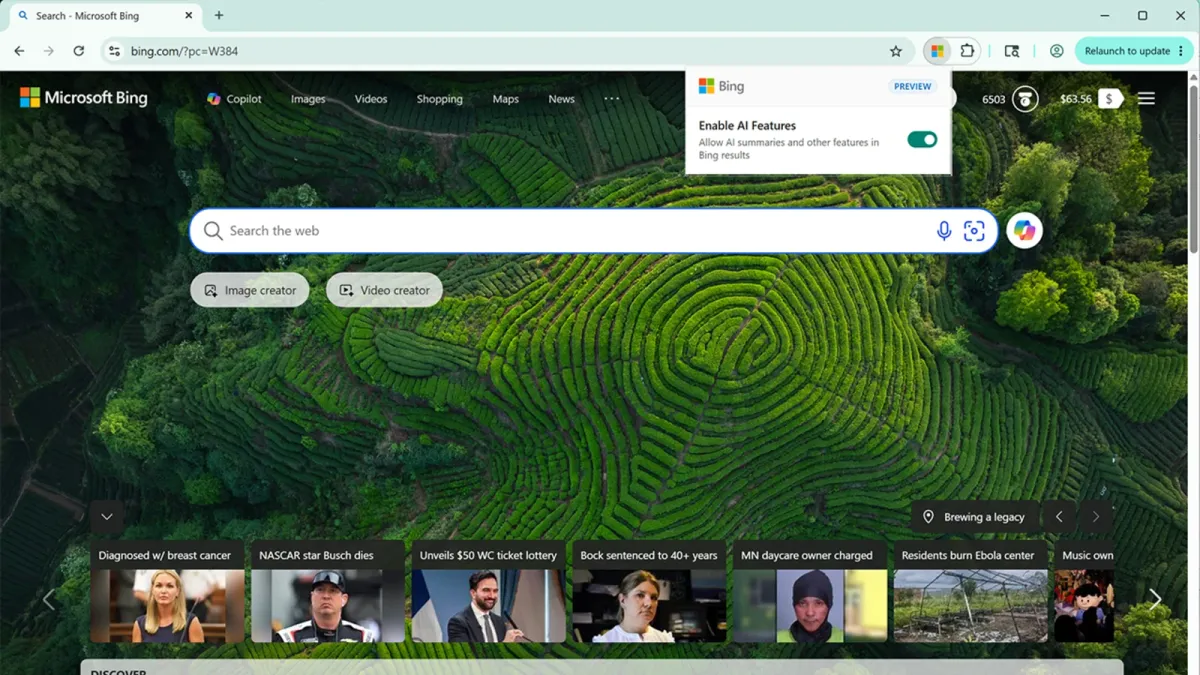
Bing now lets you turn off AI search results with one click
Microsoft ships a Bing AI toggle for Chrome and Edge, letting users disable AI summaries in one click. The preview also sets Bing as the default search engine.ppc.land
- Related coverage: techdemis.com

Microsoft Edge Removes Copilot Toggle for Some Users, Making AI Feature Permanent
A Microsoft Edge update is stripping some users of the ability to disable Copilot in the browser's address bar, with no full rollout confirmed yet.www.techdemis.com - Related coverage: pcworld.com

Copilot uses your Microsoft activity data to personalize its responses | PCWorld
Fortunately, you can disable this setting and opt out—for now.www.pcworld.com - Related coverage: pureinfotech.com

How to turn off Copilot AI responses on Bing search results - Pureinfotech
To disable Copilot responses on Bing search, from the main menu, turn off "Copilot response on result page" and "Scroll to open Copilot." pureinfotech.com