
 Google Turned the Toggle Into a Treasure Hunt
Google is the company most responsible for making this issue feel urgent, and also the company most reluctant to provide the obvious remedy. Since AI Overviews moved out of its experimental phase in 2024, Google has treated generative summaries as part of the standard search product rather than an optional layer. Users can avoid them, but not by flipping a native “off” switch in Search settings.
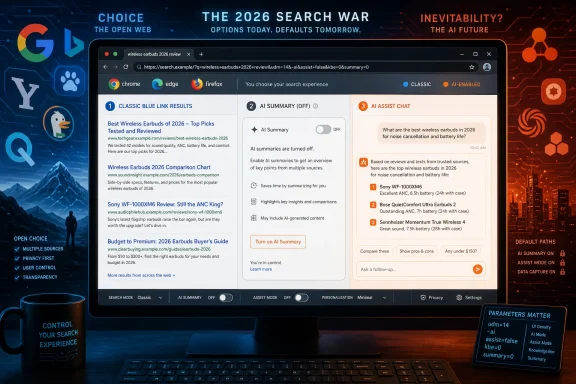
The most reliable workaround is Google’s “Web” filter. When selected, it strips the results page back to conventional blue links and removes the AI Overview box. The important bit for power users is that the Web view is not magic; it is exposed through the udm=14 URL parameter.
That means a Google query can be forced into old-school mode by appending &udm=14 to the search URL. On desktop Chrome, users can create a custom search engine using that parameter, effectively making address-bar Google searches open in the Web filter by default. That is the kind of workaround WindowsForum readers have been using for years: not elegant, not advertised, but functional.
The problem is that a workaround is not a preference. It depends on URL behavior remaining stable, browser support for custom search templates, and the user being technical enough to configure it. It also does not disable Google’s separate AI Mode, which is not simply the normal results page with an extra box.
This is the essential critique of Google’s posture. The company has given users an escape hatch, but not ownership. Google can say traditional links remain available, while users can fairly reply that an advanced URL parameter is not the same thing as consent.
Bing Discovers Choice, Then Wraps It in a Default-Search Bargain
Microsoft’s position is more complicated because Bing has recently done the thing critics have been asking Google to do: it has offered a direct control. The new Microsoft Bing AI Search Choice extension gives users a one-click toggle for AI summaries and related AI search features. In practical terms, that makes Bing the only major search engine currently offering a dedicated browser extension from the platform owner for switching AI search behavior on or off.
That is a meaningful shift. Bing’s Copilot integration had been moving in the same general direction as Google’s AI Overviews: more summaries, more generated answers, more blending of search and chatbot behavior. Earlier settings that let users suppress Copilot-style responses became harder to find or disappeared during interface changes, leaving users with partial workarounds rather than a clean preference.
The new extension reverses that trend, at least in preview form. It makes the control legible: AI features on, or AI features off. It also reportedly supports a per-query escape route using -ai, letting users ask Bing for a single traditional result set without installing anything.
But Microsoft being Microsoft, the gift comes bundled with a platform play. The extension also sets Bing as the default search engine, and in Chrome it opens Bing on every new tab. Users who want the AI toggle must accept the search-default behavior with it.
That makes the extension both better and worse than it first appears. Better, because Microsoft has acknowledged that AI search choice should be a first-class interface control. Worse, because the control is packaged as a browser acquisition tool. For IT administrators, that distinction matters: an extension that changes default search and new-tab behavior is not just a preference utility; it is a browser policy event.
DuckDuckGo Wins the Protest Vote by Making AI Optional
DuckDuckGo is the clearest beneficiary of the backlash because it has framed the issue in the simplest possible terms: users should decide how much AI appears in their search experience. The company is not anti-AI in any absolute sense. It runs an anonymous AI chat service, offers AI-assisted search features, and has experimented with generated answers. The difference is that DuckDuckGo has made optionality part of the product story rather than an afterthought.
That position appears to be paying off. After Google I/O 2026, DuckDuckGo reported a measurable rise in US app installs and increased traffic to its AI-free search page. Some of that is protest behavior, and protest behavior can fade. But it is still notable because switching search engines is frictional, especially on mobile platforms where defaults are sticky.
DuckDuckGo offers several practical controls. AI Assist can be disabled with URL parameters such as assist=false and kbe=0, while the Duck.ai chat panel can be suppressed separately. The company has also added controls for hiding AI-generated images, which is an increasingly important piece of the search experience as image results become polluted with synthetic content.
The broader lesson is that DuckDuckGo does not need to match Google’s index quality query-for-query to win frustrated users. It only needs to be good enough, private enough, and less presumptuous. In a search market where the dominant vendor increasingly acts as though AI summaries are the product, “we let you turn it off” becomes a competitive feature.
For Windows users, DuckDuckGo’s appeal is also mechanical. It is easy to set as the default engine in Chrome, Edge, Firefox, Brave, and Vivaldi. It is not a perfect substitute for every specialized Google query, but it is one of the few mainstream options where the AI-off story is coherent rather than improvised.
Brave’s URL Parameter Is Useful, but Its AI Ambition Is Showing
Brave Search sits in a different category from DuckDuckGo because it operates its own independent index. That matters. Many “alternative” search engines are privacy or interface layers over Google or Bing; Brave is trying to build a parallel search infrastructure.
For users trying to avoid AI answers, Brave offers a practical parameter: summary=0. Add it to a Brave Search URL and the AI summary block is suppressed. Browser extensions can automate this behavior, hiding the “Answer with AI” surfaces and removing related suggestions.
That is useful, but it does not make Brave an AI-free search company. Brave has leaned into answer-generation features for years, first through Summarizer, then Answer with AI, and now broader AI Answers branding. It has also launched Ask Brave, a more conversational search interface that exists alongside traditional results.
This is where the distinction between “disable the summary box” and “avoid AI search” becomes important. Suppressing one module does not necessarily remove every AI entry point in the product. Brave can legitimately claim to give users technical control over the answer panel, while users can still observe that the company’s search roadmap is not exactly retreating from AI.
For advanced users, Brave remains attractive because its independence reduces reliance on Google and Microsoft. For administrators, researchers, and privacy-minded users, that independence may be worth more than a perfectly clean AI-off switch. But users looking for a search engine ideologically committed to old-school results may find Brave more ambivalent than DuckDuckGo.
Ecosia and Qwant Show Europe’s More Conditional Version of Choice
Ecosia and Qwant are often grouped together because of their European positioning, privacy branding, and work on the Staan index through the European Search Perspective joint venture. They also illustrate a different model of AI search control: less global, more conditional, and more dependent on region, account status, and provider configuration.
Ecosia has documentation for disabling AI Overviews through an “Overviews” setting. That sounds straightforward until you reach the catch: the setting appears only where the feature is available for the selected region and search provider. In other words, some users may not see the AI feature, and some may not see the toggle, because both are tied to rollout conditions.
That is not necessarily hostile design. Regional deployment is normal for search features, especially where privacy law, licensing, language support, and data-sharing rules differ. But it does make Ecosia’s AI-off story less universal than DuckDuckGo’s.
Qwant’s model is cleaner for users who simply never opt in. Its AI features are account-gated and optional, which means unsigned-out or nonparticipating users generally remain closer to a traditional link-based search experience. That is a meaningful architectural choice: AI is not the toll booth through which every query must pass.
The European context matters here. Regulators have shown more willingness to challenge dominant platform behavior, especially where publishers and competition are concerned. But regulation has mostly focused on market power, data use, and publisher rights, not on a simple user-facing “disable AI answers” mandate. Ecosia and Qwant are therefore building choice partly as product differentiation and partly as strategic positioning against Google.
Startpage Offers the Most Old-Fashioned Compromise
Startpage’s value proposition is almost quaint in 2026: it acts as a privacy-preserving proxy for search results rather than trying to become an answer engine. It strips identifying information before passing queries along and returns results without adding its own AI-generated summary layer.
For users who want something close to Google-quality ranking without Google’s account-level profiling or AI Overviews, that makes Startpage one of the more appealing compromises. It is not a full independent search engine in the Brave sense, and it is not trying to be an AI assistant. It is a privacy layer over familiar search infrastructure.
That also means Startpage does not really need an AI toggle. There is no Startpage AI answer box to disable. The product’s restraint is the feature.
The downside is dependence. If the underlying providers change access terms, ranking behavior, or available result types, Startpage has less control than an engine with its own crawler and index. But for the specific goal of avoiding AI summaries while retaining conventional web results, Startpage is one of the least fussy options.
There is an irony here. In the early 2010s, metasearch and proxy search engines often felt like transitional tools from a previous internet era. In 2026, their refusal to reinvent themselves as chatbots looks newly modern.
Kagi Turns Search Back Into a Product You Pay For
Kagi is the option that makes the economic subtext explicit. If advertising-funded search has incentives to keep users on the results page, summarize publisher content, and maximize platform-controlled interactions, then a paid search engine can plausibly optimize for the user instead.
Kagi charges a subscription fee and does not depend on advertising. That changes the product logic. It does not mean Kagi has no AI; it offers AI-powered tools, including assistant features. But those features are positioned as optional utilities rather than unavoidable defaults in every query.
For a certain kind of WindowsForum reader, Kagi is the most ideologically satisfying answer. You pay for search, you get controls, and you are not the inventory being sold to advertisers. Its Lenses and Goggles features also let users shape result sets in ways that feel closer to power-user search than mainstream web search has in years.
The barrier is obvious: most people are not used to paying for search. A $10-per-month search engine may be rational for developers, journalists, analysts, and researchers who live in a browser all day. It is a harder sell for casual users conditioned by two decades of “free” search.
Still, Kagi’s relevance has grown because AI search has made the cost of free more visible. If the default search bargain now includes generated summaries, fewer outbound clicks, and more platform mediation, a paid alternative no longer sounds eccentric. It sounds like the old web with a subscription attached.
Perplexity Is Not a Search Engine With AI Bolted On
Perplexity should not be evaluated using the same checklist as Google, Bing, or DuckDuckGo. It is not a traditional search engine that added AI summaries. It is an AI answer engine that uses the web as source material.
That means there is no meaningful “turn off AI” mode. If users want a list of traditional web results, Perplexity is the wrong tool. Its entire interface is built around generated answers, citations, follow-ups, and conversational refinement.
This does not make Perplexity bad. For some research tasks, an answer engine can be useful, especially when users want a synthesized starting point rather than a ranked list of pages. But it is categorically different from search as many users understand it.
That distinction matters because the industry often blurs these products together under the phrase “AI search.” A user trying to avoid Google AI Overviews is not necessarily rejecting every use of generative AI. They may simply want to decide when they are using a chatbot and when they are using a search index.
Perplexity removes that boundary by design. Its browser strategy, assistant features, and advertising model all assume that AI mediation is the product. For AI-free search, the only practical control is to use something else.
Yahoo Shows the Cost of Being a Search Brand Without a Search Engine
Yahoo Search occupies an awkward place in this landscape. It remains a recognizable consumer brand, but its search results are powered by Bing. That means its AI behavior is downstream of Microsoft’s infrastructure and strategic choices.
If Bing’s main results page surfaces Copilot-style summaries, Yahoo tends to inherit comparable behavior. If Microsoft changes ranking, answer presentation, or AI integration, Yahoo does not have the same freedom as an independent index operator to chart a separate path. Users looking for Yahoo-specific AI controls will mostly come up empty.
Yahoo has also been moving toward AI assistant experiences of its own, including Scout. That makes sense as a product strategy: Yahoo still has media, finance, sports, and consumer data assets that can feed assistant-style interfaces. But it does not solve the problem for users who want a traditional web search default.
The lesson is blunt. A search brand without deep control over its underlying search stack has limited ability to offer principled user choice. Yahoo can package, verticalize, and personalize, but its core web results remain tied to Bing’s direction.
For users, the practical answer is equally blunt. If the goal is fewer AI-generated answers, Yahoo is not where the best controls are. Use Bing with Microsoft’s new extension if you want Bing’s index and a toggle, or use a different engine entirely.
The Publisher Problem Is the User Problem in Disguise
The AI search fight is often framed as a user-interface dispute: some people like summaries, some people want links, and platforms should provide a setting. That is true, but incomplete. AI search also changes the economic relationship between search engines and the web pages they index.
Traditional search was never altruistic. Google and Bing always extracted value by crawling the web, ranking pages, selling ads, and steering user attention. But the bargain had a recognizable shape: publishers created pages, search engines indexed and ranked them, and users clicked through when the result looked useful.
AI Overviews and similar systems alter that bargain. They can answer the user’s query on the results page, reducing the need to visit the source. For publishers, that turns search from a traffic channel into a content extraction layer. For advertisers, it changes click-through expectations and muddies attribution.
That is why the reported click-through declines around AI Overviews matter. Even if individual studies vary by query set and methodology, the direction is not surprising. If the search engine answers more questions itself, fewer users need to click.
User-facing AI controls therefore have publisher consequences. A user who forces Google into Web mode with udm=14 is not merely changing page aesthetics. They are restoring the click path that traditional search was built around. A user who moves to Startpage, DuckDuckGo, or Kagi may be reshaping where publisher traffic comes from and how measurable it is.
This is also why regulatory pressure has focused heavily on publisher opt-outs. Giving site owners control over whether their content appears in AI answers is important, but it does not answer the user-choice question. A publisher opt-out helps the supply side of the web; a user toggle helps the demand side.
IT Departments Should Treat AI Search as a Policy Surface
For enterprise administrators, the AI search debate is not just cultural noise. Search behavior affects data exposure, support workflows, compliance habits, and user training. When browsers, search engines, and AI assistants merge, the default search box becomes a policy surface.
Consider a managed Windows environment where Edge is the default browser and Bing is the default search engine. If AI summaries are enabled by default, users may paste sensitive operational questions, internal error messages, or proprietary snippets into a search flow that now behaves more like an assistant. Even if the vendor provides enterprise data protections in some contexts, the user’s mental model may lag behind the product’s behavior.
There is also a documentation problem. Help desks and admins often rely on predictable web results when troubleshooting Windows errors, event IDs, driver problems, or Microsoft 365 configuration issues. AI summaries can be useful, but they can also flatten nuance, obscure source quality, or return advice that is plausible rather than correct.
Organizations do not need to ban AI search to manage this risk. They need to decide when it is appropriate. That may mean standardizing on a search provider with clear controls, using browser policy to define default engines, blocking unapproved extensions, or documenting when staff should use Microsoft Learn, vendor knowledge bases, or internal runbooks instead of general AI-assisted search.
The arrival of Microsoft’s Bing AI Search Choice extension is therefore more than a consumer convenience. It is a signal that AI search behavior may become configurable, deployable, and eventually auditable. But if the same extension also changes default search and new-tab behavior, administrators will rightly want something cleaner: policy controls without marketing baggage.
The Real Split Is Between Search as Index and Search as Answer
The ten-engine landscape looks messy because the word “search” now describes at least three different products. There is traditional indexed search, which returns ranked links. There is augmented search, which adds AI summaries or answer boxes above links. And there is AI-first answer search, which treats the generated response as the primary artifact.
Google and Bing are fighting over the middle. They still have traditional indexes, but their product direction is toward AI-mediated answers. DuckDuckGo, Brave, Ecosia, and Qwant are trying to offer optionality while still experimenting with AI features of their own. Startpage and Kagi appeal to users who want a different bargain. Perplexity dispenses with the old bargain almost entirely.
This is why “Can I turn off AI search?” has no single answer. On Google, you can route around it but not truly disable it. On Bing, you can now use a preview extension or per-query syntax, with caveats. On DuckDuckGo, you get the cleanest mainstream controls. On Perplexity, the question does not apply because AI is the product.
The stronger conclusion is that search defaults are becoming ideological. A default that inserts AI summaries says the platform believes synthesis should come before sources. A default that shows links first says the user should choose what to open. A paid search model says the user, not the advertiser, should be the customer.
None of these positions is neutral. The old Google results page only felt neutral because it became familiar.
The Practical Escape Routes Are Narrow but Real
The state of AI-free search in 2026 is not hopeless, but it rewards users who are willing to configure their browsers and choose defaults deliberately. The best option depends on whether the user wants Google’s index, Bing’s index, an independent crawler, a privacy proxy, or a paid product.
- Google users can force traditional Web results with
&udm=14, but Google still offers no native user-facing setting to disable AI Overviews or AI Mode. - Bing users now have Microsoft’s preview AI Search Choice extension and a reported
-aiper-query operator, but the extension also changes default search behavior. - DuckDuckGo provides the clearest mainstream AI controls, including settings and URL parameters that suppress AI Assist and related panels.
- Brave Search can suppress its AI summary block with
summary=0, though separate AI interfaces such as Ask Brave remain part of the product. - Startpage and Kagi are the cleanest philosophical alternatives for users who want search to behave less like an advertising-funded answer machine.
- Perplexity has no AI-off mode because it is an AI-first answer engine rather than a traditional search engine.
The next phase of search will not be decided by whether AI answers are useful; many of them are, at least some of the time. It will be decided by whether platforms trust users enough to make AI a mode rather than a mandate. For Windows users and IT pros, the sensible move is to treat search engines the way we already treat browsers, telemetry, and cloud sync: as configurable infrastructure, not background weather. The companies that understand that distinction will win the users who still believe the web is something to navigate, not merely something to summarize.
