Microsoft is developing a Windows 11 setting that will let users turn off web results in the operating system’s built-in search interface, with the option previewed at a Windows Insider event in San Francisco ahead of Build 2026 and expected to reach Insider builds before general release. The change sounds small because it is small: a toggle in Settings, not a redesign of Windows. But it matters because Windows Search has become one of the clearest examples of Microsoft confusing an operating system feature with an ecosystem funnel. If Microsoft follows through, the company will be admitting something users have been saying for years: when someone presses the Windows key and starts typing, they are usually trying to find something on their PC.
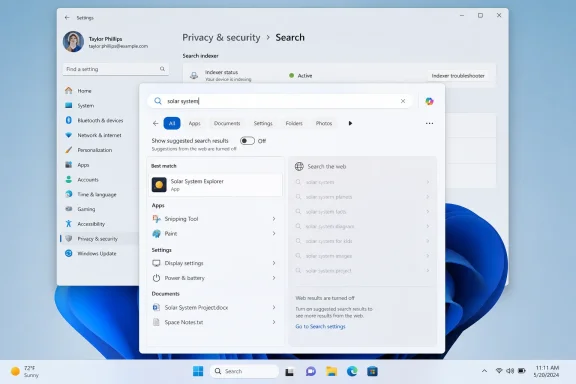
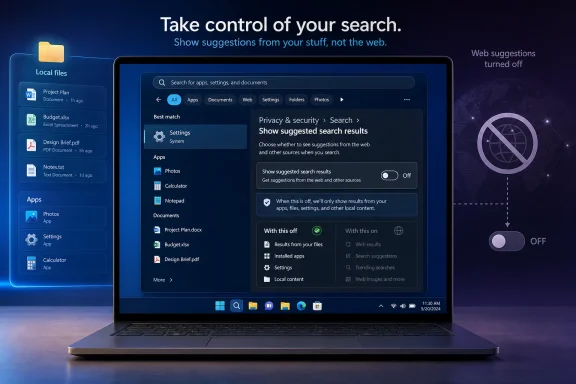
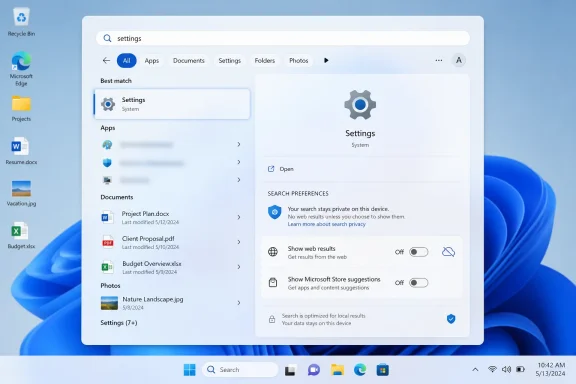
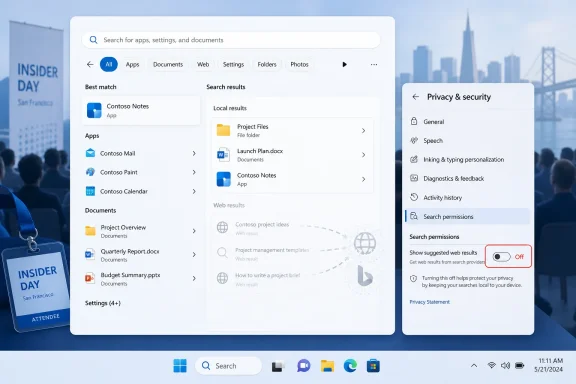
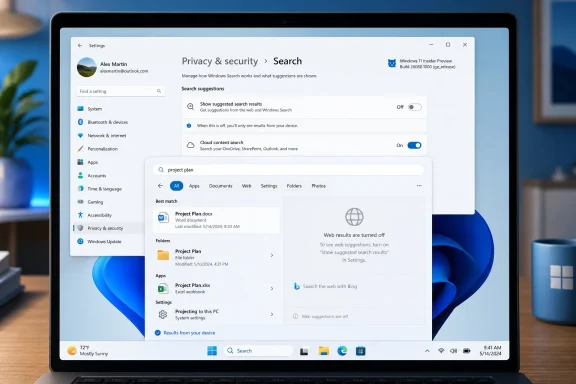
The promised setting reportedly lives under Privacy & security > Search, in a section called “Show suggested search results.” There, users will be able to toggle off web searches from Windows Search. The same interface also appears to include a way to suppress Microsoft Store results, suggesting Microsoft is not merely changing a label but rethinking what belongs in local search results.
That distinction matters. Windows Search has long been a collision zone between user intent and corporate intent. The user wants Notepad, a file, a setting, or an installed app. Microsoft has often seen the same keystrokes as an opportunity to surface Bing, web suggestions, Store entries, news-adjacent content, or some other service hook.
For technically confident users, the workaround has been familiar: Registry edits, Group Policy, third-party tweak tools, or region-dependent behavior. For everyone else, the answer was effectively “live with it.” That made the irritation worse, because the problem was not that web search existed. The problem was that opting out required knowledge Windows users should not need.
The new toggle, if it ships broadly, converts a hack into a preference. That is the sort of move Windows needs more often. Not every user wants the same interface, and not every useful feature should be welded to the default experience.
Web results disrupt that chain because they import ambiguity into a space where users expect precision. If I type the name of an installed application, I do not want a web panel to compete with the app. If I type a local file name, I do not want Windows to behave as if I have opened a browser. If I mistype a control panel item, I would rather see a clean failure than a Bing-powered guess masquerading as help.
Microsoft has often defended these blended experiences as convenience. In theory, one search box for apps, files, settings, cloud content, and the web sounds elegant. In practice, the Windows desktop is not a blank search portal. It is a working environment, and a working environment should privilege the machine in front of the user before reaching outward.
That is why the new setting feels less like a feature addition than a correction. A desktop search box can include the web, but it should not treat the web as a peer to local results by default for every user in every context. Search should be local first, cloud-aware second, and web-capable only when the user asks for it.
That is why users have described the experience as clutter rather than assistance. It often feels less like Windows is helping and more like Windows is taking a toll. The operating system becomes a distribution channel for Microsoft’s web properties, and the Start menu becomes another place where the company asks for attention.
This is not unique to Microsoft. Apple uses macOS to privilege iCloud and Spotlight suggestions. Google’s platforms are built around search and account identity. But Windows occupies a particular role in homes, schools, factories, hospitals, government offices, and enterprise fleets. Its users are often not choosing a lifestyle ecosystem; they are using the platform required to get work done.
That makes the threshold for promotional intrusion lower. A Windows laptop is not just a consumer device. It is a terminal for payroll, CAD, patient records, legal filings, code repositories, and admin consoles. When search becomes noisy, the cost is not only annoyance. It is friction at scale.
That is absurd for a mainstream preference. A user should not have to edit the Registry to tell Windows that desktop search should search the desktop. The Registry is powerful, but it is not a humane user interface, and it is not where ordinary defaults should be negotiated.
For administrators, the situation has been slightly better because Group Policy and mobile device management can impose more disciplined behavior. But even there, the split between consumer settings, regional controls, edition differences, and evolving Windows 11 builds has produced unnecessary uncertainty. Admins want predictable controls, not folklore.
The rumored Settings toggle is therefore a usability change and a governance change. It gives individuals a visible switch. It also signals that Microsoft may be willing to make search behavior legible instead of burying it behind policy plumbing.
For the past few years, Windows 11 has had an image problem among enthusiasts. The operating system is modern, secure, and visually cleaner than its predecessors in many ways, but it has also acquired a reputation for latency in the places users touch constantly: Start, Search, File Explorer, context menus, taskbar behavior, and Settings. Those are not benchmark footnotes. They are the daily texture of the OS.
When Windows Search returns irrelevant web content, the user may blame Bing. When it also feels slow, the user blames Windows. That combination is corrosive. It suggests the operating system is spending time doing things the user did not ask for before completing the thing the user did ask for.
Microsoft appears to understand that perception now. The company has recently talked more openly about improving Windows fundamentals, reducing friction, and making the interface calmer. A web-results toggle fits that theme because it removes a source of both visual and behavioral noise.
That is precisely why they matter. Windows 11 initially launched with a simplified taskbar that removed capabilities many Windows 10 users relied on. Microsoft’s argument, implicitly, was that the new shell was cleaner and more modern. The user response was that clean is not the same as capable.
The movable taskbar and smaller taskbar options suggest Microsoft is continuing its slow retreat from some of Windows 11’s most rigid design decisions. That retreat should not be read as failure. It is what mature platform stewardship looks like when the first version gets the balance wrong.
The same pattern applies to Search. Microsoft has spent years pushing toward a more connected, service-aware Windows shell. Users have spent years saying that some of those connections make the desktop worse. The new toggle is Microsoft conceding that customization is not clutter; sometimes customization is the only way to keep a general-purpose operating system general-purpose.
This is where Microsoft’s practical work on Windows can pay off more than its headline AI demos. Better indexing, faster local lookup, improved ranking, shorter query thresholds, quicker File Explorer launches, and faster file operations are the improvements that make Windows feel trustworthy. They do not require a keynote flourish. They require engineering discipline.
The risk for Microsoft is that it has trained users to expect the wrong thing from Windows announcements. When the company talks about the future, it often talks about Copilot, cloud integration, and AI-assisted workflows. Those may become important. But the credibility to sell those ideas depends on the basics working beautifully first.
A search box that finds local files quickly is not glamorous. A File Explorer window that opens without hesitation is not visionary. But for Windows users, those are the difference between an operating system that feels like a tool and one that feels like an argument.
But it also exposes how overloaded Windows privacy settings have become. The modern Settings app is now where users go not only to limit data collection, but also to reduce recommendations, disable suggestions, change search behavior, manage account integration, and suppress parts of Microsoft’s content ecosystem. Privacy has become the umbrella term for “please make Windows less interested in me.”
That is not entirely Microsoft’s fault. Modern operating systems are more networked than their predecessors, and users legitimately want controls over what data flows where. But Microsoft often worsens the confusion by using friendly language such as suggestions, highlights, recommendations, and personalized experiences when the practical user concern is simpler: stop injecting content into system surfaces.
The new search toggle will be more useful if Microsoft labels it plainly. “Show web results in Windows Search” is understandable. “Show suggested search results” is softer and more ambiguous. If the company wants credit for listening, it should make the switch unmistakable.
That does not mean this particular toggle exists only because of regulators. Microsoft has enough user-feedback evidence to justify it on product grounds alone. But the broader pattern is clear: when platform owners face pressure, they suddenly discover that hardwired defaults can become configurable.
For users outside Europe, that is the interesting part. A control that begins as a compliance accommodation can become a global feature if the company decides uniformity is easier than fragmentation. Conversely, Microsoft could choose to keep some choices regional, which would inflame the very frustration it is trying to reduce.
The right answer is simple: ship the toggle everywhere. Windows Search is not a jurisdiction-specific irritation. Users in Sydney, Seattle, Berlin, São Paulo, and Singapore all understand the difference between searching a PC and searching the web.
The enterprise case for disabling web results is straightforward. Some organizations want to reduce data leakage. Others want to minimize distraction. Many simply want a predictable user experience where typing an internal tool name does not produce web suggestions or Store promotions. In regulated environments, even the perception that local search is blending with external services can trigger review.
Microsoft should also document how the new control interacts with existing settings for search highlights, cloud content search, work or school account results, Microsoft Store suggestions, and Edge or Bing integrations. Windows has accumulated too many overlapping switches with similar-sounding descriptions. If the new toggle becomes one more ambiguous layer, Microsoft will squander part of the win.
The company has an opportunity to reset the model. Local device search, organizational search, cloud account search, Store discovery, and public web search should be distinct categories with clear administrative boundaries. That is how Windows can be both consumer-friendly and enterprise-manageable.
The backlash has not been anti-technology so much as anti-priority. Users look at sluggish shell surfaces, inconsistent dark mode, noisy widgets, Start menu ads, and web-polluted search, then hear Microsoft describe a future full of AI overlays. The obvious response is: fix the operating system first.
That is why a humble search toggle lands harder than its size suggests. It is evidence that Microsoft may be recalibrating. Not abandoning AI, not retreating from services, but recognizing that the desktop cannot be treated merely as a launchpad for whatever strategic initiative is currently ascendant.
Windows has survived for decades because it is adaptable. The more Microsoft turns it into a fixed set of funnels, the less Windows-like it feels. Giving users control over web results is a small restoration of that older bargain.
Search, widgets, Start, notifications, Settings, Edge prompts, Microsoft account nudges, Store recommendations, and Copilot entry points all contribute to the emotional state of using Windows. Each individual prompt or suggestion can be defended. Together, they can make the OS feel needy.
The search toggle is encouraging because it removes rather than adds. Modern software companies are much better at adding surfaces than subtracting them. Subtraction requires confidence that the core product is valuable without constant cross-promotion.
If Microsoft wants Windows 11 to feel calmer, it should apply the same principle elsewhere. Make recommendations opt-in where possible. Separate system functions from content feeds. Give administrators clean policy controls. Let users choose whether the shell is quiet or promotional.
The practical reading is simple:
 Microsoft Finally Finds the Off Switch It Should Have Shipped Years Ago
The promised setting reportedly lives under Privacy & security > Search, in a section called “Show suggested search results.” There, users will be able to toggle off web searches from Windows Search. The same interface also appears to include a way to suppress Microsoft Store results, suggesting Microsoft is not merely changing a label but rethinking what belongs in local search results.That distinction matters. Windows Search has long been a collision zone between user intent and corporate intent. The user wants Notepad, a file, a setting, or an installed app. Microsoft has often seen the same keystrokes as an opportunity to surface Bing, web suggestions, Store entries, news-adjacent content, or some other service hook.
For technically confident users, the workaround has been familiar: Registry edits, Group Policy, third-party tweak tools, or region-dependent behavior. For everyone else, the answer was effectively “live with it.” That made the irritation worse, because the problem was not that web search existed. The problem was that opting out required knowledge Windows users should not need.
The new toggle, if it ships broadly, converts a hack into a preference. That is the sort of move Windows needs more often. Not every user wants the same interface, and not every useful feature should be welded to the default experience.
The Start Menu Became a Search Engine Landing Page
The Windows Search controversy has never been just about aesthetics. Search is one of the fastest interaction paths in a desktop operating system. It sits between muscle memory and action: press Start, type a few letters, hit Enter. Anything that slows, distracts, or misranks that chain makes Windows feel worse, even if the rest of the system is technically functioning.Web results disrupt that chain because they import ambiguity into a space where users expect precision. If I type the name of an installed application, I do not want a web panel to compete with the app. If I type a local file name, I do not want Windows to behave as if I have opened a browser. If I mistype a control panel item, I would rather see a clean failure than a Bing-powered guess masquerading as help.
Microsoft has often defended these blended experiences as convenience. In theory, one search box for apps, files, settings, cloud content, and the web sounds elegant. In practice, the Windows desktop is not a blank search portal. It is a working environment, and a working environment should privilege the machine in front of the user before reaching outward.
That is why the new setting feels less like a feature addition than a correction. A desktop search box can include the web, but it should not treat the web as a peer to local results by default for every user in every context. Search should be local first, cloud-aware second, and web-capable only when the user asks for it.
Bing Was Always the Subtext
Microsoft’s insistence on web results in Windows Search has been difficult to separate from Bing. The company can plausibly argue that web suggestions help users discover information faster, but the commercial incentives are obvious. Every accidental or semi-intentional web query routed through Windows is another surface where Microsoft can reinforce Bing, Edge, Microsoft Start, ads, and account-connected services.That is why users have described the experience as clutter rather than assistance. It often feels less like Windows is helping and more like Windows is taking a toll. The operating system becomes a distribution channel for Microsoft’s web properties, and the Start menu becomes another place where the company asks for attention.
This is not unique to Microsoft. Apple uses macOS to privilege iCloud and Spotlight suggestions. Google’s platforms are built around search and account identity. But Windows occupies a particular role in homes, schools, factories, hospitals, government offices, and enterprise fleets. Its users are often not choosing a lifestyle ecosystem; they are using the platform required to get work done.
That makes the threshold for promotional intrusion lower. A Windows laptop is not just a consumer device. It is a terminal for payroll, CAD, patient records, legal filings, code repositories, and admin consoles. When search becomes noisy, the cost is not only annoyance. It is friction at scale.
The Registry Era Was a Quiet Indictment
The most damning evidence against Microsoft’s old approach is the ecosystem of workarounds that grew around it. Guides explaining how to disable Bing results in Windows Search have circulated for years. They usually involve creating or editing policy keys, changing DWORD values, restarting Explorer, or leaning on Pro-only management tools.That is absurd for a mainstream preference. A user should not have to edit the Registry to tell Windows that desktop search should search the desktop. The Registry is powerful, but it is not a humane user interface, and it is not where ordinary defaults should be negotiated.
For administrators, the situation has been slightly better because Group Policy and mobile device management can impose more disciplined behavior. But even there, the split between consumer settings, regional controls, edition differences, and evolving Windows 11 builds has produced unnecessary uncertainty. Admins want predictable controls, not folklore.
The rumored Settings toggle is therefore a usability change and a governance change. It gives individuals a visible switch. It also signals that Microsoft may be willing to make search behavior legible instead of burying it behind policy plumbing.
Performance Complaints Gave the Backlash Its Teeth
Search quality is one side of the complaint. Performance is the other. PCMag’s report says Microsoft also highlighted improvements to search speed, faster File Explorer launch behavior, and a 30 percent improvement in bulk delete performance in an internal build. Those claims matter because they place the web-search toggle inside a broader Windows performance narrative.For the past few years, Windows 11 has had an image problem among enthusiasts. The operating system is modern, secure, and visually cleaner than its predecessors in many ways, but it has also acquired a reputation for latency in the places users touch constantly: Start, Search, File Explorer, context menus, taskbar behavior, and Settings. Those are not benchmark footnotes. They are the daily texture of the OS.
When Windows Search returns irrelevant web content, the user may blame Bing. When it also feels slow, the user blames Windows. That combination is corrosive. It suggests the operating system is spending time doing things the user did not ask for before completing the thing the user did ask for.
Microsoft appears to understand that perception now. The company has recently talked more openly about improving Windows fundamentals, reducing friction, and making the interface calmer. A web-results toggle fits that theme because it removes a source of both visual and behavioral noise.
The Taskbar Reversal Tells the Same Story
The same Insider preview discussion reportedly included features that Windows 11 users have requested since launch: the ability to move the taskbar to the left, right, or top of the screen, and an option to shrink the taskbar so more apps can fit. These are not flashy AI features. They are old-fashioned desktop affordances.That is precisely why they matter. Windows 11 initially launched with a simplified taskbar that removed capabilities many Windows 10 users relied on. Microsoft’s argument, implicitly, was that the new shell was cleaner and more modern. The user response was that clean is not the same as capable.
The movable taskbar and smaller taskbar options suggest Microsoft is continuing its slow retreat from some of Windows 11’s most rigid design decisions. That retreat should not be read as failure. It is what mature platform stewardship looks like when the first version gets the balance wrong.
The same pattern applies to Search. Microsoft has spent years pushing toward a more connected, service-aware Windows shell. Users have spent years saying that some of those connections make the desktop worse. The new toggle is Microsoft conceding that customization is not clutter; sometimes customization is the only way to keep a general-purpose operating system general-purpose.
Two-Character Search Is the Kind of Boring Upgrade Windows Needs
Another reported change allows Windows 11 search to work with as few as two characters. That sounds almost comically minor until you consider how people actually use search. Users type fragments, initials, abbreviations, project prefixes, and partial file names. A good search system should meet that behavior rather than demand formal queries.This is where Microsoft’s practical work on Windows can pay off more than its headline AI demos. Better indexing, faster local lookup, improved ranking, shorter query thresholds, quicker File Explorer launches, and faster file operations are the improvements that make Windows feel trustworthy. They do not require a keynote flourish. They require engineering discipline.
The risk for Microsoft is that it has trained users to expect the wrong thing from Windows announcements. When the company talks about the future, it often talks about Copilot, cloud integration, and AI-assisted workflows. Those may become important. But the credibility to sell those ideas depends on the basics working beautifully first.
A search box that finds local files quickly is not glamorous. A File Explorer window that opens without hesitation is not visionary. But for Windows users, those are the difference between an operating system that feels like a tool and one that feels like an argument.
Privacy Settings Are Becoming the New Control Panel
Placing the web-search toggle under Privacy & security is also revealing. Microsoft is framing the change not merely as customization but as a privacy-adjacent control. That makes sense because Windows Search can involve local content, account-connected cloud data, web history, Microsoft services, and suggested results.But it also exposes how overloaded Windows privacy settings have become. The modern Settings app is now where users go not only to limit data collection, but also to reduce recommendations, disable suggestions, change search behavior, manage account integration, and suppress parts of Microsoft’s content ecosystem. Privacy has become the umbrella term for “please make Windows less interested in me.”
That is not entirely Microsoft’s fault. Modern operating systems are more networked than their predecessors, and users legitimately want controls over what data flows where. But Microsoft often worsens the confusion by using friendly language such as suggestions, highlights, recommendations, and personalized experiences when the practical user concern is simpler: stop injecting content into system surfaces.
The new search toggle will be more useful if Microsoft labels it plainly. “Show web results in Windows Search” is understandable. “Show suggested search results” is softer and more ambiguous. If the company wants credit for listening, it should make the switch unmistakable.
Europe’s Shadow Hangs Over the Toggle
It is impossible to discuss Windows search controls without mentioning regional pressure. European regulatory scrutiny has pushed large platform vendors to offer more choice around default apps, search providers, browser behavior, and bundled services. Some Windows users in Europe have already seen controls or behaviors that differ from those elsewhere.That does not mean this particular toggle exists only because of regulators. Microsoft has enough user-feedback evidence to justify it on product grounds alone. But the broader pattern is clear: when platform owners face pressure, they suddenly discover that hardwired defaults can become configurable.
For users outside Europe, that is the interesting part. A control that begins as a compliance accommodation can become a global feature if the company decides uniformity is easier than fragmentation. Conversely, Microsoft could choose to keep some choices regional, which would inflame the very frustration it is trying to reduce.
The right answer is simple: ship the toggle everywhere. Windows Search is not a jurisdiction-specific irritation. Users in Sydney, Seattle, Berlin, São Paulo, and Singapore all understand the difference between searching a PC and searching the web.
Enterprise IT Will Ask for Policy, Not Promises
For IT departments, the consumer-facing toggle is only half the story. Administrators will want to know whether the behavior is controllable through Group Policy, Intune, provisioning packages, and documented configuration service providers. A switch in Settings is useful for individuals; a stable policy is what makes it deployable.The enterprise case for disabling web results is straightforward. Some organizations want to reduce data leakage. Others want to minimize distraction. Many simply want a predictable user experience where typing an internal tool name does not produce web suggestions or Store promotions. In regulated environments, even the perception that local search is blending with external services can trigger review.
Microsoft should also document how the new control interacts with existing settings for search highlights, cloud content search, work or school account results, Microsoft Store suggestions, and Edge or Bing integrations. Windows has accumulated too many overlapping switches with similar-sounding descriptions. If the new toggle becomes one more ambiguous layer, Microsoft will squander part of the win.
The company has an opportunity to reset the model. Local device search, organizational search, cloud account search, Store discovery, and public web search should be distinct categories with clear administrative boundaries. That is how Windows can be both consumer-friendly and enterprise-manageable.
Microsoft’s AI Push Made the Basics More Politically Important
The timing of this change is not accidental in the larger sense. Microsoft has spent the last several product cycles saturating Windows messaging with AI. Copilot, Recall, semantic search, AI agents, image tools, and cloud-assisted experiences have all competed for attention. Some of those ideas are ambitious; some are useful; some have been controversial before they even reached ordinary users.The backlash has not been anti-technology so much as anti-priority. Users look at sluggish shell surfaces, inconsistent dark mode, noisy widgets, Start menu ads, and web-polluted search, then hear Microsoft describe a future full of AI overlays. The obvious response is: fix the operating system first.
That is why a humble search toggle lands harder than its size suggests. It is evidence that Microsoft may be recalibrating. Not abandoning AI, not retreating from services, but recognizing that the desktop cannot be treated merely as a launchpad for whatever strategic initiative is currently ascendant.
Windows has survived for decades because it is adaptable. The more Microsoft turns it into a fixed set of funnels, the less Windows-like it feels. Giving users control over web results is a small restoration of that older bargain.
The Calmer Windows Pitch Now Has to Become Real
Microsoft has reportedly talked about bringing a calmer tone to Windows 11, including changes such as hiding the MSN News feed from the Widgets board. That is the right vocabulary, but calmness cannot be achieved through cosmetic restraint alone. It requires Microsoft to stop treating every surface as inventory.Search, widgets, Start, notifications, Settings, Edge prompts, Microsoft account nudges, Store recommendations, and Copilot entry points all contribute to the emotional state of using Windows. Each individual prompt or suggestion can be defended. Together, they can make the OS feel needy.
The search toggle is encouraging because it removes rather than adds. Modern software companies are much better at adding surfaces than subtracting them. Subtraction requires confidence that the core product is valuable without constant cross-promotion.
If Microsoft wants Windows 11 to feel calmer, it should apply the same principle elsewhere. Make recommendations opt-in where possible. Separate system functions from content feeds. Give administrators clean policy controls. Let users choose whether the shell is quiet or promotional.
The Toggle Is Small, but the Concession Is Not
This is not a revolution in Windows. It will not make Windows Search perfect, and it will not end the long argument over Microsoft’s use of the desktop to promote its services. But it is a meaningful concession because it moves control from hidden machinery into visible settings.The practical reading is simple:
- Windows 11 users are expected to get a Settings toggle that disables web results in the built-in search experience.
- The setting was previewed at a Windows Insider event and is likely to appear in Insider builds before mainstream rollout.
- Microsoft also appears to be testing controls that reduce Microsoft Store suggestions in search.
- Search and File Explorer performance improvements are part of the same broader effort to make Windows feel faster and less cluttered.
- The change will matter most if Microsoft ships it globally and backs it with clear enterprise policy controls.
- The larger lesson is that Windows users still value direct, local, predictable OS behavior more than ecosystem promotion.
References
- Primary source: PCMag Australia
Published: Tue, 02 Jun 2026 17:35:08 GMT
Microsoft to Let Windows 11 Users Disable Web Results in Search
At a Windows Insider meetup in San Francisco, Microsoft previewed a few upcoming enhancements to the OS, including a way to shut off web search from the main search function.au.pcmag.com - Official source: support.microsoft.com
Windows Search and Privacy | Microsoft Support
Learn how to connect Windows Search with your accounts in the cloud, manage your Windows Search and SafeSearch settings, clear search history, and more.support.microsoft.com - Related coverage: windowscentral.com
How to stop internet results in Search for Windows 11 | Windows Central
Turn off online suggestions inside the Windows Search feature and regain a local-only experience on Windows 11.www.windowscentral.com - Related coverage: techradar.com
Microsoft is fixing one of the most baffling things about Windows 11 — 'spam' in search results | TechRadar
Why didn't this happen long before now? Search mewww.techradar.com - Related coverage: windowslatest.com
Microsoft is killing Windows 11 Search's biggest annoyance, lets you find files with just 2 characters
Microsoft is improving Windows 11 Search with a new Substring feature to find files with compound names and fast two-character local indexing. www.windowslatest.com
- Related coverage: tomshardware.com
How to Disable Windows Web Search and Speed Up Your PC | Tom's Hardware
Stop Windows from showing you web results when you just want files and apps.www.tomshardware.com
- Official source: microsoft.com
How to Delete Search Suggestions | Microsoft Edge
Search suggestions can help you pinpoint exactly what you’re searching for, fast. Learn how to delete search suggestions if you no longer want—or want others—to see them.www.microsoft.com
- Related coverage: allthings.how
Windows 11 File Explorer Preloading: What it does and how to enable or disable it
Microsoft is testing a File Explorer “preloading” feature in Windows 11 to hide launch lag by keeping its UI ready in memory.allthings.how - Related coverage: winbuzzer.com
Microsoft Adds In-App Browser to Windows 11 Copilot
Microsoft has launched web integration in the Windows 11 Copilot app, opening links in an Edge-powered side pane with opt-in per-conversation web access. winbuzzer.com
- Related coverage: teachucomp.com