

Microsoft used Build 2026 to position Microsoft IQ, Work IQ, Scout, and Windows agent security as the connective tissue for AI agents that can act across Windows, Microsoft 365, enterprise data, and the web. The pitch is simple enough: agents are not useful because they are chatty, but because they can see enough context to do work. The risk is just as simple: the more useful an agent becomes, the closer it moves to the sensitive center of the PC and the organization. Microsoft is no longer selling AI as a side panel; it is laying tracks for AI to become an operating layer.
For the first phase of the AI PC era, Microsoft’s consumer story was largely about visibility. Copilot got a key on keyboards, a place in Windows, and a steady stream of demos in which users asked it to summarize, rewrite, search, and explain. That was always a halfway house. A chatbot that waits for instructions is useful, but it is not the destination Microsoft has been describing.
The Build 2026 agent push makes the next step explicit. Microsoft wants software that can observe context, infer intent, retrieve the right internal knowledge, and perform actions with less manual prompting. That means the old “ask a question, get an answer” pattern gives way to something more operational: prepare for this meeting, resolve this schedule conflict, find the relevant document, summarize the unresolved thread, update the workflow, and do it without forcing the user to stitch five apps together.
Microsoft IQ is the umbrella for that ambition. It is not a single feature in the way Notepad tabs or Phone Link is a feature. It is a context layer, meant to make agents less generic by grounding them in work patterns, business data, enterprise knowledge, and web information.
That distinction matters because today’s AI tools often fail in the gap between fluency and relevance. They can sound confident while missing the organizational meaning of a phrase, the history behind a decision, or the permissions boundary around a dataset. Microsoft’s answer is not simply a better model. It is a claim that context, identity, governance, and retrieval are now product infrastructure.
That is where Microsoft’s agent strategy has a plausible wedge. A personal agent that prepares meeting briefs from Teams, Outlook, SharePoint, and business data is not science fiction; it is an extension of patterns Microsoft 365 users already experience in fragmented form. The difference is that an agent does not merely retrieve a document. It tries to understand why that document matters in the moment.
Scout, Microsoft’s personal work agent now in preview for Frontier customers, is important precisely because it is mundane. Its advertised capabilities revolve around the daily mechanics of work: preparing for meetings, handling scheduling conflicts, and acting across connected services. That is not the stuff of cinematic AI. It is the clerical substrate of office life.
The bet is that users will tolerate, and eventually expect, automation in those areas before they trust AI with higher-stakes decisions. If an agent can reliably brief you before a customer call, surface the unresolved blocker, and move a meeting without breaking etiquette or policy, it starts to earn operational trust. If it hallucinates, overreaches, or exposes confidential context, the trust collapses quickly.
Microsoft IQ breaks that problem into branded layers. Work IQ captures signals from Microsoft 365, organizational systems, and external sources. Fabric IQ gives business data a semantic foundation so agents are not guessing what “revenue,” “customer,” or “active account” means in a particular company. Foundry IQ connects enterprise knowledge and web retrieval into agent workflows. Web IQ supplies Microsoft’s AI-first search stack.
The branding is heavy, but the architecture reflects a real enterprise need. Companies have spent years building data lakes, SharePoint sites, Teams channels, Power BI models, CRM systems, ticket queues, wikis, and half-governed file shares. The result is not a clean knowledge graph waiting for AI. It is a messy institutional memory with conflicting definitions, uneven permissions, stale documents, and local exceptions.
Microsoft is trying to make that mess usable without pretending it disappears. The promise of IQ is that agents can ground themselves in company-specific knowledge while respecting policy and business meaning. The danger is that a branded context layer may make retrieval feel more settled than it really is.
A wrong answer from a public chatbot is annoying. A wrong answer that appears to be grounded in enterprise truth can become operationally dangerous. The more official the context layer looks, the more users may defer to it.
Agents intensify that problem. A human analyst can sometimes explain that two reports differ because one counts booked revenue and another counts recognized revenue. An agent, unless properly grounded, may simply choose one and present it as fact. That is how automation turns ambiguity into false certainty.
A semantic layer gives Microsoft a way to argue that AI agents should reason over business concepts rather than raw tables. That is sensible. If an organization has already invested in Microsoft Fabric and Power BI, there is an obvious appeal in letting agents inherit those definitions instead of building a parallel AI data stack.
But semantic layers are political objects, not just technical ones. Someone has to decide which definition wins, which ontology maps to which system, and how exceptions are handled. Microsoft can provide the tooling, but it cannot magically resolve the organizational disputes that make enterprise data hard in the first place.
That is why the IQ strategy will likely succeed unevenly. Companies with mature identity, data governance, and Microsoft 365 hygiene may see real gains. Companies with chaotic permissions, unmanaged SharePoint sprawl, and contradictory reporting logic may simply give agents a more impressive way to be confused.
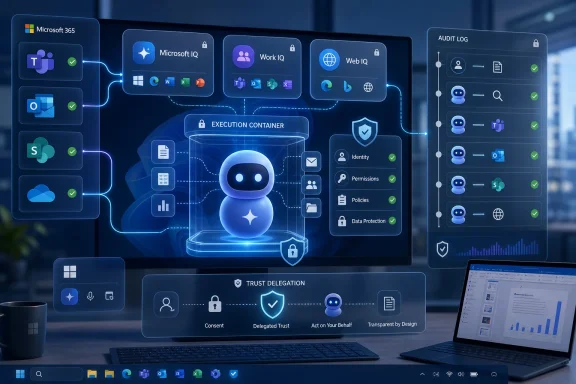
Microsoft’s latest Windows agent security work centers on containment, identity, transparency, consent, and manageability. The company is advancing the idea of agent execution inside sandboxes and controlled environments, including Microsoft Execution Containers as part of the Windows platform security story. The point is to let agents act without giving them the same broad, ambient authority as the user.
That is the right instinct. An AI agent that can browse files, issue commands, use apps, and call services is not just another process. It is a delegated actor. It may misunderstand instructions, be manipulated by malicious content, or combine harmless capabilities into a harmful sequence.
Traditional app security assumes that software has defined behavior. Agent security has to assume adaptive behavior. A spreadsheet macro, a browser extension, and a local process can all be risky, but an agent introduces an additional layer: it interprets instructions and context dynamically. The attack surface is not only code; it is language, documents, prompts, permissions, and the chain of tools the agent can invoke.
That is why Microsoft’s transparency language matters. Users and administrators need to know what an agent is doing, what it has accessed, and why it is asking for more authority. A permission prompt that says “allow access to files” is not enough when the agent’s future behavior may depend on content it has not read yet.
The old security bargain was at least somewhat legible. An app asked for camera access, location access, or file access. Users could understand the category, even if they did not always understand the implications. Agents muddy that bargain because the permission is often not for a single action. It is for a class of future actions driven by context.
A meeting-prep agent might need calendar access, email access, Teams access, document access, and CRM access. Each permission may be reasonable in isolation. Together, they create a composite view of a person’s work life and the organization’s internal state. That is exactly what makes the agent useful, and exactly what makes it sensitive.
For administrators, the question becomes less “Should this app be installed?” and more “Which actions may this agent take, under which identity, against which resources, with what audit trail, and with what rollback mechanism?” That is a richer governance problem than endpoint management alone.
The best version of Microsoft’s model gives IT departments granular controls, strong logging, clear user-facing explanations, and enforceable boundaries between personal context, team context, and enterprise context. The worst version creates a new class of shadow automation: agents that appear sanctioned because they run inside Microsoft’s ecosystem, but whose actual behavior is poorly understood.
Agents give the AI PC a more coherent job description. Local compute can help with responsiveness, privacy-sensitive processing, background tasks, and model execution close to the user’s files and apps. Cloud services can provide scale, retrieval, and enterprise connectivity. Windows sits in the middle, brokering access to the device and user environment.
That hybrid shape is likely to define the next few years. Some agent work will happen locally because the latency and privacy advantages matter. Some will happen in Microsoft’s cloud because enterprise retrieval, model orchestration, and policy enforcement are easier to centralize. Most useful workflows will cross the boundary.
This is also where Microsoft has an advantage over companies building AI assistants from the outside. Windows, Microsoft 365, Entra, Defender, Fabric, GitHub, and Azure give Microsoft more surface area than almost anyone else. If agents are only as good as their context, Microsoft owns an extraordinary amount of the context in which business work already happens.
That advantage will not automatically translate to user love. Microsoft’s history is full of powerful enterprise integrations that users experience as clutter, prompts, licensing tiers, and administrative friction. The agent layer must feel like relief, not another mandatory pane wedged into the workflow.
That could accelerate a wave of specialized agents. Legal review agents, sales operations agents, help desk agents, finance reconciliation agents, developer productivity agents, and compliance agents all become easier to imagine when they can access governed context through common platforms. Copilot Studio and Microsoft Foundry give Microsoft separate paths for low-code builders and professional developers.
But developers are also being asked to build atop an unfinished social contract. Users do not yet have stable expectations for what a work agent should be allowed to infer. Administrators do not yet have universal playbooks for reviewing agent behavior. Security teams are still developing models for prompt injection, tool abuse, data exfiltration, and autonomous action.
The platform may mature faster than the norms around it. That is often how Microsoft ecosystems evolve: capability first, governance later, with enterprise IT forced to fill the gap. The difference this time is that the capabilities touch judgment, memory, and delegation, not just storage or messaging.
If Microsoft wants third-party developers to trust this layer, it will need more than APIs. It will need predictable permission models, durable audit trails, clear pricing, migration paths, and frank documentation about failure modes. Agents that act on enterprise context cannot be treated like ordinary add-ins with better marketing.
For Windows users, that shift may feel subtle at first. Search results increasingly become background infrastructure. You do not “go search the web” so much as ask an agent to solve a problem, and the agent decides when web information is needed. The browser, search engine, and assistant start to blur.
For Microsoft, this is strategically important. Bing never displaced Google as the default mental model for search, but AI agents create a new distribution point. If enterprise agents use Microsoft’s retrieval stack by default, Microsoft does not need to win every consumer search query in the traditional sense. It can win the retrieval layer inside work.
That has consequences. Web grounding can improve freshness and breadth, but it also imports the web’s volatility into enterprise workflows. A bad source, a poisoned page, or a misleading snippet can become part of an agent’s reasoning chain. When that agent is merely answering a trivia question, the damage is limited. When it is drafting a customer response, updating a workflow, or advising on a security incident, the stakes rise.
Microsoft’s challenge is to make web retrieval auditable without making it unusably slow. Users need confidence about where claims came from, while agents need to act quickly enough to be useful. That tension will define the credibility of Web IQ more than any benchmark about speed.
That is why Microsoft’s agent push should not be judged only by demo quality. Demos are excellent at showing the happy path: the agent reads the meeting, finds the account history, drafts the summary, and politely reschedules the conflict. Real life supplies ambiguous emails, outdated decks, private side conversations, weird line-of-business apps, and people who do not want every signal interpreted by software.
Trust delegation has layers. The user must trust that the agent understands the task. The organization must trust that the agent respects boundaries. The administrator must trust that behavior can be monitored and controlled. The developer must trust that platform APIs behave consistently. The security team must trust that containment is real rather than decorative.
This is why the Windows sandboxing story and the Microsoft IQ story belong together. Context without containment is reckless. Containment without context is useless. Microsoft is trying to argue that it can provide both because it controls so much of the stack.
The argument is credible, but not proven. Microsoft has the pieces: Windows, Entra, Defender, Microsoft 365, Fabric, Foundry, GitHub, and Azure. What it does not yet have is years of evidence that autonomous or semi-autonomous agents can operate safely and consistently across that stack at enterprise scale.
The burden is also real. Every agent becomes an identity-adjacent entity. It needs permissions, policies, logs, lifecycle management, and incident response procedures. Organizations that struggled to manage OAuth app consent and Teams sprawl will not find agent governance magically easier.
The first practical question is inventory. Which agents exist in the tenant? Who created them? Which data sources can they access? Which actions can they perform? Which users can invoke them? Which logs prove what happened after the fact?
The second question is blast radius. If an agent is tricked by a malicious document, compromised workflow, or prompt injection in a webpage, what can it touch? Can it email externally? Can it modify records? Can it create tickets, delete files, approve expenses, or change configurations? Sandboxing helps, but only if the permissions model around the sandbox is equally disciplined.
The third question is user education. Employees are already learning to distrust some AI outputs while overtrusting others. An enterprise-branded agent grounded in Microsoft IQ may look more authoritative than it deserves. Training will need to shift from “AI can make mistakes” to “AI actions need the same scrutiny as delegated human actions, sometimes more.”
It is also the source of anxiety. The more Microsoft integrates the AI layer into the fabric of work, the harder it becomes for customers to separate convenience from lock-in. Context layers are sticky by design. Once an organization teaches agents its business vocabulary, workflows, and permissions, moving that intelligence elsewhere becomes harder than switching a chat model.
This does not mean the strategy is bad. Enterprises often choose integrated platforms because fragmented best-of-breed stacks create their own costs. But the agent era raises the price of dependency. The platform that knows how your company works can make your company more efficient; it can also become the place where too much institutional memory is concentrated.
Microsoft will need to be unusually transparent about interoperability. If IQ becomes a one-way funnel into Microsoft services, customers will notice. If it becomes a practical layer that can respect external systems, third-party tools, and open protocols, the platform will be harder to dismiss as another enclosure.
The reference to OpenClaw in Scout’s foundation is notable because it hints at an ecosystem that is not entirely proprietary in posture. But the decisive question is not branding around openness. It is whether customers can inspect, govern, export, and replace enough of the agent stack to avoid being trapped by their own automation.
This is where Microsoft can separate itself from AI startups that have clever demos but shallow operational controls. Enterprise customers will want to know which model ran, which context was retrieved, which permissions were used, which policy allowed the action, which user approved it, and how to reverse or contain the result. Without that, “agentic AI” becomes a compliance headache with a friendly icon.
The Windows piece matters here because PC-level actions are often harder to reconstruct than cloud workflow actions. If an agent touches local files, interacts with apps, or runs in a sandboxed execution environment, administrators need logs that connect the local event to enterprise identity and policy. Otherwise the endpoint becomes the foggy edge of the agent system.
This is also why user-visible transparency cannot be treated as decoration. If users see what an agent is doing only after the fact, they may feel surveilled or blindsided. If they see too many prompts, they will click through blindly. The interface problem is not solved by more dialog boxes. It is solved by better explanations, sensible defaults, and clear escalation when an agent is about to cross a meaningful boundary.
Microsoft has spent years convincing enterprises that identity is the new control plane. Agents may make delegated action the next one.
Skepticism is not cynicism. It is pattern recognition. Windows users remember features that arrived half-integrated, settings that migrated without becoming simpler, and AI experiences that felt more like promotion than utility. If agents become another surface for upsells and prompts, they will be resented no matter how sophisticated the backend is.
But dismissing the agent layer outright would be a mistake. The underlying shift is real. Software is moving from tools that wait to be operated toward systems that can carry out bounded tasks. Windows cannot remain merely a launcher for apps if the center of gravity moves to cross-app workflows.
The enthusiast question is whether Microsoft can make that transition without making the PC feel less personal. An agent that helps you manage your work is welcome. An agent that seems to watch, infer, and intervene without understandable boundaries will trigger backlash. The line between assistance and intrusion is thin, and Windows lives directly on it.
 Microsoft Is Done Treating Copilot as a Chat Window
For the first phase of the AI PC era, Microsoft’s consumer story was largely about visibility. Copilot got a key on keyboards, a place in Windows, and a steady stream of demos in which users asked it to summarize, rewrite, search, and explain. That was always a halfway house. A chatbot that waits for instructions is useful, but it is not the destination Microsoft has been describing.The Build 2026 agent push makes the next step explicit. Microsoft wants software that can observe context, infer intent, retrieve the right internal knowledge, and perform actions with less manual prompting. That means the old “ask a question, get an answer” pattern gives way to something more operational: prepare for this meeting, resolve this schedule conflict, find the relevant document, summarize the unresolved thread, update the workflow, and do it without forcing the user to stitch five apps together.
Microsoft IQ is the umbrella for that ambition. It is not a single feature in the way Notepad tabs or Phone Link is a feature. It is a context layer, meant to make agents less generic by grounding them in work patterns, business data, enterprise knowledge, and web information.
That distinction matters because today’s AI tools often fail in the gap between fluency and relevance. They can sound confident while missing the organizational meaning of a phrase, the history behind a decision, or the permissions boundary around a dataset. Microsoft’s answer is not simply a better model. It is a claim that context, identity, governance, and retrieval are now product infrastructure.
The Boring Tasks Are the Beachhead
Windows Central framed the story around boring PC tasks, and that is the right entry point. Nobody needs an agentic operating system because they want a more dramatic way to open a spreadsheet. They need one because modern work has become a lattice of small interruptions: scheduling, searching, reconciling, summarizing, filing, comparing, approving, and nudging.That is where Microsoft’s agent strategy has a plausible wedge. A personal agent that prepares meeting briefs from Teams, Outlook, SharePoint, and business data is not science fiction; it is an extension of patterns Microsoft 365 users already experience in fragmented form. The difference is that an agent does not merely retrieve a document. It tries to understand why that document matters in the moment.
Scout, Microsoft’s personal work agent now in preview for Frontier customers, is important precisely because it is mundane. Its advertised capabilities revolve around the daily mechanics of work: preparing for meetings, handling scheduling conflicts, and acting across connected services. That is not the stuff of cinematic AI. It is the clerical substrate of office life.
The bet is that users will tolerate, and eventually expect, automation in those areas before they trust AI with higher-stakes decisions. If an agent can reliably brief you before a customer call, surface the unresolved blocker, and move a meeting without breaking etiquette or policy, it starts to earn operational trust. If it hallucinates, overreaches, or exposes confidential context, the trust collapses quickly.
Microsoft IQ Is Really a Governance Story Wearing an AI Hat
The most revealing phrase from Microsoft’s Build messaging is that agents are only as good as the context they receive. That sounds like a developer aphorism, but it is also a governance doctrine. In enterprise AI, the hard problem is not generating text. It is deciding what the system is allowed to know, what it should consider authoritative, and what it may do with that knowledge.Microsoft IQ breaks that problem into branded layers. Work IQ captures signals from Microsoft 365, organizational systems, and external sources. Fabric IQ gives business data a semantic foundation so agents are not guessing what “revenue,” “customer,” or “active account” means in a particular company. Foundry IQ connects enterprise knowledge and web retrieval into agent workflows. Web IQ supplies Microsoft’s AI-first search stack.
The branding is heavy, but the architecture reflects a real enterprise need. Companies have spent years building data lakes, SharePoint sites, Teams channels, Power BI models, CRM systems, ticket queues, wikis, and half-governed file shares. The result is not a clean knowledge graph waiting for AI. It is a messy institutional memory with conflicting definitions, uneven permissions, stale documents, and local exceptions.
Microsoft is trying to make that mess usable without pretending it disappears. The promise of IQ is that agents can ground themselves in company-specific knowledge while respecting policy and business meaning. The danger is that a branded context layer may make retrieval feel more settled than it really is.
A wrong answer from a public chatbot is annoying. A wrong answer that appears to be grounded in enterprise truth can become operationally dangerous. The more official the context layer looks, the more users may defer to it.
The Semantic Layer Is Where the Fight Moves Next
Fabric IQ may be the least flashy part of the story, but it could be one of the most consequential. In many organizations, analytics problems are not caused by a lack of dashboards. They are caused by too many dashboards that disagree. Different teams define the same business term differently, and every executive meeting becomes a negotiation over whose numbers count.Agents intensify that problem. A human analyst can sometimes explain that two reports differ because one counts booked revenue and another counts recognized revenue. An agent, unless properly grounded, may simply choose one and present it as fact. That is how automation turns ambiguity into false certainty.
A semantic layer gives Microsoft a way to argue that AI agents should reason over business concepts rather than raw tables. That is sensible. If an organization has already invested in Microsoft Fabric and Power BI, there is an obvious appeal in letting agents inherit those definitions instead of building a parallel AI data stack.
But semantic layers are political objects, not just technical ones. Someone has to decide which definition wins, which ontology maps to which system, and how exceptions are handled. Microsoft can provide the tooling, but it cannot magically resolve the organizational disputes that make enterprise data hard in the first place.
That is why the IQ strategy will likely succeed unevenly. Companies with mature identity, data governance, and Microsoft 365 hygiene may see real gains. Companies with chaotic permissions, unmanaged SharePoint sprawl, and contradictory reporting logic may simply give agents a more impressive way to be confused.
Windows Has to Become a Safer Place for Things That Act
The Windows side of the announcement is where the story becomes more than enterprise knowledge management. If agents are going to do work on a PC, they need access to files, apps, APIs, credentials, and interface state. That changes the threat model.Microsoft’s latest Windows agent security work centers on containment, identity, transparency, consent, and manageability. The company is advancing the idea of agent execution inside sandboxes and controlled environments, including Microsoft Execution Containers as part of the Windows platform security story. The point is to let agents act without giving them the same broad, ambient authority as the user.
That is the right instinct. An AI agent that can browse files, issue commands, use apps, and call services is not just another process. It is a delegated actor. It may misunderstand instructions, be manipulated by malicious content, or combine harmless capabilities into a harmful sequence.
Traditional app security assumes that software has defined behavior. Agent security has to assume adaptive behavior. A spreadsheet macro, a browser extension, and a local process can all be risky, but an agent introduces an additional layer: it interprets instructions and context dynamically. The attack surface is not only code; it is language, documents, prompts, permissions, and the chain of tools the agent can invoke.
That is why Microsoft’s transparency language matters. Users and administrators need to know what an agent is doing, what it has accessed, and why it is asking for more authority. A permission prompt that says “allow access to files” is not enough when the agent’s future behavior may depend on content it has not read yet.
Consent Is Necessary, but It Will Not Be Enough
Microsoft has been moving Windows toward a consent-first story for apps and AI agents. That direction is welcome, especially after years in which users were trained to click through prompts with minimal understanding. But consent is a thin reed when the system asking for permission is complex, probabilistic, and integrated across work data.The old security bargain was at least somewhat legible. An app asked for camera access, location access, or file access. Users could understand the category, even if they did not always understand the implications. Agents muddy that bargain because the permission is often not for a single action. It is for a class of future actions driven by context.
A meeting-prep agent might need calendar access, email access, Teams access, document access, and CRM access. Each permission may be reasonable in isolation. Together, they create a composite view of a person’s work life and the organization’s internal state. That is exactly what makes the agent useful, and exactly what makes it sensitive.
For administrators, the question becomes less “Should this app be installed?” and more “Which actions may this agent take, under which identity, against which resources, with what audit trail, and with what rollback mechanism?” That is a richer governance problem than endpoint management alone.
The best version of Microsoft’s model gives IT departments granular controls, strong logging, clear user-facing explanations, and enforceable boundaries between personal context, team context, and enterprise context. The worst version creates a new class of shadow automation: agents that appear sanctioned because they run inside Microsoft’s ecosystem, but whose actual behavior is poorly understood.
The AI PC Finally Gets a Job Description
The AI PC narrative has often felt hardware-led. Neural processing units arrived before many users had a daily reason to care. Copilot+ PCs promised local AI experiences, but the killer workflow remained elusive for many buyers outside narrow demos such as recall, image generation, live captions, and creative tooling.Agents give the AI PC a more coherent job description. Local compute can help with responsiveness, privacy-sensitive processing, background tasks, and model execution close to the user’s files and apps. Cloud services can provide scale, retrieval, and enterprise connectivity. Windows sits in the middle, brokering access to the device and user environment.
That hybrid shape is likely to define the next few years. Some agent work will happen locally because the latency and privacy advantages matter. Some will happen in Microsoft’s cloud because enterprise retrieval, model orchestration, and policy enforcement are easier to centralize. Most useful workflows will cross the boundary.
This is also where Microsoft has an advantage over companies building AI assistants from the outside. Windows, Microsoft 365, Entra, Defender, Fabric, GitHub, and Azure give Microsoft more surface area than almost anyone else. If agents are only as good as their context, Microsoft owns an extraordinary amount of the context in which business work already happens.
That advantage will not automatically translate to user love. Microsoft’s history is full of powerful enterprise integrations that users experience as clutter, prompts, licensing tiers, and administrative friction. The agent layer must feel like relief, not another mandatory pane wedged into the workflow.
Developers Are Being Asked to Build for an Unfinished Social Contract
For developers, Microsoft IQ is both an opportunity and a warning. The opportunity is obvious: build agents that do not have to reinvent enterprise retrieval, identity, semantic models, and Microsoft 365 integration from scratch. If Work IQ APIs become broadly available as planned, developers get a more direct way to tap into work context with Microsoft’s blessing.That could accelerate a wave of specialized agents. Legal review agents, sales operations agents, help desk agents, finance reconciliation agents, developer productivity agents, and compliance agents all become easier to imagine when they can access governed context through common platforms. Copilot Studio and Microsoft Foundry give Microsoft separate paths for low-code builders and professional developers.
But developers are also being asked to build atop an unfinished social contract. Users do not yet have stable expectations for what a work agent should be allowed to infer. Administrators do not yet have universal playbooks for reviewing agent behavior. Security teams are still developing models for prompt injection, tool abuse, data exfiltration, and autonomous action.
The platform may mature faster than the norms around it. That is often how Microsoft ecosystems evolve: capability first, governance later, with enterprise IT forced to fill the gap. The difference this time is that the capabilities touch judgment, memory, and delegation, not just storage or messaging.
If Microsoft wants third-party developers to trust this layer, it will need more than APIs. It will need predictable permission models, durable audit trails, clear pricing, migration paths, and frank documentation about failure modes. Agents that act on enterprise context cannot be treated like ordinary add-ins with better marketing.
The Web IQ Claim Shows Microsoft Still Wants the Search War
Web IQ is the part of Microsoft IQ that most clearly reaches beyond internal enterprise systems. Microsoft describes it as an AI-first web search stack and claims major speed advantages over alternatives. That claim fits a broader trend: search is being absorbed into answer engines, copilots, and agents that retrieve information not as a destination but as fuel for action.For Windows users, that shift may feel subtle at first. Search results increasingly become background infrastructure. You do not “go search the web” so much as ask an agent to solve a problem, and the agent decides when web information is needed. The browser, search engine, and assistant start to blur.
For Microsoft, this is strategically important. Bing never displaced Google as the default mental model for search, but AI agents create a new distribution point. If enterprise agents use Microsoft’s retrieval stack by default, Microsoft does not need to win every consumer search query in the traditional sense. It can win the retrieval layer inside work.
That has consequences. Web grounding can improve freshness and breadth, but it also imports the web’s volatility into enterprise workflows. A bad source, a poisoned page, or a misleading snippet can become part of an agent’s reasoning chain. When that agent is merely answering a trivia question, the damage is limited. When it is drafting a customer response, updating a workflow, or advising on a security incident, the stakes rise.
Microsoft’s challenge is to make web retrieval auditable without making it unusably slow. Users need confidence about where claims came from, while agents need to act quickly enough to be useful. That tension will define the credibility of Web IQ more than any benchmark about speed.
The Real Product Is Trust Delegation
The phrase “personal assistant” has followed computing for decades, from Clippy jokes to smartphone voice assistants to modern copilots. What changes with agents is not the metaphor but the delegation. A user is not merely asking for an answer. The user is handing over a slice of agency.That is why Microsoft’s agent push should not be judged only by demo quality. Demos are excellent at showing the happy path: the agent reads the meeting, finds the account history, drafts the summary, and politely reschedules the conflict. Real life supplies ambiguous emails, outdated decks, private side conversations, weird line-of-business apps, and people who do not want every signal interpreted by software.
Trust delegation has layers. The user must trust that the agent understands the task. The organization must trust that the agent respects boundaries. The administrator must trust that behavior can be monitored and controlled. The developer must trust that platform APIs behave consistently. The security team must trust that containment is real rather than decorative.
This is why the Windows sandboxing story and the Microsoft IQ story belong together. Context without containment is reckless. Containment without context is useless. Microsoft is trying to argue that it can provide both because it controls so much of the stack.
The argument is credible, but not proven. Microsoft has the pieces: Windows, Entra, Defender, Microsoft 365, Fabric, Foundry, GitHub, and Azure. What it does not yet have is years of evidence that autonomous or semi-autonomous agents can operate safely and consistently across that stack at enterprise scale.
Admins Should Hear Opportunity and Alarm at the Same Time
For sysadmins and IT pros, the agent layer will arrive as both productivity promise and governance burden. The upside is real. Many help desk, compliance, reporting, scheduling, and knowledge-management tasks are repetitive because they require context spread across systems. Agents could reduce toil if they are constrained well.The burden is also real. Every agent becomes an identity-adjacent entity. It needs permissions, policies, logs, lifecycle management, and incident response procedures. Organizations that struggled to manage OAuth app consent and Teams sprawl will not find agent governance magically easier.
The first practical question is inventory. Which agents exist in the tenant? Who created them? Which data sources can they access? Which actions can they perform? Which users can invoke them? Which logs prove what happened after the fact?
The second question is blast radius. If an agent is tricked by a malicious document, compromised workflow, or prompt injection in a webpage, what can it touch? Can it email externally? Can it modify records? Can it create tickets, delete files, approve expenses, or change configurations? Sandboxing helps, but only if the permissions model around the sandbox is equally disciplined.
The third question is user education. Employees are already learning to distrust some AI outputs while overtrusting others. An enterprise-branded agent grounded in Microsoft IQ may look more authoritative than it deserves. Training will need to shift from “AI can make mistakes” to “AI actions need the same scrutiny as delegated human actions, sometimes more.”
Microsoft’s Advantage Is Also Its Liability
Microsoft’s strongest pitch is integration. The same account system, productivity suite, developer platform, data platform, endpoint OS, and security stack can cooperate around agents. That is compelling for organizations already committed to Microsoft’s ecosystem.It is also the source of anxiety. The more Microsoft integrates the AI layer into the fabric of work, the harder it becomes for customers to separate convenience from lock-in. Context layers are sticky by design. Once an organization teaches agents its business vocabulary, workflows, and permissions, moving that intelligence elsewhere becomes harder than switching a chat model.
This does not mean the strategy is bad. Enterprises often choose integrated platforms because fragmented best-of-breed stacks create their own costs. But the agent era raises the price of dependency. The platform that knows how your company works can make your company more efficient; it can also become the place where too much institutional memory is concentrated.
Microsoft will need to be unusually transparent about interoperability. If IQ becomes a one-way funnel into Microsoft services, customers will notice. If it becomes a practical layer that can respect external systems, third-party tools, and open protocols, the platform will be harder to dismiss as another enclosure.
The reference to OpenClaw in Scout’s foundation is notable because it hints at an ecosystem that is not entirely proprietary in posture. But the decisive question is not branding around openness. It is whether customers can inspect, govern, export, and replace enough of the agent stack to avoid being trapped by their own automation.
The Agent Era Will Be Won in the Audit Log
The most concrete way to judge Microsoft’s new AI layer is not by keynote polish. It is by what happens when something goes wrong. An agent sends the wrong file, summarizes the wrong contract clause, reschedules the wrong meeting, or acts on a poisoned webpage. At that moment, the enterprise does not need poetry about productivity. It needs an audit trail.This is where Microsoft can separate itself from AI startups that have clever demos but shallow operational controls. Enterprise customers will want to know which model ran, which context was retrieved, which permissions were used, which policy allowed the action, which user approved it, and how to reverse or contain the result. Without that, “agentic AI” becomes a compliance headache with a friendly icon.
The Windows piece matters here because PC-level actions are often harder to reconstruct than cloud workflow actions. If an agent touches local files, interacts with apps, or runs in a sandboxed execution environment, administrators need logs that connect the local event to enterprise identity and policy. Otherwise the endpoint becomes the foggy edge of the agent system.
This is also why user-visible transparency cannot be treated as decoration. If users see what an agent is doing only after the fact, they may feel surveilled or blindsided. If they see too many prompts, they will click through blindly. The interface problem is not solved by more dialog boxes. It is solved by better explanations, sensible defaults, and clear escalation when an agent is about to cross a meaningful boundary.
Microsoft has spent years convincing enterprises that identity is the new control plane. Agents may make delegated action the next one.
The Windows Enthusiast’s Skepticism Is Earned
For Windows enthusiasts, there is a familiar rhythm here. Microsoft announces an ambitious platform shift. The demos are polished, the branding is abstract, and the first wave of features lands unevenly across regions, SKUs, hardware, and subscriptions. Users then spend months separating the transformative from the ornamental.Skepticism is not cynicism. It is pattern recognition. Windows users remember features that arrived half-integrated, settings that migrated without becoming simpler, and AI experiences that felt more like promotion than utility. If agents become another surface for upsells and prompts, they will be resented no matter how sophisticated the backend is.
But dismissing the agent layer outright would be a mistake. The underlying shift is real. Software is moving from tools that wait to be operated toward systems that can carry out bounded tasks. Windows cannot remain merely a launcher for apps if the center of gravity moves to cross-app workflows.
The enthusiast question is whether Microsoft can make that transition without making the PC feel less personal. An agent that helps you manage your work is welcome. An agent that seems to watch, infer, and intervene without understandable boundaries will trigger backlash. The line between assistance and intrusion is thin, and Windows lives directly on it.
Build’s IQ Stack Gives IT a New Checklist
The practical message from Build 2026 is not that every organization should unleash agents tomorrow. It is that the groundwork is being poured now, and IT departments should start treating agent readiness as a first-class planning item. The companies that wait until users are already building and connecting agents will be governing from behind.- Microsoft IQ should be understood as a context and grounding layer, not merely another Copilot feature.
- Work IQ APIs becoming generally available on June 16 creates a near-term developer path for agents that understand Microsoft 365 work context.
- Scout shows Microsoft’s preferred direction for personal work agents: proactive, connected, and embedded in existing productivity tools.
- Windows agent sandboxing and Microsoft Execution Containers signal that Microsoft knows agent security must live below the app layer.
- Fabric IQ may be most valuable in organizations that already have mature semantic models and disciplined data governance.
- The biggest operational test will be whether administrators can inspect, limit, and audit agent behavior as easily as Microsoft can demo it.
References
- Primary source: Windows Central
Published: Tue, 02 Jun 2026 18:11:52 GMT
Loading…
www.windowscentral.com - Official source: microsoft.com
Microsoft IQ | Unified Enterprise Intelligence for AI
Microsoft IQ unifies enterprise data, context, and knowledge to power AI agents and Copilot with consistent, secure intelligence at scale.www.microsoft.com
- Official source: blogs.windows.com

Windows platform security for AI agents
Making Windows the trustworthy OS for agents AI agents are no longer just answering questions, they are taking actions across systems with increasing autonomy. As they become persistent participants in how software runs, they introduce new r blogs.windows.com
- Official source: learn.microsoft.com

What is Fabric IQ? - Microsoft Fabric
Learn about Fabric IQ, part of Microsoft IQ and a workload in Microsoft Fabric.learn.microsoft.com - Official source: techcommunity.microsoft.com
Announcing the IQ Series: Foundry IQ | Microsoft Community Hub
AI agents are rapidly becoming a new way to build applications. But for agents to be truly useful, they need access to the knowledge and context that helps... techcommunity.microsoft.com
- Official source: devblogs.microsoft.com

What's new in Microsoft Foundry | Build Edition | Microsoft Foundry Blog
Microsoft Build 2026 brings a major set of Microsoft Foundry updates for developers building agents: hosted runtimes, Toolboxes, memory, Voice Live, Foundry IQ, new models, managed compute, and trust, evaluation, and observability tools. devblogs.microsoft.com
- Related coverage: ebisuda.net
Microsoft Build 2026:Azure HorizonDB・Foundry IQ・Claude正式採用——AIは「実験」から「本番運用」へ
Microsoft Build 2026でAzure HorizonDB・Foundry IQ・Claude正式統合を発表、AIの実験フェーズ終了と本番運用移行時代の到来を宣言。 www.ebisuda.net
- Official source: blogs.microsoft.com
How Microsoft is empowering Frontier Transformation with Intelligence + Trust - The Official Microsoft Blog
At Microsoft Ignite in November, we introduced Frontier Transformation — a holistic reimagining of business aligning AI with human ambition to help organizations achieve their highest aspirations and growth potential. While AI Transformation centered on efficiency and productivity, Frontier... blogs.microsoft.com
- Official source: community.fabric.microsoft.com

Demystifying Microsoft’s AI Strategy: Work IQ, Fabric IQ, Foundry IQ, and More
Microsoft’s AI strategy is built on a three-layer intelligence stack combined with tools for building AI agents and frameworks for governance and scaling. Once you understand how these pieces fit together, the terminology becomes manageable. Quick Reference Table: Category Components...community.fabric.microsoft.com
- Official source: azure.microsoft.com
Loading…
azure.microsoft.com - Related coverage: tomshardware.com
Microsoft's vision of "AI-native" Windows is becoming real, update introduces agents that pilfer through your files — Latest Windows 11 Insider build includes experimental AI agents toggle that can perform tasks for you in the background
Microsoft states that agents read files in an isolated runtimewww.tomshardware.com
- Related coverage: pcgamer.com
Loading…
www.pcgamer.com - Related coverage: techradar.com
Windows 12 at Build 2026: What to expect
What Build 2026 signals about the future of the Windowswww.techradar.com
- Related coverage: isg.sitefinity.cloud
Loading…
isg.sitefinity.cloud