

Microsoft cancelled Microsoft 365 Roadmap item 557566 on July 2, 2026, ending a planned SharePoint feature that would have let Copilot Pages users turn researched Copilot Chat content into SharePoint News posts from a new SharePoint button under Create. The cancellation looks minor if judged as a single missing button. It is more revealing as a signal about where Microsoft’s AI publishing story still feels unfinished: Copilot can help draft, collect, and polish work, but the last mile into governed enterprise communication remains harder than a demo makes it look.
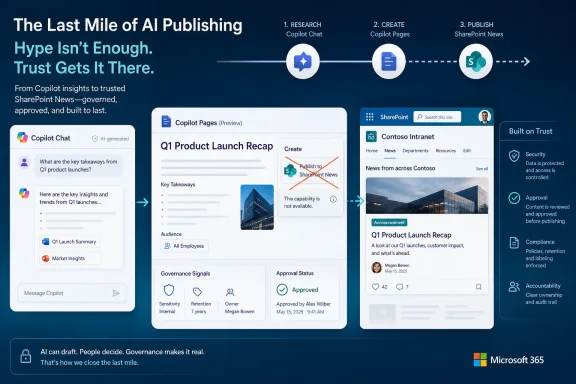
The promised workflow was simple enough to explain in one sentence. A user researches in Copilot Chat, collects and edits the result in Copilot Pages, then presses a SharePoint option to move that work into a SharePoint News post. For organizations that already use SharePoint News as an internal communications channel, this would have reduced a familiar bit of copy-and-paste friction.
Microsoft has now chosen not to ship it. The roadmap entry moved to Cancelled after originally being created on March 4, 2026, with general availability planned for May 2026 across Worldwide standard multi-tenant and GCC cloud environments. The wording was blunt by Microsoft 365 roadmap standards: “We have chosen not to move forward with this feature.”
That does not mean Copilot Pages is going away, nor does it mean SharePoint’s AI push has stalled. But it does show that Microsoft is still deciding where AI-generated work should cross from a personal or collaborative canvas into a publication surface. That boundary matters because SharePoint News is not just another document format. In many companies, it is the intranet’s front page, the HR bulletin board, the executive announcement channel, and the place where governance becomes visible.
That positioning is important. The value proposition is not simply “AI writes text.” It is that a worker can move from research to synthesis to collaborative editing without losing the context of the conversation that produced the draft. Pages is Microsoft’s attempt to make Copilot output durable.
The cancelled SharePoint News export would have been a natural extension of that logic. If Pages is where AI-assisted work becomes a draft, SharePoint News is where some drafts become announcements. The button would have made that path explicit.
Its disappearance leaves a gap between two Microsoft narratives. On one side, Microsoft says Copilot should help users create and organize knowledge. On the other, SharePoint remains the company’s flagship system for publishing and distributing that knowledge inside an organization. The cancelled feature would have stitched those ideas together at a highly visible point.
A SharePoint News post can be promoted, surfaced, emailed, indexed, searched, and redistributed. It can appear on home sites, department portals, Teams tabs, Viva experiences, and mobile feeds. Once published, it becomes part of the company’s official memory, even when the author thought they were merely pushing out a quick update.
That makes the “press a button” story complicated. A button from Copilot Pages to SharePoint News sounds efficient, but efficiency is not always the governing requirement in enterprise publishing. Communications teams care about tone, branding, legal review, accessibility, metadata, approvals, retention, and audience targeting. IT cares about permissions, policy boundaries, content lifecycle, and auditability.
Microsoft may not have said any of that in the cancellation note. But the product problem is obvious: the simpler the AI-to-news path becomes, the more pressure falls on SharePoint to prevent rough drafts from masquerading as official communications.
The Copilot Pages-to-News feature was especially vulnerable to that complexity. It touched Copilot Chat, Copilot Pages, the Microsoft 365 app, SharePoint authoring, and SharePoint News publishing. That is a lot of surface area for what looked like a small workflow shortcut.
The more systems a feature crosses, the more edge cases it inherits. What happens if the user can create a Copilot Page but lacks publishing rights on the target SharePoint site? What happens if the page contains content grounded in files the eventual news audience cannot access? What happens if Copilot-generated content includes citations, tables, or interactive elements that do not map cleanly to a SharePoint News layout?
None of those questions is exotic. They are the ordinary questions that administrators ask when a demo becomes a tenant-wide feature. The cancellation suggests Microsoft either did not like the answers yet or decided the payoff was not worth the engineering and governance burden.
That distinction matters for SharePoint because intranets are trust systems. Employees do not read a SharePoint News post the same way they read a chat response. A news post carries institutional weight, even if it was created by a frontline manager at 5:17 p.m. on a Friday.
AI raises the stakes because it can make mediocre content look polished. A Copilot-assisted draft may have confident structure, plausible phrasing, and tidy summaries while still missing nuance or introducing errors. Moving that draft directly into SharePoint News risks collapsing the review gap that many organizations rely on, even informally.
This is where Microsoft’s enterprise AI strategy keeps meeting its hardest constraint. Copilot can accelerate creation, but enterprise systems are built around controlled dissemination. The collision between those two impulses is not a bug in SharePoint; it is the central design problem of AI inside Microsoft 365.
Including GCC suggested Microsoft intended the workflow to satisfy a broader enterprise and public-sector bar. Cancelling it after that promise makes the retreat more notable, because it implies Microsoft did not merely trim a consumer-style experiment. It backed away from a feature that had been framed as generally available for commercial and government cloud customers.
That does not automatically mean compliance concerns killed it. Microsoft did not say that. But GCC support tends to force hard questions earlier, especially when generative AI, content provenance, and publication rights intersect.
For IT pros, the lesson is pragmatic. Treat roadmap cloud-instance listings as intent, not entitlement. A feature can be scoped for your cloud and still vanish before it reaches your tenant.
That combination would have been confusing in practice. A user might be able to create or edit a Copilot Page, but not publish a SharePoint News post. Another might have a Copilot license but lack access to the right site. A communications employee might have publishing rights but not the Copilot entitlement expected by the workflow.
Microsoft could have solved those cases with graceful prompts and permission checks. But the user experience would have been less magical than the roadmap blurb suggested. “Press SharePoint under Create” becomes “press SharePoint, choose a site, resolve permissions, check formatting, validate sources, satisfy approval flow, and maybe ask IT why your colleague sees a different button.”
That is the unglamorous part of Microsoft 365 feature work. The ribbon button is the advertisement; identity, licensing, and governance are the product.
The distinction is subtle but significant. Creating a page inside SharePoint begins inside the publishing system, with site permissions, templates, and page structures already in view. Exporting from Copilot Pages begins in a broader collaborative canvas and then tries to translate the result into SharePoint’s publishing model.
Microsoft may have concluded that SharePoint-native Copilot authoring is the better architecture. If the destination is a SharePoint page, start in SharePoint. That gives Microsoft more control over layout, metadata, publishing permissions, and site context from the first step.
That would be a rational product decision. It would also be less convenient for users who thought Copilot Pages would become the universal staging area for everything. Microsoft is learning, in public, that not every AI canvas should become a launchpad for every downstream artifact.
That may sound democratizing. It may also sound like a content hygiene nightmare. Many corporate intranets already struggle with stale announcements, duplicated department updates, inconsistent formatting, and unclear ownership. AI can multiply output faster than organizations can improve governance.
A cancelled shortcut is not necessarily bad news for those teams. It buys time to define what AI-assisted publishing should look like. Should Copilot-created news posts carry a disclosure? Should they require approval? Should certain sites disable AI-originated publishing? Should metadata indicate whether a post came from a page, a document, a prompt, or a template?
These are not theoretical niceties. They determine whether employees trust what appears in their news feed.
That does not make the roadmap useless. It makes it a signal, not a dependency. If an organization had already built communications training around the May 2026 arrival of a Copilot Pages-to-News button, it now has a small cleanup job to do. If it had merely noted the item as a possible workflow improvement, nothing breaks.
The more important planning lesson is to avoid building business process around a single promised UI affordance. If the goal is AI-assisted SharePoint publishing, there are still other paths: SharePoint-native Copilot page creation, manual copy from Pages, Word-to-SharePoint workflows, page templates, approvals, and custom automation where appropriate. None is as tidy as a one-button export, but all are more controllable than waiting on an unshipped roadmap item.
For WindowsForum readers managing Microsoft 365 environments, this is familiar territory. The cloud is evergreen, but governance is still local. Your tenant’s reality is shaped less by a roadmap card than by permissions, training, information architecture, and the appetite for risk.
Users will still move text from Copilot Pages into SharePoint News manually. They will paste summaries, rewrite intros, rebuild tables, and massage formatting. Some will do it carefully. Others will treat SharePoint News as the place where Copilot output goes to become official.
That manual step is inefficient, but it also creates a pause. The user has to confront the destination, choose the site, look at the layout, and make at least a minimal editorial decision. A button would reduce that friction. In some contexts, reducing friction is exactly the wrong move.
This is the paradox of enterprise AI adoption. The best demos eliminate steps. The best deployments sometimes add them back, deliberately, because the organization needs review points. Microsoft’s cancellation implicitly acknowledges that a publishing boundary is not just another productivity obstacle.
That restraint is not always visible in the AI era. Vendors are under pressure to show momentum, especially when customers are paying premium prices for Copilot licenses and executives expect visible productivity wins. A small integration that turns AI drafts into SharePoint News would have been easy to market.
Pulling it back suggests Microsoft is willing, at least sometimes, to sacrifice a neat story when the workflow does not meet the bar. That is good product hygiene, even if it frustrates customers who wanted the feature.
The question is whether Microsoft will explain the replacement path. If the answer is “use Copilot directly in SharePoint instead,” customers need clearer guidance. If the answer is “manual export remains the supported workflow,” administrators need to know that too. Silence leaves the community to infer strategy from a cancelled card.
Copilot changes the economics of content creation. It lowers the effort required to draft a news item, summarize a project, or turn meeting notes into an announcement. That can be enormously useful, particularly for teams that lack dedicated communications staff.
But lower effort does not automatically produce better communication. It can produce more communication, which is not the same thing. Intranet readers are already overloaded. The risk is not that employees will reject AI-generated SharePoint News because it looks bad. The risk is that it will look good enough to flood the channel.
An AI intranet therefore needs an editorial model. It needs rules about what belongs in news, who owns it, how it is reviewed, how long it remains prominent, and how AI assistance is handled. Microsoft can provide buttons and panels, but customers still have to decide what publishing means.
 Microsoft’s Missing Button Exposes the Fragile Last Mile of AI Work
The promised workflow was simple enough to explain in one sentence. A user researches in Copilot Chat, collects and edits the result in Copilot Pages, then presses a SharePoint option to move that work into a SharePoint News post. For organizations that already use SharePoint News as an internal communications channel, this would have reduced a familiar bit of copy-and-paste friction.Microsoft has now chosen not to ship it. The roadmap entry moved to Cancelled after originally being created on March 4, 2026, with general availability planned for May 2026 across Worldwide standard multi-tenant and GCC cloud environments. The wording was blunt by Microsoft 365 roadmap standards: “We have chosen not to move forward with this feature.”
That does not mean Copilot Pages is going away, nor does it mean SharePoint’s AI push has stalled. But it does show that Microsoft is still deciding where AI-generated work should cross from a personal or collaborative canvas into a publication surface. That boundary matters because SharePoint News is not just another document format. In many companies, it is the intranet’s front page, the HR bulletin board, the executive announcement channel, and the place where governance becomes visible.
Copilot Pages Wants to Be the Drafting Desk, Not Just the Chat Transcript
Copilot Pages exists because chat alone is a poor container for finished work. A chat response is ephemeral, linear, and awkward to edit; a page is persistent, shareable, and easier to turn into something colleagues can review. Microsoft describes Pages as an interactive canvas where Copilot responses become editable content that can be refined alongside Copilot Chat.That positioning is important. The value proposition is not simply “AI writes text.” It is that a worker can move from research to synthesis to collaborative editing without losing the context of the conversation that produced the draft. Pages is Microsoft’s attempt to make Copilot output durable.
The cancelled SharePoint News export would have been a natural extension of that logic. If Pages is where AI-assisted work becomes a draft, SharePoint News is where some drafts become announcements. The button would have made that path explicit.
Its disappearance leaves a gap between two Microsoft narratives. On one side, Microsoft says Copilot should help users create and organize knowledge. On the other, SharePoint remains the company’s flagship system for publishing and distributing that knowledge inside an organization. The cancelled feature would have stitched those ideas together at a highly visible point.
SharePoint News Is a Publishing Surface, Not a Clipboard
The easiest explanation for the cancellation is product prioritization. Microsoft ships, delays, renames, and cancels roadmap items constantly, and not every change deserves grand theory. Still, this particular cancellation lands in a sensitive place because SharePoint News carries more organizational meaning than a Word document or Loop page.A SharePoint News post can be promoted, surfaced, emailed, indexed, searched, and redistributed. It can appear on home sites, department portals, Teams tabs, Viva experiences, and mobile feeds. Once published, it becomes part of the company’s official memory, even when the author thought they were merely pushing out a quick update.
That makes the “press a button” story complicated. A button from Copilot Pages to SharePoint News sounds efficient, but efficiency is not always the governing requirement in enterprise publishing. Communications teams care about tone, branding, legal review, accessibility, metadata, approvals, retention, and audience targeting. IT cares about permissions, policy boundaries, content lifecycle, and auditability.
Microsoft may not have said any of that in the cancellation note. But the product problem is obvious: the simpler the AI-to-news path becomes, the more pressure falls on SharePoint to prevent rough drafts from masquerading as official communications.
The Cancellation Fits a Pattern: AI Features Are Easy to Announce and Harder to Operationalize
Microsoft’s roadmap has become the public weather map for its AI ambitions. Features appear with tidy names, estimated release months, and a short paragraph of product intent. Those blurbs are useful, but they flatten the messier reality of deploying AI into Microsoft 365 tenants with different licensing, compliance postures, content models, and user habits.The Copilot Pages-to-News feature was especially vulnerable to that complexity. It touched Copilot Chat, Copilot Pages, the Microsoft 365 app, SharePoint authoring, and SharePoint News publishing. That is a lot of surface area for what looked like a small workflow shortcut.
The more systems a feature crosses, the more edge cases it inherits. What happens if the user can create a Copilot Page but lacks publishing rights on the target SharePoint site? What happens if the page contains content grounded in files the eventual news audience cannot access? What happens if Copilot-generated content includes citations, tables, or interactive elements that do not map cleanly to a SharePoint News layout?
None of those questions is exotic. They are the ordinary questions that administrators ask when a demo becomes a tenant-wide feature. The cancellation suggests Microsoft either did not like the answers yet or decided the payoff was not worth the engineering and governance burden.
Governance Is the Part of AI Publishing That Refuses to Disappear
The AI productivity pitch often treats drafting as the hard part and publishing as the easy part. In the real world, it is frequently the reverse. The draft can be rough, wrong, duplicated, or speculative; the published item is what employees act on.That distinction matters for SharePoint because intranets are trust systems. Employees do not read a SharePoint News post the same way they read a chat response. A news post carries institutional weight, even if it was created by a frontline manager at 5:17 p.m. on a Friday.
AI raises the stakes because it can make mediocre content look polished. A Copilot-assisted draft may have confident structure, plausible phrasing, and tidy summaries while still missing nuance or introducing errors. Moving that draft directly into SharePoint News risks collapsing the review gap that many organizations rely on, even informally.
This is where Microsoft’s enterprise AI strategy keeps meeting its hardest constraint. Copilot can accelerate creation, but enterprise systems are built around controlled dissemination. The collision between those two impulses is not a bug in SharePoint; it is the central design problem of AI inside Microsoft 365.
GCC Inclusion Made the Feature More Ambitious Than It First Looked
The roadmap item listed both Worldwide standard multi-tenant and GCC. That detail matters. GCC customers often include government-adjacent organizations with stricter expectations around compliance, data handling, and change management. A feature that routes AI-assisted content into an official publishing channel is not merely a convenience in that context.Including GCC suggested Microsoft intended the workflow to satisfy a broader enterprise and public-sector bar. Cancelling it after that promise makes the retreat more notable, because it implies Microsoft did not merely trim a consumer-style experiment. It backed away from a feature that had been framed as generally available for commercial and government cloud customers.
That does not automatically mean compliance concerns killed it. Microsoft did not say that. But GCC support tends to force hard questions earlier, especially when generative AI, content provenance, and publication rights intersect.
For IT pros, the lesson is pragmatic. Treat roadmap cloud-instance listings as intent, not entitlement. A feature can be scoped for your cloud and still vanish before it reaches your tenant.
The Licensing Story Was Never Going to Be Invisible
There is another layer administrators would have had to explain: who gets to use the button. Copilot Pages can be available to work or school accounts with SharePoint or OneDrive storage, including users without a full Microsoft 365 Copilot license, depending on the specific Pages experience. But advanced Copilot workflows often carry licensing caveats, and third-party writeups of the planned News conversion expected Microsoft 365 Copilot licensing and SharePoint publishing permissions to matter.That combination would have been confusing in practice. A user might be able to create or edit a Copilot Page, but not publish a SharePoint News post. Another might have a Copilot license but lack access to the right site. A communications employee might have publishing rights but not the Copilot entitlement expected by the workflow.
Microsoft could have solved those cases with graceful prompts and permission checks. But the user experience would have been less magical than the roadmap blurb suggested. “Press SharePoint under Create” becomes “press SharePoint, choose a site, resolve permissions, check formatting, validate sources, satisfy approval flow, and maybe ask IT why your colleague sees a different button.”
That is the unglamorous part of Microsoft 365 feature work. The ribbon button is the advertisement; identity, licensing, and governance are the product.
SharePoint’s AI Future Is Still Moving, Just Along a Different Path
Cancelling this item does not leave SharePoint without AI-assisted authoring. Microsoft has been building Copilot into SharePoint page creation more directly, including experiences where site editors can start pages with Copilot and use existing Microsoft Graph-connected content as grounding material. That path may be more controllable than exporting from Copilot Pages after the fact.The distinction is subtle but significant. Creating a page inside SharePoint begins inside the publishing system, with site permissions, templates, and page structures already in view. Exporting from Copilot Pages begins in a broader collaborative canvas and then tries to translate the result into SharePoint’s publishing model.
Microsoft may have concluded that SharePoint-native Copilot authoring is the better architecture. If the destination is a SharePoint page, start in SharePoint. That gives Microsoft more control over layout, metadata, publishing permissions, and site context from the first step.
That would be a rational product decision. It would also be less convenient for users who thought Copilot Pages would become the universal staging area for everything. Microsoft is learning, in public, that not every AI canvas should become a launchpad for every downstream artifact.
For Communications Teams, the Delay May Be a Relief
Internal communications teams are often asked to do two conflicting things: publish faster and maintain quality. AI promises to help with the first goal and threatens the second when deployed without guardrails. A direct Copilot Pages-to-News path could have made it easier for more employees to generate more official-looking posts with less editorial friction.That may sound democratizing. It may also sound like a content hygiene nightmare. Many corporate intranets already struggle with stale announcements, duplicated department updates, inconsistent formatting, and unclear ownership. AI can multiply output faster than organizations can improve governance.
A cancelled shortcut is not necessarily bad news for those teams. It buys time to define what AI-assisted publishing should look like. Should Copilot-created news posts carry a disclosure? Should they require approval? Should certain sites disable AI-originated publishing? Should metadata indicate whether a post came from a page, a document, a prompt, or a template?
These are not theoretical niceties. They determine whether employees trust what appears in their news feed.
For IT, This Is a Reminder to Design Around Capabilities, Not Roadmap Hope
Administrators have learned to read Microsoft 365 roadmap entries with cautious optimism. A roadmap item is useful for planning, but it is not a contract. Dates move, scopes shift, feature names change, and sometimes the entry simply disappears into Cancelled.That does not make the roadmap useless. It makes it a signal, not a dependency. If an organization had already built communications training around the May 2026 arrival of a Copilot Pages-to-News button, it now has a small cleanup job to do. If it had merely noted the item as a possible workflow improvement, nothing breaks.
The more important planning lesson is to avoid building business process around a single promised UI affordance. If the goal is AI-assisted SharePoint publishing, there are still other paths: SharePoint-native Copilot page creation, manual copy from Pages, Word-to-SharePoint workflows, page templates, approvals, and custom automation where appropriate. None is as tidy as a one-button export, but all are more controllable than waiting on an unshipped roadmap item.
For WindowsForum readers managing Microsoft 365 environments, this is familiar territory. The cloud is evergreen, but governance is still local. Your tenant’s reality is shaped less by a roadmap card than by permissions, training, information architecture, and the appetite for risk.
The Real Competition Is Not Google or Notion, but the Copy-Paste Habit
It is tempting to frame every Microsoft 365 AI move as a platform battle against Google Workspace, Notion, Slack, or a new generation of AI workspaces. Those comparisons matter, but the immediate competition for this feature was more mundane. It was the copy-paste workflow.Users will still move text from Copilot Pages into SharePoint News manually. They will paste summaries, rewrite intros, rebuild tables, and massage formatting. Some will do it carefully. Others will treat SharePoint News as the place where Copilot output goes to become official.
That manual step is inefficient, but it also creates a pause. The user has to confront the destination, choose the site, look at the layout, and make at least a minimal editorial decision. A button would reduce that friction. In some contexts, reducing friction is exactly the wrong move.
This is the paradox of enterprise AI adoption. The best demos eliminate steps. The best deployments sometimes add them back, deliberately, because the organization needs review points. Microsoft’s cancellation implicitly acknowledges that a publishing boundary is not just another productivity obstacle.
Microsoft’s Apology Is Less Interesting Than Its Restraint
The roadmap language includes the standard apology: “We apologize for the inconvenience.” That line is boilerplate, but the decision behind it is more interesting. Microsoft could have shipped a minimal version, limited it to certain tenants, labeled it preview, or buried the complexity in documentation. Instead, it marked the feature cancelled.That restraint is not always visible in the AI era. Vendors are under pressure to show momentum, especially when customers are paying premium prices for Copilot licenses and executives expect visible productivity wins. A small integration that turns AI drafts into SharePoint News would have been easy to market.
Pulling it back suggests Microsoft is willing, at least sometimes, to sacrifice a neat story when the workflow does not meet the bar. That is good product hygiene, even if it frustrates customers who wanted the feature.
The question is whether Microsoft will explain the replacement path. If the answer is “use Copilot directly in SharePoint instead,” customers need clearer guidance. If the answer is “manual export remains the supported workflow,” administrators need to know that too. Silence leaves the community to infer strategy from a cancelled card.
The AI Intranet Still Needs an Editorial Model
The deeper issue is that Microsoft is building AI tools into systems that were never purely technical. SharePoint is a content management system, but it is also an organizational chart in software form. It reflects who gets to speak, who gets to approve, who gets to discover, and who gets to archive.Copilot changes the economics of content creation. It lowers the effort required to draft a news item, summarize a project, or turn meeting notes into an announcement. That can be enormously useful, particularly for teams that lack dedicated communications staff.
But lower effort does not automatically produce better communication. It can produce more communication, which is not the same thing. Intranet readers are already overloaded. The risk is not that employees will reject AI-generated SharePoint News because it looks bad. The risk is that it will look good enough to flood the channel.
An AI intranet therefore needs an editorial model. It needs rules about what belongs in news, who owns it, how it is reviewed, how long it remains prominent, and how AI assistance is handled. Microsoft can provide buttons and panels, but customers still have to decide what publishing means.
The Cancelled Button Leaves a Useful Paper Trail
The practical consequences of this cancellation are narrow, but concrete. The roadmap item’s brief life tells administrators and content owners where Microsoft was aiming, and its cancellation tells them where not to depend on near-term automation.- Microsoft 365 Roadmap ID 557566 is cancelled, so tenants should not expect the planned SharePoint button under Create in Copilot Pages to arrive as a May 2026 general availability feature.
- The cancelled workflow would have connected Copilot Chat research, Copilot Pages drafting, and SharePoint News publishing in a single user-facing action.
- SharePoint News remains a governed publishing surface, so organizations should avoid treating AI-generated drafts as automatically publication-ready.
- Teams that planned around the feature should fall back to SharePoint-native page authoring, manual transfer from Copilot Pages, or controlled automation built around existing permissions and approvals.
- The cancellation reinforces that Microsoft 365 roadmap entries are planning signals, not guaranteed release commitments.
- The strategic direction still points toward AI-assisted SharePoint authoring, but probably through experiences that begin inside SharePoint rather than exports from a separate Copilot canvas.
References
- Primary source: Microsoft 365 Roadmap
Published: 2026-07-02T23:12:48.2177075Z
Loading…
www.microsoft.com - Official source: support.microsoft.com
Loading…
support.microsoft.com - Related coverage: m365admin.handsontek.net
Loading…
m365admin.handsontek.net - Official source: techcommunity.microsoft.com
Loading…
techcommunity.microsoft.com - Official source: devblogs.microsoft.com
Going beyond text in Microsoft 365 Copilot - Introducing SharePoint Copilot Apps - Microsoft 365 Developer Blog
Microsoft 365 Copilot is brilliant with words - but work isn't only words. Introducing SharePoint Copilot Apps: bring rich, interactive UX components straight into the Copilot canvas, built with any JavaScript stack your team already knows. Reuse your existing SPFx investments across...devblogs.microsoft.com - Related coverage: supersimple365.com
Loading…
supersimple365.com