

Microsoft’s next big idea for the Clipboard could turn the most pedestrian Windows shortcut—Win+V—into a genuine productivity multiplier by building Copilot-style transformations directly into the system clipboard, and that matters more than you might think.
Microsoft has filed patent applications describing a feature set that effectively turns copy-and-paste into an Advanced Paste experience: after copying content to the clipboard, the user would be presented with conversion options powered by a large language model (LLM). The patents describe converting text between markup languages, transforming code between programming languages, generating HTML or JSON from plain text, and even applying image transformations (for example, removing backgrounds) before pasting. This advanced clipboard concept routes user prompts and conversion tasks either to a remote LLM or to a local model running on the device, and allows previews and batch pastes of converted items. The core technical description appears in published patent applications under Microsoft Technology Licensing, LLC describing “systems and methods for advanced copy-and-paste” and a related “content management tool for capturing and generatively transforming content items.” At the same time, Microsoft’s broader investments in on-device AI and recent tooling—most notably PowerToys’ Advanced Paste experiments and on-device model routing—show the company is already moving from patents to prototypes in adjacent areas. Recent reporting and updates to Advanced Paste indicate Microsoft is enabling on-device AI options and multiple model integrations, which aligns technically with the patent’s local-versus-cloud model routing. This article explains what the patent filings actually say, how such a Clipboard+Copilot integration would behave in practice, why it could be genuinely useful, and the practical, privacy, and deployment risks organizations and users will need to plan for. It includes a measured look at hardware gating, enterprise governance, user experience, and the realistic timeframe and caveats—patents don’t equal products.
From a business perspective, Microsoft must balance:
If Microsoft ships a clipboard that lets you convert code, format data, and do quick image edits without leaving the Win+V workflow—and offers clear privacy controls and enterprise management—this will be one of the few forced-AI integrations that actually helps users in a visible, daily way. If it ships without sensible defaults or enterprise controls, it risks reproducing the same backlash that followed some earlier Copilot rollouts.
For now, the smartest immediate steps are to try Microsoft’s Advanced Paste experiments (PowerToys) where available, audit clipboard DLP policies, and watch Windows Insider channels for early builds that surface these clipboard features in a user-facing form. The patents show a direction; the real test will be the first build that puts Advanced Paste in front of real users and administrators.
Conclusion
A Copilot-powered Clipboard isn’t just another AI gimmick on paper; it represents a pragmatic, low-friction way AI can augment everyday Windows tasks. The patent applications and PowerToys experiments indicate Microsoft is serious about making copy-and-paste smarter. The key determinants of success will be how Microsoft implements privacy, governance, and hardware choices—those decisions will determine whether this becomes a quietly transformative productivity improvement or another source of user and IT frustration.
Source: Windows Central https://www.windowscentral.com/micr...ade-for-one-of-the-best-modern-windows-tools/
 Background / Overview
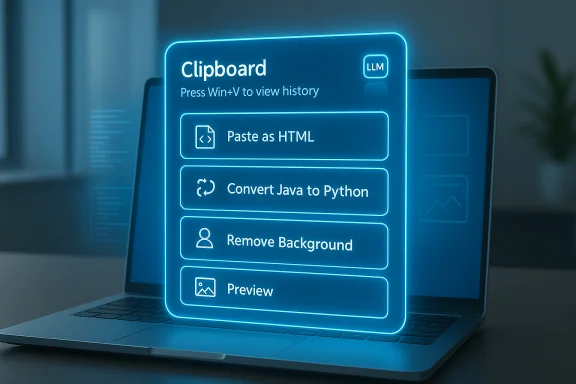
Microsoft has filed patent applications describing a feature set that effectively turns copy-and-paste into an Advanced Paste experience: after copying content to the clipboard, the user would be presented with conversion options powered by a large language model (LLM). The patents describe converting text between markup languages, transforming code between programming languages, generating HTML or JSON from plain text, and even applying image transformations (for example, removing backgrounds) before pasting. This advanced clipboard concept routes user prompts and conversion tasks either to a remote LLM or to a local model running on the device, and allows previews and batch pastes of converted items. The core technical description appears in published patent applications under Microsoft Technology Licensing, LLC describing “systems and methods for advanced copy-and-paste” and a related “content management tool for capturing and generatively transforming content items.” At the same time, Microsoft’s broader investments in on-device AI and recent tooling—most notably PowerToys’ Advanced Paste experiments and on-device model routing—show the company is already moving from patents to prototypes in adjacent areas. Recent reporting and updates to Advanced Paste indicate Microsoft is enabling on-device AI options and multiple model integrations, which aligns technically with the patent’s local-versus-cloud model routing. This article explains what the patent filings actually say, how such a Clipboard+Copilot integration would behave in practice, why it could be genuinely useful, and the practical, privacy, and deployment risks organizations and users will need to plan for. It includes a measured look at hardware gating, enterprise governance, user experience, and the realistic timeframe and caveats—patents don’t equal products.What the patents describe — a plain-English read
Key capabilities described
- A clipboard UI that surfaces predefined conversion functions relevant to the copied item (text, code, HTML, images). These are suggested automatically based on the clipboard content type.
- A text prompt box inside the advanced paste UI that lets the user request custom transformations—e.g., “convert this Java snippet to Python and highlight syntax like VS.” The user’s prompt and the clipboard payload are sent to an LLM which returns a transformed item for pasting.
- Hybrid execution: the LLM can either recommend a sequence of built-in conversion functions (which run locally on the device) or produce the conversion directly. The system may therefore combine cloud LLM intelligence (for understanding the intent) with local deterministic conversion functions (for execution).
- Generative transformations for non-text items: the related patent applications discuss generatively transforming content items (translate, correct, adapt, revise) using multimodal models—meaning images could be recropped, backgrounds removed, or otherwise modified prior to paste.
- Preview and multi-item paste: the UI can show previews of candidate transformations, offer multiple conversion options to pick from, and paste multiple items in sequence.
How it would fit into Windows today
The patents specifically target system-level clipboard workflows—i.e., Win+V—and describe the whole flow from copy to conversion to paste without requiring the user to open a separate Copilot window. In other words, rather than launching Copilot or another app, the clipboard itself becomes the transformation hub. That lowers friction and echoes existing productivity use-cases where people already rely on Copilot or external tools to reformat text, craft HTML, or convert CSV to tables.Why this is potentially a big deal for real users
1) Removes a repetitive friction point in everyday workflows
Power users, writers, reviewers, and developers do a lot of copy‑and‑paste formatting work. Turning the clipboard into a transformation layer could save steps—no need to open an editor, run a web tool, or switch to Copilot just to reformat a snippet. For journalists and reviewers who often take press-release spec sheets and convert them into tables or HTML, the clipboard-as-transformer is an immediately practical gain.2) Fast formatting without hallucination risk (when designed right)
The patents lean on a hybrid design: use an LLM to choose the right conversion function(s), then run deterministic, local functions to perform the conversion. This reduces hallucination risks because the final output can be produced by trusted local code once the intent has been parsed. That’s a sound design for reliability—LLMs are good at intent-understanding, while local functions are better at guaranteed format correctness.3) Better image handling for non-designers
Removing photo backgrounds, resizing, converting to sticker-ready images, or generating web-optimized PNG/JPEG variants right from the clipboard would remove several steps for non-graphic users. The patent’s generative transform hooks support those workflows in principle.How it would work in practice — a step-by-step user flow
- Copy content (text, code, image) — Win+C or Ctrl+C as usual.
- Press Win+V (or open Clipboard) and see the advanced paste UI.
- The UI shows a contextual list: “Paste as table,” “Paste as HTML,” “Convert Java → Python,” “Remove image background,” etc.
- Optionally type a prompt like “make these bullet points” or “convert table to HTML with <thead>.”
- The system runs a hybrid flow: it either selects and runs local conversion functions, or routes the request to an LLM which returns instructions or the transformed content.
- Preview transformed options, pick one, and paste. Multiple clipboard items can be converted and pasted together.
The technical and deployment realities to verify now
- Local vs cloud LLM: the patents explicitly describe both cloud and local model options—meaning Microsoft contemplates routing tasks to a cloud LLM or a model running on the device. That’s important because it dictates privacy, latency, and whether an NPU is useful.
- On-device inference: Microsoft and other teams are actively working on on-device options for clipboard transformations and Advanced Paste tooling—PowerToys is already experimenting with model routing and local inference in recent builds. That suggests Microsoft is testing the local branch of the patent in tooling outside the OS proper.
- Hardware gating: some advanced on-device AI features require an NPU or Copilot+ class hardware to achieve acceptable latency and privacy benefits. The patent doesn’t force an NPU requirement, but Microsoft’s productization decisions (and PowerToys’ on-device options) indicate certain features may be best when local accelerators are present. This is still an open question for the final product.
Strengths: where Microsoft could actually deliver something useful
- Low-friction utility: putting conversion tools in the clipboard meets users where they already are. People copy things a lot; giving them useful transformations at paste time is elegantly simple.
- Hybrid architecture minimizes hallucination: using an LLM to choose or configure deterministic converters reduces risk compared to asking an LLM to generate final, unvalidated formatting every time. That hybrid approach is spelled out in the patents and is a pragmatic engineering choice.
- Privacy options: hybrid routing enables an explicit privacy model—users can opt for local inference (keep data on device) or cloud LLMs (more capable but sent off‑device), which is consistent with Microsoft’s broader on-device AI work. PowerToys’ Advanced Paste already includes a model selection menu in recent updates, reinforcing that design path.
- Developer productivity: converting code between languages or exporting code snippets ready for StackOverflow/MD with syntax highlighting would be a boon for developers and documentation writers.
Risks, trade-offs, and governance issues
Privacy and data flow
Any time the clipboard becomes a system pathway to an LLM, default data movement must be transparent. Clipboard content is often sensitive—passwords, snippets of private documents, personal data—so the UI and default settings matter hugely. The ability to run models locally is a positive, but cloud fallbacks or defaults could expose content if a user isn’t careful.Enterprise compliance and DLP
Organizations already apply data loss prevention (DLP) rules to clipboard operations and app copy/paste flows. An AI‑powered clipboard that routes to cloud models could complicate compliance unless Microsoft provides strong enterprise controls: mandatory on‑prem model routing, explicit deny-lists, per-app policies, and clear audit logs.Hallucinations and trust
Patents show Microsoft expects LLMs to play a role in choosing conversions; however, if the system ever relies on generated content without deterministic conversion functions, hallucinations could slip into pasted content. The impact is different based on the content type—formatting errors are fixable, but hallucinated code behavior or contract text would be serious.Forced AI fatigue and user experience backlash
There’s already user fatigue with forced AI integrations in Windows and Office, and Microsoft’s Copilot branding has been controversial when features are aggressively pushed into workflows without clear opt-outs. Users have objected to unrequested AI overlays and rebrands; the clipboard must remain optional and non-intrusive to avoid repeat backlash. Community sentiment and critique of AI-first UI moves have been visible across forum conversations.Complexity and hardware fragmentation
If Microsoft gates top-tier local experiences behind Copilot+ hardware or NPUs, it risks fragmenting the user base. That has worked in other markets (e.g., smartphone experiences tied to certain silicon) but is tougher on Windows because of the immense variety of hardware in the ecosystem. PowerToys’ recent addition of model selection and local routing shows Microsoft is aware of this and is experimenting with off-device options as well.Deployment scenarios and productization choices Microsoft could make
Conservative enterprise-first rollout
- Default: disabled for enterprise-managed devices; admins opt-in.
- Local-first: enterprise images include a vetted on‑device model or server-side private LLM in Azure.
- Auditability: features emit DLP logs and preserve chain-of-custody for pasted content.
Consumer-focused, opt-in enhancement
- Default: basic conversion suggestions (tables, lists) that run locally.
- Cloud-only for advanced or creative transformations unless the user explicitly allows on-device models.
- Simple privacy toggles and transparent prompts when data is sent to cloud models.
Power‑user mode (deep integration with Copilot pro features)
- Deeper Copilot integration that requires a Microsoft account, Copilot subscription tier, or Copilot+ hardware for low-latency local inference.
- More advanced generative transforms (image edits, complex code reformatting) behind paywalls or hardware gates.
What we can verify today (and what’s still uncertain)
Verified:- Published patent applications from Microsoft describe advanced copy-and-paste features using LLMs, conversion functions, and both local and cloud model routing.
- Microsoft’s tooling experiments (PowerToys Advanced Paste) now include on-device model options and multi-model integrations—showing movement from patent to prototype in tooling.
- Whether the patent will become an OS shipping feature, what timeline Microsoft would choose, or which features will be included in an initial release. Patents are a legal protection and planning tool, not a launch guarantee.
- Specific hardware gating or subscription constraints for the final experience. The patent permits both local and cloud execution but doesn’t define product licensing or hardware requirements.
- Whether Microsoft will ship the full multimodal image-editing set of transformations described in the patent, or just a subset focused on text and simple image ops.
How users and IT teams should prepare
- Review clipboard DLP and endpoint governance: make sure your policies cover system-level transformations and have explicit rules about what can be sent off-device or to third-party models.
- Start testing PowerToys Advanced Paste and the model routing options today in controlled environments; that’s a practical way to evaluate on-device inference and discover likely workflows.
- Prepare training and UX guidance: if the advanced clipboard arrives, users will need clear guidance on privacy toggles, prompt design for the clipboard input box, and when to prefer local vs cloud routes.
- Monitor Microsoft’s enterprise feature documentation and Windows Insider releases: Microsoft typically surfaces large UX experiments in Insider builds first, and that will be the earliest reliable signal of product intent.
A reality check on Copilot and Microsoft’s AI narrative
Microsoft has invested heavily in Copilot across Windows and Microsoft 365, but adoption and sentiment have been mixed—power users appreciate some Copilot functions (formatting, summarization), while many users resent forced or intrusive AI features. The advanced clipboard idea is an example of where Copilot can help in narrow, useful ways without overreaching into people’s workflows; if done right, it's an example of AI augmentation rather than replacement. Forum threads and coverage of Copilot show both enthusiasm for helpful automation and frustration with productization choices and rebranding.From a business perspective, Microsoft must balance:
- Demonstrating tangible AI feature adoption (investor-facing metrics).
- Avoiding the alienation of users who dislike pervasive AI experiences.
- Ensuring enterprise customers don’t see AI as an uncontrolled data exfiltration vector.
Bottom line
The patents for an Advanced Paste clipboard powered by Copilot-style LLM decision-making are real, and Microsoft is already experimenting with parts of this vision in PowerToys and other tooling. That combination—patent + prototype—makes the clipboard integration plausible and potentially valuable. The biggest questions are not technical feasibility but product design around privacy defaults, enterprise governance, and hardware gating.If Microsoft ships a clipboard that lets you convert code, format data, and do quick image edits without leaving the Win+V workflow—and offers clear privacy controls and enterprise management—this will be one of the few forced-AI integrations that actually helps users in a visible, daily way. If it ships without sensible defaults or enterprise controls, it risks reproducing the same backlash that followed some earlier Copilot rollouts.
For now, the smartest immediate steps are to try Microsoft’s Advanced Paste experiments (PowerToys) where available, audit clipboard DLP policies, and watch Windows Insider channels for early builds that surface these clipboard features in a user-facing form. The patents show a direction; the real test will be the first build that puts Advanced Paste in front of real users and administrators.
Conclusion
A Copilot-powered Clipboard isn’t just another AI gimmick on paper; it represents a pragmatic, low-friction way AI can augment everyday Windows tasks. The patent applications and PowerToys experiments indicate Microsoft is serious about making copy-and-paste smarter. The key determinants of success will be how Microsoft implements privacy, governance, and hardware choices—those decisions will determine whether this becomes a quietly transformative productivity improvement or another source of user and IT frustration.
Source: Windows Central https://www.windowscentral.com/micr...ade-for-one-of-the-best-modern-windows-tools/
