

Microsoft’s latest push to make “agentic” AI an everyday productivity layer is no longer rhetoric — it’s a coordinated product, identity and governance play that stitches Copilot into Office, Edge, and enterprise tooling while giving IT teams the controls to manage fleets of AI agents at scale.
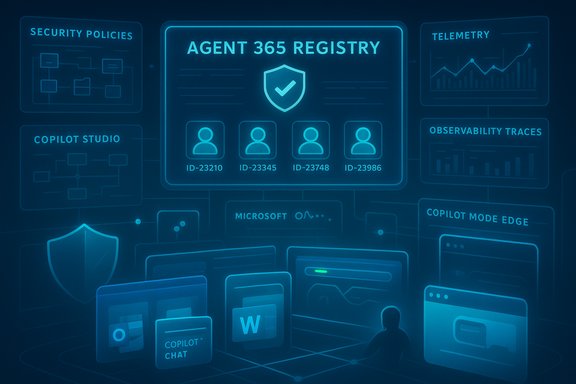
At Microsoft Ignite and in a series of product posts this year, the company moved beyond single-purpose copilots and into a platform view: Copilot Studio for building agents, Agent 365 as the management and governance control plane, Microsoft Entra Agent ID for agent identities, and expanded Copilot experiences inside Outlook, Word, Excel, PowerPoint, Microsoft Edge and a new Copilot Business tier aimed at small and mid-sized organizations. These announcements emphasize tenant-aware agents, richer in-app automation (Agent Mode), and enterprise-grade identity and observability for agents. Taken together, these moves mark a deliberate shift: Copilot is being positioned as not just a feature, but the primary interface for productivity and automation across Microsoft 365 — and Microsoft is packaging the administrative tools required to do that safely in enterprise environments.
The upside is real: time savings, faster analysis and fewer repetitive tasks for knowledge workers. The caveat is equally real: governance, observability, and rigorous configuration are not optional. Agents with identities can be audited, but only if organizations treat agent lifecycle and policy enforcement as first‑class operational responsibilities.
For IT leaders, the immediate task is pragmatic: pilot in low‑risk scenarios, enforce identity and least‑privilege, and validate outputs before widening responsibility. For everyday users and SMBs, Copilot Business and in‑app Copilot features promise accessible productivity gains — but expect to confirm licensing, rollout timing and tenant-level defaults with Microsoft as the ecosystem continues to evolve.
Source: CX Today Microsoft Expands Copilot For Widespread Productivity
 Background / Overview
At Microsoft Ignite and in a series of product posts this year, the company moved beyond single-purpose copilots and into a platform view: Copilot Studio for building agents, Agent 365 as the management and governance control plane, Microsoft Entra Agent ID for agent identities, and expanded Copilot experiences inside Outlook, Word, Excel, PowerPoint, Microsoft Edge and a new Copilot Business tier aimed at small and mid-sized organizations. These announcements emphasize tenant-aware agents, richer in-app automation (Agent Mode), and enterprise-grade identity and observability for agents. Taken together, these moves mark a deliberate shift: Copilot is being positioned as not just a feature, but the primary interface for productivity and automation across Microsoft 365 — and Microsoft is packaging the administrative tools required to do that safely in enterprise environments.What Microsoft announced (quick summary)
- Copilot embedded more deeply inside Office apps — in‑app Copilot Chat and Agent Mode that can generate and iterate documents, spreadsheets and slides using context from the open file.
- Copilot Studio: a low-code/no-code hub for designing, tuning and deploying agents that can connect to Microsoft and external systems via connectors and APIs. Agents created here receive a Microsoft Entra Agent ID by default.
- Agent 365: a control plane and inventory for agent governance — discovery, lifecycle, access control, observability and policy enforcement for agents.
- Copilot Mode in Microsoft Edge: a browser mode that summarizes and reasons across open tabs, and — where permitted — can take multi‑step actions on approved sites (Agent Mode for Edge). Users must opt in for the browser to access context.
- Copilot Business: a lower‑friction, SMB-targeted Copilot offering intended to deliver tenant-aware AI without the scale and complexity of enterprise Copilot seats; pricing and availability details were clarified at Ignite and in product announcements.
Deep dive: Copilot inside Microsoft 365 apps
Outlook, Word, PowerPoint, Excel — what’s changing
Microsoft’s strategy is to bring Copilot as a contextual assistant into the apps where people do their work rather than leave it as a separate product.- Outlook: priority triage, summarization and action drafting. Copilot can surface urgent messages, summarize long threads and assemble context-relevant material for quick replies. This lowers time-to-action for high-volume mailboxes.
- Word: drafting, refinement and expansion. Copilot can convert notes into longer-form deliverables, offer tone and structure suggestions, and summarize long documents — useful for meeting prep and report generation.
- PowerPoint: ideation-to-deck workflows. Copilot Pages and Copilot Chat can now be converted to slides so ideas generated in a canvas become editable presentation artifacts with layout and speaker notes suggestions.
- Excel: explainability for data. Copilot can summarize data tables, detect trends, and generate narrative explanations or charts, accelerating analysis handoffs. Some Excel capabilities now let users run Python or use model-assisted insights.
Copilot Studio — the agent factory
What Copilot Studio provides
Copilot Studio is positioned as the hub where teams can build, tune and deploy agents that operate inside Microsoft 365 and beyond. It includes:- Low-code tooling to create agents and agent flows for repeatable business processes.
- Connectors to Microsoft Graph, Dataverse, SharePoint, external APIs and third‑party systems so agents can act on real organizational data.
- Security integrations such as Microsoft Purview Information Protection and Defender for real‑time protection and prompt‑injection mitigation.
Entra Agent ID — treating agents like users
A critical new capability is Microsoft Entra Agent ID: agents created in Copilot Studio (and related tooling) are given managed identities, letting Azure/Microsoft identity controls (conditional access, lifecycle, governance) be applied to agents the same way they are for human users. This creates a foundational guardrail for authentication, least‑privilege assignment, and lifecycle governance for agent identities. This identity-first approach is significant: it reduces the “shadow agent” problem (agents running without clear ownership or governance) by providing a discoverable, auditable identity for every enterprise agent.Agent 365 — governance, observability and the control plane
Agent 365 is Microsoft’s management layer for an organization’s agent fleet. Major capabilities include:- A centralized registry and inventory of agents — including Entra Agent IDs and “shadow agents” discovered via telemetry.
- Access controls and policy enforcement: conditional access and least-privilege policies can be applied to agents the same way they are to users.
- Observability and auditing: traceable tool calls, telemetry for auditing and the ability to reconstruct agent actions for compliance and dispute resolution.
Copilot Mode in Microsoft Edge — browser as a research/workbench
Copilot Mode transforms Edge into a more agentic browsing environment:- It can analyze open tabs and summarize content, reducing friction from tab switching and allowing users to synthesize information from multiple sources rapidly.
- Agent Mode in Edge can, with appropriate admin opt-in and site allowances, perform multi‑step tasks on approved websites and provide visual cues and oversight prompts at critical junctions. A Microsoft 365 Copilot license may be required for certain agentic actions.
Copilot Business — SMB-focused Copilot
Recognizing differing needs and compliance requirements, Microsoft introduced Copilot Business as a tiered offering for organizations with fewer seats and simpler compliance needs. It is intended to give smaller businesses access to Copilot-driven summarization, email assistance and presentation generation without the full administrative complexity of enterprise Copilot seats. Pricing signals communicated at Microsoft events indicate a lower‑cost SMB tier distinct from enterprise pricing, with some previews suggesting price points in the low‑twenties per user per month for certain SMB plans. The value proposition for SMBs is straightforward: less setup, lower cost, and many of the same productivity gains, while large enterprises use the richer governance stack (Agent 365, Entra Agent ID, Purview integration) to maintain compliance.Security, compliance and governance — what IT teams must know
Built‑in identity and lifecycle controls
- Agents now have managed identities (Entra Agent ID), which enables conditional access, identity governance, and lifecycle management for agents — a deliberate move to treat agents as first‑class identities. This is central to preventing over‑permissioned or orphaned agents.
Observability for audit and compliance
- The Agent 365 model prioritizes telemetry and traceability so organizations can reconstruct agent decisions, detect drift or policy violations, and present evidence for audits. That functionality is essential for regulated verticals (finance, healthcare, public sector).
Data protection layers
- Copilot Studio’s integration with Microsoft Purview, Defender and tenant-level connectors aims to reduce data leakage by enabling classification and protection for data accessed by agents. However, the practical efficacy depends heavily on correct configuration of connectors, policies and admin defaults.
Practical implications for IT administrators
- Inventory and discovery: run discovery scans and enroll existing agents into Agent 365 so nothing runs unnoticed. Agent 365’s registry is intended to surface both sanctioned and shadow agents.
- Apply least‑privilege by default: use Entra Agent ID and conditional access policies to limit resource scope for agents and require sponsor approvals for high‑sensitivity access.
- Establish observability and retention policies: ensure tool‑call traces and agent logs are retained in a manner compliant with corporate and regulatory requirements.
- Pilot agentic workflows in low‑risk areas first: automate meeting recaps, inbox summarization and internal report drafting before delegating tasks that change customer data or financial records.
Strengths and business benefits
- Rapid productivity gains: contextual Copilot features reduce drafting and triage time across Outlook, Word, PowerPoint and Excel, freeing knowledge workers for higher‑value tasks.
- Platform coherence: Copilot Studio + Agent 365 + Entra Agent ID forms a coherent stack for creating, governing and operating agents — reducing fragmentation compared to ad hoc agent deployments.
- Enterprise-ready governance: identity, observability and policy controls are baked into the vision, which matters for compliance-sensitive industries.
- SMB accessibility: Copilot Business lowers barriers for small companies to access tenant-aware AI without enterprise complexity.
Risks, open questions and cautionary points
- Dependency on correct configuration: the security promise is only as strong as tenant configuration. Misconfigured connectors, overly permissive agent roles, or lax retention policies will quickly undermine governance. Admins must treat agent governance as an ongoing operational discipline, not a one‑time setup.
- Model and output verification: generative outputs still require human review for legal, financial, and customer‑facing use cases. Claims about "automating end‑to‑end tasks" are powerful, but will require rigorous testing and rollback plans before replacing human workflows. Coverage of early deployments suggests Microsoft is aware of this and is shipping observability and auditing tools, but organizations will need QA and validation processes.
- Shadow agent sprawl beyond Microsoft boundaries: while Agent 365 promises discovery, many organizations already run external LLM-based automations; integrating non‑Microsoft agents into a single governance model remains operationally difficult and may require bespoke connectors or manual processes.
- Licensing and cost complexity: Microsoft is simplifying some bundles but also introducing new tiers. Organizations must map Copilot features to business needs and understand when tenant‑aware paid Copilot seats are necessary versus the more lightweight Copilot Chat experiences. Some pricing details (SMB plans and new bundles) were signaled but may continue to change. Treat pricing referenced in early coverage as indicative and verify at purchase time.
Verification and the sources behind key claims
- The Copilot Studio and Microsoft Entra Agent ID details are described in Microsoft product blogs and official documentation: Copilot Studio posts and Microsoft Learn detail Entra Agent ID’s public‑preview capabilities and identity governance for agents. These are primary sources for the identity and agent lifecycle claims.
- Agent 365’s control plane characterization is reflected in Microsoft’s Agent 365 product pages and in independent reporting that analyzes how it helps tackle agent sprawl. Those pages explain the registry, agent store, and lifecycle management capabilities.
- Copilot Mode in Edge and its tab‑summarization and agentic browsing features have been covered in Microsoft’s Ignite Book of News and by independent outlets reporting on the Edge feature set and visible opt‑in controls. These accounts align on the user‑consent model for context use.
- The extension of Copilot into in‑app Office experiences (Copilot Chat, Agent Mode and Copilot Pages) and the SMB Copilot Business tier has been detailed in Microsoft event materials and covered by trade press analysis — the messaging about staged rollouts, preview timing and pricing signals is consistent across Microsoft announcements and independent reporting. Nonetheless, specific rollout dates and pricing remain dynamic and should be validated at procurement.
Recommendations for Windows and Microsoft 365 administrators
- Start with a controlled pilot: pick two to three low‑risk processes (meeting recaps, inbox summarization, sales proposal drafting) and validate agent outputs and audit logs before wider rollout.
- Enforce Entra-based sponsorship: require every agent have an explicitly assigned owner and Entra Agent ID sponsorship so lifecycle responsibilities are clear.
- Harden connectors and classification: apply Purview classification to high‑sensitivity sources before exposing them to agents and enforce traffic inspection for agent outbound calls.
- Define a rollback and human‑in‑the‑loop policy: mandate human sign-off for any agent activity that modifies records, initiates transactions, or sends customer communications.
- Track costs and model choices: if your tenant allows model selection or higher‑capacity models, monitor consumption and budget against expected ROI; Copilot usage patterns can drive rapid increases in compute spend if not monitored.
Conclusion
Microsoft’s expansion of Copilot from helper features into a full agentic ecosystem is a major inflection point for enterprise productivity. By combining Copilot Studio, Entra Agent ID, and Agent 365 with richer in‑app Copilot experiences and browser‑level Copilot Mode, Microsoft is attempting to make agentic workflows both powerful and governable.The upside is real: time savings, faster analysis and fewer repetitive tasks for knowledge workers. The caveat is equally real: governance, observability, and rigorous configuration are not optional. Agents with identities can be audited, but only if organizations treat agent lifecycle and policy enforcement as first‑class operational responsibilities.
For IT leaders, the immediate task is pragmatic: pilot in low‑risk scenarios, enforce identity and least‑privilege, and validate outputs before widening responsibility. For everyday users and SMBs, Copilot Business and in‑app Copilot features promise accessible productivity gains — but expect to confirm licensing, rollout timing and tenant-level defaults with Microsoft as the ecosystem continues to evolve.
Source: CX Today Microsoft Expands Copilot For Widespread Productivity
