

Microsoft’s Copilot just got a face — and a personality — with the introduction of Mico, a shape-shifting avatar designed to make voice interactions feel more expressive, empathetic, and, intentionally or not, a little nostalgic. Announced by Microsoft as part of a broad Copilot update on October 23, 2025, Mico is billed as an optional, real-time visual companion that reacts to voice tone, mirrors emotional cues, and offers new conversational behaviors — from gentle pushback to collaborative group sessions — that aim to reposition Copilot from a tool into a social-style assistant for Windows, Edge, and mobile platforms.
Microsoft has iterated on digital assistants for decades, from the early novelty of Clippy and Microsoft Bob to Cortana and the text-driven Copilot integrations that proliferated across Windows and Microsoft 365. The October 23, 2025 Copilot update accelerates that lineage into a deliberately “human-centered” direction by pairing advanced natural language models, long-term memory controls, and an expressive visual front-end called Mico.
This update arrives alongside broader functional improvements — group Copilot sessions, deeper web and third-party integrations, a “Real Talk” conversational mode that resists sycophantic agreement, and enhanced handling of health-related queries. Microsoft positioned these changes as a unifying push to make Copilot more collaborative, more personal, and more useful across both individual and group workflows.
Yet the brand risk is real. Clippy’s failure was partly due to poor timing and the mismatch between the assistant’s proactivity and users’ tolerance for interruption. Microsoft’s playbook with Mico appears more cautious: optional avatar, voice-centric mode, and a heavier emphasis on user controls.
If executed well, Mico could become the poster child for "companion design" — a friendly visual anchor that improves comprehension and engagement without overstepping. If executed poorly, it will be remembered as a modern Clippy: an anthropomorphic feature that annoyed users more than it helped.
At the same time, Mico’s introduction forces the industry to confront uncomfortable questions about the ethics of emotionalized AI: who benefits when machines look supportive, and how can designers prevent those appearances from becoming manipulative? The outcomes of Microsoft’s design choices will influence regulation, user expectations, and competitor strategies across the tech landscape.
The design’s strengths — improved engagement, contextual continuity, and new collaborative models — are compelling. Equally real are the risks: emotional manipulation, privacy concentration, accessibility costs, and the brand hazard of repeating the Clippy saga.
The balance Microsoft strikes between novelty and restraint will determine whether Mico becomes a beloved interface or a cautionary tale. For users and IT professionals, the immediate priority is not whether Mico is cute or clever, but how the underlying features are governed, how defaults are set, and how transparently control is offered to the people who ultimately must live with a conversational companion on their screens.
Mico is not just a new avatar; it’s a test case for the next generation of assistant design — one where emotional expression, memory, and action converge. The promise is compelling: a Copilot that remembers and responds with nuance. The obligation is nontrivial: to build that companion without trading away privacy, clarity, or user agency.
Source: DesignTAXI Community Microsoft introduces 'Mico' Copilot assistant as the Clippy of today, and it even mirrors your emotions
 Background
Microsoft has iterated on digital assistants for decades, from the early novelty of Clippy and Microsoft Bob to Cortana and the text-driven Copilot integrations that proliferated across Windows and Microsoft 365. The October 23, 2025 Copilot update accelerates that lineage into a deliberately “human-centered” direction by pairing advanced natural language models, long-term memory controls, and an expressive visual front-end called Mico.This update arrives alongside broader functional improvements — group Copilot sessions, deeper web and third-party integrations, a “Real Talk” conversational mode that resists sycophantic agreement, and enhanced handling of health-related queries. Microsoft positioned these changes as a unifying push to make Copilot more collaborative, more personal, and more useful across both individual and group workflows.
Overview: What Mico Is — and What It Isn’t
The simple promise
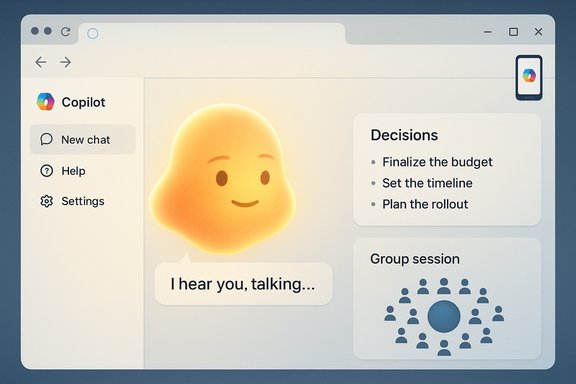
- Mico is a visual, animated avatar for Copilot’s voice mode. It’s a floating character that changes color, shape, and facial expression in real time to reflect the tone and content of the conversation.
- Mico responds emotionally, brightening or showing warmth for positive input and adopting subdued expressions for more serious or sad topics. The aim is to create the feel of conversational reciprocity.
- Mico is optional. Users can toggle it off if they prefer a minimal interface or if they have accessibility or privacy concerns.
The technical framing
Microsoft’s rollout pairs Mico with three major Copilot enhancements:- Voice-first interactions with more natural turn-taking, expressive responses, and a visual anchor for spoken exchanges.
- Long-term memory and personalization that allow Copilot to retain user context, preferences, and calendar or contact details (subject to user controls).
- New conversational modes (including “Real Talk”) and group sessions that let Copilot participate in multi-person discussions and summarize or manage tasks collaboratively.
Where Mico is available
At launch, Mico is enabled by default in Copilot’s voice mode in the United States, with staged international expansion planned thereafter. The character appears primarily in voice interactions and in the Copilot interface within Windows 11, Microsoft Edge, and the Copilot mobile app.Design and Interaction: The New Face of Copilot
A deliberately familiar aesthetic
Mico’s design intentionally echoes older digital characters — soft, animated, and slightly cartoony — but it is built for present-day AI capabilities. The visual language is minimalist: a floating, amorphous figure whose color, luminance, and micro-expressions change in response to the user’s voice and the assistant’s internal state.- Expressive cues: Mico uses subtle facial changes and color shifts to convey attention, empathy, surprise, and playfulness.
- Animation timing: Reactions are designed to be immediate but not uncanny, with animations respecting conversational pacing and not interrupting the user.
- Customization: Users can choose from variations or disable Mico entirely.
Emotional mirroring — helpful or hazardous?
Mico’s emotional mirroring is a core selling point. When a voice sounds frustrated, Mico will adopt a subdued expression; when a voice is lighter or celebratory, Mico brightens. This design aims to:- Make the assistant feel more present and attentive.
- Help people interpret Copilot’s state during multi-turn conversations (e.g., processing, thinking, uncertain).
- Build rapport that encourages continued engagement and longer, more productive interactions.
New Features Rolled Into the Update
1. Groups: collaborative Copilot sessions
Copilot now supports group sessions where multiple participants can join a live conversation with the assistant. Highlights include:- Up to 32 participants in a single session.
- The assistant can summarize discussions, highlight decisions, suggest next steps, and assign action items.
- Sessions can be used for family planning, study groups, team brainstorming, or community organizing.
2. Real Talk: a mode that pushes back
A notable behavioral change is a conversational setting Microsoft calls Real Talk. It aims to:- Allow Copilot to challenge misconceptions, question assumptions, and avoid parroting user inputs blindly.
- Encourage critical thinking by offering alternative viewpoints or asking clarifying questions.
- Reduce the risk of confirmation bias when users seek simple validation rather than nuanced answers.
3. Memory and personalization
Long-term memory is now a first-class Copilot feature:- Copilot can remember and recall personal details like preferences, recurrent tasks, or family birthdays.
- Memory is user-manageable: stored items can be viewed, edited, or deleted in settings.
- Shared memory via connectors allows Copilot to access information across platforms (e.g., OneDrive, Outlook, Gmail, Google Drive) when users grant permission.
4. Health and “grounded” information
Given that many users ask health-related questions, Microsoft added health-specific safeguards:- Copilot is designed to ground medical or health advice in credible clinical sources and to provide signposts for professional help.
- Features can suggest nearby clinicians based on shared insurance or local data when users consent.
5. Edge and Journeys improvements
Copilot’s integration into Microsoft Edge expands with features such as:- Tab reasoning and summarization that parse complex browsing sessions.
- Journeys, which convert past searches into coherent storylines and suggest next steps for ongoing research or planning.
- Closer integration with third-party services to allow Copilot to act or book on users’ behalf (with permissions).
Strengths: Where Mico and the Copilot Update Shine
1. Higher engagement through expressive UI
Mico’s visual presence addresses a long-standing problem with voice assistants: the lack of a continuously visible anchor that signals attention and intent. A reactive avatar can reduce ambiguity in turn-taking and make voice interactions feel less abrupt or robotic.2. Better context via memory and connectors
Long-term memory and cross-service connectors reduce repetition and provide continuity across sessions. Users who repeatedly explain the same context will appreciate an assistant that can remember preferences and past choices.3. Group and collaborative use cases
Supporting multi-user sessions opens Copilot to new use cases: group planning, community discussions, and hybrid meetings. If Copilot can reliably summarize and action items, it becomes a force multiplier for distributed teams.4. Safer, evidence-grounded health assistance
The explicit effort to ground health information and provide professional referrals helps mitigate one of the most dangerous failure modes of general-purpose models — hallucinating medical advice.5. Opt-in personalization and accessibility options
Making Mico optional and providing toggles for memory or voice features addresses a range of user preferences, from privacy-minded individuals to neurodiverse users who may find expressive avatars distracting.Risks and Trade-offs: Privacy, Persuasion, and the Psychology of Companions
1. Emotional design can manipulate trust
An avatar that mirrors empathy will be more persuasive. The risk: users may conflate emotional expression with understanding or correctness. This can increase susceptibility to incorrect recommendations or social engineering.- Recommendation: Design guardrails to prevent the avatar from implying it has feelings or moral authority. Clarity about the avatar’s representational function should be visible and persistent.
2. Data centralization and memory controls
Long-term memory and cross-service connectors are powerful but concentrate sensitive data. Even with user controls, the presence of integrated memory raises questions about data residency, retention policies, and potential misuse.- Recommendation: Offer fine-grained memory controls with transparent logs, short retention defaults, and clear export/deletion workflows.
3. Default-on in voice mode is friction-prone
Mico appears by default in Copilot’s voice mode in initial markets. For casual or public environments, a visible and reactive avatar may feel intrusive. The default-on setting could drive negative reactions and mistrust.- Recommendation: Consider conservative defaults — voice mode enabled but avatar off — and provide easily discoverable quick-disable options.
4. Accessibility and cognitive load
Animated avatars introduce extra cognitive elements for people with sensory or attention differences. Motion, color changes, and micro-expressions can be distracting or disorienting if not carefully controlled.- Recommendation: Provide motion-reduction modes, high-contrast themes, and consistent behavior patterns that adapt to accessibility preferences.
5. Internationalization and cultural misreads
Emotional signals are culturally specific. Color and expression cues that feel supportive in one region can be misinterpreted elsewhere. Since Mico launches first in the U.S., Microsoft must invest in culturally-aware designs for global rollout.- Recommendation: Test avatar expressions with diverse user groups and localize both appearance and default behavior by region.
The Clippy Question: Nostalgia, Branding, and Acceptance
Mico inevitably invites comparison to Clippy, Microsoft’s famously intrusive paperclip assistant from the 1990s. The difference today is not nostalgia alone — it’s capability. Where Clippy offered scripted suggestions, Mico is backed by real-time language models, contextual memory, and cross-platform integrations.Yet the brand risk is real. Clippy’s failure was partly due to poor timing and the mismatch between the assistant’s proactivity and users’ tolerance for interruption. Microsoft’s playbook with Mico appears more cautious: optional avatar, voice-centric mode, and a heavier emphasis on user controls.
If executed well, Mico could become the poster child for "companion design" — a friendly visual anchor that improves comprehension and engagement without overstepping. If executed poorly, it will be remembered as a modern Clippy: an anthropomorphic feature that annoyed users more than it helped.
Practical Advice for Users and Administrators
For individual users
- Try Mico in controlled settings first. Explore voice mode at home before enabling it in public or shared offices.
- Audit memory settings. Turn on memory features selectively, and review stored items regularly.
- Use Real Talk cautiously. The mode can be useful to get a second opinion, but verify contentious or technical claims through independent sources.
For IT administrators and organizations
- Review default deployment controls. If Mico is enabled by default in corporate environments, evaluate the privacy and data-retention implications.
- Establish data governance policies. Define which connectors (email, calendars, drives) are allowed and document how Copilot memory will be managed.
- Educate employees. Provide guidance about appropriate Copilot use for sensitive tasks (e.g., HR, legal, health queries).
What This Means for the Future of Human-Computer Interaction
Mico represents a pivotal step in the evolution of digital assistants from functional tools to social interfaces. The vector Microsoft is pursuing blends voice, memory, and a visual anchor to create conversational continuity and a sense of presence. This design pattern — an emotionally responsive, memory-enabled assistant — could become a template for other platforms seeking to increase daily active use and retention.At the same time, Mico’s introduction forces the industry to confront uncomfortable questions about the ethics of emotionalized AI: who benefits when machines look supportive, and how can designers prevent those appearances from becoming manipulative? The outcomes of Microsoft’s design choices will influence regulation, user expectations, and competitor strategies across the tech landscape.
Final Assessment: Ambition Meets Responsibility
Mico is an ambitious, well-resourced attempt to make Copilot feel more human, useful, and persistent. The update’s combined focus on memory, group collaboration, healthcare grounding, and an expressive avatar demonstrates a serious investment in productizing AI assistance across consumer and enterprise touchpoints.The design’s strengths — improved engagement, contextual continuity, and new collaborative models — are compelling. Equally real are the risks: emotional manipulation, privacy concentration, accessibility costs, and the brand hazard of repeating the Clippy saga.
The balance Microsoft strikes between novelty and restraint will determine whether Mico becomes a beloved interface or a cautionary tale. For users and IT professionals, the immediate priority is not whether Mico is cute or clever, but how the underlying features are governed, how defaults are set, and how transparently control is offered to the people who ultimately must live with a conversational companion on their screens.
Mico is not just a new avatar; it’s a test case for the next generation of assistant design — one where emotional expression, memory, and action converge. The promise is compelling: a Copilot that remembers and responds with nuance. The obligation is nontrivial: to build that companion without trading away privacy, clarity, or user agency.
Source: DesignTAXI Community Microsoft introduces 'Mico' Copilot assistant as the Clippy of today, and it even mirrors your emotions
