

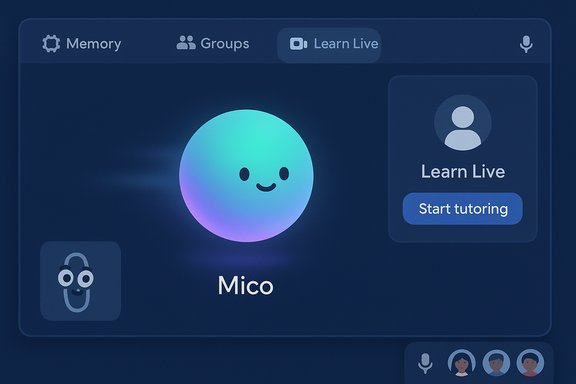
Microsoft’s decision to give Copilot a visible personality — a squishy, color-shifting avatar named Mico — turned a cautious product update into one of the most talked-about moves in consumer AI this fall. Announced as the centerpiece of Microsoft’s Copilot “Fall Release,” Mico is an optional animated face for Copilot Voice that reacts to tone, changes color and shape, offers simple tactile interactions, and even hides a nostalgic easter egg that briefly morphs it into Clippy. The feature is paired with a broader set of changes — long‑term memory, shared Copilot Groups, a “Real Talk” style that can push back, Learn Live tutoring flows, and deeper agentic capabilities in Edge — all of which together recast Copilot from a text box into a multimodal, voice‑first assistant.
Since Copilot first arrived, Microsoft’s strategy has been to embed AI across Windows, Microsoft 365, Edge and mobile apps, making the assistant feel like part of the OS rather than a separate service. The Fall Release is a deliberate next step in that roadmap: it pairs meaningful capability upgrades (memory, connectors, group sessions) with a new interaction layer — Mico — intended to make voice conversations feel less awkward and more social. Microsoft frames this as human‑centered AI designed to be helpful, supportive and personal. Mico is explicitly non‑photoreal and intentionally abstract: Microsoft calls it expressive, customizable and warm. The avatar appears primarily during Copilot’s voice mode and select learning or group flows, and it is toggleable so users can opt for a text‑only or voice‑only experience. Early reporting and hands‑on coverage place the initial rollout as U.S.‑first with staged expansion to other English‑speaking markets. However, regional availability language varies across outlets and Microsoft channels, so the exact country list and timelines remain partly provisional.
From a systems perspective, that raises operational considerations:
If Microsoft can stabilize the real‑time multimodal stack, provide rigorous grounding and citations for critical domains, and keep privacy controls transparent and usable, Mico could become a genuinely useful interaction layer for voice‑first tasks. If those things fail — if the avatar is buggy, the memory controls confusing, or the assistant’s empathetic cues misleading — Mico risks becoming a charming but ultimately disposable gimmick.
Source: MakeUseOf Microsoft added an AI pet to Copilot and it’s as weird as it sounds
 Background / Overview
Since Copilot first arrived, Microsoft’s strategy has been to embed AI across Windows, Microsoft 365, Edge and mobile apps, making the assistant feel like part of the OS rather than a separate service. The Fall Release is a deliberate next step in that roadmap: it pairs meaningful capability upgrades (memory, connectors, group sessions) with a new interaction layer — Mico — intended to make voice conversations feel less awkward and more social. Microsoft frames this as human‑centered AI designed to be helpful, supportive and personal. Mico is explicitly non‑photoreal and intentionally abstract: Microsoft calls it expressive, customizable and warm. The avatar appears primarily during Copilot’s voice mode and select learning or group flows, and it is toggleable so users can opt for a text‑only or voice‑only experience. Early reporting and hands‑on coverage place the initial rollout as U.S.‑first with staged expansion to other English‑speaking markets. However, regional availability language varies across outlets and Microsoft channels, so the exact country list and timelines remain partly provisional. What Mico Is — Design, Behavior, and Activation
A deliberately small, non‑human face
Mico is best described as a floating, animated blob — a small orb with a minimal face that shifts color, motion and expression to indicate conversational state: listening, thinking, acknowledging, or reacting emotionally to tone. The design deliberately avoids human likeness to reduce the uncanny valley and discourage emotional over‑attachment. That restraint is a clear lesson learned from Microsoft’s past UX experiments.How and where it appears
- Mico is enabled by default in Copilot’s voice mode on supported platforms but can be disabled in settings.
- It surfaces in voice dialogs, Learn Live tutoring sessions (where the avatar can help with Socratic-style learning), and some group Copilot experiences.
- The avatar supports cosmetic customization and multiple voice presets, letting users adjust tone, appearance and accents.
The Clippy easter egg
In a deliberate nod to Microsoft’s past, preview builds and hands‑on reporting captured a playful easter egg: repeatedly tapping Mico causes it to briefly morph into Clippy, the infamous Office assistant. Microsoft presents this as a nostalgic wink rather than a functional resurrection of the old interruptive model. Treat this behavior as a cosmetic preview feature that may be adjusted during rollout.Features Bundled with Mico — Why Microsoft Added Personality
Mico didn’t arrive alone. The avatar is framed as the visible anchor for a set of capabilities intended to make Copilot more persistent, collaborative and action‑capable:- Long‑term memory & personalization: Opt‑in memory stores let Copilot retain project context, preferences and recurring facts across sessions, with UIs to view, edit or delete stored items.
- Copilot Groups: Shared, link‑based sessions where up to around 32 participants can interact with the same Copilot instance for brainstorming, summarization, vote tallying and task splitting.
- Real Talk: A conversational style designed to challenge assumptions — pushing back respectfully rather than reflexively agreeing. This aims to reduce sycophancy in LLMs and produce more useful, safety‑oriented conversations.
- Learn Live: A voice‑first Socratic tutoring mode that scaffolds learning through iterative questioning and visuals — arguably the scenario where an avatar gives the most UX value.
- Edge agenting (Actions & Journeys): Permissioned, multi‑step browser behaviors that allow Copilot to act on users’ behalf (bookings, form fills) after explicit confirmation.
Hands‑On Reports and Early Critiques
Early media previews and hands‑on testing produced a mix of curiosity, skepticism and critique. Several outlets praised the thoughtfulness of the non‑human design and the breadth of capability coupling Mico with memory and group features. At the same time, reviewers flagged real UX and technical problems: animation stutter, voice distortion, and an interface that can feel weird or cringeworthy when the avatar attempts to be playful or human‑like. One consumer tech writer described the experience as “weird,” noting that Mico’s attempts to mimic natural speech cadence — filler words, laughing cues — can feel inauthentic and uncomfortable in sustained conversation. Those impressions echo a broader concern: giving AI a friendly face raises expectations and emotional responses that current models and engineering may not reliably meet.Usability and Accessibility Considerations
Mico’s designers included a few pragmatic controls aimed at mitigating historic pitfalls:- Scoped activation: Mico primarily appears in voice and learning flows, not as an always‑on desktop intruder.
- Opt‑out and toggle controls: Users can disable the avatar if they prefer a non‑visual interaction.
- Accessibility presets: Voice and text-only modes are supported, and multiple voice options are available to accommodate different listener needs.
Privacy, Safety and Regulatory Risks
Adding an expressive avatar to an AI assistant amplifies existing privacy and safety questions — and introduces new ones.Memory and data governance
Mico is tied to Copilot’s long‑term memory features, which mean the assistant can recall personal facts across sessions. Microsoft emphasizes opt‑in consent and a management UI for reviewing and deleting stored items, but retention of personal context inevitably raises risks around accidental disclosure, data portability and regulatory compliance across jurisdictions. Administrators and users must understand the connectors Copilot can use (Outlook, OneDrive, Gmail, Google Drive, Calendar) and how access is granted and audited.Emotional trust and vulnerable users
Designing for warmth invites emotional response. Even a deliberately non‑human avatar can foster perceived empathy. That’s risky in scenarios where users treat Copilot as a confidant for mental health, relationship advice or other sensitive topics. Microsoft positions Mico as a practice partner or creative collaborator, not a therapist — but marketing language does not stop users from placing undue trust in an AI’s responses. Companies should be explicit in UI disclaimers and safe‑routing flows (e.g., escalating to human help or citing trusted sources) when sensitive topics arise.Consumer protection and misinformation
Real Talk is meant to push back on bad premises, but the reliability of corrective behavior depends on grounding, retrieval accuracy and transparent reasoning. If pushback is incorrect, overstated, or insufficiently evidenced, it can mislead users. For regulated domains like health and legal advice, Copilot’s grounding mechanisms and citations must be robust and auditable. Microsoft has signaled vendor partnerships and source vetting for health flows, but real-world effectiveness will depend on implementation details and oversight.Regional variations and regulation
Microsoft’s staged rollout strategy — U.S. first, then additional markets — matters because privacy laws and consumer protection rules vary widely. In markets with stricter data residency or mental‑health regulations, regulators will likely scrutinize companion‑style AI features more closely. Microsoft’s published privacy statements were updated to clarify Copilot’s capabilities and user controls, but organizations should confirm how memory and connectors operate under local law.Technical Performance: Real‑Time Multimodal Demands
Mico’s visual animations and synchronized voice make Copilot sessions more demanding technically. Reviewers reported animation stutter and voice distortion during live tests, suggesting that the multimodal UI requires low latency and robust streaming between Microsoft’s servers and client apps. Where on‑device acceleration or Copilot+ NPU hardware is available, the UX will be smoother; on older hardware or flaky networks, the experience may degrade into laggy animations and broken lip sync.From a systems perspective, that raises operational considerations:
- Bandwidth and latency: Real‑time synthesis of voice, animation cues and retrieval calls requires consistent network quality.
- On‑device vs cloud split: Copilot may rely on local inference for wake‑word and partial processing where Copilot+ PCs exist, but heavier reasoning still falls back to cloud models.
- Update and rollback complexity: Adding UI layers multiplies the surface area for bugs, and Microsoft will need robust rollout and rollback processes to avoid widespread regressions.
Comparison: Mico, Clippy, Cortana and Modern AI Companions
Mico sits at the intersection of two design instincts: the urge to humanize technology to ease interaction, and the hard lessons of past anthropomorphic failures. Compared to earlier Microsoft assistants:- Clippy (late 1990s) was intrusive and context‑insensitive; Mico is scoped, opt‑out and deliberately non‑human.
- Cortana attempted to be a broad voice assistant but lacked consistent utility on the PC; Mico is tied to a richer Copilot stack and new capabilities that justify a visual anchor.
- External competitors (Google’s Gemini, OpenAI’s ChatGPT Voice, Apple’s Siri) have experimented with voices or limited avatars; Microsoft is differentiating by combining an expressive avatar with memory, group collaboration and agentic browser actions.
Enterprise and IT Implications
Although Mico and its companion features are rolled out as consumer features, the broader Copilot Fall Release carries implications for IT teams and administrators:- Governance and policy: Copilot’s memory, connectors and agentic features require policy controls. Admins will want to centrally manage Copilot access, connector permissions and whether the Copilot app is pinned or installed by default. Recent reporting indicates Microsoft may auto-install Copilot app components for personal users in some cases, which raises opt‑out and bloatware concerns.
- Data residency and processing: Microsoft has signaled increased options for in‑country processing for Copilot workloads; organizations in regulated industries should plan to verify processing locations and contractual commitments.
- Testing and compatibility: The added UI and agent capabilities will require test matrices for enterprise deployments, especially where Edge Actions interface with internal web apps. IT must validate that automation behaviors comply with corporate security controls and data‑handling policies.
What Microsoft Got Right — Strengths
- Design restraint: The avatar is intentionally non‑human, which reduces the risk of uncanny or emotionally manipulative interactions.
- Opt‑in controls: Scoped activation, toggle settings and memory management UIs give users agency over how expressive Copilot becomes.
- Feature synergy: Pairing Mico with memory, Real Talk and Learn Live creates cohesive use cases (tutoring, study groups, hands‑free workflows) where a visual anchor is legitimately helpful.
- Transparent nod to history: The Clippy easter egg is a playful recognition of past mistakes, signaling that Microsoft understands the cultural baggage of giving software a face.
What Still Worries Me — Risks and Open Questions
- Emotional misuse: Even a simple avatar can encourage users to confide in AI in ways that exceed the assistant’s competence, particularly around mental health or legal matters. Disclaimers and escalation paths must be explicit.
- Stability and performance: Early reports of animation stutter and voice distortion show the feature is resource‑intensive and may deliver a degraded experience on many devices. This undermines the goal of making voice interactions feel natural.
- Inconsistent regional availability: Messaging about which countries can use Mico and when has been inconsistent across outlets. Organizations and journalists should verify in‑app availability rather than rely solely on press summaries. Treat rollout details as provisional until Microsoft’s regional release notes are updated.
- Regulatory scrutiny: Companion‑style AI invites closer attention from regulators and consumer protection bodies, especially where persistent memory and advice overlap with health, finance or legal domains.
Practical Guidance for Windows Users and IT Pros
- Try Mico in a controlled way: If you’re curious, enable Mico only in scenarios where a visual cue helps (e.g., Learn Live tutoring or group sessions) rather than leaving it on by default.
- Review Memory settings: If Copilot remembers personal items, proactively audit the memory UI, remove items you don’t want stored, and understand which connectors are active.
- Test on target hardware: Evaluate Mico’s performance on representative devices and networks — particularly older laptops or low‑bandwidth environments — before recommending broad adoption.
- Set admin policies: Enterprises should map Copilot connectors and agent behaviors against internal security policies and configure tenant‑level controls as needed.
- Communicate scope to users: Make clear in internal documentation that Copilot (and Mico) is a tool, not a counselor; provide human contact routes for sensitive issues.
Verdict — Is Mico the Future of Copilot?
Mico is simultaneously a bold experiment and an astute design hedge. By making the avatar optional and tying it to concrete features like Learn Live and Groups, Microsoft avoided the worst of Clippy’s sins while testing whether visual cues can improve voice adoption on PCs. Early reactions are mixed: the novelty works, the design choices are sensible, but performance and the psychology of companionship remain hard problems.If Microsoft can stabilize the real‑time multimodal stack, provide rigorous grounding and citations for critical domains, and keep privacy controls transparent and usable, Mico could become a genuinely useful interaction layer for voice‑first tasks. If those things fail — if the avatar is buggy, the memory controls confusing, or the assistant’s empathetic cues misleading — Mico risks becoming a charming but ultimately disposable gimmick.
Conclusion
Mico turns a functional update into a cultural moment: Microsoft has deliberately put a face on its most consumer‑facing AI, inviting nostalgia, skepticism and debate. The avatar is designed to be a usability tool rather than a replacement for substantive features, and it ships alongside meaningful enhancements that could change how people collaborate, learn and use voice on Windows and mobile. But the most consequential questions are not about whether Mico is cute — they are about trust, safety and reliability. Rolling an expressive companion into mainstream computing will require engineering maturity, careful governance, and transparent guardrails. For now, Mico is an intriguing experiment — one that is worth watching closely, but not uncritically embracing, until the performance, privacy and safety seams are fully sewn up.Source: MakeUseOf Microsoft added an AI pet to Copilot and it’s as weird as it sounds
