

Microsoft Copilot briefly went offline for a subset of North American users earlier today before Microsoft confirmed the problem had been fixed after a rollback of a configuration change, a short-lived incident that highlights both how quickly modern cloud services can be recovered and why tightly coupled AI delivery chains remain fragile when configuration changes go wrong.
Background
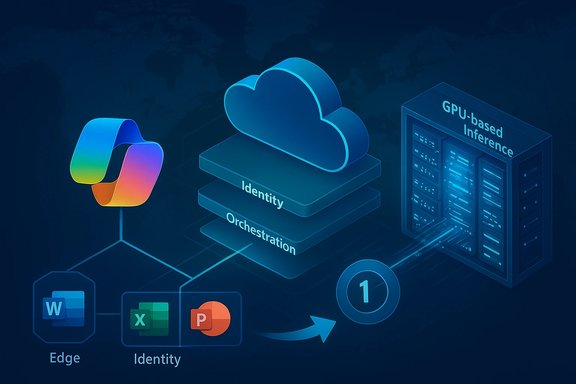
Microsoft Copilot is no longer an experimental sidebar—it's a multi-surface, generative‑AI layer woven into Microsoft 365 apps (Word, Excel, PowerPoint, Outlook), Teams, the copilot.microsoft.com web surfaces, and the Windows‑level Copilot app. That depth of integration makes Copilot extremely useful but also raises the operational stakes: when Copilot’s backend or routing fabric misbehaves, a broad swath of interactive, file‑action, and productivity workflows can exhibit the same “Copilot is unavailable” symptoms. This architectural reality has been visible across a sequence of incidents throughout the past year, where traffic spikes, routing errors, and configuration changes have each produced user‑visible outages or degraded behavior.Cloud‑era services like Copilot are delivered through multi‑layered chains that include client front‑ends, global edge/API gateways, identity/token issuance, orchestration and eligibility microservices, file‑processing pipelines (OneDrive/SharePoint connectors), and GPU‑backed inference endpoints. Failures or misconfigurations in any of those layers can present as a single widespread outage to end users even when the root cause is localized to a routing rule or control‑plane change. That coupling is central to why short maintenance missteps or rollout regressions sometimes have outsized impact.
What happened today — concise timeline
- Early reports and public signals: User reports and monitoring sites registered problems with Copilot in the early hours of the incident window on January 16, 2026. Outage trackers registered a detectable spike in problem reports and then a short tail as the issue was resolved.
- Microsoft acknowledgement: According to reporting, Microsoft acknowledged it was investigating Copilot issues affecting North America and referenced a service incident in the Microsoft 365 admin center (incident ID reported by media as CP1218461). The company pointed consumer users to its public support channels while providing tenant‑level updates for administrators.
- Resolution: Microsoft indicated that engineers confirmed service health after reverting a configuration change. Internal testing reportedly showed Copilot returned to normal after that rollback, and the incident was marked resolved. Independent trackers and status aggregators show the outage window was brief (on the order of an hour or less for most users).
Technical anatomy — why a brief configuration change can ripple into a visible outage
To readers who manage cloud services, the operational mechanics are familiar: an apparently small configuration change in a control plane or in edge routing can generate an invalid state, cause unhealthy nodes to be dropped from rotation, or create asymmetric traffic patterns that overload remaining healthy nodes. That overload then manifests as elevated latencies, timeouts, and HTTP 5xx errors for dependent services. Multiple independent incidents in Microsoft’s cloud history show the same pattern: a misapplied configuration, an abnormal traffic or request pattern, and a rollback or routing fix to restore normal operation.Key operational mechanics that make Copilot-sensitive to configuration changes:
- Autoscaling and warm pools: Generative AI inference endpoints often run on specialized hardware (GPUs or accelerators) and require pre‑warmed instances to meet interactive latency SLAs. Reactive autoscaling that must provision accelerators on demand can be outpaced by sudden bursts, producing queuing and timeouts. When orchestration cannot spin up enough warm capacity fast enough, user requests time out at the front end even if compute exists elsewhere but is not yet available.
- Edge/routing control plane: Global edge fabrics (Azure Front Door or similar) handle TLS termination, routing, and policy enforcement. A control‑plane misconfiguration can produce misrouting or shielding of healthy origins, amplifying localized faults into regionally visible outages. Several prior Microsoft incidents have traced the proximate trigger to an invalid control‑plane state or routing misconfiguration that was fixed by rollback and traffic rebalancing.
- Coupling across subsystems: Identity (Microsoft Entra/Azure AD), tenant entitlement checks, file connectors, orchestration, and inference are chained. If the eligibility check or orchestration queue stalls, the entire end‑to‑end request fails even though storage and basic authentication remain healthy. To the end user, the symptom is identical across surfaces: Copilot panes fail to respond or return generic fallback messages.
What Microsoft says and what we can verify
Media reports covering today’s event cite Microsoft messaging indicating the issue was investigated and resolved after a configuration rollback. Independent outage trackers corroborated a short window of elevated reports and subsequent restoration. Together this demonstrates two points: Microsoft rapidly deployed an operational fix, and the visible impact to users was limited in duration for most tenants. That said, not every detail circulating in early reports is independently verifiable from public Microsoft postmortems at the time of writing. Specific items to treat cautiously until Microsoft publishes a formal post‑incident review include:- Exact incidence counts or per‑tenant seat figures.
- The precise internal steps performed (beyond the high‑level rollback description).
- Any linkage to downstream third‑party edge providers in the absence of Microsoft confirmation.
Impact assessment — who felt it and how bad was it?
- End users: Many users saw short-lived Copilot failures — Copilot panes failing to load, truncated replies, “Coming soon” placeholders, or generic fallback messages. For most users the disruption lasted minutes to an hour.
- Productivity flows: Teams and individuals that have woven Copilot into fast feedback loops (instant draft generation, meeting recaps, file transformation flows) faced friction while Copilot was degraded; these are productivity regressions rather than data loss events in this incident.
- IT and helpdesk: Short incidents of this type typically produce a measurable spike in helpdesk tickets and increased ticket triage workload while administrators verify tenant health via the Microsoft 365 Admin Center and run local triage steps.
The pattern: repeated short incidents increase cumulative risk
Reviewing Microsoft’s incident history for Copilot and related services shows a recurring pattern: small configuration or control‑plane changes, unexpected request spikes, and autoscaling limitations have each produced visible interruptions in recent months. Those incidents were resolved by rollbacks, manual scaling, or routing changes, but the recurrence means organizations should treat Copilot as operationally important infrastructure rather than an optional add‑on.Why that matters:
- Concentration risk: When identity, routing, and service delivery share control planes—or when many surfaces depend on the same front‑door fabric—a single misconfiguration can cascade broadly.
- SLA and contractual exposure: Many M365 contracts do not provide explicit uptime guarantees for AI features embedded inside productivity suites. Organizations that depend on Copilot for mission‑critical flows may have limited recourse beyond basic credits and status updates.
- Security windows: Outages occasionally create windows where defenders’ visibility is reduced (telemetry ingestion delays, portal access problems), creating theoretical risk that adversaries could exploit periods of reduced monitoring. Past incident analyses flagged this as a potential concern in other large cloud outages.
Recommendations for admins and end users
The immediate operational advice for admins and power users is familiar, pragmatic, and actionable. Treat Copilot as part of your critical stack and prepare runbooks that assume intermittent degradation.- Verify tenant health quickly:
- Check the Microsoft 365 admin center for tenant‑level incident details and the incident ID noted by Microsoft.
- Use internal telemetry to identify impacted users and surfaces (Teams, Office desktop, copilot.microsoft.com).
- Short triage checklist for impacted users:
- Sign out/sign in to clear stale tokens.
- Try a different Copilot surface (browser, Teams, Word desktop) to isolate the problem.
- Test from a different network (mobile hotspot) to rule out corporate proxy/DNS issues.
- Operational readiness:
- Maintain runbooks that include fallback processes for critical workflows that rely on Copilot (e.g., switch to manual summarization, preserve local copies of critical files before automated processing).
- Instrument usage (which teams, workflows and automations rely on Copilot) so ticket volumes and impact can be triaged quickly.
- Negotiations and contracts:
- For organizations that rely heavily on Copilot features, discuss operational SLAs and post‑incident disclosure expectations with Microsoft account teams.
- Testing and deployment discipline:
- Encourage vendors (including Microsoft) to adopt stronger canarying and configuration validation for control‑plane changes; internally, emulate resilience by rehearsing failover and rollback processes.
- Security posture:
- During incidents, enforce elevated monitoring on other telemetry sources and preserve logs for post‑incident forensic work; consider temporary isolation of sensitive automations that rely on third‑party agents.
Strengths in Microsoft’s incident handling — and remaining transparency gaps
Today’s episode demonstrates positive elements of Microsoft’s operational playbook: rapid detection, acknowledgement through the proper admin channels, and a rollback that restored service for most customers. Those actions show that the engineering teams have effective runbooks for short‑lived control‑plane issues and can deploy corrective changes rapidly. But recurring incidents expose two ongoing weaknesses:- Public post‑incident transparency: Customers increasingly expect substantive post‑incident reviews (root cause, timeline, and systemic corrective steps). High‑level incident closure notes are helpful, but customers and regulators often want explicit remediation commitments and follow‑up details that go beyond “we reverted the change.”
- Architectural concentration: Shared control planes and routing fabrics are efficient but increase blast radius. Mitigations like regional reservations for warm pools, anticipatory autoscaling, and safer canary rollouts should be elevated in resilience roadmaps for AI workloads.
Broader implications: how enterprises should treat embedded AI
Copilot’s evolution from a productivity add‑on to an integrated assistant changes how organizations must think about availability and risk.- Treat Copilot like a critical SaaS dependency when it plays a role in time‑sensitive or compliance‑sensitive workflows.
- Rehearse fallbacks — automated processes that depend on Copilot should have a manual or queued contingency path.
- Insist on clearer resilience commitments for AI features in enterprise contracts; AI workloads carry different operational characteristics than traditional stateless web servers (longer cold starts, specialized hardware needs).
- Monitor independent outage feeds in addition to vendor status pages to get an early picture of user‑reported problems, while using authenticated admin‑center signals as the canonical tenant health source.
Conclusion
Today’s Copilot interruption was short and, by available signals, effectively resolved after Microsoft reverted a configuration change. That quick remediation is a strength: it shows the capacity for rapid rollback and verification. At the same time, the recurrence of these incidents in the Copilot delivery chain reinforces an operational truth for IT leaders—when AI assistants are embedded into everyday workflows, availability becomes a business risk that requires the same rigor, redundancy planning, and contractual clarity as other pieces of core infrastructure. Administrators should use this as a prompt to harden runbooks, demand clearer post‑incident analysis when providers make changes that affect availability, and ensure critical automations have reliable fallbacks.For readers tracking the evolving operational profile of embedded AI, the takeaway is straightforward: Copilot delivers meaningful productivity benefits, but those benefits need to be backed by resilience planning that recognizes the unique delivery traits of large‑scale model inference and edge routing. The short outage today underlines that reality — resolved quickly, but a reminder that robust design and transparent post‑incident accountability are still priorities for any organization betting on always‑on AI.
Source: Windows Report https://windowsreport.com/microsoft...merican-users-earlier-today-quickly-resolved/
