

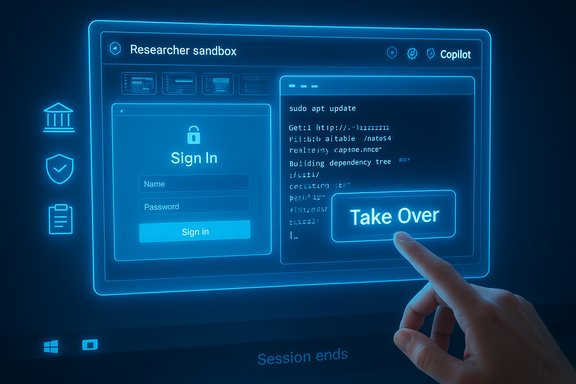
Microsoft’s latest Copilot expansion folds a risky but practical idea into a familiar Windows toolset: give the AI its own temporary computer to browse, test code, and interact with credentialed services — inside a sealed sandbox that shows you what it’s doing while preventing that work from touching your primary PC.
Background
Microsoft recently pushed Researcher — one of the new “deep reasoning” agents in Microsoft 365 Copilot — into a mode that can actually operate a computer on your behalf when needed. Researcher and a sister agent called Analyst were introduced as capabilities to do complex, multi‑step research and data analysis by grounding internal documents, connected third‑party sources, and the web. The official Microsoft announcement framed these agents as enterprise-grade tools that require explicit governance and tenant controls. What’s changed in this update is a capability Microsoft and partners are calling, in product notes and reporting, “Computer use” (or in press coverage, “Researcher with Computer Use”): a permissioned, ephemeral virtual machine — a secure virtual computer — that the Researcher agent can spin up to browse sites, run code, and interact with pages that demand sign‑ins or UI automation. That environment includes a virtual browser, a command‑line terminal, and a textual control channel the agent uses to plan and execute tasks, while giving the user visual evidence of the agent’s chain of thought and the ability to intervene.How this feature works — a practical overview
- When Researcher needs to cross authentication barriers or run code, it creates a sandboxed virtual computer and opens a virtual browser and terminal there. The agent communicates its plan in text, makes browser clicks and keystrokes via a virtual input, and can execute command‑line tasks for code testing or data extraction.
- The sandbox produces visual progress: Researcher snaps periodic screenshots of the virtual session to show the user what it’s doing, providing a visible “chain of thought” that mirrors the agent’s reasoning and action plan. You can watch the agent click, navigate, and run code — and take over at any time.
- If the agent hits a login wall, Microsoft describes a secure screen‑sharing flow: Researcher pauses and requests the user to enter credentials directly into the sandbox browser without handing those credentials over to the model. The agent will ask for explicit permission before taking actions that require authentication.
- The sandbox is ephemeral by design: when the session ends, the VM and its state are discarded (or, in enterprise settings, retained only under admin‑driven policies). This mirrors the Windows Sandbox concept that ships with Windows Pro SKUs: a disposable OS instance that vanishes when closed.
Why Microsoft built this: the practical gap agents faced
Large language models (LLMs) that do deep research run into two common roadblocks:- Some content is gated behind interactive logins or multi‑step UIs for which no API exists. An agent that can’t click, type, or sign in hits a natural ceiling.
- Generated code and scripts are risky to test on the host machine. Running code safely requires isolation to avoid exposing the host to bugs or malware.
How this maps to the existing Windows Sandbox model
Windows already ships with a lightweight virtualization utility called Windows Sandbox on Pro and Enterprise SKUs. That feature creates a fresh, disposable Windows instance for testing untrusted files or browsing risky sites: when you close the sandbox, everything in it is gone. The new Researcher sandbox follows the same ephemeral isolation principle but is integrated into a higher‑level service that can be orchestrated by an AI agent with strict permissioning and visual auditing. Key differences from the desktop Windows Sandbox include:- The Researcher sandbox is orchestrated by Copilot’s agent runtime and is built to support automated browser interactions and terminal execution patterns rather than ad‑hoc manual testing.
- It includes an explicit UI for chain‑of‑thought visibility and screenshots so the user can see exactly what the agent is doing step by step.
- Authentication interaction is implemented as an interactive handover (secure screen‑sharing) rather than as credentials stored or passed to the model.
What Microsoft and reviewers are saying
Microsoft’s product blog describes Researcher and Analyst as “first‑of‑their‑kind” reasoning agents for work, emphasizing governance, grounding in enterprise data, and integration into Copilot Studio for agent development. The official docs and Learn pages explain how Researcher can be found inside the Microsoft 365 Copilot app and advise using explicit scopes to limit whether the agent searches workplace data, the web, or both. Technical reporting and early previews from Windows Insider and industry outlets place agentic desktop features under the umbrella of Copilot Actions or Computer use previews. These previews consistently show Microsoft taking a staged, opt‑in approach with visible progress UIs, per‑action confirmations, and admin controls to manage which agents or users may run these capabilities.One performance claim surfaced in coverage: PCWorld reported that Researcher with Computer Use scored substantially better on a complex browsing benchmark called BrowseComp — a quoted improvement of “44 percent better than the current version of Researcher.” That statistic appears in press coverage but is not reproduced in Microsoft’s primary blog post; independent confirmation from Microsoft’s release materials was not located at the time of reporting, so treat that particular figure as reported by press and subject to verification.
Strengths — what this gets right
- Practical reach: The sandbox lets an agent interact with real UIs and authenticated services, addressing a core limitation of connector‑only designs. This is plausibly the most direct path to giving agents access to the “un‑API‑able” web.
- Visible audit trail and user oversight: Periodic screenshots and a step‑by‑step progress UI give users a real way to judge what the agent is doing and to interrupt it. That transparency is a significant step beyond opaque, background automation.
- Isolated code testing: Running generated code inside an ephemeral VM reduces the risk of accidental changes or malware affecting the host. For development workflows this can dramatically speed iteration while maintaining a safety posture.
- Governance integration: Microsoft ties Researcher and analystic agents into its broader Copilot governance and Copilot Studio toolchain, which includes tenant controls, connector allow‑lists, and monitoring. That’s essential for enterprise risk management.
Risks and failure modes — what keeps me up at night
No sandbox is a silver bullet. The design reduces some classes of risk while introducing others.- Sandbox escape: A determined attacker or a malicious web payload could attempt to exploit the virtual environment to pivot to the host. Ephemeral VMs lower this risk but do not eliminate it; the attack surface now includes the virtualization stack, browser engine, and any host‑to‑guest integration points. Vendors and admins must treat the sandbox runtime like any other part of their threat model.
- Credential and session risk: Secure screen‑sharing for password entry is an improvement over handing credentials to a model, but it still means privileged sessions are being operated inside an environment controlled by automation. Social‑engineering scenarios — where an agent misrepresents its actions or asks for credentials at the wrong time — must be guarded by strict UI cues and training.
- Data leakage through connectors and memory: Copilot’s broader memory and connector features can persist context across sessions. If connectors or memory are misconfigured, the sandbox’s outputs (for instance, extracted documents or compiled notes) could be stored in places that violate data governance. Admins need fine‑grained retention, eDiscovery, and DLP controls.
- Automation reliability and correctness: An agent clicking and filling forms is fragile when websites change. Automated flows can silently fail or take unintended actions (for example, inadvertently submitting the wrong form). The visible progress UI helps but does not replace thorough testing and rollback procedures.
- Audit and legal traceability: For compliance or regulatory use cases, organizations will demand clear, auditable logs that tie agent actions to user approvals and to what data was retrieved or stored. The product must provide immutable, exportable logs to satisfy legal or audit requirements. Microsoft’s governance tools aim at this, but admins must validate the behavior in their tenants.
Technical verification and what’s been confirmed
- Microsoft’s product announcements confirm the existence of Researcher and Analyst as deep‑reasoning agents within Microsoft 365 Copilot and emphasize enterprise controls and Copilot Studio.
- Microsoft Learn documents the Researcher agent and instructs users on how to call it from inside the Microsoft 365 Copilot app, including scope control (web vs. workplace data).
- Press and preview reporting (Insider notes and industry outlets) corroborate Microsoft’s intent to add UI automation/“computer use” capabilities to agents, and they report Microsoft is bundling those capabilities with staged rollout and opt‑in flags. These sources also describe the visual, sandboxed desktop approach for agentic workflows.
Operational advice: how to evaluate and roll this out safely
For IT and security teams, a staged, evidence‑driven rollout is essential. Below is a practical checklist you can adopt.- Pilot group and controlled environment
- Identify a small set of power users to pilot Researcher with Computer Use in non‑sensitive projects.
- Run experiments in isolated test tenants before enabling for production users.
- Governance configuration
- Require admins to configure connectors, memory retention, and DLP rules before enabling agents for broader groups.
- Use allow‑lists to limit which sites or domains agents may interact with automatically.
- Monitoring and logging
- Ensure the tenant captures immutable logs for agent‑initiated sessions, including screenshots, terminal output, and user confirmations.
- Integrate logs into SIEM pipelines for anomaly detection.
- Credential handling
- Require multi‑factor authentication and privileged session separation for any accounts used in sandboxed flows.
- Avoid service‑account usage for credentialed agent flows unless strictly audited.
- Testing and rollback
- Pre‑test agent automations against known target sites in a staging environment and validate fail‑over behavior.
- Create runbooks for revoking access, halting agent runs, and remediating undesired automated changes.
- User training
- Train users to recognize the visible cues that an agent is operating in a sandbox and the steps required to take over or cancel a run.
- Emphasize that agent outputs are assistive and must be reviewed for critical tasks.
What this means for Windows power users and developers
For solo developers and researchers, the sandbox model removes a frequent barrier: the fear of running generated code locally. You can test code snippets, run scrapers against credentialed endpoints you’re authorized to access, or validate data‑extraction logic in an isolated VM — and then throw that VM away. That should speed experimentation.That said, developers should still:
- Treat agent outputs as provisional; review and sanitize any code before promoting it to production.
- Use separate accounts for testing to avoid entangling personal credentials with test automation.
- Log and archive the sandbox session artifacts you need for debugging rather than relying on the ephemeral VM alone.
The competitive and industry context
Microsoft’s move mirrors an industry trend: leading AI platforms are pairing agents with runtimes — ephemeral compute or browser sessions that give models the ability to act in the world. OpenAI, Google, and other vendors have demonstrated agentic browsing and sandboxing patterns that attempt to combine planning, web navigation, and execution. These agent runtimes are a major inflection point for productivity tooling because they bridge the gap between suggestion and action — but they also raise common governance questions around traceability, consent, and correctness. Microsoft’s differentiation is integration with Windows, Edge, and Microsoft 365 governance stacks — a valuable advantage for organizations already invested in that ecosystem. But integration also means that any misconfiguration can have cross‑product implications: a lax Copilot tenant setting may expose data from Exchange, OneDrive, or third‑party connectors into agent workflows. That concentration of capability and data increases the responsibility on admins.Closing assessment
Researcher with Computer Use — the sandboxed virtual computer for Copilot’s research agent — is the kind of pragmatic engineering that can make agentic AI useful in the near term. It extends the agent’s reach to real UIs and credentialed content, adds an important safety layer for code execution, and surfaces the agent’s activities visually so humans can watch and intervene. Those are meaningful, practical gains for research, analytics, and automation.At the same time, the model raises non‑trivial risks that require careful governance: sandbox escapes, improper credential handling, agentic mistakes on fragile web forms, and the potential for data leakage through memory or connectors. Microsoft has built governance hooks and promises opt‑in behavior, but organizations must verify retention windows, auditability, and connector policies in their own tenant before trusting agents with sensitive workflows. If you are an IT admin or a power user considering trialing this capability, start small, require explicit approvals, integrate logs into your security telemetry, and treat each agentic automation like any other privileged automation: test, monitor, and be ready to revoke. When those controls are in place, a visible, ephemeral sandbox is a practical and defensible way to let Copilot do the deeper research and testing work humans used to have to perform manually.
Source: PCWorld Copilot AI's latest trick? A secure sandbox for its agentic activity
