

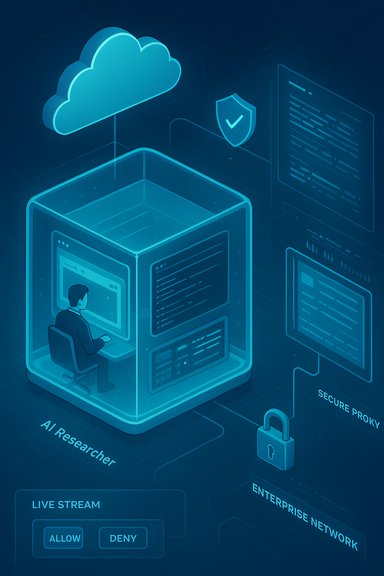
Microsoft has moved a decisive step beyond “answering” and into controlled action: the Researcher agent in Microsoft 365 Copilot can now use a permissioned “Computer Use” capability to spin up an ephemeral, Windows 365–backed virtual computer, log into gated sites with your consent, run short scripts, navigate complex UIs and pull verified data from subscription databases — all while showing a live, auditable “visual chain of thought.”
Microsoft’s Copilot vision has increasingly blended large‑language reasoning with task automation. The original Copilot features focused on drafting, summarizing and in‑app assistance across Word, Excel, Outlook and Teams. In 2025 Microsoft introduced specialized “deep‑reasoning” agents such as Researcher and Analyst to handle multi‑step research and data analysis workflows, and it has been extending the platform to let agents do more than return answers — to actually perform the UI‑level steps that previously required humans or brittle RPA scripts. The recent announcement folds a capability known internally and in press as Computer Use into that trajectory. Computer Use was introduced to Copilot Studio as an early access research preview and is now being applied to the Microsoft 365 Copilot Researcher agent so that the agent can perform hands‑on tasks inside a temporary, isolated cloud PC. This change is being delivered through Microsoft’s preview channels (Frontier/early access) and is initially limited to enterprise customers who opt into the program.
2. Define domain allowlists and deny lists before enabling external browsing.
3. Require MFA and vaulted service accounts for any automation that needs credentials; avoid interactive password entry except in supervised test runs.
4. Integrate sandbox session artifacts (screenshots, logs, terminal output) into SIEM and log retention for full traceability.
5. Test automations in staging environments with representative UI drift to measure brittleness.
6. Review vendor contracts and licensing to ensure automated access to subscription‑based content (Gartner, Forrester, etc. does not breach terms.
7. Update DLP, retention and eDiscovery policies to prevent accidental persistence of sandbox downloads.
For teams that treat Computer Use as a carefully governed capability — starting with narrow pilots, strong allowlists, vaulted credentials, and full telemetry integration — Researcher’s ability to act inside an isolated cloud PC can be a transformational productivity multiplier. For teams that enable it broadly without policy guardrails, it amplifies the same risks they already work to manage in other automation and integration projects.
Microsoft’s introduction of Computer Use is therefore both a powerful functional expansion and a reminder: when AI systems gain hands and eyes, organizational discipline — not just technical capability — determines whether those hands build value or create new liability.
Source: Windows Report Microsoft 365 Copilot’s Researcher Agent Gets "Computer Use" to Access Secured Data
 Background / Overview
Microsoft’s Copilot vision has increasingly blended large‑language reasoning with task automation. The original Copilot features focused on drafting, summarizing and in‑app assistance across Word, Excel, Outlook and Teams. In 2025 Microsoft introduced specialized “deep‑reasoning” agents such as Researcher and Analyst to handle multi‑step research and data analysis workflows, and it has been extending the platform to let agents do more than return answers — to actually perform the UI‑level steps that previously required humans or brittle RPA scripts. The recent announcement folds a capability known internally and in press as Computer Use into that trajectory. Computer Use was introduced to Copilot Studio as an early access research preview and is now being applied to the Microsoft 365 Copilot Researcher agent so that the agent can perform hands‑on tasks inside a temporary, isolated cloud PC. This change is being delivered through Microsoft’s preview channels (Frontier/early access) and is initially limited to enterprise customers who opt into the program. What Computer Use actually is
The ephemeral, sandboxed runtime
At the core of Computer Use is a disposable virtual machine — a cloud PC spun up inside Microsoft’s infrastructure (Windows 365) specifically for the agent session. The VM is designed to be isolated from the user’s local device and, by default, from corporate internal networks and tenant stores. When the session ends, the VM and most of its state are discarded unless an administrator explicitly configures retention for auditing or debugging.The agent’s “hands and eyes”
Inside the sandbox the Researcher agent has:- A visual browser it can operate for click/point/scroll interactions.
- A text extraction mode for fast scraping when pixel‑level navigation isn’t needed.
- A command‑line terminal to run short scripts, validate generated code, or transform downloaded datasets.
- A virtual input layer that simulates mouse movements, clicks and keystrokes under textual orchestration.
Visual Chain of Thought: live, auditable steps
A key design decision is observational transparency: the agent streams periodic screenshots and a textual trace of its plan so users can watch each step in near real time. Microsoft calls this a visual chain of thought — a running log of what the agent plans and what it did — and users can pause, cancel, or take over the sandbox desktop at any time. This is a deliberate countermeasure against opaque, background automation and helps create a human‑in‑the‑loop safety model.How authentication and sensitive sites are handled
The feature is explicitly built to access restricted or paywalled sources when authorized. Microsoft’s model avoids handing passwords to the agent. Instead, when a site requires sign‑in:- The agent will pause and request user entry of credentials into the sandbox browser via a secure handover (an interactive entry flow or a credential vault invocation).
- Administrators can also provision centralized service accounts in a credential vault that the agent may use under strict policy.
- Default tenant policies disable access to internal data until admins permit it, and admin allow/deny lists control which external domains agents can interact with.
Why this matters: closing the “UI gap” for agents
Large language models have always faced a practical ceiling: when the data you need sits behind interactive UIs (legacy portals, subscription dashboards, or multi‑step forms) there’s no API for an agent to call. Computer Use removes that gap by giving the agent a programmatic way to interact with interfaces, unlocking tasks like:- Pulling figures from a Gartner or Forrester report (with authorized access) and synthesizing them into an executive briefing.
- Logging into a legacy CRM and extracting customer records where no modern connector exists.
- Running a short Python extraction on a downloaded CSV inside the sandbox and returning a cleaned dataset.
Security, governance and the built‑in safeguards
Microsoft presents Computer Use as an enterprise‑grade capability with multiple protections:- Isolation by default: sessions run in ephemeral VMs separated from host devices and tenant stores unless admin policies change that behavior.
- Network filtering and safety classifiers: all outbound traffic from the sandbox is routed through Microsoft‑managed proxies and analyzed by classifiers that aim to block irrelevant or unsafe requests. Admins can configure domain allow/deny lists.
- Credential safety: the agent cannot directly read user passwords; sign‑ins happen through secure entry or vaulted service accounts.
- Visual auditing and session artifacts: the running chain of screenshots and terminal logs provides an audit trail that can be fed into SIEMs and compliance workflows.
Key risks, failure modes and what IT needs to watch
Computer Use reduces friction — and in doing so it introduces new classes of operational risk. The principal issues organizations must manage:- Sandbox escape and runtime vulnerabilities. Ephemeral VMs lower risk but do not eliminate it. The virtualization, browser engines and management plane require regular hardening and monitoring to prevent pivot attempts.
- Credential and social‑engineering exposure. Secure handover is safer than handing secrets to a model, but attackers still exploit human workflows; train users and require MFA for all agent‑mediated logins.
- Automation brittleness. UI automation is inherently fragile. Changes in page layout can produce incorrect actions — sometimes silently — so automations must include assertive checks and fail‑safe rollbacks.
- Data governance and accidental retention. If sandbox outputs or downloaded artifacts are inadvertently persisted to corporate storage (for example through retention settings or connectors), confidential information could leak. Review DLP, eDiscovery, and retention rules carefully.
- Regulatory and contractual limits on data flows. Using third‑party subscription content in automated flows may violate licensing or data residency constraints; legal and procurement need to vet the use case before scaling.
Claims and benchmarks: read the numbers carefully
Press coverage of the Researcher upgrade included performance claims — for example, a widely circulated figure that Researcher with Computer Use was “44% better” on a browsing benchmark called BrowseComp and showed modest gains on other multi‑step benchmarks. Those numbers appeared in secondary reporting but are not mirrored in the core Microsoft release notes; they should be treated as press‑reported improvements pending direct, repeatable evaluation. In short: Computer Use plausibly improves browsing‑heavy tasks, but the precise percent gains require independent verification.Availability, licensing and rollout constraints
- Microsoft introduced Computer Use into Copilot Studio as a research preview and made the capability available via the Frontier early‑access program; Copilot Studio’s preview targeted U.S. environments and had message‑volume eligibility thresholds for early customers.
- References in Microsoft Build and subsequent product posts indicate Researcher and Analyst agents rolled out through Frontier program channels and that enterprise previews for agentic features were staged for licensed Copilot customers. Early access is being managed tightly; broad tenant availability likely follows staged preview windows.
Practical rollout checklist for IT and security teams
1. Start with a limited pilot group and low‑sensitivity workflows to validate telemetry and artifact flows.2. Define domain allowlists and deny lists before enabling external browsing.
3. Require MFA and vaulted service accounts for any automation that needs credentials; avoid interactive password entry except in supervised test runs.
4. Integrate sandbox session artifacts (screenshots, logs, terminal output) into SIEM and log retention for full traceability.
5. Test automations in staging environments with representative UI drift to measure brittleness.
6. Review vendor contracts and licensing to ensure automated access to subscription‑based content (Gartner, Forrester, etc. does not breach terms.
7. Update DLP, retention and eDiscovery policies to prevent accidental persistence of sandbox downloads.
Competitive context and why Microsoft is building this
Computer Use is Microsoft’s structured answer to a market trend: agents that can act on UIs remove the need to build brittle point integrations or wait for APIs. Competitors and academic work had already demonstrated agentic browsing and UI automation as critical capabilities; Microsoft’s approach foregrounds governance, enterprise controls and integration with its Copilot Studio builder surface. The move brings Copilot closer to being a platform for composable, observable automation rather than merely a reasoning layer. That said, integrating agency into enterprise products also amplifies procurement and legal considerations: licensing of third‑party content, cross‑cloud data transfers (if any), and where inference or session data is stored all matter for compliance teams.Use cases illustrated
- Market research with paywalled sources: Researcher can (with consent and credential handover) log into subscription databases, extract relevant figures and build a deck that cites the sources. This reduces manual scraping and synthesis time.
- Legacy app automation: Organizations that rely on older web apps without APIs can automate multi‑page form workflows using natural‑language agent prompts, replacing fragile macros or manual copy/paste.
- Safe code testing and data cleaning: Analysts can ask Researcher to run a small Python extraction on a downloaded CSV inside the sandbox, check outputs, and return cleaned results — all without risking the host environment.
- Cross‑system automation: An orchestrated agent could pull sales figures from a web portal, hand them to an Analyst agent to run modeling, then ask Copilot to prepare a presentation and send a calendar invite — a multi‑agent workflow that mimics a small team.
Recommendations for executives and IT leaders
- Treat Computer Use as a strategic capability: identify workflows that remove friction (paywalled research, legacy system entry, routine reconciliation) and pilot them with clear KPIs.
- Invest in monitoring and policy first: don’t enable agentic browsing without SIEM integration, allowlists and DLP rules.
- Engage legal/procurement early: automated access to subscription services can have contractual implications; secure permissions before scaling.
- Plan for operational cost and governance: agentic automation will create new telemetry and billing events (Copilot Studio messages, VM runtime charges); model these in budgets.
Where claims remain unverified or need careful scrutiny
- Published benchmarks showing exact percentage improvements (for example, "44% better" on BrowseComp) were reported in secondary outlets and press summaries; the specific metrics are not reproduced in Microsoft’s primary blog posts and should be validated before being used as a procurement justification. Treat these as indicative rather than definitive until independent evaluations are available.
- The long‑term resilience against sandbox escape or clever exfiltration techniques will depend on continuous patching and threat intelligence; no ephemeral sandbox eliminates every attack vector.
Final assessment: opportunity and responsibility
Computer Use moves Copilot from “explain and suggest” toward “act and deliver” in ways that are immediately useful for enterprise knowledge work. The capability addresses a genuine technical problem — how to get authorized access to gated, UI‑only content and how to run small experiments safely — and Microsoft has thoughtfully added visibility, isolation and admin primitives that align with enterprise needs. At the same time, the tool forces enterprises to reconcile the operational overhead of securing a new runtime, the legal complexity of automated access to subscription services, and the brittle nature of UI automation. The payoff is tangible: faster research cycles, reduced manual toil, and agentic automation that acts more like a trusted, observable colleague than an invisible script. The balance of value versus risk will come down to how carefully administrators apply controls, how systematically organizations pilot and measure outcomes, and how quickly vendors and IT teams harden the new runtime layer.For teams that treat Computer Use as a carefully governed capability — starting with narrow pilots, strong allowlists, vaulted credentials, and full telemetry integration — Researcher’s ability to act inside an isolated cloud PC can be a transformational productivity multiplier. For teams that enable it broadly without policy guardrails, it amplifies the same risks they already work to manage in other automation and integration projects.
Microsoft’s introduction of Computer Use is therefore both a powerful functional expansion and a reminder: when AI systems gain hands and eyes, organizational discipline — not just technical capability — determines whether those hands build value or create new liability.
Source: Windows Report Microsoft 365 Copilot’s Researcher Agent Gets "Computer Use" to Access Secured Data
