

Microsoft has made computer use in Copilot Studio generally available for enterprise customers, extending Power Platform agents so they can operate websites and desktop-style interfaces with virtual clicks, typing, and visual interpretation when no usable API exists. The move turns Copilot Studio from a conversational agent builder into something closer to an enterprise action layer. That is powerful, useful, and dangerous in the same breath. The real story is not that Microsoft found a new way to click buttons; it is that Microsoft is asking IT departments to govern AI systems that can act with the reach of a human user.
Enterprise automation has always had a dirty secret: the systems most in need of automation are often the least prepared for it. The polished demo stack has clean APIs, event hooks, modern identity, and tidy data contracts. The real enterprise has vendor portals, aging ERP screens, homegrown claims systems, regional compliance databases, and line-of-business tools whose integration strategy begins and ends with “log in and fill out the form.”
That is the space Microsoft is now targeting with computer-using agents in Copilot Studio. The agent does not need the application to expose a proper endpoint. It can look at the screen, interpret what it sees, move through a workflow, enter data, and complete a task in much the same way a trained employee would.
This is a conceptual break from classic robotic process automation, even if the lineage is obvious. Traditional RPA was powerful but brittle because it relied heavily on selectors, coordinates, and predictable interface states. Move a button, rename a field, insert a pop-up, or change the layout, and yesterday’s automation became tomorrow morning’s help desk ticket.
Computer use promises a more flexible model. The agent operates through perception and reasoning rather than only through pre-scripted UI bindings. That does not make it magical, and it certainly does not make it infallible. But it does make the browser and the Windows desktop into a kind of improvised integration surface, which is exactly what many enterprises have been pretending their screens were for decades.
That matters because the first wave of enterprise AI was still mostly advisory. A chatbot could summarize a document, draft a reply, explain a policy, or help an analyst reason through a spreadsheet. Useful, yes, but the human remained the transaction boundary. The person still clicked submit, updated the record, approved the vendor, or closed the ticket.
Computer-using agents push past that boundary. Once an agent can navigate a business application and take action in an authenticated session, it becomes part of the operational fabric rather than merely part of the knowledge layer. That is why the governance discussion cannot be treated as a footnote.
For IT and DevOps teams, this will feel familiar and alien at the same time. Familiar, because they already manage service accounts, workflow engines, secrets, connectors, and automation jobs. Alien, because this new class of agent may not call a documented API or leave behind the same tidy traces as a conventional integration.
The agent’s unit of work is not just a request payload. It is a sequence of perceived screens, interpreted states, decisions, mouse clicks, and keystrokes. That makes observability harder, audit more important, and testing more subtle.
Graebel’s Service Order Agent, built with Microsoft and GET AI, reads designated mailboxes, interprets incoming service-order emails, extracts relevant data, validates the request against business rules, and then operates Graebel’s Global Connect platform through the user interface. The agent navigates screens and completes transactions without requiring a new API or a redevelopment project.
This is the kind of workflow that tends to survive every modernization push. It is important enough to matter, idiosyncratic enough to resist standardization, and embedded enough that replacing it carries real business risk. In that environment, UI-level automation is not a hack; it is sometimes the only economically plausible bridge between current operations and future architecture.
The key design choice in the Graebel example is not merely that an agent clicks through the UI. It is that exceptions and low-confidence cases are routed to humans. That is the difference between enterprise automation and a science project. The point is not to pretend the model is always right; the point is to design the workflow so that uncertainty has a path.
Human-in-the-loop design is often discussed as if it were training wheels for immature AI. In regulated or customer-facing workflows, it is closer to a control system. The agent handles the routine path, while ambiguous, risky, or policy-sensitive cases are pushed back to authorized people who can interpret context and carry accountability.
That can be rational. Not every legacy application deserves immediate replacement, and not every modernization project pays for itself quickly enough to justify the risk. Enterprises often keep old systems because they encode institutional knowledge, compliance nuance, and edge-case behavior that would be expensive to rediscover.
But this also creates a temptation. The agent can become a layer of intelligence spread over systems that remain fundamentally fragile. Instead of removing technical debt, organizations may learn to automate around it more effectively.
That is not necessarily bad. Bridges are useful things. The danger comes when the bridge becomes permanent infrastructure without being treated like infrastructure. If a computer-using agent becomes essential to order processing, claims handling, finance operations, or employee onboarding, it needs the same seriousness applied to any production dependency.
That means ownership, monitoring, release management, credential hygiene, business continuity planning, and a clear answer to what happens when the interface changes at 2 a.m. after a vendor update. The fact that the agent uses a screen rather than an API does not make the workflow less critical. It may make it more fragile.
Copilot Studio sits inside the Power Platform universe, which gives Microsoft a natural story around identity, environments, admin controls, data policies, and lifecycle management. That matters because enterprises rarely buy autonomy as a naked capability. They buy it when it can be governed, measured, restricted, and explained to auditors.
This is where Microsoft’s decades of enterprise gravity become an advantage. The company can position computer use as another managed capability inside an existing administrative perimeter rather than as a separate AI experiment running in the shadows. For organizations already standardized on Microsoft 365, Entra ID, Power Platform, and Azure governance, that is a compelling pitch.
Still, the phrase “inside the existing governance framework” should not lull anyone into complacency. A computer-using agent may inherit controls, but it also changes the risk model. A workflow that once required a human with judgment and muscle memory can now be run repeatedly, quickly, and perhaps at larger scale.
The question for administrators is not only whether the agent is allowed to access an application. It is what actions the agent is permitted to take once inside, under whose authority, with what review thresholds, and with what audit trail. Access control at login is not enough when the meaningful risk lives several clicks later.
For developers and IT teams, model choice introduces flexibility but also another dimension of governance. If one model is better at interpreting messy documents and another is cheaper for routine routing, teams will want to mix and match. But once model choice affects production behavior, it becomes part of change management.
A model swap can be as consequential as a code change. It may alter how an agent interprets a page, how often it asks for help, how it handles ambiguous instructions, or how it responds to an unexpected screen. In classic software, teams would test such changes before deployment. Agentic systems deserve no less.
This is where Copilot Studio’s role becomes more strategic. It is not just a place to assemble prompts and tools. It is becoming a control plane for how enterprise AI systems reason, act, escalate, and consume resources.
The operating layer is where the value will concentrate. Models will continue to improve, and vendors will continue to compete. But enterprises will judge platforms by whether they can turn those models into reliable business systems.
An agent that can read a web page is one thing. An agent that can submit a form, update a record, approve a transaction, or download a report is another. The blast radius is no longer limited to disclosure or bad advice. It includes erroneous action.
That makes least privilege more complicated. The agent may need enough access to complete a process, but not enough to wander into adjacent systems or perform irreversible work without confirmation. Organizations will need dedicated accounts, constrained environments, allowlisted destinations, and clear transaction limits.
Prompt injection also becomes more concrete in this world. A malicious instruction hidden in a webpage, document, ticket, or email could attempt to influence the agent’s behavior. When the agent is only summarizing, that is a content-integrity problem. When the agent is clicking and typing, it becomes an operational security problem.
The safe pattern is not to let agents roam through production systems with broad human-equivalent permissions. The safe pattern is to isolate them, narrow their duties, validate their inputs, supervise sensitive actions, and log enough detail that a failed run can be reconstructed. That sounds boring because good enterprise security usually does.
That last part is important. Once a computer-using agent becomes part of a workflow, it behaves like software even if it was configured in natural language. It needs versioning, testing, rollback, monitoring, alerting, and incident response. The input may be a prompt, but the output is production behavior.
The lifecycle challenge is especially acute because UI-driven automation depends on systems outside the automation team’s control. A vendor can change a portal. A browser update can alter behavior. A consent dialog can appear. A session timeout can interrupt a run. A field can move from one tab to another.
Vision-based agents may handle some of these changes better than traditional scripts, but “better” is not “guaranteed.” Enterprises should expect a new category of flaky automation that is less brittle in some ways and less deterministic in others. That trade-off can be worth making, but only if it is acknowledged upfront.
The best DevOps response is to treat these agents as production services. They should have environments, test cases, synthetic runs, release gates, and operational metrics. If a business unit wants an agent to process invoices or service orders, it should also accept the discipline that comes with production automation.
That is why adoption pressure will be strong. A department that spends thousands of hours a year copying data from inboxes into portals will not want to wait for a twelve-month integration roadmap. A regional office stuck with a niche compliance system will not want to fund a custom connector. A back-office team drowning in repetitive transactions will want relief now.
Microsoft’s pitch meets that impatience. Describe the task in natural language, give the agent a machine to work on, configure supervision, and start automating. Compared with the procurement and engineering drag of traditional integration, that is a dramatic simplification.
But the simplicity is front-loaded. The operational complexity comes later, when the agent must be maintained, audited, scaled, secured, and explained. This is where many automation programs have stumbled before. The first bot is a revelation; the fiftieth is a governance problem.
Enterprises should not reject computer use because it is imperfect. They should reject the fantasy that it eliminates integration strategy. In many cases, it will be a pragmatic middle layer: faster than modernization, more adaptable than old RPA, but still not as clean as a real API.
For years, the industry’s architectural rhetoric has pushed everything toward APIs, cloud services, and headless workflows. Yet the actual work of many organizations still happens through graphical interfaces. Windows remains the place where old software, new SaaS portals, browser sessions, Office files, identity prompts, and line-of-business procedures collide.
That makes managed Windows environments a natural staging ground for computer-using agents. The agent can be given a controlled machine, a constrained identity, monitored activity, and access to the applications needed for a specific job. Done well, this is cleaner than running ad hoc automations on an employee’s daily workstation.
It also creates new demand for endpoint governance. If the machine is the agent’s body, then endpoint configuration becomes part of the agent’s reliability and security posture. Browser policies, credential storage, screen resolution, session persistence, clipboard controls, and update timing all become operational variables.
Windows administrators have seen versions of this movie before with VDI, RPA farms, kiosk systems, and service workstations. The difference is that the actor at the keyboard is now probabilistic. That makes the old endpoint discipline more relevant, not less.
A well-designed workflow should distinguish between routine execution and accountable judgment. An agent can extract data, compare fields, navigate a portal, prepare a transaction, and even complete low-risk submissions. But when confidence falls, policy conflicts appear, or the action carries material consequences, the workflow should shift to a human reviewer.
That reviewer cannot be an afterthought. Organizations need to decide who receives escalations, how quickly they must respond, what information they see, and how their decisions are logged. Otherwise, human-in-the-loop becomes a vague safety slogan rather than an operating model.
There is also a labor dimension that should not be ignored. Computer-using agents will not simply eliminate drudgery; they will redistribute it. Some employees will move from doing repetitive transactions to supervising, correcting, and improving automated workflows. That can be an upgrade, but only if organizations invest in training and role design.
The worst outcome would be invisible automation layered over under-supported workers, where humans remain accountable for errors made by systems they do not understand and cannot inspect. The better outcome is a new operational role: people who know the business process well enough to teach, constrain, and audit the agents performing it.
That strategy fits Microsoft’s enterprise playbook. Abstract the hard parts, integrate with the admin plane, package the capability with familiar licensing and governance, and make the tool approachable enough for business technologists while still acceptable to central IT. It is the Power Platform formula applied to agentic automation.
The risk is that approachability can outpace maturity. Low-code platforms already created shadow IT headaches when citizen developers built workflows faster than IT could govern them. Computer-using agents raise the stakes because the workflows can now act across interfaces originally designed for people.
Microsoft’s challenge will be to keep the creation experience simple while making the administrative experience uncompromising. Organizations need visibility into what agents exist, what systems they touch, what identities they use, what models they run, how much they cost, and what actions they performed. Without that, the same ease of creation that drives adoption will become a liability.
This is why the governance roadmap matters as much as the model roadmap. Better reasoning will reduce failures, but it will not eliminate the need for permissions, audit, supervision, and operational controls. In the enterprise, autonomy is only valuable when it can be bounded.
The immediate opportunity is to target workflows that are repetitive, well understood, and bounded. The wrong starting point is a high-risk, exception-heavy process where the business cannot clearly describe the rules. The best first projects will be boring on purpose.
Microsoft’s computer-using agents will not abolish integration backlogs, replace APIs, or make legacy systems magically modern. They will, however, give enterprises a new way to automate the stubborn middle of business operations, where screens still matter and humans still spend too much time acting as glue between systems. The winners will be the organizations that move quickly but govern deliberately, treating agents not as clever assistants but as production actors whose power comes from being watched, constrained, and improved over time.
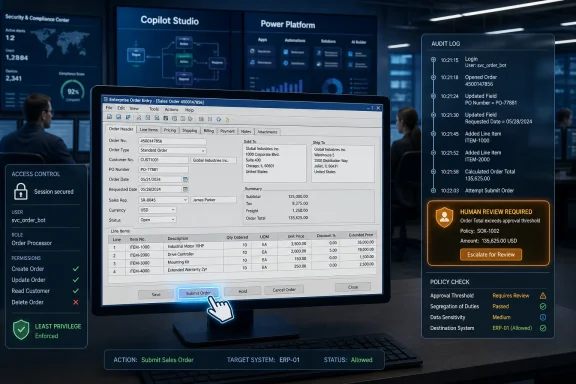 Microsoft Is Turning the Screen Into an API
Enterprise automation has always had a dirty secret: the systems most in need of automation are often the least prepared for it. The polished demo stack has clean APIs, event hooks, modern identity, and tidy data contracts. The real enterprise has vendor portals, aging ERP screens, homegrown claims systems, regional compliance databases, and line-of-business tools whose integration strategy begins and ends with “log in and fill out the form.”That is the space Microsoft is now targeting with computer-using agents in Copilot Studio. The agent does not need the application to expose a proper endpoint. It can look at the screen, interpret what it sees, move through a workflow, enter data, and complete a task in much the same way a trained employee would.
This is a conceptual break from classic robotic process automation, even if the lineage is obvious. Traditional RPA was powerful but brittle because it relied heavily on selectors, coordinates, and predictable interface states. Move a button, rename a field, insert a pop-up, or change the layout, and yesterday’s automation became tomorrow morning’s help desk ticket.
Computer use promises a more flexible model. The agent operates through perception and reasoning rather than only through pre-scripted UI bindings. That does not make it magical, and it certainly does not make it infallible. But it does make the browser and the Windows desktop into a kind of improvised integration surface, which is exactly what many enterprises have been pretending their screens were for decades.
The Agent Era Arrives Through the Back Door
Microsoft would prefer to describe this as an expansion of Copilot Studio, and that is accurate as far as product packaging goes. But the more consequential shift is architectural. Agents are moving from answering work questions to performing work transactions.That matters because the first wave of enterprise AI was still mostly advisory. A chatbot could summarize a document, draft a reply, explain a policy, or help an analyst reason through a spreadsheet. Useful, yes, but the human remained the transaction boundary. The person still clicked submit, updated the record, approved the vendor, or closed the ticket.
Computer-using agents push past that boundary. Once an agent can navigate a business application and take action in an authenticated session, it becomes part of the operational fabric rather than merely part of the knowledge layer. That is why the governance discussion cannot be treated as a footnote.
For IT and DevOps teams, this will feel familiar and alien at the same time. Familiar, because they already manage service accounts, workflow engines, secrets, connectors, and automation jobs. Alien, because this new class of agent may not call a documented API or leave behind the same tidy traces as a conventional integration.
The agent’s unit of work is not just a request payload. It is a sequence of perceived screens, interpreted states, decisions, mouse clicks, and keystrokes. That makes observability harder, audit more important, and testing more subtle.
Graebel Shows Why This Is Not Just Demo Ware
The early customer example Microsoft is highlighting is Graebel, a global mobility and relocation services company. The scenario is not glamorous, which is precisely why it is useful. Service orders arrive by email, the information is often unstructured, and the downstream system requires work inside an existing business interface.Graebel’s Service Order Agent, built with Microsoft and GET AI, reads designated mailboxes, interprets incoming service-order emails, extracts relevant data, validates the request against business rules, and then operates Graebel’s Global Connect platform through the user interface. The agent navigates screens and completes transactions without requiring a new API or a redevelopment project.
This is the kind of workflow that tends to survive every modernization push. It is important enough to matter, idiosyncratic enough to resist standardization, and embedded enough that replacing it carries real business risk. In that environment, UI-level automation is not a hack; it is sometimes the only economically plausible bridge between current operations and future architecture.
The key design choice in the Graebel example is not merely that an agent clicks through the UI. It is that exceptions and low-confidence cases are routed to humans. That is the difference between enterprise automation and a science project. The point is not to pretend the model is always right; the point is to design the workflow so that uncertainty has a path.
Human-in-the-loop design is often discussed as if it were training wheels for immature AI. In regulated or customer-facing workflows, it is closer to a control system. The agent handles the routine path, while ambiguous, risky, or policy-sensitive cases are pushed back to authorized people who can interpret context and carry accountability.
The Legacy App Just Got a Stay of Execution
There is a slightly uncomfortable implication here for CIOs: computer-using agents may reduce the urgency to modernize some legacy systems. If an agent can operate an old interface well enough, the business case for rewriting that interface may become harder to sell.That can be rational. Not every legacy application deserves immediate replacement, and not every modernization project pays for itself quickly enough to justify the risk. Enterprises often keep old systems because they encode institutional knowledge, compliance nuance, and edge-case behavior that would be expensive to rediscover.
But this also creates a temptation. The agent can become a layer of intelligence spread over systems that remain fundamentally fragile. Instead of removing technical debt, organizations may learn to automate around it more effectively.
That is not necessarily bad. Bridges are useful things. The danger comes when the bridge becomes permanent infrastructure without being treated like infrastructure. If a computer-using agent becomes essential to order processing, claims handling, finance operations, or employee onboarding, it needs the same seriousness applied to any production dependency.
That means ownership, monitoring, release management, credential hygiene, business continuity planning, and a clear answer to what happens when the interface changes at 2 a.m. after a vendor update. The fact that the agent uses a screen rather than an API does not make the workflow less critical. It may make it more fragile.
Microsoft’s Platform Advantage Is Governance, Not Novelty
Microsoft is not the only company chasing computer-use automation. The broader AI market has been converging on agents that can browse, operate applications, invoke tools, and complete tasks. What Microsoft brings to the table is not merely the agent technique; it is the enterprise packaging.Copilot Studio sits inside the Power Platform universe, which gives Microsoft a natural story around identity, environments, admin controls, data policies, and lifecycle management. That matters because enterprises rarely buy autonomy as a naked capability. They buy it when it can be governed, measured, restricted, and explained to auditors.
This is where Microsoft’s decades of enterprise gravity become an advantage. The company can position computer use as another managed capability inside an existing administrative perimeter rather than as a separate AI experiment running in the shadows. For organizations already standardized on Microsoft 365, Entra ID, Power Platform, and Azure governance, that is a compelling pitch.
Still, the phrase “inside the existing governance framework” should not lull anyone into complacency. A computer-using agent may inherit controls, but it also changes the risk model. A workflow that once required a human with judgment and muscle memory can now be run repeatedly, quickly, and perhaps at larger scale.
The question for administrators is not only whether the agent is allowed to access an application. It is what actions the agent is permitted to take once inside, under whose authority, with what review thresholds, and with what audit trail. Access control at login is not enough when the meaningful risk lives several clicks later.
Model Choice Turns Copilot Studio Into a Control Plane
The addition of model selection, including models from OpenAI and Anthropic, is more than a procurement footnote. It signals that Microsoft understands agent quality will not be solved by one model family forever. Different tasks reward different strengths: reasoning depth, speed, cost efficiency, tool-use reliability, context handling, or conservative behavior under uncertainty.For developers and IT teams, model choice introduces flexibility but also another dimension of governance. If one model is better at interpreting messy documents and another is cheaper for routine routing, teams will want to mix and match. But once model choice affects production behavior, it becomes part of change management.
A model swap can be as consequential as a code change. It may alter how an agent interprets a page, how often it asks for help, how it handles ambiguous instructions, or how it responds to an unexpected screen. In classic software, teams would test such changes before deployment. Agentic systems deserve no less.
This is where Copilot Studio’s role becomes more strategic. It is not just a place to assemble prompts and tools. It is becoming a control plane for how enterprise AI systems reason, act, escalate, and consume resources.
The operating layer is where the value will concentrate. Models will continue to improve, and vendors will continue to compete. But enterprises will judge platforms by whether they can turn those models into reliable business systems.
The Security Problem Moves From Data Access to Action Access
Most enterprise AI security debates have focused on data: what the model can see, where prompts are processed, whether customer data is retained, and how sensitive documents are grounded. Those questions remain important. Computer use adds a second axis: what the agent can do.An agent that can read a web page is one thing. An agent that can submit a form, update a record, approve a transaction, or download a report is another. The blast radius is no longer limited to disclosure or bad advice. It includes erroneous action.
That makes least privilege more complicated. The agent may need enough access to complete a process, but not enough to wander into adjacent systems or perform irreversible work without confirmation. Organizations will need dedicated accounts, constrained environments, allowlisted destinations, and clear transaction limits.
Prompt injection also becomes more concrete in this world. A malicious instruction hidden in a webpage, document, ticket, or email could attempt to influence the agent’s behavior. When the agent is only summarizing, that is a content-integrity problem. When the agent is clicking and typing, it becomes an operational security problem.
The safe pattern is not to let agents roam through production systems with broad human-equivalent permissions. The safe pattern is to isolate them, narrow their duties, validate their inputs, supervise sensitive actions, and log enough detail that a failed run can be reconstructed. That sounds boring because good enterprise security usually does.
DevOps Inherits the Workflow Nobody Wanted to Own
Computer-using agents will land in a political gray zone inside many organizations. Business teams will see the productivity opportunity. Security teams will see a new class of autonomous actor. Operations teams will inherit the outages. Developers will be asked why an API does not exist. DevOps teams will be asked to make the whole thing reliable.That last part is important. Once a computer-using agent becomes part of a workflow, it behaves like software even if it was configured in natural language. It needs versioning, testing, rollback, monitoring, alerting, and incident response. The input may be a prompt, but the output is production behavior.
The lifecycle challenge is especially acute because UI-driven automation depends on systems outside the automation team’s control. A vendor can change a portal. A browser update can alter behavior. A consent dialog can appear. A session timeout can interrupt a run. A field can move from one tab to another.
Vision-based agents may handle some of these changes better than traditional scripts, but “better” is not “guaranteed.” Enterprises should expect a new category of flaky automation that is less brittle in some ways and less deterministic in others. That trade-off can be worth making, but only if it is acknowledged upfront.
The best DevOps response is to treat these agents as production services. They should have environments, test cases, synthetic runs, release gates, and operational metrics. If a business unit wants an agent to process invoices or service orders, it should also accept the discipline that comes with production automation.
The Economics Are Seductive, Which Is Why They Need Discipline
The business case for computer use is easy to understand. APIs are expensive to build, vendor integrations take time, and manual processing does not scale gracefully. If an agent can perform a routine task across systems that were never designed to talk to each other, the productivity gains can be immediate.That is why adoption pressure will be strong. A department that spends thousands of hours a year copying data from inboxes into portals will not want to wait for a twelve-month integration roadmap. A regional office stuck with a niche compliance system will not want to fund a custom connector. A back-office team drowning in repetitive transactions will want relief now.
Microsoft’s pitch meets that impatience. Describe the task in natural language, give the agent a machine to work on, configure supervision, and start automating. Compared with the procurement and engineering drag of traditional integration, that is a dramatic simplification.
But the simplicity is front-loaded. The operational complexity comes later, when the agent must be maintained, audited, scaled, secured, and explained. This is where many automation programs have stumbled before. The first bot is a revelation; the fiftieth is a governance problem.
Enterprises should not reject computer use because it is imperfect. They should reject the fantasy that it eliminates integration strategy. In many cases, it will be a pragmatic middle layer: faster than modernization, more adaptable than old RPA, but still not as clean as a real API.
Windows Becomes the Agent Workbench Again
There is also a Windows story here, even if it sits beneath the Copilot Studio branding. Computer use depends on the idea that an agent can operate a computer environment as a worker would. That pulls the desktop, the browser, and the managed machine back into the center of enterprise automation.For years, the industry’s architectural rhetoric has pushed everything toward APIs, cloud services, and headless workflows. Yet the actual work of many organizations still happens through graphical interfaces. Windows remains the place where old software, new SaaS portals, browser sessions, Office files, identity prompts, and line-of-business procedures collide.
That makes managed Windows environments a natural staging ground for computer-using agents. The agent can be given a controlled machine, a constrained identity, monitored activity, and access to the applications needed for a specific job. Done well, this is cleaner than running ad hoc automations on an employee’s daily workstation.
It also creates new demand for endpoint governance. If the machine is the agent’s body, then endpoint configuration becomes part of the agent’s reliability and security posture. Browser policies, credential storage, screen resolution, session persistence, clipboard controls, and update timing all become operational variables.
Windows administrators have seen versions of this movie before with VDI, RPA farms, kiosk systems, and service workstations. The difference is that the actor at the keyboard is now probabilistic. That makes the old endpoint discipline more relevant, not less.
The Human Is Still the Accountability Boundary
The phrase “human in the loop” is often overused, but in this case it deserves the attention. Computer-using agents are most credible when they know when to stop. The ability to escalate is not a weakness in the design; it is the feature that makes the design enterprise-safe.A well-designed workflow should distinguish between routine execution and accountable judgment. An agent can extract data, compare fields, navigate a portal, prepare a transaction, and even complete low-risk submissions. But when confidence falls, policy conflicts appear, or the action carries material consequences, the workflow should shift to a human reviewer.
That reviewer cannot be an afterthought. Organizations need to decide who receives escalations, how quickly they must respond, what information they see, and how their decisions are logged. Otherwise, human-in-the-loop becomes a vague safety slogan rather than an operating model.
There is also a labor dimension that should not be ignored. Computer-using agents will not simply eliminate drudgery; they will redistribute it. Some employees will move from doing repetitive transactions to supervising, correcting, and improving automated workflows. That can be an upgrade, but only if organizations invest in training and role design.
The worst outcome would be invisible automation layered over under-supported workers, where humans remain accountable for errors made by systems they do not understand and cannot inspect. The better outcome is a new operational role: people who know the business process well enough to teach, constrain, and audit the agents performing it.
Microsoft’s Bet Is That Enterprises Prefer Managed Autonomy
The broader competitive question is whether enterprises want best-of-breed agent tools or managed autonomy embedded in platforms they already trust. Microsoft is betting heavily on the latter. Copilot Studio gives it a route into business processes without requiring every customer to become an AI infrastructure company.That strategy fits Microsoft’s enterprise playbook. Abstract the hard parts, integrate with the admin plane, package the capability with familiar licensing and governance, and make the tool approachable enough for business technologists while still acceptable to central IT. It is the Power Platform formula applied to agentic automation.
The risk is that approachability can outpace maturity. Low-code platforms already created shadow IT headaches when citizen developers built workflows faster than IT could govern them. Computer-using agents raise the stakes because the workflows can now act across interfaces originally designed for people.
Microsoft’s challenge will be to keep the creation experience simple while making the administrative experience uncompromising. Organizations need visibility into what agents exist, what systems they touch, what identities they use, what models they run, how much they cost, and what actions they performed. Without that, the same ease of creation that drives adoption will become a liability.
This is why the governance roadmap matters as much as the model roadmap. Better reasoning will reduce failures, but it will not eliminate the need for permissions, audit, supervision, and operational controls. In the enterprise, autonomy is only valuable when it can be bounded.
The Practical Read for WindowsForum’s IT Crowd
For Windows administrators, DevOps engineers, and enterprise architects, the right response is neither hype nor dismissal. Computer use in Copilot Studio is important because it attacks a real problem: the vast surface area of enterprise work that still lives behind human-operated interfaces. But it should be introduced with the caution reserved for any system that can take action in production.The immediate opportunity is to target workflows that are repetitive, well understood, and bounded. The wrong starting point is a high-risk, exception-heavy process where the business cannot clearly describe the rules. The best first projects will be boring on purpose.
- Organizations should prioritize workflows where the cost of manual handling is high but the action risk is low and reversible.
- Agents should run under dedicated, least-privilege identities rather than ordinary user accounts with broad access.
- Human supervision should be designed into the workflow before production use, especially for low-confidence extraction, policy exceptions, and irreversible submissions.
- DevOps teams should treat agent definitions, prompts, model choices, and tool configurations as production artifacts that require testing and change control.
- Security teams should evaluate computer-using agents by action permissions, not just by data access.
- Legacy-system automation should be viewed as a bridge strategy, not a permanent excuse to avoid modernization.
Microsoft’s computer-using agents will not abolish integration backlogs, replace APIs, or make legacy systems magically modern. They will, however, give enterprises a new way to automate the stubborn middle of business operations, where screens still matter and humans still spend too much time acting as glue between systems. The winners will be the organizations that move quickly but govern deliberately, treating agents not as clever assistants but as production actors whose power comes from being watched, constrained, and improved over time.
References
- Primary source: devops.com
Published: 2026-05-18T17:50:05.772000
Microsoft Copilot Studio Brings Computer-Using Agents to the Enterprise - DevOps.com
Microsoft Copilot Studio's computer-using agents are now GA, letting AI automate UI-driven workflows in legacy systems.devops.com - Official source: microsoft.com
Anthropic joins the multi-model lineup in Microsoft Copilot Studio | Microsoft Copilot Blog
In addition to default OpenAI models, Copilot Studio customers can now build agents with Anthropic models Claude Sonnet 4 and Claude Opus 4.1www.microsoft.com - Official source: learn.microsoft.com
Move data across regions for Copilots, AI agents, and generative AI features - Power Platform | Microsoft Learn
Learn how to turn on data movement across regions for Copilots and generative AI features.learn.microsoft.com - Official source: microsoft.github.io

🚨 Mission 05: Understanding Agent Models and Response Formatting | Agent Academy
Welcome to Copilot Studio Agent Academy. Curated lessons on getting started building agents with Copilot Studio.
microsoft.github.io
- Related coverage: supersimple365.com
Anthropic models now available in M365 Copilot Researcher and Copilot Studio - Super Simple 365
Short VersionM365 Copilot Researcher and Copilot Studio offer Anthropic models for organisations that opt in. Due from 24th September 2025. DetailsResearcher can now be powered by either existing OpenAI's deep reasoning models or Anthropic’s Claude Opus 4.1 via the Frontier Program, if your... supersimple365.com
- Official source: cdn-dynmedia-1.microsoft.com
- Related coverage: help.sparkrock.com
Copilot data movement across geographies | Sparkrock Impact Help
Learn how data that's used in copilot features in Dynamics 365 Business Central moves across geographies where Azure OpenAI Service isn't available by default.help.sparkrock.com
- Related coverage: blog-en.topedia.com
Granular access control for third-party AI model providers in Microsoft 365 Copilot | Topedia Blog
A new control in the Microsoft 365 Admin Center lets administrators assign third-party model provider access to specific users or Entra ID groups, rather than enabling it for the entire tenant. The setting is also enforced across Power Platform environments and Copilot Studio agents.blog-en.topedia.com - Official source: directionsonmicrosoft.com
M365 Copilot Adds Choice (and Risk) with Anthropic’s Claude - Directions on Microsoft
Microsoft has partnered with Anthropic, adding its Claude models to Microsoft 365 (M365) Copilot. Claude’s Sonnet and Opus models are popular models that rival OpenAI’s GPT models. This partnership answers customers’ demand for options to avoid vendor model lock-in and provides users with more...www.directionsonmicrosoft.com - Official source: azure.microsoft.com
Microsoft Copilot Studio | Create AI Agents
Build AI agents with Microsoft Copilot Studio. Enhance your workflows with powerful AI bots and seamless Microsoft 365 Copilot integrations.azure.microsoft.com
- Official source: techcommunity.microsoft.com
- Official source: adoption.microsoft.com
