

Microsoft Copilot users reported slow responses and intermittent failures on Friday, May 29, 2026, with outage trackers showing a spike in complaints and reports concentrating around the Copilot app rather than Microsoft account sign-in. The episode was not merely another “is it down?” blip. It exposed the awkward new dependency Microsoft has created by placing generative AI across Windows, Microsoft 365, Edge, and the productivity stack before users have learned to distinguish Copilot-as-feature from Copilot-as-infrastructure. When the assistant slows down, the failure now feels bigger than a chatbot hiccup because Microsoft has spent three years teaching users that Copilot is where work is supposed to happen next.
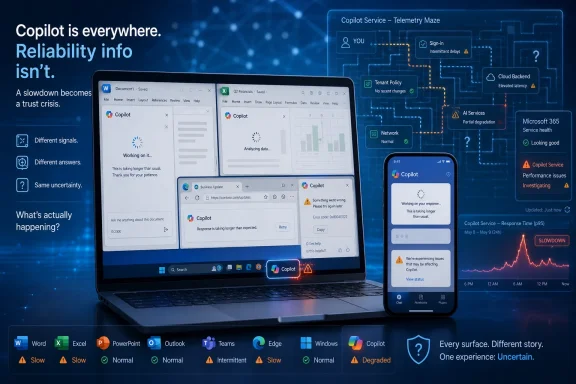
The reported Copilot issues on May 29 followed a familiar pattern: users saw sluggish answers, failed prompts, blank or incomplete responses, and uncertainty over whether the problem sat with their device, their Microsoft account, their tenant, the web app, the mobile app, or Microsoft’s own cloud backend. Downdetector-style reports are not the same thing as an official root-cause analysis, and they can be noisy. But they are useful as a barometer of user experience, especially when a cloud service has no single front door and no single failure mode.
That distinction matters. A conventional outage is binary enough for most users to understand. Outlook is loading or it is not. Teams calls connect or they do not. OneDrive syncs or it stalls. Copilot, by contrast, can degrade in ways that look deceptively local: a response takes 40 seconds, a citation panel does not populate, a prompt returns “something went wrong,” the Office side panel freezes, or the standalone Copilot app behaves differently from the web version.
For Microsoft, that ambiguity is dangerous. The company has positioned Copilot as an intelligent layer across work, search, documents, code, meetings, and Windows itself. But intelligence that cannot reliably explain whether it is broken, the network is broken, or the tenant policy is blocking something quickly starts to look less like an assistant and more like another opaque dependency.
The lesson from Friday’s reports is not that Copilot had a catastrophic failure. The lesson is that Microsoft has made Copilot important enough that even partial degradation becomes news, while still leaving users with consumer-grade troubleshooting rituals: refresh, sign out, clear cache, try another browser, wait.
When a user says “Copilot is down,” the first question is: which Copilot? The chatbot at Microsoft’s consumer Copilot site is not the same operational experience as Microsoft 365 Copilot grounded in work data. GitHub Copilot has its own developer workflow and service dependencies. Copilot inside Word or Excel relies on the Office app, the user’s license, tenant policy, service availability, and the orchestration layer that sends context to the model. A Windows user clicking a Copilot button may be interacting with a web-wrapper experience that feels native only because Microsoft placed it near the taskbar.
This is a branding victory and a support headache. Microsoft wanted “Copilot” to become the user-facing word for AI assistance across the company’s ecosystem. It succeeded too well. The name now collapses multiple services into one mental bucket, so a slowdown in one place can be interpreted as a platform-wide failure even when the underlying issue is narrower.
The inverse is also true. A real backend degradation can be underappreciated because each surface fails slightly differently. The web app may stall, the mobile app may appear unavailable, Office may generate blank responses, and enterprise admins may see nothing obvious unless Microsoft posts a service-health advisory in the right dashboard. That is not a clean status model; it is a fog machine.
For WindowsForum readers, this should sound familiar. Microsoft has often shipped a strategic abstraction first and cleaned up the operational seams later. Microsoft 365 unified a bundle of services under one subscription identity, but admins still live inside a world of separate admin centers, service advisories, licensing quirks, and workload-specific exceptions. Copilot is repeating that pattern at AI speed.
That is one reason Copilot slowdowns attract disproportionate frustration. The pitch for AI assistants is immediacy: ask a question, get a draft, summarize a meeting, rewrite a paragraph, analyze a spreadsheet, produce a starting point. If the response time becomes unpredictable, the user’s workflow breaks in a more subtle way than when a conventional app crashes. You wait because the next answer might be useful, but you do not know whether the wait is normal, doomed, or billable dead time.
That matters in enterprises. A worker experimenting with Copilot in Word can shrug and go back to typing. A help desk team using Copilot to summarize incident notes, a sales team using it to prep customer briefings, or a security analyst relying on AI-generated triage guidance has a different risk profile. Even if Copilot is not the system of record, Microsoft is nudging organizations to embed it into the flow of work. Once that happens, unpredictable degradation becomes operational friction.
The practical problem is that AI failures are often soft failures. A model may return something late, incomplete, generic, or detached from the user’s intended context. Traditional monitoring catches HTTP errors and service availability. It is harder to monitor whether the answer arrived too late to matter, whether grounding failed silently, or whether a blank response is a client problem, a policy problem, or a model orchestration problem.
That is why Copilot’s reliability story cannot be reduced to “is the service up?” Microsoft needs users and admins to know whether Copilot is healthy enough to use for the task at hand. There is a difference between an assistant that is technically reachable and one that is operationally dependable.
The problem is that Copilot is being sold as something more consequential than a web app. In Microsoft’s enterprise story, Copilot is an interface to organizational knowledge. It reaches into mail, meetings, files, chats, calendars, documents, and data protected by Microsoft 365 permissions. It is supposed to reduce busywork, compress search time, and help users reason over the sprawl of digital work.
That means the support model has to mature beyond “try again later.” If a tenant has paid for Microsoft 365 Copilot seats, admins need clear signals: whether there is a service incident, which workloads are affected, whether the issue affects all regions or only some users, whether grounding against Microsoft Graph is impaired, whether Office app integration is degraded, and whether failures are related to authentication, licensing, network edge services, or model capacity.
This is where Microsoft’s cloud heritage cuts both ways. The company knows how to run large-scale enterprise services and communicate through admin portals. But Copilot sits across so many products that incident communication can lag user reality. A user may experience Copilot as broken before a formal incident appears. An admin may see a generic advisory that does not map cleanly to the user’s complaint. A help desk may be left translating “Copilot is slow” into ten possible diagnostic paths.
That translation burden is not trivial. In a large organization, ambiguity becomes ticket volume. Ticket volume becomes lost confidence. Lost confidence becomes a quiet drag on adoption, especially for a paid AI product that many employees are still deciding whether to trust.
That fragmentation was tolerable when Copilot was a novelty. It is less tolerable now that Microsoft has pressed AI into the center of its product narrative. If the assistant is everywhere, the health model has to be understandable everywhere. Otherwise, Microsoft is asking users to treat Copilot as mission-critical while diagnosing it like a mystery plugin.
A better model would make Copilot health visible at the point of use. If Copilot in Word is degraded, Word should say so plainly. If the standalone app is experiencing elevated latency, the app should distinguish between local connectivity and a service-side issue. If a tenant policy blocks a feature, Copilot should not behave like the cloud has lost its mind. If grounding is unavailable, the user should know that the response may not include work context.
This is not merely user-interface polish. It is part of the trust architecture for AI. Users are more forgiving of failures they understand. They are less forgiving when an allegedly intelligent assistant provides no useful diagnosis of its own failure.
Microsoft has been here before. Windows Update’s reputation suffered for years not only because updates failed, but because failures were cryptic, poorly timed, and hard to reason about. OneDrive sync conflicts became manageable only when the client got better at showing what was stuck and why. Copilot needs the same operational humility: admit when the service is impaired, separate local from cloud failure, and stop making users infer backend health from vibes.
That churn has consequences. Users who never asked for AI in Windows are annoyed when it appears too prominently. Users who do want AI are annoyed when the experience is inconsistent. Admins are annoyed when policy controls, licensing boundaries, and user education lag behind the interface changes. Developers are annoyed when branding makes it harder to explain which service is failing.
The outage story therefore intersects with the product-design story. If Copilot remains optional and clearly bounded, a slowdown is annoying. If Copilot becomes the default path for search, settings help, document work, meeting recall, or file actions, a slowdown becomes a system-level reliability concern. Microsoft cannot have it both ways: Copilot cannot be simultaneously central enough to justify constant promotion and peripheral enough that outages do not matter.
Windows has traditionally been resilient because local workflows continue when cloud services wobble. You can still open files, run apps, use local search, write documents, and administer a machine. The more Microsoft makes Windows feel like a front end for cloud intelligence, the more it inherits cloud failure modes inside the local user experience. That is not automatically bad, but it demands restraint.
The right question for Microsoft is not whether AI belongs in Windows. It does, at least in some form. The question is whether AI features degrade gracefully. A Copilot action that fails should leave the user with a clear conventional path. A Settings suggestion that cannot load should not block manual navigation. A document summary that stalls should not make the document feel broken. In operating systems, graceful failure is not optional; it is part of the contract.
Microsoft should not dismiss that signal simply because it is unofficial. User reports are messy, but so is the modern cloud client stack. If thousands of people say a service is slow, the important first response is not semantic precision over whether it qualifies as an “outage.” The important response is acknowledging that user experience has degraded and explaining what is known.
That distinction is especially important for AI services because “down” is often the wrong word. A chatbot can be reachable yet unusably slow. It can accept prompts but fail to return grounded answers. It can work for one account type and fail for another. It can succeed on short prompts and choke on longer context. Users reach for the word “down” because service providers have not given them a better vocabulary.
Microsoft could help by publishing clearer categories for Copilot incidents. Availability, latency, response generation, grounding, file access, Office integration, image generation, voice, mobile app access, and sign-in are different failure domains. Lumping them together under one green or red indicator is not enough for a product that now spans personal productivity and enterprise knowledge work.
The company also needs to be careful with “warning” versus “outage” language. A warning that means users receive blank responses may be technically accurate inside an incident-management system, but to the worker staring at a failed answer, it feels like an outage. Operational classifications should not obscure user impact.
Copilot is under particular pressure because Microsoft has tied it to the future of Office and Windows. This is not a side experiment living in a lab. It is the company’s flagship productivity thesis: AI as the new interface for work. That thesis becomes harder to sell if users associate Copilot with sluggishness, clutter, licensing confusion, or inconsistent availability.
There is also a human factor. Many users are still forming their first durable opinion of workplace AI. A veteran Excel user will tolerate a spreadsheet crash because the value of Excel is already proven. A skeptical employee trying Copilot for the third time may not be so forgiving. If the assistant fails during early encounters, it confirms the suspicion that AI is a management fad bolted onto tools that already worked.
Microsoft knows this, which is why it keeps pushing Copilot deeper into familiar workflows. But forced visibility and reliable utility are not the same thing. A floating button can drive engagement. It cannot manufacture trust. Trust comes from repeated moments where the tool saves time, behaves predictably, and does not require the user to become a part-time service-health analyst.
That is the real stakes of an otherwise ordinary slowdown report. Copilot does not need to be perfect. But if Microsoft wants it to become habitual, it needs to be boringly dependable. The most successful infrastructure disappears into the work. Copilot is still too often making users think about Copilot.
Admins should also separate user education from incident response. Users need to know that Copilot in Windows, Copilot on the web, Microsoft 365 Copilot in Office, and GitHub Copilot are not interchangeable. They need plain guidance on when to retry, when to switch surfaces, when to use conventional workflows, and when to open a ticket. Without that, every Copilot hiccup becomes a vague complaint about “AI not working.”
Network teams have a role as well. Cloud AI services can be sensitive to proxy behavior, browser controls, authentication loops, conditional access, data-loss-prevention policies, and regional routing. A home user can blame Microsoft and move on. An enterprise needs to know whether its own controls are contributing to perceived slowness.
Security teams should be part of this conversation, too. During an outage or degradation, users may paste work into alternative AI tools if Copilot is unavailable. That is a predictable shadow-IT response. If Microsoft’s approved assistant fails and no fallback exists, the organization’s data-governance model is tested immediately.
This is why Copilot reliability is not just Microsoft’s issue. It is becoming part of enterprise change management. If an organization tells employees to use AI for work, it must also define what happens when the sanctioned AI is slow, unavailable, or unreliable.
For users and IT teams, the concrete lessons are already visible.
Microsoft’s next Copilot challenge is not another button, another rebrand, or another promise that agents will transform work. It is the less glamorous job of making the AI layer legible when it fails and dependable when users need it. If Copilot is going to become the front end for Microsoft’s productivity empire, days like May 29 cannot feel like guessing games; they have to feel like managed incidents in a mature platform that knows how much trust is riding on the answer box.
 Copilot’s Outage Problem Is Really a Trust Problem
The reported Copilot issues on May 29 followed a familiar pattern: users saw sluggish answers, failed prompts, blank or incomplete responses, and uncertainty over whether the problem sat with their device, their Microsoft account, their tenant, the web app, the mobile app, or Microsoft’s own cloud backend. Downdetector-style reports are not the same thing as an official root-cause analysis, and they can be noisy. But they are useful as a barometer of user experience, especially when a cloud service has no single front door and no single failure mode.That distinction matters. A conventional outage is binary enough for most users to understand. Outlook is loading or it is not. Teams calls connect or they do not. OneDrive syncs or it stalls. Copilot, by contrast, can degrade in ways that look deceptively local: a response takes 40 seconds, a citation panel does not populate, a prompt returns “something went wrong,” the Office side panel freezes, or the standalone Copilot app behaves differently from the web version.
For Microsoft, that ambiguity is dangerous. The company has positioned Copilot as an intelligent layer across work, search, documents, code, meetings, and Windows itself. But intelligence that cannot reliably explain whether it is broken, the network is broken, or the tenant policy is blocking something quickly starts to look less like an assistant and more like another opaque dependency.
The lesson from Friday’s reports is not that Copilot had a catastrophic failure. The lesson is that Microsoft has made Copilot important enough that even partial degradation becomes news, while still leaving users with consumer-grade troubleshooting rituals: refresh, sign out, clear cache, try another browser, wait.
Microsoft Built Copilot as a Brand Before It Became a Stable Surface
Copilot is not one product in the way Notepad is one product or Outlook is one product. It is a brand stretched across consumer chat, Microsoft 365 Copilot, GitHub Copilot, Security Copilot, Windows entry points, Edge integrations, mobile apps, and enterprise connectors. That breadth is the core of Microsoft’s AI strategy, but it is also why outages and slowdowns become so hard to parse.When a user says “Copilot is down,” the first question is: which Copilot? The chatbot at Microsoft’s consumer Copilot site is not the same operational experience as Microsoft 365 Copilot grounded in work data. GitHub Copilot has its own developer workflow and service dependencies. Copilot inside Word or Excel relies on the Office app, the user’s license, tenant policy, service availability, and the orchestration layer that sends context to the model. A Windows user clicking a Copilot button may be interacting with a web-wrapper experience that feels native only because Microsoft placed it near the taskbar.
This is a branding victory and a support headache. Microsoft wanted “Copilot” to become the user-facing word for AI assistance across the company’s ecosystem. It succeeded too well. The name now collapses multiple services into one mental bucket, so a slowdown in one place can be interpreted as a platform-wide failure even when the underlying issue is narrower.
The inverse is also true. A real backend degradation can be underappreciated because each surface fails slightly differently. The web app may stall, the mobile app may appear unavailable, Office may generate blank responses, and enterprise admins may see nothing obvious unless Microsoft posts a service-health advisory in the right dashboard. That is not a clean status model; it is a fog machine.
For WindowsForum readers, this should sound familiar. Microsoft has often shipped a strategic abstraction first and cleaned up the operational seams later. Microsoft 365 unified a bundle of services under one subscription identity, but admins still live inside a world of separate admin centers, service advisories, licensing quirks, and workload-specific exceptions. Copilot is repeating that pattern at AI speed.
A Slow AI Assistant Feels Worse Than a Broken Button
Latency is not just a performance metric for generative AI. It changes the user’s perception of competence. A slow file copy is irritating, but everyone understands the concept of data moving from one place to another. A slow AI assistant feels like a person pausing too long before answering a simple question. Users interpret delay as confusion, overload, or low quality, not merely network congestion.That is one reason Copilot slowdowns attract disproportionate frustration. The pitch for AI assistants is immediacy: ask a question, get a draft, summarize a meeting, rewrite a paragraph, analyze a spreadsheet, produce a starting point. If the response time becomes unpredictable, the user’s workflow breaks in a more subtle way than when a conventional app crashes. You wait because the next answer might be useful, but you do not know whether the wait is normal, doomed, or billable dead time.
That matters in enterprises. A worker experimenting with Copilot in Word can shrug and go back to typing. A help desk team using Copilot to summarize incident notes, a sales team using it to prep customer briefings, or a security analyst relying on AI-generated triage guidance has a different risk profile. Even if Copilot is not the system of record, Microsoft is nudging organizations to embed it into the flow of work. Once that happens, unpredictable degradation becomes operational friction.
The practical problem is that AI failures are often soft failures. A model may return something late, incomplete, generic, or detached from the user’s intended context. Traditional monitoring catches HTTP errors and service availability. It is harder to monitor whether the answer arrived too late to matter, whether grounding failed silently, or whether a blank response is a client problem, a policy problem, or a model orchestration problem.
That is why Copilot’s reliability story cannot be reduced to “is the service up?” Microsoft needs users and admins to know whether Copilot is healthy enough to use for the task at hand. There is a difference between an assistant that is technically reachable and one that is operationally dependable.
The Consumer Advice Is Fine, but It Does Not Solve the Enterprise Issue
The usual troubleshooting advice is not wrong. If Copilot is slow, users can reload the page, try another browser, check their connection, disable aggressive extensions, clear app cache, update the app, sign out and back in, or check whether Microsoft has acknowledged an incident. Those steps solve a meaningful share of local problems. They are also the same steps users have been told to try for every web app since the broadband era.The problem is that Copilot is being sold as something more consequential than a web app. In Microsoft’s enterprise story, Copilot is an interface to organizational knowledge. It reaches into mail, meetings, files, chats, calendars, documents, and data protected by Microsoft 365 permissions. It is supposed to reduce busywork, compress search time, and help users reason over the sprawl of digital work.
That means the support model has to mature beyond “try again later.” If a tenant has paid for Microsoft 365 Copilot seats, admins need clear signals: whether there is a service incident, which workloads are affected, whether the issue affects all regions or only some users, whether grounding against Microsoft Graph is impaired, whether Office app integration is degraded, and whether failures are related to authentication, licensing, network edge services, or model capacity.
This is where Microsoft’s cloud heritage cuts both ways. The company knows how to run large-scale enterprise services and communicate through admin portals. But Copilot sits across so many products that incident communication can lag user reality. A user may experience Copilot as broken before a formal incident appears. An admin may see a generic advisory that does not map cleanly to the user’s complaint. A help desk may be left translating “Copilot is slow” into ten possible diagnostic paths.
That translation burden is not trivial. In a large organization, ambiguity becomes ticket volume. Ticket volume becomes lost confidence. Lost confidence becomes a quiet drag on adoption, especially for a paid AI product that many employees are still deciding whether to trust.
Microsoft’s AI Ambition Has Outrun the Status Page
There is a deeper strategic tension here. Microsoft wants Copilot to feel ubiquitous, but reliability information remains fragmented. Consumer users look at public outage trackers and social media. Enterprise users check the Microsoft 365 admin center. Azure customers monitor Azure status. Developers may check GitHub status for GitHub Copilot. Windows users often have no idea which status page would apply.That fragmentation was tolerable when Copilot was a novelty. It is less tolerable now that Microsoft has pressed AI into the center of its product narrative. If the assistant is everywhere, the health model has to be understandable everywhere. Otherwise, Microsoft is asking users to treat Copilot as mission-critical while diagnosing it like a mystery plugin.
A better model would make Copilot health visible at the point of use. If Copilot in Word is degraded, Word should say so plainly. If the standalone app is experiencing elevated latency, the app should distinguish between local connectivity and a service-side issue. If a tenant policy blocks a feature, Copilot should not behave like the cloud has lost its mind. If grounding is unavailable, the user should know that the response may not include work context.
This is not merely user-interface polish. It is part of the trust architecture for AI. Users are more forgiving of failures they understand. They are less forgiving when an allegedly intelligent assistant provides no useful diagnosis of its own failure.
Microsoft has been here before. Windows Update’s reputation suffered for years not only because updates failed, but because failures were cryptic, poorly timed, and hard to reason about. OneDrive sync conflicts became manageable only when the client got better at showing what was stuck and why. Copilot needs the same operational humility: admit when the service is impaired, separate local from cloud failure, and stop making users infer backend health from vibes.
The Windows Angle Is Bigger Than a Chatbot
For Windows users, the May 29 reports land in a broader debate over how aggressively Microsoft should weave Copilot into the operating system. The company has already moved through several phases: big AI branding, taskbar prominence, Windows Copilot experiments, Copilot+ PC marketing, Recall controversy, AI actions in parts of the shell, and more recent signs of trimming or rethinking some integrations.That churn has consequences. Users who never asked for AI in Windows are annoyed when it appears too prominently. Users who do want AI are annoyed when the experience is inconsistent. Admins are annoyed when policy controls, licensing boundaries, and user education lag behind the interface changes. Developers are annoyed when branding makes it harder to explain which service is failing.
The outage story therefore intersects with the product-design story. If Copilot remains optional and clearly bounded, a slowdown is annoying. If Copilot becomes the default path for search, settings help, document work, meeting recall, or file actions, a slowdown becomes a system-level reliability concern. Microsoft cannot have it both ways: Copilot cannot be simultaneously central enough to justify constant promotion and peripheral enough that outages do not matter.
Windows has traditionally been resilient because local workflows continue when cloud services wobble. You can still open files, run apps, use local search, write documents, and administer a machine. The more Microsoft makes Windows feel like a front end for cloud intelligence, the more it inherits cloud failure modes inside the local user experience. That is not automatically bad, but it demands restraint.
The right question for Microsoft is not whether AI belongs in Windows. It does, at least in some form. The question is whether AI features degrade gracefully. A Copilot action that fails should leave the user with a clear conventional path. A Settings suggestion that cannot load should not block manual navigation. A document summary that stalls should not make the document feel broken. In operating systems, graceful failure is not optional; it is part of the contract.
Outage Trackers Are Filling a Communication Gap
The reporting around Friday’s Copilot issues leaned heavily on user-submitted outage platforms. That is not ideal, but it is understandable. Public status pages are often too broad, too delayed, or too sanitized to capture what users are experiencing in the first hour of a problem. Outage trackers, for all their imperfections, show the social reality of a service: people tried it, it failed, and enough of them complained at once to form a pattern.Microsoft should not dismiss that signal simply because it is unofficial. User reports are messy, but so is the modern cloud client stack. If thousands of people say a service is slow, the important first response is not semantic precision over whether it qualifies as an “outage.” The important response is acknowledging that user experience has degraded and explaining what is known.
That distinction is especially important for AI services because “down” is often the wrong word. A chatbot can be reachable yet unusably slow. It can accept prompts but fail to return grounded answers. It can work for one account type and fail for another. It can succeed on short prompts and choke on longer context. Users reach for the word “down” because service providers have not given them a better vocabulary.
Microsoft could help by publishing clearer categories for Copilot incidents. Availability, latency, response generation, grounding, file access, Office integration, image generation, voice, mobile app access, and sign-in are different failure domains. Lumping them together under one green or red indicator is not enough for a product that now spans personal productivity and enterprise knowledge work.
The company also needs to be careful with “warning” versus “outage” language. A warning that means users receive blank responses may be technically accurate inside an incident-management system, but to the worker staring at a failed answer, it feels like an outage. Operational classifications should not obscure user impact.
The Adoption Story Depends on Boring Reliability
The AI industry tends to celebrate model launches, benchmark gains, agent demos, and new surfaces. Enterprises care about those things only after the basics are credible. Can users access the service? Does it respect permissions? Does it produce useful output? Does it fail safely? Can admins explain what happened when it fails? Can finance justify the license when employees quietly stop using it after a few bad experiences?Copilot is under particular pressure because Microsoft has tied it to the future of Office and Windows. This is not a side experiment living in a lab. It is the company’s flagship productivity thesis: AI as the new interface for work. That thesis becomes harder to sell if users associate Copilot with sluggishness, clutter, licensing confusion, or inconsistent availability.
There is also a human factor. Many users are still forming their first durable opinion of workplace AI. A veteran Excel user will tolerate a spreadsheet crash because the value of Excel is already proven. A skeptical employee trying Copilot for the third time may not be so forgiving. If the assistant fails during early encounters, it confirms the suspicion that AI is a management fad bolted onto tools that already worked.
Microsoft knows this, which is why it keeps pushing Copilot deeper into familiar workflows. But forced visibility and reliable utility are not the same thing. A floating button can drive engagement. It cannot manufacture trust. Trust comes from repeated moments where the tool saves time, behaves predictably, and does not require the user to become a part-time service-health analyst.
That is the real stakes of an otherwise ordinary slowdown report. Copilot does not need to be perfect. But if Microsoft wants it to become habitual, it needs to be boringly dependable. The most successful infrastructure disappears into the work. Copilot is still too often making users think about Copilot.
The Admin’s Playbook Is Becoming Part of the Product
For IT pros, the practical response to Copilot degradation should now be formalized. Treat AI assistance as a supported service, not a novelty. That means documenting which Copilot surfaces are approved, where users should report problems, what telemetry the help desk can collect, and which official dashboards matter for the organization’s licenses.Admins should also separate user education from incident response. Users need to know that Copilot in Windows, Copilot on the web, Microsoft 365 Copilot in Office, and GitHub Copilot are not interchangeable. They need plain guidance on when to retry, when to switch surfaces, when to use conventional workflows, and when to open a ticket. Without that, every Copilot hiccup becomes a vague complaint about “AI not working.”
Network teams have a role as well. Cloud AI services can be sensitive to proxy behavior, browser controls, authentication loops, conditional access, data-loss-prevention policies, and regional routing. A home user can blame Microsoft and move on. An enterprise needs to know whether its own controls are contributing to perceived slowness.
Security teams should be part of this conversation, too. During an outage or degradation, users may paste work into alternative AI tools if Copilot is unavailable. That is a predictable shadow-IT response. If Microsoft’s approved assistant fails and no fallback exists, the organization’s data-governance model is tested immediately.
This is why Copilot reliability is not just Microsoft’s issue. It is becoming part of enterprise change management. If an organization tells employees to use AI for work, it must also define what happens when the sanctioned AI is slow, unavailable, or unreliable.
Friday’s Slowdown Leaves a Checklist Microsoft Cannot Ignore
The May 29 Copilot reports should be read as a warning light rather than a five-alarm fire. A short-lived or partial degradation does not invalidate Microsoft’s AI strategy. But it does reveal where that strategy is operationally thin: status clarity, graceful degradation, product boundaries, and admin-facing diagnostics.For users and IT teams, the concrete lessons are already visible.
- Microsoft Copilot can appear “down” in several different ways, including slow responses, blank answers, failed prompts, app problems, and web access issues.
- User-submitted outage spikes are not definitive root-cause evidence, but they are often the fastest public signal that a cloud service is degrading.
- Enterprise admins should check Microsoft 365 service health and tenant-specific advisories before assuming Copilot problems are local device issues.
- Organizations that rely on Copilot should define fallback workflows so users do not move sensitive data into unsanctioned AI tools during service trouble.
- Microsoft needs clearer in-product health messages because Copilot’s many surfaces make a single generic status indicator inadequate.
Microsoft’s next Copilot challenge is not another button, another rebrand, or another promise that agents will transform work. It is the less glamorous job of making the AI layer legible when it fails and dependable when users need it. If Copilot is going to become the front end for Microsoft’s productivity empire, days like May 29 cannot feel like guessing games; they have to feel like managed incidents in a mature platform that knows how much trust is riding on the answer box.
References
- Primary source: Hindustan Times
Published: Fri, 29 May 2026 17:52:03 GMT

Microsoft Copilot down update: Why Copilot is so slow today. How to solve issues?
Many users have reported problems with Microsoft Copilot on Friday as the AI assistant experienced outages and slow responses from the app. www.hindustantimes.com
- Independent coverage: aol.com
Published: Fri, 29 May 2026 16:04:34 GMT
Copilot issues today. Microsoft Copilot down? Copilot down right now? - AOL
Downdetector reports that the biggest problem is people being able to access the Copilot app. www.aol.com
- Related coverage: tomsguide.com
- Related coverage: capitolskyline.com

Is Copilot Down? Microsoft AI Outage Triggers Widespread User Complaints Across the United States
Microsoft Copilot users across the US reported outages, slow responses, and AI errors as Downdetector showed a major spike in service complaints. capitolskyline.com
- Related coverage: androidauthority.com

Is Microsoft Copilot not working? Here's what's going on
If you're having problems with Microsoft Copilot and Azure, you're not alone. Multiple Microsoft services appear to be down.www.androidauthority.com - Related coverage: windowscentral.com

Microsoft admits its "infuriating" floating AI button was a mistake
Microsoft admits the floating Copilot button was a mistake and will allow you to hide it in Word, Excel, and PowerPoint soon. www.windowscentral.com
- Related coverage: gvwire.com

Microsoft Copilot Down for Thousands, Downdetector Shows
Reports of issues with Microsoft Copilot have surfaced, with thousands of users experiencing problems on Friday morning. gvwire.com
- Related coverage: downforeveryoneorjustme.com

Is Copilot down? Live status and problems past 24 hours
Live problems for Copilot. Error received? Down? Slow? Check what is going on. downforeveryoneorjustme.com
- Related coverage: bluemonitor.org
Is Microsoft Copilot Down? — BlueMonitor
Check if Microsoft Copilot is down right now. Real-time status monitoring for Microsoft Copilot. www.bluemonitor.org
- Related coverage: outage.report
Microsoft Copilot down? Outage map, service status, incidents history
See if Microsoft Copilot is down or it's just you. Check current status and outage map. Post yours and see other's reports and complaints outage.report
- Related coverage: outage.now
Microsoft Copilot down? Current status and outage map
See if Microsoft Copilot is down or it's just you. Check current status and outage map. Post yours and see other's reports and complaints outage.now
- Related coverage: isdown.app

Is Microsoft Copilot Down? Check current status and user reports
Check if Microsoft Copilot is down right now. Live Microsoft Copilot status, real-time outage detection, and instant alerts when Microsoft Copilot has issues. Free 14-day trial. isdown.app
- Official source: cdn-dynmedia-1.microsoft.com
- Official source: microsoft.ai
- Official source: download.microsoft.com
- Related coverage: techradar.com

Despite spending billions, only 3.3% of users pay for Microsoft Copilot
Microsoft 365 Copilot usage surges on paper while most Office software users do not subscribe to the AI featureswww.techradar.com
- Related coverage: support.nhs.net
- Official source: techcommunity.microsoft.com
- Related coverage: oregon.gov
