

Microsoft is developing a unified Copilot “super app” that would combine GitHub Copilot, Copilot chat, Copilot Cowork, and an internal agentic workflow feature called Autopilot, with Fortune reporting on May 29, 2026, that Microsoft is targeting a launch by the end of summer. The move is less about inventing yet another AI assistant than admitting the current Copilot sprawl has become a product problem. For Windows users, developers, and Microsoft 365 administrators, the stakes are obvious: Microsoft wants Copilot to become the default work surface before rivals define what an AI operating layer should feel like. The question is whether unification will make Copilot coherent — or merely concentrate its confusion in one larger window.
Microsoft has spent the past few years attaching the Copilot name to almost every surface it controls: Windows, Edge, Microsoft 365, Teams, Outlook, GitHub, Azure, security tools, and developer workflows. That ubiquity was supposed to be the company’s advantage. Instead, it has often left users wondering which Copilot they are talking to, what data it can see, what license unlocks which feature, and why the same brand behaves differently depending on where it appears.
The reported super app is an attempt to solve that by collapsing several major AI experiences into one place. GitHub Copilot would bring code assistance, Copilot chat would provide the general conversational layer, Copilot Cowork would push the product toward collaborative execution, and Autopilot would represent the more ambitious agentic workflow Microsoft has been gesturing toward for more than a year. If the report is accurate, Microsoft is not just redesigning a launcher. It is trying to turn Copilot from a scattered feature family into a single product.
That distinction matters. A feature can live inside Word or Visual Studio Code and succeed on narrow terms. A product has to explain itself, remember context, manage identity, earn trust, and justify habit. Copilot has had pieces of that equation, but not the center of gravity.
The irony is that Microsoft’s greatest distribution advantage has also been its biggest UX liability. The company can put an AI button almost anywhere, but every additional entry point risks making Copilot feel less like an assistant and more like corporate wallpaper. A super app is Microsoft’s admission that AI cannot win merely by being present everywhere. It has to be understandable somewhere.
Andreou’s background at Snap is relevant not because Copilot should become social software, but because Microsoft appears to understand that AI adoption is now partly an interface and habit-formation problem. Enterprise buyers may sign contracts, but users still have to choose to open the thing. If Copilot remains a set of disconnected panels buried in apps, Microsoft risks owning the license without owning the daily workflow.
This is where the “super app” phrase earns its keep, even if it sounds borrowed from consumer tech. In Asia, super apps became powerful by aggregating adjacent activities — messaging, payments, shopping, travel, services — into one habitual surface. Microsoft’s version would be less about mini-app commerce and more about routing work: write code, query documents, summarize meetings, assign follow-ups, invoke agents, and move between personal and enterprise contexts.
That sounds elegant in a strategy deck. In practice, it is extremely hard. Microsoft must make a unified Copilot feel powerful without making it feel invasive, flexible without becoming chaotic, and integrated without turning into another Teams-like gravity well where every workflow is absorbed whether users want it or not.
Consumer AI assistants are trained by convenience. They move fast, ask fewer questions, and thrive on ambiguous personal context. Enterprise assistants are constrained by permissions, compliance, retention, auditability, tenant boundaries, data residency, and administrator policy. Microsoft wants the same user to glide between those worlds, but IT departments are paid to make sure the glide path does not become a data leak.
A visible toggle could help by making context explicit. Users need to know whether they are asking a personal assistant, a work assistant grounded in Microsoft Graph, a coding assistant connected to repositories, or an agent with permission to act. If Microsoft gets that boundary wrong, the super app becomes a security training nightmare.
The company has spent considerable effort telling enterprise customers that Microsoft 365 Copilot and Copilot Chat come with enterprise data protection, respect tenant permissions, and do not use customer prompts and Graph-grounded data to train foundation models. Those commitments matter, but they become harder to communicate as Copilot absorbs more capabilities. A chat box that can summarize an email is one thing. A unified app that can touch code, documents, calendars, agents, and automated workflows is a different governance challenge.
The toggle is therefore not a cosmetic switch. It is Microsoft’s attempt to make identity, permission, and intent legible to ordinary users. If that legibility fails, administrators will not care how slick the app looks.
A chatbot can be wrong in text. An agent can be wrong in action. It can send the email, modify the file, open the issue, change the configuration, trigger the workflow, or make a decision that creates downstream cleanup work. The value proposition is larger, but so is the blast radius.
Microsoft has been preparing the ground for this shift through Copilot Studio, Microsoft 365 agents, Copilot Actions, and Windows experiments that point toward background task execution. A unified Copilot app would give those capabilities a more obvious home. Instead of asking users to discover agents inside separate Microsoft 365 surfaces, Microsoft could present Copilot as the place where work begins and agents become the execution layer.
That is the dream. The operational reality is messier. Enterprises will want approval flows, logs, rollback options, scoped permissions, role-based access, and clear distinctions between suggested actions and autonomous actions. Developers will want to know when GitHub Copilot is merely completing code and when a broader Copilot agent is reasoning across repositories, tickets, build output, and documentation.
The name Autopilot also carries baggage. In Microsoft land, Autopilot already means Windows device provisioning. Outside Microsoft, it suggests automation with partial human supervision — a promise that can be misunderstood. If this internal name ever becomes external branding, Microsoft will need to be careful. “Autopilot” sounds reassuring until the machine does something expensive.
Microsoft 365 Copilot has had a harder road. Summarizing meetings, drafting emails, and synthesizing documents can be useful, but the return on investment is less obvious and more dependent on organizational data hygiene. If a tenant is full of stale SharePoint sites, overshared files, messy Teams channels, and inconsistent permissions, Copilot does not magically become wise. It becomes a fluent interface to the mess.
Bringing GitHub Copilot into the same orbit as Microsoft 365 Copilot could strengthen the overall story. A product manager could move from a Teams discussion to a spec, from the spec to a GitHub issue, from the issue to code context, and from code context back to release notes. That is exactly the kind of cross-domain workflow Microsoft is uniquely positioned to sell.
But it also risks diluting GitHub Copilot’s developer-first identity. Developers are famously allergic to corporate productivity theater. If the super app feels like Microsoft 365 swallowing GitHub, Redmond could irritate one of the audiences that has actually embraced its AI tooling. The integration has to respect the norms of software work rather than forcing developers into a generalized office cockpit.
That puts Microsoft in a strange position. It has the deepest enterprise distribution of any AI platform contender, but it does not automatically have the cleanest AI experience. ChatGPT became the mental model for consumer AI. Claude built a reputation around writing, reasoning, and long-context work. Google is threading Gemini through Search, Workspace, Android, and Chrome. Microsoft has reach, but reach is not the same thing as affection.
A Copilot super app is an attempt to fight at the interface layer before someone else becomes the front door to Microsoft’s own ecosystem. If users start their day in ChatGPT or Claude and merely use Microsoft 365 as a file store, Microsoft loses strategic control even if Office remains installed. The danger is not that Word disappears. The danger is that Word becomes a backend.
This is why the super app matters beyond branding. Microsoft wants Copilot to mediate work before a rival assistant does. The company’s vast suite gives it a plausible claim to that role, but only if the unified experience is faster, clearer, and more trusted than the alternatives.
That could be useful. A single Copilot surface that understands local context, work identity, cloud files, code repositories, and approved agents might finally make AI feel less bolted onto Windows. For power users, it could become a command palette with memory and permissions. For less technical users, it could become the place to ask for help without knowing which app contains the answer.
But Windows history offers a warning. Microsoft has repeatedly tried to make central surfaces that users did not ask for: assistants, feeds, widgets, search integrations, Start menu recommendations, and bundled experiences that blur the line between utility and promotion. If the Copilot super app becomes another mandatory pane, users will resist it before they understand it.
The winning version would be deeply integrated but not coercive. It would let administrators control availability, let users choose defaults, and make its data access visible. The losing version would be a glossy funnel into subscriptions, agents, and upsells.
For IT departments, a unified Copilot surface raises immediate questions. Which licenses are required? Which logs are generated? Can personal and work modes be separated by policy? Can GitHub data be kept within approved boundaries? How do retention policies apply to agent conversations? Are prompts discoverable? Can risky connectors be disabled? Can agents be approved centrally? Can users tell when Copilot is using web grounding, Graph data, code context, or third-party tools?
Microsoft has answers to some of these questions across its existing documentation and admin controls, but a super app concentrates the concerns. Fragmentation is annoying, but it can also contain risk. A single interface that combines chat, coding, enterprise data, and action-taking agents becomes a higher-value target for misconfiguration, prompt injection, oversharing, and user error.
This is where Microsoft’s enterprise muscle could become an advantage. The company knows how to sell governance, compliance, and admin control. If it can make the super app manageable through familiar Microsoft 365, Entra, Purview, GitHub Enterprise, and Power Platform controls, it can offer something consumer-first AI rivals struggle to match.
But the burden of proof is on Microsoft. Enterprises have heard the productivity pitch. Now they need evidence that the control plane is as unified as the app.
A super app could reduce that confusion by becoming the canonical Copilot. Users would no longer need to understand every product boundary before starting. They would open Copilot and let the app route the request.
Yet routing is not the same as clarity. If users ask Copilot to “summarize the customer issue and draft a fix,” the app must know whether to look in Outlook, Teams, Dynamics, GitHub, Jira, a SharePoint folder, or a local file. It must also explain what it used and what it did not. Otherwise, a unified brand simply hides complexity instead of resolving it.
Microsoft’s best path is to make Copilot less mystical. The app should show its context, permissions, and sources in plain language. It should distinguish between “I can answer,” “I can draft,” “I can act if you approve,” and “I am not allowed to do that.” The more agentic Copilot becomes, the more important humility becomes as a product feature.
The timing also suggests Microsoft does not believe it can wait for perfection. AI interface habits are forming now. Developers are choosing coding assistants. Workers are building personal routines around ChatGPT, Claude, Gemini, Perplexity, and specialized agents. Enterprises are experimenting with Copilot but also hedging with multi-vendor AI strategies.
Microsoft has an advantage in procurement, identity, documents, and installed base. Its disadvantage is that users increasingly compare every AI experience to the best standalone assistant they have used, not merely to the last version of Office. A mediocre unified Copilot would be judged harshly precisely because Microsoft has so much raw material to work with.
That is the central tension. Microsoft can move fast because it controls the stack. It can also trip over the stack because every layer has legacy, licensing, and organizational complexity attached.
That ambition will live or die on trust. Users must trust the app to know the difference between personal and work context. Developers must trust it not to turn GitHub Copilot into a generic enterprise assistant with code features attached. Administrators must trust that policies apply consistently. Security teams must trust that agentic workflows can be constrained, observed, and stopped.
The likely near-term reality is incremental rather than revolutionary. Microsoft may reference pieces of the effort at an upcoming event, while the full app reportedly remains offstage for now. Plans may change, and internal names may never become public product names. But the direction is clear enough.
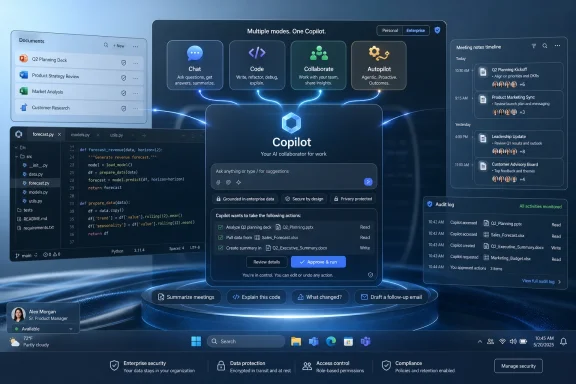 Microsoft Finally Confronts Its Copilot Sprawl
Microsoft has spent the past few years attaching the Copilot name to almost every surface it controls: Windows, Edge, Microsoft 365, Teams, Outlook, GitHub, Azure, security tools, and developer workflows. That ubiquity was supposed to be the company’s advantage. Instead, it has often left users wondering which Copilot they are talking to, what data it can see, what license unlocks which feature, and why the same brand behaves differently depending on where it appears.The reported super app is an attempt to solve that by collapsing several major AI experiences into one place. GitHub Copilot would bring code assistance, Copilot chat would provide the general conversational layer, Copilot Cowork would push the product toward collaborative execution, and Autopilot would represent the more ambitious agentic workflow Microsoft has been gesturing toward for more than a year. If the report is accurate, Microsoft is not just redesigning a launcher. It is trying to turn Copilot from a scattered feature family into a single product.
That distinction matters. A feature can live inside Word or Visual Studio Code and succeed on narrow terms. A product has to explain itself, remember context, manage identity, earn trust, and justify habit. Copilot has had pieces of that equation, but not the center of gravity.
The irony is that Microsoft’s greatest distribution advantage has also been its biggest UX liability. The company can put an AI button almost anywhere, but every additional entry point risks making Copilot feel less like an assistant and more like corporate wallpaper. A super app is Microsoft’s admission that AI cannot win merely by being present everywhere. It has to be understandable somewhere.
Jacob Andreou Inherits the Interface War
The reported role of Jacob Andreou is one of the most revealing parts of the story. Microsoft reorganized Copilot leadership earlier this year, putting Andreou in charge of a more unified Copilot experience spanning consumer and commercial use. That is a notable shift for a company whose internal structure has historically mirrored its product fragmentation.Andreou’s background at Snap is relevant not because Copilot should become social software, but because Microsoft appears to understand that AI adoption is now partly an interface and habit-formation problem. Enterprise buyers may sign contracts, but users still have to choose to open the thing. If Copilot remains a set of disconnected panels buried in apps, Microsoft risks owning the license without owning the daily workflow.
This is where the “super app” phrase earns its keep, even if it sounds borrowed from consumer tech. In Asia, super apps became powerful by aggregating adjacent activities — messaging, payments, shopping, travel, services — into one habitual surface. Microsoft’s version would be less about mini-app commerce and more about routing work: write code, query documents, summarize meetings, assign follow-ups, invoke agents, and move between personal and enterprise contexts.
That sounds elegant in a strategy deck. In practice, it is extremely hard. Microsoft must make a unified Copilot feel powerful without making it feel invasive, flexible without becoming chaotic, and integrated without turning into another Teams-like gravity well where every workflow is absorbed whether users want it or not.
The Toggle Between Personal and Enterprise Copilots Is the Real Fault Line
The reported consideration of a toggle between personal and enterprise Microsoft 365 Copilots may sound like a small interface detail. It is not. It is the fault line running through Microsoft’s entire AI strategy.Consumer AI assistants are trained by convenience. They move fast, ask fewer questions, and thrive on ambiguous personal context. Enterprise assistants are constrained by permissions, compliance, retention, auditability, tenant boundaries, data residency, and administrator policy. Microsoft wants the same user to glide between those worlds, but IT departments are paid to make sure the glide path does not become a data leak.
A visible toggle could help by making context explicit. Users need to know whether they are asking a personal assistant, a work assistant grounded in Microsoft Graph, a coding assistant connected to repositories, or an agent with permission to act. If Microsoft gets that boundary wrong, the super app becomes a security training nightmare.
The company has spent considerable effort telling enterprise customers that Microsoft 365 Copilot and Copilot Chat come with enterprise data protection, respect tenant permissions, and do not use customer prompts and Graph-grounded data to train foundation models. Those commitments matter, but they become harder to communicate as Copilot absorbs more capabilities. A chat box that can summarize an email is one thing. A unified app that can touch code, documents, calendars, agents, and automated workflows is a different governance challenge.
The toggle is therefore not a cosmetic switch. It is Microsoft’s attempt to make identity, permission, and intent legible to ordinary users. If that legibility fails, administrators will not care how slick the app looks.
Autopilot Signals the Shift From Answering to Acting
The reported Autopilot component is the most strategically important and least proven part of the plan. Microsoft and the broader AI industry have been moving from chatbots that answer questions toward agents that perform tasks. That shift changes the risk profile entirely.A chatbot can be wrong in text. An agent can be wrong in action. It can send the email, modify the file, open the issue, change the configuration, trigger the workflow, or make a decision that creates downstream cleanup work. The value proposition is larger, but so is the blast radius.
Microsoft has been preparing the ground for this shift through Copilot Studio, Microsoft 365 agents, Copilot Actions, and Windows experiments that point toward background task execution. A unified Copilot app would give those capabilities a more obvious home. Instead of asking users to discover agents inside separate Microsoft 365 surfaces, Microsoft could present Copilot as the place where work begins and agents become the execution layer.
That is the dream. The operational reality is messier. Enterprises will want approval flows, logs, rollback options, scoped permissions, role-based access, and clear distinctions between suggested actions and autonomous actions. Developers will want to know when GitHub Copilot is merely completing code and when a broader Copilot agent is reasoning across repositories, tickets, build output, and documentation.
The name Autopilot also carries baggage. In Microsoft land, Autopilot already means Windows device provisioning. Outside Microsoft, it suggests automation with partial human supervision — a promise that can be misunderstood. If this internal name ever becomes external branding, Microsoft will need to be careful. “Autopilot” sounds reassuring until the machine does something expensive.
GitHub Copilot Gives the Super App Credibility Microsoft 365 Has Not Fully Earned
The inclusion of GitHub Copilot is critical because it remains one of Microsoft’s clearest AI successes. Developers may argue about quality, pricing, model choice, and workflow fit, but GitHub Copilot has a more concrete value proposition than many office-assistant scenarios. It sits close to the work, offers immediate suggestions, and can be judged against compilable output.Microsoft 365 Copilot has had a harder road. Summarizing meetings, drafting emails, and synthesizing documents can be useful, but the return on investment is less obvious and more dependent on organizational data hygiene. If a tenant is full of stale SharePoint sites, overshared files, messy Teams channels, and inconsistent permissions, Copilot does not magically become wise. It becomes a fluent interface to the mess.
Bringing GitHub Copilot into the same orbit as Microsoft 365 Copilot could strengthen the overall story. A product manager could move from a Teams discussion to a spec, from the spec to a GitHub issue, from the issue to code context, and from code context back to release notes. That is exactly the kind of cross-domain workflow Microsoft is uniquely positioned to sell.
But it also risks diluting GitHub Copilot’s developer-first identity. Developers are famously allergic to corporate productivity theater. If the super app feels like Microsoft 365 swallowing GitHub, Redmond could irritate one of the audiences that has actually embraced its AI tooling. The integration has to respect the norms of software work rather than forcing developers into a generalized office cockpit.
The Super App Is Also a Defensive Move Against ChatGPT, Gemini, and Claude
Microsoft’s move fits a broader industry pattern. OpenAI, Google, Anthropic, Salesforce, ServiceNow, Atlassian, and others are all trying to become the place where knowledge work is routed through AI. The interface is no longer just a chat window. It is becoming a command center for tools, files, memory, connectors, and agents.That puts Microsoft in a strange position. It has the deepest enterprise distribution of any AI platform contender, but it does not automatically have the cleanest AI experience. ChatGPT became the mental model for consumer AI. Claude built a reputation around writing, reasoning, and long-context work. Google is threading Gemini through Search, Workspace, Android, and Chrome. Microsoft has reach, but reach is not the same thing as affection.
A Copilot super app is an attempt to fight at the interface layer before someone else becomes the front door to Microsoft’s own ecosystem. If users start their day in ChatGPT or Claude and merely use Microsoft 365 as a file store, Microsoft loses strategic control even if Office remains installed. The danger is not that Word disappears. The danger is that Word becomes a backend.
This is why the super app matters beyond branding. Microsoft wants Copilot to mediate work before a rival assistant does. The company’s vast suite gives it a plausible claim to that role, but only if the unified experience is faster, clearer, and more trusted than the alternatives.
Windows Is the Silent Stakeholder
Although the report centers on Copilot as an app rather than Windows itself, Windows users should pay attention. Microsoft has been steadily positioning Windows as an AI-aware client, from Copilot integration and Recall-related experiments to local AI features on Copilot+ PCs. A unified Copilot app could become the bridge between cloud AI services and the Windows desktop.That could be useful. A single Copilot surface that understands local context, work identity, cloud files, code repositories, and approved agents might finally make AI feel less bolted onto Windows. For power users, it could become a command palette with memory and permissions. For less technical users, it could become the place to ask for help without knowing which app contains the answer.
But Windows history offers a warning. Microsoft has repeatedly tried to make central surfaces that users did not ask for: assistants, feeds, widgets, search integrations, Start menu recommendations, and bundled experiences that blur the line between utility and promotion. If the Copilot super app becomes another mandatory pane, users will resist it before they understand it.
The winning version would be deeply integrated but not coercive. It would let administrators control availability, let users choose defaults, and make its data access visible. The losing version would be a glossy funnel into subscriptions, agents, and upsells.
Enterprise IT Will Judge the Plumbing, Not the Demo
The most important audience for this product may not be the users who see the first splash screen. It may be the administrators who decide whether the app is enabled, pinned, restricted, audited, or quietly buried.For IT departments, a unified Copilot surface raises immediate questions. Which licenses are required? Which logs are generated? Can personal and work modes be separated by policy? Can GitHub data be kept within approved boundaries? How do retention policies apply to agent conversations? Are prompts discoverable? Can risky connectors be disabled? Can agents be approved centrally? Can users tell when Copilot is using web grounding, Graph data, code context, or third-party tools?
Microsoft has answers to some of these questions across its existing documentation and admin controls, but a super app concentrates the concerns. Fragmentation is annoying, but it can also contain risk. A single interface that combines chat, coding, enterprise data, and action-taking agents becomes a higher-value target for misconfiguration, prompt injection, oversharing, and user error.
This is where Microsoft’s enterprise muscle could become an advantage. The company knows how to sell governance, compliance, and admin control. If it can make the super app manageable through familiar Microsoft 365, Entra, Purview, GitHub Enterprise, and Power Platform controls, it can offer something consumer-first AI rivals struggle to match.
But the burden of proof is on Microsoft. Enterprises have heard the productivity pitch. Now they need evidence that the control plane is as unified as the app.
The Branding Problem Is Bigger Than the App
Copilot is now one of Microsoft’s most valuable and most overloaded brands. It means a consumer chatbot, a Microsoft 365 assistant, a Windows feature, a developer tool, a security assistant, a sales assistant, an agent framework, and a paid enterprise SKU. That breadth gives Microsoft a unifying story, but it also creates semantic exhaustion.A super app could reduce that confusion by becoming the canonical Copilot. Users would no longer need to understand every product boundary before starting. They would open Copilot and let the app route the request.
Yet routing is not the same as clarity. If users ask Copilot to “summarize the customer issue and draft a fix,” the app must know whether to look in Outlook, Teams, Dynamics, GitHub, Jira, a SharePoint folder, or a local file. It must also explain what it used and what it did not. Otherwise, a unified brand simply hides complexity instead of resolving it.
Microsoft’s best path is to make Copilot less mystical. The app should show its context, permissions, and sources in plain language. It should distinguish between “I can answer,” “I can draft,” “I can act if you approve,” and “I am not allowed to do that.” The more agentic Copilot becomes, the more important humility becomes as a product feature.
The Calendar Is Aggressive Because the Market Is Moving Anyway
Fortune’s reported end-of-summer target is ambitious, especially for a product that appears to cross so many internal boundaries. Microsoft can ship a shell quickly; the hard part is making the shell feel like one coherent system rather than a tabbed collection of existing Copilots.The timing also suggests Microsoft does not believe it can wait for perfection. AI interface habits are forming now. Developers are choosing coding assistants. Workers are building personal routines around ChatGPT, Claude, Gemini, Perplexity, and specialized agents. Enterprises are experimenting with Copilot but also hedging with multi-vendor AI strategies.
Microsoft has an advantage in procurement, identity, documents, and installed base. Its disadvantage is that users increasingly compare every AI experience to the best standalone assistant they have used, not merely to the last version of Office. A mediocre unified Copilot would be judged harshly precisely because Microsoft has so much raw material to work with.
That is the central tension. Microsoft can move fast because it controls the stack. It can also trip over the stack because every layer has legacy, licensing, and organizational complexity attached.
The Summer Copilot Bet Comes Down to Trust
The most concrete lesson from this reported project is that Microsoft now sees fragmentation as a strategic liability. The company does not want Copilot to be a label pasted onto dozens of products. It wants Copilot to be the work hub through which those products are understood and controlled.That ambition will live or die on trust. Users must trust the app to know the difference between personal and work context. Developers must trust it not to turn GitHub Copilot into a generic enterprise assistant with code features attached. Administrators must trust that policies apply consistently. Security teams must trust that agentic workflows can be constrained, observed, and stopped.
The likely near-term reality is incremental rather than revolutionary. Microsoft may reference pieces of the effort at an upcoming event, while the full app reportedly remains offstage for now. Plans may change, and internal names may never become public product names. But the direction is clear enough.
A Few Hard Truths Before the Super App Arrives
Microsoft’s reported Copilot consolidation should be read as both a product cleanup and a strategic escalation. It is a cleanup because users cannot be expected to navigate endless Copilot variants. It is an escalation because a unified app gives Microsoft a stronger claim to be the AI front end for work itself.- Microsoft is reportedly targeting the end of summer 2026 for a unified Copilot app, but the plan remains subject to change.
- The most important integration may be the boundary between personal and enterprise Copilot experiences, not the presence of another chat box.
- Autopilot-style agentic workflows would raise the stakes from generating answers to performing actions.
- GitHub Copilot gives the project credibility, but Microsoft must avoid burying developer workflows inside Microsoft 365 assumptions.
- Enterprise adoption will depend less on launch-day demos than on licensing clarity, admin controls, auditability, and data governance.
- The super app will succeed only if it makes Copilot’s context and permissions more visible, not less.
References
- Primary source: Let's Data Science
Published: 2026-05-30T09:50:14.881075
Loading…
letsdatascience.com - Related coverage: fortune.com

Exclusive: Microsoft is building a super app that combines coding, chat, and other Copilot AI tools | Fortune
The project is being spearheaded by new Copilot chief Jacob Andreou, as Microsoft seeks to streamline its lineup of AI tools amid competition from Google, OpenAI, and Anthropic.fortune.com
- Related coverage: startupfortune.com

Microsoft is building a super app to end its own AI fragmentation before rivals do it for them - Startup Fortune
Microsoft is building a super app to end its own AI fragmentation before rivals do it for them startupfortune.com
- Related coverage: aiweekly.co
Loading…
aiweekly.co - Related coverage: computerworld.com
Loading…
www.computerworld.com - Related coverage: siliconreport.com

Microsoft Tests Single Copilot App for GitHub Copilot, Chat, Cowork and Autopilot — Silicon Report
Fortune reported Microsoft is testing a single interface for GitHub Copilot, Copilot chat, Copilot Cowork and a new agentic tool called Autopilot.www.siliconreport.com
- Related coverage: venturebeat.com
Loading…
venturebeat.com - Official source: microsofters.com
Loading…
microsofters.com - Official source: support.microsoft.com
Loading…
support.microsoft.com - Related coverage: techtarget.com
Loading…
www.techtarget.com - Related coverage: windowscentral.com
Loading…
www.windowscentral.com - Related coverage: techradar.com

Microsoft is mixing up its Copilot AI leadership, so Suleyman can 'build enterprise tuned lineages'
Microsoft brings consumer and enterprise Copilot into closer alignmentwww.techradar.com
- Related coverage: nextepinvestimentos.com.br
Loading…
nextepinvestimentos.com.br