

Microsoft is reportedly developing a unified Copilot “super app” that would combine Copilot chat, GitHub Copilot, Copilot Cowork, and an unreleased agentic workflow tool called Autopilot into one application, according to reporting published on May 29 and amplified by Thurrott on May 30, 2026. The move is less about inventing another chatbot than about admitting that Microsoft’s AI strategy has become too fragmented for normal people to understand. If the report is accurate, Redmond is trying to turn Copilot from a brand slapped across products into a single operating layer for work. That could be useful, powerful, and deeply messy all at once.
Microsoft has spent the past three years putting the Copilot name on almost everything it could plausibly connect to a large language model. There is Copilot in Windows, Copilot in Microsoft 365, GitHub Copilot for developers, Copilot in Edge, Copilot in Bing, Copilot Studio for builders, Security Copilot for defenders, and an expanding cast of agents meant to do more than answer questions. The result is not one assistant but a product family that often feels like a committee wearing the same badge.
That was tolerable when Copilot was mostly a text box. It becomes a product-design problem when these assistants start taking action. A chat pane that summarizes a document can be scattered across apps; an agent that reads mail, edits code, files tickets, schedules meetings, and invokes workflows needs a much clearer home.
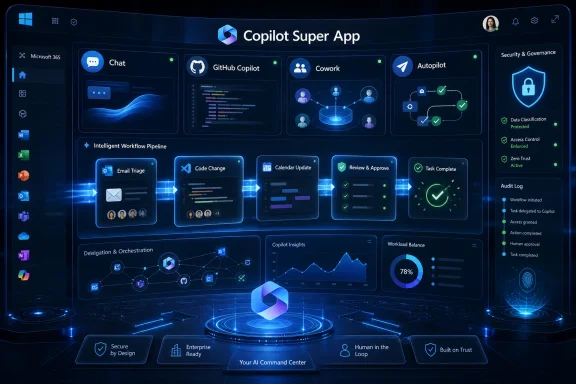
The reported super app is Microsoft’s answer to that problem. It would pull together chat, coding assistance, Copilot Cowork, and a new Autopilot workflow layer into a single experience. The term “super app” is doing a lot of work here, but the strategic shape is obvious: Microsoft wants one place where users go to ask, delegate, inspect, and approve AI-mediated work.
This is also a defensive move. OpenAI, Google, Anthropic, and smaller agent startups are all trying to become the first screen for knowledge work. Microsoft owns the productivity estate, but ownership of Word, Excel, Teams, Outlook, Windows, and GitHub does not automatically translate into ownership of the AI front door. A unified Copilot app is an attempt to make sure the AI front door opens into Microsoft’s house.
For consumers, Copilot can mean a chatbot in a browser, a Windows taskbar button, an app, a mobile assistant, or an AI feature inside Microsoft 365. For business users, it can mean a licensed Microsoft 365 assistant, a tenant-aware productivity layer, a meeting summarizer, an app-builder framework, or an agent platform. For developers, GitHub Copilot is already its own mature product with a clearer identity and workflow than many of its Microsoft-branded cousins.
That fragmentation matters because AI products are not like traditional Office features. Users need to know what an assistant can see, what it can change, which account it is using, which model is powering it, and whether its output is governed by enterprise controls. A scattered collection of Copilots makes that harder, not easier.
A single app does not magically solve those problems. In fact, it may expose them. But it at least creates a place where Microsoft can impose a hierarchy: chat for conversation, coding for development, Cowork for delegation, Autopilot for agentic workflows, and administrative controls for trust. If Microsoft cannot impose that hierarchy, the Copilot brand risks becoming the AI equivalent of “Live,” “Store,” or “Plus”: everywhere, and therefore nowhere.
That is the shift every major AI vendor is chasing in 2026. Chatbots are useful, but they are also limited by the prompt-response loop. Agents promise something more commercially interesting: durable tasks, background work, multi-step plans, approvals, and integration with enterprise systems. The money is not in answering “summarize this.” The money is in “prepare the weekly sales packet, check the pipeline exceptions, draft follow-up emails, update the CRM, and ask me before sending anything.”
Copilot Cowork already points in that direction. Microsoft has positioned it as an assistant that can operate across Microsoft 365 apps rather than being trapped inside one surface. Pair that with GitHub Copilot’s coding capabilities and a broader Autopilot workflow engine, and the super app starts to look less like a prettier chatbot and more like a command center for AI labor.
That is also where risk enters. The more useful an agent becomes, the more authority it needs. An assistant that cannot touch anything is safe but boring; an assistant that can touch everything is powerful but scary. Microsoft’s challenge is to make delegation feel controlled rather than reckless.
That oscillation has damaged trust. Enthusiasts and administrators have watched Copilot move from sidebar to app, from button to keyboard key, from promised convenience to perceived bloat. Microsoft has sometimes treated criticism as a UI placement issue, when the deeper objection is about agency: who decides when AI appears, what it can see, and how easy it is to remove?
A super app could make that tension better if it consolidates clutter. Instead of Copilot buttons scattered across every surface, Microsoft could provide one coherent app with predictable permissions and clean entry points. That is the optimistic version.
The pessimistic version is more familiar. Microsoft could use the super app as a reason to put Copilot deeper into Windows, the taskbar, File Explorer, Search, Settings, and Office, while still claiming it is all one unified experience. For WindowsForum readers, that distinction matters. Consolidation is welcome only if it reduces noise and preserves control.
That clarity is valuable. GitHub Copilot did not become important because it was called Copilot; it became important because it attached AI to a high-friction, high-value task with measurable results. It had a natural user base, a clear environment, and a visible productivity claim.
Microsoft 365 Copilot has had a harder road. Its pitch is broader: make knowledge work better. That sounds compelling in a keynote, but it is harder to prove in a spreadsheet. Summarizing meetings, drafting emails, and answering questions over enterprise data can be helpful, but the value varies wildly depending on data hygiene, user habits, licensing, and whether employees trust the output.
A super app that includes GitHub Copilot borrows some of that credibility. It also risks diluting it. Developers may not want their focused coding assistant folded into a broader corporate AI dashboard unless the integration adds real value. Microsoft needs to avoid turning its most successful Copilot into merely another tab in a larger branding exercise.
The governance pitch is even stronger. Microsoft can argue that organizations should prefer a unified Copilot stack because it sits closer to identity, compliance, audit logs, data loss prevention, sensitivity labels, and existing Microsoft 365 controls. In a world where employees are already pasting sensitive data into random AI tools, that is not a trivial argument.
But IT administrators will want more than a story. They will want tenant-level switches, granular app controls, clear retention policies, exportable logs, model transparency, licensing clarity, and a way to keep experimental agents away from regulated workflows. They will also want to know whether the app respects existing Microsoft 365 boundaries or quietly creates new pathways for data exposure.
The naming of Autopilot is especially sensitive in enterprise Windows circles. Microsoft already uses Autopilot for device provisioning, and IT pros have muscle memory around that term. Reusing it for an AI workflow engine may make sense inside a product team, but outside Redmond it invites confusion. Microsoft has a long history of naming collisions; with AI, those collisions become operational hazards.
Microsoft’s consumer AI effort has been awkward because it competes with ChatGPT, Gemini, Claude, and Perplexity on terrain where Microsoft does not have the same default advantage it enjoys in Office. Bing gave Copilot a distribution channel, Edge gave it a browser surface, and Windows gave it a launchpad. None of that guarantees affection.
A super app could improve matters if it becomes a genuinely useful personal assistant: one place for search, planning, writing, shopping, device help, and app actions. But Microsoft must resist the temptation to confuse distribution with demand. A taskbar icon can create usage. It cannot create loyalty.
Consumers are also less forgiving of product confusion than enterprises. They will not parse the difference between Copilot Pro, Microsoft 365 Copilot, Microsoft 365 Premium, and whatever bundle comes next. If Microsoft wants a consumer super app, the subscription story needs to be brutally simple. So far, simplicity has not been the company’s strongest AI product feature.
That is why Microsoft cannot afford to let Copilot remain scattered. If users begin their workday inside ChatGPT, Gemini, Claude, or another agent environment, Microsoft risks becoming the backend repository rather than the active interface. Word documents, Teams chats, GitHub repositories, and Outlook mailboxes would still matter, but the user relationship could shift elsewhere.
This is the strategic anxiety behind the super app. Microsoft wants Copilot to be the place where intent begins. Not where a finished document is edited, not where a meeting is summarized after the fact, but where work is assigned and coordinated from the start.
That ambition explains the mix of products reportedly going into the app. Chat captures intent. GitHub Copilot captures code. Cowork captures collaborative office tasks. Autopilot captures repeatable agentic workflows. Together, they form a sketch of Microsoft’s desired future: the user tells Copilot what outcome they want, and Microsoft’s stack figures out which tools to use.
But design polish is not the same as product discipline. A super app can have a beautiful interface and still fail if it interrupts too often, guesses poorly, hides costs, or blurs the line between suggestion and action. The best AI interface may be one that is visible when needed and quiet when not.
This is where Microsoft’s incentives become complicated. The company needs usage to justify enormous AI infrastructure spending and premium licensing. Usage metrics reward visibility, prompts, nudges, and default placement. User satisfaction often rewards restraint.
The tension will define Copilot’s next phase. Microsoft can build an AI layer that feels like a power tool, or it can build one that feels like another growth-hacked surface inside Windows and Microsoft 365. The super app will make that choice harder to hide.
Microsoft knows this, and its enterprise advantage depends on convincing customers that Copilot agents inherit the company’s identity, compliance, and security model. That is a strong starting point. Microsoft Entra, Purview, Defender, Intune, and Microsoft 365 admin controls give Redmond a governance vocabulary that many AI startups simply do not have.
Still, the risks are not abstract. Prompt injection, malicious documents, overshared permissions, stale access rights, and poisoned repositories all become more dangerous when an AI system can act across tools. The more connected the super app becomes, the more it needs clear permission boundaries and human approval patterns.
For developers, the stakes are especially direct. GitHub Copilot and agentic coding tools can accelerate work, but they can also introduce vulnerable code, misread project conventions, or automate changes without sufficient review. The right model is not “trust the agent.” It is “make the agent productive inside a reviewable, logged, reversible workflow.”
Copilot is already vulnerable to this. Microsoft 365 Copilot, Copilot Pro, Copilot Studio, GitHub Copilot, Security Copilot, Windows Copilot experiences, Frontier programs, and premium Microsoft 365 bundles all speak to different markets. That segmentation may make sense to product managers and revenue teams. To users, it can feel like a maze.
A super app can either simplify the maze or become its new entrance. If opening the app presents users with unavailable features, license prompts, work-versus-personal account confusion, and unclear data boundaries, Microsoft will have consolidated the clutter without reducing it.
The company’s task is therefore editorial as much as technical. It must decide what Copilot is for. If the answer is “everything,” the product will collapse under its own ambition. If the answer is “the place where Microsoft users delegate work safely,” the super app has a fighting chance.
Windows enthusiasts and IT pros should look past the choreography. The real product will be defined by defaults, controls, and failure modes. Can the app be uninstalled? Can taskbar integration be disabled? Can admins block consumer accounts? Can agent actions be audited? Can organizations prevent Copilot from crossing data boundaries? Can users see exactly why the assistant recommended or performed an action?
Those questions matter more than whether the interface looks modern. Microsoft has the pieces to build the most complete AI work surface in the industry. It also has the habits that make users brace for unwanted integration.
The super app, if it ships, will be judged less by what it can do in a keynote than by what it does on a Tuesday afternoon when a user is busy, a tenant is messy, a document is confidential, and an agent is confident but wrong.
A good Copilot super app would hide that sprawl without hiding control. It would let users move from intention to result without remembering which Microsoft product contains the right feature. It would give administrators a central place to govern agentic behavior. It would give developers the power of GitHub Copilot without forcing them into a generic productivity dashboard. It would make Windows integration optional, legible, and respectful.
A bad Copilot super app would do the opposite. It would become another Microsoft launcher, another licensing upsell, another place where work and personal identities collide, another AI pane that appears because Microsoft needs engagement. That outcome would not just annoy enthusiasts; it would weaken the case for Copilot as a serious work platform.
The distinction is simple. The app should make Microsoft’s ecosystem feel coherent. It should not make users feel captured by it.
 Microsoft’s Copilot Sprawl Has Finally Met Its Counterweight
Microsoft has spent the past three years putting the Copilot name on almost everything it could plausibly connect to a large language model. There is Copilot in Windows, Copilot in Microsoft 365, GitHub Copilot for developers, Copilot in Edge, Copilot in Bing, Copilot Studio for builders, Security Copilot for defenders, and an expanding cast of agents meant to do more than answer questions. The result is not one assistant but a product family that often feels like a committee wearing the same badge.That was tolerable when Copilot was mostly a text box. It becomes a product-design problem when these assistants start taking action. A chat pane that summarizes a document can be scattered across apps; an agent that reads mail, edits code, files tickets, schedules meetings, and invokes workflows needs a much clearer home.
The reported super app is Microsoft’s answer to that problem. It would pull together chat, coding assistance, Copilot Cowork, and a new Autopilot workflow layer into a single experience. The term “super app” is doing a lot of work here, but the strategic shape is obvious: Microsoft wants one place where users go to ask, delegate, inspect, and approve AI-mediated work.
This is also a defensive move. OpenAI, Google, Anthropic, and smaller agent startups are all trying to become the first screen for knowledge work. Microsoft owns the productivity estate, but ownership of Word, Excel, Teams, Outlook, Windows, and GitHub does not automatically translate into ownership of the AI front door. A unified Copilot app is an attempt to make sure the AI front door opens into Microsoft’s house.
A Super App Is an Admission That the Brand Got Ahead of the Product
The Copilot brand has been both Microsoft’s greatest AI asset and its most obvious liability. It is short, understandable, and broadly associated with assistance rather than replacement. But Microsoft stretched it across so many scenarios that the word now describes a vibe more than a product.For consumers, Copilot can mean a chatbot in a browser, a Windows taskbar button, an app, a mobile assistant, or an AI feature inside Microsoft 365. For business users, it can mean a licensed Microsoft 365 assistant, a tenant-aware productivity layer, a meeting summarizer, an app-builder framework, or an agent platform. For developers, GitHub Copilot is already its own mature product with a clearer identity and workflow than many of its Microsoft-branded cousins.
That fragmentation matters because AI products are not like traditional Office features. Users need to know what an assistant can see, what it can change, which account it is using, which model is powering it, and whether its output is governed by enterprise controls. A scattered collection of Copilots makes that harder, not easier.
A single app does not magically solve those problems. In fact, it may expose them. But it at least creates a place where Microsoft can impose a hierarchy: chat for conversation, coding for development, Cowork for delegation, Autopilot for agentic workflows, and administrative controls for trust. If Microsoft cannot impose that hierarchy, the Copilot brand risks becoming the AI equivalent of “Live,” “Store,” or “Plus”: everywhere, and therefore nowhere.
The Real Prize Is Not Chat, It Is Delegation
The most important reported ingredient is not Copilot chat or GitHub Copilot. It is the agentic workflow capability internally called Autopilot. The name is almost too perfect: Microsoft wants users to stop asking an assistant for one-off answers and start assigning work that runs across apps, services, and time.That is the shift every major AI vendor is chasing in 2026. Chatbots are useful, but they are also limited by the prompt-response loop. Agents promise something more commercially interesting: durable tasks, background work, multi-step plans, approvals, and integration with enterprise systems. The money is not in answering “summarize this.” The money is in “prepare the weekly sales packet, check the pipeline exceptions, draft follow-up emails, update the CRM, and ask me before sending anything.”
Copilot Cowork already points in that direction. Microsoft has positioned it as an assistant that can operate across Microsoft 365 apps rather than being trapped inside one surface. Pair that with GitHub Copilot’s coding capabilities and a broader Autopilot workflow engine, and the super app starts to look less like a prettier chatbot and more like a command center for AI labor.
That is also where risk enters. The more useful an agent becomes, the more authority it needs. An assistant that cannot touch anything is safe but boring; an assistant that can touch everything is powerful but scary. Microsoft’s challenge is to make delegation feel controlled rather than reckless.
Windows Is the Stage, Even If Microsoft Pretends This Is Just an App
Microsoft can describe a Copilot super app as a productivity product, but Windows users know better. Once Microsoft builds a unified AI command center, the pressure to wire it into Windows becomes irresistible. The company has already been experimenting with taskbar and Start menu integration, and Windows 11 has spent years oscillating between “Copilot is central” and “Copilot will be less intrusive.”That oscillation has damaged trust. Enthusiasts and administrators have watched Copilot move from sidebar to app, from button to keyboard key, from promised convenience to perceived bloat. Microsoft has sometimes treated criticism as a UI placement issue, when the deeper objection is about agency: who decides when AI appears, what it can see, and how easy it is to remove?
A super app could make that tension better if it consolidates clutter. Instead of Copilot buttons scattered across every surface, Microsoft could provide one coherent app with predictable permissions and clean entry points. That is the optimistic version.
The pessimistic version is more familiar. Microsoft could use the super app as a reason to put Copilot deeper into Windows, the taskbar, File Explorer, Search, Settings, and Office, while still claiming it is all one unified experience. For WindowsForum readers, that distinction matters. Consolidation is welcome only if it reduces noise and preserves control.
GitHub Copilot Is the Model Microsoft Wishes the Rest of Copilot Followed
GitHub Copilot is the outlier in Microsoft’s AI portfolio because it has a clear job. Developers know where it lives, what it does, and how to evaluate whether it helped. It suggests code, explains code, writes tests, assists with pull requests, and increasingly acts as a coding agent inside a workflow developers already understand.That clarity is valuable. GitHub Copilot did not become important because it was called Copilot; it became important because it attached AI to a high-friction, high-value task with measurable results. It had a natural user base, a clear environment, and a visible productivity claim.
Microsoft 365 Copilot has had a harder road. Its pitch is broader: make knowledge work better. That sounds compelling in a keynote, but it is harder to prove in a spreadsheet. Summarizing meetings, drafting emails, and answering questions over enterprise data can be helpful, but the value varies wildly depending on data hygiene, user habits, licensing, and whether employees trust the output.
A super app that includes GitHub Copilot borrows some of that credibility. It also risks diluting it. Developers may not want their focused coding assistant folded into a broader corporate AI dashboard unless the integration adds real value. Microsoft needs to avoid turning its most successful Copilot into merely another tab in a larger branding exercise.
The Enterprise Sales Pitch Writes Itself, But Admins Will Read the Fine Print
For enterprise buyers, Microsoft’s super app concept has an obvious appeal. One interface for chat, code, agents, workflows, and Microsoft 365 context is easier to explain than a dozen Copilot entry points. It also gives CIOs a cleaner story to tell boards that are asking why the company is spending heavily on AI subscriptions.The governance pitch is even stronger. Microsoft can argue that organizations should prefer a unified Copilot stack because it sits closer to identity, compliance, audit logs, data loss prevention, sensitivity labels, and existing Microsoft 365 controls. In a world where employees are already pasting sensitive data into random AI tools, that is not a trivial argument.
But IT administrators will want more than a story. They will want tenant-level switches, granular app controls, clear retention policies, exportable logs, model transparency, licensing clarity, and a way to keep experimental agents away from regulated workflows. They will also want to know whether the app respects existing Microsoft 365 boundaries or quietly creates new pathways for data exposure.
The naming of Autopilot is especially sensitive in enterprise Windows circles. Microsoft already uses Autopilot for device provisioning, and IT pros have muscle memory around that term. Reusing it for an AI workflow engine may make sense inside a product team, but outside Redmond it invites confusion. Microsoft has a long history of naming collisions; with AI, those collisions become operational hazards.
The Consumer Version Has a Harder Job Than the Enterprise Version
The enterprise case for a Copilot super app is relatively coherent: consolidate AI work tools, govern agents, and attach them to Microsoft 365 subscriptions. The consumer case is harder. Most consumers do not think in terms of workflows, tenant data, or productivity agents. They think in terms of whether an app is useful enough to open twice.Microsoft’s consumer AI effort has been awkward because it competes with ChatGPT, Gemini, Claude, and Perplexity on terrain where Microsoft does not have the same default advantage it enjoys in Office. Bing gave Copilot a distribution channel, Edge gave it a browser surface, and Windows gave it a launchpad. None of that guarantees affection.
A super app could improve matters if it becomes a genuinely useful personal assistant: one place for search, planning, writing, shopping, device help, and app actions. But Microsoft must resist the temptation to confuse distribution with demand. A taskbar icon can create usage. It cannot create loyalty.
Consumers are also less forgiving of product confusion than enterprises. They will not parse the difference between Copilot Pro, Microsoft 365 Copilot, Microsoft 365 Premium, and whatever bundle comes next. If Microsoft wants a consumer super app, the subscription story needs to be brutally simple. So far, simplicity has not been the company’s strongest AI product feature.
The Super App Fight Is Really About the First Screen of Work
Every platform shift creates a fight over the first screen. In the PC era, it was the desktop. In the web era, it was the browser and search box. In mobile, it was the app launcher and notification shade. In the AI era, the first screen may be the agent that decides which app, file, service, or person you need before you do.That is why Microsoft cannot afford to let Copilot remain scattered. If users begin their workday inside ChatGPT, Gemini, Claude, or another agent environment, Microsoft risks becoming the backend repository rather than the active interface. Word documents, Teams chats, GitHub repositories, and Outlook mailboxes would still matter, but the user relationship could shift elsewhere.
This is the strategic anxiety behind the super app. Microsoft wants Copilot to be the place where intent begins. Not where a finished document is edited, not where a meeting is summarized after the fact, but where work is assigned and coordinated from the start.
That ambition explains the mix of products reportedly going into the app. Chat captures intent. GitHub Copilot captures code. Cowork captures collaborative office tasks. Autopilot captures repeatable agentic workflows. Together, they form a sketch of Microsoft’s desired future: the user tells Copilot what outcome they want, and Microsoft’s stack figures out which tools to use.
A Cleaner Interface Will Not Fix Bad Defaults
Microsoft recently redesigned parts of Microsoft 365 Copilot with an emphasis on cleaner surfaces and more thoughtful entry points. That is the right direction. The company appears to understand that users grew tired of AI buttons appearing everywhere like digital kudzu.But design polish is not the same as product discipline. A super app can have a beautiful interface and still fail if it interrupts too often, guesses poorly, hides costs, or blurs the line between suggestion and action. The best AI interface may be one that is visible when needed and quiet when not.
This is where Microsoft’s incentives become complicated. The company needs usage to justify enormous AI infrastructure spending and premium licensing. Usage metrics reward visibility, prompts, nudges, and default placement. User satisfaction often rewards restraint.
The tension will define Copilot’s next phase. Microsoft can build an AI layer that feels like a power tool, or it can build one that feels like another growth-hacked surface inside Windows and Microsoft 365. The super app will make that choice harder to hide.
Security Is the Feature That Cannot Be Added Later
Agentic AI turns security from a checkbox into the product’s foundation. A chatbot that hallucinates is embarrassing. An agent that hallucinates while modifying files, sending messages, approving transactions, or changing code is a business incident.Microsoft knows this, and its enterprise advantage depends on convincing customers that Copilot agents inherit the company’s identity, compliance, and security model. That is a strong starting point. Microsoft Entra, Purview, Defender, Intune, and Microsoft 365 admin controls give Redmond a governance vocabulary that many AI startups simply do not have.
Still, the risks are not abstract. Prompt injection, malicious documents, overshared permissions, stale access rights, and poisoned repositories all become more dangerous when an AI system can act across tools. The more connected the super app becomes, the more it needs clear permission boundaries and human approval patterns.
For developers, the stakes are especially direct. GitHub Copilot and agentic coding tools can accelerate work, but they can also introduce vulnerable code, misread project conventions, or automate changes without sufficient review. The right model is not “trust the agent.” It is “make the agent productive inside a reviewable, logged, reversible workflow.”
Microsoft’s Biggest Competitor May Be Its Own Product Chart
The obvious external competitors are OpenAI, Google, Anthropic, and the wave of AI-agent startups. But Microsoft’s internal complexity may be just as dangerous. The company has a habit of turning promising platforms into licensing matrices, renamed bundles, overlapping portals, and admin-center archaeology.Copilot is already vulnerable to this. Microsoft 365 Copilot, Copilot Pro, Copilot Studio, GitHub Copilot, Security Copilot, Windows Copilot experiences, Frontier programs, and premium Microsoft 365 bundles all speak to different markets. That segmentation may make sense to product managers and revenue teams. To users, it can feel like a maze.
A super app can either simplify the maze or become its new entrance. If opening the app presents users with unavailable features, license prompts, work-versus-personal account confusion, and unclear data boundaries, Microsoft will have consolidated the clutter without reducing it.
The company’s task is therefore editorial as much as technical. It must decide what Copilot is for. If the answer is “everything,” the product will collapse under its own ambition. If the answer is “the place where Microsoft users delegate work safely,” the super app has a fighting chance.
The Windows Community Should Watch the Toggles, Not the Trailer
The first demo of a Copilot super app will almost certainly look impressive. It will show a user asking for an outcome, an agent making a plan, Copilot pulling context from Microsoft 365, GitHub Copilot handling code, and Autopilot coordinating the dull middle steps. The video will be smooth because demos always are.Windows enthusiasts and IT pros should look past the choreography. The real product will be defined by defaults, controls, and failure modes. Can the app be uninstalled? Can taskbar integration be disabled? Can admins block consumer accounts? Can agent actions be audited? Can organizations prevent Copilot from crossing data boundaries? Can users see exactly why the assistant recommended or performed an action?
Those questions matter more than whether the interface looks modern. Microsoft has the pieces to build the most complete AI work surface in the industry. It also has the habits that make users brace for unwanted integration.
The super app, if it ships, will be judged less by what it can do in a keynote than by what it does on a Tuesday afternoon when a user is busy, a tenant is messy, a document is confidential, and an agent is confident but wrong.
The Copilot Super App Will Succeed Only If It Makes Microsoft Smaller
The clearest way to understand the reported project is this: Microsoft is trying to make Microsoft feel less sprawling. The company’s great advantage is that it owns so many surfaces of modern work. Its great disadvantage is that it owns so many surfaces of modern work.A good Copilot super app would hide that sprawl without hiding control. It would let users move from intention to result without remembering which Microsoft product contains the right feature. It would give administrators a central place to govern agentic behavior. It would give developers the power of GitHub Copilot without forcing them into a generic productivity dashboard. It would make Windows integration optional, legible, and respectful.
A bad Copilot super app would do the opposite. It would become another Microsoft launcher, another licensing upsell, another place where work and personal identities collide, another AI pane that appears because Microsoft needs engagement. That outcome would not just annoy enthusiasts; it would weaken the case for Copilot as a serious work platform.
The distinction is simple. The app should make Microsoft’s ecosystem feel coherent. It should not make users feel captured by it.
Redmond’s Next Copilot Test Is Control, Not Intelligence
The reported super app is still unreleased, and key details remain unknown, including timing, pricing, availability, supported platforms, and whether Microsoft will present it as a consumer app, enterprise hub, developer tool, or all of the above. But the direction is clear enough to draw practical conclusions.- Microsoft is reportedly trying to consolidate Copilot chat, GitHub Copilot, Copilot Cowork, and an Autopilot agentic workflow layer into a single application.
- The project appears designed to fix Copilot fragmentation as much as to introduce new AI capabilities.
- The most consequential feature is likely to be agentic delegation, not another chat interface.
- Windows users should pay close attention to whether the app reduces scattered AI entry points or becomes a justification for deeper OS integration.
- Enterprise administrators will need granular controls, auditability, licensing clarity, and strong permission boundaries before agentic workflows can be trusted at scale.
- Microsoft’s success will depend on whether Copilot becomes a coherent command center for work rather than another confusing bundle in the company’s product catalog.
References
- Primary source: thurrott.com
Published: Sun, 31 May 2026 02:30:47 GMT
Microsoft Copilot - Thurrott.com
 www.thurrott.com
- Related coverage: techradar.com
- Related coverage: windowscentral.com
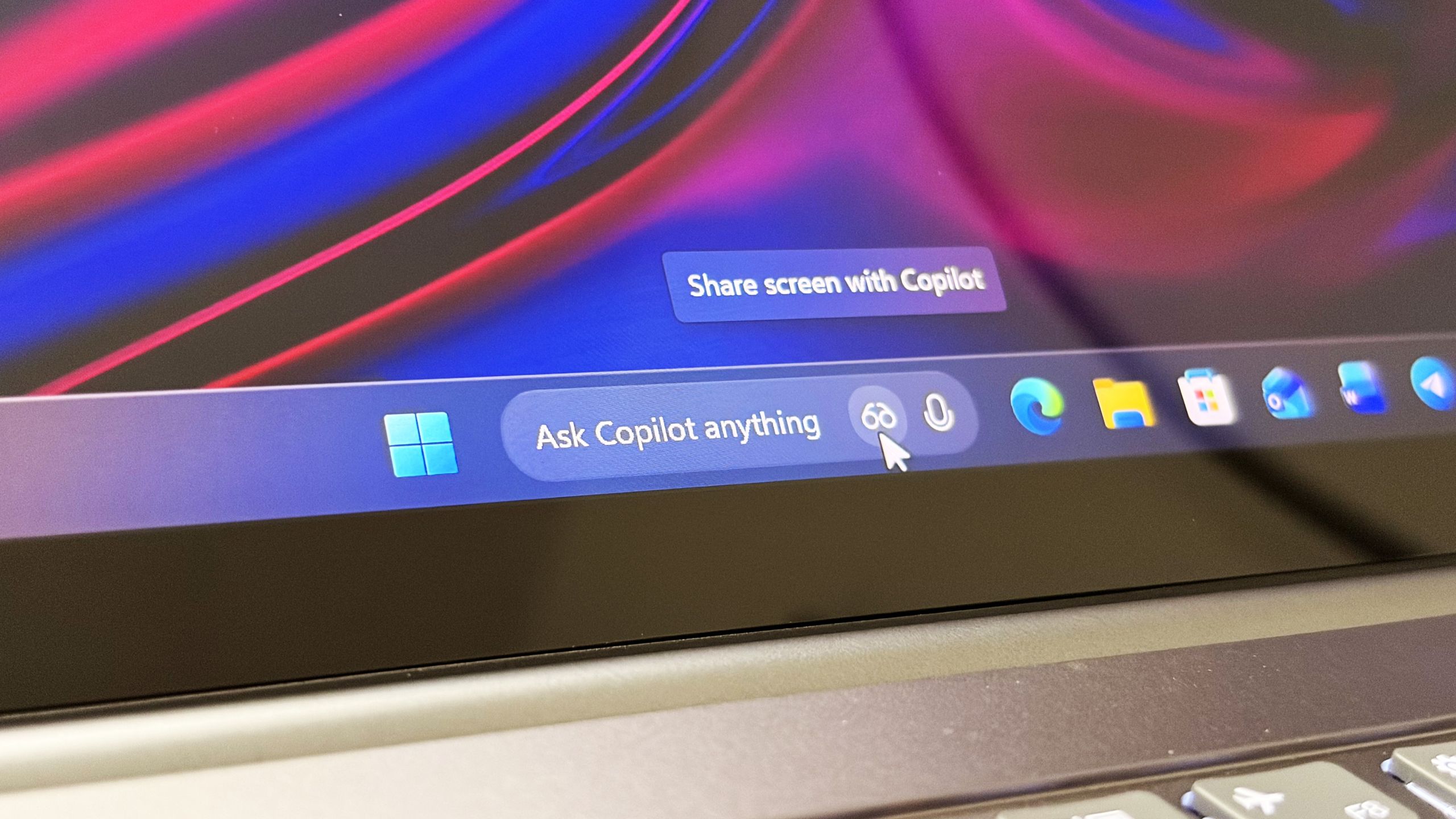
Microsoft confirms Ask Copilot is still coming to Windows 11's Taskbar this summer
First announced last year, a new document has confirmed that Microsoft's upcoming "Ask Copilot" feature for Windows 11's Taskbar is arriving mid-2026. www.windowscentral.com
- Related coverage: tomshardware.com
Nvidia and Microsoft tease "a new era of PC" ahead of Computex 2026 — coordinated social media posts could indicate that rumored N1X laptops will be Windows on Arm systems
An Nvidia-powered Arm PC running Windows could inspire new local AI experiences beyond Copilot+.www.tomshardware.com
- Related coverage: techcrunch.com

Microsoft is working on yet another OpenClaw-like agent | TechCrunch
The new features would be geared toward enterprise customers, with better security controls than the famously risky open source OpenClaw agent. techcrunch.com
- Related coverage: fortune.com

Exclusive: Microsoft is building a super app that combines coding, chat, and other Copilot AI tools | Fortune
The project is being spearheaded by new Copilot chief Jacob Andreou, as Microsoft seeks to streamline its lineup of AI tools amid competition from Google, OpenAI, and Anthropic.fortune.com
- Related coverage: venturebeat.com
- Related coverage: windowsforum.com

Microsoft Copilot Super App Leak: Chat, Coding, Cowork, and Agentic Autopilot
Microsoft is reportedly building an unreleased Copilot “super app” that would combine chat, GitHub Copilot coding help, Copilot Cowork, and a new agentic Autopilot layer, with a leaked Sources screenshot dated May 30, 2026 showing a proactive Scout agent inside the interface. The immediate story... windowsforum.com
- Related coverage: digit.in
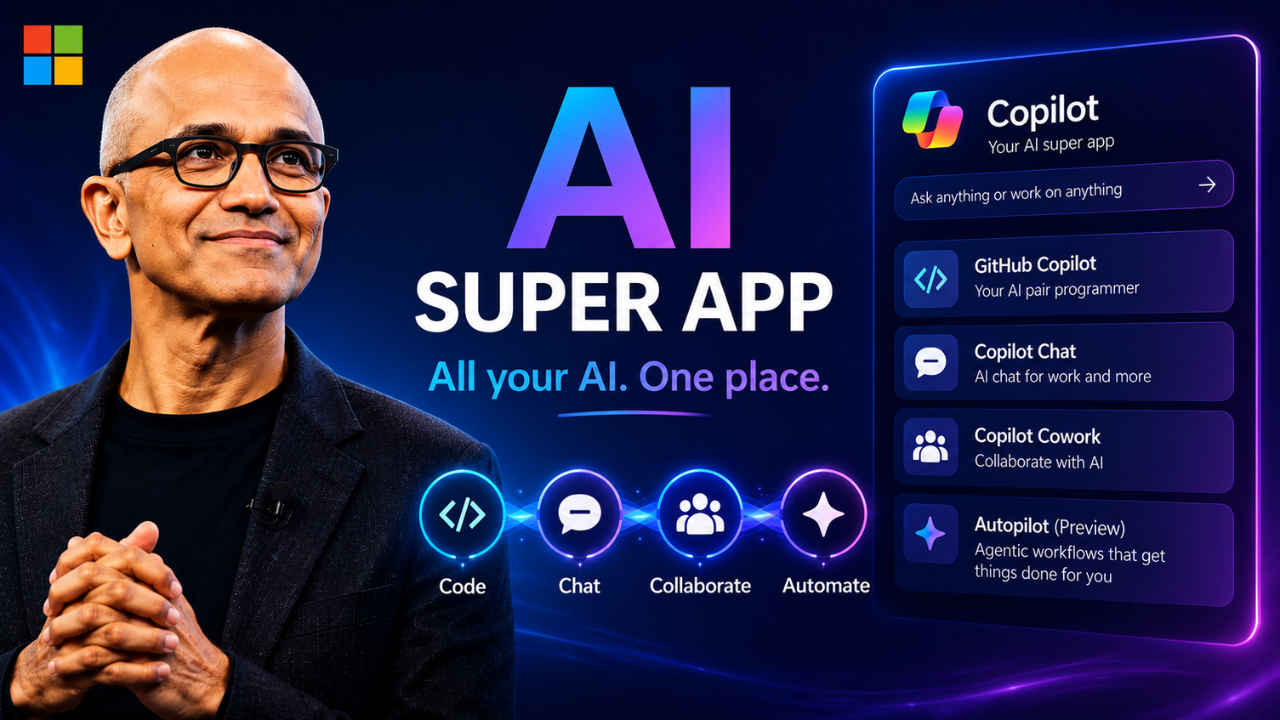
Microsoft plans super app that unifies chat, coding and other Copilot AI tools: Report
Microsoft is reportedly working on a new super app that could bring several of its Copilot AI products together in one place. www.digit.in
- Related coverage: thewincentral.com
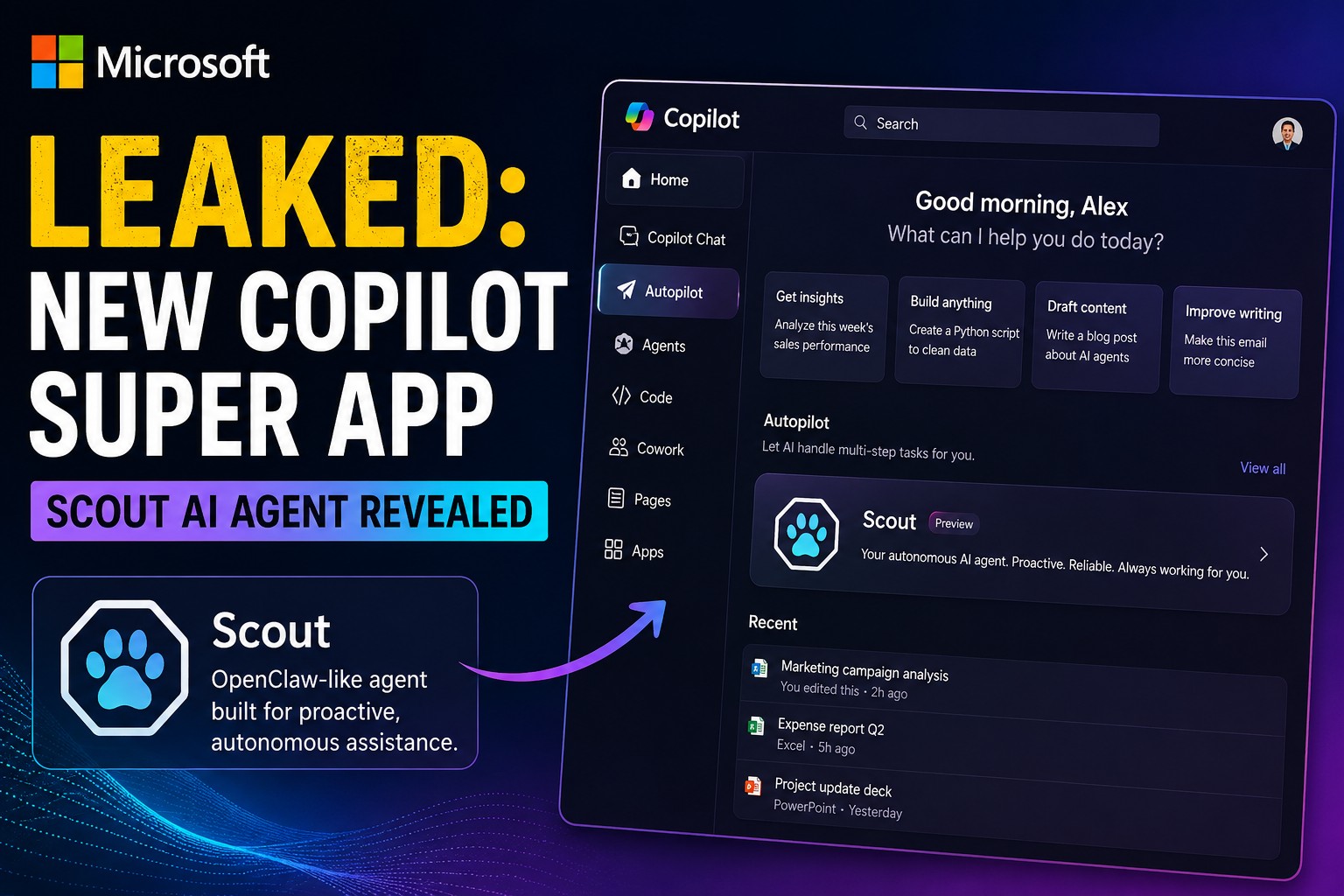
Microsoft Copilot Super App Leak Reveals Scout AI Agent - WinCentral
A leaked Microsoft Copilot screenshot reveals a redesigned super app with the new Scout AI agent & Autopilot features. - Read in AI News on WinCentral thewincentral.com
- Related coverage: siliconreport.com

Microsoft Tests Single Copilot App for GitHub Copilot, Chat, Cowork and Autopilot — Silicon Report
Fortune reported Microsoft is testing a single interface for GitHub Copilot, Copilot chat, Copilot Cowork and a new agentic tool called Autopilot.www.siliconreport.com
- Related coverage: newskarnataka.com
- Related coverage: pymnts.com
Microsoft Combining Commercial and Consumer AI Efforts | PYMNTS.com
Microsoft is reconfiguring the various teams working on its flagship artificial intelligence (AI) offering. In a message on the company blog Tuesday www.pymnts.com
- Official source: adoption.microsoft.com
- Official source: cdn-dynmedia-1.microsoft.com
- Related coverage: newsroom.ibm.com
- Official source: microsoft.com

Introducing a new design for Microsoft 365 Copilot | Microsoft 365 Blog
Copilot’s redesigned experience delivers faster performance, adaptive tools, and clearer AI-powered workflows to help you easily move from intention to outcome. www.microsoft.com
- Related coverage: techmymoney.com

Microsoft 365 Copilot Redesign Brings a Cleaner Look
Microsoft 365 Copilot is getting a cleaner redesign with a new prompt surface, faster load times, and a more consistent experience across Office apps. techmymoney.com
- Official source: blogs.microsoft.com

Introducing the First Frontier Suite built on Intelligence + Trust - The Official Microsoft Blog
Today Microsoft is announcing: Wave 3 of Microsoft 365 Copilot Expanded model diversity with Claude and next-gen OpenAI models available today General availability of Agent 365 on May 1 for $15 per user General availability of the new Microsoft 365 E7: The Frontier Suite on May 1 for $99 per... blogs.microsoft.com
- Official source: support.microsoft.com
Use Microsoft 365 Copilot in Outlook to manage your inbox (Frontier) - Microsoft Support
 support.microsoft.com
- Official source: news.microsoft.com

Introducing the Frontier Suite - Source EMEA
 news.microsoft.com
- Related coverage: moneycontrol.com
- Related coverage: theregister.com

Microsoft slaps new coat of paint on Copilot, buries annoying button
Look, says Redmond, usage up 27-43% based on one week of data - admits it 'may not be indicative of long-term usage trends'www.theregister.com
- Related coverage: hothardware.com

Microsoft Unveils Major Microsoft 365 Copilot Redesign To Streamline Office Workflows
Microsoft unveils a cleaner, faster Microsoft 365 Copilot with a streamlined interface, adaptive prompt box, and consistent in-app side-pane experience.hothardware.com