

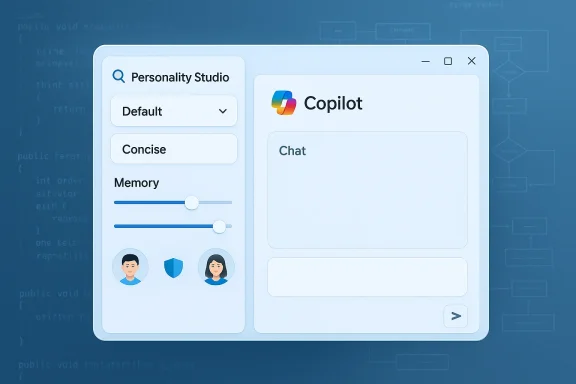
Microsoft is quietly testing a personality selector inside Copilot that will let users choose how the assistant responds — a subtle but consequential shift in how Microsoft surfaces AI customization to everyday users. Early sightings show the new control living in a “Personality Studio” area of the Copilot chat interface, currently offering a very small set of styles (default and concise for many testers) and appearing alongside updated memory controls. The experiment signals Microsoft’s continued push toward making Copilot feel more personalized while balancing safety, clarity, and enterprise governance.
At the same time, Microsoft has been iterating on personalization and memory controls—features that let Copilot store and recall user preferences and context across sessions. The newly observed personality selector appears to be folded into this broader push to make Copilot feel less like a one‑size‑fits‑all tool and more like a configurable assistant.
Key on-screen elements reported in early builds:
That said, the devil will be in the details. The true value of a personality selector will depend on Microsoft’s defaults, the clarity of UX, the robustness of safety guardrails, and the company’s ability to integrate persona behavior consistently across models. Organizations should prepare governance rules now, and consumers should experiment with awareness: personalization can improve experience, but it can also mask variance in accuracy and introduce new governance challenges. As Microsoft expands Personality Studio beyond early test cohorts, watch for official documentation that clarifies persona design, auditing options, and enterprise management controls.
Source: Windows Report https://windowsreport.com/microsoft...ector-to-let-users-choose-ai-response-styles/
 Background
The context: Copilot’s steady evolution
Copilot has moved fast from a simple chat helper to a multi-modal, multi-surface assistant across Windows, Edge, Bing, and Microsoft 365. Recent updates added expressive avatars, group chat modes, voice and vision features, and a “Real Talk” capability that lets Copilot push back on incorrect or misleading user assumptions. Those feature streams show Microsoft experimenting heavily with how Copilot looks and how it behaves, not just with which tasks it can perform.At the same time, Microsoft has been iterating on personalization and memory controls—features that let Copilot store and recall user preferences and context across sessions. The newly observed personality selector appears to be folded into this broader push to make Copilot feel less like a one‑size‑fits‑all tool and more like a configurable assistant.
Why a personality selector matters
Conversation tone dramatically affects user satisfaction. An assistant that’s too terse can feel robotic; one that’s too verbose can be tiresome. Letting users choose a response style — from concise to conversational to more opinionated — can increase perceived usefulness and reduce friction when using AI for different tasks (coding, email drafting, brainstorming, or tutoring). However, personalization also introduces risks: inconsistent outputs, amplified biases, and potential misuse via persona-specific prompts.What Microsoft is testing now
Personality Studio: what’s visible so far
According to reports from testing aggregators and tech outlets, the feature appears within a new experimental pane called Personality Studio. Early testers see a small selector within the Copilot chat interface, and most users presently only have access to default or a concise style. Microsoft is rolling the feature out cautiously and plans to expand available personalities over time as it collects feedback.Key on-screen elements reported in early builds:
- A dropdown or toggle to pick a response style (default / concise in most early accounts).
- Memory management tools co-located with the selector to let users control what Copilot retains between sessions.
- Traces of a broader “Personality Studio” UI that could allow future creation or customization of personas.
Where the selector is showing up
Reporters and testers have seen the new control in multiple Copilot surfaces, including in the web-based Copilot chat and the Copilot experience embedded in Edge and Windows. The staged rollout suggests Microsoft is validating UX across contexts before making a general availability decision.How this compares to other AI assistants
ChatGPT, Claude, and the race for customization
Other major assistants already provide variant controls. ChatGPT has offered conversation styles, custom instructions, and a broader “personality” experience for some time, letting users tweak tone and behavior. Anthropic’s Claude family and other models have also experimented with persona-like controls within developer tools. Microsoft’s move aligns Copilot with this broader industry trend toward user-configurable assistant behavior.Microsoft’s incremental approach versus open sliders
Where ChatGPT sometimes exposes more user-facing toggles, Microsoft appears to be taking a more conservative path: limited initial options and heavy emphasis on integration with memory and enterprise controls. That design choice fits Microsoft’s enterprise-first instincts—fewer surprises for IT admins and less cognitive overhead for users while the company studies real-world usage.Technical signals and model landscape
Which models power Copilot today?
Copilot is not a single-model product; Microsoft uses a mix of internally hosted models, OpenAI models, and, increasingly, Anthropic’s Claude models in certain product paths. Internal reports show Microsoft testing and adopting Anthropic’s Claude Code and related Claude models across engineering teams and integrating Claude into select Copilot capabilities. This multi-vendor strategy gives Microsoft flexibility to route tasks to the model that best fits the problem, but it also increases the complexity of governance and debugging.Model versions and availability (what’s verifiable)
Some testing reports suggest many Copilot users still run on GPT‑5.1 while a smaller cohort has access to GPT‑5.2, but these specifics are unevenly reported and vary by test cohort. Model assignments and rollout timing are controlled internally by Microsoft and are subject to rapid change; any claim about which model powers which user should be treated as provisional unless confirmed by Microsoft’s official release notes. We flag this as a partly unverifiable claim because Microsoft does not publish public, user-by-user model assignments.Benefits for users and organizations
- Faster task fit: Users can switch styles for different contexts — concise for summaries, more expansive for learning or brainstorming.
- Improved satisfaction: Tone alignment reduces friction; an assistant that matches a user’s communication preference feels more helpful.
- Stronger productivity: Task-specific personas can optimize outputs — e.g., “technical reviewer” style for code, “friendly editor” for email copy.
- Unified settings: Bringing personality and memory controls together simplifies user preferences and admin oversight.
Risks, safety concerns, and operational challenges
Persona drift and inconsistent outputs
When users toggle between personalities, the semantic intent of prompts may be interpreted differently by the underlying model. That can cause persona drift where a response’s factual accuracy or recommended actions vary with the chosen style. This risk matters most in sensitive contexts like health, finance, or legal guidance. Users and admins must be aware that tone changes may also affect substance.Amplified bias and social engineering risks
Different personas might emphasize different rhetorical strategies. An “opinionated” persona could, intentionally or not, present contentious interpretations more forcefully, increasing the chance of biased or misleading outputs. Attackers could craft prompts that exploit a specific persona’s style to deceive users or social‑engineer access. Organizations should consider restricting or auditing persona use in team settings.Governance complexity for IT
For enterprises, personality selectors introduce an additional policy surface. IT administrators must decide:- Which personas are allowed within workplace Copilot deployments.
- Whether memory and persona settings should be centrally enforceable.
- How to log and audit persona-driven interactions for compliance.
Safety guardrails and content moderation
Personality framing can affect how models handle unsafe content. A more playful persona might be more tolerant of edgy phrasing; a strict persona may decline certain requests. Microsoft will need to enforce consistent safety filters across personality modes so that tone doesn’t undermine baseline content policies. Reports so far do not confirm the exact guardrails Microsoft plans to use, so observers should treat the safety posture as incomplete pending Microsoft’s documentation and real-world tests.UX and product design considerations
Defaults matter
Most users will accept ship defaults and never adjust advanced settings. That makes the choice of default persona and the discoverability of the selector crucial. Microsoft’s cautious rollout — limited to a few choices initially — plays to this reality, reducing cognitive load while collecting telemetry on how people actually use different tones.Configurability vs. complexity
Designers must balance a rich customization surface with simplicity. A robust “Personality Studio” could empower power users and administrators but will also require clear explanations and examples so nontechnical users aren’t surprised by outputs. A likely path is to start with a small set of well‑documented presets and expand to advanced sliders or persona creation for power users.Accessibility and inclusivity
Personality changes should not disadvantage users with cognitive or language impairments. Microsoft should provide accessible descriptions and allow personas to be framed in plain language (e.g., “Short and formal” vs. “Casual and chatty”) to ensure everyone can choose a suitable style. This is an often-overlooked but important design requirement.Enterprise recommendations
- Evaluate the feature in a sandbox environment before broad deployment.
- Define acceptable persona presets centrally; disable free-form persona creation for regulated data contexts.
- Audit memory settings and persona changes; require logging for sensitive conversations.
- Update internal training and policies to include guidance on persona use and limitations.
- Test task fidelity across personas (e.g., run the same prompt through different styles and evaluate variance).
What remains unconfirmed
- The full set of personas Microsoft will ship and whether users will be able to create or share custom personas are not confirmed. Early reports indicate limited presets only, and Microsoft has not published definitive product documentation for Personality Studio. We flag claims about future persona types or advanced creation tools as speculative until Microsoft publishes formal release notes.
- Traces of video generation support and a dedicated reminders category have been reported in UI telemetry, but Microsoft has not confirmed timelines or availability; treat these as potential directions rather than announced features.
- Precise model assignments (which users are on GPT‑5.1 vs GPT‑5.2, or precisely when Anthropic models will be used for specific Copilot tasks) are controlled internally at Microsoft and are not fully publicly transparent. Any numeric breakdowns of model user shares should be regarded as provisional unless published by Microsoft.
Broader implications: product, policy, and competition
Product differentiation
Allowing tone control is a low-friction way to differentiate Copilot. Where competitors emphasize raw capability, Microsoft can emphasize contextual fit — tune Copilot for the task, persona, or team culture. If done well, this will make Copilot feel more integrated into daily workflows rather than a one‑size‑fits‑all assistant.Privacy and data protection
Pairing persona settings with memory controls is wise: personalization only benefits users if they can control what the assistant remembers. Enterprises will demand strong guarantees that persona tuning does not create hidden data flows or new leakage vectors between user-level preferences and organizational data. Microsoft’s enterprise posture and existing commercial data protections are likely to be central to adoption decisions.Competitive and strategic play
Microsoft’s experimentation with personalities comes alongside an expanding model portfolio that increasingly includes Anthropic’s Claude in addition to OpenAI and in-house models. This multi-model strategy gives Microsoft better bargaining power, model flexibility, and the ability to place workloads on models that best meet accuracy, latency, and compliance constraints. It also signals that Copilot’s architecture is evolving into a model-agnostic orchestration layer that can select the best backend for a given persona/task.Practical tips for users today
- Try the available options: If you see a personality selector, test the same prompt across available styles to understand variance in tone and substance.
- Keep prompts consistent: For important factual or decision-making queries, use the same persona and document the results.
- Review memory settings: Ensure Copilot’s memory behavior aligns with your privacy preferences, especially when using persona options that may encourage casual sharing.
- Use defaults for critical tasks: For compliance-sensitive work, stick to default or admin-approved personas until your organization establishes rules.
Conclusion
Microsoft’s tests of a Copilot Personality Selector represent an evolutionary, not revolutionary, step in assistant design: personalization that aims to make AI outputs feel more useful without dramatically shifting underlying capabilities. Early signals point to a cautious, enterprise-aware rollout that ties persona controls to memory and privacy settings — a sensible posture for a company that serves both consumers and regulated organizations.That said, the devil will be in the details. The true value of a personality selector will depend on Microsoft’s defaults, the clarity of UX, the robustness of safety guardrails, and the company’s ability to integrate persona behavior consistently across models. Organizations should prepare governance rules now, and consumers should experiment with awareness: personalization can improve experience, but it can also mask variance in accuracy and introduce new governance challenges. As Microsoft expands Personality Studio beyond early test cohorts, watch for official documentation that clarifies persona design, auditing options, and enterprise management controls.
Source: Windows Report https://windowsreport.com/microsoft...ector-to-let-users-choose-ai-response-styles/
