

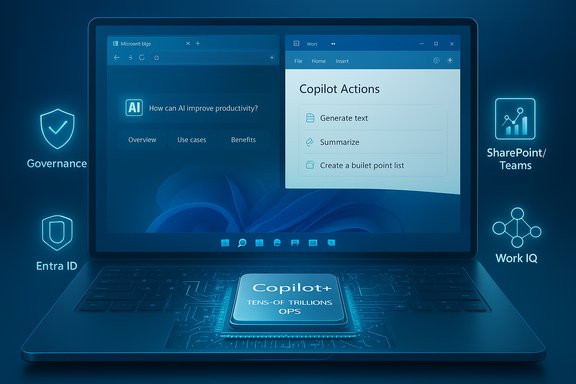
Microsoft’s Copilot rollout has become one of the most consequential—and confusing—product moves in the Windows ecosystem in years, folding AI into everything from the taskbar to Office, and creating a tiered mix of free, subscription, and hardware‑dependent features that IT teams and consumers must untangle. The landscape PCMag described after Microsoft Ignite captures the complexity: a baseline “Copilot Free” experience available via the taskbar and Edge, richer capabilities behind Microsoft 365 subscriptions, Copilot+ PC features that require special NPUs, and a new enterprise stack—Work IQ and Agent 365—that promises corporate context, memory, and governance for AI agents.
Microsoft is deliberately turning Windows and Microsoft 365 into an AI-first platform. The company frames Copilot as an umbrella brand that spans several layers:
Microsoft documentation and preview notes confirm that Copilot can be launched from Windows, Edge, or copilot.microsoft.com, and that the feature set depends on both subscription entitlements and regional/preview rollouts. Expect staged deployment and server‑side flagging—some features may be missing until Microsoft flips the availability switch for your account or device.
The sensible approach for organizations and informed consumers is cautious experimentation: pilot where value is clear, enforce governance and identity controls where risk is real, and verify the exact feature set for your devices and SKUs before investing heavily. Microsoft’s public materials and Ignite presentations outline a coherent vision; the critical questions now are operational: can the company make discovery, governance, and predictable licensing as polished as the AI demos? The next 12 months will tell whether Copilot’s promise becomes routine productivity reality or a fragmented set of features that require heavy lifting from IT and wary users.
(If a specific capability, date, or procurement decision matters for your environment, confirm GA status and licensing details in Microsoft’s admin center and product pages before rollout—many Copilot features remain in preview and are region/tenant gated.
Source: PCMag Struggling to Keep Up With Microsoft's Copilot Changes? Let's Break It Down
 Background / Overview
Microsoft is deliberately turning Windows and Microsoft 365 into an AI-first platform. The company frames Copilot as an umbrella brand that spans several layers:- Windows Copilot / Copilot Free: a system-level assistant surfaced in Windows 11 (taskbar icon, chat/voice access, Edge integration).
- Microsoft 365 Copilot / Copilot Chat: AI features embedded in Word, Excel, Outlook, Teams and the browser, some gated by subscription tiers.
- Copilot+ PCs: hardware‑optimized devices with a Neural Processing Unit (NPU) that enable low‑latency, on‑device AI features such as Recall, Click To Do, improved Windows Studio effects and Live Captions.
- Work IQ and Agent 365: enterprise features that bind corporate context (Microsoft Graph), persistent memory, and an agent management/control plane for governance and identity.
What all Windows users will see first
The new entry points: taskbar, Edge, and copilot.microsoft.com
One visible change for every Windows 11 user is the “Ask Copilot” presence on the taskbar and deeper Copilot integration in File Explorer and the Notifications Center. Microsoft’s goal: make quick, conversational access ubiquitous so users can find files, apps, or settings with natural language or voice. If you don’t have any paid Copilot license, Microsoft calls the experience Copilot Free—it uses web grounding and your on‑screen prompts rather than corporate memory.Microsoft documentation and preview notes confirm that Copilot can be launched from Windows, Edge, or copilot.microsoft.com, and that the feature set depends on both subscription entitlements and regional/preview rollouts. Expect staged deployment and server‑side flagging—some features may be missing until Microsoft flips the availability switch for your account or device.
Consumer Microsoft 365 users: Personal, Family and Premium tiers
What Copilot does inside Office apps
For subscribers of Microsoft 365 Personal, Family, or Premium, Copilot capabilities expand to content drafting, summarization, contextual help in Office apps, and limited generative tasks. Microsoft has positioned two consumer‑facing distinctions:- Personal / Family: access to Copilot functionality with a limited allowance of AI credits for generative tasks.
- Premium: larger credit allocations and access to additional agents like Researcher and Analyst (with usage caps reported—e.g., 25 agent tasks per month for some agent types).
Practical realities for everyday users
- Some features are implemented as in‑app interactions (e.g., Agent Mode in Word, Excel, PowerPoint), while others redirect to web experiences—so your offline, native app expectations will vary.
- Region, Microsoft account type, and whether the device is a Copilot+ PC determine what actually appears. Microsoft’s staged server flags mean two users with identical subscriptions can see different experiences for weeks.
Copilot+ PCs: what the NPU enables (and what it doesn’t)
What a Copilot+ PC is
Copilot+ PCs are a branded class of Windows devices that include an NPU (Neural Processing Unit) designed to offload AI inference tasks from the cloud to the device. Microsoft’s documentation explicitly positions NPUs as enabling lower latency, enhanced privacy (local processing), and features that would be impractical or costly if cloud‑only. The company cites Core features such as Recall (preview), Click To Do, improved on‑device Search, Live Captions with translation, and Windows Studio effects. Microsoft’s Copilot+ PC product pages specify an NPU capability target (devices marketed as Copilot+ often claim NPUs capable of tens of trillions of operations per second).Key Copilot+ features worth knowing
- Recall (preview): an opt‑in “photographic memory” that indexes content you’ve seen on the device to let you search by description or association. Microsoft frames Recall as local‑first processing on the NPU, but privacy controversies and staged rollouts have delayed or limited availability in some regions. Treat Recall as experimental and opt‑in only.
- Click To Do: contextual actions that operate on on‑screen text/images—like converting a PDF table to an Excel sheet or summarizing a chart. Some Click To Do features use local models; others call into cloud services depending on scope and policy.
- Windows Studio Effects and Live Captions: improved webcam, background and audio processing, and real‑time translation happen with on‑device acceleration and are being extended to more hardware partners (Intel/AMD/Snapdragon).
What to verify before buying a Copilot+ PC
- Confirm the exact NPU spec (TOPS rating) and which features are supported on that NPU.
- Verify which Windows 11 build and Microsoft account privileges are required.
- Confirm whether Recall, Click To Do, and Live Captions are available in your country or domain—many Copilot+ features launch in preview and require server‑side enablement.
Microsoft 365 for Business and the move to enterprise context
Copilot Chat and enterprise grounding
Microsoft separates the lightweight conversational Copilot Chat (which can run against web data and files you explicitly reference) from Microsoft 365 Copilot—the paid service that includes Work IQ, which adds corporate grounding, memory, and inference layered over Microsoft Graph data. Work IQ gives Copilot access to organization signals (calendars, mail, SharePoint, Teams) and applies memory/inference to personalize and automate tasks—e.g., understanding when a performance review is due, pulling policy context, or assembling meeting prep from mail and files. Industry coverage of Ignite and Microsoft briefings confirm that Work IQ was presented as a foundational intelligence layer for enterprise Copilot scenarios.Agent Mode and Copilot Chat improvements
Microsoft announced that Copilot Chat will get broader in‑app capabilities (Outlook that understands full inboxes and calendars, Agent Mode in Word/Excel/PowerPoint) and that some previously license‑locked features were being pushed into the broader Copilot Chat experience in preview. The distinction Microsoft made at Ignite (and referenced in follow‑up material) is that Copilot Chat uses file context and web data, while full Microsoft 365 Copilot with Work IQ can draw on organization‑wide data and memory.Agent platform, Windows 365 for Agents, and Cloud Apps
Agents, Copilot Studio, and the Agents SDK
Microsoft’s vision extends beyond single assistants: it’s building a multi‑agent ecosystem. Copilot Studio (low‑code) and the Microsoft 365 Agents SDK (pro‑dev) let teams assemble, publish, and orchestrate agents that can work together. Microsoft demonstrated multi‑agent orchestration and a public preview cadence at Ignite and afterward; a developer session transcript confirms multi‑agent orchestration entered public preview and that Copilot Studio integrates with Visual Studio Code, Foundry, and other developer tools.Windows 365 for Agents and Cloud Apps
Microsoft highlighted Windows 365 for Agents—cloud PCs tailored for agent scenarios that need a specific OS or app set—and Cloud Apps, a model where single apps (not full desktops) are streamed to devices while preserving app state and settings. These are targeted at regulated industries and roles requiring consistent app environments, and Microsoft showed partners and third parties integrating computer‑use agents with the feature. Consider these as virtualized, agent-optimized app delivery options rather than mainstream consumer features.Security, governance and Agent 365
The control plane: Agent 365 and identity for agents
To address enterprise concerns, Microsoft introduced Agent 365 as an agent management plane with identity controls (Entra Agent ID), governance, DLP integration, and admin tools similar to Intune/Entra management for devices and users. Agent 365 is intended to let IT inventory, assign access, and secure agents—whether Microsoft‑built, partner, or custom. Microsoft framed it as public preview in many Ignite sessions; coverage and company blogs confirm the focus on identity, observable telemetry, and governance. Expect preview controls first and GA phased later.Practical security recommendations
- Treat agent connectors and third‑party agents as any privileged integration—require least‑privilege, audit logs, and DLP policies.
- Use Entra Agent ID and Agent 365 controls to provide separate identities and scoped permissions for agent accounts.
- Pilot with high‑value governance: start small, test hallucination rates and data leakage scenarios, and expand only after risk mitigations. Independent reporting and early community pilots have repeatedly shown that agent outputs can surprise organizations; don’t assume safety just because the agent is packaged by a vendor.
Where timelines and promises are fuzzy (and what to treat as preview)
Microsoft has repeatedly announced “public preview,” “early 2025,” or “coming months” for various Copilot, agent, and Copilot+ features. Those timelines have been optimistic, and real‑world rollouts are frequently staged by region, SKU, and account eligibility. Two practical realities:- Many Copilot‑related features are still in preview or region‑restricted deployments; plan to treat features like Recall, Agent 365, Work IQ integrations, and some Copilot Chat extensions as preview until your tenant or device shows GA status.
- Privacy and availability caveats remain; Microsoft sometimes disables or stages features after privacy feedback (Recall had public pushback and was delayed in some contexts). Always verify GA status in official Microsoft admin dashboards and test in a non‑production tenant before broad enablement.
Risks and trade‑offs: privacy, cost, and operational complexity
Privacy and data residency
- Local vs cloud processing: Copilot+ on‑device features can reduce cloud exposure, but many Copilot capabilities still call cloud models and may surface results grounded in web or corporate data. Distinguish between local NPUs (device‑only inference) and cloud‑grounded Copilot features.
- Recall: despite Microsoft’s claims about local processing and encryption, Recall raised privacy concerns and was pulled or delayed in some configurations. Treat such features as opt‑in and subject to corporate policy review.
Cost and licensing confusion
Microsoft’s tiered approach—Copilot Free, M365 Personal/Family/Premium credits, Microsoft 365 Copilot work licenses, and device‑specific Copilot+ branding—creates complexity for budgeting. Some consumer features moved from licensed to free previews and vice versa during rollouts; admins must map which SKU unlocks which workflow before purchasing broadly.Operational burden
- Governance: Agent proliferation without governance increases risk—Agent 365 is Microsoft’s answer, but it’s a new management plane requiring process changes.
- Support: Copilot features can behave differently across devices and accounts. Expect helpdesk tickets for feature availability, unexpected outputs, and account entitlements.
- Training: Users will need training on when Copilot is helpful and when it’s hazardous—e.g., relying on agent outputs verbatim in regulated workflows is unsafe until validated.
Recommended action plan for IT and power users
- Inventory: map which teams and use cases would benefit from Copilot, Copilot Chat, or Copilot+ PC features.
- Pilot: choose a small, controlled pilot group and enable agent features with a governance checklist (Entra Agent ID, DLP, logging).
- Validate: measure hallucination rates, data leakage, and integration behavior against actual business requirements.
- Policy: prepare consent, privacy, and retention settings; require opt‑in for features such as Recall.
- Procurement: if buying Copilot+ PCs, specify NPU TOPS, confirmed feature support, and return/upgrade terms in procurement contracts.
- User education: publish dos and don’ts for Copilot outputs, especially for regulated content or legal/finance workflows.
Conclusion
Microsoft’s Copilot strategy is ambitious and multi‑layered: a system-level assistant for every Windows user, subscription‑gated productivity superpowers for Microsoft 365 customers, hardware‑accelerated Copilot+ experiences on NPUs, and a full enterprise stack—Work IQ and Agent 365—designed to give organizations context, memory, and governance. That same ambition produces complexity: staged rollouts, licensing permutations, shifting preview/GA timelines, and real security/privacy trade‑offs.The sensible approach for organizations and informed consumers is cautious experimentation: pilot where value is clear, enforce governance and identity controls where risk is real, and verify the exact feature set for your devices and SKUs before investing heavily. Microsoft’s public materials and Ignite presentations outline a coherent vision; the critical questions now are operational: can the company make discovery, governance, and predictable licensing as polished as the AI demos? The next 12 months will tell whether Copilot’s promise becomes routine productivity reality or a fragmented set of features that require heavy lifting from IT and wary users.
(If a specific capability, date, or procurement decision matters for your environment, confirm GA status and licensing details in Microsoft’s admin center and product pages before rollout—many Copilot features remain in preview and are region/tenant gated.
Source: PCMag Struggling to Keep Up With Microsoft's Copilot Changes? Let's Break It Down
