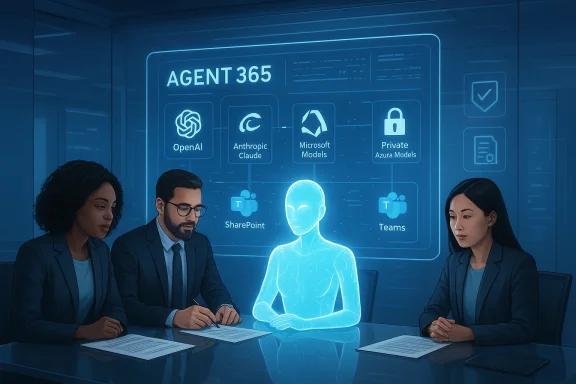
Microsoft’s latest Copilot update turns everyday Office work from “ask and receive” into assign and audit: Wave 3 of Microsoft 365 Copilot introduces agentic features — an in‑canvas Agent Mode for Word and Excel plus a chat‑first Office Agent in Microsoft 365 Copilot — that plan, execute, validate, and iterate multi‑step tasks inside documents, spreadsheets, presentations, and email.
Microsoft has been steadily evolving Copilot from a conversational sidebar into a platform of coordinated agents and integrated productivity surfaces. Early previews and staged Windows Insider rollouts established the mechanics — Connectors for cross‑account search, document export workflows inside Copilot on Windows, and an in‑app Copilot Chat pane embedded directly into Word, Excelos set the technical and conceptual groundwork for the agentic shift now packaged in Wave 3.
Wave 3 is being presented by Microsoft as the next major phase: a transition from single‑turn, suggestion‑based assistance toward steerable, multi‑step automation that produces auditable Office artifacts. Microsoft’s announcement frames these capabilities as a continuation of Copilot’s platform strategy — more agents, deeper app integration, and enterprise controls that govern data use and provenance.
Separately, Microsoft’s public blog post framing Wave 3 lists the app surfaces (Word, Excel, PowerPoint, Outlook) and positions the features as part of a broader Copilot roadmap. Availability windows, regional restrictions, and tiered licensing vary; confirm whether your tenant and region are included before planning a broad rollout.
At the same time, reviewers highlight persistent caveats: the Excel COPILOT function and agentic spreadsheet edits remain unsuitable for high‑stakes financial reporting without human verifiavailability varies. These early caveats should be a central part of any deployment playbook.
But this transition is not purely technical; it’s organizational. Success will depend on disciplined governance, selective rollouts, robust human review policies, and ongoing measurement of agent outputs. For IT leaders and knowledge workers, the immediate priority is to pilot thoughtfully: validate common workflows, lock down connectors and permissions, and train the people who will supervise the agents. Done right, Wave 3 can reclaim hours of wasted effort and raise baseline productivity. Done carelessly, it can introduce new accuracy, privacy, and compliance risks.
Source: Neowin Microsoft 365 Copilot Wave 3 announced: New agentic features for Word, Excel, and Outlook
 Background
Microsoft has been steadily evolving Copilot from a conversational sidebar into a platform of coordinated agents and integrated productivity surfaces. Early previews and staged Windows Insider rollouts established the mechanics — Connectors for cross‑account search, document export workflows inside Copilot on Windows, and an in‑app Copilot Chat pane embedded directly into Word, Excelos set the technical and conceptual groundwork for the agentic shift now packaged in Wave 3.Wave 3 is being presented by Microsoft as the next major phase: a transition from single‑turn, suggestion‑based assistance toward steerable, multi‑step automation that produces auditable Office artifacts. Microsoft’s announcement frames these capabilities as a continuation of Copilot’s platform strategy — more agents, deeper app integration, and enterprise controls that govern data use and provenance.
What’s new in Wave 3: the feature set explained
Wave 3 bundles several interlocking capabilities that together change how documents are created and maintained.Agent Mode (in‑canvas agents for Word and Excel)
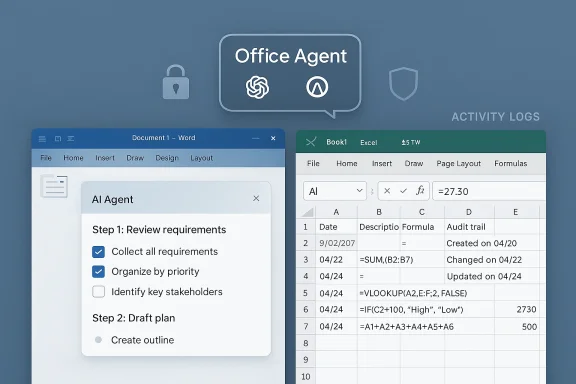
- Agent Mode embeds a stepwise AI agent directly into the editing canvas of Word and Excel. Users can supply a plain‑English brief and the agent will:
- Decompose the brief into a plan,
- Execute discrete editing or calculation steps,
- Surface intermediate artifacts for review, and
- Iterate based on user direction or guardrails.
- The design aims to create auditable edits — every action the agent takes is visible and reviewable, not magically replacing user control. This is explicitly pitched as a productivity pattern Microsoft calls “vibe working.”
Office Agent (chat‑first document and slide generation)
- The Office Agent runs from Microsoft 365 Copilot chat and can assemble full Word documents, PowerPoint slide decks, or email drafts by combining conversational prompts with live research and model‑level checks.
- It supports clarifying questions, multiple iterations, and generates native Office files (not just plain text), designed so the outputs are ready for business use after human review.
Model choice and multimodel orchestration
- Microsoft continues to expand model diversity inside Copilot. Customers can now select different LLM backends (including OpenAI and Anthropic models) for certain agent tasks, and Copilot may route different subtasks to different models for optimal results. This multi‑model orchestration reflects Microsoft’s strategy to reduce singlnd match model strengths to workload types.
Workplace controls, connectors, and file export
- Wave 3 builds on features that let Copilot connect to personal or corporate data sources (OneDrive, Outlook, Google Drive, Gmail, etc.) via opt‑in Connectors and export chat outputs into editable Office files and PDFs. These capabilities turn Copilot into a cross‑account productivity engine rather than a purely conversational assistant.
Why this matters — practical benefits for users and enterprises
Wave 3 packs productivity promises that are both immediate and structural.- Faster first drafts: Teams cane polished starting points for reports, slide decks, email campaigns, and proposals, reducing the friction between idea and deliverable.
- Complex spreadsheet work made accessible: Agent Mode’s multi‑step approach is built for tasks that previously required advanced Excel expertise — formula fixes, cross‑sheet reconciliations, and multi‑stage data transformations can be described in plain language and executed with traces for auditing.
- Reduced app switching and copy/paste: By letting Copilot pull, synntent directly within the Office canvas and Copilot chat, Wave 3 aims to cut the micro‑inefficiencies that cost knowledge workers hours a week.
- Enterprise control and governance: Microsoft emphasizes auditable agent traces, admin controls, and tenant‑ovide organizations with oversight over agent actions and data access. These administrative features are central to convincing IT teams to enable agentic automation in regulated environments.
The technical and product lineage: how Microsoft got here
Understanding Wave 3 requires tracing several prior steps that made agentic productivity feasible.- Embedding Copilot Chat in Office apps established a conversational surface in the very place people create content, which lowered the activation cost for AI assistance.
- Connectors and the Windows Copilot document export workflow demonstrated that Copilot could safely touch user files and geneputs. These features began in staged Insider previews in late 2025 and were refined with user feedback.
- Early public previews of Agent Mode (web) and the Excel COPILOT function exposed design tradeoffs — convenience versus precision — and informed the auditing and iteration model Wave 3 doubles down on. Warnings from Microsoft about using AI-generated formulas for critical reproducible tasks show Microsoft’s caution around high‑stakes workflows.
Critical analysis: strengths, risks, and governance challenges
Wave 3 is ambitious and will reshape day‑to‑day knowledge work, but the shift from assistant to agent raises a set of clear tradeoffs.Strengths — where Microsoft gets it right
- Actionable outputs, not just prose. Producing native Word, Excel, and PowerPoint files reduces the copy/paste choreography teams currently endure and speeds iteration cycles.
- Multi‑step, auditable workflows. Agent Mode’s stepwise plan-and-execute design acknowledges that teams need to review how a result was produced, not only the end text or spreadsheet. That auditability is essential foredge transfer.
- Model choice and routing. Allowing enterprises to select models — for example, Anthropic’s Claude for certain reasoning tasks — is a pragmatic approach that mitigates vendor lock‑in and lets teams pick the right tool for the job.
Risks — where IT should be cautious
- Hallucination and accuracy limits. Even with iterative checks, LLMs can generate plausible but incorrect facts. Microsoft and third‑party reporting have consistently warned that AI features are inappropriate for tasks requiring absolute accuracy or legal/financial reproducibility. Teams must not treat agent outputs as final without verification.
- Data governance and permissions. The Connectors model requires careful administrative controls. If agents can reach into Gmail, Google Drive, or Outlook, organizations must ensure tokens, permissions, and logging meet their security policies. Wave 3’s success depends on admins configuring least‑privilege access and robust audit trails.
- Overreliance and skills atrophy. There’s a cultural risk: if agents routinely perform tasks previously done by domain experts, organizations must maintain institutional knowledge and ensure subject‑matter expertise isn’t lost. Governance policies should include mandatory human review for certain decision classes.
- Regulatory and regional availability constraints. Not all features are globally available immediately; some agent features or model choices may be restricted in the EU, UK, or other jurisdictions due to data protection and regulatory considerations. Enterprises must validate which Wave 3 capabilities are authorized in their regions before planning rollouts.
Implementation checklist for IT leaders
If you’re responsible for deploying Wave 3 capabilities in your organization, treat this as a structured checklist.- Inventory and policy alignment
- Map which user groups will need agentic features and why.
- Define acceptable use cases and categories requiring mandatory human oversight.
- Permissions and connectors
- Decide whether to allow Connectors to consumer services (e.g., Gmail, Google Drive).
- Implement least‑privilege access, consent flows, and token expiration policies.
- Model selection and safety
- Evaluate which LLM backends (OpenAI, Anthropic, others) meet your accuracy, latency, and compliance requirements.
- Test model outputs on representative datasets and edge cases.
- Audit and logging
- Ensure agent actions are traceable: which agent performed what edit, what data sources were consulted, and what intermediate artifacts were created.
- Integrate logs with SIEM and DLP tooling.
- Training and change management
- Teach users how to craft briefs, verify outputs, and interpret agent traces.
- Promote playbooks for human review thresholds (e.g., financial figures, legal wording, customer communications).
- Pilot, measure, iterate
- Run targeted pilots with measurable KPIs (time saved, error rates, human review time).
- Iterate policies and configuration based on pilot findings.
Pricing, availability, and licensing details (verified)
Microsoft’s Wave 3 rollout ties into broader commercial packaging. According to Microsoft’s regional communications, the new Agent 365 capabilities (branded in some materials as Agent 365 or Microsoft 365 Copilot Wave 3 features) have staged availability, with certain paid offerings and feature bundles scheduled for general availability in the months following the announcement. One regional Microsoft release notes the availability of Agent 365 beginning May 1 with a per‑user price mentioned; enterprises should verify licensing terms with their account teams for exact entitlements and any grandfathering of existing Copilot licenses.Separately, Microsoft’s public blog post framing Wave 3 lists the app surfaces (Word, Excel, PowerPoint, Outlook) and positions the features as part of a broader Copilot roadmap. Availability windows, regional restrictions, and tiered licensing vary; confirm whether your tenant and region are included before planning a broad rollout.
Use cases that will see immediate ROI
- Sales and proposal teams: Generate tailored proposals and slide decks from a single brief, with agent‑generated outlines and suggested data pull.
- Finance analysts: Use Agent Mode to create reconciliations, standardize complex formula repairs, and document the stepwise logic used to derive key numbers (with human signoff).
- HR and legal: Draft policy documents and contracts as starting points, but always require lawyer review for final language.
- Customer support and operations: Produce standardized incident summaries and action plans from meeting notes and emails, improving time to resolution.
What Microsoft still needs to prove
- Real‑world reliability at scale: Agent Mode must consistently produce accurate edits in complex, large spreadsheets and long documents across thousands of users without excessive error rates.
- Governance tooling maturity: Admin and compliance teams need intuitive dashboards that show agent behavior, connector usage, and data flow in ways that satisfy auditors and regulators.
- Cost predictability: Enterprises will want transparent pricing models and predictable compute costs when agents call multiple models or perform web research as part of document assembly.
- Developer extensibility: Organizations will expect APIs and integration points so Copilot agents can slot into existing workflows and identity frameworks (conditional access, lifecycle management, etc.).
Early signals from reporting and previews
Independent reporting and previews from multiple outlets characterize Wave 3 as the productization of earlier agent experiments. Journalists and independent observers have described the change as a move from “help me” to “do it for me,” while emphasizing Microsoft’s attempt to balance power with auditability and admin control. Prior staged Insider previews and web‑based experiments gave Microsoft a field testbed to refine Agent Mode, document export behaviors, and connector consent flows — experiences that informed Wave 3’s design.At the same time, reviewers highlight persistent caveats: the Excel COPILOT function and agentic spreadsheet edits remain unsuitable for high‑stakes financial reporting without human verifiavailability varies. These early caveats should be a central part of any deployment playbook.
Bottom line: a pragmatic path forward
Wave 3 of Microsoft 365 Copilot is a watershed moment for productivity software. By combining in‑canvas Agent Mode, a chat‑first Office Agent, model choice, and tighter app integration, Microsoft is making a credible push to move knowledge work from ideation to audited execution — and to do it inside the Office applications millions of users already rely on.But this transition is not purely technical; it’s organizational. Success will depend on disciplined governance, selective rollouts, robust human review policies, and ongoing measurement of agent outputs. For IT leaders and knowledge workers, the immediate priority is to pilot thoughtfully: validate common workflows, lock down connectors and permissions, and train the people who will supervise the agents. Done right, Wave 3 can reclaim hours of wasted effort and raise baseline productivity. Done carelessly, it can introduce new accuracy, privacy, and compliance risks.
Quick reference: recommended next steps for WindowsForum readers
- Pilot Agent Mode on low‑risk but high‑value workflows (proposal drafts, meeting summaries, non‑financial spreadsheets).
- Require human signoff rules for outputs used in regulated or monetary decisions.
- Configure Connectors conservatively; prefer corporate data sources (OneDrive, SharePoint) before enabling consumer connectors (Gmail, Google Drive).
- Test multiple model backends on sample tasks to understand differences in tone, accuracy, and hallucination patterns.
- Integrate agent audit logs with your SIEM and DLP stacks before scaling.
Source: Neowin Microsoft 365 Copilot Wave 3 announced: New agentic features for Word, Excel, and Outlook