

Microsoft’s latest Defender security intelligence update is a good example of how modern endpoint protection now works less like a static antivirus package and more like a continuously evolving threat-intelligence service. The update being discussed in the wild is framed as a package for Windows 11, Windows 10, and Windows Server installation images, but the key story is broader: Microsoft keeps pushing Defender’s detection logic, cloud-backed protections, and offline image servicing model forward in lockstep. Official Microsoft guidance shows that Defender’s security intelligence is updated regularly, that it is tied to cloud-based protection, and that installation images can be refreshed offline to avoid protection gaps. (microsoft.com)
What matters most for users and administrators is not just the version number, but the operational flexibility. Microsoft’s current guidance confirms that Defender updates can be delivered automatically, triggered manually, or deployed into offline WIM and VHD images for Windows 11, Windows 10, and supported Windows Server releases. That makes the update relevant to everything from consumer laptops to tightly controlled enterprise build pipelines. (microsoft.com)
There is also an important caveat: the specific version details circulating in the report should be treated carefully unless they match Microsoft’s live release listings. Microsoft’s official update pages are the authoritative source for the newest security intelligence, engine, and platform versions, and those values change frequently. As of Microsoft’s latest published security-intelligence page, the newest listed package is newer than the values cited by the report, which underscores why exact version claims should always be verified against Microsoft’s own channels. (microsoft.com)
Microsoft Defender has evolved from a straightforward antivirus utility into a layered protection platform that combines local signatures, engine updates, cloud reputation data, machine-learning models, and threat-intelligence feeds. Microsoft’s own documentation describes security intelligence as a living detection layer that is constantly tweaked to improve how Defender identifies threats, and it explicitly links those updates to cloud-based protection. That is the central idea behind Defender today: the local agent is important, but the cloud is what keeps it reactive enough to deal with fast-moving threats. (microsoft.com)
Historically, endpoint protection relied on periodic signature refreshes that were often invisible to users until malware slipped through. Microsoft has spent years shifting that model toward continuous update delivery, including automatic updates via Windows Update, manual refreshes from the Windows Security app, and downloadable packages for disconnected environments. That matters because attackers no longer wait for “Patch Tuesday,” and defenders cannot afford to either. (microsoft.com)
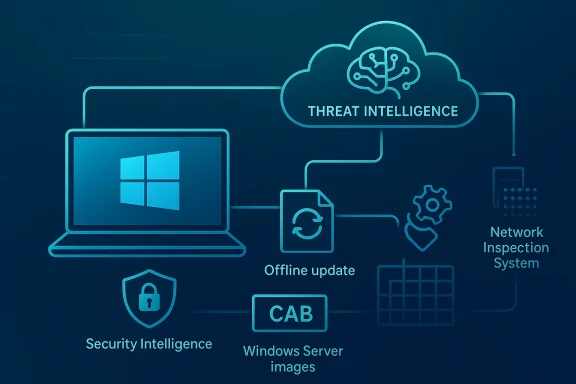
The installation-image angle is especially important in enterprise environments. Microsoft explicitly supports Defender update packages for offline servicing of Windows 11, Windows 10 ESU, several Windows 10 LTSC variants, and Windows Server 2016, 2019, and 2022 images. In other words, the same protection logic that shields a live endpoint can be baked into a gold image before deployment, reducing the window in which a newly imaged machine boots with stale protection. (support.microsoft.com)
This is also where Microsoft’s long-running move toward defense in depth shows up most clearly. Security intelligence is one layer, the engine and platform are another, and cloud-protection features add adaptive analysis on top. Microsoft says those elements work together to improve accuracy and to respond faster to emerging threats, including malware families that are changing too quickly for static controls alone. (microsoft.com)
The broader industry context is equally important. As Microsoft expands AI-assisted security tooling across Defender, Entra, Purview, and Security Copilot, Defender Antivirus itself remains the front line for endpoint protection. Microsoft’s security blog has repeatedly framed the company’s security strategy around AI-first defense, but the daily reality for most customers still comes down to whether endpoint protections are current, trusted, and easy to deploy at scale.
The distinction between security intelligence, engine, and platform is crucial. Security intelligence is the signature and detection layer; the engine is the scanning and analysis core; the platform is the broader Defender runtime that Microsoft updates monthly. Microsoft’s release notes show these pieces are tracked separately, which is why users sometimes see a new intelligence version without a matching engine or platform jump. (learn.microsoft.com)
This is why a report that lists a single “Defender update” can be misleading if it doesn’t distinguish what is actually changing. A published intelligence version, such as the one in the cyberpress piece, may not correspond to the newest package in Microsoft’s official listing by the time readers see it. Microsoft’s update page is updated frequently, and the newest live version can move within days or even hours. (microsoft.com)
The server side is particularly important because many organizations still rely on Windows Server systems that need cautious maintenance windows. Microsoft’s Windows Server guidance says that if Defender was disabled or uninstalled, administrators may need to reinstall or re-enable it, install the latest servicing stack and cumulative update, reboot, and then apply the latest platform update. That sequence reflects a broader reality: on servers, security is often entangled with maintenance discipline. (learn.microsoft.com)
This matters beyond theory. When organizations refresh a VDI catalog, a server image, or a recovery image, Defender definitions often lag behind operating system patches unless they are explicitly injected. Microsoft’s own guidance says the Defender package includes the latest security intelligence available at the time of release, which helps close the gap before machines ever connect to the network. (support.microsoft.com)
Administrators, however, have more elaborate options. Microsoft documents a command-line method using MpCmdRun.exe to remove existing definitions and trigger a fresh signature download, which is useful when cache corruption, update stalls, or policy-driven environments create edge cases. In enterprise management, this is a classic example of simple at the edge, flexible in the core. (microsoft.com)
That flexibility has strategic value. It helps keep Defender relevant in environments where Windows Update timing, network segmentation, or change-control policies could otherwise slow down security response. And because Defender is designed to work with cloud-based protection, these manual actions can still fit into a broader dynamic-defense model instead of a purely local antivirus workflow. (microsoft.com)
That said, AI-driven security claims should always be interpreted carefully. In practical terms, “AI” in Defender often means machine-learned classifications, reputation systems, anomaly detection, and cloud correlation—not a magical autonomous judge. The value lies in scale and speed, especially when malware campaigns mutate faster than humans can write a new rule set. (microsoft.com)
It also changes the economics of protection. Enterprises no longer have to choose between strict local signatures and rapid global intelligence; Microsoft’s architecture lets them have both. That does not eliminate the need for layered defenses, but it does make Defender more resilient against first-seen threats and rapidly spreading outbreaks. (microsoft.com)
This is especially relevant in enterprise networks where a single endpoint compromise can fan out into credential theft, lateral movement, or ransomware deployment. A detection that trips at the network layer may buy defenders enough time to isolate a machine before the attack reaches its destructive phase. In security terms, that is a small delay with outsized value.
For organizations with remote users, branch offices, or mixed trust zones, that can be decisive. It adds a line of defense where users are most exposed: on the wire, before a malicious file or exploit chain gets its moment to run.
The SHA-2 requirement, however, is clearly documented. Microsoft says security intelligence update packages have been SHA2 signed since October 21, 2019, and older systems need the appropriate SHA-2 code-signing support in place to receive them. That is not an optional nicety; it is a hard compatibility requirement for legacy environments. (microsoft.com)
This is also a reminder that “legacy support” is usually bounded support. Microsoft’s documentation increasingly encourages modern, unified Defender deployments on newer server versions, and it provides automation helpers for re-enabling protection where it had previously been removed. In practice, older fleets are kept on life support only as long as the surrounding maintenance model remains disciplined. (learn.microsoft.com)
For enterprises, the implications are deeper. Security teams need to manage versions across live endpoints, offline images, remote offices, and sometimes older servers or long-lived LTSC systems. The availability of downloadable packages, image-servicing tools, and command-line signature refreshes gives those teams the control surfaces they need to enforce consistency at scale. (support.microsoft.com)
The enterprise impact also extends into incident response. If a threat is trending in the wild, security teams can use the same update mechanisms to push fresh signatures or clear stale caches. That makes Defender a live-response instrument, not merely a passive baseline control. (microsoft.com)
The more interesting competition, though, is not just with traditional AV brands. It is with the entire category of endpoint detection and response, identity-aware security, and AI-assisted operations. Microsoft keeps folding more detection and response capability into its security stack, which can reduce the perceived need for separate point products.
At the same time, Microsoft’s dominance in the Windows ecosystem means Defender’s improvements ripple outward. When the built-in option gets better, the baseline expectation for “good enough” security rises, and that changes procurement conversations across the industry. Good enough becomes harder to sell when the default keeps improving. (microsoft.com)
The opportunity is even larger in regulated and hybrid environments, where offline image servicing, command-line controls, and cloud-backed protection can coexist. Microsoft can keep sharpening the balance between ease of use and deep administrative control, which is a major reason Defender remains strategically important. (support.microsoft.com)
Another concern is version confusion. Security intelligence, engine, and platform versions move on different schedules, and public reporting can lag behind Microsoft’s live pages. If administrators or journalists treat any one version claim as universal truth, they can end up troubleshooting the wrong component or overstating what the update actually delivered. (microsoft.com)
There is also the broader strategic risk of overreliance on a single vendor’s security stack. Defender is strong, but no single layer can substitute for patching, identity protection, segmentation, logging, user training, and response playbooks. The better Microsoft gets at endpoint protection, the more dangerous it becomes for organizations to underinvest elsewhere.
For enterprises, the watchword will be operational discipline. The best Defender updates are the ones that are deployed everywhere they need to be—live endpoints, offline images, servers, recovery media, and legacy systems that still matter. If Microsoft keeps refining the update cadence and the tooling around it, defenders will have a stronger foundation; if organizations fail to use those tools properly, the benefits will remain only partly realized. (support.microsoft.com)
Source: cyberpress.org Microsoft Rolls Out New Defender Update for Windows 11, 10, and Server Images
What matters most for users and administrators is not just the version number, but the operational flexibility. Microsoft’s current guidance confirms that Defender updates can be delivered automatically, triggered manually, or deployed into offline WIM and VHD images for Windows 11, Windows 10, and supported Windows Server releases. That makes the update relevant to everything from consumer laptops to tightly controlled enterprise build pipelines. (microsoft.com)
There is also an important caveat: the specific version details circulating in the report should be treated carefully unless they match Microsoft’s live release listings. Microsoft’s official update pages are the authoritative source for the newest security intelligence, engine, and platform versions, and those values change frequently. As of Microsoft’s latest published security-intelligence page, the newest listed package is newer than the values cited by the report, which underscores why exact version claims should always be verified against Microsoft’s own channels. (microsoft.com)
 Background
Microsoft Defender has evolved from a straightforward antivirus utility into a layered protection platform that combines local signatures, engine updates, cloud reputation data, machine-learning models, and threat-intelligence feeds. Microsoft’s own documentation describes security intelligence as a living detection layer that is constantly tweaked to improve how Defender identifies threats, and it explicitly links those updates to cloud-based protection. That is the central idea behind Defender today: the local agent is important, but the cloud is what keeps it reactive enough to deal with fast-moving threats. (microsoft.com)Historically, endpoint protection relied on periodic signature refreshes that were often invisible to users until malware slipped through. Microsoft has spent years shifting that model toward continuous update delivery, including automatic updates via Windows Update, manual refreshes from the Windows Security app, and downloadable packages for disconnected environments. That matters because attackers no longer wait for “Patch Tuesday,” and defenders cannot afford to either. (microsoft.com)
The installation-image angle is especially important in enterprise environments. Microsoft explicitly supports Defender update packages for offline servicing of Windows 11, Windows 10 ESU, several Windows 10 LTSC variants, and Windows Server 2016, 2019, and 2022 images. In other words, the same protection logic that shields a live endpoint can be baked into a gold image before deployment, reducing the window in which a newly imaged machine boots with stale protection. (support.microsoft.com)
This is also where Microsoft’s long-running move toward defense in depth shows up most clearly. Security intelligence is one layer, the engine and platform are another, and cloud-protection features add adaptive analysis on top. Microsoft says those elements work together to improve accuracy and to respond faster to emerging threats, including malware families that are changing too quickly for static controls alone. (microsoft.com)
The broader industry context is equally important. As Microsoft expands AI-assisted security tooling across Defender, Entra, Purview, and Security Copilot, Defender Antivirus itself remains the front line for endpoint protection. Microsoft’s security blog has repeatedly framed the company’s security strategy around AI-first defense, but the daily reality for most customers still comes down to whether endpoint protections are current, trusted, and easy to deploy at scale.
What the Update Actually Represents
At a practical level, this update is less a one-off “feature drop” than a fresh intelligence package. Microsoft’s official page explains that Defender security intelligence updates are used to cover the latest threats and continuously tweak detection logic, and they are delivered in a form that corresponds to the Windows environment or installation image being updated. That means the report’s emphasis on improved malware and zero-day detection is directionally consistent with how Microsoft positions these updates, even if the exact threat claims should be read as vendor-style marketing language rather than an itemized changelog. (microsoft.com)The distinction between security intelligence, engine, and platform is crucial. Security intelligence is the signature and detection layer; the engine is the scanning and analysis core; the platform is the broader Defender runtime that Microsoft updates monthly. Microsoft’s release notes show these pieces are tracked separately, which is why users sometimes see a new intelligence version without a matching engine or platform jump. (learn.microsoft.com)
Why version separation matters
For IT teams, separate versioning is a feature, not a nuisance. It allows Microsoft to push urgent detection improvements without forcing a disruptive platform change every time the threat landscape shifts. It also means administrators need to check the correct component when troubleshooting an issue; an endpoint can be current on definitions while still running an older platform build. (microsoft.com)This is why a report that lists a single “Defender update” can be misleading if it doesn’t distinguish what is actually changing. A published intelligence version, such as the one in the cyberpress piece, may not correspond to the newest package in Microsoft’s official listing by the time readers see it. Microsoft’s update page is updated frequently, and the newest live version can move within days or even hours. (microsoft.com)
- Security intelligence changes fastest and most often.
- Engine updates arrive less frequently and may include behavioral improvements.
- Platform updates are typically monthly and can bring compatibility or stability fixes.
- Offline image packages help enterprises stage protection before rollout.
- Cloud protection is what turns static signatures into adaptive defense. (microsoft.com)
Supported Systems and Deployment Scope
One of the strongest parts of Microsoft’s Defender model is how broad the support matrix remains. Microsoft’s image-servicing documentation says the offline Defender update package supports Windows 11, Windows 10 ESU, Windows 10 Enterprise LTSC 2021, Windows 10 Enterprise LTSC 2019, Windows 10 Enterprise LTSB 2016, Windows Server 2022, Windows Server 2019, and Windows Server 2016. That is a wide spread of consumer, enterprise, and server workloads, and it shows how deeply Defender is embedded in Microsoft’s platform strategy. (support.microsoft.com)The server side is particularly important because many organizations still rely on Windows Server systems that need cautious maintenance windows. Microsoft’s Windows Server guidance says that if Defender was disabled or uninstalled, administrators may need to reinstall or re-enable it, install the latest servicing stack and cumulative update, reboot, and then apply the latest platform update. That sequence reflects a broader reality: on servers, security is often entangled with maintenance discipline. (learn.microsoft.com)
Offline and air-gapped environments
The offline servicing workflow deserves special attention because it is one of the most underrated enterprise protections. Microsoft’s support page explains that the Defender update package can be downloaded as architecture-specific archives, extracted into CAB files and a PowerShell tool, and applied to WIM or VHD images. In air-gapped or regulated environments, that can be the difference between shipping a secure image and deploying a vulnerable one. (support.microsoft.com)This matters beyond theory. When organizations refresh a VDI catalog, a server image, or a recovery image, Defender definitions often lag behind operating system patches unless they are explicitly injected. Microsoft’s own guidance says the Defender package includes the latest security intelligence available at the time of release, which helps close the gap before machines ever connect to the network. (support.microsoft.com)
- Supported image servicing helps reduce first-boot exposure.
- Architecture-specific packages make deployment more precise.
- Offline servicing is essential for regulated and disconnected sites.
- Server teams can align security baselines with image build pipelines.
- Recovery and rollback images benefit from the same update model. (support.microsoft.com)
How Updates Reach Endpoints
For most users, Defender updates are intentionally boring—and that is a compliment. Microsoft says the latest security intelligence is applied automatically, and users on Windows 10 can manually check for updates from the Windows Security Virus & threat protection screen. That lowers friction and keeps protection current without requiring users to understand the underlying mechanics. (microsoft.com)Administrators, however, have more elaborate options. Microsoft documents a command-line method using MpCmdRun.exe to remove existing definitions and trigger a fresh signature download, which is useful when cache corruption, update stalls, or policy-driven environments create edge cases. In enterprise management, this is a classic example of simple at the edge, flexible in the core. (microsoft.com)
Manual remediation and enterprise control
The manual-update pathway is not just for troubleshooting. It is also a control surface for tightly managed environments where patch compliance has to be demonstrable. By allowing updates to be pulled on demand, Microsoft gives teams a way to react faster when new threats are being observed in the wild or when a specific outbreak requires more immediate signature changes. (microsoft.com)That flexibility has strategic value. It helps keep Defender relevant in environments where Windows Update timing, network segmentation, or change-control policies could otherwise slow down security response. And because Defender is designed to work with cloud-based protection, these manual actions can still fit into a broader dynamic-defense model instead of a purely local antivirus workflow. (microsoft.com)
- Automatic updates reduce user burden.
- Manual checks help when automation stalls.
- MpCmdRun.exe supports advanced remediation.
- Offline packages fit disconnected networks.
- Consistency across endpoints is the real operational win. (microsoft.com)
The Role of Cloud Protection and AI
Microsoft’s strongest argument for Defender is not the signature database alone, but the intelligence graph behind it. The company states that Defender uses cloud-based protection to deliver fast, AI-enhanced next-generation protection, and that it dynamically identifies new threats using interconnected data and machine learning. This is the fundamental distinction between old-school antivirus and Microsoft’s current model. (microsoft.com)That said, AI-driven security claims should always be interpreted carefully. In practical terms, “AI” in Defender often means machine-learned classifications, reputation systems, anomaly detection, and cloud correlation—not a magical autonomous judge. The value lies in scale and speed, especially when malware campaigns mutate faster than humans can write a new rule set. (microsoft.com)
What cloud protection changes
Cloud protection changes detection latency. Instead of waiting for a local definition cycle to recognize a new threat, the endpoint can consult cloud-backed signals that have already been enriched by telemetry from other devices and services. That is why Microsoft continues to position Defender as a living system rather than a static product. (microsoft.com)It also changes the economics of protection. Enterprises no longer have to choose between strict local signatures and rapid global intelligence; Microsoft’s architecture lets them have both. That does not eliminate the need for layered defenses, but it does make Defender more resilient against first-seen threats and rapidly spreading outbreaks. (microsoft.com)
- Cloud intelligence helps surface threats faster.
- Machine learning improves classification at scale.
- Telemetry correlation reduces reliance on single-device visibility.
- Rapid updates matter most during live outbreaks.
- AI is valuable when paired with traditional controls. (microsoft.com)
Network Inspection System and Layered Defense
The report’s mention of Network Inspection System updates points to another important layer in Microsoft’s stack. Network-level inspection can stop malicious traffic before payloads fully execute, which is valuable when the attack path begins with a bad link, exploit kit, or command-and-control beacon. Even when endpoint execution controls are strong, network blocking adds another chance to interrupt the chain.This is especially relevant in enterprise networks where a single endpoint compromise can fan out into credential theft, lateral movement, or ransomware deployment. A detection that trips at the network layer may buy defenders enough time to isolate a machine before the attack reaches its destructive phase. In security terms, that is a small delay with outsized value.
Why NIS still matters
Network Inspection System is not glamorous, and it is easy to overlook in an era dominated by identity, cloud, and AI discussions. But the real world still has packets, sockets, and exploited services, and attackers still depend on network communications to reach their objectives. NIS helps ensure that Defender is not just reacting after execution has started.For organizations with remote users, branch offices, or mixed trust zones, that can be decisive. It adds a line of defense where users are most exposed: on the wire, before a malicious file or exploit chain gets its moment to run.
- NIS can intercept malicious traffic early.
- It complements endpoint-based detection.
- It is useful against exploit delivery and callback traffic.
- It reduces dependence on a single control layer.
- It supports layered defense architectures.
Legacy Support and SHA-2 Requirements
One notable part of the report is its claim that older platforms such as Windows 7, Windows 8.1, Microsoft Security Essentials, System Center Endpoint Protection, and DaRT are also covered. Microsoft’s update pages do show separate support paths for older antimalware products and legacy Windows versions, though the exact packaging and applicability vary by product line. That means the general idea is plausible, but the details should be validated against Microsoft’s current download matrix before being used in production planning. (microsoft.com)The SHA-2 requirement, however, is clearly documented. Microsoft says security intelligence update packages have been SHA2 signed since October 21, 2019, and older systems need the appropriate SHA-2 code-signing support in place to receive them. That is not an optional nicety; it is a hard compatibility requirement for legacy environments. (microsoft.com)
What this means for older fleets
For organizations still running older Windows images or legacy security tooling, the operational lesson is straightforward: support is not the same as simplicity. Even when Microsoft continues to provide updates, the environment may need servicing-stack updates, SHA-2 readiness, and sometimes product-specific maintenance steps to keep the pipeline working. (microsoft.com)This is also a reminder that “legacy support” is usually bounded support. Microsoft’s documentation increasingly encourages modern, unified Defender deployments on newer server versions, and it provides automation helpers for re-enabling protection where it had previously been removed. In practice, older fleets are kept on life support only as long as the surrounding maintenance model remains disciplined. (learn.microsoft.com)
- SHA-2 signing is mandatory for older systems.
- Legacy support often depends on extra servicing steps.
- Server deployments may need re-enablement after removal.
- The more aged the environment, the more careful the update path.
- Compatibility should be verified before mass rollout. (microsoft.com)
Enterprise vs. Consumer Impact
For consumers, the story is reassuringly simple: Defender should keep updating quietly, and Windows Security should expose a manual check if needed. The benefit is mostly invisible unless a real threat appears, and that is exactly how consumer-grade security should behave. The best antivirus is often the one that becomes noticeable only when it blocks something dangerous. (microsoft.com)For enterprises, the implications are deeper. Security teams need to manage versions across live endpoints, offline images, remote offices, and sometimes older servers or long-lived LTSC systems. The availability of downloadable packages, image-servicing tools, and command-line signature refreshes gives those teams the control surfaces they need to enforce consistency at scale. (support.microsoft.com)
Why administrators care more
Administrators care because Defender is no longer just an endpoint app; it is part of the operating system lifecycle. If images ship with stale intelligence or servers fail to pick up current platform files, the environment inherits a security debt that can linger for months. That is one reason Microsoft keeps emphasizing offline image updates and manual deployment paths. (support.microsoft.com)The enterprise impact also extends into incident response. If a threat is trending in the wild, security teams can use the same update mechanisms to push fresh signatures or clear stale caches. That makes Defender a live-response instrument, not merely a passive baseline control. (microsoft.com)
- Consumers benefit from silent, automatic protection.
- Enterprises need offline and scripted deployment options.
- Servers require version discipline and servicing hygiene.
- Image-based workflows can reduce first-boot exposure.
- Incident response can leverage the same update channels. (microsoft.com)
Competitive Implications
Microsoft’s continued investment in Defender puts pressure on both standalone antivirus vendors and broader endpoint-security platforms. If Defender is already bundled, cloud-connected, and increasingly intelligent, third-party products must justify themselves with either deeper specialization or materially better operations. That is a tough sell in a market where default protection is improving every year. (microsoft.com)The more interesting competition, though, is not just with traditional AV brands. It is with the entire category of endpoint detection and response, identity-aware security, and AI-assisted operations. Microsoft keeps folding more detection and response capability into its security stack, which can reduce the perceived need for separate point products.
Market pressure on third parties
That creates a product-design challenge for rivals. They cannot merely claim better signatures, because Microsoft now positions Defender as a platform that integrates endpoint protection with cloud intelligence, AI, and broader security workflows. Rivals will need stronger visibility, easier orchestration, or niche capabilities in regulated and high-assurance sectors to stand apart. (microsoft.com)At the same time, Microsoft’s dominance in the Windows ecosystem means Defender’s improvements ripple outward. When the built-in option gets better, the baseline expectation for “good enough” security rises, and that changes procurement conversations across the industry. Good enough becomes harder to sell when the default keeps improving. (microsoft.com)
- Default security improvements raise the market baseline.
- Standalone AV vendors need clearer differentiation.
- EDR and XDR platforms face bundling pressure.
- AI features are becoming table stakes, not novelty.
- Ecosystem integration is a major competitive moat.
Strengths and Opportunities
The biggest strength of Microsoft’s Defender model is that it combines breadth, automation, and offline flexibility in one ecosystem. That combination is rare, and it gives Microsoft a powerful answer to both consumer convenience and enterprise control requirements. It also ensures Defender can keep improving without forcing a wholesale tooling change on every Windows customer. (microsoft.com)The opportunity is even larger in regulated and hybrid environments, where offline image servicing, command-line controls, and cloud-backed protection can coexist. Microsoft can keep sharpening the balance between ease of use and deep administrative control, which is a major reason Defender remains strategically important. (support.microsoft.com)
- Automatic updates reduce user error and delay.
- Manual triggers help when systems need immediate refreshes.
- Offline servicing protects image-based deployment pipelines.
- Cloud intelligence improves detection against emerging threats.
- Server support keeps Defender relevant across infrastructure layers.
- SHA-2 signing modernizes the update trust chain.
- NIS adds another useful defensive layer. (microsoft.com)
Risks and Concerns
The biggest risk is complacency. Because Defender is built into Windows and often updates automatically, organizations may assume they are protected even when image pipelines, server baselines, or legacy systems are lagging behind. That assumption can create a false sense of security, especially in environments where a single stale image can replicate weakness at scale. (support.microsoft.com)Another concern is version confusion. Security intelligence, engine, and platform versions move on different schedules, and public reporting can lag behind Microsoft’s live pages. If administrators or journalists treat any one version claim as universal truth, they can end up troubleshooting the wrong component or overstating what the update actually delivered. (microsoft.com)
Operational and strategic caveats
Legacy compatibility is another real risk. Microsoft does support a range of older systems, but those environments may require SHA-2 readiness and additional maintenance work. If organizations treat that support as a guarantee of effortless upkeep, they may discover that older platforms are supported but still fragile. (microsoft.com)There is also the broader strategic risk of overreliance on a single vendor’s security stack. Defender is strong, but no single layer can substitute for patching, identity protection, segmentation, logging, user training, and response playbooks. The better Microsoft gets at endpoint protection, the more dangerous it becomes for organizations to underinvest elsewhere.
- Stale images can quietly weaken entire fleets.
- Version confusion can lead to bad operational decisions.
- Older systems may require extra compatibility work.
- Vendor bundling can encourage security monocultures.
- Endpoint AV is not a substitute for broader controls.
- Cloud reliance increases the need for resilient connectivity. (support.microsoft.com)
Looking Ahead
The next phase for Defender is likely to be less about dramatic antivirus “features” and more about continuously improving the quality, speed, and context of protection. Microsoft has already positioned its security stack around AI-assisted detection, cloud intelligence, and broader workflow integration, and Defender Antivirus sits at the foundation of that model. What changes next will probably be incremental, but those increments matter because they shape the security baseline for hundreds of millions of Windows devices.For enterprises, the watchword will be operational discipline. The best Defender updates are the ones that are deployed everywhere they need to be—live endpoints, offline images, servers, recovery media, and legacy systems that still matter. If Microsoft keeps refining the update cadence and the tooling around it, defenders will have a stronger foundation; if organizations fail to use those tools properly, the benefits will remain only partly realized. (support.microsoft.com)
What to watch next
- New security intelligence releases on Microsoft’s live Defender page.
- Whether platform and engine updates arrive with additional stability fixes.
- Expanded guidance for Windows Server and offline image servicing.
- Any changes in SHA-2, signing, or legacy compatibility requirements.
- Further integration between Defender, cloud protection, and AI-driven security tooling. (microsoft.com)
Source: cyberpress.org Microsoft Rolls Out New Defender Update for Windows 11, 10, and Server Images
Last edited:
