

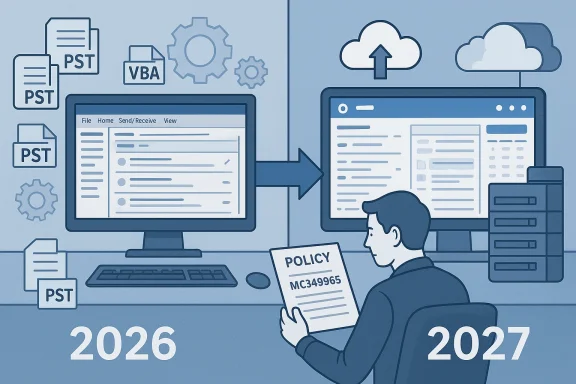
Microsoft has pushed the enterprise “opt‑out” start for the New Outlook for Windows out by roughly one year — moving the phase Microsoft had targeted for April 2026 to March 1, 2027 — a change the company says gives organizations twelve months of lead time while it finishes key features and improvements.
Microsoft’s multi-stage migration plan for Outlook on Windows has been public for more than a year and is organized around three broad phases: opt‑in (voluntary adoption), opt‑out (make New Outlook the default while allowing a temporary revert), and cutover (final transition where classic Outlook is removed from new installs). The Message Center entry that governs the enterprise toggle, Message ID MC949965, is the primary administrative notice Microsoft has used to communicate schedule changes and controls for tenant admins.
The recent update revises the opt‑out phase timeline for enterprise tenants from April 2026 to March 1, 2027. Microsoft’s public-facing documentation and Admin Center posts reiterate the firm’s position that classic Outlook installations — including those provided through perpetual licences — will remain supported until at least 2029. Administrators retain controls to delay or stage rollouts for their tenants while Microsoft continues feature work on New Outlook.
Industry outlets characterized Microsoft’s change as both pragmatic and overdue: pragmatic because enterprise migrations require caution; overdue because the New Outlook project has been in public rollout and roadmap limbo for many months. That dual reading is reflected in our analysis of news coverage and community commentary.
Use the extension as an opportunity to modernize responsibly: inventory, test, engage vendors, and stage rollouts. If you ignore the extra time, you’ll face compressed, high‑risk migration windows in 2027. If you use it well, you can turn a forced architectural shift into a controlled modernization that reduces long‑term technical debt and positions users for the cloud‑native productivity scenarios Microsoft is building toward.
Conclusion: The March 2027 deferral is significant and sensible — but not a reason to pause planning. Treat it as a warning and an opportunity: plan methodically, test widely, and push vendors for roadmaps so you can make March 2027 a controlled milestone rather than a crisis.
Source: TechRadar Microsoft delays enterprise Outlook switchover to 2027
 Background
Microsoft’s multi-stage migration plan for Outlook on Windows has been public for more than a year and is organized around three broad phases: opt‑in (voluntary adoption), opt‑out (make New Outlook the default while allowing a temporary revert), and cutover (final transition where classic Outlook is removed from new installs). The Message Center entry that governs the enterprise toggle, Message ID MC949965, is the primary administrative notice Microsoft has used to communicate schedule changes and controls for tenant admins.The recent update revises the opt‑out phase timeline for enterprise tenants from April 2026 to March 1, 2027. Microsoft’s public-facing documentation and Admin Center posts reiterate the firm’s position that classic Outlook installations — including those provided through perpetual licences — will remain supported until at least 2029. Administrators retain controls to delay or stage rollouts for their tenants while Microsoft continues feature work on New Outlook.
What changed, precisely
- Microsoft updated Message Center item MC949965 to move the enterprise opt‑out start to March 1, 2027; the update was reflected in the Admin Center and widely republished by industry outlets.
- The company framed the change as a deliberate extension to "provide 12 months of lead time" while it continues to "deliver key features and improvements." That language has appeared in Microsoft’s admin messaging and in vendor reporting.
- For organizations that rely on classic Outlook, Microsoft’s position remains: existing classic Outlook installations (whether from subscription or perpetual licensing) will be supported until at least 2029. That caveat has been reiterated in support docs and community posts.
Why Microsoft delayed the opt‑out phase
Feature parity and enterprise readiness
New Outlook represents a re‑imagining of the Windows email client around a modern, service‑backed architecture that prioritizes cloud integration, web technologies, and extensibility patterns different from the decades‑old Win32 classic client. That architectural shift has produced feature gaps — sometimes small, often critical for business users — which Microsoft continues to close. Admin notices link the delay explicitly to finishing missing features and improvements before making the New Outlook the default in enterprise tenants.Migration complexity across large estates
Enterprises are not single‑user consumers. They have:- Custom COM add‑ins, proprietary automation (VBA macros), and desktop integrations that depend on the classic Outlook object model.
- Large PST collections, special archive workflows, and hybrid Exchange configurations that require careful data migration or preservation strategies.
- Compliance, eDiscovery, and archiving systems that must be validated against any client change to avoid gaps in retention or legal holds.
What this means for enterprise admins
Immediate actions (what you should do in the next 30–90 days)
- Inventory: Build a comprehensive inventory of Outlook integrations, add‑ins, and any automation that relies on the classic Outlook object model.
- Prioritize: Classify integrations by criticality — business critical, nice‑to‑have, or deprecated.
- Test plan: Create a staged testing plan that includes pilot groups, representative devices, and a rollback procedure.
- Communication: Notify stakeholders and user groups about the revised timeline and expected in‑app prompts users might see.
- Policy controls: Review and refresh group policy, Intune, or Microsoft 365 controls that manage the New Outlook toggle and migration behavior.
Deployment controls and options
- Admins can use tenant‑level policies to manage when and how users see the New Outlook toggle. Microsoft’s documentation explains the administrative controls and the in‑app notification cadence.
- During the opt‑out phase, New Outlook will become the default experience for affected tenants, but users will generally be allowed to switch back temporarily while admins finalize transitions. Microsoft has emphasized staged rollouts and managed toggles for enterprise environments.
Key technical gaps that have driven concern
Enterprise complaints and vendor notes have consistently flature and compatibility gaps — many of which determine whether a large organization can shift safely from classic Outlook.- PST handling and local archive workflows: New Outlook’s cloud-first sync model changed how PSTs and POP accounts are handled; enterprises with large PST estates must plan for migration.
- COM add‑ins and VBA automation: Classic Outlook’s heavy use of COM add‑ins and VBA macros is not fully compatible with New Outlook; many vendors must re‑engineer integrations. ([getmailbirmailbird.com/microsoft-retires-legacy-outlook-add-ins-migration-guide/)
- Offline calendar and rich offline capabilities: Offline calendar editing and robust offline behavior took longer than some expected to reach parity, and delays in those features have been repeatedly cited in community reports.
- Shared mailbox and send‑as/send‑on‑behalf behaviors: Enterprise shared mailbox workflows are complex; admins and users have reported edge cases that still need validation in New Outlook. Community threads and vendor writeups document such edge cases.
Risks and trade‑offs
For IT organizations
- Complacency risk: The additional year reduces immediate pressure, but it’s also a trap. Waiting until the last quarter before March 2027 compresses testing time and increases risk of failed rollouts. Community advice strongly recommends using the extra runway to widen pilot groups rather than delay planning.
- Vendor dependency: Some third‑party vendors will not modernize add‑ins quickly. If a vendor does not commit to an updated integration path, organizations may face a forced re‑engineering or maintain hybrid client approaches for years.
For users
- UX fragmentation: Users may see different Outlook experiences across devices and between desktop and web clients, causing confusion. Clear communications and training will be necessary.
- Feature regressions during early toggles: Early adopters may encounter transient regressions while Microsoft ships iterative feature updates; organizations should not use pilot groups that include high‑risk roles (legal, compliance, executive assistants) without appropriate mitigation.
For Microsoft
- Reputational cost: The repeated delays and the perception of unfinished parity undermine Microsoft’s messaging about New Outlook readiness. Analysts and community voices have noted that repeated timeline changes erode trust.
- Engineering tradeoffs: Rewriting a decades‑old client around a web/service model requires delicate compatibility decisions. Microsoft must balance shipping cloud‑first innovations with the practical realities of enterprise backward compatibility.
Vendor and third‑party ecosystem implications
Independent software vendors (ISVs), security vendors, and systems integrators must decide whether to:- Rebuild integrations against new extension points (if available), or
- Continue to support classic Outlook for customers on perpetual licences through 2029, or
- Offer hybrid support and migration services.
Recommended migration framework for large enterprises
Below is a practical, staged approach you can adopt now to turn the extra 12 months into a decisive advantage.Phase 0 — Discovery (months 0–2)
- Inventory add‑ins, macros, PST files, and critical user personas.
- Identify business processes that are impossible to perform without classic Outlook features.
Phase 1 — Pilot design and vendor engagement (months 2–5)
- Select pilot groups with a cross-section of roles and edge cases.
- Engage ISVs and internal developers to map migration scope for add‑ins and automation.
Phase 2 — Controlled pilot and telemetry (months 6–12)
- Roll New Outlook to pilot groups; collect telemetry on feature gaps, support incidents, and user productivity metrics.
- Maintain rollback plans and restore points for user profiles.
Phase 3 — Staged broader rollout (months 12–20)
- Based on pilot learnings, move broader user cohorts. Use tenant policies to stagger adoption.
- Implement training programs, knowledge base updates, and support SLAs for transition windows.
Phase 4 — Default opt‑out acceptance and final cutover prep (months 20–24)
- Confirm final readiness before the tenant default toggle in March 2027. If necessary, apply Microsoft’s administrative controls for staged opt‑outs.
What Microsoft has said and what it hasn’t
- Microsoft has publicly stated the opt‑out phase will now begin March 1, 2027 for enterprise tenants and framed the extension as a measured step to deliver missing features and allow organizations time to prepare. That statement is reflected in Message Center updates and Microsoft 365 admin messaging.
- Microsoft support documentation and several official posts also say classic Outlook installations will be supported until at least 2029, a critical detail that should reassure organizations that need longer than twelve months to modernize. However, "at least 2029" is not the same as a firm retirement date; Microsoft has not published a definitive cutover/end‑of‑support date that stretches beyond that horizon. Treat "until at least 2029" as a firm short‑to‑mid‑term support promise but not a permanent guarantee.
- Microsoft’s Message Center entry MC949965 contains the authoritative admin details, including the specific dates referenced. Administrators who have access to the Microsoft 365 admin center should review the Message Center item for tenant‑specific guidance and controls.
Community response and on‑the‑ground reporting
Windows and enterprise IT forums captured a swift reaction from admins and MSPs: relief from the additional runway, but frustration at the ongoing uncertainty and repeated slips. Forum threads we sampled show administrators urging peers to use the extended time for testing rather than defer planning, while others warned of the long tail of vendors who still haven’t committed to add‑in modernization.Industry outlets characterized Microsoft’s change as both pragmatic and overdue: pragmatic because enterprise migrations require caution; overdue because the New Outlook project has been in public rollout and roadmap limbo for many months. That dual reading is reflected in our analysis of news coverage and community commentary.
Practical checklists for IT teams
- Security: Validate that your eDiscovery, archiving, and DLP tools continue to capture messages and metadata in New Outlook during pilots.
- Backup/Archive: If you rely on PST archives, develop a migration or preservation strategy; treat PSTs as potential single points of failure during client toggles.
- Automation: Catalog VBA and COM macros; begin proof‑of‑concepts for replacement automation (Power Automate, Graph API, or vendor SDKs).
- Training & UX: Draft role‑specific training, cheat sheets, and quick‑reference guides for calendar and mail workflows that differ in New Outlook.
- Support readiness: Prepare Level‑1 support playbooks, escalation trees, and a rollback script that reverts affected users to classic Outlook if critical issues arise.
Bottom line: Opportunity, not just delay
Microsoft’s deferral of the enterprise opt‑out to March 1, 2027 is a meaningful extension that acknowledges the complexity of enterprise migrations. It gives IT teams breathing room — but the blue sky of an extra year can quickly become a storm if teams assume the work will complete itself.Use the extension as an opportunity to modernize responsibly: inventory, test, engage vendors, and stage rollouts. If you ignore the extra time, you’ll face compressed, high‑risk migration windows in 2027. If you use it well, you can turn a forced architectural shift into a controlled modernization that reduces long‑term technical debt and positions users for the cloud‑native productivity scenarios Microsoft is building toward.
Final recommendations (short)
- Start inventory and pilot work now — do not defer planning.
- Engage critical ISVs and your compliance/legal teams immediately.
- Use tenant policy controls to stage adoption, and monitor Microsoft Message Center MC949965 for any further changes.
Conclusion: The March 2027 deferral is significant and sensible — but not a reason to pause planning. Treat it as a warning and an opportunity: plan methodically, test widely, and push vendors for roadmaps so you can make March 2027 a controlled milestone rather than a crisis.
Source: TechRadar Microsoft delays enterprise Outlook switchover to 2027
