

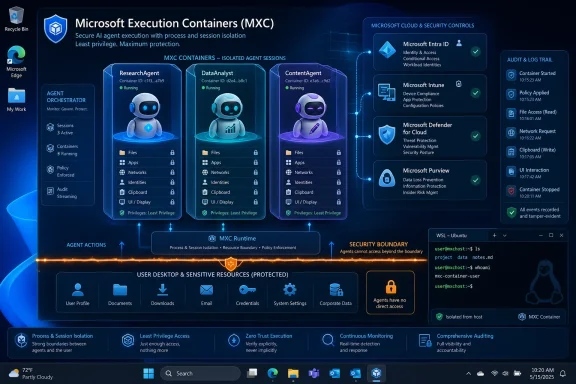
Microsoft announced Microsoft Execution Containers at Build 2026 as a preview security layer for Windows and WSL that lets developers and administrators define which files, apps, networks, identities, and device resources AI agents may use. The move is less about another sandboxing acronym than about Microsoft admitting that agentic AI has become an operating-system problem. If agents are going to click, code, browse, read, write, and automate on behalf of users, Windows can no longer treat them like ordinary applications. MXC is Microsoft’s attempt to make autonomy administrable.
For the past two years, the software industry has talked about AI agents as if the hard part were reasoning. Better models, longer context windows, richer toolchains, and orchestration frameworks dominated the conversation. But the more capable agents become, the more mundane the real risk looks: a process with access to your files, credentials, browser session, clipboard, screen, network, and shell can do real damage even when it is merely trying to help.
That is the premise behind Microsoft Execution Containers, or MXC. Microsoft is describing it as a policy-driven execution layer for agents across Windows and Windows Subsystem for Linux, with enforcement handled by the operating system rather than left entirely to an application framework. In plain English, MXC is meant to answer a question enterprises are already asking: what, exactly, is this agent allowed to touch?
The answer matters because “AI agent” is a misleadingly friendly phrase. A modern agent is not just a chatbot with a nicer prompt. It can be a semi-autonomous software actor that chains tasks, calls tools, edits documents, writes code, invokes command-line utilities, opens web pages, and interacts with business systems through whatever credentials it has been granted.
That changes the security model. Traditional desktop software usually does what a developer programmed it to do. Agentic software reasons through a task, chooses tools dynamically, and may encounter malicious or confusing instructions along the way. The boundary is no longer just between trusted and untrusted code; it is between human intent, model interpretation, tool execution, and enterprise policy.
A spreadsheet macro may be dangerous, but it is at least a recognizable category of danger. An AI agent that can read a spreadsheet, summarize an email, open a browser, run a script, and upload a generated file to a project management system crosses categories by design. Its usefulness comes from moving between contexts that enterprise security teams have historically tried to separate.
That is why MXC is notable. Microsoft is not merely saying developers should write safer agents. It is saying the platform should provide a way to declare and enforce the agent’s allowed operating envelope at runtime.
The distinction is important. Prompt-level rules can guide a model, but they are not a security boundary. A system prompt saying “do not read confidential files” is not the same as an operating system denying access to those files. MXC is Microsoft’s attempt to put a harder layer underneath the softer, probabilistic behavior of models.
That does not make agents safe by default. It does, however, acknowledge that safety must be expressed in terms Windows understands: file permissions, process boundaries, network access, device capabilities, identity, audit trails, and management policy.
That matters because enterprise adoption usually fails at the boundary between developer enthusiasm and IT accountability. Developers want agents that can automate meaningful work. Security teams want to know why an experimental assistant needs access to the user’s entire home directory, clipboard, screen, browser session, and internal network.
MXC gives both sides a shared vocabulary. A low-risk automation task might run with process-level isolation inside the user’s session, while a more sensitive agent could be separated from the user’s desktop, clipboard, input devices, and UI. The policy decision becomes more granular than “allow agents” or “ban agents.”
Microsoft’s examples point toward a world where a user or administrator can mark files as read-only to an agent, deny screen capture, restrict browser access, block location data, or constrain network behavior. That is the kind of control enterprises need if agents are going to move beyond demos and into regulated workflows.
The catch, as always, is that policy design becomes the new hard part. If policies are too permissive, MXC becomes theater. If they are too restrictive, agents become glorified autocomplete. The real enterprise work will be finding the minimum useful authority for each class of agentic task.
For low-risk tasks, that may be enough. A build helper that only needs a working directory, a compiler, and a network route to a package registry should not need the same access as a user. A documentation agent that reads a repo and proposes edits does not need access to the clipboard, camera, or the rest of the user profile.
The problem is that “low risk” is not a property of the agent alone. It depends on the task, the environment, the data nearby, the credentials available, and the tools exposed. An agent running in a developer workstation with access to source code, tokens, internal endpoints, and build scripts is operating in a much more consequential space than the same agent running against a toy project.
That is where MXC’s success will depend on defaults and tooling. If defining useful policies is tedious, developers will over-grant. If the platform makes least privilege natural, MXC could become one of those invisible Windows features that only gets noticed when it prevents something embarrassing.
Separating an agent from the user’s desktop, UI, clipboard, and input devices is not a cosmetic feature. It is a response to attacks that blur the line between what the user sees, what the agent sees, and what the agent is tricked into doing. UI spoofing, input injection, prompt injection through visible content, and cross-session leakage are not hypothetical categories in a world where agents are asked to operate computers.
The clipboard is a perfect example. For humans, it is a convenience feature. For agents, it can become an accidental data bridge between unrelated tasks. A copied password, customer record, code snippet, or authentication token may be harmless in one context and catastrophic in another.
Screen access is similar. If an agent can see everything the user can see, then every notification, chat message, dashboard, and browser tab becomes potential input. Some of that input may be sensitive. Some of it may be malicious. Some of it may simply be irrelevant noise that changes the agent’s behavior.
Session isolation is Microsoft’s way of saying that agent autonomy needs a workspace of its own. That workspace may still be powerful, but it should not automatically inherit every human-facing surface on the device.
Microsoft says Agent 365 integration will bring Entra, Intune, Defender, and Purview into the story, with preview availability planned for July 2026. The framing is predictable but important: identity, device management, threat protection, and data governance need to apply to agents the way they apply to users, devices, and applications.
Entra gives Microsoft a way to distinguish agent identity from human identity. That distinction is vital. If an agent modifies a file, opens a ticket, queries a database, or calls an internal API, the audit trail should not simply say the human user did it. It should show that an agent acting under a particular identity performed the action within a defined container and policy context.
Intune gives administrators a path to central policy enforcement. That is where MXC becomes manageable at fleet scale rather than a per-developer experiment. A security team can imagine policies that vary by device type, user group, data sensitivity, workload category, or compliance requirement.
Defender’s role is runtime protection and visibility. That matters because containment is not the same as detection. A contained agent can still behave suspiciously inside its allowed boundary, and enterprises will want telemetry that separates normal agent activity from abuse, compromise, or prompt-driven misuse.
Purview adds the data governance angle. If agents read, transform, summarize, or move corporate data, compliance teams will want classification, retention, eDiscovery, and audit implications to follow. The more agents become part of ordinary work, the less plausible it becomes to treat their actions as outside the governance fabric.
That is why the language around MXC is filled with containment, observability, attribution, and policy. Microsoft is trying to reassure the people who can say no. A CIO may be excited by productivity gains, but the CISO will ask what happens when an agent follows a poisoned instruction, reads the wrong file, or takes an action under a privileged identity.
The strategic bet is that Windows can become the trusted local runtime for agents. That is a significant shift. For years, the center of gravity in AI has been cloud APIs and web applications. MXC suggests Microsoft sees the endpoint itself as a critical control point for agentic computing.
That makes sense. Corporate work still happens on endpoints. Developers build on endpoints. Employees authenticate on endpoints. Files are synced, cached, opened, edited, and copied on endpoints. If AI agents are going to operate where work happens, the endpoint OS cannot be a passive bystander.
Microsoft also has a defensive reason to move quickly. If agent runtimes proliferate without OS-level controls, enterprises may end up with a patchwork of vendor-specific sandboxes, browser extensions, local daemons, scripts, and unmanaged automation tools. That is a governance nightmare. MXC is Microsoft’s attempt to make Windows the place where agent boundaries are declared, enforced, and observed.
Microsoft’s collaboration around OpenClaw appears to have become a practical proving ground for MXC. That is the right kind of test. A containment layer that only works for tame first-party demos is not very interesting. The real question is whether it can constrain agents that actually behave like agents: messy, tool-using, persistent, and eager to cross boundaries.
This is where the industry has been quietly uncomfortable. Many agent systems have been built as if “ask for permission” were the main safety mechanism. That approach does not scale. Users habituate to prompts, developers add bypasses, and the agent’s usefulness declines if every meaningful action requires another modal interruption.
A better model is predeclared authority. The agent gets a defined operating area, and inside that area it can move with less friction. Outside it, the OS says no. That is the same conceptual move that made mobile permission systems, browser sandboxes, and enterprise device policies tolerable at scale, even if none of them are perfect.
OpenClaw is a reminder that autonomy without containment is not a product feature. It is an incident report waiting for a date.
That makes WSL a natural habitat for agentic development. It also makes it a risk surface. An agent that can operate inside a Linux environment on a Windows device may have access to code, secrets, build scripts, local services, package registries, and deployment workflows. If MXC only handled the Windows side, it would miss a major part of how modern Windows development actually works.
Microsoft has been steadily turning WSL from a compatibility feature into a first-class developer substrate. Native Linux container work, GPU acceleration, and tighter Windows integration all make WSL more useful. They also make the boundary between Windows and Linux more consequential.
For security teams, WSL has always required a slightly different mental model. It is integrated enough to feel local, but different enough to complicate monitoring and control. MXC’s cross-platform positioning suggests Microsoft wants agent policy to follow the workload rather than stop at the Windows/Linux seam.
That is exactly the right ambition. Whether the implementation is mature enough in preview is a separate question.
Today, many enterprise systems still collapse action into the user account. If a user authorizes an agent and the agent deletes files, sends an email, or changes a configuration, the logs may not clearly distinguish human action from agent action. That ambiguity is dangerous for incident response, compliance, and internal trust.
Agent identity changes the conversation. An organization can ask whether the agent was authorized for the action, whether it stayed within policy, whether the user approved the task, whether the agent’s behavior matched its declared purpose, and whether a specific runtime should be disabled. Those are better questions than “which employee’s account did this?”
But attribution also raises uncomfortable issues. If an agent acts under a user’s authority but with its own identity, responsibility becomes layered. Was the user careless? Was the agent misconfigured? Did the developer expose too many tools? Did IT approve an unsafe policy? Did the model follow hostile instructions embedded in data?
MXC cannot solve that governance problem by itself. What it can do is produce a cleaner record of events. In enterprise security, clean records are often the difference between a manageable incident and a week of forensic guesswork.
A container is a boundary, not a moral character reference. If an agent is allowed to read a project directory, it can still leak sensitive information from that directory if network rules permit it. If it is allowed to run build tools, it can still be manipulated into producing malicious output. If it is allowed to interact with internal applications, it can still make bad decisions within authorized workflows.
The policy layer narrows the blast radius. It does not eliminate the blast.
That means MXC should be evaluated alongside other controls: data classification, secret management, network segmentation, least-privilege identity, endpoint detection, approval workflows, logging, and user training. The agent does not get a pass because it is novel. If anything, it should face more scrutiny because its behavior is harder to predict.
There is also the problem of policy drift. An agent that starts as a harmless assistant often gains capabilities over time. It gets access to another folder, another API, another workflow, another credential. Six months later, the original containment assumptions may no longer match reality.
The enterprises that handle MXC well will treat agent permissions like cloud IAM permissions: reviewable, revocable, scoped, logged, and periodically challenged.
That does not make MXC unimportant. It makes it something to test deliberately. The right early use cases are narrow, observable, and reversible: developer assistants scoped to specific repos, internal automation against non-production systems, agents that operate on synthetic or low-sensitivity data, and workflows where success and failure are easy to measure.
The wrong early use case is giving a general-purpose agent broad access to a production workstation because it sits inside a shiny new container. That would repeat the oldest mistake in security: confusing a mitigation with permission to take unnecessary risk.
Microsoft will also need to prove that MXC is understandable. Security controls fail when only specialists can configure them correctly. If developers cannot easily declare policies, they will avoid the system or use permissive templates. If administrators cannot inspect those policies, they will block deployment or demand blanket restrictions.
The preview period should be judged not only by whether MXC can enforce boundaries, but by whether ordinary enterprise teams can reason about those boundaries.
That is a profound change in endpoint administration. IT teams have long managed devices, users, apps, and data. Agents blur all four. They are software, but they act like delegated users. They manipulate data, but they may do so across applications. They run locally, but they may depend on cloud identity, cloud models, and cloud policy.
Agent 365 is Microsoft’s attempt to fit that new actor into the existing Microsoft management universe. It is a sensible move. Enterprises do not want a separate security console for every AI runtime. They want agent activity to appear in the same operational language as everything else: who, what, where, when, under which policy, and with what risk.
This also explains why Microsoft is pushing the issue now. The company knows that if agents become popular before governance catches up, enterprises may freeze adoption. The history of IT is full of useful technologies that were slowed by unmanaged risk: macros, browser plugins, shadow SaaS, mobile apps, personal cloud storage, and unmanaged developer tools.
MXC is Microsoft trying to avoid that cycle by building the fence before the horses become a platform.
That is a smaller, sharper, and more operational question. It forces teams to define what an agent actually needs instead of what would be convenient. It also gives them a way to say yes without saying yes to everything.
 Microsoft Is Moving the AI Boundary Into the Operating System
For the past two years, the software industry has talked about AI agents as if the hard part were reasoning. Better models, longer context windows, richer toolchains, and orchestration frameworks dominated the conversation. But the more capable agents become, the more mundane the real risk looks: a process with access to your files, credentials, browser session, clipboard, screen, network, and shell can do real damage even when it is merely trying to help.That is the premise behind Microsoft Execution Containers, or MXC. Microsoft is describing it as a policy-driven execution layer for agents across Windows and Windows Subsystem for Linux, with enforcement handled by the operating system rather than left entirely to an application framework. In plain English, MXC is meant to answer a question enterprises are already asking: what, exactly, is this agent allowed to touch?
The answer matters because “AI agent” is a misleadingly friendly phrase. A modern agent is not just a chatbot with a nicer prompt. It can be a semi-autonomous software actor that chains tasks, calls tools, edits documents, writes code, invokes command-line utilities, opens web pages, and interacts with business systems through whatever credentials it has been granted.
That changes the security model. Traditional desktop software usually does what a developer programmed it to do. Agentic software reasons through a task, chooses tools dynamically, and may encounter malicious or confusing instructions along the way. The boundary is no longer just between trusted and untrusted code; it is between human intent, model interpretation, tool execution, and enterprise policy.
The Old Desktop Trust Model Was Not Built for Agents
Windows has spent decades accumulating security controls: user accounts, access control lists, UAC, AppContainer, Defender, enterprise device management, virtualization-based security, browser sandboxes, and more. Those controls still matter. But AI agents stress them in a way ordinary applications do not.A spreadsheet macro may be dangerous, but it is at least a recognizable category of danger. An AI agent that can read a spreadsheet, summarize an email, open a browser, run a script, and upload a generated file to a project management system crosses categories by design. Its usefulness comes from moving between contexts that enterprise security teams have historically tried to separate.
That is why MXC is notable. Microsoft is not merely saying developers should write safer agents. It is saying the platform should provide a way to declare and enforce the agent’s allowed operating envelope at runtime.
The distinction is important. Prompt-level rules can guide a model, but they are not a security boundary. A system prompt saying “do not read confidential files” is not the same as an operating system denying access to those files. MXC is Microsoft’s attempt to put a harder layer underneath the softer, probabilistic behavior of models.
That does not make agents safe by default. It does, however, acknowledge that safety must be expressed in terms Windows understands: file permissions, process boundaries, network access, device capabilities, identity, audit trails, and management policy.
MXC Turns Agent Permissions Into Something IT Can Argue About
The most practical idea in MXC is also the least glamorous: administrators and developers can declare what an agent is allowed to access. Files, network destinations, applications, local resources, and sensitive capabilities can become policy inputs rather than vague assurances buried in product documentation.That matters because enterprise adoption usually fails at the boundary between developer enthusiasm and IT accountability. Developers want agents that can automate meaningful work. Security teams want to know why an experimental assistant needs access to the user’s entire home directory, clipboard, screen, browser session, and internal network.
MXC gives both sides a shared vocabulary. A low-risk automation task might run with process-level isolation inside the user’s session, while a more sensitive agent could be separated from the user’s desktop, clipboard, input devices, and UI. The policy decision becomes more granular than “allow agents” or “ban agents.”
Microsoft’s examples point toward a world where a user or administrator can mark files as read-only to an agent, deny screen capture, restrict browser access, block location data, or constrain network behavior. That is the kind of control enterprises need if agents are going to move beyond demos and into regulated workflows.
The catch, as always, is that policy design becomes the new hard part. If policies are too permissive, MXC becomes theater. If they are too restrictive, agents become glorified autocomplete. The real enterprise work will be finding the minimum useful authority for each class of agentic task.
Process Isolation Is the Lightweight Bet
Microsoft’s process isolation model is the lighter-weight version of the MXC story. The agent runs within the same user session, but its access is constrained by policy. That is likely to be attractive for developers and internal automation teams because it preserves much of the convenience of local execution.For low-risk tasks, that may be enough. A build helper that only needs a working directory, a compiler, and a network route to a package registry should not need the same access as a user. A documentation agent that reads a repo and proposes edits does not need access to the clipboard, camera, or the rest of the user profile.
The problem is that “low risk” is not a property of the agent alone. It depends on the task, the environment, the data nearby, the credentials available, and the tools exposed. An agent running in a developer workstation with access to source code, tokens, internal endpoints, and build scripts is operating in a much more consequential space than the same agent running against a toy project.
That is where MXC’s success will depend on defaults and tooling. If defining useful policies is tedious, developers will over-grant. If the platform makes least privilege natural, MXC could become one of those invisible Windows features that only gets noticed when it prevents something embarrassing.
Session Isolation Is Where the Threat Model Gets Serious
The more interesting MXC mode is session isolation, because it recognizes that agents do not merely read and write files. They can also interact with the user environment, and that environment is full of security assumptions that were not designed for autonomous software.Separating an agent from the user’s desktop, UI, clipboard, and input devices is not a cosmetic feature. It is a response to attacks that blur the line between what the user sees, what the agent sees, and what the agent is tricked into doing. UI spoofing, input injection, prompt injection through visible content, and cross-session leakage are not hypothetical categories in a world where agents are asked to operate computers.
The clipboard is a perfect example. For humans, it is a convenience feature. For agents, it can become an accidental data bridge between unrelated tasks. A copied password, customer record, code snippet, or authentication token may be harmless in one context and catastrophic in another.
Screen access is similar. If an agent can see everything the user can see, then every notification, chat message, dashboard, and browser tab becomes potential input. Some of that input may be sensitive. Some of it may be malicious. Some of it may simply be irrelevant noise that changes the agent’s behavior.
Session isolation is Microsoft’s way of saying that agent autonomy needs a workspace of its own. That workspace may still be powerful, but it should not automatically inherit every human-facing surface on the device.
Agent 365 Makes MXC an Enterprise Control Plane, Not Just a Sandbox
MXC by itself is a platform feature. Agent 365 is how Microsoft turns it into an enterprise product strategy.Microsoft says Agent 365 integration will bring Entra, Intune, Defender, and Purview into the story, with preview availability planned for July 2026. The framing is predictable but important: identity, device management, threat protection, and data governance need to apply to agents the way they apply to users, devices, and applications.
Entra gives Microsoft a way to distinguish agent identity from human identity. That distinction is vital. If an agent modifies a file, opens a ticket, queries a database, or calls an internal API, the audit trail should not simply say the human user did it. It should show that an agent acting under a particular identity performed the action within a defined container and policy context.
Intune gives administrators a path to central policy enforcement. That is where MXC becomes manageable at fleet scale rather than a per-developer experiment. A security team can imagine policies that vary by device type, user group, data sensitivity, workload category, or compliance requirement.
Defender’s role is runtime protection and visibility. That matters because containment is not the same as detection. A contained agent can still behave suspiciously inside its allowed boundary, and enterprises will want telemetry that separates normal agent activity from abuse, compromise, or prompt-driven misuse.
Purview adds the data governance angle. If agents read, transform, summarize, or move corporate data, compliance teams will want classification, retention, eDiscovery, and audit implications to follow. The more agents become part of ordinary work, the less plausible it becomes to treat their actions as outside the governance fabric.
Microsoft Is Selling Trust Because It Has To
There is an obvious commercial reason for Microsoft to build MXC. The company wants AI agents to run across Windows, Microsoft 365, GitHub, Azure, and the broader enterprise stack. But enterprise buyers do not adopt autonomous software merely because it is clever; they adopt it when they can govern it.That is why the language around MXC is filled with containment, observability, attribution, and policy. Microsoft is trying to reassure the people who can say no. A CIO may be excited by productivity gains, but the CISO will ask what happens when an agent follows a poisoned instruction, reads the wrong file, or takes an action under a privileged identity.
The strategic bet is that Windows can become the trusted local runtime for agents. That is a significant shift. For years, the center of gravity in AI has been cloud APIs and web applications. MXC suggests Microsoft sees the endpoint itself as a critical control point for agentic computing.
That makes sense. Corporate work still happens on endpoints. Developers build on endpoints. Employees authenticate on endpoints. Files are synced, cached, opened, edited, and copied on endpoints. If AI agents are going to operate where work happens, the endpoint OS cannot be a passive bystander.
Microsoft also has a defensive reason to move quickly. If agent runtimes proliferate without OS-level controls, enterprises may end up with a patchwork of vendor-specific sandboxes, browser extensions, local daemons, scripts, and unmanaged automation tools. That is a governance nightmare. MXC is Microsoft’s attempt to make Windows the place where agent boundaries are declared, enforced, and observed.
OpenClaw Shows Why the Demo Era Is Ending
The OpenClaw angle is revealing because it captures the tension around agents better than a polished enterprise slide ever could. OpenClaw-style systems are attractive precisely because they are powerful: they can automate across tools, operate locally, and perform multi-step work with less human babysitting. They are also unsettling for the same reasons.Microsoft’s collaboration around OpenClaw appears to have become a practical proving ground for MXC. That is the right kind of test. A containment layer that only works for tame first-party demos is not very interesting. The real question is whether it can constrain agents that actually behave like agents: messy, tool-using, persistent, and eager to cross boundaries.
This is where the industry has been quietly uncomfortable. Many agent systems have been built as if “ask for permission” were the main safety mechanism. That approach does not scale. Users habituate to prompts, developers add bypasses, and the agent’s usefulness declines if every meaningful action requires another modal interruption.
A better model is predeclared authority. The agent gets a defined operating area, and inside that area it can move with less friction. Outside it, the OS says no. That is the same conceptual move that made mobile permission systems, browser sandboxes, and enterprise device policies tolerable at scale, even if none of them are perfect.
OpenClaw is a reminder that autonomy without containment is not a product feature. It is an incident report waiting for a date.
WSL Support Makes the Developer Story More Complicated and More Important
MXC’s support for Windows and WSL is not incidental. Developers increasingly live in hybrid environments: Windows desktop, Linux tools, containers, local models, cloud CLIs, package managers, SSH keys, Git credentials, and test infrastructure all within reach of the same machine.That makes WSL a natural habitat for agentic development. It also makes it a risk surface. An agent that can operate inside a Linux environment on a Windows device may have access to code, secrets, build scripts, local services, package registries, and deployment workflows. If MXC only handled the Windows side, it would miss a major part of how modern Windows development actually works.
Microsoft has been steadily turning WSL from a compatibility feature into a first-class developer substrate. Native Linux container work, GPU acceleration, and tighter Windows integration all make WSL more useful. They also make the boundary between Windows and Linux more consequential.
For security teams, WSL has always required a slightly different mental model. It is integrated enough to feel local, but different enough to complicate monitoring and control. MXC’s cross-platform positioning suggests Microsoft wants agent policy to follow the workload rather than stop at the Windows/Linux seam.
That is exactly the right ambition. Whether the implementation is mature enough in preview is a separate question.
The Hard Part Will Be Explaining What the Agent Actually Did
Attribution may become MXC’s most underrated feature. Microsoft says Windows can assign agents a local ID or a cloud-provisioned identity backed by Entra, with activity attributed to that identity. That is not merely an audit nicety. It is the foundation for accountability.Today, many enterprise systems still collapse action into the user account. If a user authorizes an agent and the agent deletes files, sends an email, or changes a configuration, the logs may not clearly distinguish human action from agent action. That ambiguity is dangerous for incident response, compliance, and internal trust.
Agent identity changes the conversation. An organization can ask whether the agent was authorized for the action, whether it stayed within policy, whether the user approved the task, whether the agent’s behavior matched its declared purpose, and whether a specific runtime should be disabled. Those are better questions than “which employee’s account did this?”
But attribution also raises uncomfortable issues. If an agent acts under a user’s authority but with its own identity, responsibility becomes layered. Was the user careless? Was the agent misconfigured? Did the developer expose too many tools? Did IT approve an unsafe policy? Did the model follow hostile instructions embedded in data?
MXC cannot solve that governance problem by itself. What it can do is produce a cleaner record of events. In enterprise security, clean records are often the difference between a manageable incident and a week of forensic guesswork.
Containment Is Not the Same as Trust
Microsoft’s messaging around MXC will inevitably sound reassuring. That is the job of product messaging. But Windows admins should resist the temptation to treat MXC as a magic wrapper that makes agents safe.A container is a boundary, not a moral character reference. If an agent is allowed to read a project directory, it can still leak sensitive information from that directory if network rules permit it. If it is allowed to run build tools, it can still be manipulated into producing malicious output. If it is allowed to interact with internal applications, it can still make bad decisions within authorized workflows.
The policy layer narrows the blast radius. It does not eliminate the blast.
That means MXC should be evaluated alongside other controls: data classification, secret management, network segmentation, least-privilege identity, endpoint detection, approval workflows, logging, and user training. The agent does not get a pass because it is novel. If anything, it should face more scrutiny because its behavior is harder to predict.
There is also the problem of policy drift. An agent that starts as a harmless assistant often gains capabilities over time. It gets access to another folder, another API, another workflow, another credential. Six months later, the original containment assumptions may no longer match reality.
The enterprises that handle MXC well will treat agent permissions like cloud IAM permissions: reviewable, revocable, scoped, logged, and periodically challenged.
The Preview Label Is Doing Real Work
MXC is in preview, and that word should not be ignored. Preview security infrastructure is where concepts meet edge cases. Administrators should expect missing documentation, changing APIs, rough tooling, and uneven third-party support.That does not make MXC unimportant. It makes it something to test deliberately. The right early use cases are narrow, observable, and reversible: developer assistants scoped to specific repos, internal automation against non-production systems, agents that operate on synthetic or low-sensitivity data, and workflows where success and failure are easy to measure.
The wrong early use case is giving a general-purpose agent broad access to a production workstation because it sits inside a shiny new container. That would repeat the oldest mistake in security: confusing a mitigation with permission to take unnecessary risk.
Microsoft will also need to prove that MXC is understandable. Security controls fail when only specialists can configure them correctly. If developers cannot easily declare policies, they will avoid the system or use permissive templates. If administrators cannot inspect those policies, they will block deployment or demand blanket restrictions.
The preview period should be judged not only by whether MXC can enforce boundaries, but by whether ordinary enterprise teams can reason about those boundaries.
The Agent PC Is Becoming a Managed Endpoint Category
The larger implication is that Microsoft is preparing for a new category of managed endpoint behavior. A Windows device may soon host not just human users and applications, but multiple agent identities operating with different scopes, policies, logs, and lifetimes.That is a profound change in endpoint administration. IT teams have long managed devices, users, apps, and data. Agents blur all four. They are software, but they act like delegated users. They manipulate data, but they may do so across applications. They run locally, but they may depend on cloud identity, cloud models, and cloud policy.
Agent 365 is Microsoft’s attempt to fit that new actor into the existing Microsoft management universe. It is a sensible move. Enterprises do not want a separate security console for every AI runtime. They want agent activity to appear in the same operational language as everything else: who, what, where, when, under which policy, and with what risk.
This also explains why Microsoft is pushing the issue now. The company knows that if agents become popular before governance catches up, enterprises may freeze adoption. The history of IT is full of useful technologies that were slowed by unmanaged risk: macros, browser plugins, shadow SaaS, mobile apps, personal cloud storage, and unmanaged developer tools.
MXC is Microsoft trying to avoid that cycle by building the fence before the horses become a platform.
The Windows Admin’s New Job Is Drawing Smaller Boxes
The practical lesson from MXC is not that every organization should immediately deploy autonomous agents. It is that the shape of endpoint security is changing. The old question was whether a user or application was trusted. The new question is how much trust a particular task deserves.That is a smaller, sharper, and more operational question. It forces teams to define what an agent actually needs instead of what would be convenient. It also gives them a way to say yes without saying yes to everything.
- Microsoft Execution Containers are designed to let Windows and WSL enforce runtime boundaries around agent access to files, applications, networks, and device resources.
- Process isolation is likely to suit lower-risk automation, while session isolation is aimed at agents that should not share the user’s desktop, clipboard, input, or UI surfaces.
- Agent 365 is the enterprise layer that connects MXC to Entra, Intune, Defender, and Purview for identity, policy, detection, and governance.
- Agent identity matters because organizations need logs that distinguish human action from agent action when investigating changes, data access, or policy violations.
- The preview status means MXC should be tested against narrow, well-understood workflows before it is trusted with sensitive production tasks.
- The long-term value of MXC will depend less on Microsoft’s announcement and more on whether developers and administrators can create least-privilege policies without killing the usefulness of agents.
References
- Primary source: Petri IT Knowledgebase
Published: 2026-06-05T15:12:35.662052
Loading…
petri.com - Related coverage: tomsguide.com
Loading…
www.tomsguide.com - Related coverage: techradar.com
From code-first to intent-first: Microsoft Build 2026 could be the end of programming as we know it
Redefining what it means to be a developer with agentic AIwww.techradar.com
- Official source: blogs.microsoft.com

Microsoft Build 2026: Be yourself at work - The Official Microsoft Blog
Platforms shift when developers build. We explore, choose tools, dream, create. This platform shift comes with more information than ever, ready at your fingertips. This shift, it’s about building fast AND THEN: it’s about building, operating, optimizing and observing. Securing your... blogs.microsoft.com
- Official source: developer.microsoft.com

Windows Agentic | Microsoft Developer
The secure, open platform for AI & agents. Native support for MCP and Agent workspace on Windows.developer.microsoft.com - Related coverage: scworld.com

Microsoft introduces execution containers for AI agents
MXC functions as an SDK and policy model embedded within Windows and WSL, acting as a declarative boundary system for AI agents.www.scworld.com
- Official source: learn.microsoft.com
Loading…
learn.microsoft.com - Related coverage: techrepublic.com
Loading…
www.techrepublic.com - Related coverage: implicator.ai

Microsoft Build 2026 Turns Windows Into AI Agent Control Pla
Microsoft put the OS between agents and enterprise data at Build 2026, shipping OS-level containment for autonomous software ahead of July Defender integration. The stack spans a desktop debug badge, a wearable concept, and local models rated at petaflop compute. The gap between a sandbox and a trus www.implicator.ai
- Official source: news.microsoft.com
- Related coverage: gihyo.jp
Microsoft Build 2026、AIエージェント開発向けにMicrosoft IQ、MAIモデル、MXCなどを発表 ——Coreutils for WindowsやIntelligent Terminalも | gihyo.jp
Microsoftは2026年6月2日から開催されている開発者イベントMicrosoft Build 2026」で、AIエージェントの構築、実行、管理に関わる開発者向けの発表を行った。gihyo.jp

