

Microsoft announced Intelligent Terminal 0.1 on June 2, 2026, at Build 2026 as a separate open-source Windows Terminal fork that adds native AI agent integration while leaving the standard Windows Terminal app installed, maintained, and functionally unchanged for existing users. That separation is the story. After years of trying to make AI feel inevitable inside Windows, Microsoft is now experimenting with a more cautious model: put the agent where power users can test it, but do not turn the main console into a compulsory proving ground. For developers and administrators, the fork is less a novelty than a referendum on how much agency should be allowed inside the command line.
The most important design decision in Intelligent Terminal is not the agent pane, the status bar, or the default GitHub Copilot CLI integration. It is the fact that the app is not Windows Terminal. Microsoft could have shipped these features into Canary builds and let them drift toward general availability, as it often does with Windows features. Instead, it created a separate app.
That matters because terminals are not chat surfaces. They are where developers delete directories, rotate credentials, restart services, install packages, alter registries, and push code. A bad suggestion in a browser tab is annoying; a bad action in a privileged shell can become an outage.
The fork gives Microsoft room to test agentic command-line workflows without turning every Windows Terminal user into an unwilling participant. It also gives the company a cleaner story to tell skeptics: the familiar terminal remains the familiar terminal, while the experimental one can break, evolve, or disappear without destabilizing the daily toolchain of millions of users.
Microsoft has learned, or at least now speaks as if it has learned, that AI adoption in Windows depends as much on consent and containment as on capability. The Recall controversy showed the cost of treating ambient AI as an operating-system destiny rather than a user choice. Intelligent Terminal is a quieter, more developer-centric release, but it carries the same institutional lesson.
That is why the browser-copy workflow, clumsy as it is, has a hidden safety property. When a developer pastes an error into search or an AI chat window, there is friction. The user must decide what to copy, what to omit, what to trust, and what to run. Intelligent Terminal’s value proposition is to remove that friction by giving an agent direct awareness of shell output.
The productivity upside is real. Anyone who has chased a PowerShell module conflict, a broken path, an npm dependency failure, a WSL permissions problem, or a cryptic compiler error can see the appeal. If the terminal can detect the failure, load the relevant output, and ask an agent to explain or propose a fix, it compresses a common debugging loop.
But compression is not the same as safety. The closer the agent sits to execution, the more the interface must distinguish between advice, proposed action, and authorized action. A terminal agent that merely explains stderr is one thing. A terminal agent that can auto-run fixes, spawn background tasks, or manipulate a working environment is another.
This is a meaningful shift in how Microsoft imagines the terminal. Windows Terminal was primarily a host: a modern interface for PowerShell, Command Prompt, WSL, SSH, and other shells. Intelligent Terminal is a host plus an observer plus a coordinator. It is not just displaying sessions; it is watching them.
The default agent experience is GitHub Copilot CLI, but Microsoft says the app supports agents compatible with the Agent Client Protocol. That is an important architectural detail because it suggests Microsoft does not want Intelligent Terminal to be only a Copilot-branded command box. It wants the terminal to become a standardized surface where different agents can plug into shell context.
That openness is strategically useful. Developers are already dividing their work among cloud-hosted assistants, local models, IDE agents, CI bots, and specialized automation tools. A terminal that can act as a meeting point for those agents is more powerful than one hardwired to a single service. It also puts Microsoft in a familiar position: controlling the host environment even when the intelligence layer is swappable.
Those are different risk models, but the same political problem: Microsoft must convince users that AI features are bounded, optional, inspectable, and reversible. The fork is the company’s answer. It tells developers that the experiment is opt-in by product boundary, not merely by a toggle buried in settings.
That distinction will matter to enterprise IT. A toggle can be changed by policy, accident, update, or user curiosity. A separate app has a clearer deployment story. It can be blocked, allowed, packaged, monitored, or ignored. For organizations that manage developer workstations tightly, that is not a small difference.
The decision also gives Microsoft a way to gather feedback from the users most likely to understand the risk. Developers and sysadmins will test edge cases that a consumer-facing AI feature might never encounter during staged rollout. They will run it against strange shells, broken environments, enterprise proxies, private repositories, internal tools, and permission boundaries. If Intelligent Terminal is going to fail, this is the audience that will find out how.
The difference is not merely branding. Terminal Chat suggested assistance attached to a terminal. Intelligent Terminal suggests a terminal redesigned around assistance. That may sound like a subtle distinction, but it changes the product’s center of gravity.
The agent pane, error detection, status bar, and background task model all imply a terminal that understands itself as an interactive workspace rather than a passive output surface. If an agent can diagnose a failed command, propose a fix, launch work in another tab, and preserve the user’s active shell, then the terminal becomes more like a lightweight operations cockpit.
That is exciting, and it is exactly why it should not be quietly merged into the mainstream app too soon. A terminal with agentic affordances needs different defaults, different telemetry discussions, different enterprise controls, and different user education. Deprecating the old chat experiment is less a retreat than an admission that bolting AI onto a mature developer tool is not enough.
That graduation path is sensible, but it is also where the hard arguments will begin. Which features belong in the main terminal? Error detection without agents? The status bar? The pane framework? ACP support? A disabled-by-default agent integration? Each step toward integration reopens the opt-in question.
There is also the problem of user confusion. Microsoft now has Windows Terminal, Terminal Preview or Canary channels, Intelligent Terminal, PowerShell, Command Prompt, WSL shells, and increasingly AI-enabled developer tools around Visual Studio Code and GitHub. For enthusiasts, this is choice. For ordinary users who just want the “right terminal,” it can become a maze.
Still, a maze is better than a trap. The separate app lets Microsoft move quickly without making the standard terminal feel captured by the AI agenda. For once, the company’s fragmentation may be functioning as a safety mechanism.
A shell transcript may contain secrets even when no one intends it to. Build logs can expose internal package names, private repository paths, hostnames, tokens, customer identifiers, and architecture details. Commands may include credentials or reveal infrastructure patterns. An agent pane with “always-ready context” is convenient precisely because it has access to material administrators may not want leaving the machine.
Local model support and custom agents could help here, but only if organizations can enforce them. Enterprise administrators will want policy controls that determine which agents are allowed, whether cloud agents can receive shell output, what redaction occurs, whether auto-run behavior is permitted, and how approvals are recorded. Without that management layer, Intelligent Terminal will be treated as another shadow-AI risk.
The broader Build 2026 story suggests Microsoft understands this. The company is also talking about execution containers, policy-based sandboxing, and Windows as a platform for agents rather than just a place where Copilot happens to live. Intelligent Terminal is one client-facing expression of that strategy, but the enterprise sale depends on the plumbing underneath.
By moving complex work into separate tabs, Intelligent Terminal starts to resemble an orchestrator. The user keeps the primary session while an agent handles a multi-step job elsewhere. That could be a clean model for package upgrades, test runs, environment checks, build repairs, or infrastructure diagnostics.
It also multiplies the need for visibility. If an agent is running commands in a background tab, the user must be able to see what it did, why it did it, and whether it changed system state. The interface cannot treat agent work as magic. In the command line, magic is just automation without auditability.
This is where Microsoft’s developer audience will be unforgiving. Terminal users tolerate terse interfaces, but they do not tolerate hidden state. If Intelligent Terminal wants to earn trust, it needs to make the agent’s actions more legible than a human’s frantic debugging session, not less.
That is a more coherent strategy than the earlier era of AI garnish. An operating system can offer identity, permissions, device access, process isolation, local models, file-system context, developer tools, and policy enforcement. Those are exactly the layers agents need if they are going to do more than generate text in a web app.
The risk is that “Windows as the agent platform” becomes another way to justify intrusive defaults. Intelligent Terminal avoids that mistake for now by narrowing the audience and separating the experiment. It says, in effect, that the shell is a good place to test agentic workflows because the users understand both the upside and the danger.
That may be the right bet. Developers and IT pros are not anti-automation; they are anti-surprise. They will accept powerful tools if the tools are explicit about context, permissions, and blast radius. Intelligent Terminal’s future depends less on how clever its default agent is than on whether Microsoft respects that culture.
Open source also makes the fork more than a preview channel. If Microsoft is serious, Intelligent Terminal can become a place where agent-interface conventions are tested in public. How should a terminal show that an agent is observing output? How should approvals work? What should be redacted by default? How should local and cloud agents be distinguished? These are interface and governance questions as much as model questions.
The MIT license gives outsiders more room to experiment than a tightly controlled SDK would. That matters because Microsoft’s own instincts will not cover every workflow. Security teams, Linux-heavy developers using WSL, DevOps engineers, data scientists, and accessibility specialists will all have different ideas about what an agent-aware terminal should do.
The danger, as always, is abandonment. Microsoft has launched many experiments that looked promising at version 0.1 and became archaeological layers in the Windows developer story. The healthiest sign will not be marketing language at Build; it will be a sustained cadence of issues, pull requests, documentation, policy controls, and boring reliability work.
Microsoft says WSL2 agent support is on the roadmap, and that will be an important test. If the agent understands only the Windows side of a developer’s workflow, it will miss a large part of the context that matters. If it can operate cleanly across Windows and WSL boundaries, it becomes far more useful — and far more sensitive.
The cross-boundary problem is not trivial. File paths, permissions, processes, package managers, shells, and environment assumptions differ. An agent that suggests a PowerShell fix for a bash problem, or confuses Windows and Linux paths during a repair, will quickly lose credibility.
This is where Intelligent Terminal’s experimental label is doing real work. Version 0.1 should be judged as a direction, not a destination. The harder product is not an AI pane beside PowerShell; it is an agent-aware terminal that understands the messy hybrid reality of Windows development.
The ambition is obvious. Microsoft wants the command line to become a place where agents can reason over live context, propose fixes, and eventually perform multi-step work. That is a plausible future for developer tools. It may even become normal.
The scar tissue is the fork. Microsoft is acknowledging that not every AI feature belongs in every user’s face, and not every experiment should ride the update channel of a trusted default app. That is a healthier posture than pretending that adoption equals inevitability.
But the temptation will remain. If telemetry looks good and demos land well, the company will want to fold pieces of Intelligent Terminal back into Windows Terminal. Some of that may be wise. Some of it may recreate the very trust problem the fork was designed to avoid.
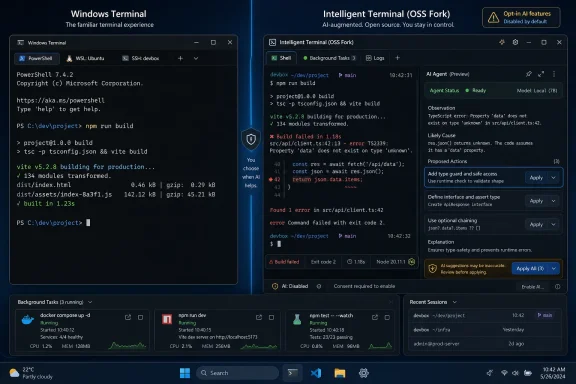 Microsoft Chooses the Fork Over the Forced March
The most important design decision in Intelligent Terminal is not the agent pane, the status bar, or the default GitHub Copilot CLI integration. It is the fact that the app is not Windows Terminal. Microsoft could have shipped these features into Canary builds and let them drift toward general availability, as it often does with Windows features. Instead, it created a separate app.That matters because terminals are not chat surfaces. They are where developers delete directories, rotate credentials, restart services, install packages, alter registries, and push code. A bad suggestion in a browser tab is annoying; a bad action in a privileged shell can become an outage.
The fork gives Microsoft room to test agentic command-line workflows without turning every Windows Terminal user into an unwilling participant. It also gives the company a cleaner story to tell skeptics: the familiar terminal remains the familiar terminal, while the experimental one can break, evolve, or disappear without destabilizing the daily toolchain of millions of users.
Microsoft has learned, or at least now speaks as if it has learned, that AI adoption in Windows depends as much on consent and containment as on capability. The Recall controversy showed the cost of treating ambient AI as an operating-system destiny rather than a user choice. Intelligent Terminal is a quieter, more developer-centric release, but it carries the same institutional lesson.
The Command Line Is a Dangerous Place to Improvise
AI assistance in a shell sounds obvious until you remember what the shell is for. The command line is a compact interface to enormous power, where a single character can change the meaning of an operation and where context often lives outside the visible prompt. Environment variables, working directories, credentials, aliases, remote sessions, mounted volumes, and elevated privileges all shape what a command will actually do.That is why the browser-copy workflow, clumsy as it is, has a hidden safety property. When a developer pastes an error into search or an AI chat window, there is friction. The user must decide what to copy, what to omit, what to trust, and what to run. Intelligent Terminal’s value proposition is to remove that friction by giving an agent direct awareness of shell output.
The productivity upside is real. Anyone who has chased a PowerShell module conflict, a broken path, an npm dependency failure, a WSL permissions problem, or a cryptic compiler error can see the appeal. If the terminal can detect the failure, load the relevant output, and ask an agent to explain or propose a fix, it compresses a common debugging loop.
But compression is not the same as safety. The closer the agent sits to execution, the more the interface must distinguish between advice, proposed action, and authorized action. A terminal agent that merely explains stderr is one thing. A terminal agent that can auto-run fixes, spawn background tasks, or manipulate a working environment is another.
Microsoft’s Agent Pane Turns the Shell Into a Conversation
The core interaction in Intelligent Terminal is a dockable agent pane that sits beside the active shell. Microsoft describes it as a kind of pair programmer in the terminal, a side panel with direct access to command output and enough context to respond without the user copying text into another application. The app also includes an agent status bar and automatic error detection, giving the interface a persistent layer dedicated to agent activity.This is a meaningful shift in how Microsoft imagines the terminal. Windows Terminal was primarily a host: a modern interface for PowerShell, Command Prompt, WSL, SSH, and other shells. Intelligent Terminal is a host plus an observer plus a coordinator. It is not just displaying sessions; it is watching them.
The default agent experience is GitHub Copilot CLI, but Microsoft says the app supports agents compatible with the Agent Client Protocol. That is an important architectural detail because it suggests Microsoft does not want Intelligent Terminal to be only a Copilot-branded command box. It wants the terminal to become a standardized surface where different agents can plug into shell context.
That openness is strategically useful. Developers are already dividing their work among cloud-hosted assistants, local models, IDE agents, CI bots, and specialized automation tools. A terminal that can act as a meeting point for those agents is more powerful than one hardwired to a single service. It also puts Microsoft in a familiar position: controlling the host environment even when the intelligence layer is swappable.
The Recall Lesson Is Now Product Strategy
The shadow of Recall hangs over this release not because Intelligent Terminal resembles Recall technically, but because both features expose the same trust problem. Recall asked users to accept persistent capture of PC activity in exchange for searchable memory. Intelligent Terminal asks developers to let an agent observe and potentially act on shell context in exchange for faster troubleshooting and task execution.Those are different risk models, but the same political problem: Microsoft must convince users that AI features are bounded, optional, inspectable, and reversible. The fork is the company’s answer. It tells developers that the experiment is opt-in by product boundary, not merely by a toggle buried in settings.
That distinction will matter to enterprise IT. A toggle can be changed by policy, accident, update, or user curiosity. A separate app has a clearer deployment story. It can be blocked, allowed, packaged, monitored, or ignored. For organizations that manage developer workstations tightly, that is not a small difference.
The decision also gives Microsoft a way to gather feedback from the users most likely to understand the risk. Developers and sysadmins will test edge cases that a consumer-facing AI feature might never encounter during staged rollout. They will run it against strange shells, broken environments, enterprise proxies, private repositories, internal tools, and permission boundaries. If Intelligent Terminal is going to fail, this is the audience that will find out how.
Terminal Chat Dies Because the Sidecar Model Won
Microsoft’s decision to deprecate Terminal Chat in Canary makes sense in this context. A chat feature embedded inside the main terminal is an awkward halfway step: too integrated to feel safely experimental, not integrated enough to deliver the deeper context that agentic workflows require. Intelligent Terminal replaces that ambiguity with a cleaner split.The difference is not merely branding. Terminal Chat suggested assistance attached to a terminal. Intelligent Terminal suggests a terminal redesigned around assistance. That may sound like a subtle distinction, but it changes the product’s center of gravity.
The agent pane, error detection, status bar, and background task model all imply a terminal that understands itself as an interactive workspace rather than a passive output surface. If an agent can diagnose a failed command, propose a fix, launch work in another tab, and preserve the user’s active shell, then the terminal becomes more like a lightweight operations cockpit.
That is exciting, and it is exactly why it should not be quietly merged into the mainstream app too soon. A terminal with agentic affordances needs different defaults, different telemetry discussions, different enterprise controls, and different user education. Deprecating the old chat experiment is less a retreat than an admission that bolting AI onto a mature developer tool is not enough.
The Separate App Is Also a Liability Shield
Forking Windows Terminal reduces risk, but it does not eliminate it. It creates a boundary, and boundaries must be maintained. If Intelligent Terminal becomes popular, pressure will build to merge its best features back into Windows Terminal proper. Microsoft has already signaled that successful ideas may graduate when the community and telemetry suggest they are ready.That graduation path is sensible, but it is also where the hard arguments will begin. Which features belong in the main terminal? Error detection without agents? The status bar? The pane framework? ACP support? A disabled-by-default agent integration? Each step toward integration reopens the opt-in question.
There is also the problem of user confusion. Microsoft now has Windows Terminal, Terminal Preview or Canary channels, Intelligent Terminal, PowerShell, Command Prompt, WSL shells, and increasingly AI-enabled developer tools around Visual Studio Code and GitHub. For enthusiasts, this is choice. For ordinary users who just want the “right terminal,” it can become a maze.
Still, a maze is better than a trap. The separate app lets Microsoft move quickly without making the standard terminal feel captured by the AI agenda. For once, the company’s fragmentation may be functioning as a safety mechanism.
The Enterprise Question Is Not Whether Agents Help
In managed environments, the question is not whether an AI agent can help a developer solve a shell error. It can. The question is what data the agent sees, where that data goes, what actions it can take, and how those actions are logged. Intelligent Terminal steps directly into that governance problem.A shell transcript may contain secrets even when no one intends it to. Build logs can expose internal package names, private repository paths, hostnames, tokens, customer identifiers, and architecture details. Commands may include credentials or reveal infrastructure patterns. An agent pane with “always-ready context” is convenient precisely because it has access to material administrators may not want leaving the machine.
Local model support and custom agents could help here, but only if organizations can enforce them. Enterprise administrators will want policy controls that determine which agents are allowed, whether cloud agents can receive shell output, what redaction occurs, whether auto-run behavior is permitted, and how approvals are recorded. Without that management layer, Intelligent Terminal will be treated as another shadow-AI risk.
The broader Build 2026 story suggests Microsoft understands this. The company is also talking about execution containers, policy-based sandboxing, and Windows as a platform for agents rather than just a place where Copilot happens to live. Intelligent Terminal is one client-facing expression of that strategy, but the enterprise sale depends on the plumbing underneath.
Background Tasks Are the Feature to Watch
The flashiest demo is likely to be automatic error handling, but the more consequential feature may be the ability for agents to spin up background tasks in new tabs. That design acknowledges a real problem with agentic tools: they often block the user while they plan, run, fail, retry, and summarize. In a terminal, blocking the active shell is a productivity killer.By moving complex work into separate tabs, Intelligent Terminal starts to resemble an orchestrator. The user keeps the primary session while an agent handles a multi-step job elsewhere. That could be a clean model for package upgrades, test runs, environment checks, build repairs, or infrastructure diagnostics.
It also multiplies the need for visibility. If an agent is running commands in a background tab, the user must be able to see what it did, why it did it, and whether it changed system state. The interface cannot treat agent work as magic. In the command line, magic is just automation without auditability.
This is where Microsoft’s developer audience will be unforgiving. Terminal users tolerate terse interfaces, but they do not tolerate hidden state. If Intelligent Terminal wants to earn trust, it needs to make the agent’s actions more legible than a human’s frantic debugging session, not less.
Windows Wants to Be the Agent Workbench
Intelligent Terminal is not an isolated experiment. It fits into Microsoft’s larger Build 2026 push to define Windows as the place where AI agents are built, run, supervised, and constrained. The company is no longer merely adding Copilot buttons to Windows; it is trying to make Windows the substrate for agentic computing.That is a more coherent strategy than the earlier era of AI garnish. An operating system can offer identity, permissions, device access, process isolation, local models, file-system context, developer tools, and policy enforcement. Those are exactly the layers agents need if they are going to do more than generate text in a web app.
The risk is that “Windows as the agent platform” becomes another way to justify intrusive defaults. Intelligent Terminal avoids that mistake for now by narrowing the audience and separating the experiment. It says, in effect, that the shell is a good place to test agentic workflows because the users understand both the upside and the danger.
That may be the right bet. Developers and IT pros are not anti-automation; they are anti-surprise. They will accept powerful tools if the tools are explicit about context, permissions, and blast radius. Intelligent Terminal’s future depends less on how clever its default agent is than on whether Microsoft respects that culture.
The Fork Gives Open Source Real Work to Do
Because Intelligent Terminal is open source under the MIT license, the community can inspect, fork, patch, and argue over the implementation. That does not automatically solve trust, but it changes the conversation. A closed AI terminal from Microsoft would have been a harder sell to the very people most likely to use it.Open source also makes the fork more than a preview channel. If Microsoft is serious, Intelligent Terminal can become a place where agent-interface conventions are tested in public. How should a terminal show that an agent is observing output? How should approvals work? What should be redacted by default? How should local and cloud agents be distinguished? These are interface and governance questions as much as model questions.
The MIT license gives outsiders more room to experiment than a tightly controlled SDK would. That matters because Microsoft’s own instincts will not cover every workflow. Security teams, Linux-heavy developers using WSL, DevOps engineers, data scientists, and accessibility specialists will all have different ideas about what an agent-aware terminal should do.
The danger, as always, is abandonment. Microsoft has launched many experiments that looked promising at version 0.1 and became archaeological layers in the Windows developer story. The healthiest sign will not be marketing language at Build; it will be a sustained cadence of issues, pull requests, documentation, policy controls, and boring reliability work.
The Windows-Only Limitation Narrows the Experiment
For now, Intelligent Terminal supports Windows. That is unsurprising, given its Windows Terminal lineage, but it limits the scope of the experiment. Much of the modern developer terminal culture is cross-platform, and many Windows developers live partly in WSL, remote Linux hosts, containers, or cloud shells.Microsoft says WSL2 agent support is on the roadmap, and that will be an important test. If the agent understands only the Windows side of a developer’s workflow, it will miss a large part of the context that matters. If it can operate cleanly across Windows and WSL boundaries, it becomes far more useful — and far more sensitive.
The cross-boundary problem is not trivial. File paths, permissions, processes, package managers, shells, and environment assumptions differ. An agent that suggests a PowerShell fix for a bash problem, or confuses Windows and Linux paths during a repair, will quickly lose credibility.
This is where Intelligent Terminal’s experimental label is doing real work. Version 0.1 should be judged as a direction, not a destination. The harder product is not an AI pane beside PowerShell; it is an agent-aware terminal that understands the messy hybrid reality of Windows development.
The Real Test Is Whether Microsoft Can Resist the Shortcut
Microsoft’s recent AI history has been defined by urgency. The company saw the platform shift and moved aggressively, sometimes impressively, sometimes clumsily. Intelligent Terminal feels like a product shaped by both ambition and scar tissue.The ambition is obvious. Microsoft wants the command line to become a place where agents can reason over live context, propose fixes, and eventually perform multi-step work. That is a plausible future for developer tools. It may even become normal.
The scar tissue is the fork. Microsoft is acknowledging that not every AI feature belongs in every user’s face, and not every experiment should ride the update channel of a trusted default app. That is a healthier posture than pretending that adoption equals inevitability.
But the temptation will remain. If telemetry looks good and demos land well, the company will want to fold pieces of Intelligent Terminal back into Windows Terminal. Some of that may be wise. Some of it may recreate the very trust problem the fork was designed to avoid.
The Version 0.1 Bargain Windows Users Should Actually Read
Intelligent Terminal’s first release is best understood as a bargain between Microsoft and the developer community: Microsoft gets a live testbed for agentic shell workflows, and users get a hard boundary around an experiment that would be risky inside the default terminal. That bargain is reasonable, but only if both sides remember its terms.- Intelligent Terminal is a separate app, not a replacement for Windows Terminal.
- The fork is designed to test native agent integration without destabilizing the mainstream terminal experience.
- GitHub Copilot CLI is the default agent, but the design is meant to support compatible third-party or custom agents.
- Automatic error detection and context-aware explanations are useful because they reduce copy-and-paste debugging, but they also increase the importance of data handling and approval controls.
- Background agent tasks could become the most powerful feature, provided Microsoft makes every action visible, auditable, and interruptible.
- Enterprise adoption will depend less on the novelty of AI help and more on policy controls, redaction, logging, and the ability to restrict which agents can see shell context.
References
- Primary source: Technobezz
Published: 2026-06-03T17:47:20.765631

Microsoft Forks Windows Terminal Into Intelligent Terminal for AI Agent Experiments
Microsoft forks Windows Terminal into an open-source AI experiment, Intelligent Terminal 0.1, learning from Recall's rollout to offer opt-in agent integration. www.technobezz.com
- Official source: devblogs.microsoft.com

Announcing Intelligent Terminal 0.1
Today we're announcing Intelligent Terminal version 0.1, an open-source experimental fork of Windows Terminal with native agent integration. Get started devblogs.microsoft.com
- Related coverage: phoronix.com
Microsoft Announces Open-Source "Intelligent Terminal" - Phoronix
 www.phoronix.com
- Official source: blogs.windows.com
Build 2026: Furthering Windows as the trusted platform for development
Build is one of our favorite moments each year - a chance to connect with the global developer community and share what we’ve been building. Over the past year, we have connected with many developers pushing the boundaries of what’s possible on blogs.windows.com
- Related coverage: windowsforum.com

Microsoft Intelligent Terminal 0.1: AI agents via an opt-in Windows Terminal fork
Microsoft announced Intelligent Terminal 0.1 on June 2, 2026, as an open-source experimental fork of Windows Terminal for Windows users, adding native AI agent integration while leaving the standard Windows Terminal app installed separately and unchanged for people who do not want agent... windowsforum.com
- Related coverage: redmondmag.com

Microsoft Uses Build 2026 To Put AI Agents at the Center of Windows -- Redmondmag.com
Microsoft used Build 2026 to position Windows as a platform for building and running AI agents, expanding its developer focus beyond AI-assisted apps and into agents that can act across local devices, cloud environments and enterprise systems. redmondmag.com
- Related coverage: windowslatest.com

Microsoft pledges to make Windows 11 the OS for building AI, after years of Copilot backlash
Microsoft is turning Windows 11 into agent-native at Build 2026, adding local AI models and OS-level security to fix its developer platform. www.windowslatest.com
- Related coverage: pcworld.com

No Windows 12 at Build, but Microsoft has something else up its sleeve
Microsoft's Pavan Davuluri confirmed Windows 12 won't appear at Build 2026, but the new Surface Laptop Ultra with Nvidia N1X might steal the show. www.pcworld.com
- Official source: blogs.microsoft.com

Microsoft Build 2026: Be yourself at work - The Official Microsoft Blog
Platforms shift when developers build. We explore, choose tools, dream, create. This platform shift comes with more information than ever, ready at your fingertips. This shift, it’s about building fast AND THEN: it’s about building, operating, optimizing and observing. Securing your... blogs.microsoft.com
- Related coverage: techxplore.com
- Official source: download.microsoft.com
- Related coverage: bitsavers.org