

Microsoft quietly signaled a course correction: after months of user outcry over promotional content across Windows, the company has begun rolling back some of the most intrusive upgrade prompts while simultaneously continuing to experiment with in-OS promotions like Start menu “recommendations.”
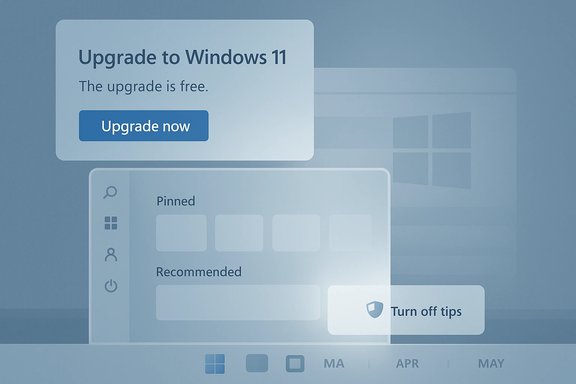
Windows has been a carrier for promotional content for years, but the scope and visibility of those promotions accelerated around the Windows 10 → Windows 11 transition and the introduction of AI-driven services such as Copilot and Microsoft 365 add-ons. Microsoft’s stated goals are straightforward: keep users secure and promote services and apps it believes improve the Windows experience. The execution, however, has repeatedly rubbed users the wrong way — from full‑screen upgrade messages on Windows 10 to app recommendations baked into the Windows 11 Start menu. In late February 2024 Microsoft published a Windows IT Pro post describing plans to “expand invitations” to move eligible machines to Windows 11. That post was updated after feedback: Microsoft said it would not push those full‑screen upgrade prompts in the April 2024 monthly security update and promised to provide a new timeline later. That formal backtrack acknowledged how strongly some tactics were perceived as intrusive. At the same time, Microsoft continued to ship updates that place “recommendations” and curated Microsoft Store app suggestions in the Windows 11 Start menu (delivered via preview and Patch Tuesday updates such as KB5036980 and later KB5037771). These additions drew attention because they are visible in a very prominent UI surface and — despite toggles to disable them — many users viewed the move as shifting the operating system toward a monetized, ad‑like model.
Conclusion
Microsoft’s adjustment to its upgrade messaging shows that public pressure can prompt changes in platform behavior. However, systemic promotional strategies — Start menu recommendations, widget feeds, settings prompts, and integration nudges for services like OneDrive and Copilot — remain part of Windows’ operating model. Users who prize a minimalist, ad‑free experience will need to proactively toggle settings or rely on enterprise policies where available. The landscape is better than it was at the peak of full‑screen upgrade prompts, but the question of whether Microsoft will choose less intrusive monetization or no monetization at all remains open.
Source: Neowin https://www.neowin.net/news/microsoft-will-soon-let-you-see-fewer-ads-in-windows-11/
 Background
Windows has been a carrier for promotional content for years, but the scope and visibility of those promotions accelerated around the Windows 10 → Windows 11 transition and the introduction of AI-driven services such as Copilot and Microsoft 365 add-ons. Microsoft’s stated goals are straightforward: keep users secure and promote services and apps it believes improve the Windows experience. The execution, however, has repeatedly rubbed users the wrong way — from full‑screen upgrade messages on Windows 10 to app recommendations baked into the Windows 11 Start menu. In late February 2024 Microsoft published a Windows IT Pro post describing plans to “expand invitations” to move eligible machines to Windows 11. That post was updated after feedback: Microsoft said it would not push those full‑screen upgrade prompts in the April 2024 monthly security update and promised to provide a new timeline later. That formal backtrack acknowledged how strongly some tactics were perceived as intrusive. At the same time, Microsoft continued to ship updates that place “recommendations” and curated Microsoft Store app suggestions in the Windows 11 Start menu (delivered via preview and Patch Tuesday updates such as KB5036980 and later KB5037771). These additions drew attention because they are visible in a very prominent UI surface and — despite toggles to disable them — many users viewed the move as shifting the operating system toward a monetized, ad‑like model. What Microsoft actually changed — and what it didn’t
The upgrade-prompt retreat: a narrow, calculated concession
Microsoft’s Tech Community post and subsequent edits made one concrete change: it paused the planned inclusion of full‑screen, multi‑option upgrade prompts in the April 2024 security update cycle for certain Windows 10 devices, stating the decision was made “to honor your feedback.” That measure relieved many of the most aggressive cross‑OS upgrade nudges, particularly on unmanaged consumer devices. However, the pause applied to a very specific promotional mechanism, not a broad ban on all promotional content within Windows.Start menu promotions: smaller surface, persistent presence
Separately, Microsoft rolled out Start menu “Recommended” content in Windows 11 through optional and later mandatory updates. The change causes the Recommended area to surface curated Microsoft Store apps and — on some builds — frequent‑use items that the system thinks are helpful. Microsoft documented these changes in update notes and provided the Settings toggle that disables the feature (Settings > Personalization > Start), but critics pointed out that toggles are sometimes buried, can be linked with other features, and rely on users knowing how to turn them off.The net effect
- Microsoft backed off one of the most overt upgrade ad mechanisms (full‑screen prompts) after backlash, which is a reputation‑preserving step for the company.
- Microsoft kept and in some cases expanded in‑OS promotional surfaces — notably the Start menu, Widgets, and Settings — relying on opt‑out controls rather than removing the features entirely.
Timeline: major milestones you should know
- Feb 28, 2024 — Microsoft posts the “Expanding invitations to move to Windows 11” blog, signaling a scaled effort to invite eligible devices to upgrade; Editor’s notes in March/April reflect community feedback and a commitment to revise rollout timing.
- April 2024 — Microsoft updates and then pauses the inclusion of full‑screen upgrade prompts slated for the April security update after user outcry; the company pledges a new timeline.
- April–May 2024 — Optional preview releases (KB5036980) and the May Patch Tuesday roll (KB5037771) bring Start menu recommendations and related changes to Windows 11 builds, turning up the visibility of Microsoft Store app suggestions in the Recommended area. These were rolled out to Insiders first and later to the broader user base.
Where ads and promotions appear in Windows 11
Microsoft’s promotional content shows up in multiple UI surfaces — some obvious, others subtle:- Start Menu (Recommended section): curates Store apps, tips, and occasionally promoted content. Toggleable via Settings > Personalization > Start.
- Settings app and system notifications: suggested content and tips that can appear after updates or during setup flows. These are controlled by several toggles under Privacy & Security and Notifications.
- File Explorer: OneDrive sync and “provider” notifications present as suggestions or prompts; users can disable sync-provider notifications.
- Lock screen (Windows Spotlight): rotates images and may include promotional tips or “fun facts”; switching to Picture/Slideshow removes those dynamic tips.
- Widgets feed and taskbar surfaces: news, app suggestions, and Microsoft News content can feel promotional and consume prominent taskbar real estate.
How to reduce or remove promotional content (practical steps)
Windows still offers built‑in toggles to reduce or remove surface‑level promotions. The most reliable, user‑facing steps are:- Open Settings (Win + I) → Personalization → Start → Turn off Show recommendations for tips, shortcuts, new apps, and more. This hides Recommended‑area suggestions.
- Settings → System → Notifications → expand Additional settings → uncheck Get tips and suggestions when using Windows and Show the Windows welcome experience after updates.
- File Explorer → three‑dot menu → Options → View tab → uncheck Show sync provider notifications (stops frequently nagging OneDrive prompts).
- Settings → Personalization → Lock screen → switch from Windows Spotlight to Picture/Slideshow.
- Settings → Privacy & Security → General → toggle off advertising ID / suggested content options to limit personalized promotions.
Why Microsoft is doing this (analysis)
Microsoft’s incentive structure and product strategy make this predictable.- Ecosystem monetization and adoption: Promoting Microsoft Store apps, Microsoft 365, Copilot subscriptions, and OneDrive helps the company drive product adoption and recurring revenue without requiring separate marketing channels. Platform owners frequently use native surfaces to promote services, and Microsoft is no exception.
- Discoverability for developers: The Store ecosystem benefits when curated recommendations expose higher‑quality apps to users who wouldn’t otherwise find them. Microsoft argues that curated recommendations improve app discovery.
- Security and support timelines: The push to upgrade eligible Windows 10 devices to Windows 11 is partly about consolidating support on modern platforms and surfacing newer security and productivity features — but presenting this as repeated in‑OS invitations to upgrade can be perceived as coercive. Microsoft’s tech blog framed invitations in terms of protection and productivity for organizations, while later edits conceded that some methods of delivering those invitations were poorly received.
Strengths of Microsoft’s approach
- Centralized control for discovery: Using the OS to surface apps and services enables a centralized way to promote high‑quality experiences without relying solely on external ad buys. For developers, this can materially improve discoverability in a crowded market.
- User opt‑outs exist: Microsoft provides toggles for many promotional surfaces. For users willing to dig into Settings, the system can be decluttered significantly. This preserves choice in a default‑on model.
- Consistency with modern digital ecosystems: Many platforms (mobile OSes, app stores) favor discovery-driven promotion to sustain developer ecosystems; Microsoft’s approach mirrors that reality and helps subsidize free OS development and continuous feature delivery.
Risks and potential downsides
- User trust erosion: Repeated in‑OS promotional tactics — particularly when they are intrusive or difficult to disable — can degrade trust in the platform. That trust is hard to rebuild once lost. Community reaction in forums and the press repeatedly warned about perceiving Windows as “adware.”
- Fragmentation in enforcement and definition of “managed” devices: Microsoft’s behavior differs between managed (enterprise) and unmanaged devices, which complicates messaging and policy enforcement. IT admins want clarity on what counts as “managed” and which surfaces Microsoft will or will not use for promotions. Community threads highlighted requests for clearer technical definitions and detection mechanisms.
- Privacy and personalization concerns: Even when ads are labeled as “recommendations,” personalization leverages diagnostic data and an advertising ID — raising privacy questions for sensitive users. Turning off personalization toggles mitigates this, but not all users are aware of the settings or the extent of data used to drive recommendations.
- Unintended side effects when toggling controls: Some opt‑outs are linked to convenience features. For example, disabling Recommended content can also hide recent files, which may impact user productivity. Microsoft’s design trade‑offs mean that reclaiming a clean UI can come with functional compromises.
Enterprise and IT implications
For IT professionals and organizations, the story is nuanced.- Managed vs. unmanaged devices: Microsoft explicitly treats devices managed through Intune, Configuration Manager, WSUS, and Windows Update for Business differently from unmanaged consumer devices. Enterprises will want to ensure group policies and management tools are correctly configured to prevent unwanted end‑user upgrade prompts and avoid surprising behavior during patch cycles.
- Policy controls exist but require vetting: Administrators can enforce many of the same toggles via Group Policy or MDM configuration profiles. However, the need to continually validate which KB updates alter UI behavior introduced by Microsoft means admins must test updates in staging environments to avoid UX regressions.
- Communications and change management matter: Even where admins can block or disable promotional elements, the visibility of Microsoft’s messaging in public forums makes communications essential. Organizations should proactively inform users about update behavior and any changes to default settings to avoid confusion.
A quick set of recommendations for users and admins
- For everyday users:
- Disable Start recommendations and promotional notifications in Settings.
- Replace Windows Spotlight with a static lock screen background.
- For privacy-conscious users:
- Turn off the Advertising ID and suggested content toggles under Privacy & Security. Consider auditing other connected Microsoft services for ad personalization settings.
- For IT admins:
- Test updates in a controlled ring before broad deployment.
- Use Intune or Group Policy to lock down unwanted suggestions if necessary.
- Communicate precisely what updates will do and provide instructions for staff to restore preferred settings if changes arrive unexpectedly.
What remains unverified or uncertain
- Microsoft’s longer‑term roadmap for promotional surfaces in Windows is still evolving. The company paused one specific upgrade prompt in April 2024, but that does not guarantee a future retreat from other forms of in‑OS promotions. Treat promises of “fewer” ads as incremental adjustments rather than an explicit commitment to remove promotional content entirely.
- The precise telemetry signals and heuristics Microsoft uses to determine when and where to surface recommendations (e.g., the “small set of curated developers” that feed Start menu suggestions) are not fully documented for public scrutiny. IT pros and privacy advocates should watch for clarifying documentation or changes to Microsoft’s telemetry disclosures.
Final analysis: progress, but not a clean break
Microsoft’s recent moves amount to damage control, not a wholesale policy reversal. The company listened enough to pause one particularly unpopular mechanism — full‑screen upgrade prompts — which was the most visible flashpoint for user anger. That pause matters because it restores some goodwill and avoids heavy-handed messaging on Windows 10 devices nearing end of support. At the same time, Microsoft continues to treat Windows as a platform for promoting apps and services. The Start menu changes and other in‑OS promotional channels demonstrate a long‑term strategy: use OS real estate to surface curated experiences and drive adoption. For users and administrators, the outcome is a pragmatic one: the tools to reduce or remove many promotions already exist, but the burden of doing so rests largely on end users or IT managers. In short: expect fewer of the most egregious upgrade popups, but don’t expect Windows to become a marketing‑free zone. Users can reclaim a clean, distraction‑free environment by applying the built‑in opt‑outs and management policies described above — and they should, because choice and transparency are the only reliable protections against an OS that increasingly doubles as a marketing channel.Conclusion
Microsoft’s adjustment to its upgrade messaging shows that public pressure can prompt changes in platform behavior. However, systemic promotional strategies — Start menu recommendations, widget feeds, settings prompts, and integration nudges for services like OneDrive and Copilot — remain part of Windows’ operating model. Users who prize a minimalist, ad‑free experience will need to proactively toggle settings or rely on enterprise policies where available. The landscape is better than it was at the peak of full‑screen upgrade prompts, but the question of whether Microsoft will choose less intrusive monetization or no monetization at all remains open.
Source: Neowin https://www.neowin.net/news/microsoft-will-soon-let-you-see-fewer-ads-in-windows-11/
