

Microsoft’s reported decision to pause large swaths of its “AI everywhere” push inside Windows 11 is a blunt acknowledgement that stability, performance, and trustworthiness matter more to everyday users than OS-level novelty done at scale. ]
Windows 11’s public narrative over the last two years has been dominated by two competing threads: an aggressive push to make the OS an “AI PC” through deep Copilot integration, and mounting user frustration with regressions, heavier system requirements, and a sense that the operating system was being treated as a platform for experiments rather than a stable user environment. Microsoft’s leadership — notably Windows and Devices president Pavan Davuluri — has admitfeedback was “loud and clear,” and the company has signaled a year of prioritizing foundational fixes over proliferating visible AI surfaces.
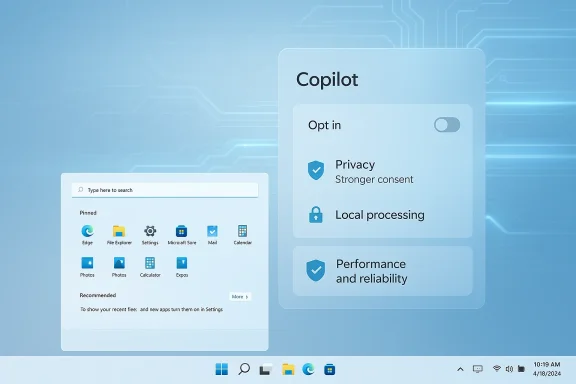
This shift is not a cancellation of Microsoft’s AI ambitions; it’s a reprioritization. The company reportedly intends to slow or pause additional Copilot buttons and other front-line AI affordances, rework the controversial Recall feature into a strictly opt-in experience, and redeploy engineering effort to improve core UI elements such as Start, Taskbar, and File Explorer. Early reporting places this as a strategic course correction: keep investing in underlying AI plumbing and APIs, but stop littering the UI with forced entry points that create friction and privacy concerns.
At the same time, users and administrators have endured a higher-than-normal cadence of update-related regressions: some January 2026 security and quality updates introduced boot and app compatibility problems, and Microsoft has had to ship follow-up fixes in short order. The visible tension between rapidly shipping new features and preserving update reliability made the “AI everywhere” bet politically and practically harder to justify, especially when basic responsiveness and the predictability of daily tasks were deteriorating for some users. Microsoft’s public statement pledging to focus on performance and reliability is thus an attempt to re-balance priorities.
Microsoft has responded with targeted preview rollups and what internal teams call “swarming” — concentrated engineering efforts to close hard-to-reproduce, high-impact bugs quickly. The public commitment is to improve the “overall experience” of Windows by making these fixes more visible and consistent in shipping schedules and communications.
From a security standpoint, TPM 2.0 makes sense: it enables features that materially reduce certain attack vectors. From a user-adoption perspective, the consequence is polarizing: enterprises and users with modern fleets gain security but some existing users face a forced upgrade calculus. Microsoft’s decision to stick with TPM 2.0 as a non-negotiable baseline reflects a strategic prioritization of security posture over broad backward compatibility.
This maneuver carries real upside: better defaults, fewer surprise regressions, and a higher bar for where Copilot earns a place in the UI. But it also carries risk: if Microsoft uses the pause to merely rebrand features rather than redesign consent and admin control, the credibility gap will persist. The company must show quantifiable improvement across update reliability, UX performance metrics, and transparent privacy controls to turn talk into trust.
For users and IT teams, the pause is a signal to prepare: validate update policies, audit Copilot and telemetry controls, and keep a close eye on Insider channels for the concrete engineering outcomes that will determine whether 2026 becomes Windows’ “repair year” or a prolonged interim full of promises.
Source: Redmondmag.com Windows 11 Overhaul Puts AI on the Back Burner -- Redmondmag.com
 Background
Windows 11’s public narrative over the last two years has been dominated by two competing threads: an aggressive push to make the OS an “AI PC” through deep Copilot integration, and mounting user frustration with regressions, heavier system requirements, and a sense that the operating system was being treated as a platform for experiments rather than a stable user environment. Microsoft’s leadership — notably Windows and Devices president Pavan Davuluri — has admitfeedback was “loud and clear,” and the company has signaled a year of prioritizing foundational fixes over proliferating visible AI surfaces.This shift is not a cancellation of Microsoft’s AI ambitions; it’s a reprioritization. The company reportedly intends to slow or pause additional Copilot buttons and other front-line AI affordances, rework the controversial Recall feature into a strictly opt-in experience, and redeploy engineering effort to improve core UI elements such as Start, Taskbar, and File Explorer. Early reporting places this as a strategic course correction: keep investing in underlying AI plumbing and APIs, but stop littering the UI with forced entry points that create friction and privacy concerns.
Why this matters now
Windows runs on over a billion devices; changes at the operating system level affect a vast and diverse user base. When an OS ships features that appear to collect, index, or otherwise touch personal data without crystal-clear consent models, trust erodes quickly. The Recall feature — a background screen-indexing capability that captures snapshots of what appears on the screen and makes that content searchable via Copilot — crystallized those worries. Privacy-focused developers and browsers moved to block aspects of Recall, underscoring the reputational and technical risk of pushing such features without ironclad controls.At the same time, users and administrators have endured a higher-than-normal cadence of update-related regressions: some January 2026 security and quality updates introduced boot and app compatibility problems, and Microsoft has had to ship follow-up fixes in short order. The visible tension between rapidly shipping new features and preserving update reliability made the “AI everywhere” bet politically and practically harder to justify, especially when basic responsiveness and the predictability of daily tasks were deteriorating for some users. Microsoft’s public statement pledging to focus on performance and reliability is thus an attempt to re-balance priorities.
Overview of the changes Microsoft is reportedly making
- Pause further expansion of Copilot UI elements into lightweight, in-box apps (Notepad, Paint, basic dialogs).
- Re‑gate and rework Windows Recall into an explicit, opt-in experience with stronger privacy controls and admin options.
- Reallocate engineering cycles to fix performance and reliability pain points in core UI surfaces: Start menu, Taskbar, File Explorer, and app launch times.
- Continue backend investments in Windows ML, AI frameworks, and developer-facing APIs that do not directly alter the shell experience.
The Recall controversy: what went wrong, and how Microsoft is responding
What Recall attempted to do
Recall was designed to give users a searchable “memory” of what appeared on their screens, enabling them to find previously seen images, documents, or dialogs without manually saving screenshots. In principle, this sounds useful: a local index of visual content can speed retrieval and assist productivity. But execution matters: always-on indexing of screen content crosses a privacy inflection point for many users, because sensitive data — passwords, payment information, private messages — can be captured in snapshots before deliberate user consent or clear exclusion controls are in place.Real-world reaction
Privacy-focused projects and browsers implemented blocks or protections against Recall, and community reaction was swift and vocal. That response highlighted two failures: poor initial defaults and a weak consent story. Microsoft moved Recall back into a narrower Insider preview and signaled a transition toward a strictly opt-in model with clearer controls. That’s appropriate remediation, but the reputational damage to trust is not immediate to repair.Technical and governance fixes needed
- Default-off: indexers that capture user content should be off by default. Opt-in should be explicit and granular.
- Granular exclusions: users must be able to exclude specific applications, browser profiles, and secure fields (password dialogs, payment inputs) from any indexing.
- Local-first encryption and clear retention policies: where data is stored must be explicit (local vs. cloud) and encrypted; retention settings should be user-configurable.
- Admin controls for enterprises: group policy and MDM controls to set default behavior across managed fleets.
- Transparent telemetry and audit logs: users should be able to see what was indexed and how it was used.
Performance and update reliability: the other half of the problem
Regressions that raised alarms
Microsoft’s 2026 update cadence included a few high-profile incidents where patches introduced regressions: credential and sign-in failures affecting remote desktop and virtual desktop scenarios, Secure Launch-related shutdown problems, and occasional application compatibility breakages after cumulative updates. Microsoft documented known issues and shipped mitigations and follow-ups, but the cumulative news cycle of “updates that break things” had the same effect as a persistent leak: it eroded confidence.Microsoft has responded with targeted preview rollups and what internal teams call “swarming” — concentrated engineering efforts to close hard-to-reproduce, high-impact bugs quickly. The public commitment is to improve the “overall experience” of Windows by making these fixes more visible and consistent in shipping schedules and communications.
Bloat and startup overhead
Another source of complaints has been the sheer number of preinstalled services, bundled experiences, and UI affordances that launch by default. Users on older or low‑end hardware report longer boot times, sluggish UI transitions, and a sense that the OS favors discoverability of Microsoft services over snappy performance. Community projects emerged to address this directly: enthusiast “debloated” distributions such as AtlasOS automate removal or disabling of nonessential services and UI adornments to reclaim memory and reduce background CPU churn. AtlasOS’s documentation and releases show the appetite for this approach among power users — but they also highlight compatibility and support tradeoffs when modifying the stock environment.Hardware requirements and the TPM debate
Windows 11’s requirement for Trusted Platform Module (TPM) 2.0 remains a flashpoint. Microsoft’s official system requirements list TPM 2.0 as mandatory; the company frames this as core to identity protection, BitLocker, and future security features tied to hardware-backed protections. TPM demands exclude older systems and contribute to a perception that Windows 11 is less accessible for long-lived hardware. Microsoft has reiterated that it is not planning to relax the baseline requirements. That stance has practical impact: many users who could otherwise upgrade are forced to buy new hardware, or resort to unsupported workarounds.From a security standpoint, TPM 2.0 makes sense: it enables features that materially reduce certain attack vectors. From a user-adoption perspective, the consequence is polarizing: enterprises and users with modern fleets gain security but some existing users face a forced upgrade calculus. Microsoft’s decision to stick with TPM 2.0 as a non-negotiable baseline reflects a strategic prioritization of security posture over broad backward compatibility.
What Microsoft gets right by pausing visible AI rollouts
- Product discipline: stepping back prevents feature creep in the shell and allows the company to deliver fewer, better-designed AI experiences rather than many shallow ones. This respects the basic principle that a stable platform wins trust.
- Privacy-first course correction: moving Recall to opt‑in and strengthening exclusion options is exactly the kind of privacy baseline modern OSes should provide before rolling such features to a broad audience.
- Reduced attack surface for bugs: pausing new front-end integrations slows the rate of change and gives teams time to harden patches and update channels, which should reduce regression risk.
What remains risky and unresolved
- Credibility gap: words alone won’t restore trust. Microsoft must show measurable improvements — fewer regressions in update telemetry, clearer privacy defaults, and tangible changes to where Copilot appears — or the community will remain skeptical. Early reporting suggests the company knows this; execution is the hard part.
- Enterprise complexity: enterprises will want deterministic controls (Group Policy, MDM) that ensure consistent behavior across thousands of endpoints. If policy granularities are delayed, admins will remain reluctant to enable new AI features at scale.
- The underlying platform bet: Microsoft still needs to invest in the on-device and hybrid AI plumbing that enables useful scenarios (semantic search, accessibility helpers, document extraction). If those foundations are deprioritized for too long, Microsoft risks ceding developer mindshare to other ecosystems even as it attempts UX repair.
Practical guidance for users and administrators today
- Review update channels: prefer staged deployments (Release Preview or controlled rings) for production fleets and avoid immediate installation of optional preview rollups until they’ve been validated.
- Audit Copilot settings: if Copilot surfaces appear annoying, evaluate per-device and group policies to control visibility and behavior. Microsoft is expanding admin controls; admins should test them in controlled environments now.
- Treat Recall (and similar features) conservatively: unless you are comfortable with local indexing and retention policies, keep such features disabled until opt‑in models and exclusion lists are fully rolled out.
- If hardware is a blocker, verify TPM status and see whether enabling TPM in firmware is possible before buying new hardware. Microsoft’s guidance shows many PCs support TPM 2.0 but have it disabled in firmware.
How Microsoft should measure success (recommended metrics)
- Update reliability delta: number of high-impact update regressions per quarter and time-to-resolution. A measurable decline will be the strongest signal of progress.
- Copilot and Recall opt-in rates: percent of users explicitly opting into AI experiences vs. those who never do, which will give product teams evidence about true adoption and satisfaction.
- Latency and responsiveness benchmarks: end-to-end measures of shell responsiveness on a standard suite of hardware profiles, with trends published to improve transparency.
- Enterprise control coverage: the breadth of Group Policy / MDM toggles and their effectiveness in test deployments. Admins need to be able to centrally enforce opt-out or opt-in.
The broader industry angle: OS vendors and the trust economy
Microsoft is not alone in learning that shipping AI without conservative defaults invites backlash. Across platforms, vendors are encountering a trust-tax when features interact with private user data. The sane course for OS makers is to treat trust as a strategic asset: conservative defaults, robust auditability, and clear admin controls buy the time to innovate without alienating the user base. Microsoft’s reported pause is a textbook response to those lessons: not a retreat from AI, but a corrective realignment that recognizes trust is the precondition for adoption at scale.What to watch next
- Insider and Release Preview telemetry: look for signals that Microsoft’s fixes are reducing regressions and improving responsiveness in daily workflows.
- Recall’s reappearance: whether it returns as a conservative, opt-in service with robust exclusions and local-first defaults or whether it’s substantially re-engineered or renamed. The implementation detail will determine whether the privacy crisis is truly resolved.
- Copilot surface consolidation: will Microsoft choose a single, discoverable hub (taskbar/toolbar) for Copilot, or will it continue to fragment the experience across many first-party apps? Consolidation would be the more user-friendly option.
Final analysis — a cautious welcome
Microsoft’s decision to slow its “AI everywhere” rollout inside Windows 11 is an overdue, sensible correction. It recognizes three core truths: first, that stability and predictability are the foundational products Windows sells; second, that privacy and explicit consent are non-negotiable when features interact with screen content and personal data; and third, that a platform can invest in powerful under‑the‑hood AI while choosing more judicious surface placements for user-facing affordances.This maneuver carries real upside: better defaults, fewer surprise regressions, and a higher bar for where Copilot earns a place in the UI. But it also carries risk: if Microsoft uses the pause to merely rebrand features rather than redesign consent and admin control, the credibility gap will persist. The company must show quantifiable improvement across update reliability, UX performance metrics, and transparent privacy controls to turn talk into trust.
For users and IT teams, the pause is a signal to prepare: validate update policies, audit Copilot and telemetry controls, and keep a close eye on Insider channels for the concrete engineering outcomes that will determine whether 2026 becomes Windows’ “repair year” or a prolonged interim full of promises.
Source: Redmondmag.com Windows 11 Overhaul Puts AI on the Back Burner -- Redmondmag.com
