

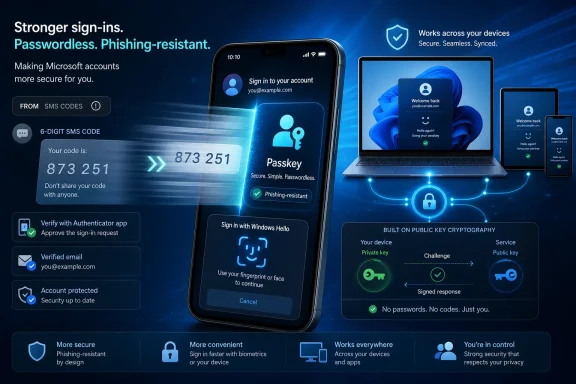
Microsoft has confirmed in May 2026 that it will phase out SMS codes for personal Microsoft accounts, replacing text-message sign-in and recovery with passkeys, authenticator apps, and verified secondary email addresses across the Windows account ecosystem. The move is not a cosmetic cleanup of an old security option; it is Microsoft using its consumer identity platform to force a mass migration away from one of the web’s most familiar login rituals. The company is right about the security problem, but the transition will expose every place where passwordless sign-in still behaves like a polished demo rather than universal infrastructure.
For most people, the six-digit SMS code became the lingua franca of online identity. It was not elegant, but it was understandable: enter password, wait for buzz, type code, move on. Banks, email providers, app stores, game accounts, government portals, and work systems trained users to believe that a code arriving on a phone was the reassuring second lock on the door.
Microsoft’s decision to start pulling that method from personal accounts is therefore bigger than a settings-page change. A Microsoft account is not merely an Outlook.com login. It is the identity layer behind Windows 11 setup, OneDrive, Microsoft Store purchases, Xbox, Edge sync, Microsoft 365 consumer subscriptions, Windows Backup, BitLocker recovery key access, and a long tail of services that touch both casual users and power users.
The company’s argument is simple: SMS is no longer good enough. Text-message authentication can be phished, intercepted, socially engineered, delayed, blocked, or hijacked through SIM-swap attacks. In Microsoft’s framing, the safer future is passwordless authentication built around passkeys, device biometrics, local PINs, authenticator apps, and verified email recovery.
That security logic is hard to dispute. The uncomfortable part is that Microsoft is not merely offering better methods. It is beginning to remove the old fallback, and fallbacks are where real users discover whether a security model is resilient or just modern.
That ubiquity made SMS the default second factor for the messy consumer internet. It worked across operating systems, browsers, public computers, borrowed laptops, hotel Wi-Fi, elderly relatives’ phones, cheap Android handsets, and rebuilt Windows installs. It did not require the user’s device to be healthy, patched, enrolled, or even the same device they used yesterday.
Its weaknesses were also obvious for years. A phone number is not an identity; it is a carrier-managed routing pointer that can be reassigned, ported, spoofed in workflows, or manipulated through customer-support fraud. A text code is a shared secret visible to the user, which means it can be typed into a phishing site just as easily as into Microsoft’s real sign-in page.
The consumer-security industry lived with that contradiction because SMS was better than passwords alone. It raised the cost of account takeover for commodity attackers. It also gave users a recovery route when everything else failed.
That last point matters. Microsoft is killing SMS because attackers learned to abuse it, but users came to rely on it because the modern identity stack still breaks in mundane ways. A phone number was not the strongest proof of identity, but it was often the last proof that remained when a device was wiped, an authenticator app was lost, a passkey was not synced, or a browser profile vanished.
The security gain is not subtle. A phishing page can trick a user into typing a password or SMS code, but it cannot easily trick a legitimate passkey into authenticating to the wrong domain. There is no six-digit code to relay. There is no reusable password database to steal. There is no carrier help desk to fool into moving the second factor to an attacker’s SIM card.
Windows 11 is a natural place for Microsoft to push this model. Windows Hello already gives many PCs a local biometric or PIN-based unlock flow. Edge and Microsoft Password Manager have been moving toward passkey storage and synchronization. Microsoft Authenticator has become a central part of the company’s consumer and enterprise passwordless strategy.
For users with new hardware, a stable Microsoft account, a working phone, a verified recovery email, and a mainstream browser, the experience can be excellent. Face unlock on a Windows laptop followed by a seamless account sign-in is exactly the kind of security upgrade that feels less like medicine and more like convenience.
This is the rare security migration where the safer option can also be the easier option. That is why Microsoft is pushing hard now.
Windows enthusiasts and IT pros know this gap well. A clean Windows install does not always have the same authentication affordances as a mature daily-driver PC. A virtual machine may not expose biometric hardware. A test bench may be local-only until drivers are installed. A recovery environment may have no access to a user’s normal browser profile. A newly imaged PC may sit at the awkward point where Microsoft wants cloud identity before the user has rebuilt the local trust chain that makes cloud identity painless.
That is why the Windows Latest report’s virtual-machine example rings true. For an Insider or sysadmin spinning up test builds, the old SMS code was not elegant, but it was predictable. It crossed the boundary between the broken environment and the working one. If the VM did not have Windows Hello, if the passkey prompt failed, if the authenticator flow became confused, the phone still received a code.
Passkeys can work across devices, but the implementation details matter. Some passkeys are device-bound. Some sync through a password manager or platform account. Some are available in one browser but not another. Some require Bluetooth or proximity flows when used cross-device. Some depend on a mobile authenticator that itself depends on a healthy account-recovery setup.
That ecosystem is improving quickly, but Microsoft’s own products still create friction at precisely the moments when users are most vulnerable: new PC setup, account recovery, phone replacement, hardware failure, and profile migration. Removing SMS makes those edge cases less forgiving.
That gives the company’s authentication choices operating-system consequences. If a Microsoft account sign-in fails, a user may not merely lose access to webmail. They may struggle with Windows setup, OneDrive file restoration, Microsoft Store app licensing, Edge sync, Xbox services, or device recovery features. For many home users, the Microsoft account has become the skeleton key to the PC experience.
That is strategically useful for Microsoft. A unified account lets the company sync settings, sell subscriptions, enforce security defaults, recover devices, and reduce the support burden of forgotten local passwords. It also creates a single point where identity-policy changes ripple outward into daily computing.
The SMS phaseout is therefore part of a broader pattern: Microsoft is converting identity from a user preference into a platform requirement. The same company that tells users Windows is more secure with a Microsoft account is now telling them that one of the most familiar Microsoft account recovery methods is too dangerous to keep.
That may be true. But when a vendor makes an account mandatory in more places, it inherits a higher duty to make recovery boring, redundant, and intelligible.
Email recovery is only as strong as the security of the other mailbox. If a user’s Microsoft account recovery depends on a Gmail account, iCloud account, ISP mailbox, or old work address, then Microsoft has effectively outsourced part of its account-rescue process to another provider’s identity stack. In many cases that will be fine. In some cases it will create a chain of dependencies users do not understand until something breaks.
The cleanest version of the passwordless future looks like this: the user has multiple passkeys, a trusted authenticator app, a current recovery email, and recovery information they have actually tested. The real consumer version often looks messier: one old phone, one laptop, a forgotten backup address, a number that changed two years ago, and an assumption that “Microsoft will send me a code” if things go sideways.
Microsoft’s challenge is not just to disable SMS. It must retrain hundreds of millions of users to maintain account recovery like a safety system. That means prompts cannot be vague, nagging, or dismissible wallpaper. They must make the user understand that a verified email and passkey are not optional decorations; they are the new spare keys.
The company also needs to be careful with users who are less technically confident. The phrase “sign in faster with your face, fingerprint, or PIN” sells convenience, but it can obscure what is actually happening. A Windows Hello PIN is not the same thing as an account password. A passkey is not a photo of your face stored on a website. A biometric unlock does not mean Microsoft is receiving your fingerprint. These distinctions matter if Microsoft wants trust rather than compliance.
But removing an insecure method does not automatically create a secure user. It can also create support debt.
Users who fail a passkey setup may choose weaker workarounds. Users locked out of accounts may create new accounts, abandon old purchases, or disable security features elsewhere. Families may centralize recovery in one person’s inbox. Power users may keep undocumented bypass procedures. Small offices using consumer Microsoft accounts inappropriately may discover their mistake during a lockout rather than during planning.
This is the recurring tradeoff in modern platform security. Vendors can improve aggregate safety by removing legacy options, but the pain is concentrated among users whose workflows do not match the happy path. Microsoft can point to lower fraud, fewer phished codes, and stronger account protection. The user who cannot sign in to a test VM, recover a parent’s account, or restore a rebuilt PC will judge the policy by a different metric.
That does not mean Microsoft should preserve SMS forever. It does mean the company should treat the phaseout as a product migration, not merely a security directive.
Consumer Microsoft accounts do not have the same administrative scaffolding. There is no help desk that can verify your identity in person. There is no internal runbook for replacing a lost phone. There is no conditional-access dashboard for the family PC. The user is the administrator, the help desk, and the recovery authority.
That makes Microsoft’s consumer migration harder in some ways than the enterprise one. A corporate rollout can mandate security keys for privileged users and require two registered methods before enforcement. A home rollout must persuade people who may not know the difference between a device PIN and an account password.
The company should borrow the discipline of enterprise migrations anyway. Before SMS disappears for a user, Microsoft should make it painfully clear whether that account has at least two viable recovery routes. It should detect stale recovery email addresses. It should warn when a passkey is device-bound and no synced alternative exists. It should make account-recovery readiness visible in the Microsoft account dashboard in plain language, not buried as a security score only enthusiasts will inspect.
Security defaults are good. Silent cliffs are not.
When SMS was available, the Microsoft account requirement had a crude but widely compatible escape hatch for verification. Without SMS, setup depends more heavily on passkeys, authenticator apps, email access, and whatever device the user has nearby. That may be fine on a modern laptop in a home with stable broadband. It may be less fine on a lab bench, a rebuilt desktop, a child’s first PC, a used machine being resold, or a device being configured for someone else.
Microsoft could reduce the tension by making local account setup more straightforward, especially when authentication hardware or recovery methods are unavailable. Instead, the company has generally moved in the opposite direction, treating the Microsoft account as the normal route and local accounts as an exception.
That strategy becomes harder to defend as account authentication becomes more complex. If the company wants passwordless identity to be the front door to Windows, that door must work under recovery conditions, not just under showroom conditions. Otherwise Microsoft will create a perverse incentive: the most technical users will keep finding unofficial ways around setup precisely because the official path is too brittle for testing, repair, and deployment work.
Microsoft controls a remarkable amount of that stack on Windows. It controls the operating system, the Microsoft account service, Edge, Microsoft Password Manager, Windows Hello, Authenticator, and the setup experience. That vertical control is why the company can move aggressively. It is also why users will blame Microsoft when any part of the chain fails.
A mature passkey world should make several things routine. Users should be able to create more than one passkey without thinking like administrators. They should be able to see where their passkeys live. They should be able to recover from a lost device without weakening the account. They should be able to sign in from a temporary environment without training themselves to accept phishing risk. They should be able to choose reputable third-party credential providers without feeling punished for not using Microsoft’s own stack.
The industry is moving in that direction, but it is not fully there. Apple, Google, Microsoft, 1Password, Bitwarden, Dashlane, and others have all pushed passkeys forward, yet cross-platform usability still varies. A credential that feels magical inside one ecosystem can feel strangely opaque at the boundary of another.
Microsoft’s SMS phaseout will accelerate adoption, but it will also force ordinary users into those boundary cases sooner. That is where the company’s implementation will be judged.
Microsoft is making the correct security bet, but it is still a bet: that passkeys, authenticator apps, verified email, and Windows Hello are now ready to carry the consumer Windows ecosystem without the training wheels of text-message codes. If the company handles the transition with clarity and redundancy, most users will end up safer and barely miss the old buzz from their phone. If it treats the SMS cutoff as just another forced modernization campaign, the future of sign-in will be more secure on paper and more frustrating at exactly the moments people most need it to work.
 Microsoft Is Retiring the Login Habit Everyone Learned to Trust
For most people, the six-digit SMS code became the lingua franca of online identity. It was not elegant, but it was understandable: enter password, wait for buzz, type code, move on. Banks, email providers, app stores, game accounts, government portals, and work systems trained users to believe that a code arriving on a phone was the reassuring second lock on the door.Microsoft’s decision to start pulling that method from personal accounts is therefore bigger than a settings-page change. A Microsoft account is not merely an Outlook.com login. It is the identity layer behind Windows 11 setup, OneDrive, Microsoft Store purchases, Xbox, Edge sync, Microsoft 365 consumer subscriptions, Windows Backup, BitLocker recovery key access, and a long tail of services that touch both casual users and power users.
The company’s argument is simple: SMS is no longer good enough. Text-message authentication can be phished, intercepted, socially engineered, delayed, blocked, or hijacked through SIM-swap attacks. In Microsoft’s framing, the safer future is passwordless authentication built around passkeys, device biometrics, local PINs, authenticator apps, and verified email recovery.
That security logic is hard to dispute. The uncomfortable part is that Microsoft is not merely offering better methods. It is beginning to remove the old fallback, and fallbacks are where real users discover whether a security model is resilient or just modern.
SMS Was Always a Crutch, but It Was a Useful One
SMS authentication became popular because it solved a deployment problem, not because it was cryptographically impressive. Nearly everyone had a phone number. Nearly every phone could receive a text. Users did not need to install an app, understand public-key cryptography, carry a hardware token, or configure device trust.That ubiquity made SMS the default second factor for the messy consumer internet. It worked across operating systems, browsers, public computers, borrowed laptops, hotel Wi-Fi, elderly relatives’ phones, cheap Android handsets, and rebuilt Windows installs. It did not require the user’s device to be healthy, patched, enrolled, or even the same device they used yesterday.
Its weaknesses were also obvious for years. A phone number is not an identity; it is a carrier-managed routing pointer that can be reassigned, ported, spoofed in workflows, or manipulated through customer-support fraud. A text code is a shared secret visible to the user, which means it can be typed into a phishing site just as easily as into Microsoft’s real sign-in page.
The consumer-security industry lived with that contradiction because SMS was better than passwords alone. It raised the cost of account takeover for commodity attackers. It also gave users a recovery route when everything else failed.
That last point matters. Microsoft is killing SMS because attackers learned to abuse it, but users came to rely on it because the modern identity stack still breaks in mundane ways. A phone number was not the strongest proof of identity, but it was often the last proof that remained when a device was wiped, an authenticator app was lost, a passkey was not synced, or a browser profile vanished.
Passkeys Are the Right Destination
Passkeys are a genuine improvement over passwords and SMS codes. Instead of asking users to remember or receive a secret, passkeys use public-key cryptography. The service stores a public key; the private key remains on the user’s device or inside a trusted credential provider. When the user signs in, the device proves possession of the private key after local verification through Windows Hello, a fingerprint sensor, face recognition, a PIN, or another approved unlock method.The security gain is not subtle. A phishing page can trick a user into typing a password or SMS code, but it cannot easily trick a legitimate passkey into authenticating to the wrong domain. There is no six-digit code to relay. There is no reusable password database to steal. There is no carrier help desk to fool into moving the second factor to an attacker’s SIM card.
Windows 11 is a natural place for Microsoft to push this model. Windows Hello already gives many PCs a local biometric or PIN-based unlock flow. Edge and Microsoft Password Manager have been moving toward passkey storage and synchronization. Microsoft Authenticator has become a central part of the company’s consumer and enterprise passwordless strategy.
For users with new hardware, a stable Microsoft account, a working phone, a verified recovery email, and a mainstream browser, the experience can be excellent. Face unlock on a Windows laptop followed by a seamless account sign-in is exactly the kind of security upgrade that feels less like medicine and more like convenience.
This is the rare security migration where the safer option can also be the easier option. That is why Microsoft is pushing hard now.
The Forced Migration Exposes the Places Windows Still Isn’t Seamless
The problem is not the destination. It is the assumption that everyone can get there without needing the bridge Microsoft is dismantling.Windows enthusiasts and IT pros know this gap well. A clean Windows install does not always have the same authentication affordances as a mature daily-driver PC. A virtual machine may not expose biometric hardware. A test bench may be local-only until drivers are installed. A recovery environment may have no access to a user’s normal browser profile. A newly imaged PC may sit at the awkward point where Microsoft wants cloud identity before the user has rebuilt the local trust chain that makes cloud identity painless.
That is why the Windows Latest report’s virtual-machine example rings true. For an Insider or sysadmin spinning up test builds, the old SMS code was not elegant, but it was predictable. It crossed the boundary between the broken environment and the working one. If the VM did not have Windows Hello, if the passkey prompt failed, if the authenticator flow became confused, the phone still received a code.
Passkeys can work across devices, but the implementation details matter. Some passkeys are device-bound. Some sync through a password manager or platform account. Some are available in one browser but not another. Some require Bluetooth or proximity flows when used cross-device. Some depend on a mobile authenticator that itself depends on a healthy account-recovery setup.
That ecosystem is improving quickly, but Microsoft’s own products still create friction at precisely the moments when users are most vulnerable: new PC setup, account recovery, phone replacement, hardware failure, and profile migration. Removing SMS makes those edge cases less forgiving.
Microsoft’s Consumer Account Is Now Windows Infrastructure
The shift away from SMS would be less contentious if Microsoft accounts were merely optional web accounts. They are not. Microsoft has spent years tightening the link between Windows 11 and cloud identity, especially on consumer editions where local-account setup has become more hidden, more fragile, or more dependent on workarounds.That gives the company’s authentication choices operating-system consequences. If a Microsoft account sign-in fails, a user may not merely lose access to webmail. They may struggle with Windows setup, OneDrive file restoration, Microsoft Store app licensing, Edge sync, Xbox services, or device recovery features. For many home users, the Microsoft account has become the skeleton key to the PC experience.
That is strategically useful for Microsoft. A unified account lets the company sync settings, sell subscriptions, enforce security defaults, recover devices, and reduce the support burden of forgotten local passwords. It also creates a single point where identity-policy changes ripple outward into daily computing.
The SMS phaseout is therefore part of a broader pattern: Microsoft is converting identity from a user preference into a platform requirement. The same company that tells users Windows is more secure with a Microsoft account is now telling them that one of the most familiar Microsoft account recovery methods is too dangerous to keep.
That may be true. But when a vendor makes an account mandatory in more places, it inherits a higher duty to make recovery boring, redundant, and intelligible.
Verified Email Becomes the New Emergency Exit
Microsoft’s support guidance emphasizes verified secondary email addresses as part of the replacement model. That is sensible, but it shifts the recovery burden rather than eliminating it.Email recovery is only as strong as the security of the other mailbox. If a user’s Microsoft account recovery depends on a Gmail account, iCloud account, ISP mailbox, or old work address, then Microsoft has effectively outsourced part of its account-rescue process to another provider’s identity stack. In many cases that will be fine. In some cases it will create a chain of dependencies users do not understand until something breaks.
The cleanest version of the passwordless future looks like this: the user has multiple passkeys, a trusted authenticator app, a current recovery email, and recovery information they have actually tested. The real consumer version often looks messier: one old phone, one laptop, a forgotten backup address, a number that changed two years ago, and an assumption that “Microsoft will send me a code” if things go sideways.
Microsoft’s challenge is not just to disable SMS. It must retrain hundreds of millions of users to maintain account recovery like a safety system. That means prompts cannot be vague, nagging, or dismissible wallpaper. They must make the user understand that a verified email and passkey are not optional decorations; they are the new spare keys.
The company also needs to be careful with users who are less technically confident. The phrase “sign in faster with your face, fingerprint, or PIN” sells convenience, but it can obscure what is actually happening. A Windows Hello PIN is not the same thing as an account password. A passkey is not a photo of your face stored on a website. A biometric unlock does not mean Microsoft is receiving your fingerprint. These distinctions matter if Microsoft wants trust rather than compliance.
Security Wins Can Still Create Support Debt
Microsoft’s security teams have every reason to dislike SMS. Attackers have industrialized phishing kits, SIM-swap fraud, real-time code relay, and account-recovery abuse. Consumer identity is attacked at scale because consumer accounts are valuable: email inboxes reset other accounts, cloud drives hold documents, Xbox accounts have purchases, and Microsoft 365 subscriptions create payment relationships.But removing an insecure method does not automatically create a secure user. It can also create support debt.
Users who fail a passkey setup may choose weaker workarounds. Users locked out of accounts may create new accounts, abandon old purchases, or disable security features elsewhere. Families may centralize recovery in one person’s inbox. Power users may keep undocumented bypass procedures. Small offices using consumer Microsoft accounts inappropriately may discover their mistake during a lockout rather than during planning.
This is the recurring tradeoff in modern platform security. Vendors can improve aggregate safety by removing legacy options, but the pain is concentrated among users whose workflows do not match the happy path. Microsoft can point to lower fraud, fewer phished codes, and stronger account protection. The user who cannot sign in to a test VM, recover a parent’s account, or restore a rebuilt PC will judge the policy by a different metric.
That does not mean Microsoft should preserve SMS forever. It does mean the company should treat the phaseout as a product migration, not merely a security directive.
Enterprise IT Has Seen This Movie Before
Business administrators have lived through this argument in Microsoft Entra ID, conditional access, security defaults, authenticator registration campaigns, FIDO2 keys, Windows Hello for Business, and the gradual demotion of legacy authentication. The enterprise lesson is clear: stronger authentication works best when it is staged, measured, communicated, and backed by break-glass procedures.Consumer Microsoft accounts do not have the same administrative scaffolding. There is no help desk that can verify your identity in person. There is no internal runbook for replacing a lost phone. There is no conditional-access dashboard for the family PC. The user is the administrator, the help desk, and the recovery authority.
That makes Microsoft’s consumer migration harder in some ways than the enterprise one. A corporate rollout can mandate security keys for privileged users and require two registered methods before enforcement. A home rollout must persuade people who may not know the difference between a device PIN and an account password.
The company should borrow the discipline of enterprise migrations anyway. Before SMS disappears for a user, Microsoft should make it painfully clear whether that account has at least two viable recovery routes. It should detect stale recovery email addresses. It should warn when a passkey is device-bound and no synced alternative exists. It should make account-recovery readiness visible in the Microsoft account dashboard in plain language, not buried as a security score only enthusiasts will inspect.
Security defaults are good. Silent cliffs are not.
The Windows 11 Setup Fight Just Got More Important
The SMS decision also reopens the debate over Microsoft account pressure during Windows 11 setup. Microsoft wants Windows users tied into cloud identity early because it improves sync, backup, device protection, and services uptake. Critics object because it reduces user choice and makes a working internet-and-account flow feel mandatory before the PC is fully usable.When SMS was available, the Microsoft account requirement had a crude but widely compatible escape hatch for verification. Without SMS, setup depends more heavily on passkeys, authenticator apps, email access, and whatever device the user has nearby. That may be fine on a modern laptop in a home with stable broadband. It may be less fine on a lab bench, a rebuilt desktop, a child’s first PC, a used machine being resold, or a device being configured for someone else.
Microsoft could reduce the tension by making local account setup more straightforward, especially when authentication hardware or recovery methods are unavailable. Instead, the company has generally moved in the opposite direction, treating the Microsoft account as the normal route and local accounts as an exception.
That strategy becomes harder to defend as account authentication becomes more complex. If the company wants passwordless identity to be the front door to Windows, that door must work under recovery conditions, not just under showroom conditions. Otherwise Microsoft will create a perverse incentive: the most technical users will keep finding unofficial ways around setup precisely because the official path is too brittle for testing, repair, and deployment work.
The Better Future Needs More Than a Better Credential
Passkeys are often described as if they are a single technology with a single user experience. In practice, they are an ecosystem: operating system support, browser support, password-manager support, device hardware, cloud synchronization, recovery policy, service implementation, and user education all have to line up.Microsoft controls a remarkable amount of that stack on Windows. It controls the operating system, the Microsoft account service, Edge, Microsoft Password Manager, Windows Hello, Authenticator, and the setup experience. That vertical control is why the company can move aggressively. It is also why users will blame Microsoft when any part of the chain fails.
A mature passkey world should make several things routine. Users should be able to create more than one passkey without thinking like administrators. They should be able to see where their passkeys live. They should be able to recover from a lost device without weakening the account. They should be able to sign in from a temporary environment without training themselves to accept phishing risk. They should be able to choose reputable third-party credential providers without feeling punished for not using Microsoft’s own stack.
The industry is moving in that direction, but it is not fully there. Apple, Google, Microsoft, 1Password, Bitwarden, Dashlane, and others have all pushed passkeys forward, yet cross-platform usability still varies. A credential that feels magical inside one ecosystem can feel strangely opaque at the boundary of another.
Microsoft’s SMS phaseout will accelerate adoption, but it will also force ordinary users into those boundary cases sooner. That is where the company’s implementation will be judged.
The Old Code Is Dying, but the Fallback Problem Remains
The most concrete lesson for Windows users is not “panic,” and it is not “ignore this until Microsoft forces the issue.” It is that account recovery is becoming something users must actively maintain. The passwordless future is safer, but it is less forgiving of stale assumptions.- Users should add and verify a secondary email address before SMS disappears from their Microsoft account recovery flow.
- Users should create a passkey on more than one trusted device or credential provider where possible, rather than relying on a single PC or phone.
- Users who depend on Windows Insider builds, virtual machines, clean installs, or repair workflows should test Microsoft account sign-in before they need it under pressure.
- Families and informal tech-support helpers should update recovery information for less technical users while the old SMS route still works.
- Microsoft should make recovery readiness obvious during Windows setup and account security prompts, because a safer default is only successful if users can recover from ordinary failures.
Microsoft is making the correct security bet, but it is still a bet: that passkeys, authenticator apps, verified email, and Windows Hello are now ready to carry the consumer Windows ecosystem without the training wheels of text-message codes. If the company handles the transition with clarity and redundancy, most users will end up safer and barely miss the old buzz from their phone. If it treats the SMS cutoff as just another forced modernization campaign, the future of sign-in will be more secure on paper and more frustrating at exactly the moments people most need it to work.
References
- Primary source: Windows Latest
Published: Mon, 18 May 2026 23:12:52 GMT
Microsoft is killing SMS codes for Microsoft account sign-in, aggressively pushes passkeys on Windows 11
Microsoft is ending SMS login codes for personal accounts and replacing them with passkeys, authenticator apps, and backup email on Windows. www.windowslatest.com
- Official source: support.microsoft.com
Microsoft to stop sending SMS codes for personal accounts | Microsoft Support
Microsoft to stop sending SMS codes for personal accountssupport.microsoft.com - Official source: learn.microsoft.com
Support for Passkeys in Windows | Microsoft Learn
Learn about passkeys and how to use them on Windows devices.learn.microsoft.com - Related coverage: windowscentral.com
Windows 11’s March update is breaking sign-in, here's the fix | Windows Central
Microsoft breaks sign-ins on Windows 11, but this quick fix gets you back in instantly.www.windowscentral.com - Related coverage: techradar.com
Microsoft is introducing Entra passkeys to Windows – so tough luck if your device is jailbroken, as your credentials will soon be gone forever | TechRadar
Microsoft is making signing in easier and more securewww.techradar.com - Official source: news.microsoft.com
- Official source: cdn-dynmedia-1.microsoft.com
- Official source: download.microsoft.com
Microsoft - Technology Support for our Older Adults Community
Global Playbookdownload.microsoft.com
- Related coverage: catalogartifact.azureedge.net
