

Microsoft is pushing Power Apps into a new phase where business applications do more than store records and enforce workflows: they actively participate in the work. The company’s latest update brings Microsoft 365 Copilot deeper into model-driven apps, extends Power Apps MCP Server so agents can reuse app skills, and introduces an agent feed that keeps humans in the approval loop where it matters. The broader message is unmistakable: Microsoft wants enterprise apps to become smarter, more context-aware, and much more tightly connected to the company’s growing AI stack. s not an isolated feature drop. It is the latest step in a long-running Microsoft effort to collapse the distance between data, workflow, and AI assistance. Power Apps has been moving toward this destination for years, first by adding Copilot-assisted app creation and then by turning business apps into surfaces where agents can help with data entry, case handling, and routine analysis. The new update takes that logic further by making the app itself part of the agent platform, not just a destination for users.
The timing matters because Microsoft’s enterprise AI story is becoming more coherent in 2026. Across Power Apps, Dynamics 365, and Microsoft 365, the company is now pushing a common idea: AI should be grounded in the organization’s own business context, and it should operate inside the same security and governance rules as the apps it touches. Microsoft’s own documentation says Work IQ connects signals from Microsoft 365 with operational data from Dynamics 365 and Power Apps so agents share a common understanding of the business. That makes the current Power Apps release feel like infrastructure, not just interface polish. (microsoft.com)
There is also a historical contrast worth noting. Early enterprise AI tools often sat outside the workflow, asking users to copy, paste, and reinterpret results across systems. Microsoft’s current approach is the opposite: put the AI in the app, let the app expose itself to agents, and make the whole thing governable. That is a much more serious enterprise bet, because it assumes customers will value control, reusability, and context more than novelty.
At the same time, Microsoft is clearly trying to avoid the trap of over-automating sensitive business operations. The new agent feed is designed as a supervision layer, not a hidden backend. The company is emphasizing approvals, side-by-side comparisons, and direct navigation back to records so people can see what the agent did before anything becomes authoritative. In other words, Microsoft is selling autonomy with guardrails, not autonomy without oversight. (microsoft.com)
Power Apps began as a low-code platform for building business applications faster. Over time, it became much more than that. The platform now sits at the center of Microsoft’s broader “build, automate, govern” vision for enterprise software, where low-code apps, agents, workflow automation, and admin controls are meant to reinforce each other rather than live in separate product silos. That evolution is important because it explains why this AI update matters beyond Power Apps itself.
Microsoft’s early Copilot work in Power Apps focused on helping makers create apps faster. Later, the company started talking about generating agents from existing app capabilities, using the logic and actions already built into business processes. That was the first real sign that Microsoft saw apps as more than user interfaces; it saw them as repositories of business knowledge that agents could reuse. The current update is a natural extension of that idea. (microsoft.com)
In March 2026, Microsoft’s Dynamics 365 blog said Microsoft 365 Copilot in model-driven Power Apps would reach general availability, while canvas apps would get a public preview. It also described Work IQ as the layer that connects documents, meetings, chats, and operational records so agents and Copilot can reason over full business context. That sets the stage for the April Power Apps announcement, which pushes those ideas deeper into the app runtime itself. (microsoft.com)
The other background thread is governance. Microsoft has been steadily acknowledging that enterprise AI is only useful if organizations can control permissions, audit activity, and constrain behavior. The Power Apps MCP Server documentation makes that especially clear: starting May 1, 2026, the agent feed only supports agents that use the Power Apps MCP Server to create tasks, and the feed disappears if an agent does not use it. That is a strong signal that Microsoft wants supervision to be baked into the architecture, not bolted on later. (learn.microsoft.com)
Perhaps the most interesting historical shift is semantic. Microsoft once framed Copilot as a productivity assistant. Now it is talking about business apps as intelligent agents, agents as consumers of app capabilities, and supervision as part of the user experience. That shift mirrors the broader market’s move from chatbots to agentic systems, but Microsoft’s edge is that it already owns the app layer where enterprise work happens.
Microsoft is also making a subtle but important trust argument. The Copilot experience respects the same security, permissions, and business logic already enforced by the app, which means the AI is not bypassing governance just because it is more conversational. That matters in regulated industries, where the difference between “helpful” and “compliant” is often the difference between deployment and rejection. (microsoft.com)
For consumers of enterprise software, the practical gain is convenience. For IT, the gain is consistency. And for Microsoft, the gain is strategic: Copilot becomes more sticky when it lives inside the app layer rather than acting like a separate destination the user visits occasionally. That is exactly how platform gravity is built in enterprise software.
That is especially important for model-driven apps, where the data model is already organized around business entities. Copilot no longer has most from a blank chat thread; it can work from the same business objects that the app itself uses. That dramatically improves the odds that the answer is operationally useful, not just linguistically polished. (microsoft.com)
The broader implication is that Microsoft is treating context as a product feature. This is more than semantic search or prompt enhancement. It is a strategy for making AI work where the business rules already live, and that is a much more defensible enterprise story than generic chat.
Microsoft’s February 2026 update already described Copilot chat in model-driven apps as a way to reason over in-app data without leaving the app. The new release expands that into a broader app-skill model, which is why this feels like a platform milestone rather than just a UI improvement. It is the difference between a clever prompt box and an AI-enabled workflow surface. (microsoft.com)
There is also a productivity advantage that is easy to underestimate. Summaries and visualizations save time, yes, but the bigger win is that they reduce ambiguity at the moment decisions are made. That is especially important in business applications, where the cost of misunderstanding a record can be much larger than the cost of typing a few extra words.
The appeal for enterprises is that app skills inherit the business logic already encoded in the app. That means they can be faster than custom integration work and safer than free-form automation. In practical terms, this reduces the temptation to build point solutions every time a department wants AI assistance.
What makes the app-skills story compelling is that it is incremental. Organizations do not have to redesign their entire process model to use it. They can start by automating data entry, then move to summaries, then expand into more advanced decision support once trust is established. That is a far more enterprise-friendly adoption path than a big-bang AI rewrite. (microsoft.com)
The documentation makes this concrete by saying that agents can use advanced tools developed in Power Apps, including data-entry capabilities that were previously available only as an on-demand AI feature. Microsoft is explicitly turning application features into agent tools. That is a meaningful shift from app-centric AI to capability-centric AI. (learn.microsoft.com)
For enterprise buyers, this has a very practical benefit: it reduces duplication. Instead of rebuilding the same validation logic or record-generation behavior in multiple agents, the organization can expose the existing app skill once and let different agents consume it. That is cleaner, cheaper, and much easier to govern.
That bet makes competitive sense. If agents are going to be everywhere, then the winner is not necessarily the tool with the flashiest conversation layer. It is the tool that can reliably orchestrate tasks, preserve business semantics, and fit into the controls enterprises already use. Microsoft is trying to own that layer. (learn.microsoft.com)
It also helps explain why Microsoft is emphasizing maker-provided credentials and specific orchestration instructions. The company is clearly aware that once apps become tools for agents, credential handling and tool invocation policy become first-order security concerns. That is not a footnote; it is the backbone of the model. (learn.microsoft.com)
That design choice is critical. Enterprise AI often fails not because the model is weak, but because the workflow around it is clumsy. If a user has to leave the app, open a separate console, inspect a log, and then cross-check a record manually, the “AI advantage” quickly evaporates. Microsoft seems to understand that approval friction is every bit as important as model quality.
The Power Apps MCP Server documentation goes even further by saying the agent feed only supports agents that use the server to create tasks starting May 1, 2026. That is a clear sign that Microsoft wants agent supervision to be structurally tied to the new tooling. In plain English: if you want the feed, you need to play by the platform’s rules. (learn.microsoft.com)
The insurance claims example is a good illustration. An agent can extract data from incoming emails and prepopulate case forms, but an adjuster still reviews and approves the result before anything lands in the system. That is the right balance for most businesses: agents do the heavy lifting, humans validate the consequential parts. (microsoft.com)
The deeper lesson is that Microsoft is trying to make supervision feel native. That is exactly what enterprise customers need if they are going to trust agents with real work. Not more dashboards. Not more random alerts. A live, contextual, auditable workspace inside the application they already use.
That creates a new incentive for makers to think like platform architects. If the app is going to expose tools to agents, then its data model has to be durable. If Copilot is going to reason across business data, then the app’s metadata and permissions have to be trustworthy. The role of the maker is moving from screen designer to business-context designer.
There is a real upside here for citizen developers and professional developers alike. Citizen makers get more capability without having to build custom AI plumbing from scratch. Professional developers get a clearer platform contract for how AI enters and exits the app. That division of labor should make the ecosystem healthier over time. (microsoft.com)
That sounds like overhead, but it is actually a sign of maturity. The organizations that adopt agentic workflows successfully will be the ones that treat them like software, not magic. Microsoft is giving them the plumbing to do exactly that. (learn.microsoft.com)
From a licensing perspective, the move also reinforces Microsoft’s strategy of making AI a premium layer attached to existing enterprise value. That is not surprising, but it is commercially important. The more AI becomes part of the default business workflow, the harder it becomes for customers to treat it as optional.
Frontline and semi-structured roles could benefit especially from app skills like data entry and summarization. Those are the tasks where workers are often repeating the same pattern over and over, and where a good AI layer can shave minutes off every interaction. Small efficiencies are what compound into meaningful productivity gains at scale.
The most important thing to watch is adoption quality, not just adoption volume. If customers use the new features for repetitive, governed, high-value tasks, then Microsoft will have proven that its “AI in the app” strategy works. If the features remain mostly demo material, the platform will still be impressive — but less transformative than the company hopes.
What to watch next:
Source: Microsoft Making apps smarter with Copilot and app skills in Power Apps - Microsoft Power Platform Blog
The timing matters because Microsoft’s enterprise AI story is becoming more coherent in 2026. Across Power Apps, Dynamics 365, and Microsoft 365, the company is now pushing a common idea: AI should be grounded in the organization’s own business context, and it should operate inside the same security and governance rules as the apps it touches. Microsoft’s own documentation says Work IQ connects signals from Microsoft 365 with operational data from Dynamics 365 and Power Apps so agents share a common understanding of the business. That makes the current Power Apps release feel like infrastructure, not just interface polish. (microsoft.com)
There is also a historical contrast worth noting. Early enterprise AI tools often sat outside the workflow, asking users to copy, paste, and reinterpret results across systems. Microsoft’s current approach is the opposite: put the AI in the app, let the app expose itself to agents, and make the whole thing governable. That is a much more serious enterprise bet, because it assumes customers will value control, reusability, and context more than novelty.
At the same time, Microsoft is clearly trying to avoid the trap of over-automating sensitive business operations. The new agent feed is designed as a supervision layer, not a hidden backend. The company is emphasizing approvals, side-by-side comparisons, and direct navigation back to records so people can see what the agent did before anything becomes authoritative. In other words, Microsoft is selling autonomy with guardrails, not autonomy without oversight. (microsoft.com)
 Background
Power Apps began as a low-code platform for building business applications faster. Over time, it became much more than that. The platform now sits at the center of Microsoft’s broader “build, automate, govern” vision for enterprise software, where low-code apps, agents, workflow automation, and admin controls are meant to reinforce each other rather than live in separate product silos. That evolution is important because it explains why this AI update matters beyond Power Apps itself.Microsoft’s early Copilot work in Power Apps focused on helping makers create apps faster. Later, the company started talking about generating agents from existing app capabilities, using the logic and actions already built into business processes. That was the first real sign that Microsoft saw apps as more than user interfaces; it saw them as repositories of business knowledge that agents could reuse. The current update is a natural extension of that idea. (microsoft.com)
In March 2026, Microsoft’s Dynamics 365 blog said Microsoft 365 Copilot in model-driven Power Apps would reach general availability, while canvas apps would get a public preview. It also described Work IQ as the layer that connects documents, meetings, chats, and operational records so agents and Copilot can reason over full business context. That sets the stage for the April Power Apps announcement, which pushes those ideas deeper into the app runtime itself. (microsoft.com)
The other background thread is governance. Microsoft has been steadily acknowledging that enterprise AI is only useful if organizations can control permissions, audit activity, and constrain behavior. The Power Apps MCP Server documentation makes that especially clear: starting May 1, 2026, the agent feed only supports agents that use the Power Apps MCP Server to create tasks, and the feed disappears if an agent does not use it. That is a strong signal that Microsoft wants supervision to be baked into the architecture, not bolted on later. (learn.microsoft.com)
Perhaps the most interesting historical shift is semantic. Microsoft once framed Copilot as a productivity assistant. Now it is talking about business apps as intelligent agents, agents as consumers of app capabilities, and supervision as part of the user experience. That shift mirrors the broader market’s move from chatbots to agentic systems, but Microsoft’s edge is that it already owns the app layer where enterprise work happens.
Microsoft 365 Copilot Comes Into the App
The headline feature is straightforward: Microsoft 365 Copilot is now generally available in model-driven apps, with a public preview for canvas apps. That means users can ask questions, reason over app data, and pull in insights from documents and collaboration signals without leaving the application they are already using. Microsoft’s own framing is that the experience keeps workers in flow while reducing app switching and speeding decisions. (microsoft.com)Why embedded Copilot matters
This is one of those changes that sounds modest until you think about how enterprise work actually gets done. Most employees do not lose time because they lack access to software; they lose time because they keep bouncing between systems, tabs, messages, and records. Embedding Copilot directly inside the app cuts down on that friction and makes the business context visible at the moment a decision is needed. (microsoft.com)Microsoft is also making a subtle but important trust argument. The Copilot experience respects the same security, permissions, and business logic already enforced by the app, which means the AI is not bypassing governance just because it is more conversational. That matters in regulated industries, where the difference between “helpful” and “compliant” is often the difference between deployment and rejection. (microsoft.com)
For consumers of enterprise software, the practical gain is convenience. For IT, the gain is consistency. And for Microsoft, the gain is strategic: Copilot becomes more sticky when it lives inside the app layer rather than acting like a separate destination the user visits occasionally. That is exactly how platform gravity is built in enterprise software.
The role of Work IQ
Microsoft says Work IQ ties together signals from Microsoft 365 and business systems so Copilot can reason over both structured and unstructured information. In the Power Apps context, that means a pricing decision discussed in email or meetings can connect back to active opportunities and operational records. The result is a form of contextual intelligence that is richer than a simple database lookup. (microsoft.com)That is especially important for model-driven apps, where the data model is already organized around business entities. Copilot no longer has most from a blank chat thread; it can work from the same business objects that the app itself uses. That dramatically improves the odds that the answer is operationally useful, not just linguistically polished. (microsoft.com)
The broader implication is that Microsoft is treating context as a product feature. This is more than semantic search or prompt enhancement. It is a strategy for making AI work where the business rules already live, and that is a much more defensible enterprise story than generic chat.
What App Skills Mean for Everyday Work
Microsoft says new app skills including data entry, exploration, visualization, and summarization are now generally available in Power Apps. That matters because it shifts AI from a one-off assistant into a repeatable set of app-native behaviors. Users can structure information, inspect it, summarize it, and act on it in a way that feels much closer to normal application use.From prompting to doing
The major shift here is that userg an assistant to generate text. They are asking the app to help them complete a workflow. A form can be prepopulated from unstructured content, a grid can be reshaped around a natural-language request, and a summary can reduce a long history of interactions into something a human can review quickly. (microsoft.com)Microsoft’s February 2026 update already described Copilot chat in model-driven apps as a way to reason over in-app data without leaving the app. The new release expands that into a broader app-skill model, which is why this feels like a platform milestone rather than just a UI improvement. It is the difference between a clever prompt box and an AI-enabled workflow surface. (microsoft.com)
There is also a productivity advantage that is easy to underestimate. Summaries and visualizations save time, yes, but the bigger win is that they reduce ambiguity at the moment decisions are made. That is especially important in business applications, where the cost of misunderstanding a record can be much larger than the cost of typing a few extra words.
Concrete enterprise use cases
Microsoft’s examples make the value proposition easy to picture. A recruiter can ask an agent to extract fields from incoming documents. An insurance adjuster can review claims data before anything is committed. A support manager can surface open high-priority tickets and instantly reshape the view around them. These are not flashy demos; they are the sort of repetitive, high-volume tasks where small efficiency gains compound quickly. (microsoft.com)The appeal for enterprises is that app skills inherit the business logic already encoded in the app. That means they can be faster than custom integration work and safer than free-form automation. In practical terms, this reduces the temptation to build point solutions every time a department wants AI assistance.
What makes the app-skills story compelling is that it is incremental. Organizations do not have to redesign their entire process model to use it. They can start by automating data entry, then move to summaries, then expand into more advanced decision support once trust is established. That is a far more enterprise-friendly adoption path than a big-bang AI rewrite. (microsoft.com)
Power Apps MCP Server Turns Apps Into Agent Tools
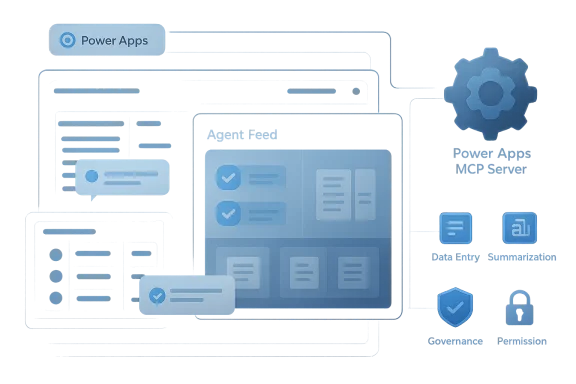
The Power Apps MCP Server is the most strategically interesting part of the update because it lets app capabilities flow outward into agents. Microsoft says these tools, starting with structured form and grid views, can be exposed as reusable tools for agents, with custom UX support entering preview later. In effect, the app is no longer just a place where people work; it becomes a toolset that agents can call.Why this is bigger than one feature
This two-way model is the real story. In one direction, Copilot and agents enter the app to help users work faster. In the other, the app’s own logic and capabilities are made available to agents outside the app. That is a much more mature architecture than the old “chatbot attached to software” pattern, because it lets Microsoft reuse the same business rules across multiple surfaces.The documentation makes this concrete by saying that agents can use advanced tools developed in Power Apps, including data-entry capabilities that were previously available only as an on-demand AI feature. Microsoft is explicitly turning application features into agent tools. That is a meaningful shift from app-centric AI to capability-centric AI. (learn.microsoft.com)
For enterprise buyers, this has a very practical benefit: it reduces duplication. Instead of rebuilding the same validation logic or record-generation behavior in multiple agents, the organization can expose the existing app skill once and let different agents consume it. That is cleaner, cheaper, and much easier to govern.
The platform implications
MCP support is also a signal that Microsoft wants Power Apps to be interoperable with the broader agent ecosystem. In enterprise AI, interoperability is not a nice-to-have; it is what prevents each department from creating its own isolated mini-platform. By exposing app skills through a standard protocol, Microsoft is betting that customers will prefer reusable tools over bespoke automation.That bet makes competitive sense. If agents are going to be everywhere, then the winner is not necessarily the tool with the flashiest conversation layer. It is the tool that can reliably orchestrate tasks, preserve business semantics, and fit into the controls enterprises already use. Microsoft is trying to own that layer. (learn.microsoft.com)
It also helps explain why Microsoft is emphasizing maker-provided credentials and specific orchestration instructions. The company is clearly aware that once apps become tools for agents, credential handling and tool invocation policy become first-order security concerns. That is not a footnote; it is the backbone of the model. (learn.microsoft.com)
The Agent Feed Brings Human Oversight Back to the Center
The agent feed may be the least glamorous feature in the announcement, but it is arguably the most important for real-world enterprise adoption. Microsoft describes it as a dedicated experience where users can see, review, and guide agent activity directly inside business apps. That means approvals and interventions happen in context, rather than in some separate monitoring dashboard that no one remembers to use.Supervision, not just automation
The agent feed is designed to make human oversight practical. Makers can set thresholds so low-risk actions happen automatically while higher-impact actions, such as sending emails or creating records, surface for approval. Microsoft also highlights side-by-side comparison views and deep links back to records, which should make it easier for users to validate output before it becomes part of the system of record. (microsoft.com)That design choice is critical. Enterprise AI often fails not because the model is weak, but because the workflow around it is clumsy. If a user has to leave the app, open a separate console, inspect a log, and then cross-check a record manually, the “AI advantage” quickly evaporates. Microsoft seems to understand that approval friction is every bit as important as model quality.
The Power Apps MCP Server documentation goes even further by saying the agent feed only supports agents that use the server to create tasks starting May 1, 2026. That is a clear sign that Microsoft wants agent supervision to be structurally tied to the new tooling. In plain English: if you want the feed, you need to play by the platform’s rules. (learn.microsoft.com)
Why the governance angle matters
This is where Microsoft’s enterprise instincts show. Agentic systems are powerful, but they create a new kind of accountability problem. Someone still has to know what was automated, what was approved, what was rejected, and what data was used. The feed gives business users a way to supervise those decisions without turning the process into a separate compliance project.The insurance claims example is a good illustration. An agent can extract data from incoming emails and prepopulate case forms, but an adjuster still reviews and approves the result before anything lands in the system. That is the right balance for most businesses: agents do the heavy lifting, humans validate the consequential parts. (microsoft.com)
The deeper lesson is that Microsoft is trying to make supervision feel native. That is exactly what enterprise customers need if they are going to trust agents with real work. Not more dashboards. Not more random alerts. A live, contextual, auditable workspace inside the application they already use.
What This Means for Makers and Developers
For makers, the message is simple: apps are no longer just places to define forms and views. They are becoming the source of business intelligence that both humans and agents can use. That means the value of good data modeling, sensible permissions, and clean business logic is increasing, not decreasing.A stronger low-code story
Microsoft has spent years arguing that low-code is good for speed. The 2026 version of that argument is stronger: low-code is good for speed because it also gives Microsoft a controlled place to attach AI. The app already knows the fields, the rules, and the process boundaries, so it is a natural anchor point for Copilot and agents. (microsoft.com)That creates a new incentive for makers to think like platform architects. If the app is going to expose tools to agents, then its data model has to be durable. If Copilot is going to reason across business data, then the app’s metadata and permissions have to be trustworthy. The role of the maker is moving from screen designer to business-context designer.
There is a real upside here for citizen developers and professional developers alike. Citizen makers get more capability without having to build custom AI plumbing from scratch. Professional developers get a clearer platform contract for how AI enters and exits the app. That division of labor should make the ecosystem healthier over time. (microsoft.com)
The development workflow changes
The new model also changes how teams should think about testing. It is not enough to verify that an app renders properly. Teams now need to verify that the app’s AI behaviors are grounded, that agent tasks are approved at the right threshold, and that the protocol-based tool exposure behaves as expected. In practice, that means more governance during build and more review during release.That sounds like overhead, but it is actually a sign of maturity. The organizations that adopt agentic workflows successfully will be the ones that treat them like software, not magic. Microsoft is giving them the plumbing to do exactly that. (learn.microsoft.com)
Enterprise vs. Consumer Impact
The enterprise story is obvious: better decision-making, fewer context switches, tighter oversight, and more reusable automation. But the consumer-adjacent effect matters too, because many workers now experience Microsoft 365 as both a business platform and a personal productivity layer. That means the new Power Apps capabilities will shape expectations across the broader Microsoft ecosystem.Enterprise buyers
For enterprises, the key advantage is governed productivity. Copilot can work in the same business context as the app, and agents can reuse app capabilities without bypassing controls. That should appeal to organizations that have been cautious about letting AI write directly to operational systems. ([microsoft.com](https://www.microsoft.com/en-us/dyn...rking-is-taking-shape-frontier-transformatiis consistency. Microsoft is trying to make Power Apps, Dynamics 365, and Microsoft 365 feel like one continuous environment from the standpoint of context and action. That reduces the burden on IT, simplifies training, and makes the platform more attractive to departments that are tired of stitching together disconnected tools. (microsoft.com)From a licensing perspective, the move also reinforces Microsoft’s strategy of making AI a premium layer attached to existing enterprise value. That is not surprising, but it is commercially important. The more AI becomes part of the default business workflow, the harder it becomes for customers to treat it as optional.
Consumers and frontline users
For everyday users, the gain is simpler and more immediate: less tab hopping, faster form completion, and better summaries of what matters. Workers who live in operational applications all day will likely feel the benefit of in-app Copilot before they ever think about protocols ooften how Microsoft wins adoption: the user notices the convenience long before the CIO no. (microsoft.com)Frontline and semi-structured roles could benefit especially from app skills like data entry and summarization. Those are the tasks where workers are often repeating the same pattern over and over, and where a good AI layer can shave minutes off every interaction. Small efficiencies are what compound into meaningful productivity gains at scale.
Strengths and Opportunities
Microsoft’s update is strongest where it connects AI to existing business context rather than pretending AI can replace that context. It also gives enterprises a more coherent path from experimentation to controlled deployment, which is exactly where most AI projects need help. The opportunity is not just to make apps smarter, but to make them more actionable without sacrificing governance.- Context-rich Copilot inside model-driven apps should improve relevance and reduce app switching. (microsoft.com)
- App skills like data entry, summarization, exploration, and visualization map cleanly to common business tasks.
- Power Apps MCP Server turns app capabilities into reusable agent tools, reducing duplication. (learn.microsoft.com)
- Agent feed supervision gives business users a native approval layer instead of a separate admin console. (learn.microsoft.com)
- Work IQ grounding strengthens the case for business-aware AI instead of generic chat. (microsoft.com)
- Governance-by-design should appeal to regulated industries and cautious IT teams.
- Platform reuse across apps and agents can lower development cost over time.
Risks and Concerns
The biggest concern is that the more capable these systems become, the more complex they become to manage. Multi-surface AI can drift, misfire, or become difficult to debug if the app, the agent, and the approval layer are not aligned. Microsoft is clearly aware of that problem, but customers will still need strong operating discipline to avoid it.- Overtrust could lead users to accept summaries or prefilled records without sufficient review.
- Orchestration complexity may make failures harder to trace across apps and agents.
- Model and feature fragmentation could create inconsistent experiences across app surfaces.
- Governance overhead may rise as more tools, thresholds, and approvals are introduced. (learn.microsoft.com)
- Security exposure can expand when agents are allowed to act on richer business context.
- Licensing complexity may slow adoption if customers need multiple premium entitlements. (microsoft.com)
- Privacy and retention concerns will remain front and center whenever agent activity is recorded and reviewed.
Looking Ahead
The next phase of this story will be judged less by the announcement itself and more by whether customers actually operationalize it. Microsoft has set dates for key milestones: agent feed with Power Apps MCP Server is due to be generally available on May 4, 2026, and app-based form and grid experiences in Copilot Chat are slated for July 2026, with custom UX entering preview. Those dates will tell us whether this vision is shipping at the pace Microsoft wants, or whether enterprise readiness slows things down.The most important thing to watch is adoption quality, not just adoption volume. If customers use the new features for repetitive, governed, high-value tasks, then Microsoft will have proven that its “AI in the app” strategy works. If the features remain mostly demo material, the platform will still be impressive — but less transformative than the company hopes.
What to watch next:
- Whether more app skills are exposed through MCP for reuse by third-party agents. (learn.microsoft.com)
- How quickly canvas apps close the gap with model-driven apps on Copilot capabilities. (microsoft.com)
- Whether enterprises standardize on agent feed workflows for approvals and supervision. (learn.microsoft.com)
- How Microsoft balances app intelligence with tenant-level governance and admin controls. (microsoft.com)
- Whether Work IQ becomes a visible differentiator in real customer deployments. (microsoft.com)
Source: Microsoft Making apps smarter with Copilot and app skills in Power Apps - Microsoft Power Platform Blog
