

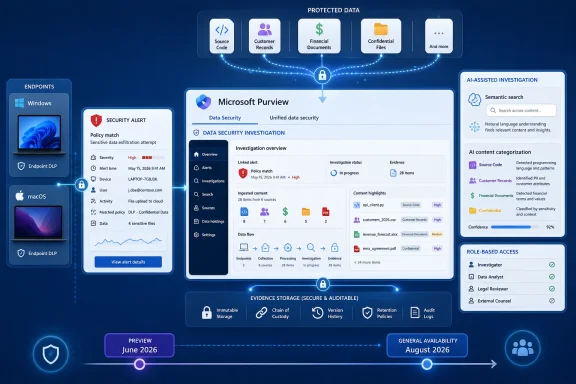
Microsoft is tightening the connection between detection and investigation in Microsoft Purview by letting security teams launch a Data Security Investigation directly from endpoint Data Loss Prevention alerts. The new workflow, listed under Microsoft 365 Roadmap ID 558547, is designed to collect the files associated with a defined set of endpoint DLP events and place them into a purpose-built investigation for deeper review. Preview availability began in June 2026, while general availability for worldwide standard multi-tenant customers is scheduled to begin in August 2026.
Microsoft Purview Data Loss Prevention has steadily expanded from protecting information inside Microsoft 365 services to monitoring sensitive data on managed Windows and macOS endpoints. Endpoint DLP can detect activities such as copying a sensitive file to removable storage, printing it, uploading it through a browser, transferring it over a network share, or opening it with an application that administrators consider unapproved.
Those controls help organizations enforce policy at the point where information might leave a trusted environment. They also generate a substantial amount of telemetry, including policy matches, user actions, device details, sensitive information types, enforcement decisions, and alerts.
The challenge begins after the alert appears. An analyst may know that a user downloaded, copied, printed, or uploaded a protected file, but understanding the significance of that event requires answers to more difficult questions. What was actually inside the file? Was it one ordinary business document or part of a larger collection? Did multiple events involve related intellectual property, personal records, credentials, or financial information?
Traditional alert triage focuses heavily on the action and its surrounding telemetry. Data Security Investigations, or DSI, shifts attention toward the affected content itself, allowing investigators to assemble relevant files, analyze their sensitivity, identify common themes, and evaluate the potential impact of an incident.
The new integration reduces the operational gap between those two stages. Instead of manually tracing an alert to a user, endpoint, event, and file before constructing a separate investigation, an analyst can use an endpoint DLP query to gather the related evidence.
General availability is targeted for August 2026 on the web-based Microsoft Purview experience. The listed cloud scope is Worldwide Standard Multi-Tenant, which means organizations in specialized government clouds should not assume support until Microsoft separately documents it.
DSI then gathers the related files that triggered the matching alerts. A query might, for example, target files downloaded by a particular employee during a specified period or files involved in suspicious events across a group of corporate devices.
An investigation could be scoped around:
An endpoint DLP event might represent a blocked attempt, an overridden warning, an audited action, or an activity permitted by policy. Analysts still need to correlate content with enforcement status, device telemetry, identity risk, business context, and the user’s explanation.
A practical workflow is likely to follow a sequence similar to this:
Query-based collection makes it easier to examine those events collectively. The analyst can evaluate whether the files form a meaningful set, such as source code for one project, documents concerning the same acquisition, or records belonging to the same customer population.
That does not eliminate organizational boundaries. It gives the teams a shared investigation object around which responsibilities and evidence can be coordinated.
For DSI to gather files, organizations need more than ordinary event telemetry. They must have the appropriate endpoint onboarding, policy, evidence collection, storage, retention, and access arrangements in place.
This is operationally powerful because the investigation does not have to depend on the file remaining on the employee’s device. The user may delete it, rename it, disconnect the endpoint, or leave the organization before the alert is fully investigated.
However, capturing original files also creates a sensitive repository. Evidence may contain personal information, privileged communications, trade secrets, credentials, health records, source code, or regulated customer data. Organizations must treat evidence storage as a high-value security asset rather than as routine diagnostic logging.
This creates an important operational trade-off. Short retention reduces storage, privacy, and exposure concerns, but it can prevent investigators from reconstructing incidents discovered weeks or months later. Long retention improves historical visibility while increasing cost and governance obligations.
Security leaders should align retention with realistic detection and escalation times. A nominally generous investigation process is of little value if evidence disappears before a case reaches the appropriate team.
Analysts should therefore avoid treating an initial zero-result query as definitive. Rechecking after devices reconnect may reveal files that were not available during the first search.
Its analytical features include semantic or vector-based search, content categorization, and examinations designed to identify particular forms of security or privacy exposure.
Vector search attempts to understand semantic similarity rather than relying exclusively on literal text matches. An analyst investigating a product design leak could potentially locate documents discussing related technical concepts even when they do not contain the precise phrase used in the query.
This capability can reduce false negatives, but it also introduces interpretive uncertainty. Semantic relevance is not the same as evidentiary proof, and investigators must validate results before drawing conclusions.
DSI can categorize content to help analysts identify clusters and prioritize review. Useful categories might distinguish human resources records from source code, customer information, legal documents, financial forecasts, or product plans.
The practical benefit is triage. If a collection includes ten highly sensitive merger documents and hundreds of low-risk templates, the investigation should surface the merger material quickly.
This deeper examination is one reason the endpoint DLP integration matters. A policy alert tells the organization why a rule matched at the time of the activity. DSI can evaluate the broader meaning of the collected content and reveal risks beyond the original policy condition.
Organizations should regard AI findings as prioritization and decision-support signals. They should not use an AI-generated category or risk summary as the sole basis for disciplinary, legal, or regulatory action.
This has implications for privacy, workplace transparency, and acceptable-use policies.
An isolated action that once appeared innocuous may become significant when examined alongside related activity. For example, one downloaded spreadsheet might be ordinary work, while a collection of hundreds of files downloaded shortly before resignation may warrant investigation.
Organizations should minimize unnecessary collection through carefully scoped policies. Broad capture rules may produce more evidence, but they also increase the chance of collecting irrelevant personal content.
Where employment law, labor agreements, works councils, or local privacy rules impose additional requirements, technical availability does not override those obligations.
That question influences containment, legal exposure, customer communication, regulatory notification, and executive decision-making.
Combining endpoint alert scope with content analysis helps bridge those perspectives. If a compromised account downloaded engineering documents and then attempted to upload them, DSI can help identify the affected intellectual property and its business significance.
AI-assisted examinations may help identify personal-data categories and prioritize files for privacy review. Legal and privacy teams must still validate the findings, but earlier visibility can improve decision-making under time pressure.
That feedback can improve the protection program. Investigators can identify missing labels, weak classification rules, unmonitored applications, or business processes that routinely bypass expected controls.
Access to captured evidence should be narrower than access to ordinary DLP alerts. Seeing that a policy matched is materially different from opening the underlying confidential file.
Strong role design is therefore fundamental.
A practical access model can separate responsibilities among:
Administrators should test boundary behavior before enabling production investigations. A search interface that appears properly scoped is not enough; the organization should verify results using accounts with different roles and organizational assignments.
A defensible workflow records why the query was necessary, who approved it, which criteria were used, and when access should end.
Useful pilot metrics include:
Separate playbooks may be appropriate for employee departures, compromised endpoints, mass USB copying, unusual printing, cloud uploads, source-code movement, or suspected credential theft.
This could appeal to organizations already standardized on Microsoft 365, Defender, Intune, Entra, and Purview.
Microsoft’s advantage is its access to signals across the productivity, identity, endpoint, and compliance layers. If those signals can be connected without excessive licensing, role complexity, or portal switching, Purview becomes more attractive as an integrated operating environment.
However, Microsoft’s strength inside its own ecosystem can also be a limitation. Enterprises with significant Linux estates, non-Microsoft collaboration platforms, specialized engineering systems, or multiple cloud providers may still require independent tools for consistent visibility.
DSI’s effectiveness will ultimately depend less on the presence of an AI label than on accuracy, transparency, scale, cost, and the ability to support defensible investigations.
Administrators should also watch for final documentation describing licensing, billing, regional availability, supported endpoint scenarios, query limits, file-size restrictions, retention behavior, and role requirements.
If the direct alert-launch experience carries richer context than a general endpoint evidence query, it could reduce the need to move repeatedly between DSI, the DLP Alerts dashboard, Activity Explorer, and Defender. If it does not, analysts will still need a disciplined process for maintaining the chain between file content and endpoint events.
Limits on query windows, file counts, investigation size, or concurrent processing could materially affect real-world usefulness. Security teams should test high-volume scenarios rather than judging performance from a small pilot alone.
Enterprises will need dashboards, budgets, thresholds, and chargeback policies that explain what each investigation consumes. Without those controls, analysts may avoid valuable analysis because costs are unclear, or they may run unnecessarily broad investigations that create surprise spending.
Microsoft will also face pressure to preserve context across all of those sources. A unified portal is useful only if analysts can see why each item entered the investigation and how it relates to the original activity.
DSI can support operational investigation, but customers should evaluate whether its records meet their requirements for formal forensic or legal proceedings. In some cases, specialized forensic collection and eDiscovery preservation will remain necessary.
The feature’s success will depend on disciplined deployment. Organizations should configure evidence collection deliberately, restrict access rigorously, test query behavior, validate AI findings, monitor consumption, and preserve the distinction between suspicious activity and proven misconduct.
If Microsoft delivers the planned August 2026 rollout with reliable evidence gathering and manageable operational overhead, Roadmap ID 558547 could become one of Purview’s more consequential workflow improvements. It turns endpoint DLP from a system that primarily reports and controls risky actions into a stronger starting point for understanding exactly what information may have left the organization—and what must happen next.
 Background
Microsoft Purview Data Loss Prevention has steadily expanded from protecting information inside Microsoft 365 services to monitoring sensitive data on managed Windows and macOS endpoints. Endpoint DLP can detect activities such as copying a sensitive file to removable storage, printing it, uploading it through a browser, transferring it over a network share, or opening it with an application that administrators consider unapproved.Those controls help organizations enforce policy at the point where information might leave a trusted environment. They also generate a substantial amount of telemetry, including policy matches, user actions, device details, sensitive information types, enforcement decisions, and alerts.
The challenge begins after the alert appears. An analyst may know that a user downloaded, copied, printed, or uploaded a protected file, but understanding the significance of that event requires answers to more difficult questions. What was actually inside the file? Was it one ordinary business document or part of a larger collection? Did multiple events involve related intellectual property, personal records, credentials, or financial information?
Traditional alert triage focuses heavily on the action and its surrounding telemetry. Data Security Investigations, or DSI, shifts attention toward the affected content itself, allowing investigators to assemble relevant files, analyze their sensitivity, identify common themes, and evaluate the potential impact of an incident.
From policy enforcement to content investigation
Endpoint DLP and DSI therefore serve different but complementary purposes. Endpoint DLP detects and, depending on policy configuration, restricts risky activity. DSI helps analysts determine what the affected information means to the organization after a suspicious or prohibited action has occurred.The new integration reduces the operational gap between those two stages. Instead of manually tracing an alert to a user, endpoint, event, and file before constructing a separate investigation, an analyst can use an endpoint DLP query to gather the related evidence.
Roadmap timing
Microsoft added Roadmap ID 558547 on March 12, 2026, and updated it on July 21, 2026. The roadmap continues to list the feature as in development, despite preview availability being scheduled for June 2026.General availability is targeted for August 2026 on the web-based Microsoft Purview experience. The listed cloud scope is Worldwide Standard Multi-Tenant, which means organizations in specialized government clouds should not assume support until Microsoft separately documents it.
What Microsoft Is Adding
The central improvement is the ability to move from an endpoint DLP alert context into Data Security Investigations and define a query for the content an analyst wants to examine. Microsoft’s roadmap description identifies criteria such as a time range, users, and endpoints.DSI then gathers the related files that triggered the matching alerts. A query might, for example, target files downloaded by a particular employee during a specified period or files involved in suspicious events across a group of corporate devices.
Query-driven collection
This is more useful than simply attaching one file to one alert. A query-driven workflow lets an investigator define the boundaries of the suspected incident and collect content across multiple events.An investigation could be scoped around:
- A particular user suspected of copying information before leaving the company.
- Several users involved in an unusual sequence of related transfers.
- One endpoint that may have been compromised.
- Multiple endpoints used by the same identity.
- A short incident window associated with a known intrusion.
- A longer period in which a gradual leak may have occurred.
- Files matching endpoint DLP policies protecting a specific class of information.
Automatic gathering, not automatic judgment
The word automatically is important, but it should not be overinterpreted. DSI automates the gathering of files that meet the query and are available through the relevant evidence mechanisms. It does not automatically prove that a user intended to steal data or that every collected file was successfully exfiltrated.An endpoint DLP event might represent a blocked attempt, an overridden warning, an audited action, or an activity permitted by policy. Analysts still need to correlate content with enforcement status, device telemetry, identity risk, business context, and the user’s explanation.
How the Investigation Workflow Changes
The new integration should shorten the distance between alert triage and content analysis. That matters because security incidents often become more expensive and difficult to contain as investigative delays accumulate.A practical workflow is likely to follow a sequence similar to this:
- An endpoint DLP policy detects a monitored file activity. The event may involve removable media, printing, cloud upload, an unauthorized application, a network destination, or another configured endpoint action.
- Purview generates an event or alert according to policy settings. The analyst reviews the user, device, policy, sensitive information, and action involved.
- The analyst launches or pivots into Data Security Investigations. Rather than treating the alert as an isolated occurrence, the analyst defines the broader incident scope.
- The analyst enters endpoint DLP query criteria. These criteria can include the time window, relevant users, and endpoints.
- DSI gathers the related captured files. Available content associated with matching endpoint DLP alerts is added for review.
- The investigation processes the collected content. Analysts can search, categorize, examine, and prioritize the material.
- Security, privacy, legal, and business teams determine the response. Remediation can address both the immediate incident and weaknesses in policy design.
Better handling of multi-event incidents
Many serious data-loss cases do not present themselves as one dramatic alert. They appear as a series of individually ambiguous events: several downloads, a handful of USB copies, repeated printing, or small uploads distributed over days.Query-based collection makes it easier to examine those events collectively. The analyst can evaluate whether the files form a meaningful set, such as source code for one project, documents concerning the same acquisition, or records belonging to the same customer population.
Faster escalation from operations to specialists
First-line security operations staff may identify suspicious behavior without having the expertise or authorization to inspect sensitive content in depth. DSI can provide a more structured escalation destination for specialists in data security, insider risk, privacy, legal response, and digital forensics.That does not eliminate organizational boundaries. It gives the teams a shared investigation object around which responsibilities and evidence can be coordinated.
The Role of Endpoint DLP Evidence Collection
The quality of a content-focused investigation depends on whether the content is available. Microsoft Purview endpoint DLP includes an evidence collection capability that can retain copies of files associated with selected endpoint activities.For DSI to gather files, organizations need more than ordinary event telemetry. They must have the appropriate endpoint onboarding, policy, evidence collection, storage, retention, and access arrangements in place.
Capturing the original file
Endpoint DLP policies can be configured to collect an original file as evidence for selected activities. When a matching event occurs, the system captures a copy and stores it for authorized review.This is operationally powerful because the investigation does not have to depend on the file remaining on the employee’s device. The user may delete it, rename it, disconnect the endpoint, or leave the organization before the alert is fully investigated.
However, capturing original files also creates a sensitive repository. Evidence may contain personal information, privileged communications, trade secrets, credentials, health records, source code, or regulated customer data. Organizations must treat evidence storage as a high-value security asset rather than as routine diagnostic logging.
Retention determines availability
Evidence collection retention has a direct impact on investigative reach. If a file has already expired from the evidence store when an analyst runs the DSI query, the investigation cannot retrieve it from that source.This creates an important operational trade-off. Short retention reduces storage, privacy, and exposure concerns, but it can prevent investigators from reconstructing incidents discovered weeks or months later. Long retention improves historical visibility while increasing cost and governance obligations.
Security leaders should align retention with realistic detection and escalation times. A nominally generous investigation process is of little value if evidence disappears before a case reaches the appropriate team.
Latency and endpoint connectivity
Collected evidence may not become available immediately. Devices can be offline, intermittently connected, or delayed in uploading the necessary information.Analysts should therefore avoid treating an initial zero-result query as definitive. Rechecking after devices reconnect may reveal files that were not available during the first search.
AI-Assisted Analysis Inside DSI
Data Security Investigations is intended to do more than preserve files. Microsoft positions it as an AI-assisted environment for finding risks hidden inside a potentially large body of affected content.Its analytical features include semantic or vector-based search, content categorization, and examinations designed to identify particular forms of security or privacy exposure.
Semantic search
Traditional keyword search works when an investigator knows the exact words likely to appear in a document. It is less effective when files use abbreviations, internal project names, technical jargon, misspellings, or conceptually related language.Vector search attempts to understand semantic similarity rather than relying exclusively on literal text matches. An analyst investigating a product design leak could potentially locate documents discussing related technical concepts even when they do not contain the precise phrase used in the query.
This capability can reduce false negatives, but it also introduces interpretive uncertainty. Semantic relevance is not the same as evidentiary proof, and investigators must validate results before drawing conclusions.
Content categorization
A large endpoint incident may involve hundreds or thousands of files. Reviewing each item in arbitrary order is slow and risks spending valuable time on low-impact material.DSI can categorize content to help analysts identify clusters and prioritize review. Useful categories might distinguish human resources records from source code, customer information, legal documents, financial forecasts, or product plans.
The practical benefit is triage. If a collection includes ten highly sensitive merger documents and hundreds of low-risk templates, the investigation should surface the merger material quickly.
Security examinations
AI-assisted examinations can look for risks that are not always represented by a standard sensitivity label or DLP policy match. These may include exposed credentials, personal data, network information, or indications of threat-related discussion.This deeper examination is one reason the endpoint DLP integration matters. A policy alert tells the organization why a rule matched at the time of the activity. DSI can evaluate the broader meaning of the collected content and reveal risks beyond the original policy condition.
Human validation remains essential
Generative AI can accelerate analysis, but it can misclassify content, miss context, or produce conclusions that sound more certain than the underlying evidence supports. Sensitive investigations require review by trained personnel.Organizations should regard AI findings as prioritization and decision-support signals. They should not use an AI-generated category or risk summary as the sole basis for disciplinary, legal, or regulatory action.
Consumer and Employee Impact
Although the feature targets enterprise security teams, employees will experience its effects through endpoint monitoring and evidence collection. A corporate device may capture files involved in policy-controlled activities and make those copies available to authorized investigators.This has implications for privacy, workplace transparency, and acceptable-use policies.
More complete monitoring of file activity
Employees in managed environments should already expect organizations to monitor actions involving sensitive business information. The DSI integration makes that monitoring more actionable by linking events to the files themselves and enabling aggregate analysis.An isolated action that once appeared innocuous may become significant when examined alongside related activity. For example, one downloaded spreadsheet might be ordinary work, while a collection of hundreds of files downloaded shortly before resignation may warrant investigation.
Personal files on corporate devices
Bring-your-own-device arrangements, personal use of corporate computers, and mixed-storage practices can complicate evidence collection. A policy match might involve a document containing both business and personal information, or a captured file could expose material unrelated to the suspected incident.Organizations should minimize unnecessary collection through carefully scoped policies. Broad capture rules may produce more evidence, but they also increase the chance of collecting irrelevant personal content.
Transparency and due process
Clear notices, acceptable-use agreements, documented investigation criteria, and review procedures can reduce the risk of surprise or inconsistent enforcement. Employees should understand that managed devices and corporate data may be monitored, while investigators should understand the limits of their authority.Where employment law, labor agreements, works councils, or local privacy rules impose additional requirements, technical availability does not override those obligations.
Enterprise Security and Compliance Impact
For enterprises, the new capability strengthens the connection between data protection operations and incident response. It can help answer the central question after a suspected leak: What information was put at risk?That question influences containment, legal exposure, customer communication, regulatory notification, and executive decision-making.
Breach impact assessment
Security teams often know that a device was compromised before they know which data the attacker could access. Conversely, DLP teams may detect file movement without knowing whether the behavior is malicious.Combining endpoint alert scope with content analysis helps bridge those perspectives. If a compromised account downloaded engineering documents and then attempted to upload them, DSI can help identify the affected intellectual property and its business significance.
Privacy response
When personal information is involved, organizations may need to determine which data elements were exposed, how many people were affected, and whether notification obligations apply. This can be a painstaking process when records are spread across multiple documents and formats.AI-assisted examinations may help identify personal-data categories and prioritize files for privacy review. Legal and privacy teams must still validate the findings, but earlier visibility can improve decision-making under time pressure.
Intellectual property protection
DLP policies can detect labels, sensitive information types, keywords, document fingerprints, and other conditions, but not every valuable file is perfectly classified. Endpoint-derived investigations may reveal related intellectual property that the original rule did not fully describe.That feedback can improve the protection program. Investigators can identify missing labels, weak classification rules, unmonitored applications, or business processes that routinely bypass expected controls.
Auditability
A mature investigation process needs a record of who searched for evidence, who viewed sensitive content, what conclusions were reached, and what mitigation actions followed. Microsoft’s broader Purview architecture includes audit logging for investigation-related activity, but organizations still need their own governance model.Access to captured evidence should be narrower than access to ordinary DLP alerts. Seeing that a policy matched is materially different from opening the underlying confidential file.
Permissions, Separation of Duties, and Governance
The endpoint DLP-to-DSI workflow creates a concentration of power. Authorized investigators may be able to search across users, retrieve captured files, apply AI analysis, and expose content that was never intended for broad internal access.Strong role design is therefore fundamental.
Least-privilege access
Microsoft documents additional role requirements for querying endpoint evidence beyond ordinary DSI permissions. Administrators should validate the current requirements during deployment and avoid assigning broad role groups merely to make setup easier.A practical access model can separate responsibilities among:
- DLP administrators who design and maintain policies.
- Security operations analysts who triage alerts.
- Data security investigators who examine collected content.
- Insider risk teams that assess user context.
- Privacy or legal reviewers who evaluate regulated information.
- Audit personnel who review investigator activity.
- Storage and billing administrators who manage supporting resources.
Compliance boundaries
Large organizations may need to prevent investigators in one region, subsidiary, or business unit from searching another unit’s data. Purview search permissions and compliance boundaries can help enforce those divisions.Administrators should test boundary behavior before enabling production investigations. A search interface that appears properly scoped is not enough; the organization should verify results using accounts with different roles and organizational assignments.
Investigation approval
High-risk queries may deserve a formal approval process. Searching all endpoint evidence for an executive, attorney, union representative, or privileged project could have serious consequences even when technically permitted.A defensible workflow records why the query was necessary, who approved it, which criteria were used, and when access should end.
Operational Deployment Considerations
The August 2026 general-availability target should not be treated as a signal to enable the feature without preparation. Organizations need to assess endpoint coverage, evidence policy configuration, storage, retention, permissions, and incident-response procedures.Validate prerequisites
Before relying on the integration, administrators should confirm that:- Relevant Windows and macOS devices are correctly onboarded.
- Endpoint DLP policies are active and generating expected telemetry.
- Evidence collection is enabled for the file activities that matter.
- Microsoft-managed storage or the required evidence storage configuration is operational.
- Retention is long enough for normal escalation timelines.
- Appropriate investigators have the necessary roles.
- Compliance boundaries produce the intended result.
- Investigation activity is included in audit and oversight processes.
- Cost monitoring is enabled for storage and AI-backed analysis.
Begin with a controlled pilot
A pilot should involve a representative but limited group of devices, users, applications, and DLP policies. The goal is to learn how much evidence is collected, how quickly it becomes available, and how effectively analysts can distinguish important content from noise.Useful pilot metrics include:
- The percentage of relevant alerts for which file evidence is available.
- The delay between endpoint activity and DSI availability.
- The average number of files collected per query.
- The proportion of collected files that are relevant to the case.
- The time saved compared with the existing manual process.
- The frequency of false-positive AI classifications.
- Storage and AI consumption per investigation.
- The number of investigators who require access to original content.
Develop query playbooks
Investigators should not improvise broad searches during every incident. Predefined playbooks can specify recommended time windows, users, endpoint criteria, escalation thresholds, and review steps for common scenarios.Separate playbooks may be appropriate for employee departures, compromised endpoints, mass USB copying, unusual printing, cloud uploads, source-code movement, or suspected credential theft.
Competitive and Strategic Implications
Microsoft is positioning Purview as a data-security platform rather than a collection of disconnected compliance tools. The endpoint DLP integration with DSI supports that strategy by joining policy enforcement, evidence collection, AI analysis, and mitigation inside the Microsoft security ecosystem.This could appeal to organizations already standardized on Microsoft 365, Defender, Intune, Entra, and Purview.
Reducing console fragmentation
Data-loss investigations frequently require several products: endpoint telemetry, DLP alerts, identity information, cloud activity, eDiscovery tools, case management, and content classification. Every handoff adds delay and can strip away context.Microsoft’s advantage is its access to signals across the productivity, identity, endpoint, and compliance layers. If those signals can be connected without excessive licensing, role complexity, or portal switching, Purview becomes more attractive as an integrated operating environment.
Pressure on specialist vendors
Specialist DLP and insider-risk vendors often differentiate through behavioral analytics, cross-platform coverage, flexible policy engines, forensic depth, and support for heterogeneous environments. Microsoft’s integrated approach raises the baseline they must exceed.However, Microsoft’s strength inside its own ecosystem can also be a limitation. Enterprises with significant Linux estates, non-Microsoft collaboration platforms, specialized engineering systems, or multiple cloud providers may still require independent tools for consistent visibility.
AI as an operational differentiator
Many vendors can generate an alert when a protected file is copied. The competitive frontier is shifting toward explaining the content, connecting related events, prioritizing business impact, and recommending action.DSI’s effectiveness will ultimately depend less on the presence of an AI label than on accuracy, transparency, scale, cost, and the ability to support defensible investigations.
Strengths and Opportunities
The endpoint DLP integration introduces several clear opportunities for security and compliance teams.- It reduces manual evidence gathering. Analysts can define an incident scope and collect related files without reconstructing every alert independently.
- It supports aggregate investigation. Multiple endpoint events can be assessed as one potential campaign instead of as unrelated policy matches.
- It places content at the center of triage. Investigators can evaluate the sensitivity and business meaning of the affected files, not merely the mechanics of their movement.
- It can accelerate breach assessment. Faster identification of personal information, intellectual property, credentials, or financial data can improve containment and notification decisions.
- It strengthens collaboration. Security, privacy, legal, insider risk, and business teams can work from a shared investigation scope.
- It can improve DLP policy quality. Findings can expose classification gaps, excessive false positives, missing policies, and risky business workflows.
- It preserves evidence beyond the live endpoint. Captured files may remain available even if the user deletes the local copy or the device becomes inaccessible.
- It aligns with Microsoft’s unified security strategy. Organizations invested in Defender and Purview gain a more direct path from endpoint detection to data-focused response.
Risks and Concerns
The same capabilities that improve investigations can create substantial governance and security risks.- Evidence collection increases the sensitive-data footprint. Captured files create another repository that must be secured, monitored, retained, and eventually deleted.
- Overbroad queries can expose irrelevant information. Investigators may retrieve personal, privileged, or confidential content unrelated to the incident.
- AI analysis can be wrong. Misclassification, missed context, and overly confident summaries can distort prioritization or unfairly influence decisions.
- Retention can undermine investigations. Evidence that expires before escalation may leave analysts with incomplete results.
- Latency can create false reassurance. A query may initially return no files because devices have not uploaded evidence.
- Permissions can become excessive. Broad role assignments may allow more employees than necessary to inspect highly sensitive content.
- Costs may be unpredictable. Storage and AI-backed processing can grow with the number and size of investigations.
- Endpoint evidence lacks the whole story. Collected file content does not replace detailed event context, identity analysis, device forensics, or interviews.
- Insider investigations can affect employee rights. Organizations must align monitoring with local law, labor agreements, privacy obligations, and documented policy.
- Roadmap dates can change. The August 2026 general-availability date is a target rather than a guarantee of universal tenant availability on the first day of the month.
What to Watch Next
The first issue to watch is whether Microsoft meets the August 2026 general-availability target and how quickly the feature reaches eligible tenants. Microsoft 365 roadmap dates usually indicate rollout timing, not a promise that every customer will receive the capability simultaneously.Administrators should also watch for final documentation describing licensing, billing, regional availability, supported endpoint scenarios, query limits, file-size restrictions, retention behavior, and role requirements.
Context preserved during the pivot
One important technical question is how much alert context follows the collected file into DSI. Microsoft’s existing endpoint evidence documentation warns that some per-event device metadata is not preserved in the investigation scope.If the direct alert-launch experience carries richer context than a general endpoint evidence query, it could reduce the need to move repeatedly between DSI, the DLP Alerts dashboard, Activity Explorer, and Defender. If it does not, analysts will still need a disciplined process for maintaining the chain between file content and endpoint events.
Scale and performance
Large organizations may generate enormous numbers of endpoint DLP events. Microsoft will need to demonstrate that DSI can handle broad but legitimate queries without excessive processing delays or unusable result sets.Limits on query windows, file counts, investigation size, or concurrent processing could materially affect real-world usefulness. Security teams should test high-volume scenarios rather than judging performance from a small pilot alone.
Cost visibility
DSI uses consumption-oriented models for storage and AI capacity rather than depending entirely on a conventional per-user license. That can make entry easier, but it shifts attention toward usage governance.Enterprises will need dashboards, budgets, thresholds, and chargeback policies that explain what each investigation consumes. Without those controls, analysts may avoid valuable analysis because costs are unclear, or they may run unnecessarily broad investigations that create surprise spending.
Expansion beyond endpoint DLP
The roadmap item focuses on endpoint DLP alerts, but the strategic direction points toward broader investigation entry points. Similar one-click pivots from Defender incidents, Insider Risk Management alerts, Data Security Posture Management findings, audit searches, and other Purview signals could create a more consistent data-security response model.Microsoft will also face pressure to preserve context across all of those sources. A unified portal is useful only if analysts can see why each item entered the investigation and how it relates to the original activity.
Evidence integrity and defensibility
For serious disciplinary, contractual, or legal matters, organizations may need stronger assurances around evidence provenance. They must know when a file was captured, which event produced it, whether it changed before ingestion, who accessed it, and how analytical outputs were generated.DSI can support operational investigation, but customers should evaluate whether its records meet their requirements for formal forensic or legal proceedings. In some cases, specialized forensic collection and eDiscovery preservation will remain necessary.
Looking Ahead
Microsoft’s endpoint DLP-to-DSI integration reflects a broader change in enterprise security: alerts alone are no longer enough. Security teams increasingly need to understand the value, sensitivity, and relationships of the data involved in an event, especially when an apparently simple file transfer could represent intellectual-property theft, privacy exposure, or preparation for extortion.The feature’s success will depend on disciplined deployment. Organizations should configure evidence collection deliberately, restrict access rigorously, test query behavior, validate AI findings, monitor consumption, and preserve the distinction between suspicious activity and proven misconduct.
If Microsoft delivers the planned August 2026 rollout with reliable evidence gathering and manageable operational overhead, Roadmap ID 558547 could become one of Purview’s more consequential workflow improvements. It turns endpoint DLP from a system that primarily reports and controls risky actions into a stronger starting point for understanding exactly what information may have left the organization—and what must happen next.