

Microsoft Recall, the Windows 11 feature that saves searchable snapshots of a user’s PC activity on Copilot+ PCs, has moved from a 2024 privacy fiasco to a more defensible opt-in tool in 2025 and 2026, though real-world testing still shows dangerous gaps around sensitive information. The latest wave of hands-on coverage, including MakeUseOf’s unexpectedly sympathetic trial, does not vindicate Microsoft’s original pitch. It does something more interesting: it shows that Recall can be genuinely useful while still being exactly the kind of feature users are right to distrust. That tension is now the whole story.
The first version of Recall was not merely poorly explained. It was architecturally and politically tone-deaf in a way that only a platform owner can manage. Microsoft introduced it in May 2024 as a kind of photographic memory for Windows, a feature that would periodically capture the screen, index the contents locally, and let users search back through their digital lives.
That pitch landed in the middle of a security culture already exhausted by telemetry, dark-pattern consent flows, cloud AI land grabs, and years of Windows nudging users toward Microsoft accounts, Edge, OneDrive, and Copilot. Then came the technical findings: early Recall builds stored sensitive data in ways researchers found alarmingly easy to inspect. The problem was not that the public misunderstood the feature. The problem was that the public understood the feature well enough to recoil.
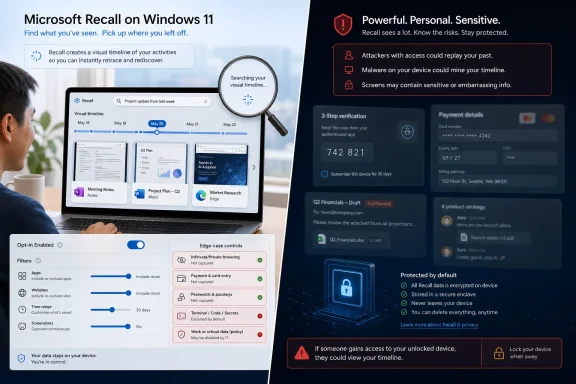
Microsoft’s retreat was unusually fast. Recall was delayed, reworked, pushed through Windows Insider testing, and eventually relaunched for Copilot+ PCs with a much heavier security model. The company made it opt-in, tied access to Windows Hello Enhanced Sign-in Security, moved protected operations into a virtualization-based security enclave, encrypted snapshot data, and added filtering controls for apps and websites.
Those changes matter. They also do not erase the original error. When a company proposes a feature that records the screen every few seconds, the burden of trust is not on users to calm down. It is on the vendor to prove, repeatedly and boringly, that the feature behaves exactly as promised.
That usefulness is not mysterious. Most modern work happens in fragments. A user reads a support thread, checks a dashboard, copies a value, opens a document, compares two browser tabs, edits an image, answers a message, and then loses the path that connected those actions. Search is excellent when the user knows the file name, URL, or phrase. It is much worse when the user remembers only that “I saw that somewhere yesterday next to the thing about the SSD.”
Recall’s basic promise is to search memory the way humans often remember context: visually, approximately, and chronologically. That is why the feature keeps surviving the privacy backlash. There is a real product hiding inside the controversy.
The MakeUseOf trial captures that duality. The author found Recall helpful for returning to writing sessions, browser research, and recent work. App and website exclusions reportedly worked. Private browsing windows were ignored. Payment pages on Amazon caused Recall to stand down as intended. These are not trivial wins; they are exactly the kinds of controls Microsoft needed to demonstrate after the original debacle.
But then the same test found Recall capturing a Wise two-factor authentication flow and account details. That single failure is not a footnote. It is the kind of failure that defines the acceptable-risk boundary for a feature whose whole job is to watch the screen.
Local processing changes the threat model. It means Recall is not, by design, a server-side database of user activity. It means the snapshots are supposed to live on the device, protected by local hardware and Windows security primitives. It also explains why Recall is limited to Copilot+ PCs rather than every Windows 11 machine with a recent CPU.
But local does not mean safe. A password manager is local. A browser profile is local. An Outlook cache is local. Local data can still be exfiltrated, abused by malware, accessed by a compromised user session, or mishandled by software that was supposed to protect it.
That is the category Recall belongs in. It is not best understood as spyware in the crude sense of a vendor secretly uploading everything you do. It is better understood as a high-value local archive that becomes extremely attractive the moment an attacker, rogue insider, abusive partner, forensic examiner, or poorly governed enterprise workflow gets near it.
Microsoft’s security architecture tries to reduce that risk with encryption, Windows Hello, TPM-backed keys, just-in-time access, and isolation. Those are serious measures. They are also compensating controls around a new concentration of sensitive data that did not previously exist.
That single reversal changed the politics. An opt-out screen recorder inside Windows feels presumptuous by design. An opt-in memory aid, protected by biometric authentication and governed by explicit filters, is at least a product someone can choose.
For consumer Windows users, this is the minimum acceptable line. Nobody should wake up to discover that their PC has been quietly building a searchable visual diary because they missed a setup prompt or clicked through an onboarding flow. The more sensitive the feature, the less Microsoft gets to rely on habituated consent.
For administrators, the issue is sharper. In managed environments, Recall is not merely a user preference. It intersects with data classification, legal discovery, endpoint compromise, insider risk, and regulatory obligations. A feature that snapshots a payroll system, customer record, internal incident channel, or privileged admin console can create a record that compliance teams did not ask for and may not be prepared to govern.
Microsoft has added management controls, and organizations can disable or govern Recall through policy. That is necessary, but it is not the same as harmless. The safest enterprise assumption remains that Recall should be off unless there is a specific business case, a documented risk assessment, and clear user training.
A banking site may be recognized. A fintech dashboard may not. A payment flow may trigger protection. A two-factor screen may slip through. A customer portal, medical form, admin console, remote desktop session, or webmail preview may not look like “sensitive information” to whatever detector is making the call.
This is why the Wise example matters so much. It is not proof that Recall is broken everywhere. It is proof that Recall’s safety model depends partly on classification systems that will inevitably miss edge cases. The more users trust Recall to know what not to capture, the more consequential those misses become.
The manual exclusion tools help. Users can block specific apps and websites, and Recall can remove captured instances after the fact. But after-the-fact deletion is not the same as prevention. Once a snapshot exists, even locally and encrypted, it has crossed a boundary many users never intended to cross.
The uncomfortable truth is that Recall asks users to become curators of their own surveillance exclusions. That may be acceptable for a power user who understands the feature and regularly audits settings. It is a poor default mental model for everyone else.
The TotalRecall line of research is especially damaging because it targets the confidence Microsoft wants users to have in the redesigned system. The concern is not simply “what if someone steals your laptop.” It is whether Recall creates an archive that can be extracted or abused once an attacker has sufficient local access, session access, or malware foothold.
Microsoft can reasonably argue that if an attacker already has deep access to a Windows machine, the user has many problems beyond Recall. That is true as far as it goes. Malware on a compromised PC can capture keystrokes, steal browser cookies, dump files, take screenshots, and monitor clipboard contents.
But Recall changes the timing. Traditional malware has to be present when the sensitive event happens, or it has to go hunting through scattered artifacts afterward. Recall creates a historical index of what happened before the compromise, including things the attacker was not around to witness. That is a meaningful expansion of blast radius.
This is the security case against Recall in its most durable form. It is not that Recall is uniquely evil. It is that it converts transient screen activity into persistent, searchable evidence, and then asks the rest of Windows security to be perfect enough to justify that conversion.
Signal is the clearest example. A secure messenger’s privacy model is not only about encryption in transit. It is also about what appears on screen, what can be captured, and what users reasonably believe will not be silently archived by the operating system. If Signal lets Windows create searchable snapshots of conversations, Signal’s own privacy story becomes harder to defend.
Brave’s stance is similarly revealing. A browser can block trackers, partition storage, and harden fingerprinting defenses, but if the operating system records the contents of pages after they render, browser privacy reaches a hard limit. That is why browser-level resistance to Recall is less a stunt than a boundary dispute.
These moves also expose Microsoft’s platform problem. Windows is not an app among apps. It is the surface on which all apps run. When Microsoft introduces a system feature that can observe other applications at scale, it forces every privacy-sensitive developer to decide whether to cooperate, warn, block, or engineer around the OS.
That is a dangerous place for Windows to be. A desktop operating system depends on developer trust as much as user trust. If app makers begin treating Windows features as adversarial by default, the platform becomes more fragmented and less predictable.
Click to Do pushes the feature toward action. It lets users interact with captured content, search from screenshots, extract context, and potentially hand off tasks to Copilot or other services. That is where the privacy argument becomes more slippery.
The moment a local snapshot becomes an input to a cloud assistant, the user needs a clear understanding of what leaves the device, when it leaves, and under which account and data-handling rules. Microsoft can design prompts and permissions for that. The challenge is that ordinary users already struggle to distinguish Windows search, Copilot, local AI, cloud AI, Microsoft account sync, and browser-based services.
This is not only a Recall problem. It is a Windows AI UX problem. Microsoft is layering local inference, cloud assistance, semantic search, and action shortcuts into the same interface vocabulary. For enthusiasts, those distinctions are manageable. For mainstream users, “the AI thing in Windows” becomes one blob.
That blob is bad for trust. Recall needs unusually clear boundaries to survive. Any integration that makes those boundaries feel porous will revive the original fear, even if the underlying data flow is more careful than critics assume.
Writers can recover the article, source, or draft state they were looking at. Developers can return to a documentation page, terminal output, or configuration screen. Support technicians can retrace a troubleshooting path. Students can find a lecture slide or research note. Analysts can revisit a dashboard state that was never saved as a file.
The best case for Recall is not that it knows everything. It is that computers have become terrible at preserving working context. Files are saved in one place, browser history in another, chat in another, app state somewhere else, and much of what matters vanishes when a tab closes or a window changes.
Recall stitches that context together visually. That is powerful. It is also why people who try it may come away more impressed than they expected. The product solves a real annoyance, not an invented one.
Microsoft’s problem is that the better Recall works, the more sensitive it becomes. A useless screen recorder would be easy to ignore. A genuinely useful memory system is precisely the kind of tool users may depend on before fully appreciating what it stores.
A company that allows Recall may be creating local records of internal systems, chats, customer information, source code, financial data, HR discussions, privileged admin sessions, and regulated workflows. Even if those records stay encrypted on the endpoint, they still exist. Existence has consequences.
Legal teams may care about discoverability. Security teams may care about endpoint compromise. Compliance teams may care about retention and minimization. Privacy teams may care about employee monitoring implications. Incident responders may care about whether Recall snapshots help reconstruct events or expose additional secrets during a breach.
This is why many organizations will default to disabling Recall, at least for now. Not because every admin believes Microsoft’s security model is fraudulent, but because the feature introduces a new class of local data that must be governed. In enterprise IT, “useful” is not enough. Useful things that create uncontrolled records are often the most dangerous.
There may eventually be managed Recall deployments with narrow use cases, strong policy controls, and clear exclusions. But the mainstream enterprise posture should remain cautious. Microsoft has not earned a broad presumption of trust here, and the feature’s history gives risk committees an easy reason to say no.
Trust is partly technical, partly historical, and partly emotional. Microsoft’s recent Windows strategy has often asked users to accept more cloud integration, more account prompts, more AI entry points, more default nudges, and more telemetry-adjacent language in exchange for convenience. Recall arrived into that environment carrying a camera.
That context matters. If Apple had shipped a similar feature, it would have faced scrutiny but benefited from a stronger consumer privacy brand. If a small open-source project shipped it, users would evaluate the code and threat model differently. Microsoft ships Recall as the company that owns Windows, sells cloud AI, runs advertising products, and has repeatedly pushed users toward its services.
The company therefore needs to overperform on restraint. Opt-in is essential. Clear uninstallability matters. Plain-language explanations matter. Admin controls matter. Reliable filters matter. So does humility when researchers find problems.
The phrase users least want to hear is “by design.” When a security researcher demonstrates a frightening access pattern, a vendor may be technically correct that the behavior fits the documented model. But if the documented model permits something users reasonably believed was impossible, the design is the issue.
That shift has an obvious benefit. Computers can become less brittle when they understand what users were doing rather than merely what files they saved. The old model of explicit commands and folder hierarchies is giving way to a model where the machine watches, remembers, and suggests.
It also has an obvious cost. The more helpful the computer becomes, the more it must know. The more it knows, the more dangerous failures become. The debate is not whether users want convenience. They do. The debate is whether platform companies can build ambient memory without turning the endpoint into a liability.
Recall is Microsoft’s first major Windows test of that bargain. The MakeUseOf experience suggests the bargain is not absurd. A skeptical user can enable Recall, configure exclusions, find real utility, and still decide the risk is manageable on a personal machine.
But the same experience shows why the backlash remains rational. A feature that works beautifully for article research and then captures a financial account screen has not crossed the trust threshold. It has merely demonstrated both sides of the argument in one sitting.
 Recall’s Second Act Is Better Than Its First Sin
The first version of Recall was not merely poorly explained. It was architecturally and politically tone-deaf in a way that only a platform owner can manage. Microsoft introduced it in May 2024 as a kind of photographic memory for Windows, a feature that would periodically capture the screen, index the contents locally, and let users search back through their digital lives.That pitch landed in the middle of a security culture already exhausted by telemetry, dark-pattern consent flows, cloud AI land grabs, and years of Windows nudging users toward Microsoft accounts, Edge, OneDrive, and Copilot. Then came the technical findings: early Recall builds stored sensitive data in ways researchers found alarmingly easy to inspect. The problem was not that the public misunderstood the feature. The problem was that the public understood the feature well enough to recoil.
Microsoft’s retreat was unusually fast. Recall was delayed, reworked, pushed through Windows Insider testing, and eventually relaunched for Copilot+ PCs with a much heavier security model. The company made it opt-in, tied access to Windows Hello Enhanced Sign-in Security, moved protected operations into a virtualization-based security enclave, encrypted snapshot data, and added filtering controls for apps and websites.
Those changes matter. They also do not erase the original error. When a company proposes a feature that records the screen every few seconds, the burden of trust is not on users to calm down. It is on the vendor to prove, repeatedly and boringly, that the feature behaves exactly as promised.
The MakeUseOf Test Lands Where Microsoft Wanted the Debate to Start
The MakeUseOf piece is notable because it does not read like a Microsoft brief. It begins from skepticism, walks through the well-known objections, and then admits something many Recall critics would rather not say out loud: the feature can be useful.That usefulness is not mysterious. Most modern work happens in fragments. A user reads a support thread, checks a dashboard, copies a value, opens a document, compares two browser tabs, edits an image, answers a message, and then loses the path that connected those actions. Search is excellent when the user knows the file name, URL, or phrase. It is much worse when the user remembers only that “I saw that somewhere yesterday next to the thing about the SSD.”
Recall’s basic promise is to search memory the way humans often remember context: visually, approximately, and chronologically. That is why the feature keeps surviving the privacy backlash. There is a real product hiding inside the controversy.
The MakeUseOf trial captures that duality. The author found Recall helpful for returning to writing sessions, browser research, and recent work. App and website exclusions reportedly worked. Private browsing windows were ignored. Payment pages on Amazon caused Recall to stand down as intended. These are not trivial wins; they are exactly the kinds of controls Microsoft needed to demonstrate after the original debacle.
But then the same test found Recall capturing a Wise two-factor authentication flow and account details. That single failure is not a footnote. It is the kind of failure that defines the acceptable-risk boundary for a feature whose whole job is to watch the screen.
Local AI Is Not a Privacy Wand
One of the most persistent misconceptions about Recall is that it sends snapshots to Microsoft for cloud processing. Microsoft says the processing and indexing happen locally on Copilot+ PCs, using the device’s neural processing unit rather than a remote Copilot service. That distinction is important, particularly for users who assume every AI-branded Windows feature is another pipe into the cloud.Local processing changes the threat model. It means Recall is not, by design, a server-side database of user activity. It means the snapshots are supposed to live on the device, protected by local hardware and Windows security primitives. It also explains why Recall is limited to Copilot+ PCs rather than every Windows 11 machine with a recent CPU.
But local does not mean safe. A password manager is local. A browser profile is local. An Outlook cache is local. Local data can still be exfiltrated, abused by malware, accessed by a compromised user session, or mishandled by software that was supposed to protect it.
That is the category Recall belongs in. It is not best understood as spyware in the crude sense of a vendor secretly uploading everything you do. It is better understood as a high-value local archive that becomes extremely attractive the moment an attacker, rogue insider, abusive partner, forensic examiner, or poorly governed enterprise workflow gets near it.
Microsoft’s security architecture tries to reduce that risk with encryption, Windows Hello, TPM-backed keys, just-in-time access, and isolation. Those are serious measures. They are also compensating controls around a new concentration of sensitive data that did not previously exist.
The Opt-In Switch Fixed the Politics, Not the Philosophy
Microsoft’s most important Recall change was not AES-256 encryption or VBS enclave isolation. It was consent. Recall moved from a feature users would have to avoid to a feature users must deliberately enable.That single reversal changed the politics. An opt-out screen recorder inside Windows feels presumptuous by design. An opt-in memory aid, protected by biometric authentication and governed by explicit filters, is at least a product someone can choose.
For consumer Windows users, this is the minimum acceptable line. Nobody should wake up to discover that their PC has been quietly building a searchable visual diary because they missed a setup prompt or clicked through an onboarding flow. The more sensitive the feature, the less Microsoft gets to rely on habituated consent.
For administrators, the issue is sharper. In managed environments, Recall is not merely a user preference. It intersects with data classification, legal discovery, endpoint compromise, insider risk, and regulatory obligations. A feature that snapshots a payroll system, customer record, internal incident channel, or privileged admin console can create a record that compliance teams did not ask for and may not be prepared to govern.
Microsoft has added management controls, and organizations can disable or govern Recall through policy. That is necessary, but it is not the same as harmless. The safest enterprise assumption remains that Recall should be off unless there is a specific business case, a documented risk assessment, and clear user training.
Filtering Is the Feature’s Weakest Promise
Recall’s filtering system is where Microsoft’s vision collides with the messy reality of the web. In theory, Recall can avoid private browsing sessions, excluded apps, excluded websites, DRM-protected content, and pages that expose sensitive information such as payment details or passwords. In practice, the internet is not a clean set of page types.A banking site may be recognized. A fintech dashboard may not. A payment flow may trigger protection. A two-factor screen may slip through. A customer portal, medical form, admin console, remote desktop session, or webmail preview may not look like “sensitive information” to whatever detector is making the call.
This is why the Wise example matters so much. It is not proof that Recall is broken everywhere. It is proof that Recall’s safety model depends partly on classification systems that will inevitably miss edge cases. The more users trust Recall to know what not to capture, the more consequential those misses become.
The manual exclusion tools help. Users can block specific apps and websites, and Recall can remove captured instances after the fact. But after-the-fact deletion is not the same as prevention. Once a snapshot exists, even locally and encrypted, it has crossed a boundary many users never intended to cross.
The uncomfortable truth is that Recall asks users to become curators of their own surveillance exclusions. That may be acceptable for a power user who understands the feature and regularly audits settings. It is a poor default mental model for everyone else.
The Security Researchers Are Not Nitpicking
Security researchers have repeatedly focused on the gap between Recall’s stated architecture and the ways attackers might interact with it in the real world. That distinction matters because vendors often defend security designs by describing the ideal path: encrypted data, authenticated access, isolated execution, local-only storage. Attackers do not politely stay on the ideal path.The TotalRecall line of research is especially damaging because it targets the confidence Microsoft wants users to have in the redesigned system. The concern is not simply “what if someone steals your laptop.” It is whether Recall creates an archive that can be extracted or abused once an attacker has sufficient local access, session access, or malware foothold.
Microsoft can reasonably argue that if an attacker already has deep access to a Windows machine, the user has many problems beyond Recall. That is true as far as it goes. Malware on a compromised PC can capture keystrokes, steal browser cookies, dump files, take screenshots, and monitor clipboard contents.
But Recall changes the timing. Traditional malware has to be present when the sensitive event happens, or it has to go hunting through scattered artifacts afterward. Recall creates a historical index of what happened before the compromise, including things the attacker was not around to witness. That is a meaningful expansion of blast radius.
This is the security case against Recall in its most durable form. It is not that Recall is uniquely evil. It is that it converts transient screen activity into persistent, searchable evidence, and then asks the rest of Windows security to be perfect enough to justify that conversion.
Third-Party Apps Are Voting With Their APIs
Brave, Signal, and AdGuard have each moved to block or resist Recall-style capture in their own ways. That pushback is not symbolic. It is the software ecosystem telling Microsoft that platform-level capture changes other developers’ privacy promises.Signal is the clearest example. A secure messenger’s privacy model is not only about encryption in transit. It is also about what appears on screen, what can be captured, and what users reasonably believe will not be silently archived by the operating system. If Signal lets Windows create searchable snapshots of conversations, Signal’s own privacy story becomes harder to defend.
Brave’s stance is similarly revealing. A browser can block trackers, partition storage, and harden fingerprinting defenses, but if the operating system records the contents of pages after they render, browser privacy reaches a hard limit. That is why browser-level resistance to Recall is less a stunt than a boundary dispute.
These moves also expose Microsoft’s platform problem. Windows is not an app among apps. It is the surface on which all apps run. When Microsoft introduces a system feature that can observe other applications at scale, it forces every privacy-sensitive developer to decide whether to cooperate, warn, block, or engineer around the OS.
That is a dangerous place for Windows to be. A desktop operating system depends on developer trust as much as user trust. If app makers begin treating Windows features as adversarial by default, the platform becomes more fragmented and less predictable.
Click to Do Makes the Recall Debate Cloudier
Recall’s integration with Click to Do complicates the story further. On its own, Recall is easiest to defend as a local search and retrieval system. It captures, indexes, and helps users return to what they saw. That is controversial, but at least the boundary is legible.Click to Do pushes the feature toward action. It lets users interact with captured content, search from screenshots, extract context, and potentially hand off tasks to Copilot or other services. That is where the privacy argument becomes more slippery.
The moment a local snapshot becomes an input to a cloud assistant, the user needs a clear understanding of what leaves the device, when it leaves, and under which account and data-handling rules. Microsoft can design prompts and permissions for that. The challenge is that ordinary users already struggle to distinguish Windows search, Copilot, local AI, cloud AI, Microsoft account sync, and browser-based services.
This is not only a Recall problem. It is a Windows AI UX problem. Microsoft is layering local inference, cloud assistance, semantic search, and action shortcuts into the same interface vocabulary. For enthusiasts, those distinctions are manageable. For mainstream users, “the AI thing in Windows” becomes one blob.
That blob is bad for trust. Recall needs unusually clear boundaries to survive. Any integration that makes those boundaries feel porous will revive the original fear, even if the underlying data flow is more careful than critics assume.
The Practical Use Case Is Real, Especially for Power Users
It is tempting to dismiss Recall as a gimmick because Microsoft marketed it with the usual AI-era overreach. That would be a mistake. A searchable timeline of visual work has obvious utility for many people who live inside their PCs all day.Writers can recover the article, source, or draft state they were looking at. Developers can return to a documentation page, terminal output, or configuration screen. Support technicians can retrace a troubleshooting path. Students can find a lecture slide or research note. Analysts can revisit a dashboard state that was never saved as a file.
The best case for Recall is not that it knows everything. It is that computers have become terrible at preserving working context. Files are saved in one place, browser history in another, chat in another, app state somewhere else, and much of what matters vanishes when a tab closes or a window changes.
Recall stitches that context together visually. That is powerful. It is also why people who try it may come away more impressed than they expected. The product solves a real annoyance, not an invented one.
Microsoft’s problem is that the better Recall works, the more sensitive it becomes. A useless screen recorder would be easy to ignore. A genuinely useful memory system is precisely the kind of tool users may depend on before fully appreciating what it stores.
Enterprise IT Will Treat Recall as Evidence, Not Convenience
For home users, the Recall decision is personal: convenience versus privacy risk. For businesses, it becomes institutional. That difference changes everything.A company that allows Recall may be creating local records of internal systems, chats, customer information, source code, financial data, HR discussions, privileged admin sessions, and regulated workflows. Even if those records stay encrypted on the endpoint, they still exist. Existence has consequences.
Legal teams may care about discoverability. Security teams may care about endpoint compromise. Compliance teams may care about retention and minimization. Privacy teams may care about employee monitoring implications. Incident responders may care about whether Recall snapshots help reconstruct events or expose additional secrets during a breach.
This is why many organizations will default to disabling Recall, at least for now. Not because every admin believes Microsoft’s security model is fraudulent, but because the feature introduces a new class of local data that must be governed. In enterprise IT, “useful” is not enough. Useful things that create uncontrolled records are often the most dangerous.
There may eventually be managed Recall deployments with narrow use cases, strong policy controls, and clear exclusions. But the mainstream enterprise posture should remain cautious. Microsoft has not earned a broad presumption of trust here, and the feature’s history gives risk committees an easy reason to say no.
Microsoft Is Learning the Wrong Lesson If It Thinks Security Alone Will Win
The redesigned Recall is plainly more secure than the version that triggered the 2024 backlash. That is good engineering damage control. But Microsoft should not confuse “more secure” with “trusted.”Trust is partly technical, partly historical, and partly emotional. Microsoft’s recent Windows strategy has often asked users to accept more cloud integration, more account prompts, more AI entry points, more default nudges, and more telemetry-adjacent language in exchange for convenience. Recall arrived into that environment carrying a camera.
That context matters. If Apple had shipped a similar feature, it would have faced scrutiny but benefited from a stronger consumer privacy brand. If a small open-source project shipped it, users would evaluate the code and threat model differently. Microsoft ships Recall as the company that owns Windows, sells cloud AI, runs advertising products, and has repeatedly pushed users toward its services.
The company therefore needs to overperform on restraint. Opt-in is essential. Clear uninstallability matters. Plain-language explanations matter. Admin controls matter. Reliable filters matter. So does humility when researchers find problems.
The phrase users least want to hear is “by design.” When a security researcher demonstrates a frightening access pattern, a vendor may be technically correct that the behavior fits the documented model. But if the documented model permits something users reasonably believed was impossible, the design is the issue.
The Fight Over Recall Is Really a Fight Over Ambient Computing
Recall is not an isolated feature. It is a preview of where personal computing is going: devices that observe more context, index more behavior, infer more intent, and turn passive history into actionable prompts. Every major platform vendor is moving in that direction, whether through AI assistants, semantic search, memory features, screen understanding, or agentic workflows.That shift has an obvious benefit. Computers can become less brittle when they understand what users were doing rather than merely what files they saved. The old model of explicit commands and folder hierarchies is giving way to a model where the machine watches, remembers, and suggests.
It also has an obvious cost. The more helpful the computer becomes, the more it must know. The more it knows, the more dangerous failures become. The debate is not whether users want convenience. They do. The debate is whether platform companies can build ambient memory without turning the endpoint into a liability.
Recall is Microsoft’s first major Windows test of that bargain. The MakeUseOf experience suggests the bargain is not absurd. A skeptical user can enable Recall, configure exclusions, find real utility, and still decide the risk is manageable on a personal machine.
But the same experience shows why the backlash remains rational. A feature that works beautifully for article research and then captures a financial account screen has not crossed the trust threshold. It has merely demonstrated both sides of the argument in one sitting.
The Snapshot Machine Finally Has a Use Case, but Not a Free Pass
Recall is no longer the indefensible product Microsoft first tried to ship. It is also not the harmless memory aid Microsoft would like Windows users to see. The practical middle is more complicated, and that is where decisions should be made.- Recall is now best understood as an opt-in local memory system for Copilot+ PCs, not as a cloud service that automatically sends screenshots to Microsoft.
- Microsoft’s redesigned security model is substantially stronger than the original 2024 implementation, but it does not eliminate the risk created by storing a searchable history of screen activity.
- Real-world filtering appears useful but imperfect, and missed sensitive screens are the feature’s most serious consumer-facing failure mode.
- Privacy-focused apps blocking Recall are not overreacting; they are protecting their own user promises against operating-system-level capture.
- Home users who understand the trade-off may find Recall genuinely helpful, while enterprises should keep it disabled unless they have a specific governed use case.
- Microsoft’s biggest task is not convincing critics that Recall can be useful, but proving over time that Windows AI features will respect boundaries users can understand.
References
- Primary source: MakeUseOf
Published: Thu, 21 May 2026 13:30:17 GMT
Microsoft's most controversial feature is more practical than I expected
I wouldn't advise everyone to use it, but it's definitely not as horrific as I assumed. www.makeuseof.com
- Official source: support.microsoft.com
Privacy and control over your Recall experience - Microsoft Support
 support.microsoft.com
- Official source: microsoft.com
Copilot+ PCs and AI Features for Businesses | Microsoft
Discover Microsoft Copilot+ PCs for your business. Learn how these AI-powered computers and laptops deliver business solutions with Copilot+ PC AI features that streamline work.www.microsoft.com
- Official source: learn.microsoft.com
Manage Recall for Windows clients | Microsoft Learn
Learn how to manage Recall for commercial environments and about Recall features.learn.microsoft.com - Related coverage: windowscentral.com
Microsoft ships Windows Recall after almost year long delay | Windows Central
First announced in May 2024, Microsoft's Recall for Windows 11 is now generally available on Copilot+ PCs, with new Click To Do and AI-powered Search features.www.windowscentral.com - Related coverage: business-standard.com
Brave and AdGuard join Signal in blocking Microsoft's Recall feature
More apps are blocking Microsoft's Recall feature over privacy concerns, with Brave and AdGuard following Signal's lead in restricting screenshot accesswww.business-standard.com
- Related coverage: techradar.com
Microsoft's Recall tool is back and still has major security concerns — but the company denies any data risk | TechRadar
Color me surprised...www.techradar.com - Official source: news.microsoft.com
- Related coverage: tomsguide.com
Microsoft's Windows Recall is reportedly still capturing passwords and Social Security numbers even after its relaunch | Tom's Guide
Testing reveals that Microsoft's controversial Windows Recall feature is still capturing sensitive personal and financial information.www.tomsguide.com - Related coverage: arstechnica.com
“Microsoft has simply given us no other option,” Signal says as it blocks Windows Recall - Ars Technica
Even after its refurbishing, Recall provides few ways to exclude specific apps.arstechnica.com - Related coverage: axios.com
Copilot+ PCs finally get AI-powered Recall
The company says the updated features is now more secure.www.axios.com
- Related coverage: laptopmag.com
Microsoft Recall is gradually rolling out — will new privacy features get you to try Windows AI? | Laptop Mag
Microsoft Recall is rolling out gradually as part of the latest Windows Insider update almost a year after its announcement. Here's a look at what's changed.www.laptopmag.com - Related coverage: na.ingrammicro.com

