

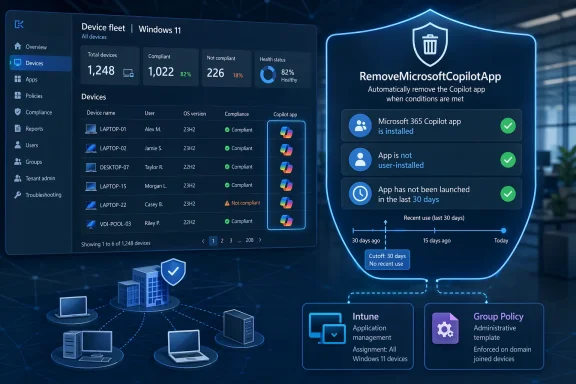
Microsoft is giving enterprise IT admins a new way to curb Copilot sprawl in Windows, and the move says as much about governance as it does about product design. Through the new RemoveMicrosoftCopilotApp policy, administrators can automatically uninstall the consumer Copilot app from managed devices when Microsoft’s conditions are met: Microsoft 365 Copilot must also be installed, the Copilot app must not have been user-installed, and it must not have been launched recently. Microsoft’s own WindowsAI policy documentation shows the setting is available through Intune and Group Policy, with support mapped to Windows 11 version 25H2 and later on Pro, Enterprise, Education, and IoT Enterprise devices.
The significance is bigger than a simple uninstall toggle. Microsoft is effectively acknowledging that a one-size-fits-all Copilot presence does not work for every organization, especially those that want a single, well-defined entry point into AI through Microsoft 365 rather than a separate Windows app layer. At the same time, the policy is deliberately constrained: users can still reinstall the app, and Microsoft is not making blanket removal available on all editions or in arbitrary circumstances. That balance suggests the company is trying to satisfy enterprise control demands without giving up its broader Copilot strategy.
Microsoft’s Copilot strategy has spent the past two years oscillating between ambition and restraint. First the company pushed Copilot into the Windows shell and across inbox apps, then it began documenting more ways to disable, manage, or de-emphasize those surfaces as pushback grew. The current policy lands squarely in that evolution: not a retreat from AI, but a tighter distribution model that treats Copilot as something to manage rather than simply broadcast.
That shift matters because Microsoft built Copilot as a platform story, not just a feature. The company has repeatedly framed the assistant as a productivity layer for consumers, professionals, and enterprises alike, and that message works best when the assistant feels ubiquitous. But ubiquity has a cost. The more often Copilot appears in unexpected places, the more it starts to resemble branding pressure rather than utility. Microsoft’s documentation and recent commentary show it is increasingly sensitive to that distinction.
The enterprise angle is especially important. Microsoft already documents ways to turn off Copilot in some Microsoft 365 apps, remove ribbon icons, and control access through admin tools. That is a strong signal that the company understands enterprise adoption depends on policy, not just enthusiasm. The new Windows removal option fits that same pattern: fewer surprises at the OS level, more predictable governance at the app and tenant level.
There is also a broader Windows context here. Windows 11 has endured persistent criticism for feeling overly managed, overly promotional, and sometimes less customizable than users want. In that environment, every new AI touchpoint becomes more than a feature; it becomes a statement about who controls the desktop. Microsoft appears to have recognized that in some environments, restraint is not a sign of weakness but a practical deployment strategy.
The practical implication is that Microsoft is trying to preserve user intent. If someone actually installed and used Copilot, the company appears to be saying the app should not be silently stripped away. That is a more nuanced approach than a blunt removal policy, and it shows an awareness that administrative control and user autonomy need to coexist in managed environments.
Microsoft also states that users can reinstall the app if they choose. That matters because it turns the policy into a reversible governance action rather than a hard ban. In enterprise IT terms, reversibility lowers the political cost of trying the policy, which can make pilot deployments more likely.
For Microsoft, this is a smart way to present control without creating a new administrative universe. Enterprises are already stretched thin by policy sprawl, so making Copilot removal part of the existing Windows policy structure is more likely to earn adoption than a standalone tool ever would. The company appears to be learning that if AI is going to live in the desktop, then the desktop’s governance model must also apply.
There is a subtle but important signal in the edition support. The policy applies to Enterprise, Professional, Education, and IoT Enterprise client SKUs, but not broadly to consumer editions. That reinforces Microsoft’s long-standing pattern: consumer devices get more default experiences, while managed devices get more policy controls. It is a familiar split, but now it is being applied to Copilot as a managed software artifact rather than a default branding layer.
The “not launched recently” requirement serves another purpose. It gives the policy a usage-based filter, which is a far more defensible criterion than a purely software-centric one. If the app has not been used, Microsoft can argue that removing it reduces clutter without materially affecting workflow. That is a classic enterprise compromise: preserve functionality where it is needed, remove redundancy where it is not.
The user-installed exception is equally important. It makes the policy feel less authoritarian and more like a cleanup mechanism for automatically deployed software. In corporate environments, that distinction matters because users are more likely to accept changes that do not override their explicit choices. Microsoft seems to be using that principle to reduce resistance while still asserting control.
That distinction matters because Windows users have long been sensitive to anything that feels like clutter. A visible feature is not necessarily a useful feature, and in many cases the opposite is true. Copilot can still exist as a productivity tool, but if it appears in the wrong context, it can begin to feel like a marketing surface instead of an aid.
Microsoft seems to be responding to a pattern it can no longer ignore. The more it embeds AI into high-frequency tools, the more users ask whether the platform is helping them work or simply advertising its strategy. That is a difficult line for any vendor, but especially for Microsoft, which controls both the OS and the productivity stack.
There is also a support angle. Fewer unwanted apps mean fewer tickets, fewer user questions, and fewer explanations about why AI has appeared in places employees did not expect. In enterprise IT, reducing cognitive overhead is often as valuable as adding a new feature. Microsoft appears to understand that a quieter desktop is easier to govern.
The policy also aligns better with licensing structure. Microsoft has been tightening the distinction between broad chat access and the richer capabilities tied to Microsoft 365 Copilot licenses. By removing the standalone Windows app where appropriate, Microsoft can keep the user journey aligned with what the organization has actually purchased. That is not just cleaner technically; it is cleaner commercially.
That can be beneficial even for users who occasionally like the tool. The problem with overly visible AI is not that it exists, but that it intrudes on tasks that do not require it. When users open Notepad, Snipping Tool, or other lightweight apps, they usually want a fast path to the job, not a feature pitch. Microsoft’s move suggests it is starting to appreciate that emotional reality.
The broader consumer lesson is that Microsoft is moving toward a selective Copilot presence. That does not mean the assistant is becoming less important; it means Microsoft is trying to make the assistant feel situational rather than omnipresent. In a mature product, that may be the better outcome.
That matters because the Copilot brand now spans multiple experiences: Windows, Microsoft 365, consumer apps, and more. If Microsoft does not differentiate the roles clearly, the ecosystem risks confusing users and exhausting administrators. This policy helps draw a line between what belongs in a managed workstation and what belongs in a standalone app.
There is a commercial logic here as well. Microsoft wants Copilot to drive value, not irritation. If the assistant becomes too associated with forced placement, it risks becoming a symbol of platform overreach. By making removal possible in certain enterprise conditions, Microsoft is trying to lower that risk without surrendering the broader distribution strategy.
Administrators should also confirm how the policy interacts with their image baselines. If Copilot is present in a master image and then later removed through policy, that may affect helpdesk scripts, compliance inventories, or app catalog expectations. Small as that sounds, deployment teams know these are the kinds of details that create support noise.
Finally, organizations should think about user communication. If a user sees Copilot disappear without context, they may assume something broke. If the policy is deployed as part of a broader Microsoft 365 Copilot strategy, the change will feel intentional instead of mysterious. In enterprise software, the explanation is part of the rollout.
The move also reinforces a broader market truth: enterprise AI success depends on governance as much as capability. Vendors that treat control as an afterthought may win attention, but they will struggle to win long-term deployment. Microsoft’s policy is a signal that it wants Copilot to look like a managed productivity asset, not an unruly consumer add-on.
For the Windows ecosystem, this may also reduce backlash against future AI additions. If users and admins believe they can remove or suppress visible features when needed, they are more likely to tolerate experimentation. That can help Microsoft ship faster while keeping the political cost of change manageable.
There is also the question of how fast the policy propagates. Microsoft’s documentation already points to modern management paths, but enterprises will want to know how consistent the behavior is across update rings, build levels, and device classes. If the rollout is smooth, this could become a template for future Copilot governance. If it is messy, the company may have to revisit its timing and thresholds.
What to watch next:
Source: Techzine Global Microsoft offers IT admins a way to remove Copilot
The significance is bigger than a simple uninstall toggle. Microsoft is effectively acknowledging that a one-size-fits-all Copilot presence does not work for every organization, especially those that want a single, well-defined entry point into AI through Microsoft 365 rather than a separate Windows app layer. At the same time, the policy is deliberately constrained: users can still reinstall the app, and Microsoft is not making blanket removal available on all editions or in arbitrary circumstances. That balance suggests the company is trying to satisfy enterprise control demands without giving up its broader Copilot strategy.
 Background
Microsoft’s Copilot strategy has spent the past two years oscillating between ambition and restraint. First the company pushed Copilot into the Windows shell and across inbox apps, then it began documenting more ways to disable, manage, or de-emphasize those surfaces as pushback grew. The current policy lands squarely in that evolution: not a retreat from AI, but a tighter distribution model that treats Copilot as something to manage rather than simply broadcast.That shift matters because Microsoft built Copilot as a platform story, not just a feature. The company has repeatedly framed the assistant as a productivity layer for consumers, professionals, and enterprises alike, and that message works best when the assistant feels ubiquitous. But ubiquity has a cost. The more often Copilot appears in unexpected places, the more it starts to resemble branding pressure rather than utility. Microsoft’s documentation and recent commentary show it is increasingly sensitive to that distinction.
The enterprise angle is especially important. Microsoft already documents ways to turn off Copilot in some Microsoft 365 apps, remove ribbon icons, and control access through admin tools. That is a strong signal that the company understands enterprise adoption depends on policy, not just enthusiasm. The new Windows removal option fits that same pattern: fewer surprises at the OS level, more predictable governance at the app and tenant level.
There is also a broader Windows context here. Windows 11 has endured persistent criticism for feeling overly managed, overly promotional, and sometimes less customizable than users want. In that environment, every new AI touchpoint becomes more than a feature; it becomes a statement about who controls the desktop. Microsoft appears to have recognized that in some environments, restraint is not a sign of weakness but a practical deployment strategy.
What Microsoft Actually Introduced
The centerpiece of the change is RemoveMicrosoftCopilotApp, a WindowsAI policy setting that allows targeted removal of the Copilot app from devices that meet Microsoft’s criteria. In Microsoft’s policy documentation, the setting is exposed through both MDM and Group Policy, with the path under WindowsAI > AT > WindowsComponents > WindowsAI. Administrators set the value to 1 to enable removal or 0 to disable it.Policy Behavior
Microsoft says the uninstall logic is conditional, not universal. According to the policy page, the app is removed only when Microsoft 365 Copilot and Microsoft Copilot are both installed, the Copilot app was not installed by the user, and the app wasn’t launched in the last 14 days in the current policy text. The reporting you provided describes a 28-day threshold, which may reflect either an earlier draft, a documentation mismatch, or a separate rollout interpretation; the official policy page currently states 14 days. That discrepancy is worth watching because policy timing details can affect deployment decisions.The practical implication is that Microsoft is trying to preserve user intent. If someone actually installed and used Copilot, the company appears to be saying the app should not be silently stripped away. That is a more nuanced approach than a blunt removal policy, and it shows an awareness that administrative control and user autonomy need to coexist in managed environments.
Microsoft also states that users can reinstall the app if they choose. That matters because it turns the policy into a reversible governance action rather than a hard ban. In enterprise IT terms, reversibility lowers the political cost of trying the policy, which can make pilot deployments more likely.
How Admins Deploy It
From an IT operations standpoint, the value of this change is not just that it exists, but that it plugs into tools admins already use. Microsoft lists support for both Intune and Group Policy, which means organizations can apply the setting through established management channels instead of resorting to custom scripting or brittle workaround approaches.Deployment Paths
The policy maps to the WindowsAI container, with the registry and ADMX references exposed in Microsoft’s documentation. That makes it easier for desktop engineering teams to standardize the setting across fleets, especially in larger environments where local user preference cannot be the primary control mechanism. It also makes compliance tracking simpler because the policy sits inside the normal Windows management model.For Microsoft, this is a smart way to present control without creating a new administrative universe. Enterprises are already stretched thin by policy sprawl, so making Copilot removal part of the existing Windows policy structure is more likely to earn adoption than a standalone tool ever would. The company appears to be learning that if AI is going to live in the desktop, then the desktop’s governance model must also apply.
There is a subtle but important signal in the edition support. The policy applies to Enterprise, Professional, Education, and IoT Enterprise client SKUs, but not broadly to consumer editions. That reinforces Microsoft’s long-standing pattern: consumer devices get more default experiences, while managed devices get more policy controls. It is a familiar split, but now it is being applied to Copilot as a managed software artifact rather than a default branding layer.
Why the Conditions Matter
The three conditions Microsoft uses are the heart of the policy, and they tell you a lot about its priorities. This is not about punishing users for wanting Copilot, and it is not about removing every trace of Microsoft’s AI branding from Windows. It is about narrowing the policy to situations where the app looks redundant in an enterprise stack.Installed, but Not Essential
The requirement that Microsoft 365 Copilot be present suggests Microsoft wants to preserve the primary AI entry point in the productivity suite. That aligns with the company’s broader messaging that managed PCs should center Copilot in the Microsoft 365 environment rather than on the Windows desktop itself. In other words, if the organization already pays for and deploys Microsoft 365 Copilot, the standalone Windows Copilot app may be seen as duplicative.The “not launched recently” requirement serves another purpose. It gives the policy a usage-based filter, which is a far more defensible criterion than a purely software-centric one. If the app has not been used, Microsoft can argue that removing it reduces clutter without materially affecting workflow. That is a classic enterprise compromise: preserve functionality where it is needed, remove redundancy where it is not.
The user-installed exception is equally important. It makes the policy feel less authoritarian and more like a cleanup mechanism for automatically deployed software. In corporate environments, that distinction matters because users are more likely to accept changes that do not override their explicit choices. Microsoft seems to be using that principle to reduce resistance while still asserting control.
The Windows 11 Context
This announcement does not stand alone. It arrives in the middle of a broader rebalancing of Copilot’s role in Windows 11, where Microsoft has been reducing unnecessary entry points in some inbox apps and rethinking how much AI should be visible in the shell. Recent commentary around Windows Insider changes suggests a company trying to separate useful integration from persistent clutter.From Presence to Placement
Placement has become the core issue. A taskbar icon, a shell integration, or an app-level feature all imply different levels of control and expectation. Microsoft’s new removal policy is best understood as a continuation of that same design rethink: the company is not removing Copilot from the strategy, but it is narrowing where the assistant is allowed to feel ambient.That distinction matters because Windows users have long been sensitive to anything that feels like clutter. A visible feature is not necessarily a useful feature, and in many cases the opposite is true. Copilot can still exist as a productivity tool, but if it appears in the wrong context, it can begin to feel like a marketing surface instead of an aid.
Microsoft seems to be responding to a pattern it can no longer ignore. The more it embeds AI into high-frequency tools, the more users ask whether the platform is helping them work or simply advertising its strategy. That is a difficult line for any vendor, but especially for Microsoft, which controls both the OS and the productivity stack.
Enterprise vs Consumer Impact
For enterprises, this is mainly about control, licensing, and supportability. For consumers, it is more about friction and perceived clutter. Microsoft is trying to solve both problems with one policy, but the motivations are different, and the outcomes will be judged differently.Enterprise IT: Control First
Administrators care where Copilot lives, how it is updated, and whether it can be removed without side effects. Microsoft’s new policy answers those questions by giving IT a cleaner path to standardize the Microsoft 365 experience and remove a redundant Windows app when it is safe to do so. That is especially appealing in regulated environments where visible AI in the shell can become a compliance discussion.There is also a support angle. Fewer unwanted apps mean fewer tickets, fewer user questions, and fewer explanations about why AI has appeared in places employees did not expect. In enterprise IT, reducing cognitive overhead is often as valuable as adding a new feature. Microsoft appears to understand that a quieter desktop is easier to govern.
The policy also aligns better with licensing structure. Microsoft has been tightening the distinction between broad chat access and the richer capabilities tied to Microsoft 365 Copilot licenses. By removing the standalone Windows app where appropriate, Microsoft can keep the user journey aligned with what the organization has actually purchased. That is not just cleaner technically; it is cleaner commercially.
Consumer Use: Less Noise, More Choice
For consumers, the change should read as a reduction in pressure rather than an outright removal of Copilot from the Windows ecosystem. The assistant remains available, and Microsoft continues to expand its product family across apps and services. What changes is the way Windows itself presents the assistant, especially in managed and semi-managed scenarios.That can be beneficial even for users who occasionally like the tool. The problem with overly visible AI is not that it exists, but that it intrudes on tasks that do not require it. When users open Notepad, Snipping Tool, or other lightweight apps, they usually want a fast path to the job, not a feature pitch. Microsoft’s move suggests it is starting to appreciate that emotional reality.
The broader consumer lesson is that Microsoft is moving toward a selective Copilot presence. That does not mean the assistant is becoming less important; it means Microsoft is trying to make the assistant feel situational rather than omnipresent. In a mature product, that may be the better outcome.
What This Says About Microsoft’s AI Strategy
This policy is not a retreat from AI. It is a sign that Microsoft is learning where AI belongs and, just as importantly, where it does not belong. The company’s early Copilot push aimed for maximum visibility; the current approach appears aimed at maximum legitimacy.From Ambition to Calibration
Microsoft’s first Copilot phase was about normalization. The company wanted AI to feel like an expected layer of the Windows and Microsoft 365 experience, not a separate product category. But normalization can become saturation if every surface starts carrying the same message. The new removal policy implies Microsoft now sees calibration as the better long-term strategy.That matters because the Copilot brand now spans multiple experiences: Windows, Microsoft 365, consumer apps, and more. If Microsoft does not differentiate the roles clearly, the ecosystem risks confusing users and exhausting administrators. This policy helps draw a line between what belongs in a managed workstation and what belongs in a standalone app.
There is a commercial logic here as well. Microsoft wants Copilot to drive value, not irritation. If the assistant becomes too associated with forced placement, it risks becoming a symbol of platform overreach. By making removal possible in certain enterprise conditions, Microsoft is trying to lower that risk without surrendering the broader distribution strategy.
Practical Administration Considerations
For IT teams, the immediate questions are implementation, timing, and rollback. Microsoft’s policy documentation helps on all three fronts, but organizations will still need to test how the setting behaves alongside their existing Windows servicing and app deployment workflows. That is especially true because policy timing can affect whether devices qualify for removal.What Admins Should Validate
A sensible rollout would begin with a pilot group rather than a broad fleet-wide push. Teams should confirm whether the device has Microsoft 365 Copilot, whether the Copilot app was user-installed, and whether user behavior falls inside Microsoft’s usage threshold. Those details determine whether the policy actually does anything, so assumptions can be dangerous.Administrators should also confirm how the policy interacts with their image baselines. If Copilot is present in a master image and then later removed through policy, that may affect helpdesk scripts, compliance inventories, or app catalog expectations. Small as that sounds, deployment teams know these are the kinds of details that create support noise.
Finally, organizations should think about user communication. If a user sees Copilot disappear without context, they may assume something broke. If the policy is deployed as part of a broader Microsoft 365 Copilot strategy, the change will feel intentional instead of mysterious. In enterprise software, the explanation is part of the rollout.
Competitive and Market Implications
Microsoft’s change also has competitive meaning. The company is effectively acknowledging that AI assistants in the desktop are only valuable when users and admins trust their placement. That is a useful lesson for the rest of the industry, because many vendors are now trying to force AI into every layer of the UI.Why Rivals Should Pay Attention
If Microsoft, which has arguably the best right to be aggressive here, is offering an opt-down path for a flagship AI app, other vendors will face similar pressure to do the same. Enterprises will increasingly ask not just whether AI works, but whether it can be contained. Once that question becomes normal, forced defaults become much harder to justify.The move also reinforces a broader market truth: enterprise AI success depends on governance as much as capability. Vendors that treat control as an afterthought may win attention, but they will struggle to win long-term deployment. Microsoft’s policy is a signal that it wants Copilot to look like a managed productivity asset, not an unruly consumer add-on.
For the Windows ecosystem, this may also reduce backlash against future AI additions. If users and admins believe they can remove or suppress visible features when needed, they are more likely to tolerate experimentation. That can help Microsoft ship faster while keeping the political cost of change manageable.
Strengths and Opportunities
Microsoft’s policy has several clear strengths. It addresses user frustration without abandoning the company’s AI roadmap, and it gives IT departments a cleaner way to align Windows behavior with Microsoft 365 licensing. It also sends a strong signal that Microsoft is beginning to treat control and trust as core product features rather than afterthoughts.- Reduces visible clutter in managed Windows environments.
- Aligns Copilot placement with Microsoft 365 licensing and deployment strategy.
- Improves admin control through Intune and Group Policy.
- Respects user autonomy by preserving reinstall options.
- Lowers helpdesk friction by removing redundant AI surfaces.
- Makes Windows feel more predictable in enterprise fleets.
- Creates room for selective AI adoption instead of blanket saturation.
- Strengthens Microsoft’s enterprise credibility around governance.
Risks and Concerns
The biggest risk is that Microsoft treats this as a sufficient fix when it may only address one symptom of a broader Windows trust problem. Users who dislike Copilot in the shell may still find other parts of Windows 11 too intrusive, too promotional, or too inconsistent. A targeted removal policy will not solve that on its own.- Policy thresholds may confuse admins if documentation or rollout timing changes.
- Mixed messaging could make Microsoft’s Copilot strategy look inconsistent.
- Partial removal may not satisfy users who want a deeper opt-out.
- Conditional logic may create unexpected edge cases in deployment.
- Support complexity could persist across licensing tiers and update channels.
- Perceived retreat may alarm Microsoft’s AI advocates and product teams.
- Overreliance on policy could mask broader UX issues that still need design work.
Looking Ahead
The most important question now is whether Microsoft extends this philosophy beyond Copilot’s standalone app. If the company is willing to reduce AI presence in one area, it may also be willing to keep trimming unnecessary entry points elsewhere in Windows and Microsoft 365. That would suggest a broader shift from “AI everywhere” to “AI where it helps.”There is also the question of how fast the policy propagates. Microsoft’s documentation already points to modern management paths, but enterprises will want to know how consistent the behavior is across update rings, build levels, and device classes. If the rollout is smooth, this could become a template for future Copilot governance. If it is messy, the company may have to revisit its timing and thresholds.
What to watch next:
- Whether the 14-day launch threshold remains stable or changes in future documentation.
- Whether Microsoft expands similar controls to other Copilot surfaces in Windows.
- Whether enterprise admins report fewer helpdesk issues after deployment.
- Whether Microsoft 365 Copilot becomes the dominant default entry point on managed PCs.
- Whether other Windows 11 AI integrations follow the same selective-removal model.
Source: Techzine Global Microsoft offers IT admins a way to remove Copilot
