

Microsoft’s decision to strip the Copilot badge from Notepad is more than a cosmetic tweak. It is a small but telling admission that the company’s all-in branding strategy has started to clash with how people actually use Windows. The AI features remain, but the loud Copilot label is being replaced by a quieter “Writing tools” treatment, which suggests Microsoft is trying to keep the functionality while lowering the visual temperature around it. That matters because Notepad has long been one of the last places Windows users expected a heavy-handed product pitch.
For decades, Notepad was the purest symbol of Windows minimalism. It launched as a tiny utility for quick text entry, plain editing, and nothing more, which is exactly why so many users still treat it as a sanctuary from feature creep. Microsoft has slowly pushed that boundary in recent years, turning the app into a testbed for lightweight formatting, cloud-aware behavior, and now AI-assisted writing. What was once a blank canvas has become a small but conspicuous showcase for the company’s broader Windows strategy.
That evolution did not happen overnight. Microsoft first began rolling out AI writing features in Notepad through Windows Insider builds, adding options such as Write, Rewrite, and Summarize. The company framed them as productivity helpers, not as a replacement for the editor’s plain-text identity, but the Copilot branding made the change feel much bigger than the feature set alone. A utility that used to disappear into the background suddenly became another stage for Microsoft’s AI push.
The latest move now suggests a reset in presentation rather than a retreat in capability. In Microsoft’s own March statement about Windows quality, Pavan Davuluri said the company was reducing unnecessary Copilot entry points, naming Notepad alongside Snipping Tool, Photos, and Widgets. That is a notable shift because it acknowledges that the issue is not whether AI can be useful, but whether Microsoft has been too eager to make every tool wear the same badge.
The timing also reflects a broader reality: Copilot has become a polarizing name inside Windows. Some users associate it with convenience and cross-app assistance, while others see it as branding pollution that turns ordinary utilities into marketing surfaces. When even Notepad starts carrying the Copilot logo, the message becomes less “helpful assistant” and more “AI everywhere whether you asked or not.” That tension is the backdrop for the latest rebrand.
Microsoft’s approach is also shaped by what happened to older Windows tools. WordPad was deprecated in 2023 and removed later, which left a curious gap in the lineup: there is no longer a basic middle ground between ultra-plain Notepad and full office software for casual drafting and formatting. That makes Notepad a tempting place to add more capability, even if doing so erodes its identity. The result is an editor that is being asked to remain simple while quietly becoming more ambitious.
The change also preserves a key user promise: the writing features can be disabled. That matters because a lot of the frustration around AI in Windows has not been about existence but about insistence. Users are generally more tolerant of optional tools than of persistent prompts, toolbar buttons, and assistant branding that show up in places where a simple editor used to be enough.
This is especially true in Windows, where trust is built through familiarity. A small system utility is expected to behave predictably; every extra control raises the cognitive cost of opening it. By moving from Copilot branding to a simpler pen icon, Microsoft is not restoring Notepad to its former self, but it is at least trying to make the AI layer feel less like an ad and more like a tool. That distinction is the entire story.
The Notepad change is therefore as much about brand management as product design. Microsoft may still believe in the utility of AI-assisted drafting, summarizing, and rewriting, but it appears to be learning that product usefulness and product visibility are not the same thing. In mature software, excessive visibility can be counterproductive.
That distinction is central to understanding Microsoft’s current Windows strategy. The company still wants AI deeply embedded across the platform, but it now seems more willing to hide some of the scaffolding behind task-specific labels. The broader hope is that if the UI becomes less ideological, fewer users will treat every Copilot appearance as a provocation.
There is a strong argument that Microsoft needed a lightweight editor with modern conveniences. WordPad is gone, and many users want a quick place to draft content without opening Word or dealing with a full productivity suite. In that sense, Notepad has become the natural landing zone for a middle class of Windows writing tasks. The problem is that the more Microsoft loads onto that landing zone, the less it resembles the stripped-down tool people remember.
For consumers, that compromise may actually be useful. Casual users want formatting, summaries, and quick rewrites without learning a new application. For enthusiasts and developers, though, every added control chips away at the editor’s elegance. The tension here is not technical; it is philosophical. Microsoft wants Notepad to serve more people, but every added audience changes the rules of the product.
The company also has a reason to be careful. Windows users tend to dislike sudden changes, especially when those changes affect core built-in apps. By testing first on Insiders, Microsoft can quietly soften the UI without making a grand public retreat. That makes the company look responsive while avoiding the optics of a formal correction.
That said, broader normalization can still leave users uneasy if the company keeps changing labels while preserving the same control count. If the Copilot brand disappears but the toolbar still grows, the user experience may feel less like simplification and more like renaming. That distinction will matter a great deal as the rollout expands.
The change may also reduce confusion for users who never understood why a simple editor needed a branded assistant in the first place. A more generic pen icon suggests writing assistance without forcing users to think about Copilot as a separate product layer. In practical terms, it lowers the barrier to trying the feature while reducing the sense that Microsoft is trying to upsell them every time they type a sentence. That psychological change is important.
That frustration is understandable because Microsoft’s broader trend has been additive, not reductive. Even when a brand gets toned down, the underlying feature density keeps rising. So while this change may calm some complaints, it will not end the larger argument over whether Windows has become too crowded with helpers, prompts, and intelligent surfaces.
The quieter branding could help here by making AI feel less consumer-marketing-driven and more like a standard productivity capability. Enterprises generally prefer features that are described in functional terms, such as writing assistance, summarization, or text rewriting, rather than in platform-brand terms. That is why the move from Copilot to Writing tools may read as a small but meaningful improvement in procurement and governance conversations.
There is also a compliance angle. When AI features are framed as writing tools instead of a branded assistant, organizations may find them easier to describe in internal policy documents. That does not eliminate data-handling questions, but it does make the feature easier to place in the broader taxonomy of office productivity tools. In enterprise software, labels matter more than marketing teams admit.
This is especially relevant for platforms that are still trying to define their AI identity. The lesson is not that users reject AI outright. It is that they reject unnecessary friction, especially when the feature appears in apps that already have a clear purpose. Windows Notepad is a small stage, but it offers a big branding lesson.
At the same time, the company deserves some credit for not doubling down indefinitely. Many tech firms would have kept the same branding and hoped users would get used to it. Microsoft at least appears willing to make the product quieter when the noise becomes counterproductive. That is not a full retreat, but it is a meaningful acknowledgment that trust is earned through restraint.
What makes this moment interesting is that Microsoft is trying to reconcile two competing truths. It still believes AI should be embedded deeply into Windows, but it is also learning that embedding is not the same as advertising. The more successful strategy may be the one that makes AI available when needed and invisible when not. That is a harder design problem than plastering a logo on every window.
Source: theregister.com Notepad loses Copilot icon as Microsoft gives subtlety a try
 Background
For decades, Notepad was the purest symbol of Windows minimalism. It launched as a tiny utility for quick text entry, plain editing, and nothing more, which is exactly why so many users still treat it as a sanctuary from feature creep. Microsoft has slowly pushed that boundary in recent years, turning the app into a testbed for lightweight formatting, cloud-aware behavior, and now AI-assisted writing. What was once a blank canvas has become a small but conspicuous showcase for the company’s broader Windows strategy.That evolution did not happen overnight. Microsoft first began rolling out AI writing features in Notepad through Windows Insider builds, adding options such as Write, Rewrite, and Summarize. The company framed them as productivity helpers, not as a replacement for the editor’s plain-text identity, but the Copilot branding made the change feel much bigger than the feature set alone. A utility that used to disappear into the background suddenly became another stage for Microsoft’s AI push.
The latest move now suggests a reset in presentation rather than a retreat in capability. In Microsoft’s own March statement about Windows quality, Pavan Davuluri said the company was reducing unnecessary Copilot entry points, naming Notepad alongside Snipping Tool, Photos, and Widgets. That is a notable shift because it acknowledges that the issue is not whether AI can be useful, but whether Microsoft has been too eager to make every tool wear the same badge.
The timing also reflects a broader reality: Copilot has become a polarizing name inside Windows. Some users associate it with convenience and cross-app assistance, while others see it as branding pollution that turns ordinary utilities into marketing surfaces. When even Notepad starts carrying the Copilot logo, the message becomes less “helpful assistant” and more “AI everywhere whether you asked or not.” That tension is the backdrop for the latest rebrand.
Microsoft’s approach is also shaped by what happened to older Windows tools. WordPad was deprecated in 2023 and removed later, which left a curious gap in the lineup: there is no longer a basic middle ground between ultra-plain Notepad and full office software for casual drafting and formatting. That makes Notepad a tempting place to add more capability, even if doing so erodes its identity. The result is an editor that is being asked to remain simple while quietly becoming more ambitious.
What Changed in Notepad
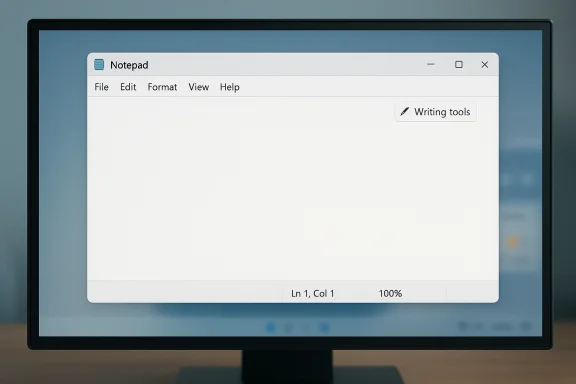
The headline change is straightforward: the Copilot button is being replaced by a more subdued Writing tools entry with a pen icon. The underlying AI functions are still present, and users can still invoke them, but the design language is much less aggressive. That kind of interface change matters because branding is often the difference between a feature that feels optional and one that feels imposed.A softer label, same underlying capability
This is not a functional rollback. Microsoft is not removing the writing assistance engine from Notepad; it is changing how the feature is presented and, just as importantly, how often it shouts at the user. The move mirrors a broader product design principle: if a feature is useful enough, it should not need a neon sign to prove it. In this case, the icon swap is Microsoft admitting that subtlety may be a better fit for a text editor.The change also preserves a key user promise: the writing features can be disabled. That matters because a lot of the frustration around AI in Windows has not been about existence but about insistence. Users are generally more tolerant of optional tools than of persistent prompts, toolbar buttons, and assistant branding that show up in places where a simple editor used to be enough.
- The Copilot logo is being removed from Notepad’s prominent UI surface.
- The AI features stay available under a quieter Writing tools menu.
- Users can still turn the feature off entirely.
- The emphasis shifts from assistant branding to task-oriented labeling.
- The change is present in Insider builds first, not immediately for everyone.
Why the icon matters more than it sounds
A toolbar icon may seem trivial, but interface signals shape user perception at scale. In a product like Notepad, where many people prize speed and discretion, a branded AI button can feel like a violation of the app’s social contract. Microsoft may have learned that the fastest way to annoy power users is not to break the app, but to decorate it with something that looks like a sales pitch.This is especially true in Windows, where trust is built through familiarity. A small system utility is expected to behave predictably; every extra control raises the cognitive cost of opening it. By moving from Copilot branding to a simpler pen icon, Microsoft is not restoring Notepad to its former self, but it is at least trying to make the AI layer feel less like an ad and more like a tool. That distinction is the entire story.
Why Microsoft Is Doing This Now
Microsoft’s March 2026 statement about reducing unnecessary Copilot entry points reads like the clearest internal acknowledgment yet that the company overplayed its hand. When the Windows team says it wants to be more intentional about where Copilot appears, that is corporate language for we heard you. Not all reactions to AI in Windows have been negative, but the saturation strategy clearly created resistance.Brand fatigue in a crowded interface
Copilot has gone from being a flagship term to a visual annoyance in some corners of Windows. If every app, surface, and helper feature uses the same badge, the label loses meaning and starts to feel like noise. That is bad for adoption because users stop seeing a differentiated assistant and start seeing repetitive branding that interrupts workflows instead of improving them.The Notepad change is therefore as much about brand management as product design. Microsoft may still believe in the utility of AI-assisted drafting, summarizing, and rewriting, but it appears to be learning that product usefulness and product visibility are not the same thing. In mature software, excessive visibility can be counterproductive.
- Microsoft appears to be responding to user fatigue.
- The company is trying to separate useful AI from conspicuous AI branding.
- Notepad is a low-risk place to test a quieter approach.
- The move lets Microsoft claim restraint without abandoning AI.
- It may help defuse complaints that Windows is becoming over-Copilotized.
A partial correction, not a reversal
It would be a mistake to read this as Microsoft abandoning its AI roadmap. The company has repeatedly expanded Notepad’s capabilities through 2025 and 2026, including AI writing tools and richer formatting. The current pivot is less about stepping away from AI and more about making AI feel native instead of bolted on. In other words, the behavior stays, but the badge gets toned down.That distinction is central to understanding Microsoft’s current Windows strategy. The company still wants AI deeply embedded across the platform, but it now seems more willing to hide some of the scaffolding behind task-specific labels. The broader hope is that if the UI becomes less ideological, fewer users will treat every Copilot appearance as a provocation.
Notepad’s Identity Crisis
Notepad’s journey from plain editor to hybrid writing surface is one of the clearest examples of Windows feature accretion. Each addition may look modest in isolation, but over time the accumulation changes the product’s identity. The current debate is not just whether Notepad should have AI; it is whether Notepad can keep being Notepad once AI becomes part of its default personality.From blank slate to lightweight drafting tool
The old Notepad was intentionally limited. It opened fast, used almost no resources, and did one job well. The newer version still does that, but now it also includes formatting features, AI prompts, and Microsoft account-linked experiences in some builds. That broadens usefulness for some users while making the app less universally appealing to those who valued the original restraint.There is a strong argument that Microsoft needed a lightweight editor with modern conveniences. WordPad is gone, and many users want a quick place to draft content without opening Word or dealing with a full productivity suite. In that sense, Notepad has become the natural landing zone for a middle class of Windows writing tasks. The problem is that the more Microsoft loads onto that landing zone, the less it resembles the stripped-down tool people remember.
The gap WordPad left behind
WordPad’s removal created a vacuum that Microsoft has quietly been filling in pieces. Notepad has gained enough capability that it now sits awkwardly between bare-bones editing and true document creation. That is not inherently bad, but it does mean the app is now carrying expectations it was never designed to shoulder. The app is becoming a compromise product.For consumers, that compromise may actually be useful. Casual users want formatting, summaries, and quick rewrites without learning a new application. For enthusiasts and developers, though, every added control chips away at the editor’s elegance. The tension here is not technical; it is philosophical. Microsoft wants Notepad to serve more people, but every added audience changes the rules of the product.
- WordPad’s disappearance increased pressure on Notepad.
- Microsoft has expanded Notepad’s role from editor to helper.
- Convenience features appeal to casual users more than purists.
- Every new capability weakens the app’s historical simplicity.
- The Copilot label amplified the sense of identity drift.
The Windows Insider Strategy
The Windows Insider Program remains Microsoft’s preferred laboratory for UI experiments, and Notepad is one of the cleanest places to test reaction before a wider rollout. That matters because Microsoft can gauge whether people object to the branding more than the feature. If the quieter design lands better, it becomes a template for other apps.Testing how much AI users will tolerate
Insider builds make it possible to separate functional feedback from emotional feedback. A feature might work well technically and still fail socially if it feels intrusive or poorly labeled. Microsoft’s current move suggests it is collecting exactly that kind of feedback and adjusting the presentation accordingly. It is a pragmatic response, even if it arrives late.The company also has a reason to be careful. Windows users tend to dislike sudden changes, especially when those changes affect core built-in apps. By testing first on Insiders, Microsoft can quietly soften the UI without making a grand public retreat. That makes the company look responsive while avoiding the optics of a formal correction.
A pattern across multiple apps
Notepad is not the only place Microsoft has experimented with AI surfaces. Similar Copilot-style entry points have appeared in Snipping Tool, Photos, Widgets, Paint, and the broader Windows shell. The march toward integration has been broad enough that a rollback in one app may be the first sign of a larger normalization phase. Microsoft wants AI to feel embedded, not festooned.That said, broader normalization can still leave users uneasy if the company keeps changing labels while preserving the same control count. If the Copilot brand disappears but the toolbar still grows, the user experience may feel less like simplification and more like renaming. That distinction will matter a great deal as the rollout expands.
- Insider builds allow Microsoft to test reaction before GA release.
- UI labeling is being used as a pressure valve.
- The strategy may spread to other Windows inbox apps.
- Microsoft can claim restraint without dismantling AI integrations.
- User acceptance will hinge on whether the interface feels cleaner, not just quieter.
Consumer Impact
For everyday users, the Notepad change is mostly about comfort. Most people who open Notepad are not looking for a generative AI suite; they want to jot something down, copy text, or make a quick edit. A subtle Writing tools label is less likely to interrupt that flow than a big Copilot badge in the corner of the window.What casual users will notice
Consumers will probably appreciate the reduced visual clutter first and the AI helpers second. If they need rewrite or summarize functions, they can still reach them, but the editor no longer screams “AI assistant” the moment it opens. That is good design for people who value optionality and bad design only for those who wanted a full rollback.The change may also reduce confusion for users who never understood why a simple editor needed a branded assistant in the first place. A more generic pen icon suggests writing assistance without forcing users to think about Copilot as a separate product layer. In practical terms, it lowers the barrier to trying the feature while reducing the sense that Microsoft is trying to upsell them every time they type a sentence. That psychological change is important.
Why some users will still be annoyed
Not everyone will be satisfied. Some users believe Notepad should remain exactly what it was decades ago, and even a subtler AI menu is still a departure from that ideal. Those users are unlikely to care whether the icon is Copilot blue or pen-shaped; what matters to them is that a previously spare interface now has a toolbox attached to it.That frustration is understandable because Microsoft’s broader trend has been additive, not reductive. Even when a brand gets toned down, the underlying feature density keeps rising. So while this change may calm some complaints, it will not end the larger argument over whether Windows has become too crowded with helpers, prompts, and intelligent surfaces.
- Less branding noise should make Notepad feel more familiar.
- Optional AI tools remain available for quick drafting and editing.
- Some users will still object to any AI in the editor at all.
- The change may reduce perceived nagging without changing workflow much.
- Microsoft is betting convenience will outweigh ideological resistance.
Enterprise Impact
Enterprises care about different things than consumers, and the Notepad change should be read through the lens of manageability, compliance, and user trust. A quieter UI matters if it reduces support tickets and lowers resistance to Windows updates, especially in organizations where employees are sensitive to interface churn. A cleaner presentation can make AI features easier to approve in principle, even if IT teams still want policy control.Trust and policy matter more than iconography
For managed environments, the real issue is rarely the color of a button. It is whether the feature is controllable, whether it respects account boundaries, and whether it behaves predictably in a corporate image. Microsoft has already been expanding support for sign-in requirements and managed features in Insider builds, which suggests enterprise deployment remains part of the design equation.The quieter branding could help here by making AI feel less consumer-marketing-driven and more like a standard productivity capability. Enterprises generally prefer features that are described in functional terms, such as writing assistance, summarization, or text rewriting, rather than in platform-brand terms. That is why the move from Copilot to Writing tools may read as a small but meaningful improvement in procurement and governance conversations.
Distribution and rollout controls remain crucial
The fact that these changes are starting in Insider channels is important because it gives IT teams time to assess impact before broader deployment. Microsoft has increasingly used staged rollouts and feature flags across Windows and Microsoft 365, which means no one should assume the Notepad UI they see today is final. In enterprise terms, that caution is welcome even if it slows the path to standardization.There is also a compliance angle. When AI features are framed as writing tools instead of a branded assistant, organizations may find them easier to describe in internal policy documents. That does not eliminate data-handling questions, but it does make the feature easier to place in the broader taxonomy of office productivity tools. In enterprise software, labels matter more than marketing teams admit.
- Quieter labeling may reduce employee resistance.
- Functional naming fits enterprise governance better.
- Insider rollout gives IT teams more time to test.
- Policy teams still need clarity on data handling and sign-in rules.
- Microsoft is signaling that AI should feel like a utility, not a campaign.
Competitive Implications
Microsoft’s Notepad move does not happen in a vacuum. Across the industry, companies are discovering that users want AI assistance to be available but not omnipresent. The companies that win will probably be the ones that make AI feel like a power tool rather than a mascot. Microsoft’s rebranding effort in Notepad looks like a first step toward that lesson.The broader UI lesson for rivals
Competitors should pay attention because this is about more than Windows. It is a warning that over-branding an assistant can turn a useful feature into a symbol of overreach. If Microsoft, which is among the most aggressive AI integrators in mainstream software, is backing away from the loudest version of its own branding, rivals should expect similar resistance when they plaster AI across every surface.This is especially relevant for platforms that are still trying to define their AI identity. The lesson is not that users reject AI outright. It is that they reject unnecessary friction, especially when the feature appears in apps that already have a clear purpose. Windows Notepad is a small stage, but it offers a big branding lesson.
The risk of arriving at subtlety too late
Microsoft may still be able to correct course, but there is a cost to being seen as reactive. Once users conclude that a company is learning from backlash rather than from judgment, every adjustment starts to look like damage control. That is the danger of the current moment: a modest interface improvement can still be read as evidence that the original strategy was flawed.At the same time, the company deserves some credit for not doubling down indefinitely. Many tech firms would have kept the same branding and hoped users would get used to it. Microsoft at least appears willing to make the product quieter when the noise becomes counterproductive. That is not a full retreat, but it is a meaningful acknowledgment that trust is earned through restraint.
- Other vendors may also rethink aggressive AI branding.
- Users appear open to AI tools that stay out of the way.
- Simple task labels may outperform assistant branding in legacy apps.
- Microsoft risks looking reactive rather than strategic.
- The shift reinforces the value of invisible, context-aware AI.
Strengths and Opportunities
Microsoft’s softer Notepad presentation has genuine strengths, especially if the company follows through with broader UI restraint. The biggest opportunity is to preserve the usefulness of AI writing features while reducing the sense that every Windows app is trying to sell the same idea. Done well, this could improve user trust without sacrificing capability.- Reduced visual clutter should make Notepad feel more like the classic utility users expect.
- Task-based naming like Writing tools is easier to understand than Copilot branding.
- Optional AI features keep power users in control.
- Enterprise acceptance may improve if features look less marketing-driven.
- Cross-app consistency could emerge if Microsoft applies the same restraint elsewhere.
- User trust may recover if the company keeps emphasizing usefulness over visibility.
- Product clarity improves when the feature label matches the job it performs.
Risks and Concerns
The biggest risk is that Microsoft will stop at the icon swap and treat the branding change as a deeper fix than it really is. If the toolbar keeps expanding and the app keeps accumulating features, many users will still feel that Notepad has been diluted. There is also a reputational risk if Microsoft signals humility in one release while continuing to push AI aggressively in adjacent parts of Windows.- Cosmetic changes may not satisfy users who want a true simplicity reset.
- Feature creep can still erode Notepad’s identity over time.
- Mixed signals may confuse users about Microsoft’s real AI strategy.
- Trust issues could persist if AI remains prominent in too many places.
- Enterprise skepticism may continue unless data handling is crystal clear.
- Rollout inconsistency could create different experiences across Insider and retail builds.
- Brand fatigue may shift from Copilot to the next label if Microsoft only renames features.
Looking Ahead
The next phase will tell us whether Microsoft is genuinely rethinking its Windows AI presentation or merely sanding off the sharpest edges. If the company extends the same restraint to other inbox apps, it will signal that Notepad was not an isolated cosmetic tweak but the start of a broader interface philosophy. If not, then this will be remembered as a small concession made after too much user resistance.What makes this moment interesting is that Microsoft is trying to reconcile two competing truths. It still believes AI should be embedded deeply into Windows, but it is also learning that embedding is not the same as advertising. The more successful strategy may be the one that makes AI available when needed and invisible when not. That is a harder design problem than plastering a logo on every window.
- Watch whether Snipping Tool, Photos, and Widgets receive similarly toned-down treatments.
- Watch for retail Windows 11 builds to pick up the same Notepad changes.
- Watch whether Microsoft expands Writing tools as a generic label across apps.
- Watch for user sentiment to improve if the UI becomes less branded and more task-driven.
- Watch enterprise guidance for clearer policy and data-handling language around AI features.
Source: theregister.com Notepad loses Copilot icon as Microsoft gives subtlety a try
Last edited:
