

Microsoft is removing visible Copilot branding from parts of Windows 11 in 2026, starting with Insider versions of apps such as Notepad and Snipping Tool, while also giving enterprise administrators a narrower policy path to remove the Copilot app under Windows 11 25H2. This is not a retreat from AI so much as a retreat from the idea that every surface in Windows should look like an advertisement for it. The shift matters because Microsoft has finally acknowledged, through product behavior if not through a grand mea culpa, that users distinguish between useful assistance and ambient product pressure. Windows is still becoming an AI operating system; it is just learning that the operating system cannot feel like a billboard.
For the past two years, Microsoft’s Windows strategy has been easy to summarize and hard to love: put Copilot everywhere, call it integration, and sort out the user reaction later. The Copilot icon arrived in taskbars, app chrome, context flows, and marketing copy with the confidence of a company convinced that proximity would become adoption. If users saw the button often enough, the theory seemed to go, they would eventually click it.
That theory collided with a stubborn fact about Windows. People do not open Notepad, Snipping Tool, Photos, or Widgets because they want a platform strategy. They open them because they want to jot down a line, capture a rectangle, crop a picture, or glance at a feed before returning to something else.
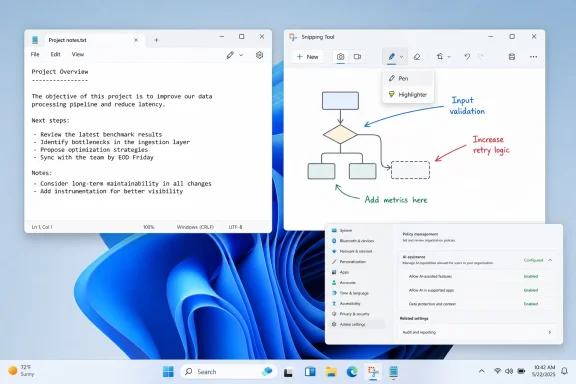
The latest Insider changes show Microsoft trimming the most conspicuous Copilot furniture from those small utilities. In Notepad, reporting indicates that the Copilot swirl and text have been replaced by a pen-style icon and a more generic “Writing tools” surface. Settings language that once foregrounded AI or Copilot has reportedly been moved into “Advanced features,” a phrase so Microsoftian it practically arrives wearing a gray suit.
That sounds cosmetic because, in part, it is. The writing features still exist. Summarization, rewriting, and generation do not vanish because the logo does. But in Windows, cosmetics are not trivial; the shell is a trust contract, and every icon Microsoft adds to a familiar app is a claim about what the app is now for.
That is why Copilot in Notepad felt more irritating than transformative. The problem was not that text-generation tools can never belong in a writing surface. The problem was that Microsoft placed a corporate AI brand inside one of Windows’ most deliberately humble tools, then seemed surprised when users read the move as intrusion rather than convenience.
The replacement of the Copilot logo with a pen icon is therefore not merely a UI tweak. It is Microsoft conceding that the right metaphor for lightweight AI assistance is a tool, not a mascot. A pen suggests an action. Copilot suggests an ecosystem.
That distinction matters because Windows users have seen this movie before. Microsoft has a long history of taking useful capabilities and burying them under branding campaigns that serve the company’s org chart more than the user’s workflow. Cortana, Bing, Edge prompts, Microsoft account nudges, Start menu recommendations, Teams integration, Widgets, and now Copilot all belong to the same recurring temptation: treat Windows not just as an operating system, but as distribution leverage.
The Notepad rollback says the leverage has limits. It says that even if AI features survive, the campaign around them may need to become quieter.
That cynicism is not wrong, but it is incomplete. Product naming in Windows is never just naming. The difference between a feature called “Rewrite” and a button called “Copilot” is the difference between an app helping you do something and an app inviting you into Microsoft’s broader AI funnel.
The company appears to be separating two things it had previously fused together: local task assistance and the Copilot brand. That is a healthier architecture for users. If Notepad can offer writing actions without becoming a Copilot billboard, Windows can preserve optional utility while reducing the sense that every app has been colonized by a single corporate initiative.
But this separation also exposes the weakness of the original push. If the features are good, they should not need omnipresent branding. If the placement is natural, it should not require a bright icon in every corner. And if Copilot is genuinely becoming the organizing layer of modern Windows, Microsoft should be able to explain that through solved problems rather than repeated entry points.
The rebranding is therefore both an improvement and an indictment. It makes the interface less obnoxious while admitting, implicitly, that the previous design mistook visibility for value.
That last detail is classic Microsoft compromise. The admin gets a tool, but not absolute silence. The user gets agency, but within a device environment that may still carry Microsoft’s preferred defaults. The company wants to satisfy IT’s demand for control without turning Copilot into something that can be banished permanently from the Windows story.
For enterprise administrators, the value is still real. Copilot is not just another consumer widget when it appears on managed devices. It raises questions about licensing, data boundaries, tenant configuration, compliance expectations, training, support burden, and user confusion between Microsoft Copilot, Microsoft 365 Copilot, Copilot Chat, in-app AI tools, and whatever branding Microsoft decides to refine next quarter.
The policy’s conditions also reveal how complicated the Copilot stack has become. Removing “Copilot” is no longer a single act because Copilot is not a single thing. It is a consumer app, a Microsoft 365 surface, a brand attached to features, a chat experience, a set of buttons, and a marketing umbrella stretched across Windows, Office, Edge, Bing, Teams, and Azure-adjacent services.
That ambiguity is exactly why IT departments have been wary. A feature that cannot be explained cleanly cannot be governed cleanly. Microsoft’s policy is a step toward manageability, but it is also evidence of a naming and packaging problem that Microsoft created for itself.
Windows users are not uniformly anti-AI. Many use Copilot, ChatGPT, Claude, Gemini, GitHub Copilot, local models, image generators, transcription tools, and AI-assisted search every day. The enthusiast backlash has never been as simple as “AI bad.” It has been, more precisely, “Stop changing the default experience of my PC to satisfy your AI roadmap.”
That distinction is crucial. A user who willingly opens an AI assistant to summarize a document is making a choice. A user who finds Copilot branding inserted into Notepad, Snipping Tool, or Photos is receiving a corporate suggestion embedded inside a tool they already understood. The difference is consent, or at least the feeling of consent.
This is where Microsoft’s instincts routinely clash with its audience. Windows is both a consumer product and critical infrastructure. It runs gaming rigs, family laptops, corporate fleets, school machines, hospital workstations, manufacturing terminals, developer environments, and government desktops. A change that looks like harmless promotion on a consumer laptop can look like operational noise in a managed estate.
The Copilot buttons became a symbol because they arrived before Microsoft had earned the placement. Users saw the icon and asked why it was there. Too often, the best answer seemed to be because Microsoft wanted it there.
Deleted executive posts are rarely the center of the story, and they should not be overread as policy documents. But they are useful atmospheric evidence. They suggest that Microsoft’s internal conversation may be more candid than its public phrasing, and that the company is still trying to find the right vocabulary for retreating from overreach without making it sound like retreat.
That tension is understandable. Microsoft has invested heavily in Copilot as a brand and strategic pillar. It cannot simply say, “We put this in too many places too quickly,” even if that is the sentence many Windows users would find most refreshing. Public companies prefer “focus,” “craft,” and “intentionality” because those words imply refinement rather than reversal.
Still, the deleted-post language, if accurately reported, gets closer to the point than the official language does. Some Copilot placements did not live up to their promise. Some were not useful enough to justify the attention they demanded. Some made Windows feel less like a personal computer and more like a test bed for Microsoft’s AI ambitions.
There is nothing embarrassing about pruning features that fail that test. The embarrassing part is pretending that the pruning is merely the next phase of a perfectly calibrated plan.
Those are very different futures. In the first, AI features appear where they save time, respect policy, disclose boundaries, and can be disabled or managed consistently. In the second, AI surfaces appear wherever Microsoft can justify an entry point, and control arrives later, after complaints, workarounds, and admin scripts circulate through the community.
The RemoveMicrosoftCopilotApp policy points toward the first future, but cautiously. It recognizes that managed environments require a way to remove or suppress Copilot app installation under defined conditions. Yet because users can reinstall the app, and because in-app AI features may remain under different names, the policy does not end the governance problem.
For IT pros, this means the work shifts from “block the Copilot icon” to “map the AI surface area.” That is a much more annoying job. It requires understanding which features call cloud services, which are tenant-bound, which are consumer-facing, which respect commercial data protection, which are merely branded buttons, and which survive even after an app is removed.
Microsoft could make that job easier by publishing a clean, comprehensive matrix of Copilot and AI surfaces across Windows SKUs, app versions, account types, policy controls, and data-handling modes. The company has documentation in pieces, but the user experience has outpaced the clarity of the administrative story. In 2026, that gap is no longer acceptable.
Spellcheck did not need a mascot. Snap layouts did not need a separate identity. Clipboard history, Windows Hello, Storage Sense, Focus Assist, and live captions work best when they feel like Windows capabilities rather than attached campaigns. AI will be no different if Microsoft wants durable adoption rather than trial clicks.
A writing tool in Notepad can be useful if it is fast, optional, transparent, and subordinate to the document. A Copilot button in Notepad feels different because it draws the eye away from the document and toward Microsoft’s strategic narrative. One helps the task; the other asks the user to acknowledge the brand.
That is the design lesson Microsoft appears to be relearning. AI should not be measured by how many surfaces carry the Copilot name. It should be measured by how often users complete a job faster, with fewer mistakes, and without feeling that the OS has changed the terms of the interaction.
If Microsoft internalizes that lesson, the Copilot brand may become less visible precisely as AI becomes more important. That would not be failure. It would be maturity.
Brands stretch until they stop helping users understand what they are looking at. Copilot is approaching that point. The name is strategically valuable to Microsoft, but in daily Windows use it can obscure rather than clarify.
The move toward labels like “Writing tools” is a quiet admission that task-specific language beats umbrella branding inside apps. Users know what a writing tool is. They may not know whether a Copilot-branded control will rewrite text, open a chatbot, require a subscription, send data to a cloud service, invoke a Microsoft account, or produce a licensing prompt.
That uncertainty has a cost. Every ambiguous AI surface forces users to decide whether clicking is safe, useful, annoying, billable, governed, or reversible. For enthusiasts, that cost produces irritation. For enterprises, it produces tickets, policy reviews, and blocked deployments.
The more Microsoft wants Copilot to be trusted, the less it should make users decode the brand in contexts where a plain verb would do. “Summarize” is clear. “Rewrite” is clear. “Ask Copilot” is a detour.
But on Copilot, the enthusiasts were directionally right early. They recognized that Microsoft was not merely adding features; it was changing the texture of Windows. They noticed the difference between optional tools and default promotional surfaces. They understood that the cumulative effect of small prompts, icons, banners, and account nudges is not small.
That is why Microsoft’s recent course correction should not be read as capitulation to a niche audience. It should be read as the company hearing from the part of its user base that detects platform rot first. The people who complain about a Copilot button in Notepad are often the same people who later have to explain Windows decisions to family members, clients, coworkers, and help desk queues.
The broader public may not articulate the issue in terms of operating-system trust. They simply experience the machine as more cluttered, more insistent, and less theirs. Enthusiasts put language around that feeling.
Microsoft should treat that as telemetry, not hostility.
The most concrete lesson is that the Copilot rollout is moving from saturation to selectivity. The next year will show whether that selectivity is real or merely cosmetic.
Source: Let's Data Science Microsoft removes Copilot branding from Windows 11 apps
 Microsoft Blinks After Turning Windows Into a Copilot Launchpad
For the past two years, Microsoft’s Windows strategy has been easy to summarize and hard to love: put Copilot everywhere, call it integration, and sort out the user reaction later. The Copilot icon arrived in taskbars, app chrome, context flows, and marketing copy with the confidence of a company convinced that proximity would become adoption. If users saw the button often enough, the theory seemed to go, they would eventually click it.That theory collided with a stubborn fact about Windows. People do not open Notepad, Snipping Tool, Photos, or Widgets because they want a platform strategy. They open them because they want to jot down a line, capture a rectangle, crop a picture, or glance at a feed before returning to something else.
The latest Insider changes show Microsoft trimming the most conspicuous Copilot furniture from those small utilities. In Notepad, reporting indicates that the Copilot swirl and text have been replaced by a pen-style icon and a more generic “Writing tools” surface. Settings language that once foregrounded AI or Copilot has reportedly been moved into “Advanced features,” a phrase so Microsoftian it practically arrives wearing a gray suit.
That sounds cosmetic because, in part, it is. The writing features still exist. Summarization, rewriting, and generation do not vanish because the logo does. But in Windows, cosmetics are not trivial; the shell is a trust contract, and every icon Microsoft adds to a familiar app is a claim about what the app is now for.
The Notepad Change Is Small Because Notepad Is Symbolic
Notepad has always been a strange battleground for Microsoft’s grand ambitions. It is the app people use when they want the opposite of a grand ambition. Its cultural value is not that it is powerful, but that it is predictable, fast, plain, and hard to misunderstand.That is why Copilot in Notepad felt more irritating than transformative. The problem was not that text-generation tools can never belong in a writing surface. The problem was that Microsoft placed a corporate AI brand inside one of Windows’ most deliberately humble tools, then seemed surprised when users read the move as intrusion rather than convenience.
The replacement of the Copilot logo with a pen icon is therefore not merely a UI tweak. It is Microsoft conceding that the right metaphor for lightweight AI assistance is a tool, not a mascot. A pen suggests an action. Copilot suggests an ecosystem.
That distinction matters because Windows users have seen this movie before. Microsoft has a long history of taking useful capabilities and burying them under branding campaigns that serve the company’s org chart more than the user’s workflow. Cortana, Bing, Edge prompts, Microsoft account nudges, Start menu recommendations, Teams integration, Widgets, and now Copilot all belong to the same recurring temptation: treat Windows not just as an operating system, but as distribution leverage.
The Notepad rollback says the leverage has limits. It says that even if AI features survive, the campaign around them may need to become quieter.
Removing the Logo Is Not the Same as Removing the Strategy
The easy cynical read is that Microsoft has simply changed the label on the jar. Copilot becomes Writing tools. AI settings become Advanced features. A colorful swirl becomes a neutral pen. The feature remains, the branding retreats, and the company gets to claim responsiveness without surrendering the product direction.That cynicism is not wrong, but it is incomplete. Product naming in Windows is never just naming. The difference between a feature called “Rewrite” and a button called “Copilot” is the difference between an app helping you do something and an app inviting you into Microsoft’s broader AI funnel.
The company appears to be separating two things it had previously fused together: local task assistance and the Copilot brand. That is a healthier architecture for users. If Notepad can offer writing actions without becoming a Copilot billboard, Windows can preserve optional utility while reducing the sense that every app has been colonized by a single corporate initiative.
But this separation also exposes the weakness of the original push. If the features are good, they should not need omnipresent branding. If the placement is natural, it should not require a bright icon in every corner. And if Copilot is genuinely becoming the organizing layer of modern Windows, Microsoft should be able to explain that through solved problems rather than repeated entry points.
The rebranding is therefore both an improvement and an indictment. It makes the interface less obnoxious while admitting, implicitly, that the previous design mistook visibility for value.
Enterprise IT Gets a Policy, But Not a Blank Check
The more consequential change for administrators is the documented RemoveMicrosoftCopilotApp policy behavior for Windows 11 25H2. According to reporting on the policy, it applies to devices where Microsoft 365 Copilot and Microsoft Copilot are both installed, and it is available across Enterprise, Professional, and Education SKUs. The scope is not universal, and users can reinstall the app if they choose.That last detail is classic Microsoft compromise. The admin gets a tool, but not absolute silence. The user gets agency, but within a device environment that may still carry Microsoft’s preferred defaults. The company wants to satisfy IT’s demand for control without turning Copilot into something that can be banished permanently from the Windows story.
For enterprise administrators, the value is still real. Copilot is not just another consumer widget when it appears on managed devices. It raises questions about licensing, data boundaries, tenant configuration, compliance expectations, training, support burden, and user confusion between Microsoft Copilot, Microsoft 365 Copilot, Copilot Chat, in-app AI tools, and whatever branding Microsoft decides to refine next quarter.
The policy’s conditions also reveal how complicated the Copilot stack has become. Removing “Copilot” is no longer a single act because Copilot is not a single thing. It is a consumer app, a Microsoft 365 surface, a brand attached to features, a chat experience, a set of buttons, and a marketing umbrella stretched across Windows, Office, Edge, Bing, Teams, and Azure-adjacent services.
That ambiguity is exactly why IT departments have been wary. A feature that cannot be explained cleanly cannot be governed cleanly. Microsoft’s policy is a step toward manageability, but it is also evidence of a naming and packaging problem that Microsoft created for itself.
The Real Backlash Was About Control, Not Artificial Intelligence
Microsoft often frames these adjustments as a matter of placing AI where it is “meaningful” or “well crafted.” That language is safe, corporate, and not entirely empty. The deeper issue, however, is control.Windows users are not uniformly anti-AI. Many use Copilot, ChatGPT, Claude, Gemini, GitHub Copilot, local models, image generators, transcription tools, and AI-assisted search every day. The enthusiast backlash has never been as simple as “AI bad.” It has been, more precisely, “Stop changing the default experience of my PC to satisfy your AI roadmap.”
That distinction is crucial. A user who willingly opens an AI assistant to summarize a document is making a choice. A user who finds Copilot branding inserted into Notepad, Snipping Tool, or Photos is receiving a corporate suggestion embedded inside a tool they already understood. The difference is consent, or at least the feeling of consent.
This is where Microsoft’s instincts routinely clash with its audience. Windows is both a consumer product and critical infrastructure. It runs gaming rigs, family laptops, corporate fleets, school machines, hospital workstations, manufacturing terminals, developer environments, and government desktops. A change that looks like harmless promotion on a consumer laptop can look like operational noise in a managed estate.
The Copilot buttons became a symbol because they arrived before Microsoft had earned the placement. Users saw the icon and asked why it was there. Too often, the best answer seemed to be because Microsoft wanted it there.
The Deleted-Post Drama Shows a Company Still Negotiating With Itself
The reported deletion of posts from Xbox CEO Asha Sharma and Copilot executive Jacob Andreou added an awkward layer to the story. According to WindowsLatest, the text of those deleted posts referred to retiring features and removing Copilot where it “doesn’t live up to its promise.” The posts reportedly disappeared after publication.Deleted executive posts are rarely the center of the story, and they should not be overread as policy documents. But they are useful atmospheric evidence. They suggest that Microsoft’s internal conversation may be more candid than its public phrasing, and that the company is still trying to find the right vocabulary for retreating from overreach without making it sound like retreat.
That tension is understandable. Microsoft has invested heavily in Copilot as a brand and strategic pillar. It cannot simply say, “We put this in too many places too quickly,” even if that is the sentence many Windows users would find most refreshing. Public companies prefer “focus,” “craft,” and “intentionality” because those words imply refinement rather than reversal.
Still, the deleted-post language, if accurately reported, gets closer to the point than the official language does. Some Copilot placements did not live up to their promise. Some were not useful enough to justify the attention they demanded. Some made Windows feel less like a personal computer and more like a test bed for Microsoft’s AI ambitions.
There is nothing embarrassing about pruning features that fail that test. The embarrassing part is pretending that the pruning is merely the next phase of a perfectly calibrated plan.
Windows 11 25H2 Is Becoming a Referendum on AI Governance
Windows 11 25H2 now carries more than the usual burden of servicing, security, and feature polish. It is becoming a referendum on how Microsoft intends to govern AI inside Windows. Not whether AI will be present; that question is settled. The question is whether AI will be governed like an operating-system capability or promoted like a growth product.Those are very different futures. In the first, AI features appear where they save time, respect policy, disclose boundaries, and can be disabled or managed consistently. In the second, AI surfaces appear wherever Microsoft can justify an entry point, and control arrives later, after complaints, workarounds, and admin scripts circulate through the community.
The RemoveMicrosoftCopilotApp policy points toward the first future, but cautiously. It recognizes that managed environments require a way to remove or suppress Copilot app installation under defined conditions. Yet because users can reinstall the app, and because in-app AI features may remain under different names, the policy does not end the governance problem.
For IT pros, this means the work shifts from “block the Copilot icon” to “map the AI surface area.” That is a much more annoying job. It requires understanding which features call cloud services, which are tenant-bound, which are consumer-facing, which respect commercial data protection, which are merely branded buttons, and which survive even after an app is removed.
Microsoft could make that job easier by publishing a clean, comprehensive matrix of Copilot and AI surfaces across Windows SKUs, app versions, account types, policy controls, and data-handling modes. The company has documentation in pieces, but the user experience has outpaced the clarity of the administrative story. In 2026, that gap is no longer acceptable.
The AI Feature That Wins Is the One That Disappears Into the Task
The irony of the Copilot branding pullback is that it may make Microsoft’s AI features more successful. The best operating-system features rarely announce themselves as platforms. They become verbs, shortcuts, affordances, and muscle memory.Spellcheck did not need a mascot. Snap layouts did not need a separate identity. Clipboard history, Windows Hello, Storage Sense, Focus Assist, and live captions work best when they feel like Windows capabilities rather than attached campaigns. AI will be no different if Microsoft wants durable adoption rather than trial clicks.
A writing tool in Notepad can be useful if it is fast, optional, transparent, and subordinate to the document. A Copilot button in Notepad feels different because it draws the eye away from the document and toward Microsoft’s strategic narrative. One helps the task; the other asks the user to acknowledge the brand.
That is the design lesson Microsoft appears to be relearning. AI should not be measured by how many surfaces carry the Copilot name. It should be measured by how often users complete a job faster, with fewer mistakes, and without feeling that the OS has changed the terms of the interaction.
If Microsoft internalizes that lesson, the Copilot brand may become less visible precisely as AI becomes more important. That would not be failure. It would be maturity.
The Copilot Brand Has Become Too Big to Be Precise
Part of Microsoft’s problem is that Copilot now means too much. It can mean a paid Microsoft 365 assistant. It can mean a free consumer chatbot. It can mean GitHub coding help. It can mean a Windows app. It can mean AI features inside Notepad or Paint. It can mean a button that launches a web-adjacent panel. It can mean an enterprise productivity promise, a search companion, or simply “the AI thing Microsoft put there.”Brands stretch until they stop helping users understand what they are looking at. Copilot is approaching that point. The name is strategically valuable to Microsoft, but in daily Windows use it can obscure rather than clarify.
The move toward labels like “Writing tools” is a quiet admission that task-specific language beats umbrella branding inside apps. Users know what a writing tool is. They may not know whether a Copilot-branded control will rewrite text, open a chatbot, require a subscription, send data to a cloud service, invoke a Microsoft account, or produce a licensing prompt.
That uncertainty has a cost. Every ambiguous AI surface forces users to decide whether clicking is safe, useful, annoying, billable, governed, or reversible. For enthusiasts, that cost produces irritation. For enterprises, it produces tickets, policy reviews, and blocked deployments.
The more Microsoft wants Copilot to be trusted, the less it should make users decode the brand in contexts where a plain verb would do. “Summarize” is clear. “Rewrite” is clear. “Ask Copilot” is a detour.
Enthusiasts Were the Early Warning System
It is fashionable in some corners of big tech to dismiss power-user backlash as noise. Windows enthusiasts complain, the argument goes, because Windows enthusiasts complain. There is some truth there; no UI change is too small to provoke a forum thread, and nostalgia can turn even flawed old behavior into sacred tradition.But on Copilot, the enthusiasts were directionally right early. They recognized that Microsoft was not merely adding features; it was changing the texture of Windows. They noticed the difference between optional tools and default promotional surfaces. They understood that the cumulative effect of small prompts, icons, banners, and account nudges is not small.
That is why Microsoft’s recent course correction should not be read as capitulation to a niche audience. It should be read as the company hearing from the part of its user base that detects platform rot first. The people who complain about a Copilot button in Notepad are often the same people who later have to explain Windows decisions to family members, clients, coworkers, and help desk queues.
The broader public may not articulate the issue in terms of operating-system trust. They simply experience the machine as more cluttered, more insistent, and less theirs. Enthusiasts put language around that feeling.
Microsoft should treat that as telemetry, not hostility.
The New Deal Microsoft Is Quietly Offering Windows Users
The emerging bargain looks like this: Microsoft will keep building AI into Windows, but it will try to stop making every AI feature look like an executive mandate. That is a better bargain than the one users were getting, though it still leaves important details unresolved.The most concrete lesson is that the Copilot rollout is moving from saturation to selectivity. The next year will show whether that selectivity is real or merely cosmetic.
- Microsoft is removing prominent Copilot branding from some Windows 11 app surfaces, but the underlying AI capabilities may remain under task-oriented names such as writing tools.
- Notepad’s change matters because it shows Microsoft retreating from brand-first placement in one of Windows’ most familiar and minimalist apps.
- The RemoveMicrosoftCopilotApp policy gives administrators more control on Windows 11 25H2, but its conditions and reinstall behavior mean it is not a universal kill switch.
- The Copilot ecosystem remains confusing because the same brand spans consumer apps, Microsoft 365 experiences, Windows entry points, and in-app AI features.
- The next test is whether Microsoft documents and governs AI surfaces clearly enough for enterprises while keeping consumer Windows from feeling like a permanent upsell.
Source: Let's Data Science Microsoft removes Copilot branding from Windows 11 apps
