

Microsoft has resumed automatic installation of the Microsoft 365 Copilot app on eligible commercial Windows PCs in June 2026, targeting devices that already run Microsoft 365 desktop apps outside the European Economic Area. The move revives a rollout Microsoft paused in March after citing a technical issue, and it makes clear that the pause was not a retreat from the company’s broader AI distribution strategy. For IT departments, the issue is less whether Copilot is useful than whether Microsoft has again treated managed Windows estates as a channel for product placement by default. The app can be blocked, but the burden of action sits with administrators, not with Microsoft.
The important word in Microsoft’s March communication was always temporarily. When the company disabled automatic installation of the Microsoft 365 Copilot app earlier this year, some customers read the move as a sign that Microsoft might be backing away from one of its more aggressive Copilot pushes. That was understandable. By early 2026, Microsoft had already absorbed months of criticism over AI surfaces appearing in places users did not ask for them, from Windows entry points to Microsoft 365 workflows.
But the latest Message Center update suggests a more prosaic explanation: the machinery was stopped because something was broken, not because the strategy had changed. Microsoft is now restarting the same basic plan, with a phased rollout beginning June 4 and running through the end of the month into July 1. That timeline matters because it turns what looked like a reprieve into an operational deadline.
The affected systems are not random consumer PCs. Microsoft is aiming this at commercial Windows devices with Microsoft 365 Apps already installed, meaning the app is being delivered into environments that are supposed to be governed by tenant policy, update rings, licensing controls, endpoint management, and change advisory boards. In other words, Microsoft is not merely adding another app to a home Start menu. It is altering the default software inventory of business endpoints.
That distinction is what makes the story bigger than Copilot fatigue. Microsoft’s argument is that the Microsoft 365 Copilot app is a logical entry point into the Microsoft 365 experience. Many administrators will see something else: another example of the vendor converting a subscription footprint into an installation channel.
That framing is convenient, but it does not eliminate the trust problem. Enterprise desktops are not just collections of vendor-approved shortcuts. They are managed workspaces with security baselines, application allow lists, support documentation, user training, privacy reviews, and help desk expectations. Even a relatively harmless app can become a meaningful change when it appears without a local install action.
Microsoft says the automatic installation happens in the background and should not interrupt users. That may be true in a narrow technical sense. The trouble is that “doesn’t interrupt the user” is not the same as “doesn’t affect the organization.” The surprise is itself the interruption.
The company is reportedly telling admins to notify users before the app appears. That advice is sensible, but it also reveals the awkwardness of the deployment model. If Microsoft knows the appearance of the app may confuse users, then the company also knows it is making administrators explain a change many of them did not initiate.
That distinction will matter in larger organizations. Enterprises that keep productivity apps on slower update channels may dodge the immediate push, while organizations on Current Channel or Monthly Enterprise Channel are more likely to see the app arrive. Smaller businesses that rely on Microsoft defaults may discover the change only when users notice a new entry in Installed Apps or the Start menu.
The European Economic Area carve-out is equally telling. Microsoft’s documentation says automatic installation through Microsoft 365 Apps is not enabled for EEA customers. The company frames this as a deployment distinction, but the policy reality is obvious enough: Microsoft has learned that defaults tolerated in one jurisdiction may become regulatory liabilities in another.
That creates an odd global split. A U.S.-based tenant with users abroad may be treated differently from an EEA-based tenant with devices elsewhere, because Microsoft’s documentation points to tenant attributes rather than simply the physical location of the PC. For admins, this is one more reminder that cloud-era Windows behavior is increasingly shaped by tenant metadata, licensing state, update channel, region, and feature flags—not merely by what is installed on the disk.
That is a normal enough sequence for cloud service engineering. It is also maddening for administrators who want a crisp answer to a simple question: when will this app show up on my endpoints? Microsoft 365 has spent years moving from monolithic releases to staged service activation, and that model is technically safer. It also makes causality harder to explain.
A traditional Windows admin could once point to a KB number, an MSI, a GPO, or a software deployment job. Today, an endpoint’s behavior may depend on whether a server-side flag has reached a tenant, whether a channel update has landed, whether a service schema has propagated, and whether a device has checked in during the right window. The machine may look unchanged until it suddenly is not.
That ambiguity is not unique to Copilot, but Copilot amplifies it because the product is politically loaded inside many organizations. Security teams want to know what data paths are enabled. Legal teams want to know what users can paste into AI tools. Executives want to know why competitors appear to be deploying AI faster. Users want to know why yet another Microsoft icon exists. Administrators sit in the middle, translating feature flags into workplace reality.
But the existence of an opt-out does not settle the argument. Defaults are policy. In software distribution, the default path often determines the outcome because many organizations are understaffed, many tenants are inconsistently governed, and many administrators do not live inside the Message Center every morning waiting for a new “major change” to land.
Microsoft knows this better than anyone. The company’s entire cloud productivity strategy depends on defaults, prompts, nudges, seeded experiences, and gradual normalization. Teams became infrastructure not merely because it was a good product, but because it was bundled, integrated, and made increasingly unavoidable. OneDrive, Edge, Loop components, and the Microsoft 365 app have all benefited from similar gravity.
Copilot is now being given that same gravitational assistance. Microsoft is not waiting for every customer to make a clean, affirmative deployment decision. It is placing the app where it believes the workflow should begin, then allowing administrators to say no if they move in time.
That inversion is the heart of the controversy. In a managed estate, the customer normally decides what gets installed and the vendor supplies the means. Microsoft’s cloud model increasingly asks customers to monitor what the vendor plans to install and intervene before it happens.
A standalone app gives Microsoft a more controllable canvas than Word or Excel. Office apps carry decades of user expectations; a Copilot hub can evolve faster. It can surface recommended files, summarize work, expose agents, push prompts, and direct users toward features that Microsoft wants to make habitual. The app is less about today’s icon than tomorrow’s behavioral loop.
That is why the “it’s just an app” defense is incomplete. Distribution creates habit, and habit creates market power. If the Copilot app becomes the default place where millions of workers start their day, Microsoft has created a new layer between the user and the organization’s information. That layer may be helpful, but it is not neutral.
Enterprises understand this when the vendor is anyone other than Microsoft. Few IT departments would shrug if a third-party SaaS provider quietly placed a new AI assistant on every managed Windows endpoint because the organization already used its browser plugin or document connector. Microsoft gets more tolerance because it owns the productivity suite, the identity platform, the endpoint management stack, and the operating system. That is precisely why the tolerance is becoming more strained.
This is not just a branding columnist’s complaint. It becomes a help desk problem. A user sees “Microsoft 365 Copilot” installed and assumes they now have the licensed Copilot features their colleague demonstrated in Teams. Another user opens the app and encounters a different chat experience than the one they used in a browser. A manager asks why AI was installed after the company said it had not approved Copilot. A security analyst wants to know which Copilot logs, policies, and data protections apply.
Microsoft’s documentation tries to separate these concepts, but documentation is not what most users experience. They experience an icon. If the icon arrives automatically, the organization owns the explanation.
For admins who have already spent the last two years untangling “new Teams,” “classic Teams,” “Microsoft 365,” “Office,” “Copilot,” and “Copilot for Microsoft 365,” this rollout adds another layer of semantic debt. Microsoft can rename products faster than enterprises can update training materials.
That means Microsoft has built the switch. It can separate automatic distribution from product availability. It can allow customers to deploy the app deliberately without making the suite installer do it for them. The EEA gets that posture by default; many other regions get automatic installation unless admins opt out.
The reason is not hard to infer. European regulators have spent years scrutinizing platform bundling, default services, user choice, and the way large technology companies use dominant products to advance adjacent ones. Microsoft knows the terrain. It has been here before with browsers, media players, Teams, and cloud licensing complaints. Copilot may be new technology, but the competition and consent questions are old.
For U.S. and other non-EEA customers, the lesson is uncomfortable. The same technical product can be distributed under a more restrained model when Microsoft has sufficient legal incentive. That does not automatically make the non-EEA rollout illegal or abusive, but it does weaken the argument that automatic installation is simply necessary for product coherence.
It also leaves global companies with a two-speed governance model. A multinational tenant may need to understand not only which devices are eligible, but why a European subsidiary’s expectations differ from a U.S. business unit’s experience. The result is more policy work for customers because Microsoft has chosen an uneven default.
But perception can still become a security issue. If users believe “Copilot is now installed,” they may assume the company has approved broader AI use. They may paste data into whatever Copilot-branded surface is easiest to access, without understanding the difference between consumer and commercial experiences, licensed and unlicensed modes, or browser and desktop entry points. The risk is not only what the app does; it is what the app signals.
This is why Microsoft’s advice to communicate with users ahead of the rollout is more than courtesy. It is risk management. Organizations need to explain what the app is, what it is not, who is licensed for which features, what data users may enter, and where official policy lives. If they do not, the new icon becomes an invitation to improvise.
There is also the more mundane endpoint-security angle. Application inventory changes can trigger alerts, confuse baselines, complicate gold images, and create exceptions in app control policies. Even when the software is signed by Microsoft and delivered through supported channels, a sudden new app can produce operational noise. In mature environments, noise has a cost.
The Copilot app rollout is a perfect example. The decision is not primarily a Windows Update setting. It is not something most users will understand as an app they downloaded. It is tied to Microsoft 365 Apps, tenant eligibility, update channel, service-side rollout, and a Microsoft 365 Apps admin center control. For the modern IT department, the Windows desktop is increasingly the rendered output of cloud policy.
That model has advantages. It lets Microsoft patch, configure, and evolve experiences quickly. It gives admins central switches. It reduces the need for some legacy deployment packaging. It makes sense in a world where work follows identity more than device ownership.
But it also shifts power toward Microsoft’s roadmap. If the vendor can add a new experience by changing the cloud default, the administrator’s job becomes defensive: read the advisory, find the toggle, test the impact, communicate the change, and document the exception. That may be manageable for a large enterprise with a dedicated Microsoft 365 governance team. It is a heavier lift for schools, nonprofits, local governments, and small businesses whose “IT department” may be one person with too many portals already open.
Microsoft’s advantage is distribution. It owns the apps where much of the work already happens. It owns the identity system. It owns the endpoint. It owns the admin relationship. From a business strategy standpoint, failing to use that advantage would be almost irrational.
From a customer standpoint, however, distribution is not the same as readiness. Many organizations are still writing AI acceptable-use policies. Some are piloting Copilot with small groups. Others are waiting for clearer ROI, better controls, more predictable licensing, or stronger internal data hygiene. A new app appearing across eligible PCs can make the organization look further along than it is.
That disconnect matters because AI deployment is not like adding a PDF reader. The value of enterprise AI depends on permissions, information architecture, training, user judgment, legal posture, and business process redesign. Installing an entry point is the easy part. Making it safe, useful, and supportable is the hard part.
Microsoft often behaves as if exposure will create adoption, and adoption will justify the exposure. That flywheel worked for some cloud collaboration tools. AI may prove less forgiving because misuse, disappointment, and confusion are more expensive.
Still, admins should be careful about relying on user uninstall behavior as a governance model. If the organization does not want the app installed, tenant-level prevention is cleaner than asking users to remove it or scripting cleanup afterward. Removal after surprise installation also does nothing to prevent the support tickets, screenshots, and internal debate that happen when users first notice it.
This is where Microsoft’s “major change” label is appropriate. The app may be small, but the deployment has organizational meaning. It changes user-facing software inventory, touches AI policy, and intersects with region-specific compliance posture. That is major enough.
It also fits a broader pattern in which Microsoft tests the boundary between service evolution and customer consent. Sometimes the company retreats, sometimes it clarifies, sometimes it renames, and sometimes it simply resumes the rollout once the blocking issue is fixed. Customers have learned to treat pauses as pauses, not promises.
That last step is easy to dismiss and costly to skip. Users do not distinguish between a tenant-level app deployment, a Windows update, a Microsoft Store update, and an AI licensing change. They see a new Microsoft app and draw conclusions. If the organization does not supply the narrative, the rumor mill will.
The reported rollout milestones also suggest admins should not wait until the end of June. Feature flags are already moving. A tenant that looks unaffected today may not remain so next week. The safer assumption is that eligible non-EEA commercial Windows devices on the right Microsoft 365 Apps channels will eventually receive the app unless a prevention control is set.
This is also a good moment to audit Copilot communication more broadly. If the organization has approved Microsoft 365 Copilot for some users, say who and why. If it has approved Copilot Chat but not paid Copilot, explain the difference. If it has not approved AI use for sensitive data, say that clearly. The desktop icon is only one piece of a larger governance conversation.
The company is no longer merely offering Copilot as an add-on for curious customers. It is weaving Copilot-branded entry points into the fabric of Microsoft 365 and Windows. The app is part of a distribution campaign designed to make AI feel native, expected, and eventually indispensable.
For some organizations, that will be welcome. They want Microsoft to accelerate AI adoption, reduce deployment friction, and give users an obvious place to begin. For others, it will feel like yet another example of Redmond mistaking license ownership for consent.
Both reactions can be true. Microsoft can be solving a real adoption problem while also creating a governance problem. The controversy exists because the same mechanism that helps eager customers move faster can push cautious customers before they are ready.
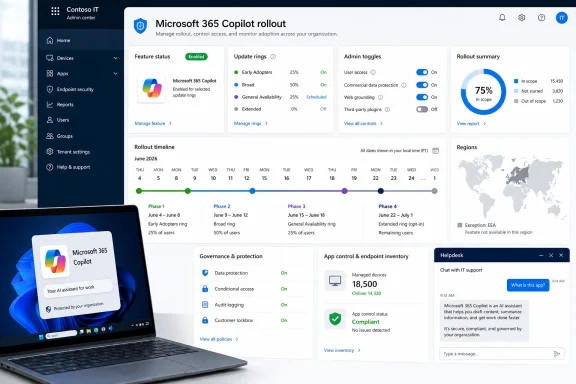 Microsoft Turns the Pause Into a Countdown
The important word in Microsoft’s March communication was always temporarily. When the company disabled automatic installation of the Microsoft 365 Copilot app earlier this year, some customers read the move as a sign that Microsoft might be backing away from one of its more aggressive Copilot pushes. That was understandable. By early 2026, Microsoft had already absorbed months of criticism over AI surfaces appearing in places users did not ask for them, from Windows entry points to Microsoft 365 workflows.But the latest Message Center update suggests a more prosaic explanation: the machinery was stopped because something was broken, not because the strategy had changed. Microsoft is now restarting the same basic plan, with a phased rollout beginning June 4 and running through the end of the month into July 1. That timeline matters because it turns what looked like a reprieve into an operational deadline.
The affected systems are not random consumer PCs. Microsoft is aiming this at commercial Windows devices with Microsoft 365 Apps already installed, meaning the app is being delivered into environments that are supposed to be governed by tenant policy, update rings, licensing controls, endpoint management, and change advisory boards. In other words, Microsoft is not merely adding another app to a home Start menu. It is altering the default software inventory of business endpoints.
That distinction is what makes the story bigger than Copilot fatigue. Microsoft’s argument is that the Microsoft 365 Copilot app is a logical entry point into the Microsoft 365 experience. Many administrators will see something else: another example of the vendor converting a subscription footprint into an installation channel.
The App Is Small, but the Governance Problem Is Not
The Microsoft 365 Copilot app is not the same thing as silently assigning every user a paid Copilot license. It is an app shell, a desktop entry point into Microsoft 365 Copilot, Copilot Chat, search, agents, files, and related Microsoft 365 experiences depending on licensing and tenant configuration. On a device where users already work in Word, Excel, PowerPoint, Outlook, Teams, OneDrive, and the Microsoft 365 web portal, Microsoft can plausibly argue that the app belongs in the same family.That framing is convenient, but it does not eliminate the trust problem. Enterprise desktops are not just collections of vendor-approved shortcuts. They are managed workspaces with security baselines, application allow lists, support documentation, user training, privacy reviews, and help desk expectations. Even a relatively harmless app can become a meaningful change when it appears without a local install action.
Microsoft says the automatic installation happens in the background and should not interrupt users. That may be true in a narrow technical sense. The trouble is that “doesn’t interrupt the user” is not the same as “doesn’t affect the organization.” The surprise is itself the interruption.
The company is reportedly telling admins to notify users before the app appears. That advice is sensible, but it also reveals the awkwardness of the deployment model. If Microsoft knows the appearance of the app may confuse users, then the company also knows it is making administrators explain a change many of them did not initiate.
Eligible Does Not Mean Ready
Microsoft’s eligibility rules narrow the blast radius, but they do not make the rollout benign. Devices need commercial Microsoft 365 desktop apps, and Microsoft’s public documentation has tied automatic installation to Microsoft 365 Apps version 2511 or later on Current Channel or Monthly Enterprise Channel. Devices on the Semi-Annual Enterprise Channel are not in scope for the automatic install path described in the deployment guidance.That distinction will matter in larger organizations. Enterprises that keep productivity apps on slower update channels may dodge the immediate push, while organizations on Current Channel or Monthly Enterprise Channel are more likely to see the app arrive. Smaller businesses that rely on Microsoft defaults may discover the change only when users notice a new entry in Installed Apps or the Start menu.
The European Economic Area carve-out is equally telling. Microsoft’s documentation says automatic installation through Microsoft 365 Apps is not enabled for EEA customers. The company frames this as a deployment distinction, but the policy reality is obvious enough: Microsoft has learned that defaults tolerated in one jurisdiction may become regulatory liabilities in another.
That creates an odd global split. A U.S.-based tenant with users abroad may be treated differently from an EEA-based tenant with devices elsewhere, because Microsoft’s documentation points to tenant attributes rather than simply the physical location of the PC. For admins, this is one more reminder that cloud-era Windows behavior is increasingly shaped by tenant metadata, licensing state, update channel, region, and feature flags—not merely by what is installed on the disk.
Feature Flags Are the New Patch Tuesday Fog
The rollout schedule reported from the Message Center is a familiar Microsoft 365 pattern: feature flags first, infrastructure and schema work in the middle, then more flags to complete the experience. Feature Flag 1 began June 4 and is expected to finish June 10. Feature Flag 2 is expected to run June 11 through June 17. A Microsoft Graph schema rollout is expected June 18 through June 24. Feature Flag 3 is expected to run June 25 through July 1.That is a normal enough sequence for cloud service engineering. It is also maddening for administrators who want a crisp answer to a simple question: when will this app show up on my endpoints? Microsoft 365 has spent years moving from monolithic releases to staged service activation, and that model is technically safer. It also makes causality harder to explain.
A traditional Windows admin could once point to a KB number, an MSI, a GPO, or a software deployment job. Today, an endpoint’s behavior may depend on whether a server-side flag has reached a tenant, whether a channel update has landed, whether a service schema has propagated, and whether a device has checked in during the right window. The machine may look unchanged until it suddenly is not.
That ambiguity is not unique to Copilot, but Copilot amplifies it because the product is politically loaded inside many organizations. Security teams want to know what data paths are enabled. Legal teams want to know what users can paste into AI tools. Executives want to know why competitors appear to be deploying AI faster. Users want to know why yet another Microsoft icon exists. Administrators sit in the middle, translating feature flags into workplace reality.
The Opt-Out Exists, but Defaults Still Do the Work
Microsoft deserves some credit for providing an administrative opt-out. Public deployment guidance says admins can prevent automatic installation in the Microsoft 365 Apps admin center by going through Customization, Device Configuration, and Modern Apps settings, then disabling automatic installation for the Microsoft 365 Copilot app. That is better than a hard-coded install with no tenant-level control.But the existence of an opt-out does not settle the argument. Defaults are policy. In software distribution, the default path often determines the outcome because many organizations are understaffed, many tenants are inconsistently governed, and many administrators do not live inside the Message Center every morning waiting for a new “major change” to land.
Microsoft knows this better than anyone. The company’s entire cloud productivity strategy depends on defaults, prompts, nudges, seeded experiences, and gradual normalization. Teams became infrastructure not merely because it was a good product, but because it was bundled, integrated, and made increasingly unavoidable. OneDrive, Edge, Loop components, and the Microsoft 365 app have all benefited from similar gravity.
Copilot is now being given that same gravitational assistance. Microsoft is not waiting for every customer to make a clean, affirmative deployment decision. It is placing the app where it believes the workflow should begin, then allowing administrators to say no if they move in time.
That inversion is the heart of the controversy. In a managed estate, the customer normally decides what gets installed and the vendor supplies the means. Microsoft’s cloud model increasingly asks customers to monitor what the vendor plans to install and intervene before it happens.
Microsoft Is Selling an Entry Point, Not Just an Assistant
The Microsoft 365 Copilot app is best understood as a front door. It gives Microsoft a dedicated place on Windows to route users into AI-assisted search, chat, agents, files, meetings, and eventually whatever new productivity abstraction the company wants to promote. That makes the desktop app strategically important even when the user does not have the full paid Microsoft 365 Copilot license.A standalone app gives Microsoft a more controllable canvas than Word or Excel. Office apps carry decades of user expectations; a Copilot hub can evolve faster. It can surface recommended files, summarize work, expose agents, push prompts, and direct users toward features that Microsoft wants to make habitual. The app is less about today’s icon than tomorrow’s behavioral loop.
That is why the “it’s just an app” defense is incomplete. Distribution creates habit, and habit creates market power. If the Copilot app becomes the default place where millions of workers start their day, Microsoft has created a new layer between the user and the organization’s information. That layer may be helpful, but it is not neutral.
Enterprises understand this when the vendor is anyone other than Microsoft. Few IT departments would shrug if a third-party SaaS provider quietly placed a new AI assistant on every managed Windows endpoint because the organization already used its browser plugin or document connector. Microsoft gets more tolerance because it owns the productivity suite, the identity platform, the endpoint management stack, and the operating system. That is precisely why the tolerance is becoming more strained.
The Branding Confusion Is Now a Support Cost
Microsoft’s Copilot naming remains a mess, and automatic installation makes that mess visible to ordinary users. There is Microsoft Copilot, the consumer-facing assistant. There is Microsoft 365 Copilot, the paid work assistant integrated with Microsoft 365 data and apps. There is Copilot Chat. There are Copilot experiences inside Word, Excel, PowerPoint, Outlook, Teams, Edge, Windows, and the Microsoft 365 app. There are also Copilot+ PCs, which refer to hardware capabilities and local AI features rather than a subscription to Microsoft 365 Copilot.This is not just a branding columnist’s complaint. It becomes a help desk problem. A user sees “Microsoft 365 Copilot” installed and assumes they now have the licensed Copilot features their colleague demonstrated in Teams. Another user opens the app and encounters a different chat experience than the one they used in a browser. A manager asks why AI was installed after the company said it had not approved Copilot. A security analyst wants to know which Copilot logs, policies, and data protections apply.
Microsoft’s documentation tries to separate these concepts, but documentation is not what most users experience. They experience an icon. If the icon arrives automatically, the organization owns the explanation.
For admins who have already spent the last two years untangling “new Teams,” “classic Teams,” “Microsoft 365,” “Office,” “Copilot,” and “Copilot for Microsoft 365,” this rollout adds another layer of semantic debt. Microsoft can rename products faster than enterprises can update training materials.
The EEA Exception Says the Quiet Part Out Loud
The European Economic Area exclusion is one of the most revealing details in the rollout. Microsoft is not saying the app cannot technically be installed in Europe. It is saying this automatic installation route is not enabled for EEA customers. Manual deployment remains available through other paths.That means Microsoft has built the switch. It can separate automatic distribution from product availability. It can allow customers to deploy the app deliberately without making the suite installer do it for them. The EEA gets that posture by default; many other regions get automatic installation unless admins opt out.
The reason is not hard to infer. European regulators have spent years scrutinizing platform bundling, default services, user choice, and the way large technology companies use dominant products to advance adjacent ones. Microsoft knows the terrain. It has been here before with browsers, media players, Teams, and cloud licensing complaints. Copilot may be new technology, but the competition and consent questions are old.
For U.S. and other non-EEA customers, the lesson is uncomfortable. The same technical product can be distributed under a more restrained model when Microsoft has sufficient legal incentive. That does not automatically make the non-EEA rollout illegal or abusive, but it does weaken the argument that automatic installation is simply necessary for product coherence.
It also leaves global companies with a two-speed governance model. A multinational tenant may need to understand not only which devices are eligible, but why a European subsidiary’s expectations differ from a U.S. business unit’s experience. The result is more policy work for customers because Microsoft has chosen an uneven default.
Security Teams Will Care About Perception as Much as Permissions
The Microsoft 365 Copilot app is not, by itself, proof that sensitive corporate data is being sprayed into an AI model. Microsoft has invested heavily in enterprise data protection messaging, tenant controls, auditability, and permission-respecting retrieval for Microsoft 365 Copilot experiences. Those details matter, and security teams should evaluate the actual data flows rather than react to the word “AI” as if every implementation were identical.But perception can still become a security issue. If users believe “Copilot is now installed,” they may assume the company has approved broader AI use. They may paste data into whatever Copilot-branded surface is easiest to access, without understanding the difference between consumer and commercial experiences, licensed and unlicensed modes, or browser and desktop entry points. The risk is not only what the app does; it is what the app signals.
This is why Microsoft’s advice to communicate with users ahead of the rollout is more than courtesy. It is risk management. Organizations need to explain what the app is, what it is not, who is licensed for which features, what data users may enter, and where official policy lives. If they do not, the new icon becomes an invitation to improvise.
There is also the more mundane endpoint-security angle. Application inventory changes can trigger alerts, confuse baselines, complicate gold images, and create exceptions in app control policies. Even when the software is signed by Microsoft and delivered through supported channels, a sudden new app can produce operational noise. In mature environments, noise has a cost.
Admin Centers Have Become the Real Operating System
One of the underappreciated shifts in modern Windows administration is that more consequential settings now live outside Windows itself. The Microsoft 365 Apps admin center, Intune, Entra, Defender portals, Teams admin center, Purview, and Message Center collectively shape the user’s desktop as much as local policy does. The operating system is still there, but the control plane has moved upward.The Copilot app rollout is a perfect example. The decision is not primarily a Windows Update setting. It is not something most users will understand as an app they downloaded. It is tied to Microsoft 365 Apps, tenant eligibility, update channel, service-side rollout, and a Microsoft 365 Apps admin center control. For the modern IT department, the Windows desktop is increasingly the rendered output of cloud policy.
That model has advantages. It lets Microsoft patch, configure, and evolve experiences quickly. It gives admins central switches. It reduces the need for some legacy deployment packaging. It makes sense in a world where work follows identity more than device ownership.
But it also shifts power toward Microsoft’s roadmap. If the vendor can add a new experience by changing the cloud default, the administrator’s job becomes defensive: read the advisory, find the toggle, test the impact, communicate the change, and document the exception. That may be manageable for a large enterprise with a dedicated Microsoft 365 governance team. It is a heavier lift for schools, nonprofits, local governments, and small businesses whose “IT department” may be one person with too many portals already open.
The Copilot Push Is Running Ahead of Copilot Readiness
Microsoft’s urgency is understandable. The company has invested enormous technical, financial, and strategic capital into AI. It wants Copilot to become the interface layer for work before rivals establish their own habits inside the enterprise. Google, OpenAI, Anthropic, Salesforce, ServiceNow, Slack, Notion, Zoom, and countless vertical vendors all want some version of the same prize: the assistant that sits closest to the worker’s intent.Microsoft’s advantage is distribution. It owns the apps where much of the work already happens. It owns the identity system. It owns the endpoint. It owns the admin relationship. From a business strategy standpoint, failing to use that advantage would be almost irrational.
From a customer standpoint, however, distribution is not the same as readiness. Many organizations are still writing AI acceptable-use policies. Some are piloting Copilot with small groups. Others are waiting for clearer ROI, better controls, more predictable licensing, or stronger internal data hygiene. A new app appearing across eligible PCs can make the organization look further along than it is.
That disconnect matters because AI deployment is not like adding a PDF reader. The value of enterprise AI depends on permissions, information architecture, training, user judgment, legal posture, and business process redesign. Installing an entry point is the easy part. Making it safe, useful, and supportable is the hard part.
Microsoft often behaves as if exposure will create adoption, and adoption will justify the exposure. That flywheel worked for some cloud collaboration tools. AI may prove less forgiving because misuse, disappointment, and confusion are more expensive.
The App Can Be Removed, but the Memory Remains
Microsoft’s documentation indicates that if the Microsoft 365 Copilot app is automatically installed through Microsoft 365 Apps and a user later uninstalls it, the automatic installation is not supposed to keep reinstalling it repeatedly. That is an important operational detail. The rollout is not described as an endless enforcement loop.Still, admins should be careful about relying on user uninstall behavior as a governance model. If the organization does not want the app installed, tenant-level prevention is cleaner than asking users to remove it or scripting cleanup afterward. Removal after surprise installation also does nothing to prevent the support tickets, screenshots, and internal debate that happen when users first notice it.
This is where Microsoft’s “major change” label is appropriate. The app may be small, but the deployment has organizational meaning. It changes user-facing software inventory, touches AI policy, and intersects with region-specific compliance posture. That is major enough.
It also fits a broader pattern in which Microsoft tests the boundary between service evolution and customer consent. Sometimes the company retreats, sometimes it clarifies, sometimes it renames, and sometimes it simply resumes the rollout once the blocking issue is fixed. Customers have learned to treat pauses as pauses, not promises.
The June Copilot Calendar Gives Admins a Narrow Window
For administrators who do not want surprises, the practical response is not complicated, but it is time-sensitive. Check whether the tenant is in scope, verify Microsoft 365 Apps update channels, review the Microsoft 365 Apps admin center setting, and decide whether the Copilot app should be deployed automatically, manually, or not at all. Then tell users what to expect.That last step is easy to dismiss and costly to skip. Users do not distinguish between a tenant-level app deployment, a Windows update, a Microsoft Store update, and an AI licensing change. They see a new Microsoft app and draw conclusions. If the organization does not supply the narrative, the rumor mill will.
The reported rollout milestones also suggest admins should not wait until the end of June. Feature flags are already moving. A tenant that looks unaffected today may not remain so next week. The safer assumption is that eligible non-EEA commercial Windows devices on the right Microsoft 365 Apps channels will eventually receive the app unless a prevention control is set.
This is also a good moment to audit Copilot communication more broadly. If the organization has approved Microsoft 365 Copilot for some users, say who and why. If it has approved Copilot Chat but not paid Copilot, explain the difference. If it has not approved AI use for sensitive data, say that clearly. The desktop icon is only one piece of a larger governance conversation.
The Real Story Is the Default Microsoft Chose
The concrete facts of this rollout are easy to summarize, but the strategic lesson is larger. Microsoft has decided that the Microsoft 365 Copilot app belongs on eligible commercial Windows PCs by default, and it has placed the burden on administrators to opt out where that default is unwanted. That choice tells us more about Microsoft’s AI strategy than any keynote demo.The company is no longer merely offering Copilot as an add-on for curious customers. It is weaving Copilot-branded entry points into the fabric of Microsoft 365 and Windows. The app is part of a distribution campaign designed to make AI feel native, expected, and eventually indispensable.
For some organizations, that will be welcome. They want Microsoft to accelerate AI adoption, reduce deployment friction, and give users an obvious place to begin. For others, it will feel like yet another example of Redmond mistaking license ownership for consent.
Both reactions can be true. Microsoft can be solving a real adoption problem while also creating a governance problem. The controversy exists because the same mechanism that helps eager customers move faster can push cautious customers before they are ready.
The Admin’s June Checklist Writes Itself
The immediate task for IT is to turn Microsoft’s cloud-side rollout into a local decision rather than a surprise. The app may arrive quietly, but the policy around it should not.- Administrators should verify whether their tenant is outside the European Economic Area and whether eligible Windows devices run Microsoft 365 Apps on Current Channel or Monthly Enterprise Channel.
- Organizations that do not want automatic installation should disable it in the Microsoft 365 Apps admin center before the phased rollout reaches their tenant.
- Help desks should be briefed on the difference between Microsoft Copilot, Microsoft 365 Copilot, Copilot Chat, and Copilot+ PCs so they can answer user questions without improvising.
- Security and compliance teams should update AI-use guidance to explain what the desktop app permits, what licensing enables, and what data users may enter into approved Copilot experiences.
- Endpoint teams should expect application inventory changes, app-control questions, and possible user confusion even if the installation itself is technically quiet.
- Leaders should treat the rollout as part of Microsoft’s broader AI-default strategy, not as an isolated app deployment.
References
- Primary source: Neowin
Published: 2026-06-05T15:12:07.023932
Loading…
www.neowin.net - Related coverage: windowslatest.com

Microsoft says it won't auto install Microsoft 365 Copilot app on Windows 11, likely due to outrage over 'Microslop'
Microsoft says it’s taking a step back and temporarily disabling the automatic installation of Microsoft 365 Copilot on Windows 11. In September 2025, Microsoft confirmed it was auto-installing Microsoft 365 Copilot (formerly called Microsoft 365 / Office Hub) on Windows, and that was in... www.windowslatest.com
- Related coverage: pcworld.com

Microsoft is halting forced installs of Microsoft 365 Copilot app
It comes at a time when Microsoft faces heavy backlash from users over its obsession with Copilot AI. www.pcworld.com
- Related coverage: techtimes.com

Microsoft Will Not Auto-Install M365 Copilot App on Windows 11 PCs
Microsoft is no longer automatically installing the Microsoft 365 Copilot app on Windows 11 PCs despite previous plans to make it default. www.techtimes.com
- Related coverage: windowsreport.com
Loading…
windowsreport.com - Official source: learn.microsoft.com

Frequently asked questions about deploying the Microsoft 365 Copilot app.
Frequently asked questions about deploying the Microsoft 365 Copilot app.learn.microsoft.com
- Related coverage: computerworld.com
Loading…
www.computerworld.com - Related coverage: netservicesgroup.com
Loading…
www.netservicesgroup.com - Related coverage: vpncentral.com
Loading…
vpncentral.com - Related coverage: techradar.com

Microsoft Confirms Automatic Copilot Installation on 365 Clients This October
Microsoft is pushing the Copilot app on more userswww.techradar.com
- Related coverage: gadgets360.com
Loading…
www.gadgets360.com - Related coverage: tech.yahoo.com
Loading…
tech.yahoo.com - Related coverage: techspot.com
Loading…
www.techspot.com - Related coverage: windowscentral.com
Loading…
www.windowscentral.com - Related coverage: tomshardware.com
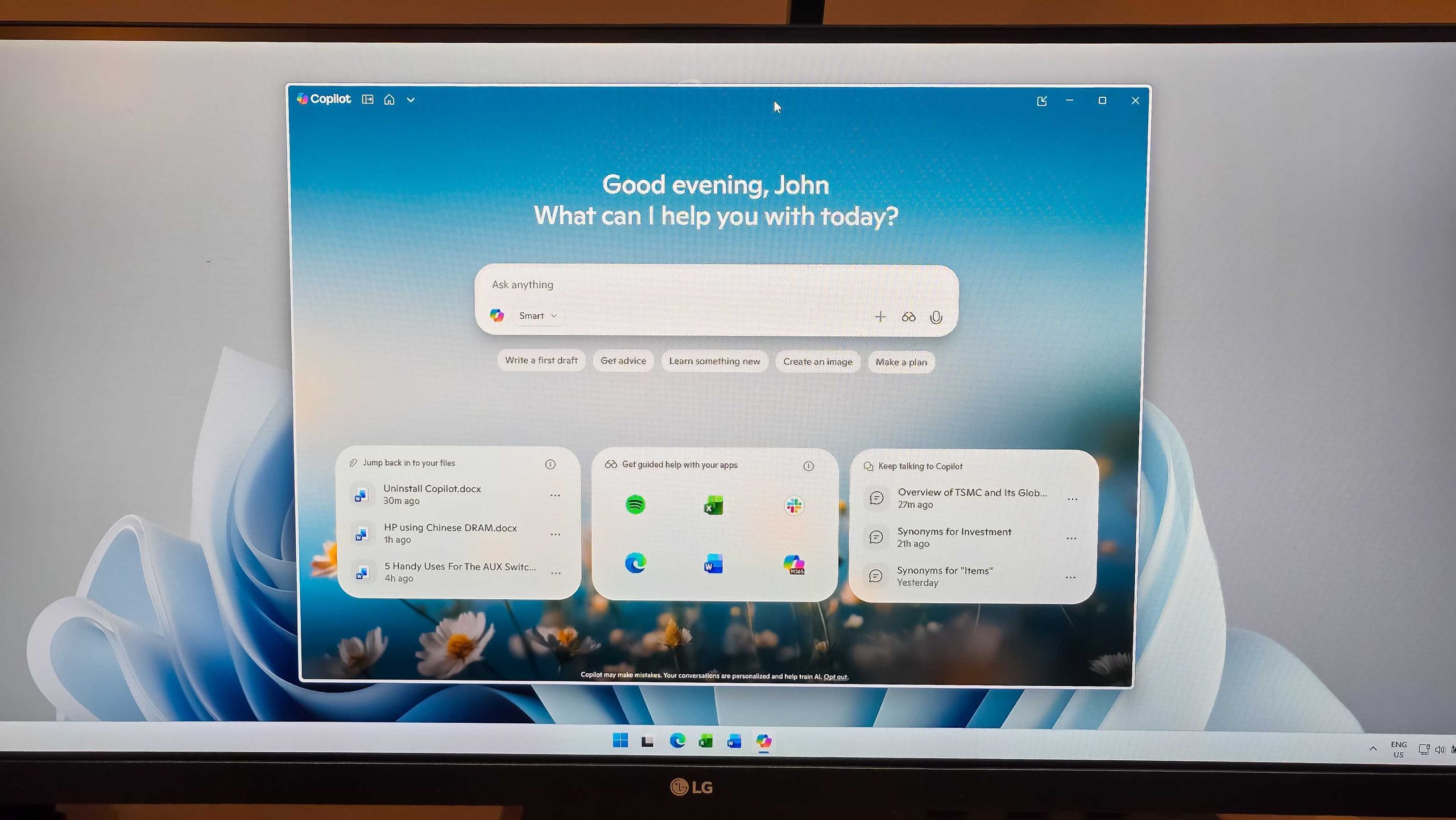
Admins finally get the power to uninstall Microsoft Copilot on Windows 11 Pro, Enterprise, and EDU versions — devices must meet specific conditions to allow the removal of the AI app
One less bloatware on Windows 11.www.tomshardware.com
- Official source: microsoft.com
Loading…
www.microsoft.com - Related coverage: techriver.com
Loading…
www.techriver.com - Official source: techcommunity.microsoft.com
Loading…
techcommunity.microsoft.com - Official source: news.microsoft.com
Loading…
news.microsoft.com