

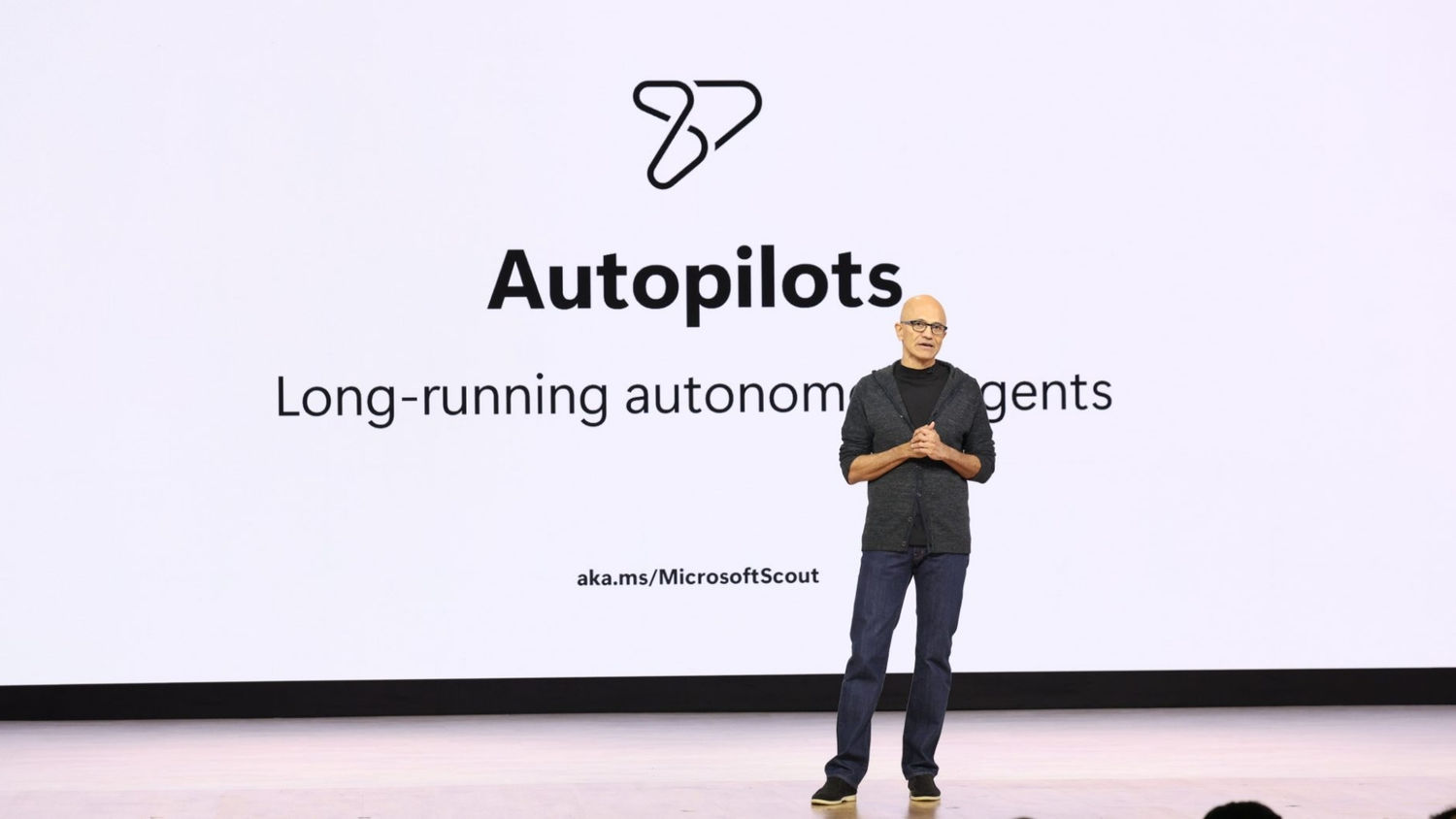
Microsoft announced Scout at Build 2026 on June 2 as an always-on Microsoft 365 work agent built on OpenClaw, while reports based on internal documents say an earlier rollout plan for the product, then called ClawPilot, described its first phase as “Make people addicted.” The phrase is blunt enough to travel faster than the product itself, but the real story is not merely that someone at Microsoft wrote a bad heading. Scout sits at the point where enterprise productivity software, autonomous agents, identity systems, and behavioral design are all starting to collapse into one interface. If Microsoft wants AI to become the new layer of work, the uncomfortable question is whether dependence is a side effect, a success metric, or the business model.
Scout is being presented publicly as a practical work agent: a personal assistant that lives inside the Microsoft 365 world and can act across Teams, Outlook, OneDrive, SharePoint, the browser, and local desktop tasks. Microsoft’s official framing is that Scout belongs to a new class of Autopilot agents, software that does not wait passively for prompts but works continuously in the background with its own governed identity.
That positioning matters because Scout is not just another chatbot box slapped onto a productivity app. Microsoft is pitching it as a persistent work companion with access to the documents, conversations, meetings, calendars, and workflows that define a modern office job. The company says it is available in private preview for Frontier customers, which is Microsoft’s way of putting the feature in front of early enterprise adopters while still keeping it inside a controlled channel.
The leak reported by 404 Media cuts across that polished rollout. According to the report, an internal document titled “ClawPilot: Overview and Plan with Project Lobster” described the first phase of Scout’s earlier development strategy as “Make people addicted.” The document reportedly described a plan to keep shipping a standalone ClawPilot experience, pilot the user experience, grow the user base, and build the skills-and-tools ecosystem that would make people depend on it daily.
There is a world in which that phrase was casual shorthand rather than an official doctrine. Engineers and product managers often use regrettable internal language that was never meant to survive contact with the public. But in 2026, when AI dependency is no longer a speculative social worry and enterprise agents are being granted real permissions, the distinction between “sticky” and “addictive” is not just semantic.
That shift is subtle but important. Copilot usually responds to a user’s explicit request. Scout is designed to understand context, anticipate work, and take action without being asked every time. Microsoft’s Build messaging emphasized that most AI at work still waits for a prompt, while Scout and related Autopilot agents are meant to operate continuously.
For sysadmins and security teams, this is not just a UX evolution. A prompted assistant has a relatively clear interaction boundary: the user asks, the system responds. A persistent agent with access to files, meetings, email, browser sessions, and local actions creates a much larger audit, permissions, and trust surface.
That is why Microsoft is also talking about Entra identities, Defender, Purview, Agent 365, and governance. The company understands that an always-on agent cannot be sold to enterprises as a toy. It needs an identity, logs, policy controls, permission boundaries, and an explanation for who is accountable when the agent does something consequential.
But even a well-governed agent changes the center of gravity. Once Scout becomes the place where work is prepared, delegated, summarized, scheduled, chased, and nudged, the user no longer merely uses Microsoft 365. The user starts using Microsoft’s agent as the daily interpreter of Microsoft 365.
That is precisely the kind of energy enterprise software companies usually struggle to manufacture. Microsoft can build infrastructure, licensing programs, admin consoles, and developer platforms at industrial scale. It is less naturally associated with viral end-user delight. OpenClaw gave Microsoft a cultural shortcut: an agent pattern that people were already excited about, wrapped in the permissions and compliance machinery that enterprises demand.
The internal codename “Project Lobster” is almost too on the nose, given OpenClaw’s crustacean branding and the broader agent subculture that formed around it. But beneath the playful naming is a familiar Microsoft playbook. Find the developer movement, absorb the useful pattern, wrap it in Microsoft 365, and make it manageable for organizations that would never let employees run a chaotic open-source agent against production data.
That move is both sensible and risky. Sensible, because unmanaged agent use is already happening in many companies, just as shadow IT happened with cloud apps and messaging tools before it. Risky, because domestication does not remove the behavioral dynamics that made the original technology compelling. It may simply make them safe enough to deploy everywhere.
Enterprise software has always wanted this. Outlook became indispensable by owning email, calendar, contacts, and meeting rituals. Teams became indispensable by becoming the place where meetings, chats, files, and approvals converged. SharePoint became indispensable less through love than institutional gravity. The difference with Scout is that Microsoft is not merely trying to own a tool category; it is trying to own the layer that decides which tool matters next.
That is what makes the addiction framing more than a PR problem. If Scout is successful, it will not just be opened frequently. It will become a mediator between the worker and the organization’s memory, priorities, commitments, and operational routines. A user may come to rely on it not because it is fun, but because the workday becomes harder without it.
The internal document reportedly cited high retention and intense daily usage among Microsoft employees. That is exactly what a product team wants to see in an early pilot. But when the product is an autonomous agent, “intensity” is a loaded word. More chats, more queries, more workflows, and more skills may indicate productivity, but they may also indicate that the user’s cognitive offloading is accelerating faster than the organization’s ability to evaluate it.
But an always-on agent changes the augmentation bargain. If the system remembers what you usually do, anticipates what you probably need, and executes steps across applications, the worker’s role shifts from doing to supervising. That can be liberating when the task is low-value administrative work. It can also be deskilling when the agent becomes the only practical way to navigate the complexity the organization has created.
This is where WindowsForum readers should pay close attention. Microsoft’s enterprise AI strategy is not just about adding smarter features to Office. It is about changing how Windows, Microsoft 365, identity, security, and cloud services combine into a work substrate where agents are first-class actors. Scout is a user-facing expression of that substrate.
The more agentic the workplace becomes, the more governance becomes a product dependency rather than an optional admin concern. Who approved the agent’s access? Which files did it read? Which emails did it draft? Which browser actions did it perform? Which workflow did it trigger? Which policy stopped it, and which policy failed to stop it?
Microsoft is already building the control plane because it knows these questions are coming. But history suggests that usability and adoption often outrun governance. Teams sprawl, SharePoint permission inheritance, OAuth app consent, and unmanaged Power Automate flows all taught administrators the same lesson: if a Microsoft productivity tool becomes useful enough, users will spread it faster than IT can rationalize it.
Still, identity is not the same thing as judgment. An agent can be properly authenticated and still do the wrong thing. It can access only permitted data and still combine that data in ways that create new exposure. It can obey policy and still become a superb accelerator for mistakes, oversharing, social engineering, or internal confusion.
Agentic systems also create a new flavor of insider risk. A compromised user account is already dangerous; a compromised user account with a trained, persistent assistant that understands that user’s work patterns may be worse. The attacker does not merely gain access to files and mail. The attacker may gain access to a machine-readable map of how the victim gets work done.
Then there is the prompt-injection problem, which becomes harder when the agent reads email, documents, websites, chats, and possibly local files. A malicious instruction hidden in a document or webpage can attempt to manipulate the agent into taking an action the user did not intend. Microsoft can mitigate this, but it cannot wish away the architectural fact that agents ingest untrusted input and then act in trusted contexts.
For administrators, the practical stance should be cautious experimentation rather than panic. Scout may become genuinely useful. It may also become another place where permission hygiene, logging, conditional access, data-loss prevention, and endpoint controls suddenly matter more than they did last quarter.
Scout is not primarily a companion chatbot. It is an agentic work tool, and that difference matters. A finance analyst leaning on Scout to prepare a weekly report is not the same as a lonely teenager forming an emotional bond with a chatbot. Conflating those scenarios would be lazy.
But they do rhyme in one critical respect: both make the system more valuable by embedding itself into recurring human needs. In a work context, the need is not emotional intimacy but competence under pressure. If Scout helps a manager survive a calendar, prioritize tasks, remember commitments, and avoid embarrassment, that manager will come back tomorrow.
The dependency may be organizational as much as psychological. A company that redesigns workflows around agents can create a workplace where opting out is technically possible but professionally irrational. The employee who refuses Scout may simply be slower, less prepared, and less aligned with the rhythms of automated work.
That is the darker reading of “Make people addicted.” It may not mean Microsoft wants users staring at Scout for dopamine hits. It may mean Microsoft wants Scout to become the path of least resistance for doing one’s job. In enterprise software, that kind of dependency is often more durable than affection.
Scout attacks that problem by moving from prompting to presence. Instead of waiting for the user to ask, it watches the shape of the workday and offers or performs the next useful step. That is why Microsoft’s internal focus on retention and daily usage is strategically important. The company is trying to turn AI from a novelty into a reflex.
This is also why integration with Teams and Outlook is so valuable. Microsoft does not need to convince workers to visit a new destination if Scout lives in the places where the workday already happens. Meetings, messages, files, approvals, and calendar conflicts are not edge cases. They are the operating system of office life.
The risk is that habit can become opacity. If Scout quietly smooths over the day’s rough edges, users may stop understanding which steps were automated, which assumptions were made, and which decisions were effectively delegated. Productivity gains are easiest to measure when tasks disappear. Accountability is harder to measure when responsibility becomes distributed across user, agent, model, policy, and platform.
Microsoft knows the market wants measurable AI return on investment. Scout is designed to make that easier by finding recurring work and doing more of it. But the more successful that becomes, the harder it will be for organizations to distinguish productive reliance from brittle dependence.
That has obvious echoes of Microsoft’s earlier Copilot+ PC push, but Scout is different in emphasis. Copilot+ PCs emphasized local AI acceleration and features like recall, image generation, and on-device model workloads. Scout emphasizes agency across work systems. One is about what the PC can compute; the other is about what the PC can let an agent do.
This distinction will matter as Microsoft tries to make Windows relevant in an AI-first era. The company does not want the browser, phone, or standalone AI app to become the primary interface for work. It wants Windows and Microsoft 365 to remain the trusted environment where agents can act with context and permission.
That creates a new competitive front. If OpenAI, Google, Anthropic, Apple, or a startup can provide the preferred personal agent, Microsoft risks losing the top layer of user intent even if it still owns the documents and endpoints underneath. Scout is therefore defensive as well as offensive. It is a bid to ensure that the agent mediating your work is Microsoft’s agent, not someone else’s.
The irony is that Windows users have historically resisted features that feel too watchful, too automatic, or too difficult to remove. Microsoft has learned this lesson repeatedly, from telemetry fights to Edge defaults to the backlash around Recall. Scout will need to persuade users that persistent help is not persistent surveillance with better branding.
The first wave of Scout deployments will likely be shaped by conservative defaults. Private preview access, Frontier customer limits, admin management, identity controls, and audit hooks are all meant to keep the blast radius manageable. That is the right approach, but it should not lull anyone into thinking the hard work is finished.
The real test comes when business units want Scout everywhere. Legal will want it to summarize matter files. Finance will want it to reconcile reporting workflows. HR will want it to manage policy questions and employee requests. Operations will want it to watch handoffs, vendors, and exceptions. Every one of those use cases is plausible, and every one carries different risk.
Microsoft’s advantage is that it already owns much of the enterprise control layer. Entra, Purview, Defender, Intune, Microsoft 365 admin controls, and the broader compliance stack give it a story that smaller AI vendors cannot easily match. But Microsoft’s disadvantage is the same breadth. A misconfigured Microsoft environment is already a sprawling attack surface; agents make sprawl more consequential.
Admins should expect Scout to force old hygiene issues back onto the agenda. Over-permissioned SharePoint sites, stale Teams, poorly labeled sensitive data, weak conditional access policies, unmanaged browser extensions, and vague retention rules all become more urgent when an agent can traverse the environment on behalf of users.
The internal language described by 404 Media has a different energy. “Make people addicted” is not the language of reassurance; it is the language of momentum. It suggests a product team trying to capture the organic intensity of early users before the strategy hardens into platform layers, partnerships, and admin frameworks.
Both messages can be true. Microsoft can sincerely build governance into Scout while also pursuing aggressive daily dependence. In fact, those goals reinforce each other. The safer Scout appears, the easier it is to deploy; the more widely it is deployed, the more likely it becomes a habit; the more habitual it becomes, the more valuable Microsoft’s agent platform becomes.
This is the central tension of enterprise AI in 2026. Vendors want agents to be trusted enough to act and useful enough to become indispensable. Users want relief from busywork without surrendering agency. Administrators want innovation without losing control. Executives want productivity gains without reading the risk register too closely.
Scout is not the first product to expose that tension, but it may be one of the clearest. It arrives with the right enterprise nouns and the wrong leaked verb. Governed identities and addictive loops are not opposites. They are the two halves of the modern AI platform pitch.
That future could be genuinely better for many workers. Nobody needs to mourn the manual assembly of meeting briefs, the endless triage of calendar conflicts, or the repetitive hunting through folders and message threads. If Scout can reduce that burden without making users less capable or organizations less secure, it will deserve adoption.
But lock-in in the agent era will be more intimate than lock-in in the app era. It will not just be about file formats, licenses, or switching costs. It will be about the assistant that knows how your team works, which shortcuts you prefer, what your boss expects, how your projects are structured, and which recurring problems appear every Friday afternoon.
That kind of embedded context becomes difficult to leave. It also becomes difficult to audit from the outside. A company may not notice the moment it becomes dependent on Scout because the dependency will look like convenience, then efficiency, then standard operating procedure.
That is why Microsoft’s leaked language matters even if it was careless shorthand. It names the destination more honestly than the launch materials do. Scout is not merely meant to help. It is meant to become part of the workday’s muscle memory.
For users, the right posture is curiosity with boundaries. For administrators, it is pilot discipline. For security teams, it is a reason to accelerate data governance before agents make bad permissions more actionable. For Microsoft, it is a reminder that the language of addiction does not belong anywhere near tools that may soon mediate daily work for millions of people.
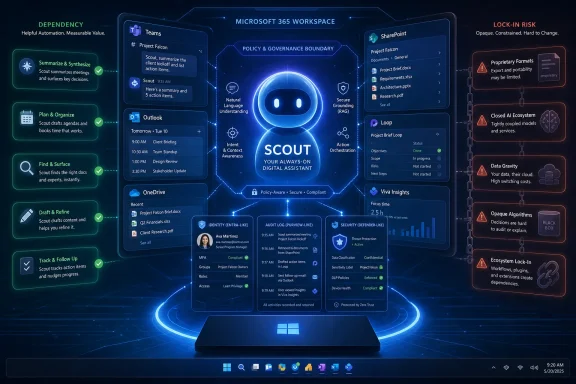 Microsoft’s New Assistant Arrives With a Marketing Smile and an Internal Grimace
Scout is being presented publicly as a practical work agent: a personal assistant that lives inside the Microsoft 365 world and can act across Teams, Outlook, OneDrive, SharePoint, the browser, and local desktop tasks. Microsoft’s official framing is that Scout belongs to a new class of Autopilot agents, software that does not wait passively for prompts but works continuously in the background with its own governed identity.That positioning matters because Scout is not just another chatbot box slapped onto a productivity app. Microsoft is pitching it as a persistent work companion with access to the documents, conversations, meetings, calendars, and workflows that define a modern office job. The company says it is available in private preview for Frontier customers, which is Microsoft’s way of putting the feature in front of early enterprise adopters while still keeping it inside a controlled channel.
The leak reported by 404 Media cuts across that polished rollout. According to the report, an internal document titled “ClawPilot: Overview and Plan with Project Lobster” described the first phase of Scout’s earlier development strategy as “Make people addicted.” The document reportedly described a plan to keep shipping a standalone ClawPilot experience, pilot the user experience, grow the user base, and build the skills-and-tools ecosystem that would make people depend on it daily.
There is a world in which that phrase was casual shorthand rather than an official doctrine. Engineers and product managers often use regrettable internal language that was never meant to survive contact with the public. But in 2026, when AI dependency is no longer a speculative social worry and enterprise agents are being granted real permissions, the distinction between “sticky” and “addictive” is not just semantic.
Scout Is Copilot’s More Ambitious, More Dangerous Cousin
Microsoft has spent the last several years teaching customers to accept Copilot as a layer inside existing applications. Copilot summarizes meetings, drafts emails, analyzes spreadsheets, and answers questions over company data. Scout appears to be a step beyond that pattern: less assistant in an app, more agent across the workday.That shift is subtle but important. Copilot usually responds to a user’s explicit request. Scout is designed to understand context, anticipate work, and take action without being asked every time. Microsoft’s Build messaging emphasized that most AI at work still waits for a prompt, while Scout and related Autopilot agents are meant to operate continuously.
For sysadmins and security teams, this is not just a UX evolution. A prompted assistant has a relatively clear interaction boundary: the user asks, the system responds. A persistent agent with access to files, meetings, email, browser sessions, and local actions creates a much larger audit, permissions, and trust surface.
That is why Microsoft is also talking about Entra identities, Defender, Purview, Agent 365, and governance. The company understands that an always-on agent cannot be sold to enterprises as a toy. It needs an identity, logs, policy controls, permission boundaries, and an explanation for who is accountable when the agent does something consequential.
But even a well-governed agent changes the center of gravity. Once Scout becomes the place where work is prepared, delegated, summarized, scheduled, chased, and nudged, the user no longer merely uses Microsoft 365. The user starts using Microsoft’s agent as the daily interpreter of Microsoft 365.
OpenClaw Gave Microsoft a Shortcut Into Agent Culture
Scout’s lineage is part of what makes this launch unusual. Microsoft says Scout is built on OpenClaw, the open-source agent technology that went viral earlier in 2026 among AI enthusiasts. OpenClaw’s appeal was not simply that it could automate tasks; it was that it felt personal, hackable, and strangely alive compared with the more constrained assistants shipped by large vendors.That is precisely the kind of energy enterprise software companies usually struggle to manufacture. Microsoft can build infrastructure, licensing programs, admin consoles, and developer platforms at industrial scale. It is less naturally associated with viral end-user delight. OpenClaw gave Microsoft a cultural shortcut: an agent pattern that people were already excited about, wrapped in the permissions and compliance machinery that enterprises demand.
The internal codename “Project Lobster” is almost too on the nose, given OpenClaw’s crustacean branding and the broader agent subculture that formed around it. But beneath the playful naming is a familiar Microsoft playbook. Find the developer movement, absorb the useful pattern, wrap it in Microsoft 365, and make it manageable for organizations that would never let employees run a chaotic open-source agent against production data.
That move is both sensible and risky. Sensible, because unmanaged agent use is already happening in many companies, just as shadow IT happened with cloud apps and messaging tools before it. Risky, because domestication does not remove the behavioral dynamics that made the original technology compelling. It may simply make them safe enough to deploy everywhere.
The Addiction Line Is Crude, but the Dependency Strategy Is Real
The phrase “Make people addicted” is the kind of internal wording that detonates because it says the quiet part in the least charitable possible way. Microsoft would almost certainly prefer terms like engagement, retention, habit formation, workflow integration, or daily active use. Those phrases sound more professional, but they orbit the same basic ambition: make the product indispensable.Enterprise software has always wanted this. Outlook became indispensable by owning email, calendar, contacts, and meeting rituals. Teams became indispensable by becoming the place where meetings, chats, files, and approvals converged. SharePoint became indispensable less through love than institutional gravity. The difference with Scout is that Microsoft is not merely trying to own a tool category; it is trying to own the layer that decides which tool matters next.
That is what makes the addiction framing more than a PR problem. If Scout is successful, it will not just be opened frequently. It will become a mediator between the worker and the organization’s memory, priorities, commitments, and operational routines. A user may come to rely on it not because it is fun, but because the workday becomes harder without it.
The internal document reportedly cited high retention and intense daily usage among Microsoft employees. That is exactly what a product team wants to see in an early pilot. But when the product is an autonomous agent, “intensity” is a loaded word. More chats, more queries, more workflows, and more skills may indicate productivity, but they may also indicate that the user’s cognitive offloading is accelerating faster than the organization’s ability to evaluate it.
Enterprise AI Is Moving From Assistance to Substitution
The classic pitch for workplace AI is augmentation: the human remains in control, and the machine removes drudgery. Scout’s public examples fit that framing. Meeting prep, scheduling conflicts, routine tasks, document handling, and workflow follow-ups are all the small frictions that knowledge workers complain about constantly.But an always-on agent changes the augmentation bargain. If the system remembers what you usually do, anticipates what you probably need, and executes steps across applications, the worker’s role shifts from doing to supervising. That can be liberating when the task is low-value administrative work. It can also be deskilling when the agent becomes the only practical way to navigate the complexity the organization has created.
This is where WindowsForum readers should pay close attention. Microsoft’s enterprise AI strategy is not just about adding smarter features to Office. It is about changing how Windows, Microsoft 365, identity, security, and cloud services combine into a work substrate where agents are first-class actors. Scout is a user-facing expression of that substrate.
The more agentic the workplace becomes, the more governance becomes a product dependency rather than an optional admin concern. Who approved the agent’s access? Which files did it read? Which emails did it draft? Which browser actions did it perform? Which workflow did it trigger? Which policy stopped it, and which policy failed to stop it?
Microsoft is already building the control plane because it knows these questions are coming. But history suggests that usability and adoption often outrun governance. Teams sprawl, SharePoint permission inheritance, OAuth app consent, and unmanaged Power Automate flows all taught administrators the same lesson: if a Microsoft productivity tool becomes useful enough, users will spread it faster than IT can rationalize it.
The Security Model Has to Be More Than “Trust Us, It Has an Identity”
Microsoft’s argument for Scout rests heavily on enterprise-grade security. The agent is supposed to operate under a governed Entra identity rather than some opaque shared service account. That is a meaningful design choice. At least in theory, it makes Scout’s actions attributable, policy-bound, and visible to existing directory and security tooling.Still, identity is not the same thing as judgment. An agent can be properly authenticated and still do the wrong thing. It can access only permitted data and still combine that data in ways that create new exposure. It can obey policy and still become a superb accelerator for mistakes, oversharing, social engineering, or internal confusion.
Agentic systems also create a new flavor of insider risk. A compromised user account is already dangerous; a compromised user account with a trained, persistent assistant that understands that user’s work patterns may be worse. The attacker does not merely gain access to files and mail. The attacker may gain access to a machine-readable map of how the victim gets work done.
Then there is the prompt-injection problem, which becomes harder when the agent reads email, documents, websites, chats, and possibly local files. A malicious instruction hidden in a document or webpage can attempt to manipulate the agent into taking an action the user did not intend. Microsoft can mitigate this, but it cannot wish away the architectural fact that agents ingest untrusted input and then act in trusted contexts.
For administrators, the practical stance should be cautious experimentation rather than panic. Scout may become genuinely useful. It may also become another place where permission hygiene, logging, conditional access, data-loss prevention, and endpoint controls suddenly matter more than they did last quarter.
The Workplace Dependency Problem Is Not the Same as Chatbot Addiction, but It Rhymes
The strongest criticism of the reported internal language is that “addiction” is not a neutral product goal. Consumer platforms have spent two decades learning how to turn engagement into compulsion, and users have spent the same period living with the consequences. AI adds a new dimension because it can simulate companionship, competence, patience, and personalized attention.Scout is not primarily a companion chatbot. It is an agentic work tool, and that difference matters. A finance analyst leaning on Scout to prepare a weekly report is not the same as a lonely teenager forming an emotional bond with a chatbot. Conflating those scenarios would be lazy.
But they do rhyme in one critical respect: both make the system more valuable by embedding itself into recurring human needs. In a work context, the need is not emotional intimacy but competence under pressure. If Scout helps a manager survive a calendar, prioritize tasks, remember commitments, and avoid embarrassment, that manager will come back tomorrow.
The dependency may be organizational as much as psychological. A company that redesigns workflows around agents can create a workplace where opting out is technically possible but professionally irrational. The employee who refuses Scout may simply be slower, less prepared, and less aligned with the rhythms of automated work.
That is the darker reading of “Make people addicted.” It may not mean Microsoft wants users staring at Scout for dopamine hits. It may mean Microsoft wants Scout to become the path of least resistance for doing one’s job. In enterprise software, that kind of dependency is often more durable than affection.
Microsoft Has Learned That AI Adoption Is a Habit Problem
The industry’s first wave of generative AI in the office suffered from a paradox. Executives were excited, vendors were ecstatic, and many workers still did not know what to do with the tools after the demo ended. A blank prompt box is powerful, but it asks the user to invent both the task and the method.Scout attacks that problem by moving from prompting to presence. Instead of waiting for the user to ask, it watches the shape of the workday and offers or performs the next useful step. That is why Microsoft’s internal focus on retention and daily usage is strategically important. The company is trying to turn AI from a novelty into a reflex.
This is also why integration with Teams and Outlook is so valuable. Microsoft does not need to convince workers to visit a new destination if Scout lives in the places where the workday already happens. Meetings, messages, files, approvals, and calendar conflicts are not edge cases. They are the operating system of office life.
The risk is that habit can become opacity. If Scout quietly smooths over the day’s rough edges, users may stop understanding which steps were automated, which assumptions were made, and which decisions were effectively delegated. Productivity gains are easiest to measure when tasks disappear. Accountability is harder to measure when responsibility becomes distributed across user, agent, model, policy, and platform.
Microsoft knows the market wants measurable AI return on investment. Scout is designed to make that easier by finding recurring work and doing more of it. But the more successful that becomes, the harder it will be for organizations to distinguish productive reliance from brittle dependence.
Windows Is Becoming an Agent Host, Not Just a Desktop
For Windows users, Scout’s importance extends beyond Microsoft 365. Microsoft’s Build announcements around Project Solara and agent-first devices point toward a broader platform strategy. The PC is no longer just the place where apps run; it is becoming a node in an agent environment that spans local hardware, cloud state, identity, and specialized devices.That has obvious echoes of Microsoft’s earlier Copilot+ PC push, but Scout is different in emphasis. Copilot+ PCs emphasized local AI acceleration and features like recall, image generation, and on-device model workloads. Scout emphasizes agency across work systems. One is about what the PC can compute; the other is about what the PC can let an agent do.
This distinction will matter as Microsoft tries to make Windows relevant in an AI-first era. The company does not want the browser, phone, or standalone AI app to become the primary interface for work. It wants Windows and Microsoft 365 to remain the trusted environment where agents can act with context and permission.
That creates a new competitive front. If OpenAI, Google, Anthropic, Apple, or a startup can provide the preferred personal agent, Microsoft risks losing the top layer of user intent even if it still owns the documents and endpoints underneath. Scout is therefore defensive as well as offensive. It is a bid to ensure that the agent mediating your work is Microsoft’s agent, not someone else’s.
The irony is that Windows users have historically resisted features that feel too watchful, too automatic, or too difficult to remove. Microsoft has learned this lesson repeatedly, from telemetry fights to Edge defaults to the backlash around Recall. Scout will need to persuade users that persistent help is not persistent surveillance with better branding.
The Admin Console Will Decide Whether Scout Is Trusted
For IT departments, the adoption question will not be whether Scout can produce a slick demo. It almost certainly can. The harder question is whether the organization can deploy it without creating an unmanageable thicket of agent permissions, user expectations, compliance obligations, and support tickets.The first wave of Scout deployments will likely be shaped by conservative defaults. Private preview access, Frontier customer limits, admin management, identity controls, and audit hooks are all meant to keep the blast radius manageable. That is the right approach, but it should not lull anyone into thinking the hard work is finished.
The real test comes when business units want Scout everywhere. Legal will want it to summarize matter files. Finance will want it to reconcile reporting workflows. HR will want it to manage policy questions and employee requests. Operations will want it to watch handoffs, vendors, and exceptions. Every one of those use cases is plausible, and every one carries different risk.
Microsoft’s advantage is that it already owns much of the enterprise control layer. Entra, Purview, Defender, Intune, Microsoft 365 admin controls, and the broader compliance stack give it a story that smaller AI vendors cannot easily match. But Microsoft’s disadvantage is the same breadth. A misconfigured Microsoft environment is already a sprawling attack surface; agents make sprawl more consequential.
Admins should expect Scout to force old hygiene issues back onto the agenda. Over-permissioned SharePoint sites, stale Teams, poorly labeled sensitive data, weak conditional access policies, unmanaged browser extensions, and vague retention rules all become more urgent when an agent can traverse the environment on behalf of users.
The Public Message Is Control; the Product Logic Is Momentum
Microsoft’s public language around Scout is full of control. Agents are governed. Security is built in. Work happens under identity. Context is enterprise-grade. The assistant acts in the tools users already use. This is the vocabulary of reassurance, and Microsoft needs it because enterprise buyers are not going to deploy autonomous agents on vibes.The internal language described by 404 Media has a different energy. “Make people addicted” is not the language of reassurance; it is the language of momentum. It suggests a product team trying to capture the organic intensity of early users before the strategy hardens into platform layers, partnerships, and admin frameworks.
Both messages can be true. Microsoft can sincerely build governance into Scout while also pursuing aggressive daily dependence. In fact, those goals reinforce each other. The safer Scout appears, the easier it is to deploy; the more widely it is deployed, the more likely it becomes a habit; the more habitual it becomes, the more valuable Microsoft’s agent platform becomes.
This is the central tension of enterprise AI in 2026. Vendors want agents to be trusted enough to act and useful enough to become indispensable. Users want relief from busywork without surrendering agency. Administrators want innovation without losing control. Executives want productivity gains without reading the risk register too closely.
Scout is not the first product to expose that tension, but it may be one of the clearest. It arrives with the right enterprise nouns and the wrong leaked verb. Governed identities and addictive loops are not opposites. They are the two halves of the modern AI platform pitch.
The Real Scout Story Is Not the Leak, but the Lock-In
The easy version of this story is that Microsoft got caught using an ugly word. The harder version is that Scout reveals where productivity software is going. The future Microsoft is describing is one where work is not organized around apps, but around agents that understand context, take action, and improve through repeated use.That future could be genuinely better for many workers. Nobody needs to mourn the manual assembly of meeting briefs, the endless triage of calendar conflicts, or the repetitive hunting through folders and message threads. If Scout can reduce that burden without making users less capable or organizations less secure, it will deserve adoption.
But lock-in in the agent era will be more intimate than lock-in in the app era. It will not just be about file formats, licenses, or switching costs. It will be about the assistant that knows how your team works, which shortcuts you prefer, what your boss expects, how your projects are structured, and which recurring problems appear every Friday afternoon.
That kind of embedded context becomes difficult to leave. It also becomes difficult to audit from the outside. A company may not notice the moment it becomes dependent on Scout because the dependency will look like convenience, then efficiency, then standard operating procedure.
That is why Microsoft’s leaked language matters even if it was careless shorthand. It names the destination more honestly than the launch materials do. Scout is not merely meant to help. It is meant to become part of the workday’s muscle memory.
The Practical Reading for WindowsForum Readers
Scout should be treated neither as a cartoon villain nor as a harmless productivity toy. It is a serious product signal from Microsoft: the company believes the next workplace interface is a persistent, governed, agentic layer across Microsoft 365 and Windows. The reported internal strategy language makes that signal harder to ignore.For users, the right posture is curiosity with boundaries. For administrators, it is pilot discipline. For security teams, it is a reason to accelerate data governance before agents make bad permissions more actionable. For Microsoft, it is a reminder that the language of addiction does not belong anywhere near tools that may soon mediate daily work for millions of people.
- Scout was announced at Build 2026 as Microsoft’s first always-on personal work agent built on OpenClaw and integrated with Microsoft 365 services.
- The reported internal “Make people addicted” phrasing is damaging because Scout is designed for persistent daily reliance, not occasional chatbot use.
- The product’s enterprise acceptability will depend on identity, auditability, permission boundaries, prompt-injection defenses, and admin controls.
- The biggest user impact may be dependency rather than distraction, because Scout could become the easiest way to navigate routine knowledge work.
- IT teams should review data permissions, sensitivity labels, conditional access, retention policies, and agent governance before broad deployment.
- Microsoft’s broader strategy is to make agents a new work layer across Microsoft 365, Windows, cloud services, and eventually agent-first devices.
References
- Primary source: digit.in
Published: 2026-06-03T10:12:21.549553
Microsoft wants to make users AI addict with its new assistant Scout: All details
Microsoft announced Scout, its new always-on AI agent at Build 2026 this week. But internal documents uncovered by 404 Media reveal that the strategy behind Scout is more candid than most product roadmaps tend to be. A document titled 'ClawPilot: Overview and Plan with Project Lobster' outlines... www.digit.in
- Related coverage: techcrunch.com

Microsoft launches Scout, an OpenClaw-inspired personal assistant | TechCrunch
Launched at Build, Microsoft Scout is a new AI assistant meant to bring the power and flexibility of OpenClaw into the Microsoft 365 system. techcrunch.com
- Official source: commandline.microsoft.com

Composing a new platform for agent-first devices - Command Line
New interaction technology enables new types of computers. Learn more about Microsoft’s Project Solara. commandline.microsoft.com
- Official source: blogs.microsoft.com

Microsoft Build 2026: Be yourself at work - The Official Microsoft Blog
Platforms shift when developers build. We explore, choose tools, dream, create. This platform shift comes with more information than ever, ready at your fingertips. This shift, it’s about building fast AND THEN: it’s about building, operating, optimizing and observing. Securing your... blogs.microsoft.com
- Official source: news.microsoft.com

Microsoft Build Live
The home for real-time coverage of the news as it is announced from Microsoft Build, June 2-3, 2026. news.microsoft.com
- Official source: learn.microsoft.com

Use Microsoft Scout
Learn how to use Microsoft Scout's file system, shell, browser, Microsoft 365, heartbeat, automations, skills, and permissions features.learn.microsoft.com
- Related coverage: blog.donweb.com

Microsoft Scout asistente IA: el plan filtrado
Microsoft Scout asistente IA llega en 2026 y un documento interno dice 'make people addicted'. Qué hace, en qué se diferencia de Copilot y quién accede hoy blog.donweb.com
- Related coverage: computerworld.com

Microsoft unveils Scout, an autonomous AI agent built on OpenClaw
Scout is the first of a new breed of ‘autopilot’ agents in Microsoft 365 that can carry out tasks independently. www.computerworld.com
- Related coverage: xenospectrum.com

Microsoft、OpenClawベースの常時稼働型エンタープライズAIエージェント「Scout」を発表:Copilotの次を狙う「Autopilot」戦略 | XenoSpectrum
MicrosoftがBuild 2026で発表した「Scout」は、GitHubスター18万を集めたOpenClawを基盤とする常時稼働型のエンタープライズAIエージェントだ。会議準備・スケジュール調整・メール管理をバックグラウンドで自律処理し、Copilotとは一線を画す「Autopilot」カテゴリを新たに定義した。一方、内部文書には第一フェーズの戦略目標として「Make people addicted(人々を中毒にする)」と記されており、使い込むほど離れられなくなる設計の意図が浮かぶ。14億のWindowsユーザー基盤への展開が現実になるとき、ナレッジワーカーの日常業務はどう変わるのか。 xenospectrum.com
- Related coverage: androidauthority.com
Microsoft literally wants to 'make people addicted' to AI
Microsoft has just announced a new agentic AI service, but internal documents reportedly show that it wants to 'make people addicted' to it.www.androidauthority.com - Related coverage: bighatgroup.com

Project Lobster Exposed: Microsoft's ClawPilot Is Live, 3,000 Employees Are Running It, and Your Security Team Isn't Ready
Microsoft's internal ClawPilot agent hit 3,000 daily users in days. Microsoft Defender called it 'untrusted code execution with persistent credentials.' Here's what enterprise IT must do before Build 2026. www.bighatgroup.com
- Related coverage: financialexpress.com
- Official source: adoption.microsoft.com
- Official source: microsoft.com
- Official source: techcommunity.microsoft.com
- Official source: download.microsoft.com