

Microsoft introduced Scout, its first AI “Autopilot” agent for Microsoft 365, on June 2, 2026, positioning it as an always-on workplace assistant that can monitor context, plan multi-step work, and act across business apps with governed enterprise identity. The announcement matters less because Microsoft has found a new brand name and more because it is trying to turn Copilot from a chat box into a delegated worker. That is the real shift: from asking software for help to letting software hold a task while humans look elsewhere. For WindowsForum readers, the question is no longer whether AI will appear in the productivity stack; it is how much operational authority IT is prepared to give it.
For the past three years, Microsoft’s AI strategy has been noisy by design. Copilot appeared in Windows, Edge, Bing, Office, GitHub, Security, Azure, and nearly every enterprise pitch deck the company could produce. The problem with that first wave was not ambition; it was friction. Users still had to stop what they were doing, summon the assistant, phrase a request, inspect the answer, and often perform the last mile themselves.
Autopilots are Microsoft’s answer to that limitation. The company is describing them as a new class of long-running agents that stay active in the background rather than waiting for a prompt each time. Scout, the first of these agents, is meant to observe workplace context, understand recurring patterns, and take action across Microsoft 365 with enough continuity to feel less like a tool and more like a digital staff member.
That language is deliberately provocative. Microsoft knows that “agent” has become the current AI industry’s magic word, but “Autopilot” carries a more specific implication. It suggests a system entrusted with navigation, not merely response. It also suggests a system that still needs human oversight, because no serious person wants an aircraft, a business process, or a compliance workflow flying blind.
The company’s wager is that enterprise buyers are ready for that middle ground. They may not want AI replacing whole departments, but they do want relief from the repetitive glue work that clogs calendars, inboxes, project trackers, and reporting cycles. Microsoft is betting that the next productivity frontier is not a better document draft. It is the automation of the messy handoffs between documents, meetings, messages, and systems of record.
This chronology matters because the word “launch” can mislead. Microsoft is not unveiling a single magic product that suddenly manages every email, report, and workflow in the enterprise. It is assembling a stack: workplace context, identity, governance, app integration, model orchestration, and user-facing assistants that can run over time. Scout is the visible agent; the platform underneath is the actual play.
That platform includes Microsoft’s attempt to make workplace context machine-readable. The company has talked up Work IQ as the intelligence layer that helps Copilot understand organizational data, relationships, meetings, files, messages, and patterns of work. It has also been pushing Agent 365 as the control plane for discovering, securing, and governing AI agents in an enterprise environment. Those details are less glamorous than a demo, but they are where the enterprise battle will be won or lost.
The consumer version of AI often treats context as a convenience. In a company, context is both value and liability. An agent that can summarize a meeting is useful; an agent that can infer who owns a customer problem, retrieve the relevant contract, draft a status update, and schedule the next escalation is far more useful. It is also far more dangerous if permissions, logging, retention, and approval gates are vague.
Scout is meant to push beyond that. Microsoft’s framing emphasizes background activity, multi-step task management, and action without needing a fresh prompt for each micro-decision. In plain English, the agent is supposed to keep working after the meeting ends and after the user has moved on.
That distinction may sound subtle, but it changes the adoption calculus. A chat assistant competes for attention. A delegated agent competes for trust. Users do not merely ask whether the output is good; they ask whether the system can be allowed to touch the workflow at all.
The hard part is not generating a report. The hard part is knowing which report matters, which data source is authoritative, which recipient should see it, whether the numbers changed since the last version, and whether sending it now creates a compliance or political problem. Microsoft’s pitch is that an agent grounded in Microsoft 365 context can make better decisions about those details than a generic chatbot. The market will decide whether “better” is good enough.
IT departments already know how to reason about users, groups, permissions, audit logs, conditional access, and lifecycle management. They have far less patience for anonymous automation that acts as a shared service account with unclear ownership. If an AI agent updates a spreadsheet, files a ticket, sends a message, or queries a sensitive dataset, administrators need to know whose authority it used, what it accessed, and what it changed.
By tying agents to governed identity, Microsoft is trying to make them legible to the existing security model. That does not solve every problem, but it gives CISOs and administrators a familiar surface area. In a world of shadow AI tools, browser extensions, local coding agents, and unsanctioned SaaS bots, “the agent has an identity” becomes a serious selling point.
This is also why Microsoft has an advantage that smaller AI startups may struggle to match. The company does not merely sell an AI model; it controls the productivity suite, the directory, the device management plane, the collaboration layer, the compliance tooling, and a large chunk of the cloud infrastructure. An Autopilot that lives inside that stack can be governed in ways that a standalone agent bolted onto the side of a company’s workflow cannot easily replicate.
Modern office work is full of tiny administrative taxes. Someone has to turn meeting notes into action items, chase status updates, reconcile spreadsheet columns, prepare recurring reports, summarize email threads, schedule follow-ups, and move information from one system to another. None of this feels important in isolation. Together, it becomes a hidden operating system of corporate drag.
Microsoft’s advantage is that much of this drag already flows through Microsoft 365. Email is in Outlook, meetings are in Teams, documents are in Word and SharePoint, data is in Excel or Fabric, tasks are in Planner or Loop or whatever tool a department adopted last quarter. If an AI agent can operate across that terrain with enough awareness, it can attack the problem where it lives.
But the same integration that makes the pitch attractive also raises expectations. A worker will forgive a chatbot for writing a bland summary. They will not forgive an Autopilot for quietly mishandling a customer escalation, misreading a permission boundary, or sending an outdated report to executives. The deeper the integration, the lower the tolerance for error.
Still, the language of assistance becomes less stable as agents become more capable. A tool that drafts an email is obviously an assistant. A tool that monitors a project, asks for missing inputs, updates stakeholders, schedules meetings, and prepares a weekly business review starts to look like a junior operations role. The distinction between “helping the worker” and “absorbing part of the work” becomes semantic.
This is not a reason to panic, but it is a reason to be honest. Microsoft is not investing billions of dollars to make Clippy more polite. It is trying to create a new labor layer inside software: persistent, auditable, assignable, and available on demand. That layer will not replace everyone, but it will reshape expectations about what a single employee or team can produce.
For managers, the temptation will be obvious. If agents reduce the administrative burden, teams can do more with the same headcount. If agents become reliable enough, teams may be asked to do the same work with fewer people. Microsoft can insist the product is human-centered, but the economics of enterprise software have always been about leverage.
Microsoft has spent years nudging Windows toward a more cloud-managed, identity-centered model. Intune, Entra ID, Defender, Purview, Windows Hello, and conditional access policies all become more important when software agents can perform work on behalf of users. The old endpoint security model assumed malware was the thing trying to act without permission. The new model must also account for approved AI acting with permission but possibly poor judgment.
That distinction is uncomfortable. A sanctioned agent may access data legitimately, follow policy as written, and still produce an outcome the business regrets. It may summarize too much, route information to the wrong audience, or take a workflow step based on stale context. These are not classic security failures. They are governance failures, and they will be harder to detect with tools built for malware, phishing, and patch compliance.
Windows administrators should therefore treat Autopilots as part of a broader endpoint and identity conversation. Which users can delegate what kinds of tasks? Which apps can agents control? What approval thresholds apply before an agent sends, posts, deletes, modifies, or escalates? Those questions belong in the same room as device compliance and data loss prevention, not in a separate “AI innovation” workshop.
A worker who already distrusts Copilot summaries is not going to hand over a multi-step workflow because a keynote says “Autopilot.” A department that cannot agree on where project status lives will not magically benefit from an agent reading five contradictory sources. A company with messy permissions will find that AI makes the mess visible faster than it fixes it.
This is where Microsoft’s installed base can become both advantage and burden. The company can ship new capabilities into the tools people already use, reducing adoption friction. But it also inherits decades of customer sprawl: old SharePoint sites, orphaned Teams channels, overloaded mailboxes, duplicate files, local workarounds, and undocumented business processes that survive only because a veteran employee remembers how they work.
Agents thrive on structure, even when they are marketed as a way to handle ambiguity. The better the underlying information architecture, the more useful the agent. The worse the data hygiene, the more likely the Autopilot becomes a high-speed confusion amplifier.
This is not just a compliance concern. It is a usability concern. Trust grows when users can reconstruct a system’s behavior. If an agent changes a meeting, updates a document, or drafts a response, the user needs a trail that is understandable, not just a cryptic backend log for administrators.
Microsoft has the ingredients for this, from Purview auditing to Entra identity to activity logs across Microsoft 365. The challenge is making those controls practical for normal teams. If every agent action requires a security analyst to interpret it, the model will not scale. If the logs are too shallow, the model will not be trusted.
The best enterprise AI systems will likely borrow from both software development and financial controls. They will need version history, approval gates, rollback, separation of duties, delegated authority, and plain-language explanations of actions taken. “The agent did it” cannot become an acceptable answer inside a serious business.
That is why the Autopilot announcement should not be read as a standalone productivity feature. Microsoft is trying to define the architecture of enterprise AI before competitors define it elsewhere. If the company can make Entra identity, Microsoft 365 data, Agent 365 governance, and Copilot interfaces the default environment for workplace agents, it will have recreated the old Office advantage in a new form.
This is classic Microsoft platform strategy. The company rarely wins by having the flashiest individual app. It wins by making the surrounding ecosystem feel inevitable. Windows made Win32 matter; Office made document formats and workflows matter; Azure made Microsoft a cloud infrastructure player after arriving late. The agent era gives Microsoft another chance to turn ubiquity into gravity.
The risk is that customers may experience this as yet another layer of Microsoft licensing and branding complexity. Copilot, Copilot Chat, Microsoft 365 Copilot, Copilot Studio, Agent 365, Copilot Cowork, Scout, Work IQ, Frontier, E7 — the names pile up quickly. If Microsoft wants Autopilots to feel like relief from complexity, it cannot bury them under the very product taxonomy that makes enterprise buyers groan.
That is why early deployments will likely be conservative. The safest use cases will involve low-risk preparation work: summarizing meetings, drafting status reports, collecting inputs, organizing research, creating task lists, and preparing materials for review. The more consequential use cases — sending messages externally, updating customer records, approving transactions, changing access, or triggering operational workflows — will require tighter guardrails.
The best adopters will not ask, “What can the agent do?” They will ask, “What can the agent do repeatedly, observably, reversibly, and within policy?” That is a less exciting question, but it is the one that separates enterprise automation from keynote theater.
Microsoft’s own positioning seems to acknowledge this. By emphasizing monitoring, review, identity, and governance, the company is signaling that autonomy will be graduated rather than absolute. That is the right instinct. In enterprise IT, the fastest way to kill a promising technology is to let it surprise the people responsible for risk.
A sales operations team with defined reporting cadences can use an agent to gather updates and prepare weekly briefs. A project management office with standardized templates can use an agent to detect missing information and chase owners. A legal or compliance team with strict review gates can use an agent to assemble drafts without allowing final submission. These are not science-fiction examples. They are the kind of dull, repeatable workflows where automation usually earns its keep.
The laggards will be teams that treat the agent as a miracle worker. If employees cannot describe how a task should be performed, the AI will infer a process from digital exhaust. Sometimes that will work. Sometimes it will faithfully reproduce the organization’s worst habits at machine speed.
That is the paradox of workplace AI. The vendors sell it as a way to cope with complexity, but the customers who get the most value are often those that have already reduced complexity enough for the system to operate safely. Scout may be an Autopilot, but someone still has to file the flight plan.
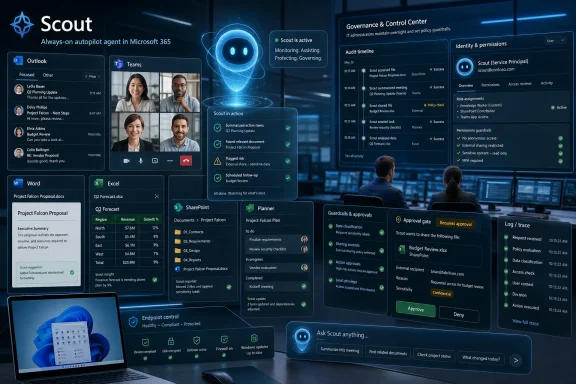 Microsoft Is Trying to Make Copilot Disappear Into the Workday
For the past three years, Microsoft’s AI strategy has been noisy by design. Copilot appeared in Windows, Edge, Bing, Office, GitHub, Security, Azure, and nearly every enterprise pitch deck the company could produce. The problem with that first wave was not ambition; it was friction. Users still had to stop what they were doing, summon the assistant, phrase a request, inspect the answer, and often perform the last mile themselves.Autopilots are Microsoft’s answer to that limitation. The company is describing them as a new class of long-running agents that stay active in the background rather than waiting for a prompt each time. Scout, the first of these agents, is meant to observe workplace context, understand recurring patterns, and take action across Microsoft 365 with enough continuity to feel less like a tool and more like a digital staff member.
That language is deliberately provocative. Microsoft knows that “agent” has become the current AI industry’s magic word, but “Autopilot” carries a more specific implication. It suggests a system entrusted with navigation, not merely response. It also suggests a system that still needs human oversight, because no serious person wants an aircraft, a business process, or a compliance workflow flying blind.
The company’s wager is that enterprise buyers are ready for that middle ground. They may not want AI replacing whole departments, but they do want relief from the repetitive glue work that clogs calendars, inboxes, project trackers, and reporting cycles. Microsoft is betting that the next productivity frontier is not a better document draft. It is the automation of the messy handoffs between documents, meetings, messages, and systems of record.
The Name Is New, but the Strategy Has Been Building for Months
The June Scout announcement did not arrive out of nowhere. Microsoft has been steadily recasting Copilot around agentic work throughout 2026, with earlier launches such as Agent 365, the Microsoft 365 E7 “Frontier” bundle, Copilot Cowork, and broader agent capabilities in Word, Excel, PowerPoint, Outlook, Teams, Dynamics, and Copilot Studio. Scout is the latest and most rhetorically ambitious piece of that architecture.This chronology matters because the word “launch” can mislead. Microsoft is not unveiling a single magic product that suddenly manages every email, report, and workflow in the enterprise. It is assembling a stack: workplace context, identity, governance, app integration, model orchestration, and user-facing assistants that can run over time. Scout is the visible agent; the platform underneath is the actual play.
That platform includes Microsoft’s attempt to make workplace context machine-readable. The company has talked up Work IQ as the intelligence layer that helps Copilot understand organizational data, relationships, meetings, files, messages, and patterns of work. It has also been pushing Agent 365 as the control plane for discovering, securing, and governing AI agents in an enterprise environment. Those details are less glamorous than a demo, but they are where the enterprise battle will be won or lost.
The consumer version of AI often treats context as a convenience. In a company, context is both value and liability. An agent that can summarize a meeting is useful; an agent that can infer who owns a customer problem, retrieve the relevant contract, draft a status update, and schedule the next escalation is far more useful. It is also far more dangerous if permissions, logging, retention, and approval gates are vague.
Scout Moves Microsoft From Assistant Theater to Delegation
The first generation of Copilot was sold as augmentation. It could draft, summarize, rewrite, explain, brainstorm, and search across corporate material. That was useful, but it also exposed an awkward truth: much of “AI productivity” was just a more expensive way to create another artifact for a human to validate.Scout is meant to push beyond that. Microsoft’s framing emphasizes background activity, multi-step task management, and action without needing a fresh prompt for each micro-decision. In plain English, the agent is supposed to keep working after the meeting ends and after the user has moved on.
That distinction may sound subtle, but it changes the adoption calculus. A chat assistant competes for attention. A delegated agent competes for trust. Users do not merely ask whether the output is good; they ask whether the system can be allowed to touch the workflow at all.
The hard part is not generating a report. The hard part is knowing which report matters, which data source is authoritative, which recipient should see it, whether the numbers changed since the last version, and whether sending it now creates a compliance or political problem. Microsoft’s pitch is that an agent grounded in Microsoft 365 context can make better decisions about those details than a generic chatbot. The market will decide whether “better” is good enough.
Enterprise Identity Is the Quiet Center of the Announcement
One of the most important parts of Microsoft’s Autopilot pitch is not the automation itself but the claim that agents operate under governed Entra identities. That is a very Microsoft sentence, and it is easy to skim past. It may also be the difference between a toy and an enterprise system.IT departments already know how to reason about users, groups, permissions, audit logs, conditional access, and lifecycle management. They have far less patience for anonymous automation that acts as a shared service account with unclear ownership. If an AI agent updates a spreadsheet, files a ticket, sends a message, or queries a sensitive dataset, administrators need to know whose authority it used, what it accessed, and what it changed.
By tying agents to governed identity, Microsoft is trying to make them legible to the existing security model. That does not solve every problem, but it gives CISOs and administrators a familiar surface area. In a world of shadow AI tools, browser extensions, local coding agents, and unsanctioned SaaS bots, “the agent has an identity” becomes a serious selling point.
This is also why Microsoft has an advantage that smaller AI startups may struggle to match. The company does not merely sell an AI model; it controls the productivity suite, the directory, the device management plane, the collaboration layer, the compliance tooling, and a large chunk of the cloud infrastructure. An Autopilot that lives inside that stack can be governed in ways that a standalone agent bolted onto the side of a company’s workflow cannot easily replicate.
The Productivity Pitch Is Familiar Because the Pain Is Real
The user-facing promise is simple: AI should take on routine workplace tasks so employees can spend more time on work that actually requires judgment. That pitch has appeared in every office automation wave from macros to workflow engines to robotic process automation. It persists because the problem persists.Modern office work is full of tiny administrative taxes. Someone has to turn meeting notes into action items, chase status updates, reconcile spreadsheet columns, prepare recurring reports, summarize email threads, schedule follow-ups, and move information from one system to another. None of this feels important in isolation. Together, it becomes a hidden operating system of corporate drag.
Microsoft’s advantage is that much of this drag already flows through Microsoft 365. Email is in Outlook, meetings are in Teams, documents are in Word and SharePoint, data is in Excel or Fabric, tasks are in Planner or Loop or whatever tool a department adopted last quarter. If an AI agent can operate across that terrain with enough awareness, it can attack the problem where it lives.
But the same integration that makes the pitch attractive also raises expectations. A worker will forgive a chatbot for writing a bland summary. They will not forgive an Autopilot for quietly mishandling a customer escalation, misreading a permission boundary, or sending an outdated report to executives. The deeper the integration, the lower the tolerance for error.
The “Digital Assistant, Not Replacement” Line Has a Shelf Life
Microsoft, like every major AI vendor, is careful to say these systems are intended to assist employees rather than replace them. That is prudent, and in many environments it is probably true in the near term. Most organizations still need humans to define goals, interpret tradeoffs, manage relationships, and take accountability for final decisions.Still, the language of assistance becomes less stable as agents become more capable. A tool that drafts an email is obviously an assistant. A tool that monitors a project, asks for missing inputs, updates stakeholders, schedules meetings, and prepares a weekly business review starts to look like a junior operations role. The distinction between “helping the worker” and “absorbing part of the work” becomes semantic.
This is not a reason to panic, but it is a reason to be honest. Microsoft is not investing billions of dollars to make Clippy more polite. It is trying to create a new labor layer inside software: persistent, auditable, assignable, and available on demand. That layer will not replace everyone, but it will reshape expectations about what a single employee or team can produce.
For managers, the temptation will be obvious. If agents reduce the administrative burden, teams can do more with the same headcount. If agents become reliable enough, teams may be asked to do the same work with fewer people. Microsoft can insist the product is human-centered, but the economics of enterprise software have always been about leverage.
Windows Is Still the Endpoint Where Trust Gets Tested
Although Scout is primarily a Microsoft 365 story, Windows remains central to how these systems will be experienced and controlled. The endpoint is where users sign in, where local files exist, where Teams calls happen, where browser sessions persist, and where sensitive information often leaks through the cracks between sanctioned and unsanctioned tools. For IT pros, agentic AI is not just a cloud service; it is a device governance problem.Microsoft has spent years nudging Windows toward a more cloud-managed, identity-centered model. Intune, Entra ID, Defender, Purview, Windows Hello, and conditional access policies all become more important when software agents can perform work on behalf of users. The old endpoint security model assumed malware was the thing trying to act without permission. The new model must also account for approved AI acting with permission but possibly poor judgment.
That distinction is uncomfortable. A sanctioned agent may access data legitimately, follow policy as written, and still produce an outcome the business regrets. It may summarize too much, route information to the wrong audience, or take a workflow step based on stale context. These are not classic security failures. They are governance failures, and they will be harder to detect with tools built for malware, phishing, and patch compliance.
Windows administrators should therefore treat Autopilots as part of a broader endpoint and identity conversation. Which users can delegate what kinds of tasks? Which apps can agents control? What approval thresholds apply before an agent sends, posts, deletes, modifies, or escalates? Those questions belong in the same room as device compliance and data loss prevention, not in a separate “AI innovation” workshop.
Microsoft’s Real Competitors Are Workflow Inertia and User Skepticism
It is easy to frame this as a race among Microsoft, Google, OpenAI, Anthropic, Salesforce, ServiceNow, and every other vendor attaching agents to enterprise software. That competition is real. But Microsoft’s biggest obstacle may be more mundane: organizations are bad at changing how work gets done.A worker who already distrusts Copilot summaries is not going to hand over a multi-step workflow because a keynote says “Autopilot.” A department that cannot agree on where project status lives will not magically benefit from an agent reading five contradictory sources. A company with messy permissions will find that AI makes the mess visible faster than it fixes it.
This is where Microsoft’s installed base can become both advantage and burden. The company can ship new capabilities into the tools people already use, reducing adoption friction. But it also inherits decades of customer sprawl: old SharePoint sites, orphaned Teams channels, overloaded mailboxes, duplicate files, local workarounds, and undocumented business processes that survive only because a veteran employee remembers how they work.
Agents thrive on structure, even when they are marketed as a way to handle ambiguity. The better the underlying information architecture, the more useful the agent. The worse the data hygiene, the more likely the Autopilot becomes a high-speed confusion amplifier.
The Price of Autonomy Is Auditability
The more Microsoft talks about agents acting in the background, the more customers should ask about records of action. Background work is only enterprise-ready if it is inspectable after the fact. A user should be able to see what the agent did, why it did it, what sources it used, what permissions it invoked, and whether a human approved the final step.This is not just a compliance concern. It is a usability concern. Trust grows when users can reconstruct a system’s behavior. If an agent changes a meeting, updates a document, or drafts a response, the user needs a trail that is understandable, not just a cryptic backend log for administrators.
Microsoft has the ingredients for this, from Purview auditing to Entra identity to activity logs across Microsoft 365. The challenge is making those controls practical for normal teams. If every agent action requires a security analyst to interpret it, the model will not scale. If the logs are too shallow, the model will not be trusted.
The best enterprise AI systems will likely borrow from both software development and financial controls. They will need version history, approval gates, rollback, separation of duties, delegated authority, and plain-language explanations of actions taken. “The agent did it” cannot become an acceptable answer inside a serious business.
The Build 2026 Message Was Really About an Agent Operating System
Scout sits within a broader Build 2026 narrative that Microsoft has been shaping around agent-first computing. The company’s Project Solara language points toward a future where AI agents span cloud, device, and application boundaries. Its Microsoft IQ framing suggests a shared context layer feeding agents with workplace, business, and web-grounded knowledge. GitHub Copilot, Copilot Studio, Azure AI Foundry, and Microsoft 365 are increasingly being presented as parts of one agent pipeline.That is why the Autopilot announcement should not be read as a standalone productivity feature. Microsoft is trying to define the architecture of enterprise AI before competitors define it elsewhere. If the company can make Entra identity, Microsoft 365 data, Agent 365 governance, and Copilot interfaces the default environment for workplace agents, it will have recreated the old Office advantage in a new form.
This is classic Microsoft platform strategy. The company rarely wins by having the flashiest individual app. It wins by making the surrounding ecosystem feel inevitable. Windows made Win32 matter; Office made document formats and workflows matter; Azure made Microsoft a cloud infrastructure player after arriving late. The agent era gives Microsoft another chance to turn ubiquity into gravity.
The risk is that customers may experience this as yet another layer of Microsoft licensing and branding complexity. Copilot, Copilot Chat, Microsoft 365 Copilot, Copilot Studio, Agent 365, Copilot Cowork, Scout, Work IQ, Frontier, E7 — the names pile up quickly. If Microsoft wants Autopilots to feel like relief from complexity, it cannot bury them under the very product taxonomy that makes enterprise buyers groan.
The Small Print Will Matter More Than the Demo
Every agent demo looks impressive when the scenario is clean. The user asks for a task, the AI gathers context, a polished output appears, and the executive on stage says the future of work has arrived. Real organizations are not clean. Their data is incomplete, their policies are inconsistent, their permissions are overbroad, and their workflows contain exceptions that never made it into documentation.That is why early deployments will likely be conservative. The safest use cases will involve low-risk preparation work: summarizing meetings, drafting status reports, collecting inputs, organizing research, creating task lists, and preparing materials for review. The more consequential use cases — sending messages externally, updating customer records, approving transactions, changing access, or triggering operational workflows — will require tighter guardrails.
The best adopters will not ask, “What can the agent do?” They will ask, “What can the agent do repeatedly, observably, reversibly, and within policy?” That is a less exciting question, but it is the one that separates enterprise automation from keynote theater.
Microsoft’s own positioning seems to acknowledge this. By emphasizing monitoring, review, identity, and governance, the company is signaling that autonomy will be graduated rather than absolute. That is the right instinct. In enterprise IT, the fastest way to kill a promising technology is to let it surprise the people responsible for risk.
The First Winners Will Be Teams That Already Know Their Processes
The organizations most likely to benefit from Scout and similar Autopilots are not necessarily the ones with the biggest AI budgets. They are the ones with clear process ownership, clean data boundaries, and enough operational maturity to decide which tasks should be delegated. AI does not eliminate the need for process discipline; it raises the return on having it.A sales operations team with defined reporting cadences can use an agent to gather updates and prepare weekly briefs. A project management office with standardized templates can use an agent to detect missing information and chase owners. A legal or compliance team with strict review gates can use an agent to assemble drafts without allowing final submission. These are not science-fiction examples. They are the kind of dull, repeatable workflows where automation usually earns its keep.
The laggards will be teams that treat the agent as a miracle worker. If employees cannot describe how a task should be performed, the AI will infer a process from digital exhaust. Sometimes that will work. Sometimes it will faithfully reproduce the organization’s worst habits at machine speed.
That is the paradox of workplace AI. The vendors sell it as a way to cope with complexity, but the customers who get the most value are often those that have already reduced complexity enough for the system to operate safely. Scout may be an Autopilot, but someone still has to file the flight plan.
Microsoft’s AI Office Now Has a Governance Test
The concrete lesson from Scout is not that every worker suddenly has a tireless digital colleague. The lesson is that Microsoft is moving the default unit of productivity from the document to the delegated task. That shift will reward organizations that treat AI agents as managed actors inside the enterprise, not clever widgets attached to chat windows.- Microsoft’s Autopilot branding signals a move from prompt-and-response assistance toward persistent agents that can manage work over time.
- Scout is best understood as part of Microsoft’s larger 2026 agent stack, including Microsoft 365 Copilot, Agent 365, Entra governance, and workplace context through Work IQ.
- The most important enterprise feature may be governed identity, because administrators need to know which agent acted, under whose authority, and with what access.
- Early value will probably come from repeatable, reviewable administrative workflows rather than high-risk autonomous decisions.
- IT teams should evaluate agent deployments through auditability, approval gates, permissions, data hygiene, and rollback—not just demo quality.
- Microsoft’s biggest challenge is turning a crowded Copilot product family into a coherent operating model that users and administrators can actually trust.
References
- Primary source: 247news.com.pk
Published: 2026-06-06T06:12:07.296083
Loading…
247news.com.pk - Related coverage: techradar.com
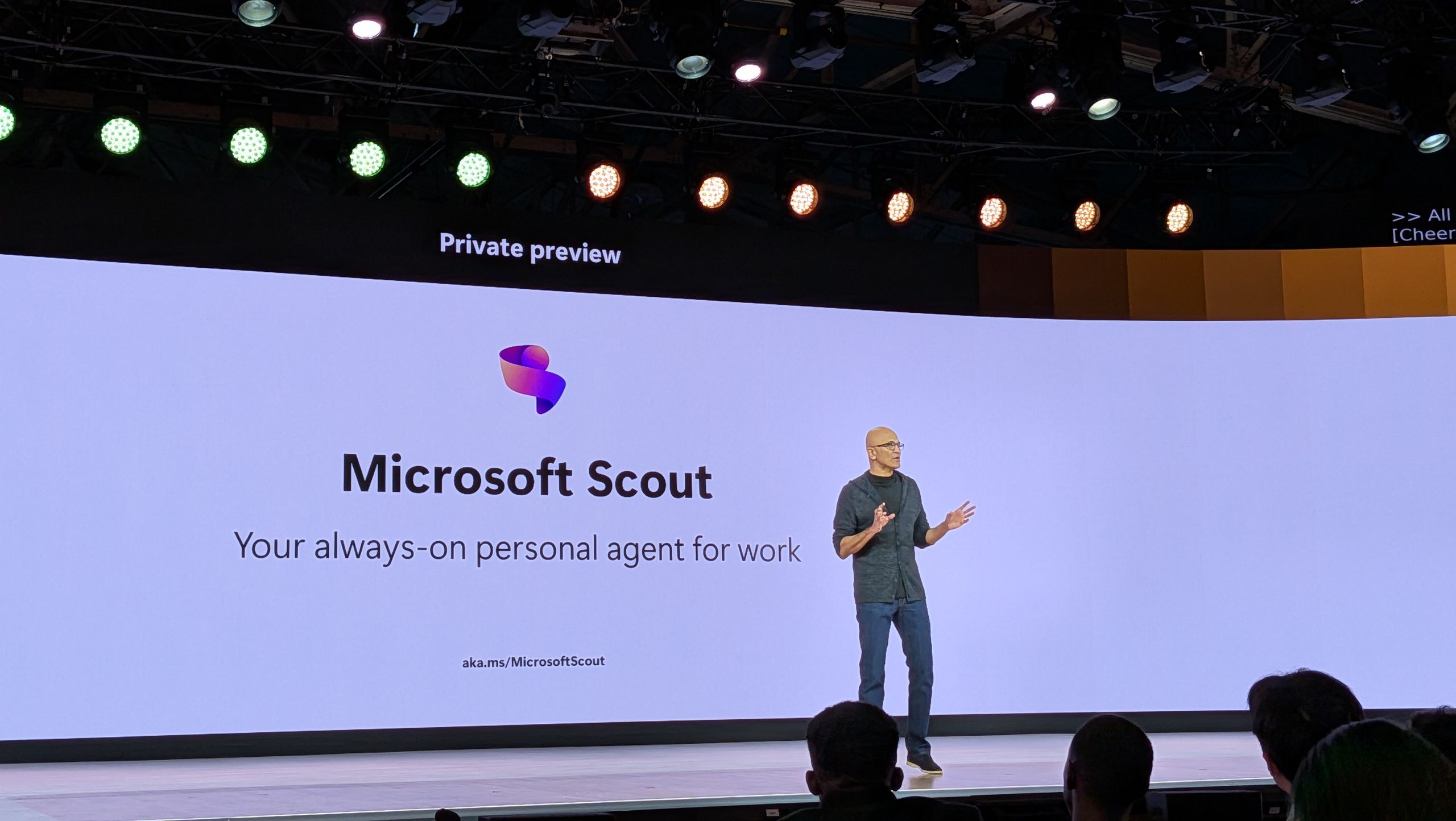
'A new category of agents': Microsoft reveals Scout, its first "Autopilot"
Microsoft unveils Autopilots, a new kind of AI agents, with Scout promising improved productivity and efficiency.www.techradar.com
- Related coverage: tomsguide.com
Loading…
www.tomsguide.com - Related coverage: windowscentral.com
Loading…
www.windowscentral.com - Official source: microsoft.com

Introducing Microsoft Scout: Your always-on personal agent | Microsoft 365 Blog
Microsoft introduces a new, always-on personal agent, Microsoft Scout, integrated across the Microsoft 365 apps you use every day. www.microsoft.com
- Official source: blogs.microsoft.com

Introducing the First Frontier Suite built on Intelligence + Trust - The Official Microsoft Blog
Today Microsoft is announcing: Wave 3 of Microsoft 365 Copilot Expanded model diversity with Claude and next-gen OpenAI models available today General availability of Agent 365 on May 1 for $15 per user General availability of the new Microsoft 365 E7: The Frontier Suite on May 1 for $99 per... blogs.microsoft.com
- Official source: news.microsoft.com

Microsoft kündigt neue agentische KI-Funktionen an - Source EMEA
 news.microsoft.com
- Related coverage: computerworld.com

Microsoft unveils Scout, an autonomous AI agent built on OpenClaw
Scout is the first of a new breed of ‘autopilot’ agents in Microsoft 365 that can carry out tasks independently. www.computerworld.com
- Related coverage: reality-tech.com
Loading…
reality-tech.com - Official source: adoption.microsoft.com
Loading…
adoption.microsoft.com