

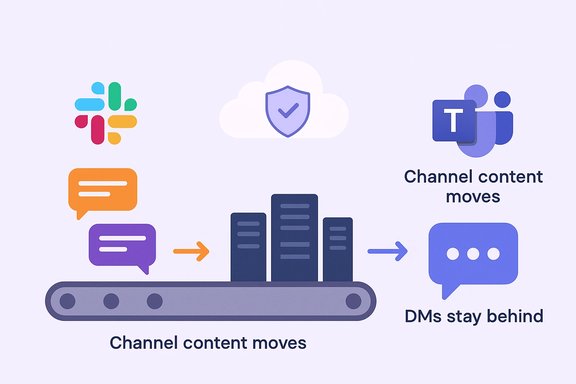
Microsoft’s new first‑party Slack → Teams migration tool simplifies moving channels — but it won’t bring over your private chats, leaving Slack direct messages (DMs) and group chats stranded unless you take extra steps. This gap is not a bug so much as an architecture and policy decision: Microsoft’s initial rollout intentionally moves only Slack channel content into Teams, and administrators who assumed a full‑fidelity migration (including one‑to‑one and multi‑party DMs) are now facing awkward choices about archival, compliance, and user experience.
Microsoft announced a built‑in Slack to Microsoft Teams migration capability in the Microsoft 365 admin center as part of its late‑2025/early‑2026 roadmap, positioning the tool as a first‑party option to migrate Slack channels (public and private) and channel content into Teams. The Message Center and roadmap entries outline a staged rollout across Targeted Release and general availability windows, and make clear the initial scope: channel data only. That scope matters because Slack’s workspace model is built around both channel conversations and direct messages (DMs), which many teams use for quick coordination, sensitive one‑to‑one conversations, and ad‑hoc project notes. Microsoft’s Teams architecture treats personal chats and group chats differently from channel posts — the APIs and tenancy models diverge — and that technical difference underpins the practical limitation: the out‑of‑the‑box migration will not import DMs or Slack workflows and app integrations.
Practical next steps:
Conclusion
The new Microsoft‑built Slack → Teams migration tool is a meaningful advance for organizations moving collaboration to Teams, but its scope is intentionally narrow: channels move, private DMs do not. Organizations must plan accordingly — archive or export Slack DMs, evaluate specialist migration vendors for rehydration (with healthy skepticism), and communicate clearly with users about what will be available in Teams. The road to a smooth migration now requires both Microsoft’s first‑party tool and disciplined project management to avoid losing critical conversational history.
Source: Windows Central https://www.windowscentral.com/soft...sing-questions-about-how-useful-it-really-is]
 Background
Microsoft announced a built‑in Slack to Microsoft Teams migration capability in the Microsoft 365 admin center as part of its late‑2025/early‑2026 roadmap, positioning the tool as a first‑party option to migrate Slack channels (public and private) and channel content into Teams. The Message Center and roadmap entries outline a staged rollout across Targeted Release and general availability windows, and make clear the initial scope: channel data only. That scope matters because Slack’s workspace model is built around both channel conversations and direct messages (DMs), which many teams use for quick coordination, sensitive one‑to‑one conversations, and ad‑hoc project notes. Microsoft’s Teams architecture treats personal chats and group chats differently from channel posts — the APIs and tenancy models diverge — and that technical difference underpins the practical limitation: the out‑of‑the‑box migration will not import DMs or Slack workflows and app integrations. What the new Microsoft tool does — and what it doesn’t
What it can migrate
- Public Slack channels (messages, threads, reactions)hannels** (when permissions allow).
- Channel file attachments and some channel‑scoped artifacts (e.g., Canvas/List content migrated as attachments).
What it deliberately excludes
- Direct messages (DMs) — both one‑to‑one DMs and multi‑person group DMs are not migrated by Microsoft’s tool.
- Workflows, custom app integrations, and bot state — Slack‑specific automations and many third‑party integrations will need to be rebuilt or reconfigured in Teams.
- Certain metadata and non‑IPM system items — some back‑end object types and compliance artifacts may not move in full fidelity.
Why DMs are left behind — the technical and organizational reasons
1) Architectural mismatch between Slack and Teams
Slack stores DMs and group DMs in constructs that are logically distinct from channeleams organizes private chats and threads differently. Importing DMs requires APIs that can rehydrate conversational state into Teams’ chat objects, preserve participant identities across tenants, and reconcile message metadata and search indexes. Microsoft’s initial admin‑tool implementation focuses on channel import because it maps more cleanly to Teams’ channel/team model. Several migration vendors and community write‑ups confirm that Teams’ official Graph/Import capabilities for private chat import are either unavailable or limited for cross‑platform migrations.2) Compliance, ownership and administrative permissions
DM histories often contain personally identifiable information and off‑record discussions, and moving them between tenants raises governance questions about retention, eDiscovery, and legal holds. Microsoft’s documented migration frameworks typically require administrators to validate holds and license prerequisites before moving mailboxes or chat content — a precaution that’s easier to enforce for team/channel content than for ad‑hoc DMs.3) Risk‑avoidant rollout strategy
Shipping a migration tool with a narrow, predictable scope reduces complexity and operational risk during an enterprise roars to have chosen a conservative path: offer first‑party migration for the largest, most frequently required subset (channels) and iterate for the rest. That improves predictability for admins but forces choices around how to handle the remainder of the archive.What this means for organizations and users
Short‑term user experience
- Users who are moved to Teams will retain their channel conversation history in the new Teams channels, but their private one‑to‑one and group DMs will not appear in Teams. That creates a fractured user history: public knowledge and project channels move, while personal context remains in Slack.
- If Slack workspaces are deactivated after migration, DMs may become inaccessible to users, unless admins have exported or archived them ahead of time. Administrators must decide whether to maintain read‑only Slack access for a period of time to preserve that history.
Compliance and eDiscovery implications
- Legal and compliance teams should treat Slack DMs as separate records and ensure exports or retained copies before decommissioning Slack. Microsoft’s orchestrated tenant migration tooling for other workloads emphasizes that legal holds and retention labels can block moves and require pre‑validation; Slack DMs fall outside the migration scope and thus require their own retention strategy.
Operational impact for IT
- Migration project plans must explicitly include DM handling: archive, export, or use a third‑party migration vendor capable of rehydrating DMs (see next section).
- Training and change management must highlight that not all historical chats will arrive in Teams, and end‑users need guidance on where to find archived DMs and how to continue conversations in Teams.
Options available to IT teams: practical paths forward
Organizations have three primary options to handle Slack DMs when moving to Teams:- Archive Slack DMs (recommended for compliance)
- Use Slack’s export features (org export or enterprise grid exports) to create a preserved copy of DMs for compliance and records retention.
- Store exported archives in a governed repository (encrypted at rest, RBAC, retention policy).
- Use a third‑party migration vendor
- Several migration vendors claim the ability to migrate direct messages from Slack into Teams; offerings vary in fidelity and cost.
- Vendors such as CloudFuze and CloudM advertise DM migration capabilities that attempt to rehydrate DMs inside Teams; other vendors (Cloudiway, ZuniPixel) provide mixed coverage and caveats. These are vendor solutions — not Microsoft’s built‑in path — and their claims must be validated in pilot migrations and compliance checks.
- Run Slack in parallel or provide read‑only access
- Keep Slack in read‑only mode for a defined retention window so users can reference old DMs while new conversations move to Teams.
- Use bridging tools or dual‑admin runs to maintain communication across both platforms during a phased migration. Slack bridging solutions exist but generally focus on channels, not DMs.
Third‑party migration vendors: claims and caveats
A simple market scan shows divergent claims:- CloudFuze and some other commercial migration products advertise full DM migration including history, attachments, reactions, and timestamps. These vendors position their products as “100% success” for DMs in many scenarios.
- Other tools (Cloudiway, CloudM) explicitly note limitations or require workarounds: some tools migrate portions of private chats or inject the last N messages into a placeholder, and move older content into mailbox folders for discoverability rather than native Teams chat records.
- Marketing claims of “complete” DM migration can hide complexity: identity mapping, timestamp preservation, and fidelity for reactions, threads inside DMs, and message edits can vary substantially between tools.
- Some tools implement a compromise: migrate the last few messages natively into Teams and store older messages as searchable items in a mailbox or an attachment. That preserves some continuity but is not a one‑to‑one recreation of the Slack DM experience.
- Verify vendor claims through pilot migrations on representative S on sample output, integrity checks (message counts, attachment hashes), and a rollback plan.
Recommended migration checklist (practical, numbered steps)
- Inventory Slack usage
- Identify which channels are active, which DMs are business‑critical, and which integrations are essential.
- Consult legal/compliance
- Determine retention and eDiscovery obligations for chat history and ensure exports meet legal standards.
- Decide DM strategy
- Choose archival (export & store), third‑party rehydration, or temporary Slack read‑only retention.
- Pilot a channel migration
- Use Microsoft’s built‑in migration tool for a small set of channels first to validate permission mapping and content fidelity.
- Pilot DM migration (if using vendor)
- Run a focused vendor pilot that migrates a subset of DMs and verify fidelity: message text, attachments, timestamps, reactions, and identity mapping.
- Communicate to users
- Tell users what will and won’t move — provide instructions for exporting personal archives if they want local copies.
- Plan cutover and decommissioning
- Schedule cutover windows, maintain access to Slack for a defined archive period if needed, then retire Slack only after verification and stakeholders sign off.
- Validate post‑migration
- Confirm that channels, files, and required artifacts are present in Teams; ensure compliance teams can access archived DMs as needed.
Strengths of Microsoft’s approach
- First‑party simplicity and control: The migration tool appears in the Microsoft 365 admin center, reducing the need to trust third‑party tools for channel imports and giving admins a familiar management surface.
- Security and data residency: By keeping migration traffic inside Microsoft datacenters for channel content, the tool reduces egress risk and simplifies compliance for many tenants. This aligns with Microsoft’s broader tenancy migration model that favors internal, auditable copies.
- Predictability: A narrow initial scope yields fewer surprises during large enterprise migrations; channels map more cleanly to Teams constructs than DMs do.
Major risks and downsides
- Fragmented user history: Without DMs in Teams, users lose conversational continuity. This harms knowledge discovery, accountability, and onboarding for teams that rely on private chats for decisions.
- Compliance exposure: If DMs are deleted or Slack is deactivated without archival, organizations risk violating retention policies or losing evidence for eDiscovery.
- Vendor reliance for “complete” migrations: Buying into a third‑party vendor to migrate DMs introduces procurement, vendor risk, and high privilege consent (many migration tools require admin consent to read message archives). That’s operationally heavier than using Microsoft’s built‑in admin path.
- False expectations among users: If leadership promises “all content will move,” the omission of DMs can undermine trust and cause disruption when users find gaps in their message history.
How administrators should brief stakeholders (three short messages)
- To executives: “Channels, files and team history will move natively to Teams; private DMs will not. We recommend a compliance‑approved archival of DMs and aon vendor only if those DMs are business‑critical.”
- To compliance/legal: “Slack DMs are out of scope for Microsoft’s initial tool; we’ll export and retain Slack archives under our retention policy and evaluate vendor tools for in‑place chat migration.”
- To end users: “Work/channel history will be available in Teams. Personal and direct chats will remain in Slack — please archive any personal notes or request support to export your chats.”
Broader implications for the market
Microsoft’s move to provide a first‑party migration tool is a strategic play: make it easier for organizations to consolidate on Teams and reduce friction for channel adoption. However, by excluding DMs from the initial feature set Microsoft leaves room for specialized migration ISVs to sell high‑fidelity migration services — a commercial gap that migration vendors are eager to fill. That hybrid dynamic (first‑party channel migration + third‑party DM migration) is likely to persist until either Microsoft expands the tool’s scope or industry standards for chat portability improve.Final assessment and guidance
Microsoft’s Slack → Teams migration tool is a pragmatic, low‑risk starting point for organizations moving away from Slack, but it is not a complete archive‑and‑restore solution. The official tool covers channel content well and reduces one major friction point for tenant migrations, but it deliberately leaves DMs behind — and that omission matters for both users and compliance teams.Practical next steps:
- Treat the migration as two projects: channel migration (use Microsoft’s built‑in tool) and DM handling (archive with Slack exports or evaluate third‑party vendors).
- Insist on pilot runs, data integrity checks, and a documented rollback for any vendor‑assisted DM migration.
- Keep Slack read‑only for a defined retention window if your organization needs live access to past DMs during the transition.
Conclusion
The new Microsoft‑built Slack → Teams migration tool is a meaningful advance for organizations moving collaboration to Teams, but its scope is intentionally narrow: channels move, private DMs do not. Organizations must plan accordingly — archive or export Slack DMs, evaluate specialist migration vendors for rehydration (with healthy skepticism), and communicate clearly with users about what will be available in Teams. The road to a smooth migration now requires both Microsoft’s first‑party tool and disciplined project management to avoid losing critical conversational history.
Source: Windows Central https://www.windowscentral.com/soft...sing-questions-about-how-useful-it-really-is]
