

Microsoft’s Microsoft Store entered 2025 not as a static marketplace but as a rapidly evolving distribution platform — one that finally bridges legacy desktop software and modern app-store expectations, tightens the update and discovery experience, and introduces new delivery options that matter to consumers, IT teams, and developers alike. The changes rolled out across late 2024 and through 2025 include a redesigned Library and a dedicated Updates & Downloads page, media-forward product pages, clearer download progress and reliability improvements, broader Win32 support via the Store Web Installer and multi‑app web workflows, and a string of high‑profile catalog additions that demonstrate Microsoft’s intention to make the Store a first‑stop destination on Windows. These are not incremental UX tweaks: they reshape how apps are discovered, installed, updated, and governed on Windows machines.
Microsoft’s Store has long been criticized for being underpopulated, inconsistent, or hard to trust for desktop users. The company’s strategy over the past few years has been clear: fix the fundamentals (speed, reliability, discoverability), remove friction for developers, and make the Store capable of handling traditional Win32 desktop apps without forcing developers to replatform.
That shift is visible in two related priorities that guided 2025 changes:
Why this matters: the separation reduces cognitive load and makes it easier to audit changes on a machine. For power users and administrators, visible version notes aid auditing and troubleshooting when updates change behavior or introduce regressions. Microsoft’s developer post announced exactly this reorganization and emphasized the inclusion of version notes where developers supply them.
Why this matters: for game discovery and consumer conversion, video and high‑res imagery significantly increase engagement. For productivity apps, better visuals and clearer descriptions reduce install friction by letting users preview the experience before committing to an install. These UX improvements align the Store with modern e‑commerce norms and are visible across the updated Store experience.
Key performance claims Microsoft published include a 25% reduction in Store launch time and a 50% reduction in download hanging issues; Microsoft clearly states these figures are based on internal testing and are subject to device, region, and version differences. Independent coverage has repeatedly confirmed the UI changes and the general reliability improvements, but long‑term, independent benchmarking across broad device sets is still limited. Treat the numeric gains as credible vendor‑reported improvements — practically meaningful, but not a substitute for your own tests on targeted hardware and networks.
The trade‑offs are straightforward:
This offers a fast way to provision a fresh machine with curated consumer utilities (examples observed in early rollouts included mainstream apps like Spotify, Discord, Adobe Reader, and Canva). It's a convenience play: smaller footprint installer, Store-managed downloads, and a one‑run provisioning flow. However, for enterprises, the generated launcher lacks a human‑readable manifest for version control or audit trails — so winget, Intune, or SCCM remain the recommended tooling for managed fleets.
What to watch for:
The Store is no longer merely cosmetic — it is an active contender in Windows software distribution, but it’s also not a universal replacement for enterprise package management or an automatic fix for every update and governance challenge. The improvements deliver concrete benefits to consumers and reduce friction for many desktop apps, yet they introduce a mixed ecosystem that requires vigilance from administrators who need deterministic, auditable installs.
For the typical Windows user in 2025, the new Microsoft Store means fewer stalled downloads, clearer update messaging, and a broader catalog to discover from a trusted interface. For developers and IT professionals, it opens useful choices — and reminds everyone that, even in 2025, the right balance between convenience and governance still requires careful decisions.
Source: Neowin https://www.neowin.net/news/here-is-everything-new-microsoft-added-to-the-microsoft-store-in-2025/
 Background: why the Microsoft Store mattered in 2025
Microsoft’s Store has long been criticized for being underpopulated, inconsistent, or hard to trust for desktop users. The company’s strategy over the past few years has been clear: fix the fundamentals (speed, reliability, discoverability), remove friction for developers, and make the Store capable of handling traditional Win32 desktop apps without forcing developers to replatform.That shift is visible in two related priorities that guided 2025 changes:
- Make the Store fast, reliable, and transparent for end users so it can be a practical replacement for ad‑laden or risky third‑party installers.
- Make it easy for mainstream Win32 developers and publishers to list and update apps without changing their packaging or distribution model.
At a glance: the major additions and changes in 2025
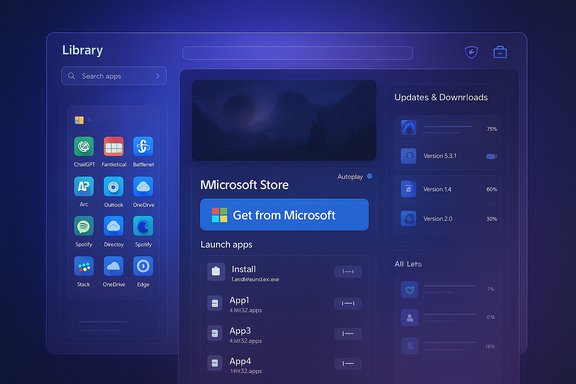
- New Library and Updates & Downloads pages — the Library now shows all products owned by a Microsoft account, while updates and active downloads live on a separate, focused page that surfaces version notes when available.
- Immersive product pages with trailers, hero images, and an autoplay toggle; richer visuals support better discovery for games and apps.
- Clearer download and install UI — linear progress bars that show percentage and total file size, with cancel controls on product pages and improved retry handling. Microsoft reported a 25% faster Store launch time and a 50% reduction in download hangs based on internal telemetry. These metrics are vendor‑reported and should be read in that context.
- Win32 support through the Store Web Installer — the Store Web Installer lets developers offer Win32 apps on the Store and use a browser‑initiated, Store‑managed install flow; Microsoft Learn documents the feature and the supported content types.
- Web multi‑app install / curated packs — browser flows that generate a small launcher to provision multiple apps in one go, leaning on the Store for validated downloads and installs. This workflow is aimed at consumer provisioning and quick setups but is not a drop‑in replacement for enterprise package management.
- Catalog expansion — a number of high‑profile desktop and third‑party titles arrived (or were surfaced) in the Store, including apps and games like ChatGPT clients, Fantastical, Battle.net and titles in the Blizzard portfolio; this signals more mainstream publishers trusting the Store as a distribution channel.
Overview: what changed in detail
Redesigned Library and a dedicated Updates & Downloads page
The single biggest user‑facing reorganization is the split between the Library and the Updates & Downloads page. The Library now defaults to showing all products owned on a Microsoft account rather than only installed items, and it includes a search box to find products by name or publisher. Separating downloads and updates into a dedicated page makes update management explicit: active downloads, pending updates, recent installs, and — crucially — developer‑provided version notes are visible in that view.Why this matters: the separation reduces cognitive load and makes it easier to audit changes on a machine. For power users and administrators, visible version notes aid auditing and troubleshooting when updates change behavior or introduce regressions. Microsoft’s developer post announced exactly this reorganization and emphasized the inclusion of version notes where developers supply them.
Product pages: trailers, hero images, and autoplay controls
Product pages were rebuilt for a media‑first presentation. For apps and games that supply trailers, those trailers appear prominently; otherwise a developer‑provided hero image occupies the header. Autoplay is enabled by default but users can toggle it off in Settings.Why this matters: for game discovery and consumer conversion, video and high‑res imagery significantly increase engagement. For productivity apps, better visuals and clearer descriptions reduce install friction by letting users preview the experience before committing to an install. These UX improvements align the Store with modern e‑commerce norms and are visible across the updated Store experience.
Download UI and reliability: linear progress bars and telemetry claims
The Store’s download feedback moved from opaque, circular progress indicators to a linear progress bar showing both percentage and total download size. Microsoft also reworked retry logic, background handling, and the plumbing that orchestrates file transfers.Key performance claims Microsoft published include a 25% reduction in Store launch time and a 50% reduction in download hanging issues; Microsoft clearly states these figures are based on internal testing and are subject to device, region, and version differences. Independent coverage has repeatedly confirmed the UI changes and the general reliability improvements, but long‑term, independent benchmarking across broad device sets is still limited. Treat the numeric gains as credible vendor‑reported improvements — practically meaningful, but not a substitute for your own tests on targeted hardware and networks.
Win32 support and the Store Web Installer: the technical pivot
What the Store Web Installer does
The Store Web Installer is a browser‑initiated installer that delegates the install orchestration to the Microsoft Store application while allowing developers to list Win32 apps without repackaging them into MSIX or UWP formats. Microsoft Learn documents the supported content types, the web badge setup, and the enterprise controls that affect the Web Installer. The feature supports:- Free packaged MSIX content published on the Store.
- Win32 apps published on the Store.
How it changes developer and user behavior
For developers, this reduces the friction to list legacy desktop apps in the Store without changing distribution channels. For users, it means you can hit a “Get from Microsoft” badge in a browser and have the Store manage the download and install flows while maintaining the native publisher installer where required.The trade‑offs are straightforward:
- Benefit: better discoverability and a trusted delivery channel for Win32 apps; centralized update visibility inside the Store UI.
- Limitation: the Web Installer can chain to third‑party installers; automatic updates for externally hosted installers may require publisher support and in some cases manual confirmation. Enterprises should continue to rely on winget, Intune, or SCCM for scripted or audited provisioning.
Catalog growth and notable additions
A hallmark of 2025 was a clearer willingness by mainstream apps and games to appear in the Store. Microsoft’s update highlighted recent catalog entries such as ChatGPT‑based apps, Fantastical, Battle.net and titles from Blizzard’s portfolio, and Arc, among others. Multiple outlets and community coverage tracked these catalog additions as evidence that the Store’s relevancy is increasing. The practical upshot is that many apps Windows users were accustomed to downloading directly from vendor websites could now be discovered and installed through a unified interface. Important nuance: the presence of an app on the Store does not always mean the app is repackaged or controlled by Microsoft — some listings act as discovery entries or point to web installers/launchers (for example, when publishers prefer to keep their own update infrastructure). Always check the product page details to see whether the Store hosts the package or merely brokers the install.Multi‑app install and web‑based provisioning
One consumer‑focused convenience introduced during 2025 was a web‑based multi‑app install workflow. Users can select multiple popular apps in a curated list on the web, download a small launcher .exe, and the Store will orchestrate the installation of every selected title.This offers a fast way to provision a fresh machine with curated consumer utilities (examples observed in early rollouts included mainstream apps like Spotify, Discord, Adobe Reader, and Canva). It's a convenience play: smaller footprint installer, Store-managed downloads, and a one‑run provisioning flow. However, for enterprises, the generated launcher lacks a human‑readable manifest for version control or audit trails — so winget, Intune, or SCCM remain the recommended tooling for managed fleets.
Policy, updates, and controls: what changed for automated updates
Microsoft also revisited update controls. In 2025 the Store added clearer update surfaces, but a controversial policy tweak limited how long users could indefinitely pause automatic Store updates; instead, temporary pause windows and more visible update controls were introduced.What to watch for:
- Users and admins should review local group policy and MDM settings that govern Store behavior (RequirePrivateStoreOnly, AppLocker, and the Microsoft Store removal flags).
- For regulated environments, relying on the Store for automatic updates of critical software may not meet auditing needs; combine Store visibility with enterprise management tooling.
Security and risks: what improved — and what to be cautious about
Security gains
- Centralized delivery via Microsoft’s Store and the Store Web Installer reduces the risk of fake or repackaged binaries compared with random web downloads.
- Store vetting and content rating improve baseline trust, and version notes aid change control and troubleshooting.
- The integrated update UI and progress indicators reduce failed or partial installs, lowering the likelihood of partially applied updates that can create security gaps.
Risks and gaps
- Vendor‑reported performance numbers (25% faster launch, 50% fewer hung downloads) are meaningful but internal; independent, broad benchmarks are still sparse. Treat these numbers as vendor telemetry unless independent studies corroborate them.
- Web Installer and multi‑app packs improve consumer convenience but create potential transparency gaps for enterprise auditing (no machine‑readable manifest for the generated multi‑app launcher, limited control if a publisher hosts their own update system). Use winget or Intune for reproducible, auditable installs at scale.
- The Store’s growing catalog includes apps that are either fully packaged by publishers or act as discovery entries that launch vendor installers; admins must confirm whether an app in the Store will be updated by Microsoft or by the publisher’s own infrastructure. The Store indicates update provenance on Downloads lists, but this requires careful oversight in sensitive settings.
Practical guidance: how to use the new Microsoft Store, safely and efficiently
For power users and home users
- Use the new Library to find previously purchased or owned software quickly.
- Use the Updates & Downloads page to inspect pending updates and read developer version notes before applying changes.
- When installing Win32 apps, prefer entries that are delivered via the Store (hosted packages) if you want Microsoft‑managed updates and vetting; if a Store page delegates to a publisher installer, be aware updates might continue to be handled outside Microsoft’s pipeline.
For IT administrators and enterprises
- Continue to use winget and Intune/SCCM for fleet provisioning and reproducible installs; the Store multi‑app web workflow is a consumer convenience, not an enterprise provisioning tool.
- Confirm Store‑hosted vs. publisher‑hosted update provenance for any critical applications — the Store UI marks third‑party update sources, but verify policies and update cadence in contractual or technical documentation.
- Use AppLocker, RequirePrivateStoreOnly, or domain policies to control which machines can use the Microsoft Store or the Store Web Installer; blocking the get.microsoft.com domain will prevent Store Web Installer launches if required.
Critical analysis: strengths, trade‑offs, and the road ahead
Strengths
- Real, usable progress on reliability and discoverability. The Store’s UI overhaul — split Library and Updates & Downloads page, progress bars, media‑rich product pages — addresses the most common user complaints about the Store being slow, opaque, or underpopulated. That matters because user trust is a prerequisite for adoption.
- Practical Win32 support without heavy repackaging. The Store Web Installer enables legacy apps to coexist with modern Store experiences, which is a pragmatic pivot that acknowledges the reality of enterprise and consumer Windows ecosystems. The Microsoft Learn documentation clarifies supported types and admin controls, making the approach auditable and manageable.
- Catalog credibility. High‑profile entries — from AI clients to big game launchers — show publishers are willing to appear in or integrate with the Store, which improves discovery and reduces risky downloads.
Trade‑offs and risks
- Vendor metrics vs. independent verification. The headline performance numbers are compelling but come from Microsoft telemetry; independent studies across diverse hardware and network conditions are necessary to understand real‑world gains. Until then, treat them as informed vendor claims rather than universal guarantees.
- Mixed update governance. The presence of publisher‑hosted installers alongside Store‑hosted packages introduces heterogeneity in update behavior. For regulated environments that require strict update proofs and manifests, the Store is not yet a full replacement for enterprise package management.
- Consumer vs. enterprise targeting. Some features (multi‑app web bundles, curated packs) are squarely consumer‑facing. Enterprises should evaluate these as convenience features rather than governance tools.
Quick checklist: what to do next
- Update Windows and the Microsoft Store app to the latest versions to see the interface and performance improvements.
- Review new Library and Updates & Downloads pages to understand how version notes and update provenance appear for your most used apps.
- For sensitive or regulated environments, test the Store Web Installer and multi‑app launcher on sample devices to assess auditability and compliance before wider deployment.
- If you manage a fleet, keep using winget + Intune/SCCM for scripted and audited provisioning; rely on the Store for consumer provisioning or for users who prefer a GUI first approach.
Conclusion
The Microsoft Store’s 2025 evolution represents a practical, multi‑vector approach: better performance and a clearer UI for everyday users; media‑rich product pages for discovery; a pragmatic Win32 story via the Store Web Installer for developers; and curated web workflows for quick provisioning. Microsoft’s internal telemetry and developer posts describe measurable improvements in speed and reliability, while independent coverage and ecosystem signals corroborate the direction and the impact.The Store is no longer merely cosmetic — it is an active contender in Windows software distribution, but it’s also not a universal replacement for enterprise package management or an automatic fix for every update and governance challenge. The improvements deliver concrete benefits to consumers and reduce friction for many desktop apps, yet they introduce a mixed ecosystem that requires vigilance from administrators who need deterministic, auditable installs.
For the typical Windows user in 2025, the new Microsoft Store means fewer stalled downloads, clearer update messaging, and a broader catalog to discover from a trusted interface. For developers and IT professionals, it opens useful choices — and reminds everyone that, even in 2025, the right balance between convenience and governance still requires careful decisions.
Source: Neowin https://www.neowin.net/news/here-is-everything-new-microsoft-added-to-the-microsoft-store-in-2025/
