

Microsoft’s own “2025 in review” for the Microsoft Store reads like a success story: cleaner navigation, faster loading, a new AI hub, a Themes section, and a parade of big-name arrivals that make the Store suddenly feel like a first-stop app marketplace. What the company’s recap does not foreground — and what many Windows users and observers spent the year complaining about — are the policy shifts and product decisions that erode user choice, complicate enterprise stability, and left parts of the Windows ecosystem less consumer-friendly than they appear on paper.
The Microsoft Store was once a peripheral part of Windows: limited catalog, patchy discovery, and an uneasy relationship with the Win32 desktop universe. Over the past two years Microsoft committed to reshaping that image by improving performance, widening app support, and adding storefront features that make browsing and installing feel modern. The company’s 2025 blog post by the Store team framed the year as a set of measurable improvements and new experiences — a message repeated in vendor communications and press coverage. Those changes are visible and real: Microsoft rolled out a redesigned Library, a separate Updates & Downloads view, richer product pages (trailers and hero images), and a Store Web Installer that widens support for Win32 distribution without forcing developers to repackage. Internally reported telemetry claimed meaningful performance gains, and Microsoft increasingly positioned the Store as the place to find AI-powered apps via an expanded AI Hub. These are practical upgrades that improve discoverability and polish.
For Windows users the most pragmatic posture is mixed: embrace the Store for safe discovery and convenience, but plan governance and recovery strategies for mission-critical apps and bought content. For Microsoft, the lesson is that product wins and platform trust must travel together: performance, discoverability, and AI promise are compelling, but only if users keep enough control and clarity to feel secure in their choices.
Source: Windows Central https://www.windowscentral.com/soft...-a-recap-microsoft-left-out-all-the-bad-news/
 Background
The Microsoft Store was once a peripheral part of Windows: limited catalog, patchy discovery, and an uneasy relationship with the Win32 desktop universe. Over the past two years Microsoft committed to reshaping that image by improving performance, widening app support, and adding storefront features that make browsing and installing feel modern. The company’s 2025 blog post by the Store team framed the year as a set of measurable improvements and new experiences — a message repeated in vendor communications and press coverage. Those changes are visible and real: Microsoft rolled out a redesigned Library, a separate Updates & Downloads view, richer product pages (trailers and hero images), and a Store Web Installer that widens support for Win32 distribution without forcing developers to repackage. Internally reported telemetry claimed meaningful performance gains, and Microsoft increasingly positioned the Store as the place to find AI-powered apps via an expanded AI Hub. These are practical upgrades that improve discoverability and polish. What Microsoft highlighted in its 2025 recap
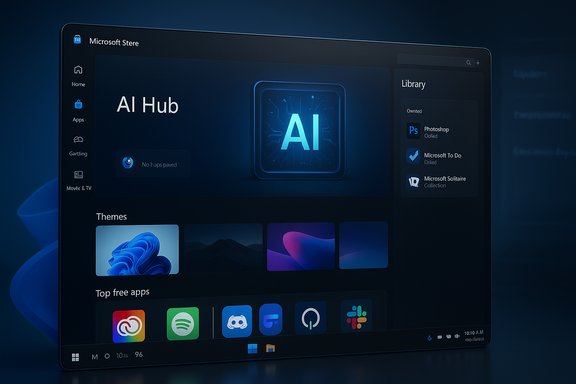
Microsoft’s “year in review” emphasizes three themes: polish, scale, and AI. The recap lists UX changes and platform investments that are visible the moment you open the Store.- Discovery and UX: A separate Updates & Downloads page, media-first product pages, an improved Library that shows owned products, and faster app-launch behavior. These reduce friction and make the Store feel like a real marketplace rather than a leftover system app.
- Win32 distribution and the Store Web Installer: Publishers can place traditional desktop applications in the Store while managing installs through a Store-mediated web flow. That lowers the barrier for desktop app distribution while keeping centralized update delivery as an option.
- AI Hub and copilot-aware surfaces: Microsoft expanded and redesigned an AI Hub inside the Store to surface apps and experiences optimized for Copilot+ PCs and NPUs, and to showcase third-party AI tools in a curated storefront. The Store also added an in‑store AI discovery experience that highlights apps built for on‑device acceleration.
- A new Themes section and personalization: A curated Themes hub makes desktop personalization discoverable inside the Store, with hundreds of themed wallpapers and accent color packages. This moves some personalization flows from Settings back into a storefront experience.
- Catalog expansion: High-profile apps and publishers—Adobe, Discord, Slack, Spotify, and others—were either added to the Store or prominently featured in Store listings, improving relevance to mainstream Windows users. The Store team used these entries to demonstrate that the platform now supports the apps people actually want.
What Microsoft left out — the missing bad news
The company’s recap is selective. It showcases wins while downplaying or omitting changes that generated user backlash and real operational friction.1) Update control was narrowed
One of the most consequential changes in 2025 was the Store’s move away from indefinite user control over automatic updates. The permanent “off” switch for automatic app updates in the consumer Store interface was removed and replaced with temporary pause options (short, finite windows rather than an indefinite off toggle). Microsoft framed this as a security-first decision — ensuring critical fixes reach users — but the change reduced a level of control many power users, hobbyists, and some small organizations relied on. The behavior and its consequences were widely reported and contested across community and specialist channels. Why this matters: updates can and do introduce regressions. Power users and administrators often keep a known-good version until an essential fix or compatibility patch ships. Taking away the indefinite consumer toggle pushes those users toward more complex hacks — Group Policy, MDM controls, or registry edits — to get the quiet, predictable version governance they want. Microsoft still offers administrative controls for managed environments, but many end users are not in managed estates and therefore lost a simple, consumer-friendly way to avoid disruptive updates.2) The Movies & TV storefront was shut down — abruptly
On July 18, 2025 Microsoft discontinued the sale and rental of movies and TV shows across Windows and Xbox storefronts. New purchases were stopped, and Microsoft directed users toward third-party streaming platforms; previously purchased content remains accessible in the Movies & TV app but cannot be bought there anymore. The announcement felt abrupt to some customers and reignited the broader debate about “digital ownership” for purchased movies and shows. Practical effect: if you bought content in the Microsoft ecosystem over the last decade and expected a long-term, platform-agnostic storage path for that content, the abrupt cessation of the storefront is a reminder that digital purchases can be ephemeral. Microsoft’s FAQ noted there are no refunds as a general policy for past purchases — a detail that left consumers frustrated.3) The "native" promise and the new Outlook controversy
Microsoft has talked for years about creating flagship native experiences for Windows. But 2025 exposed a tension: some flagship apps being promoted in the Store (and installed widely via Windows Update) were not fully native. The “new Outlook” — pushed aggressively by Microsoft as the successor to Mail & Calendar — is built on a WebView2/web-derived architecture rather than a fully native WinUI implementation. That technical choice produced a chorus of complaints about performance, missing features, and the optics of shipping web-wrapped apps as “native” Windows experiences. Why this matters: when Microsoft signals that a flagship app is “native” but the implementation is web-based, it affects trust. Developers and users alike care about the long-term quality and extensibility of OS-native apps — things like COM add-in support, predictable keyboard and input behavior, and deep accessibility integration. Packaging web apps as the company-standard client risks resetting expectations and influencing third-party developer behavior in ways that may reduce native investment across the ecosystem.4) Awards and curation controversies
The Microsoft Store Awards for 2025 drew criticism for selections that many felt prioritized AI novelty or community votes over craftsmanship and quality. The selection of a mobile/browser-first title, Castle Craft, as Microsoft Store Game of the Year particularly upset parts of the gaming community and observers who expected heavier consideration for high-profile releases like Hollow Knight: Silksong and other premium titles. Microsoft’s own recap highlighted many arrivals and winners but curiously did not call out Castle Craft by name in its year-in-review narrative, deepening the sense that awards and curation lacked a clear quality rubric.The catalog expansion: welcome but incomplete
There’s no question the Store’s catalogue looks healthier in 2025. Big desktop-first clients and mainstream consumer apps appearing in the Store materially change the proposition: fewer awkward workarounds, easier discovery, and a safer way to get software. That said, availability varies across regions and publisher participation remains voluntary, so listings are not guaranteed in every market. The entry of apps like Adobe Creative Cloud, Spotify, Discord, and Slack is a positive signal — but it doesn’t automatically equate to consistent experiences across platforms or better trust in update behavior. Key nuance: some “Store” listings are wrappers or managed installers rather than replatformed native binaries. That’s not inherently bad — the Store Web Installer and browser-initiated flows make desktop installs safer and simpler — but it does mean the Store is, in many cases, a distribution wrapper rather than a guarantee of a native runtime or integrated feature set. Enterprises should treat the Store as another distribution channel to validate rather than a single-source-of-truth for app packaging.AI Hub and personalization: real value, targeted rollout
Microsoft’s AI Hub is arguably one of the Store’s more forward-looking moves: a curated space for AI-first experiences that can highlight apps optimized for local NPUs on Copilot+ PCs and showcase third-party tools that rely on on-device acceleration. The Hub’s redesign and targeted rollout for Copilot+ PCs demonstrates Microsoft’s desire to pair hardware and software selling points: Copilot+ devices get a special discovery surface, while mainstream Windows users see compatible apps. That strategy is sensible for marketing hardware and services, but it does create a two-tier discovery experience inside the Store. The Themes hub similarly democratizes personalization — hundreds of curated themes make it easier for users to alter look-and-feel safely from the Store rather than chasing wallpapers on third‑party sites — but it also nudges personalization flows into the commerce-ready Store environment, which may open subtle monetization or promotional paths down the road.Enterprise implications and admin controls
For managed environments the story is mixed. The Store’s new features make discovery and update delivery more transparent, and the Store Web Installer reduces friction when deploying Win32 apps to end users. Microsoft also preserved and expanded MDM/Group Policy controls for administrators to manage app updates and distribution, which mitigates the consumer-facing removal of an indefinite update toggle. However, the consumer UI changes do increase support complexity for BYOD and small-business users, because the experience diverges between unmanaged consumer devices and corporate-managed devices. IT admins should:- Audit how key apps are listed in the Store (native Win32 package, MSIX, or web-installer wrapper).
- Use Intune/Group Policy to lock down update behavior where determinism is required.
- Treat the Store as one distribution channel among several; maintain enterprise deployment pipelines (MSIX, SCCM, winget) for predictable app lifecycle control.
Strengths, risks, and practical guidance
Strengths
- Real UX polish: The redesigned Library, clearer download progress, and product page upgrades meaningfully improve discoverability and reduce friction.
- Better Win32 integration: The Store Web Installer opens distribution to legacy desktop apps without forcing repackaging, a practical win for users and many developers.
- AI discovery: The AI Hub and copilot-aware badges make it easier for users to find apps that actually use the new Windows AI capabilities.
Risks
- Erosion of user control: The removal of the indefinite update toggle risks alienating power users and increases the reliance on registry hacks or enterprise tools for predictable behavior.
- Perception vs. reality of “native”: Shipping flagship apps as web-wrapped clients while promoting them as native experiences undermines trust and may reduce native investments by third-party developers.
- Content and commerce friction: The sudden closure of the Movies & TV storefront showed how fragile digital purchase ecosystems can be and emphasized the need for resilient cross-platform ownership models.
- Awards and curation backlash: If Store curation feels arbitrary or biased toward trends (for example, AI novelty), trust in the Store’s editorial signals can decline, making discovery less useful.
Practical guidance for everyday Windows users
- Use the Store where it makes sense: it’s safer for discovery and easier for many casual installs.
- For critical tools or workflows, keep an installer archive and use enterprise package tools if you need deterministic updates.
- If you rely on disabling updates permanently, plan for policy-based controls or be prepared for temporary pauses rather than a permanent off switch.
A closer look at the metrics and claims
Microsoft’s recap includes vendor-supplied telemetry — for example, claimed reductions in launch time and download hangs. These figures come from the Store team’s internal testing and phased rollouts; they are plausible and corroborated by press observation of improved behavior, but they should be read as vendor-reported rather than independent benchmarks. Independent, reproducible third-party metrics will be the only rigorous test of long-term reliability at scale. When Microsoft writes that the AI Hub “lifted” discoverability for partners, that is demonstrably true in partner case studies, but partners' results vary by region, device class, and promotional cadence — the Hub helps, but it’s not an automatic growth engine for every publisher. Treat partner statistics as directional, not universal.The Store’s path forward: recommendations for Microsoft
- Be explicit about implementation: If flagship apps use WebView2 or PWA codebases, label that clearly. Users and enterprises deserve accurate signals about app architecture and limitations.
- Restore a clear, documented update control UX for consumers: If security is the rationale, pair the policy change with clearer messaging and a consumer-friendly path for users who prefer version stability.
- Improve award clarity and curation criteria: If awards value innovation (for example AI), explain the rubric publicly so winners are less puzzling and selection looks more deliberate.
- Strengthen content continuity commitments: If digital purchases can vanish as storefronts close, offer practical migration tools (e.g., Movies Anywhere integration, or export paths) and clearer refund policies to reduce consumer risk.
Conclusion
Microsoft’s 2025 Store recap is accurate about the polish and the feature wins: the Store is faster, more discoverable, and more relevant thanks to a richer catalog and new discovery surfaces like the AI Hub and Themes. Those wins are real and important for the Windows ecosystem. But a recap that omits the practical downsides — narrowed update controls, the abrupt Movies & TV storefront shutdown, and the optics of web-wrapped flagship apps being presented as native — misses the story that many Windows enthusiasts and administrators lived this year. The Store is better, but not unambiguously better for everyone.For Windows users the most pragmatic posture is mixed: embrace the Store for safe discovery and convenience, but plan governance and recovery strategies for mission-critical apps and bought content. For Microsoft, the lesson is that product wins and platform trust must travel together: performance, discoverability, and AI promise are compelling, but only if users keep enough control and clarity to feel secure in their choices.
Source: Windows Central https://www.windowscentral.com/soft...-a-recap-microsoft-left-out-all-the-bad-news/
