

Microsoft's surprise “mystery” keynote revealing the Surface tablet is now viewable in full, and the recording does more than satisfy curiosity—it crystallizes a pivotal moment in Microsoft's hardware strategy and the broader Windows 8 story.
When Microsoft opened its unannounced Los Angeles event in June 2012, the company set out to change a narrative that had, until then, been dominated by OEMs and Apple’s iPad. The surprise reveal—kept deliberately under wraps until hours before the show—introduced Surface, a tablet line that Microsoft described as “PCs built to be the ultimate stage for Windows.” The on-demand keynote video and subsequent coverage capture the debut in full: product demos, design storytelling, and the company’s rationale for taking the bold step into first-party hardware.
This article walks through what the keynote showed, verifies the main technical claims against Microsoft’s own documentation and independent reporting, analyzes the strengths and risks of Microsoft’s hardware-first move, and explains why the 2012 Surface debut still matters as a case study in platform strategy.
The secrecy of the event—held at Milk Studios in Los Angeles—was deliberate. It produced a sense of theater and helped Microsoft control the narrative. Media coverage following the event framed the reveal as both a defensive and offensive play: defensive in that Microsoft sought to prevent Windows hardware from becoming purely OEM-defined; offensive because Surface put Microsoft in direct competition with its partners in the tablet market. Coverage at the time captured that tension clearly.
Verified, headliner specifications for Surface with Windows RT (as published by Microsoft) included:
Independent hands-on coverage (Ars Technica, Engadget, SlashGear) validated those physical and platform claims during the immediate post-keynoteutlets reported display sizes, chassis material, and the dual-model strategy consistent with Microsoft’s statements.
Caveat: early press coverage and pre-release demos sometimes referenced prototype silicon names or emerging component choices. When possible, this article gives weight to Microsoft’s formal, published specifications and corroborates them with reputable tech press hands-on reports. Claims that were only shown on-stage or in early demos but not fully documented by Microsoft have been flagged as such in the analysis below.
Keynote highlights worth watching closely:
Developers also faced a decision: invest in Windows Store-style apps built for touch and modern UI, or continue building for the desktop and ignore the new app model. Microsoft’s Surface was meant to lower the perceived risk—showing a high-quality device running modern apps could catalyze developer interest. But the real test would be whether consumers bought and used those apps at scale.
But the keynote also highlighted systemic risks—most notably, platform fragmentation (RT vs Pro), channel tension with OEMs, and the all-important app ecosystem challenge. The success of Surface would depend not only on product execution but on communication, pricing discipline, and Microsoft’s ability to shepherd partners and developers through a major platform transition.
For readers watching the keynote today, it’s worth reflecting on two lessons:
If you want a primary-record look at the moment Microsoft introduced Surface and why it mattered to Windows 8, the on-demand keynote is an excellent place to start.
Source: onmsft.com Microsoft mystery event keynote now available, Windows 8 Surface tablet introduced (video) – OnMSFT
 Background / Overview
When Microsoft opened its unannounced Los Angeles event in June 2012, the company set out to change a narrative that had, until then, been dominated by OEMs and Apple’s iPad. The surprise reveal—kept deliberately under wraps until hours before the show—introduced Surface, a tablet line that Microsoft described as “PCs built to be the ultimate stage for Windows.” The on-demand keynote video and subsequent coverage capture the debut in full: product demos, design storytelling, and the company’s rationale for taking the bold step into first-party hardware.This article walks through what the keynote showed, verifies the main technical claims against Microsoft’s own documentation and independent reporting, analyzes the strengths and risks of Microsoft’s hardware-first move, and explains why the 2012 Surface debut still matters as a case study in platform strategy.
The mystery event: why it mattered
Microsoft framed the Surface announcement not as a consumer stunt but as a structural response to Windows’ evolution. With Windows 8 moving to tile-driven, touch-first experiences, Microsoft argued that software alone was not enough; hardware needed to be rethought so Windows could be shown at its best. The keynote emphasized that the company intended Surface to be a reference and halo product for the Windows ecosystem—one that highlights the form factors and interactions Windows 8 enables.The secrecy of the event—held at Milk Studios in Los Angeles—was deliberate. It produced a sense of theater and helped Microsoft control the narrative. Media coverage following the event framed the reveal as both a defensive and offensive play: defensive in that Microsoft sought to prevent Windows hardware from becoming purely OEM-defined; offensive because Surface put Microsoft in direct competition with its partners in the tablet market. Coverage at the time captured that tension clearly.
What the keynote actually showed
Design and industrial choices
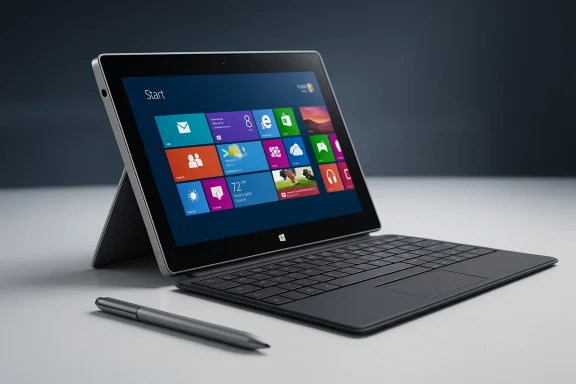
The keynote and demos focused on a handful of design decisions that Microsoft pitched as differentiators:- VaporMg (VaporMag) casing — a molded magnesium shell intended to be rigid yet lightweight, giving Surface a premium feel while enabling thinness and structural rigidity. Microsoft called out manufacturing processes and finish during demos.
- Integrated kickstand — a built-in, fold-out kickstand that Microsoft argued was a meaningful usability improvement over needing a separate accessory to prop up a tablet. The keynote demo highlighted multiple viewing angles and the engineering of the hinge.
- Magnetic keyboard covers — two cover types were shown: a slim Touch Cover (a 3 mm, touch-sensitive keyboard with a capacitive typing surface) and a Type Cover (traditional moving keys). The covers attached magnetically and doubled as protective shells. Microsoft emphasized the keyboard as an accessory that shifted the device from consumption to creation.
- Dual digitizers — Surface was described as having separate digitizers for multi-touch and digital ink, allowing pen input without accidental palm touches while inking. Microsoft showcased stylus support and note-taking scenarios.
Two models: Windows RT and Windows 8 Pro
Microsoft announced two distinct Surface device families:- Surface (Windows RT) — a thinner, lighter tablet based on ARM silicon running Windows RT. Microsoft explicitly positioned this model as a mainstream, consumption-focused tablet that still included Microsoft Office Home and Student 2013 RT Preview out of the box.
- Surface Pro (Windows 8 Pro) — a slightly thicker model running full Windows 8 Pro on an Intel Core processor, intended to run legacy desktop applications and target users who need traditional PC compatibility. It was pitched as a performance-focused device more akin to ultrabooks than ARM tablets.
Key technical specifications (verified)
Because early reporting included some speculation, it’s important to separate keynote claims from final published specifications. The most authoritative post-keynote source is Microsoft’s own product bulletin and press materials, which were later published ahead of the Windows 8 launch. Independent outlets corroborated these details during hands-on coverage.Verified, headliner specifications for Surface with Windows RT (as published by Microsoft) included:
- Display: roughly 10.81 x 6.77 x 0.37 inches; 10.6-inch ClearType HD display (16:9 aspect ratio).
- Weight: ~1.5 pounds (≈675 g).
- Casing: VaporMg molded magnesium chassis.
- Storage/RAM: 32 GB or 64 GB configurations; 2 GB RAM on RT.
- CPU: ARM-based NVIDIA chipset (Tegra-class/NVIDIA T30 referenced in Microsoft materials).
- Wireless: Wi‑Fi (802.11a/b/g/n) and Bluetooth 4.0.
- Bundled software: Office Home & Student 2013 RT Preview for the RT model.
Independent hands-on coverage (Ars Technica, Engadget, SlashGear) validated those physical and platform claims during the immediate post-keynoteutlets reported display sizes, chassis material, and the dual-model strategy consistent with Microsoft’s statements.
Caveat: early press coverage and pre-release demos sometimes referenced prototype silicon names or emerging component choices. When possible, this article gives weight to Microsoft’s formal, published specifications and corroborates them with reputable tech press hands-on reports. Claims that were only shown on-stage or in early demos but not fully documented by Microsoft have been flagged as such in the analysis below.
The video: length, structure, and highlights
If you missed the event live, Microsoft’s on-demand keynote is now available and runs for roughly three-quarters of an hour depending on the edit; several outlets measured the full recording at about 45–48 minutes, while some write-ups described it as “nearly an hour.” Watching it provides a valuable primary-source record of how Microsoft framed Surface’s pitch—design philosophy, a prominent role for Office on RT, the Touch/Type Cover demos, and the company’s defense of entering the hardware space.Keynote highlights worth watching closely:
- Steve Ballmer’s positioning of Surface as part of Microsoft’s broader hardware lineage and as a device for both creation and consumption.
- Steven Sinofsky and Panos Panay’s demos and the design vignette that showcases VaporMg manufacturing.
- The Touch Cover demo, which generated outsized interest because of its thinness, magnetics, and the promise of a keyboard integrated into the cover.
- Application demos (including early versions of media and entertainment apps) and mention of partners and app work underway—useful context for the later ecosystem conversation.
Strengths and notable innovations
Microsoft’s Surface keynote showcased a number of tangible innovations and strengths:- Hardware-software integration as a priority. Microsoft’s message was clear: to show Windows 8’s full potential, it needed a purpose-built device. Surface demonstrated scenarios where Windows’ touch features, keyboard interaction, and Office presented cohesively.
- Industrial design ambition. The VaporMg chassis and built-in kickstand gave Surface an instantly recognizable silhouette that differentiated it from commodity OEM slabs. Reviewers praised the perceived build quality.
- Keyboard cover concept. The Touch Cover and Type Cover were arguably the event’s breakout innovations: they rethought how a tablet could become a productivity device without adding bulk, while maintaining portability. That accessory model would influence detachable PC design choices across the industry.
- Office inclusion on RT. By bundling Office with Windows RT devices, Microsoft created a consumer differentiator relative to competing ARM tablets, particularly for users who valued document compatibility and basic productivity.
Risks, ambiguities, and trade-offs
The keynote also exposed several structural risks that would shape the Surface story for years:- Platform fragmentation and customer confusion. The simultaneous launch of Windows RT (ARM, no legacy desktop apps) and Windows 8 Pro (Intel, full desktop) cconsumer message. Casual buyers could misinterpret “Windows” as a single experience when RT and Pro offered fundamentally different application compatibilities. Microsoft’s keynote tried to clarify the difference, but the complexity remained a communication risk.
- OEM partner tension. Microsoft’s move into first-party hardware drew immediate concern from PC manufacturers, who saw Surface as a potential competitor. Industry watchers flagged the move as risky for channel relationships—some OEMs publicly voiced unease in the weeks after the announcement. Microsoft acknowledged the tension, but the strategic trade-off of controlling a hardware halo device was clear.
- The app ecosystem for Windows RT. Because Windows RT could not run x86 desktop apps, the surface-level value proposition relied heavily on the Windows Store catalog and built-in Office. Early demos hinted that major apps were in development, but the availability and quality of third-party apps remained an open question at launch. Forum and early press discussions noted this gap as a potential barrier to consumer adoption.
- Price and positioning. Microsoft initially said RT Surface would be priced competitively with ARM tablets and that the Pro model would be priced closer to ultrabooks. Later pricing announcements clarified this, but early vagueness created uncertainty. Prospective buyers and analysts debated whether Surface would compete with iPad-like prices or be a higher-cost productivity device.
- Supply, distribution, and channel constraints. Microsoft’s initial distribution strategy (Microsoft Stores and selected online channels) limited surface availability compared with mainstream OEM channels. That selective approach was useful for controlling the debut, but limite enterprise uptake at launch.
Ecosystem implications and developer concerns
A key subtext of the Surface announcement was the importance of a healthy developer and app ecosystem for Windows 8. Microsoft’s strategy relied on three linked pillars:- Hardware that demonstrates scenarios (Surface).
- An OS designed for touch and modern app paradigms (Windows 8).
- An app ecosystem to make the devices useful and sticky.
Developers also faced a decision: invest in Windows Store-style apps built for touch and modern UI, or continue building for the desktop and ignore the new app model. Microsoft’s Surface was meant to lower the perceived risk—showing a high-quality device running modern apps could catalyze developer interest. But the real test would be whether consumers bought and used those apps at scale.
How to watch the keynote and what to look for
The full keynote is available on-demand from Microsoft and has also been reposted and discussed by major tech outlets. If you watch the recording, here are recommended moments and what to watch for:- Early framing by Ballmer — listen for the language about hardware history and why Microsoft felt compelled to build Surface; it explains the strategic mindset.
- Panos Panay’s design video — conveys manufacturing choices and the team narrative; useful for understanding VaporMg and industrial commitment.
- Touch/Type Cover demos — these sequences show how Microsoft envisioned typing and creation on a tablet-form device. Pay attention to the magnetic attachment and the accelerometer behavior described in the demo.
- App demos and Office on RT — watch for Office behavior on RT and how the company pitches productivity on an ARM tablet. That moment signals Microsoft’s bet on productivity as a differentiator.
Community reaction and early coverage
Reaction in the immediate aftermath ranged from enthusiastic to skeptical. Tech sites praisn and the boldness of Microsoft’s move, while editorial commentary raised questions about partner relations, pricing, and the fragmented Windows message. Forum threads captured a microcosm of those reactions—readers were excited by the Touch Cover and VaporMg finish but concerned about app availability and Microsoft’s role as an OEM competitor. These community discussions provide useful contemporaneous texture to the press coverage.What this keynote revealed about Microsoft’s strategy
The Surface keynote was an explicit statement: Microsoft would not cede hardware entirely to OEMs if it meant Windows experiences would be compromised. Surface was intended to be both a demonstration of what Windows devices could be and a signpost to OEMs and developers. That approach has three strategic implications:- Control of reference design — by shipping a Microsoft-made device, the company controlled one reference implementation of Windows 8, which could help educate users and developers.
- Halo and brand value — Surface was a high-visibility product that could lift perceptions of Windows in tablet scenarios.
- Competitive friction with OEMs — the move risked alienating partners who feared direct competition. Microsoft had to balance the need for a reference product with the business reality of vendor relationships.
Final assessment: strengths, risks, and long-term lessons
The Surface keynote is important beyond the immediate product reveal because it charts Microsoft’s willingness to take risks at the hardware-software boundary. The device demonstrated meaningful industrial design thinking, thoughtful accessory integration, and an explicit attempt to reframe a software company as a hardware-first innovator where necessary. Those are strengths that deserve credit.But the keynote also highlighted systemic risks—most notably, platform fragmentation (RT vs Pro), channel tension with OEMs, and the all-important app ecosystem challenge. The success of Surface would depend not only on product execution but on communication, pricing discipline, and Microsoft’s ability to shepherd partners and developers through a major platform transition.
For readers watching the keynote today, it’s worth reflecting on two lessons:
- Radical product moves can clarify a platform’s potential—but they also require meticulous ecosystem management.
- A great keynote and a polished demo don’t eliminate the real-world business challenges of distribution, partner relations, and developer momentum.
Summary
Microsoft’s mystery event and the Surface keynote were more than a product unveiling—they were a strategic signal. The video captures a company trying to realign its hardware and software story around touch, productivity, and design. Verified specifications from Microsoft and independent hands-on reporting confirm the device’s key attributes: a VaporMg chassis, integrated kickstand, keyboard covers, and a two-model split between Windows RT (ARM) and Windows 8 Pro (Intel). The announcement emphasized innovation but also exposed acute risks—partner friction, platform messaging complexity, and app ecosystem dependency. Watching the keynote provides a clear window into how Microsoft chose to position itself in the tablet era and the tactical choices that followed in the months after the reveal.If you want a primary-record look at the moment Microsoft introduced Surface and why it mattered to Windows 8, the on-demand keynote is an excellent place to start.
Source: onmsft.com Microsoft mystery event keynote now available, Windows 8 Surface tablet introduced (video) – OnMSFT
