

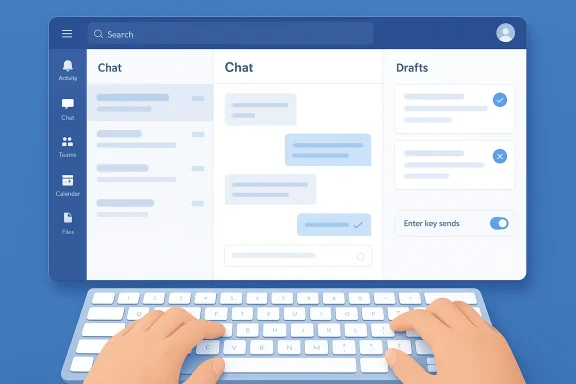
Microsoft Teams has finally closed a handful of the most annoying gaps in its chat experience, and for many users the changes feel overdue by years rather than months. The March 2026 update doesn’t introduce flashy redesigns or headline-grabbing AI tricks; instead, it focuses on the daily friction that makes Teams feel clunky when you’re trying to move fast. The most noticeable additions are a configurable Enter key, a unified Drafts view, and a keyboard shortcut for marking chats and channels as read. Together, they point to a more mature product philosophy: fewer accidental sends, fewer lost drafts, and less time spent cleaning up after the interface.
Microsoft Teams has spent the last several years evolving from a basic collaboration hub into a sprawling platform for messaging, meetings, calling, device management, compliance, and AI. That growth has been powerful, but it has also made the product feel fragmented in places, especially for users who rely on keyboard-driven workflows or who juggle many conversations at once. The March 2026 update is interesting because it doesn’t expand Teams outward so much as smooth it inward.
That matters because Teams has long attracted two very different kinds of users. There are the enterprise administrators who care about governance, retention, external collaboration, and policy control, and there are the everyday knowledge workers who just want the app to stop getting in the way. Microsoft’s latest batch of improvements tries to serve both camps, but the visible wins are mostly on the user side. The company appears to be acknowledging that productivity software loses credibility when basic interaction patterns remain awkward for years.
There is also a broader context here. Microsoft has been steadily refining the newer chat-and-channels experience, and the March changes fit neatly into that arc. Features such as easier message triage, better control over external collaboration, and more approachable message composition all suggest a product being re-centered around clarity rather than mere feature count. The result is less revolutionary than it is overdue.
The official Microsoft Teams update cadence has also become more predictable. Monthly roundups now function almost like a product narrative, showing how the platform is being tuned for day-to-day resilience, not just showcase demos. That makes this release especially useful to read as a signal: Microsoft knows the basics still matter, and it is willing to revisit them.
That is significant because it acknowledges that not every collaboration tool should force the same messaging grammar on everyone. Some people type quickly and want Enter to send immediately. Others draft carefully, use line breaks for readability, and would rather keep the keyboard behavior aligned with editing, not dispatch. Microsoft’s answer is to let the user decide, which is exactly how it should have worked all along.
The optional shortcut for sending a message, depending on operating system, is also useful because it preserves speed for power users. Microsoft is not taking away fast entry; it is making fast entry compatible with deliberate formatting. That balance is what good enterprise UX looks like.
That said, there is a catch. Any time you add configurable behavior, you create the possibility of inconsistency across devices or user expectations. Some teams will standardize on one behavior and some won’t, which can complicate support. Still, that is a reasonable tradeoff for letting the user control the workflow.
That is not a minor quality-of-life tweak. Draft management is one of the most obvious markers of whether a messaging platform respects real work. People do not always finish a thought in one sitting, and they should not have to remember where they abandoned it. Teams is now acting a little more like a writing workspace and a little less like a fire hose.
The feature also reflects a wider trend in productivity software: tools are becoming more state-aware. They are no longer only places to type and send; they are also places to stage, revisit, and refine. In that sense, Teams is moving closer to the way people actually work in between meetings and notifications.
This one does not feel abstract. It is hard to argue against making unfinished messages easier to find. If anything, it highlights how much friction Teams has tolerated for too long in the name of breadth and complexity.
Microsoft’s shortcut, which lets users clear the backlog with a quick keyboard action, is essentially a triage tool. It does not solve overload, but it gives users a practical way to assert control over it. In a platform built around persistent conversation, that control is critical.
The shortcut also fits with Microsoft’s broader effort to make Teams more keyboard-friendly. The more the app can be navigated without mouse-heavy cleanup, the less it feels like an overgrown dashboard and the more it feels like a work surface.
The only concern is that features like this can sometimes encourage over-clearing, where users sweep away items they should have reviewed. But that is a workflow issue, not a flaw in the feature itself. Properly used, the shortcut should make Teams feel less oppressive and more manageable.
External collaboration is one of the hardest balancing acts in enterprise software. Make it too open, and you create security and compliance risk. Make it too restrictive, and you force people into shadow IT or email detours. Teams has spent years trying to sit between those extremes, and the March update suggests Microsoft is still sanding down the rough edges.
The addition of Loop components to external chats is especially noteworthy because it reflects Microsoft’s continued commitment to modular, co-editable content inside Teams. That is the company’s vision of modern collaboration: less static attachment, more living document. If executed well, it can make external work much smoother.
If Teams can help organizations share more freely without making admins nervous, it strengthens the product’s moat. If it cannot, then users will continue to route urgent outside work through email, cloud file links, or consumer chat apps. Microsoft is clearly trying to prevent that drift.
This is where a lot of modern work software becomes emotionally loaded. People do not just want to know that someone sent a message; they want to know whether they are expected to respond instantly. Presence indicators, activity states, and notification policies all feed that social pressure. Microsoft’s recent efforts suggest it is trying to make those signals more accurate and less noisy.
There is also a trust element here. When presence is wrong, users notice. They notice even more in remote and hybrid settings, where the little signals become substitutes for hallway context. Accuracy, therefore, is not merely technical; it is social.
That is probably the right direction. People do not want less information; they want more usable information. The difference is subtle, but it is the difference between a system that supports attention and one that fragments it.
That shift matters because the competitive bar has changed. Teams no longer competes only with Slack-style chat or Zoom-style meetings. It also competes with the expectations users have from consumer-grade interfaces, from AI-enhanced productivity apps, and from mobile-first communication tools. In that environment, basic usability is not a bonus; it is table stakes.
The update cadence itself is meaningful. Microsoft’s monthly “what’s new” rhythm creates a sense of momentum, but it also creates accountability. Users can see whether the company is making the product easier to use or merely bigger. March 2026 lands clearly in the first category.
That is good news. It suggests Microsoft understands that AI cannot compensate for a messy interface. People will welcome Copilot features, but they will notice first whether the app lets them type, send, organize, and recover messages without friction.
In large organizations, these changes could reduce support tickets and training overhead. Fewer accidental sends, fewer missing drafts, and clearer external-sharing behavior all lower the cost of user confusion. In smaller environments, the value is more immediate and personal: the app simply becomes less annoying to live in.
That is why the March release feels like a trust-building move. Microsoft is not asking users to be impressed; it is trying to be useful. In product terms, that is often the harder and smarter path.
The next test will be consistency. Users will want these changes to land cleanly across desktop, web, and mobile, and they will want Microsoft to keep addressing the old friction points that still define daily use. It is one thing to fix the Enter key; it is another to continue chipping away at the accumulated complexity around notifications, search, message routing, and conversation management.
In the end, the most impressive thing about this release is not that it introduced new power, but that it made everyday work feel more under control. That may not spark applause in a keynote, but it is exactly the kind of improvement that makes a collaboration platform earn its place.
Source: Windows Central Teams finally added the features I waited almost a decade for
 Overview
Microsoft Teams has spent the last several years evolving from a basic collaboration hub into a sprawling platform for messaging, meetings, calling, device management, compliance, and AI. That growth has been powerful, but it has also made the product feel fragmented in places, especially for users who rely on keyboard-driven workflows or who juggle many conversations at once. The March 2026 update is interesting because it doesn’t expand Teams outward so much as smooth it inward.That matters because Teams has long attracted two very different kinds of users. There are the enterprise administrators who care about governance, retention, external collaboration, and policy control, and there are the everyday knowledge workers who just want the app to stop getting in the way. Microsoft’s latest batch of improvements tries to serve both camps, but the visible wins are mostly on the user side. The company appears to be acknowledging that productivity software loses credibility when basic interaction patterns remain awkward for years.
There is also a broader context here. Microsoft has been steadily refining the newer chat-and-channels experience, and the March changes fit neatly into that arc. Features such as easier message triage, better control over external collaboration, and more approachable message composition all suggest a product being re-centered around clarity rather than mere feature count. The result is less revolutionary than it is overdue.
The official Microsoft Teams update cadence has also become more predictable. Monthly roundups now function almost like a product narrative, showing how the platform is being tuned for day-to-day resilience, not just showcase demos. That makes this release especially useful to read as a signal: Microsoft knows the basics still matter, and it is willing to revisit them.
The Long Wait for Basic Messaging Sanity
The biggest emotional reaction to this update will probably come from the simple Enter key change. In Teams, as in many chat apps, the default behavior has long been one of those tiny annoyances that becomes disproportionately irritating because you repeat it dozens of times a day. Accidentally sending half-finished thoughts is not a glamorous problem, but it is a real one, and Microsoft is finally giving users a proper way to choose between sending with Enter or starting a new line.That is significant because it acknowledges that not every collaboration tool should force the same messaging grammar on everyone. Some people type quickly and want Enter to send immediately. Others draft carefully, use line breaks for readability, and would rather keep the keyboard behavior aligned with editing, not dispatch. Microsoft’s answer is to let the user decide, which is exactly how it should have worked all along.
Why this matters more than it looks
A small preference toggle can change how a product feels. If your chat app constantly interrupts your thought process, you start to distrust it, and that distrust accumulates into friction. Teams has often been powerful enough to tolerate that friction, but power is not the same as polish.- It reduces accidental message sends.
- It makes multiline drafting more natural.
- It gives keyboard-heavy users more control.
- It narrows the gap with more customizable chat platforms.
- It removes one of the oldest “why can’t this just work?” complaints.
The optional shortcut for sending a message, depending on operating system, is also useful because it preserves speed for power users. Microsoft is not taking away fast entry; it is making fast entry compatible with deliberate formatting. That balance is what good enterprise UX looks like.
A small change with outsized psychological impact
This update may not drive procurement decisions, but it will shape daily satisfaction. In many workplaces, a collaboration tool is judged not by feature checklists but by whether it creates small embarrassments. Sending a partial thought to a manager or client is a classic example. Teams is finally offering an escape hatch from that awkwardness.That said, there is a catch. Any time you add configurable behavior, you create the possibility of inconsistency across devices or user expectations. Some teams will standardize on one behavior and some won’t, which can complicate support. Still, that is a reasonable tradeoff for letting the user control the workflow.
Drafts Are Finally Treated Like First-Class Citizens
The new Drafts view may be the single most practical change in the March 2026 batch. Unfinished messages in Teams have long been easy to lose, especially in a busy day filled with channels, direct messages, and interrupted thoughts. Microsoft is now aggregating those unsent drafts into one place, which turns them from scattered leftovers into a manageable to-do list.That is not a minor quality-of-life tweak. Draft management is one of the most obvious markers of whether a messaging platform respects real work. People do not always finish a thought in one sitting, and they should not have to remember where they abandoned it. Teams is now acting a little more like a writing workspace and a little less like a fire hose.
Why draft aggregation is a meaningful redesign
A centralized draft list changes user behavior. Instead of hunting through conversations and mentally retracing where you stopped typing, you can treat half-written replies as recoverable tasks. That is especially useful in asynchronous work, where a draft often becomes a note to self rather than a message sent immediately.- It reduces lost follow-ups.
- It makes unfinished replies visible.
- It helps users resume context faster.
- It lowers cognitive load after interruptions.
- It can encourage more thoughtful messaging.
The feature also reflects a wider trend in productivity software: tools are becoming more state-aware. They are no longer only places to type and send; they are also places to stage, revisit, and refine. In that sense, Teams is moving closer to the way people actually work in between meetings and notifications.
Consumer convenience and enterprise value are not the same thing
For consumers or smaller teams, drafts are mostly about convenience and sanity. For enterprise users, they can also reduce missed customer responses, delayed internal approvals, and message duplication. That distinction matters because Teams often gets criticized for serving large organizations with features that feel abstract to ordinary workers.This one does not feel abstract. It is hard to argue against making unfinished messages easier to find. If anything, it highlights how much friction Teams has tolerated for too long in the name of breadth and complexity.
Cleaner Triage for Busy Channels
The new shortcut to mark all chats and channel messages as read is another deceptively simple addition with immediate value. Anyone living in Teams for eight hours a day knows that unread counts can become a kind of background anxiety. Some notifications deserve attention, but many are already resolved elsewhere, or simply no longer relevant by the time you see them.Microsoft’s shortcut, which lets users clear the backlog with a quick keyboard action, is essentially a triage tool. It does not solve overload, but it gives users a practical way to assert control over it. In a platform built around persistent conversation, that control is critical.
Why inbox hygiene still matters in 2026
We often talk about collaboration tools as if the challenge is generating enough information. In reality, the bigger challenge is deciding what can be safely ignored. Teams is leaning into that reality by making the cleanup process faster and more visible.- It helps users reset after a busy day.
- It prevents unread badges from becoming noise.
- It supports quick context clearing during meetings.
- It reduces the burden of manual marking.
- It makes the app feel more responsive to attention management.
The shortcut also fits with Microsoft’s broader effort to make Teams more keyboard-friendly. The more the app can be navigated without mouse-heavy cleanup, the less it feels like an overgrown dashboard and the more it feels like a work surface.
The hidden cost of unread clutter
Unread clutter is not just cosmetic. It can distort prioritization and create the illusion of more unresolved work than actually exists. That is why a reliable “mark all as read” action matters so much; it allows users to separate signal from residue.The only concern is that features like this can sometimes encourage over-clearing, where users sweep away items they should have reviewed. But that is a workflow issue, not a flaw in the feature itself. Properly used, the shortcut should make Teams feel less oppressive and more manageable.
External Collaboration Gets More Structured
Microsoft has also continued refining external collaboration controls, which are increasingly important as organizations work across vendors, contractors, partners, and mixed identity boundaries. The update includes simplified controls for external collaboration and new support for sharing files and Loop components in external chats. That combination hints at a platform trying to make cross-company work feel less brittle without giving up administrative oversight.External collaboration is one of the hardest balancing acts in enterprise software. Make it too open, and you create security and compliance risk. Make it too restrictive, and you force people into shadow IT or email detours. Teams has spent years trying to sit between those extremes, and the March update suggests Microsoft is still sanding down the rough edges.
Why collaboration outside the tenant is a strategic battleground
In modern work, the boundary of the company is not the boundary of the workflow. Teams, guests, and shared artifacts increasingly need to flow across organizational lines. When that flow is cumbersome, people revert to tools that are easier but less governed.- It supports more natural cross-company collaboration.
- It reduces friction when sharing work artifacts.
- It keeps Loop components useful in wider workflows.
- It gives admins better control over exposure.
- It helps Teams remain competitive against lighter-weight tools.
The addition of Loop components to external chats is especially noteworthy because it reflects Microsoft’s continued commitment to modular, co-editable content inside Teams. That is the company’s vision of modern collaboration: less static attachment, more living document. If executed well, it can make external work much smoother.
Enterprise control versus user experience
The challenge is that compliance-friendly controls are often built in a way that administrators appreciate more than end users do. This update appears to be an attempt to bridge that gap by making the controls easier to understand rather than merely more numerous. That is important because collaboration products are only as good as the confidence they inspire.If Teams can help organizations share more freely without making admins nervous, it strengthens the product’s moat. If it cannot, then users will continue to route urgent outside work through email, cloud file links, or consumer chat apps. Microsoft is clearly trying to prevent that drift.
Notifications, Presence, and the Psychology of Being “On”
Microsoft’s update also touches the quieter layers of collaboration: notifications, presence, and activity awareness. Those may sound like background details, but they shape how people experience Teams throughout the day. The platform’s usefulness depends not just on messages arriving, but on whether the system helps users understand what deserves attention now and what can wait.This is where a lot of modern work software becomes emotionally loaded. People do not just want to know that someone sent a message; they want to know whether they are expected to respond instantly. Presence indicators, activity states, and notification policies all feed that social pressure. Microsoft’s recent efforts suggest it is trying to make those signals more accurate and less noisy.
What better presence actually changes
Presence is not a decorative feature. It is a social contract. If Teams can more accurately represent whether someone is active, available, or simply logged in on the web, it can reduce false assumptions and awkward follow-up behavior.- It improves expectation-setting.
- It reduces unnecessary pings.
- It helps users manage responsiveness.
- It gives remote workers more honest status cues.
- It supports more respectful collaboration norms.
There is also a trust element here. When presence is wrong, users notice. They notice even more in remote and hybrid settings, where the little signals become substitutes for hallway context. Accuracy, therefore, is not merely technical; it is social.
Reducing notification fatigue without hiding the work
Notification controls in Teams have always been a balancing act. Too many alerts and the product becomes exhausting. Too few and users miss important conversations. The recent emphasis on cleaning up activity and making unread states easier to handle suggests Microsoft is leaning toward better triage rather than brute-force silence.That is probably the right direction. People do not want less information; they want more usable information. The difference is subtle, but it is the difference between a system that supports attention and one that fragments it.
Microsoft’s Broader Teams Strategy
Seen in isolation, these changes look like a grab bag of modest improvements. In context, they reveal a consistent strategy: Microsoft is trying to make Teams feel less like a machine of many disconnected parts and more like a coherent work environment. The company is focusing on interaction quality, not just new modules.That shift matters because the competitive bar has changed. Teams no longer competes only with Slack-style chat or Zoom-style meetings. It also competes with the expectations users have from consumer-grade interfaces, from AI-enhanced productivity apps, and from mobile-first communication tools. In that environment, basic usability is not a bonus; it is table stakes.
Why this release feels different from earlier Teams updates
Older Teams updates often emphasized scope: more meeting options, more admin controls, more calling features, more devices, more integrations. The March 2026 changes are narrower, but they target pain that users feel repeatedly. That makes them more likely to be remembered, even if they are less flashy.- They solve everyday annoyances.
- They reduce accidental behavior.
- They help users recover unfinished work.
- They improve visibility into conversation state.
- They reinforce keyboard-first efficiency.
The update cadence itself is meaningful. Microsoft’s monthly “what’s new” rhythm creates a sense of momentum, but it also creates accountability. Users can see whether the company is making the product easier to use or merely bigger. March 2026 lands clearly in the first category.
The AI question hanging over everything
Although this update is not centered on AI, that absence is revealing. Microsoft has spent a lot of effort positioning Teams as an AI-enabled collaboration layer, but users still care deeply about non-AI basics. The Enter key, drafts, and message triage are reminders that not every win needs a model behind it.That is good news. It suggests Microsoft understands that AI cannot compensate for a messy interface. People will welcome Copilot features, but they will notice first whether the app lets them type, send, organize, and recover messages without friction.
Enterprise Impact Versus Everyday User Value
The March 2026 Teams update lands differently depending on who is using the platform. Enterprise administrators will care most about the external collaboration controls, account management visibility, and broader governance implications. Everyday users will likely notice the Enter key choice, the Drafts view, and the read-status shortcut first. That split is healthy because it means Microsoft is addressing both the infrastructure of collaboration and the experience of collaboration.In large organizations, these changes could reduce support tickets and training overhead. Fewer accidental sends, fewer missing drafts, and clearer external-sharing behavior all lower the cost of user confusion. In smaller environments, the value is more immediate and personal: the app simply becomes less annoying to live in.
What IT teams will likely appreciate
Admins tend to value predictability more than novelty, and this update offers exactly that. It gives them better knobs to manage collaboration while also reducing the need for users to invent workarounds. That is the kind of change that tends to pay off slowly but steadily.- Better external collaboration structure.
- More manageable user behavior.
- Less accidental message traffic.
- Improved clarity around presence and activity.
- Lower reliance on user education for basic tasks.
Why the smallest features can create the most loyalty
People remember friction more vividly than abundance. A beautifully designed feature can be overlooked if the basics are painful, while a tiny fix can generate outsized gratitude if it removes a repeated annoyance. The new Teams changes fall squarely into that category.That is why the March release feels like a trust-building move. Microsoft is not asking users to be impressed; it is trying to be useful. In product terms, that is often the harder and smarter path.
Strengths and Opportunities
The strongest thing about this update is that it targets real workflow pain instead of chasing novelty for its own sake. Microsoft has identified a set of annoyances that affect nearly every Teams user, and it has addressed them with practical controls and sensible defaults. That is a sign of a product team paying attention to behavior, not just benchmarks.- The Enter key toggle respects different writing styles.
- The Drafts view makes unfinished work recoverable.
- The mark all as read shortcut reduces notification drag.
- Better external collaboration controls strengthen enterprise use cases.
- Shared Loop and file handling in external chats improve cross-company work.
- More accurate presence and activity handling support hybrid work.
- The update reinforces Teams as a coherent productivity surface.
- The changes are low-risk, high-utility improvements.
Risks and Concerns
The main risk is that incremental fixes may arrive too slowly for users who have already normalized the friction. Teams has a long history, and some people have spent years building workaround habits around its quirks. A better Enter key and a Drafts view are welcome, but they also highlight how long users had to wait for obvious improvements.- Some organizations may resist changes in default message behavior.
- More configuration options can create uneven user experiences.
- External collaboration controls can still feel complex to admins.
- Draft aggregation may not solve deeper conversation overload.
- Shortcut-driven cleanup can encourage over-clearing important items.
- Users may expect more substantial usability gains than one update can deliver.
- The product still carries a reputation for complexity.
Looking Ahead
The most important question now is whether this update represents a one-off cleanup pass or the beginning of a broader usability push. The signs are encouraging. Microsoft appears to be investing in the mundane but essential work of making collaboration software feel less combative and more intuitive. If that continues, Teams could become not just more capable, but more pleasant.The next test will be consistency. Users will want these changes to land cleanly across desktop, web, and mobile, and they will want Microsoft to keep addressing the old friction points that still define daily use. It is one thing to fix the Enter key; it is another to continue chipping away at the accumulated complexity around notifications, search, message routing, and conversation management.
What to watch next
- Whether the new Enter key behavior is applied consistently across platforms.
- How widely the Drafts view is adopted in day-to-day workflows.
- Whether Microsoft extends read-state shortcuts to more surfaces.
- How external collaboration changes affect admin policy design.
- Whether Teams continues prioritizing usability fixes in future monthly updates.
- If more keyboard-centric improvements follow in upcoming releases.
In the end, the most impressive thing about this release is not that it introduced new power, but that it made everyday work feel more under control. That may not spark applause in a keynote, but it is exactly the kind of improvement that makes a collaboration platform earn its place.
Source: Windows Central Teams finally added the features I waited almost a decade for
