

Microsoft plans to bring AI-powered Facilitator notes to in-person meetings in Teams Rooms on Windows in August 2026, giving Teams Rooms Pro customers a one-tap way to capture notes, decisions, and action items from room-only discussions. The feature, listed as Microsoft 365 Roadmap ID 560318, is still in development, but its direction is clear: Microsoft wants the meeting record to follow the conversation even when the meeting never really leaves the room. That sounds mundane until you consider how much corporate work still happens in side rooms, huddles, project spaces, and executive conference rooms where nobody remembers to write down what was decided. The bigger story is not that Teams can take notes; it is that Microsoft is trying to make the physical meeting room another endpoint for Copilot-era knowledge capture.
For the last few years, the best AI meeting features have assumed that a meeting is a digital object first and a human event second. There is a calendar invite, a Teams link, a participant roster, a transcript, a chat thread, and a recap page waiting to absorb whatever happens. Hybrid meetings fit that model neatly because the software is already present as the shared venue.
In-person meetings have always been messier. A group walks into a room, taps a console, throws a deck onto the screen, and makes decisions that later exist only in someone’s memory or in a half-legible photo of a whiteboard. Microsoft’s Facilitator expansion is aimed at precisely that gap: the meeting where Teams Rooms hardware is present, but the collaboration record is not guaranteed.
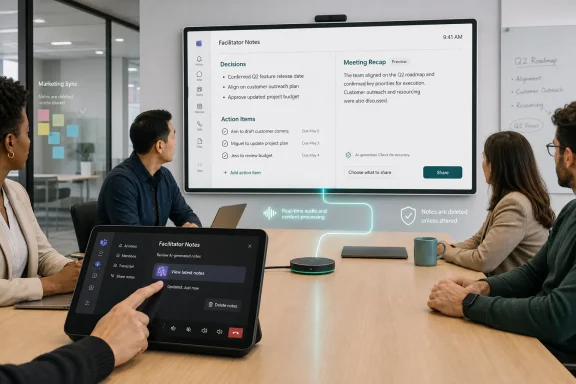
The implementation described in the roadmap is intentionally simple. A participant can invite Facilitator from the room console with a tap, and the agent can capture notes, decisions, and action items during an in-person meeting. Those notes can appear on the front-of-room display or touch board, and if shared, they become available through meeting recap.
That last clause matters. Microsoft is not merely adding a transcription-adjacent feature to a conference room appliance. It is trying to route physical-room conversations into the same recap-driven workflow that already governs scheduled Teams meetings. The room becomes a capture surface, and the recap becomes the durable corporate memory.
Teams Rooms already lives in the privileged place where meeting friction gets negotiated: the room console. That device is the interface people use to start calls, join meetings, manage audio, and share content. Putting Facilitator there gives Microsoft a chance to turn AI note capture into a room behavior rather than a personal productivity habit.
That is a subtle but important shift. If AI notes depend on one participant remembering to launch a bot from a laptop, the feature belongs to that person. If the console exposes it as part of the room experience, the feature belongs to the meeting. That changes expectations around consent, visibility, access, and governance.
The display behavior reinforces the same point. Notes appearing on the front-of-room display or touch board make the AI’s output visible as the meeting unfolds. This is not a silent recorder hidden in the background. In Microsoft’s preferred model, the agent is a visible collaborator, producing a shared artifact that participants can see, correct, and eventually choose to retain or discard.
In a scheduled Teams meeting, users are increasingly conditioned to expect transcripts, recaps, Copilot summaries, and persistent artifacts. In an in-person meeting room, the social expectation can be different. People may treat a room-only discussion as more ephemeral, even if it happens in a corporate space on corporate equipment.
That is why the retention model will be watched closely by administrators and privacy teams. The promise that notes are deleted unless selected is reassuring, but it also introduces a governance question: who gets to select them, who gets access once they are shared, and how clearly does the room communicate that AI capture is active? A technically sound deletion model can still create trust problems if users do not understand the moment at which ephemeral notes become persistent records.
The “no data remains in the room” phrase is also a reminder that Teams Rooms devices are not supposed to become local repositories of meeting intelligence. Microsoft wants the durable record, when retained, to live in Microsoft 365 services and meeting recap rather than on shared-room hardware. For IT teams, that distinction matters because room devices are used by many groups, often in spaces where the next meeting begins minutes after the last one ends.
There is a practical reason for that. Room-based AI capture needs more than a clever user interface. It depends on microphones, speakers, displays, console controls, device management, identity configuration, and cloud policy. Teams Rooms Pro gives Microsoft a commercial and administrative container for those requirements.
But there is also a market-shaping move here. By reserving room-based Facilitator experiences for Pro customers, Microsoft encourages organizations to treat AI meeting capture as part of the room platform, not merely as part of individual Microsoft 365 Copilot licensing. That matters for procurement. A CIO evaluating conference room refreshes is no longer just comparing cameras and microphones; they are comparing how much institutional memory a room can produce.
For customers already standardized on Teams Rooms Pro, this may feel like a natural extension of existing investment. For organizations running mixed room estates or trying to hold down licensing costs, it may feel like another reminder that Microsoft’s most interesting collaboration features increasingly arrive behind premium entitlements. The AI meeting room is not free real estate.
That does not mean every government tenant will see identical behavior on the same day. Microsoft 365 roadmap dates are planning targets, not shipping guarantees, and sovereign or government cloud deployments often move with additional compliance and operational constraints. Still, the cloud-instance list suggests Microsoft sees AI meeting notes as more than a Silicon Valley productivity demo.
In regulated environments, the use case is easy to understand. Agencies and contractors hold endless in-person briefings, operational reviews, and project meetings where action items matter and institutional memory is fragile. A room-native way to capture decisions could be genuinely useful, especially where remote attendance is not the default.
The risk is equally obvious. Government and defense customers will care intensely about retention, access control, sensitivity labels, eDiscovery behavior, auditability, and whether AI-generated notes are treated as official records. Microsoft can sell the feature as a productivity gain, but adoption in those environments will depend on whether administrators can make it boringly governable.
Facilitator’s expansion into Teams Rooms on Windows strengthens that pattern. The room discussion is no longer outside the recap economy. Once shared, its decisions and actions can sit alongside the rest of the meeting record, making it easier for people who were not present to catch up and for participants to revisit commitments.
This is where Microsoft’s approach differs from standalone AI notetakers. A third-party bot can summarize a meeting and send an email. Microsoft can embed the artifact into the same tenant, identity, compliance, and collaboration fabric that already contains the meeting invite, chat, files, and follow-up work. That integration is the advantage Microsoft keeps pressing.
It is also the lock-in. The more valuable the recap becomes, the harder it is for organizations to treat Teams as interchangeable meeting plumbing. Once room decisions, AI notes, Planner tasks, Loop pages, and Copilot queries all orbit the same meeting object, the collaboration suite becomes a system of record.
Teams Rooms on Windows has long occupied the more PC-like end of Microsoft’s room strategy. It gives admins a familiar management surface, supports a broad range of certified peripherals, and often serves as the target for advanced room experiences. Bringing Facilitator here reinforces the idea that Windows-based rooms remain a priority venue for Microsoft’s collaboration ambitions.
There is also a broader Windows story. The PC used to be the primary place where knowledge work was captured. Now, Microsoft is pushing capture outward: into calls, chats, whiteboards, mobile devices, and conference rooms. Windows is no longer just the workstation OS in this model; in Teams Rooms, it is the embedded substrate for the meeting environment itself.
That matters for sysadmins because room PCs are operationally different from user PCs. They are shared, appliance-like, expected to work every time, and highly visible when they fail. Adding AI features to that surface raises the stakes for updates, policies, audio quality, network reliability, and user education.
Teams Rooms hardware helps because certified room systems are designed for shared audio capture. A good room microphone can hear the table more reliably than a laptop at one end of the conference room. But room audio is still a messy input, especially in large spaces, glass-walled rooms, open offices, and meetings where people turn away from microphones to address a whiteboard.
Speaker attribution is another practical issue. In hybrid meetings, participants often join with named accounts, giving the system identity signals. In a purely in-person room, the agent may have less reliable information about who said what unless the room and meeting context provide enough identity mapping. For decisions and action items, getting the content right may not be enough; organizations often need to know who owns the follow-up.
This is why the front-of-room display could be more than a convenience. If notes are visible as they are generated, participants can catch errors while context is fresh. The best version of Facilitator is not an oracle that produces a perfect record after the fact; it is a live note-taker that humans can supervise.
Some employees will welcome the feature because it reduces drudgery. The person who always ends up writing notes can participate more fully. Managers can leave with a cleaner list of decisions. Distributed teams can get a record of what happened in the room without relying on secondhand summaries.
Others will worry that AI capture changes how people speak. Brainstorming sessions, performance discussions, labor conversations, legal strategy meetings, and security incident reviews all have different expectations around candor and recordkeeping. Even if Facilitator is not technically recording a video or retaining raw room data by default, the presence of a live AI note-taker can alter the room.
The organizations that deploy this well will not treat it as a novelty. They will define when it should be used, when it should not be used, how participants are notified, who can save notes, and how generated action items are validated. The button may be one tap, but the policy around it cannot be one sentence.
The first set of questions will be about eligibility. Which rooms have Teams Rooms Pro? Which devices are Teams Rooms on Windows? Which tenants and cloud environments are enabled? Which users can access the recap? If the feature appears in some rooms and not others, help desks will hear about it immediately.
The second set will be about data handling. Users will want to know whether the room keeps anything, whether notes are saved automatically, whether they can be deleted later, and whether the AI output is searchable or discoverable. Legal and compliance teams will want more precise answers than “no data remains in the room.”
The third set will be about meeting norms. If a participant taps Facilitator during an ad hoc meeting, is that enough consent? Should sensitive meetings ban AI notes by default? Should room signage indicate that AI note-taking may be available? These are not merely HR questions; they are adoption questions. A feature users distrust will be bypassed, disabled, or quietly resented.
This is the Copilot-era bargain. Users get summaries, action items, and easier recall. Microsoft gets a more complete map of organizational work, expressed through Microsoft 365 artifacts that its AI can later reason over. The value proposition is compelling, but it depends on trust that the map is accurate, access-controlled, and not more permanent than users expect.
For IT leaders, the question is not whether AI notes are useful. They are useful. The question is whether the organization is ready for a world in which not writing something down is no longer the default failure mode. When capture becomes effortless, intentional non-capture becomes the governance decision.
That inversion will take time to absorb. Many businesses have spent years trying to reduce meeting waste by making meetings shorter, fewer, or better documented. Facilitator attacks the documentation problem from another angle: keep the meeting, but make the output automatic. Whether that improves work or simply produces more artifacts will depend on how disciplined organizations are about using the notes after the meeting ends.
A sensible preparation cycle starts with inventory. Organizations should know which rooms run Teams Rooms on Windows, which have Teams Rooms Pro, and which are used for sensitive discussions. From there, admins can decide whether the feature should be broadly encouraged, selectively piloted, or restricted until legal and compliance teams are comfortable.
Training should be practical rather than promotional. Users do not need a Copilot manifesto; they need to know what the button does, where notes appear, when notes are deleted, and what happens when someone shares them. Room signage, internal guidance, and executive assistant training may matter as much as admin center configuration.
The pilot group should include skeptics. Facilities teams, legal staff, project managers, and frontline supervisors will find different failure modes than early adopters in IT. If Facilitator misidentifies owners, captures tentative ideas as decisions, or misses side comments that matter, those lessons are better learned before broad rollout.
 Microsoft Moves the AI Scribe From the Calendar Invite to the Conference Table
For the last few years, the best AI meeting features have assumed that a meeting is a digital object first and a human event second. There is a calendar invite, a Teams link, a participant roster, a transcript, a chat thread, and a recap page waiting to absorb whatever happens. Hybrid meetings fit that model neatly because the software is already present as the shared venue.In-person meetings have always been messier. A group walks into a room, taps a console, throws a deck onto the screen, and makes decisions that later exist only in someone’s memory or in a half-legible photo of a whiteboard. Microsoft’s Facilitator expansion is aimed at precisely that gap: the meeting where Teams Rooms hardware is present, but the collaboration record is not guaranteed.
The implementation described in the roadmap is intentionally simple. A participant can invite Facilitator from the room console with a tap, and the agent can capture notes, decisions, and action items during an in-person meeting. Those notes can appear on the front-of-room display or touch board, and if shared, they become available through meeting recap.
That last clause matters. Microsoft is not merely adding a transcription-adjacent feature to a conference room appliance. It is trying to route physical-room conversations into the same recap-driven workflow that already governs scheduled Teams meetings. The room becomes a capture surface, and the recap becomes the durable corporate memory.
The One-Tap Interface Is the Product Strategy
The most revealing detail in the roadmap item is not the AI model, the Microsoft 365 branding, or even the Copilot tie-in. It is the phrase “one tap.” Microsoft knows that the barrier to meeting documentation is rarely philosophical. People broadly agree that decisions should be written down; they just do not want to stop the meeting to appoint a secretary.Teams Rooms already lives in the privileged place where meeting friction gets negotiated: the room console. That device is the interface people use to start calls, join meetings, manage audio, and share content. Putting Facilitator there gives Microsoft a chance to turn AI note capture into a room behavior rather than a personal productivity habit.
That is a subtle but important shift. If AI notes depend on one participant remembering to launch a bot from a laptop, the feature belongs to that person. If the console exposes it as part of the room experience, the feature belongs to the meeting. That changes expectations around consent, visibility, access, and governance.
The display behavior reinforces the same point. Notes appearing on the front-of-room display or touch board make the AI’s output visible as the meeting unfolds. This is not a silent recorder hidden in the background. In Microsoft’s preferred model, the agent is a visible collaborator, producing a shared artifact that participants can see, correct, and eventually choose to retain or discard.
The Deletion Promise Is Doing a Lot of Work
Microsoft’s roadmap language includes a reassurance that no data remains in the room. If no one selects or shares the generated notes, they are deleted. That sentence exists because this feature walks directly into the most sensitive part of workplace AI: the difference between useful memory and ambient surveillance.In a scheduled Teams meeting, users are increasingly conditioned to expect transcripts, recaps, Copilot summaries, and persistent artifacts. In an in-person meeting room, the social expectation can be different. People may treat a room-only discussion as more ephemeral, even if it happens in a corporate space on corporate equipment.
That is why the retention model will be watched closely by administrators and privacy teams. The promise that notes are deleted unless selected is reassuring, but it also introduces a governance question: who gets to select them, who gets access once they are shared, and how clearly does the room communicate that AI capture is active? A technically sound deletion model can still create trust problems if users do not understand the moment at which ephemeral notes become persistent records.
The “no data remains in the room” phrase is also a reminder that Teams Rooms devices are not supposed to become local repositories of meeting intelligence. Microsoft wants the durable record, when retained, to live in Microsoft 365 services and meeting recap rather than on shared-room hardware. For IT teams, that distinction matters because room devices are used by many groups, often in spaces where the next meeting begins minutes after the last one ends.
Teams Rooms Pro Becomes the Toll Booth for Ambient AI
The feature is listed as available with Teams Rooms Pro, which is not a trivial licensing footnote. Microsoft has been steadily turning Teams Rooms Pro into the enterprise tier for advanced room management, AI-enabled experiences, and higher-value collaboration features. Facilitator for in-person meetings fits that strategy cleanly.There is a practical reason for that. Room-based AI capture needs more than a clever user interface. It depends on microphones, speakers, displays, console controls, device management, identity configuration, and cloud policy. Teams Rooms Pro gives Microsoft a commercial and administrative container for those requirements.
But there is also a market-shaping move here. By reserving room-based Facilitator experiences for Pro customers, Microsoft encourages organizations to treat AI meeting capture as part of the room platform, not merely as part of individual Microsoft 365 Copilot licensing. That matters for procurement. A CIO evaluating conference room refreshes is no longer just comparing cameras and microphones; they are comparing how much institutional memory a room can produce.
For customers already standardized on Teams Rooms Pro, this may feel like a natural extension of existing investment. For organizations running mixed room estates or trying to hold down licensing costs, it may feel like another reminder that Microsoft’s most interesting collaboration features increasingly arrive behind premium entitlements. The AI meeting room is not free real estate.
The Roadmap Points to a Wider Government Push
The roadmap entry lists Worldwide, GCC, GCC High, and DoD cloud instances. That inclusion is notable because many AI collaboration features arrive first in commercial tenants and only later, sometimes much later, in government clouds. Listing those environments from the roadmap stage signals that Microsoft expects regulated customers to be part of the addressable audience for this feature.That does not mean every government tenant will see identical behavior on the same day. Microsoft 365 roadmap dates are planning targets, not shipping guarantees, and sovereign or government cloud deployments often move with additional compliance and operational constraints. Still, the cloud-instance list suggests Microsoft sees AI meeting notes as more than a Silicon Valley productivity demo.
In regulated environments, the use case is easy to understand. Agencies and contractors hold endless in-person briefings, operational reviews, and project meetings where action items matter and institutional memory is fragile. A room-native way to capture decisions could be genuinely useful, especially where remote attendance is not the default.
The risk is equally obvious. Government and defense customers will care intensely about retention, access control, sensitivity labels, eDiscovery behavior, auditability, and whether AI-generated notes are treated as official records. Microsoft can sell the feature as a productivity gain, but adoption in those environments will depend on whether administrators can make it boringly governable.
The Meeting Recap Is Becoming Microsoft’s Real Collaboration Surface
Teams used to be best understood as a chat and meeting app. Increasingly, it is becoming an index of work artifacts: recordings, transcripts, summaries, Loop components, files, action items, and now AI-produced room notes. The meeting itself is temporary; the recap is where Microsoft wants the value to persist.Facilitator’s expansion into Teams Rooms on Windows strengthens that pattern. The room discussion is no longer outside the recap economy. Once shared, its decisions and actions can sit alongside the rest of the meeting record, making it easier for people who were not present to catch up and for participants to revisit commitments.
This is where Microsoft’s approach differs from standalone AI notetakers. A third-party bot can summarize a meeting and send an email. Microsoft can embed the artifact into the same tenant, identity, compliance, and collaboration fabric that already contains the meeting invite, chat, files, and follow-up work. That integration is the advantage Microsoft keeps pressing.
It is also the lock-in. The more valuable the recap becomes, the harder it is for organizations to treat Teams as interchangeable meeting plumbing. Once room decisions, AI notes, Planner tasks, Loop pages, and Copilot queries all orbit the same meeting object, the collaboration suite becomes a system of record.
The Windows Room Still Matters in a Cloud-First Story
The feature is specifically for Teams Rooms on Windows, with the roadmap listing Teams and Surface Devices as platforms. That specificity is worth noting because Teams Rooms exists across different hardware ecosystems, and Microsoft often stages capabilities unevenly across Windows, Android, Surface Hub, and partner devices. For WindowsForum readers, the Windows angle is more than branding.Teams Rooms on Windows has long occupied the more PC-like end of Microsoft’s room strategy. It gives admins a familiar management surface, supports a broad range of certified peripherals, and often serves as the target for advanced room experiences. Bringing Facilitator here reinforces the idea that Windows-based rooms remain a priority venue for Microsoft’s collaboration ambitions.
There is also a broader Windows story. The PC used to be the primary place where knowledge work was captured. Now, Microsoft is pushing capture outward: into calls, chats, whiteboards, mobile devices, and conference rooms. Windows is no longer just the workstation OS in this model; in Teams Rooms, it is the embedded substrate for the meeting environment itself.
That matters for sysadmins because room PCs are operationally different from user PCs. They are shared, appliance-like, expected to work every time, and highly visible when they fail. Adding AI features to that surface raises the stakes for updates, policies, audio quality, network reliability, and user education.
AI Notes Are Only as Good as the Room They Hear
The seductive version of this feature imagines a meeting where Facilitator calmly identifies speakers, extracts decisions, assigns actions, and produces a clean summary without anyone lifting a pen. The real-world version will depend on acoustics, microphone placement, participant behavior, language settings, and whether people talk over one another. AI meeting notes are not magic; they are an interpretation layer over captured audio.Teams Rooms hardware helps because certified room systems are designed for shared audio capture. A good room microphone can hear the table more reliably than a laptop at one end of the conference room. But room audio is still a messy input, especially in large spaces, glass-walled rooms, open offices, and meetings where people turn away from microphones to address a whiteboard.
Speaker attribution is another practical issue. In hybrid meetings, participants often join with named accounts, giving the system identity signals. In a purely in-person room, the agent may have less reliable information about who said what unless the room and meeting context provide enough identity mapping. For decisions and action items, getting the content right may not be enough; organizations often need to know who owns the follow-up.
This is why the front-of-room display could be more than a convenience. If notes are visible as they are generated, participants can catch errors while context is fresh. The best version of Facilitator is not an oracle that produces a perfect record after the fact; it is a live note-taker that humans can supervise.
The Cultural Obstacle Is Not the Button
The technical story is easy to tell: Microsoft adds a button, the room starts taking notes, and the recap becomes useful. The cultural story is harder. Many workplaces still have no settled etiquette for AI-generated meeting records, especially in rooms where the act of recording used to be exceptional.Some employees will welcome the feature because it reduces drudgery. The person who always ends up writing notes can participate more fully. Managers can leave with a cleaner list of decisions. Distributed teams can get a record of what happened in the room without relying on secondhand summaries.
Others will worry that AI capture changes how people speak. Brainstorming sessions, performance discussions, labor conversations, legal strategy meetings, and security incident reviews all have different expectations around candor and recordkeeping. Even if Facilitator is not technically recording a video or retaining raw room data by default, the presence of a live AI note-taker can alter the room.
The organizations that deploy this well will not treat it as a novelty. They will define when it should be used, when it should not be used, how participants are notified, who can save notes, and how generated action items are validated. The button may be one tap, but the policy around it cannot be one sentence.
Admins Will Need to Translate the Feature Into Rules Users Understand
Microsoft’s roadmap entry is written for product discovery, not deployment planning. It gives the shape of the feature but not the full operational playbook. By the time general availability arrives, administrators will need to answer the questions users actually ask when a room starts producing AI notes.The first set of questions will be about eligibility. Which rooms have Teams Rooms Pro? Which devices are Teams Rooms on Windows? Which tenants and cloud environments are enabled? Which users can access the recap? If the feature appears in some rooms and not others, help desks will hear about it immediately.
The second set will be about data handling. Users will want to know whether the room keeps anything, whether notes are saved automatically, whether they can be deleted later, and whether the AI output is searchable or discoverable. Legal and compliance teams will want more precise answers than “no data remains in the room.”
The third set will be about meeting norms. If a participant taps Facilitator during an ad hoc meeting, is that enough consent? Should sensitive meetings ban AI notes by default? Should room signage indicate that AI note-taking may be available? These are not merely HR questions; they are adoption questions. A feature users distrust will be bypassed, disabled, or quietly resented.
Microsoft Is Turning Presence Into a Data Source
The larger arc is that Microsoft keeps finding new places where work happens and converting them into structured data. Email became searchable knowledge. Teams chats became persistent collaboration streams. Meetings became transcripts and recaps. Now the in-person room is being invited into the same machine.This is the Copilot-era bargain. Users get summaries, action items, and easier recall. Microsoft gets a more complete map of organizational work, expressed through Microsoft 365 artifacts that its AI can later reason over. The value proposition is compelling, but it depends on trust that the map is accurate, access-controlled, and not more permanent than users expect.
For IT leaders, the question is not whether AI notes are useful. They are useful. The question is whether the organization is ready for a world in which not writing something down is no longer the default failure mode. When capture becomes effortless, intentional non-capture becomes the governance decision.
That inversion will take time to absorb. Many businesses have spent years trying to reduce meeting waste by making meetings shorter, fewer, or better documented. Facilitator attacks the documentation problem from another angle: keep the meeting, but make the output automatic. Whether that improves work or simply produces more artifacts will depend on how disciplined organizations are about using the notes after the meeting ends.
The August Target Gives IT a Short Runway
The roadmap lists general availability for August 2026, with the item created in April 2026 and updated on July 1, 2026. That timing gives Teams Rooms administrators a narrow but useful window to prepare. The worst deployment path would be discovering the feature only after users start tapping it in conference rooms.A sensible preparation cycle starts with inventory. Organizations should know which rooms run Teams Rooms on Windows, which have Teams Rooms Pro, and which are used for sensitive discussions. From there, admins can decide whether the feature should be broadly encouraged, selectively piloted, or restricted until legal and compliance teams are comfortable.
Training should be practical rather than promotional. Users do not need a Copilot manifesto; they need to know what the button does, where notes appear, when notes are deleted, and what happens when someone shares them. Room signage, internal guidance, and executive assistant training may matter as much as admin center configuration.
The pilot group should include skeptics. Facilities teams, legal staff, project managers, and frontline supervisors will find different failure modes than early adopters in IT. If Facilitator misidentifies owners, captures tentative ideas as decisions, or misses side comments that matter, those lessons are better learned before broad rollout.
The Room Finally Joins the Recap Economy
Microsoft’s Facilitator roadmap item is small enough to look like a feature update, but it sits at the intersection of AI, meeting culture, room hardware, and compliance. The concrete details are the ones administrators should track most closely:- Microsoft is targeting August 2026 general availability for AI-powered Facilitator notes in in-person meetings on Teams Rooms on Windows.
- The feature is associated with Microsoft 365 Roadmap ID 560318 and is currently marked as in development.
- Teams Rooms Pro is required, making this part of Microsoft’s premium room strategy rather than a baseline Teams Rooms capability.
- Participants will be able to invite Facilitator from the room console, with notes visible on the front-of-room display or touch board.
- Shared notes can be available through meeting recap, while unselected notes are described as deleted so that no data remains in the room.
- The roadmap lists Worldwide, GCC, GCC High, and DoD cloud instances, but administrators should still validate timing and compliance behavior in their own tenants.
References
- Primary source: Microsoft 365 Roadmap
Published: 2026-07-01T23:03:18.2442931Z
Loading…
www.microsoft.com - Official source: learn.microsoft.com
Facilitator in Teams Rooms - Microsoft Teams | Microsoft Learn
This user guide provides comprehensive setup instructions and information on using the Facilitator agent within Teams Rooms. The AI-powered Facilitator agent or app lets meeting participants hold unscheduled meetings and use Facilitator to transcribe the entire meeting conversation and create...learn.microsoft.com - Official source: support.microsoft.com
Loading…
support.microsoft.com - Related coverage: kbworks.eu
Loading…
kbworks.eu - Related coverage: m365admin.handsontek.net
Loading…
m365admin.handsontek.net - Related coverage: m365maps.com
- Related coverage: cisco.com
- Official source: techcommunity.microsoft.com
Loading…
techcommunity.microsoft.com