

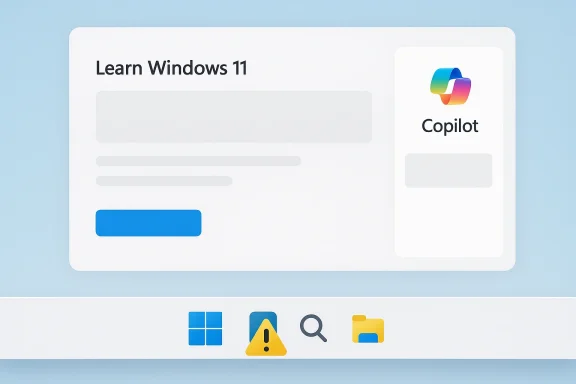
Microsoft’s Windows Learning Center is once again showing how awkward the company’s AI-first messaging can look when it meets the basic expectations of a product tutorial. A recent Windows 11 learning page reportedly includes an AI-generated illustration with an obvious interface mistake: two Start buttons on the taskbar. That kind of error might be easy to forgive in a casual concept image, but it is much harder to excuse in an official guide meant to teach people how Windows 11 actually works.
The episode is a small detail on the surface, yet it neatly captures a larger tension running through Microsoft’s consumer strategy in 2026: the company is still aggressively promoting Copilot, AI art, and AI-assisted experiences across Windows, but it is also increasingly being judged on whether those features make the operating system clearer, safer, and more trustworthy. When the visuals in a Microsoft tutorial become less reliable than the product they are supposed to explain, the problem is no longer just aesthetics. It becomes a credibility issue.
Microsoft has spent the last several years reframing Windows 11 as the foundation of its broader AI PC push. That effort has touched nearly every corner of the consumer product stack, from the Copilot app to Paint, Notepad, Windows Search, and learning resources on the official Windows site. The Learning Center page for Copilot on Windows 11, published on October 16, 2025, is a good example of the company’s current positioning: it presents Copilot as a built-in assistant that works by voice, helps with everyday tasks, and fits naturally into the operating system. Microsoft’s own page says Copilot is “built into Windows 11,” can be activated with “Hey Copilot,” and is framed as a hands-free helper for work, learning, and organization. (microsoft.com)
That context matters because the complaint here is not simply that Microsoft used an AI-generated image. Microsoft has been openly encouraging people to create images with Copilot and has published its own guidance on AI art generation, including pages labeled “AI art created via Copilot.” The company’s Copilot materials explicitly promote AI image creation as a mainstream creative tool, and Microsoft’s Windows and Copilot pages repeatedly emphasize generative AI as part of the user experience.
The issue is that a learning or support page is not a marketing poster. A tutorial should optimize for accuracy, clarity, and trust, especially when it is teaching less experienced users how to navigate a complex interface. If an image on an official Microsoft learning page contains two Start buttons, it undercuts the page’s purpose even if the image is clearly marked as AI-generated. In a product guide, a disclaimer does not fully solve a visual error; it merely informs the reader that the error is intentional or tolerated.
There is also a broader editorial angle. Microsoft’s public AI narrative has become increasingly ambitious, but its execution is often uneven. The company wants consumers to believe that AI can be embedded everywhere in Windows without friction, yet at the same time it is asking users to trust generated content in places where precision matters most. That tension is why a seemingly trivial visual mistake can generate outsized attention. It symbolizes a mismatch between the story Microsoft wants to tell and the product reality users can see.
When a guide includes a fake-looking interface image, the problem is not just that it may be “incorrect.” It can actively confuse the reader about what is part of the operating system and what is merely decorative. For new or older users, particularly the seniors the criticism jokingly referenced, a duplicated Start button is not a harmless design quirk. It is the sort of artifact that can trigger uncertainty about whether they are looking at a real Windows 11 screen or an invented one.
Microsoft could argue that the image is merely illustrative, and that is likely true. But illustrative and accurate are not the same thing. In product education, they should be as close as possible.
The problem emerges when the visual category is blurred. If a page looks like documentation but behaves like a marketing piece, readers are left to infer the difference on their own. That is a poor tradeoff for a company whose operating system depends on user confidence. Windows has always been a platform where small interface details matter, from the Start menu to the taskbar to system settings.
Microsoft’s own Copilot pages encourage generation, iteration, and stylistic experimentation. That is sensible for creative workflows, but tutorials need a different standard. In a help article, a misleading visual can be worse than no visual at all because it creates false certainty.
A few practical distinctions help explain the issue:
The company has also expanded AI branding across consumer tools and educational material. Microsoft’s Copilot art and creativity pages explain how to use image generation, while Microsoft’s product pages continue to highlight new AI experiences in Windows 11 and Copilot-related offerings. The direction of travel is obvious: AI is being woven into the operating system, the app layer, and the educational layer all at once.
But the strategy also creates pressure to overuse AI, even where it does not belong. Once everything is branded as intelligent, every error becomes more noticeable. If Microsoft wants to say that AI improves the experience, then its content has to demonstrate that improvement in practice.
The current situation is especially delicate because Microsoft has been pushing Windows 11 as cleaner, more modern, and more cohesive than Windows 10. Yet a generated image with an obvious taskbar error cuts against that promise. It reinforces the idea that Microsoft’s presentation layer is not always aligned with the actual system experience.
The public reaction is also colored by the broader debate around AI in consumer software. Many Windows enthusiasts already worry that Microsoft is forcing AI into places where users did not ask for it. Seeing a sloppy AI-generated illustration inside a learning resource confirms those fears more effectively than any product roadmap slide could.
A few reasons the issue lands so hard:
For enterprise buyers and IT administrators, the stakes are broader. Enterprises already evaluate Microsoft not just on features but on governance, support quality, and documentation reliability. If official learning content feels hastily assembled, it can weaken confidence in the broader AI rollout, especially in organizations that are cautious about deploying Copilot or other AI functions to employees.
That split matters because Microsoft’s AI push is trying to serve both groups at once. The company wants to sell Copilot as an everyday convenience for consumers while also convincing businesses that AI can be deployed responsibly. Official content that looks machine-generated but not fully polished works against both goals.
That leads to an important question: did Microsoft allow the image because it did not care, or because it assumed the label was enough? Neither answer is flattering. The first suggests neglect. The second suggests a misunderstanding of how documentation works.
To be fair, large content systems are imperfect. Microsoft publishes at scale, and mistakes happen. But if AI makes those mistakes easier to produce and harder to spot, then the editorial bar needs to rise rather than fall.
Competitors watching this will likely draw two lessons. First, AI-generated visuals are acceptable only when the surrounding quality control is strong. Second, if your product documentation is meant to build trust, artificial imagery can backfire quickly when the product is highly recognizable. In a category like Windows, users know what the interface should look like.
That scale also means Microsoft has more to lose from perception problems. If users start associating Copilot-branded content with inaccuracies or generated filler, the company may need to spend more time convincing people that its AI tools are reliable. That is not where Microsoft wants to be while trying to sell AI as the next era of personal computing.
Microsoft also deserves credit for making its AI guidance relatively discoverable. Consumers can find Copilot-related education in the Windows Learning Center, Microsoft Copilot pages, and broader AI blog ecosystems. That creates a more coherent path than scattershot feature announcements would.
The challenge is to align the presentation with the product:
If the company takes this lesson seriously, the controversy may fade into a footnote. If it does not, the criticism will keep resurfacing every time Microsoft asks users to trust an AI-generated asset inside a product explanation. In a world where Windows itself is being redefined around AI, those details matter more than they used to.
Microsoft’s AI ambitions are not the problem; the mismatch between those ambitions and the quality of the supporting material is. That gap is exactly where user confidence leaks away, one strange Start button at a time.
Source: VideoCardz.com https://videocardz.com/newz/microso...ws-ai-generated-image-with-two-start-buttons/
The episode is a small detail on the surface, yet it neatly captures a larger tension running through Microsoft’s consumer strategy in 2026: the company is still aggressively promoting Copilot, AI art, and AI-assisted experiences across Windows, but it is also increasingly being judged on whether those features make the operating system clearer, safer, and more trustworthy. When the visuals in a Microsoft tutorial become less reliable than the product they are supposed to explain, the problem is no longer just aesthetics. It becomes a credibility issue.
 Overview
Microsoft has spent the last several years reframing Windows 11 as the foundation of its broader AI PC push. That effort has touched nearly every corner of the consumer product stack, from the Copilot app to Paint, Notepad, Windows Search, and learning resources on the official Windows site. The Learning Center page for Copilot on Windows 11, published on October 16, 2025, is a good example of the company’s current positioning: it presents Copilot as a built-in assistant that works by voice, helps with everyday tasks, and fits naturally into the operating system. Microsoft’s own page says Copilot is “built into Windows 11,” can be activated with “Hey Copilot,” and is framed as a hands-free helper for work, learning, and organization. (microsoft.com)That context matters because the complaint here is not simply that Microsoft used an AI-generated image. Microsoft has been openly encouraging people to create images with Copilot and has published its own guidance on AI art generation, including pages labeled “AI art created via Copilot.” The company’s Copilot materials explicitly promote AI image creation as a mainstream creative tool, and Microsoft’s Windows and Copilot pages repeatedly emphasize generative AI as part of the user experience.
The issue is that a learning or support page is not a marketing poster. A tutorial should optimize for accuracy, clarity, and trust, especially when it is teaching less experienced users how to navigate a complex interface. If an image on an official Microsoft learning page contains two Start buttons, it undercuts the page’s purpose even if the image is clearly marked as AI-generated. In a product guide, a disclaimer does not fully solve a visual error; it merely informs the reader that the error is intentional or tolerated.
There is also a broader editorial angle. Microsoft’s public AI narrative has become increasingly ambitious, but its execution is often uneven. The company wants consumers to believe that AI can be embedded everywhere in Windows without friction, yet at the same time it is asking users to trust generated content in places where precision matters most. That tension is why a seemingly trivial visual mistake can generate outsized attention. It symbolizes a mismatch between the story Microsoft wants to tell and the product reality users can see.
The Learning Center Problem
The Windows Learning Center is supposed to be a place where Microsoft explains Windows features in plain language. That puts a premium on visual fidelity, because many users rely on screenshots and illustrations rather than reading dense documentation. Microsoft’s own Copilot on Windows 11 page makes this obvious: the content is structured as a beginner-friendly guide, complete with scenario-based examples, step-by-step activation instructions, and benefit statements. (microsoft.com)When a guide includes a fake-looking interface image, the problem is not just that it may be “incorrect.” It can actively confuse the reader about what is part of the operating system and what is merely decorative. For new or older users, particularly the seniors the criticism jokingly referenced, a duplicated Start button is not a harmless design quirk. It is the sort of artifact that can trigger uncertainty about whether they are looking at a real Windows 11 screen or an invented one.
Why tutorial visuals matter
Tutorials work because they reduce ambiguity. A screenshot is supposed to anchor the reader in a known interface, helping them map instructions to what they see on their own machine. If the image is generated, stylized, or partially fabricated, that anchor weakens.- Screenshots should show real UI states.
- Illustrations should be obviously decorative, not misleading.
- AI-generated visuals need strong context when used in documentation.
- Learning pages should prioritize accuracy over visual novelty.
Microsoft could argue that the image is merely illustrative, and that is likely true. But illustrative and accurate are not the same thing. In product education, they should be as close as possible.
AI Art Versus Product Documentation
Microsoft has every right to use AI-generated art in places where it adds value. For concept pieces, banners, marketing visuals, and campaign assets, generative imagery can be efficient and attractive. The company has even embraced that use case in its consumer Copilot material, where it tells users how to create images and make AI-generated photos.The problem emerges when the visual category is blurred. If a page looks like documentation but behaves like a marketing piece, readers are left to infer the difference on their own. That is a poor tradeoff for a company whose operating system depends on user confidence. Windows has always been a platform where small interface details matter, from the Start menu to the taskbar to system settings.
The trust gap in generated visuals
The phrase “AI art created via Copilot” is a useful label, but it is not a substitute for editorial judgment. A label tells users what they are looking at. It does not guarantee that the content is suitable for the context.Microsoft’s own Copilot pages encourage generation, iteration, and stylistic experimentation. That is sensible for creative workflows, but tutorials need a different standard. In a help article, a misleading visual can be worse than no visual at all because it creates false certainty.
A few practical distinctions help explain the issue:
- Marketing art can be expressive.
- Support screenshots should be literal.
- Educational illustrations can simplify, but not invent interface elements.
- Generated images should not depict core UI unless carefully reviewed.
Microsoft’s Broader AI Messaging
Microsoft’s Windows 11 messaging has become inseparable from AI. The company’s Windows and Copilot pages frame voice interaction, image generation, and assistant-driven workflows as foundational parts of the future PC experience. Its current Learning Center page for Copilot on Windows 11 says the assistant can answer questions, manage tasks, create or edit files, and support accessibility through voice. That is not a side note; it is the pitch. (microsoft.com)The company has also expanded AI branding across consumer tools and educational material. Microsoft’s Copilot art and creativity pages explain how to use image generation, while Microsoft’s product pages continue to highlight new AI experiences in Windows 11 and Copilot-related offerings. The direction of travel is obvious: AI is being woven into the operating system, the app layer, and the educational layer all at once.
The strategy and its limits
That strategy has strengths. It gives Microsoft a simple narrative for investors, partners, and consumers: Windows 11 is not just an OS, it is an AI platform. It also creates opportunities to unify features under a recognizable brand, which matters in a market where users often struggle to understand the difference between Windows, Copilot, Microsoft 365, Edge, and third-party AI tools.But the strategy also creates pressure to overuse AI, even where it does not belong. Once everything is branded as intelligent, every error becomes more noticeable. If Microsoft wants to say that AI improves the experience, then its content has to demonstrate that improvement in practice.
- AI branding can simplify the message.
- Overuse can make the message feel synthetic.
- Documentation errors are amplified by the branding.
- Consumer trust becomes harder to preserve.
Why This Resonates With Windows Users
Windows users have long been sensitive to interface inconsistency. That is partly because Windows is so widely used in school, work, and home settings, but also because the platform has always mixed legacy patterns with new design language. When Microsoft introduces a new visual identity, users immediately notice when something feels off.The current situation is especially delicate because Microsoft has been pushing Windows 11 as cleaner, more modern, and more cohesive than Windows 10. Yet a generated image with an obvious taskbar error cuts against that promise. It reinforces the idea that Microsoft’s presentation layer is not always aligned with the actual system experience.
Perception versus reality
There is a meaningful difference between a company saying “AI helps us create content faster” and a company publishing visibly flawed content on an official learning page. The first sounds efficient; the second sounds careless. In a niche tech controversy, that distinction can be everything.The public reaction is also colored by the broader debate around AI in consumer software. Many Windows enthusiasts already worry that Microsoft is forcing AI into places where users did not ask for it. Seeing a sloppy AI-generated illustration inside a learning resource confirms those fears more effectively than any product roadmap slide could.
A few reasons the issue lands so hard:
- Windows users expect precision from Microsoft’s own help content.
- AI fatigue has made consumers less forgiving.
- Learning pages imply authority and reliability.
- Visual errors are easier to spot than text errors.
Consumer and Enterprise Implications
For everyday users, the consequence is mostly about trust. If Microsoft’s own learning materials contain oddities, users may become less likely to rely on them. That is especially true for people who are trying to learn Windows 11 without outside help. A flawed illustration can slow down learning and create avoidable confusion.For enterprise buyers and IT administrators, the stakes are broader. Enterprises already evaluate Microsoft not just on features but on governance, support quality, and documentation reliability. If official learning content feels hastily assembled, it can weaken confidence in the broader AI rollout, especially in organizations that are cautious about deploying Copilot or other AI functions to employees.
Different audiences, different concerns
Consumers mostly care about usability. They want to know where to click, what to expect, and whether the instructions match the screen in front of them. Enterprises care about consistency, auditability, and support burden. If a feature is explained with inaccurate visuals, helpdesk tickets can rise and training materials become harder to standardize.That split matters because Microsoft’s AI push is trying to serve both groups at once. The company wants to sell Copilot as an everyday convenience for consumers while also convincing businesses that AI can be deployed responsibly. Official content that looks machine-generated but not fully polished works against both goals.
- Consumers need easy-to-follow guidance.
- IT teams need dependable documentation.
- Training programs rely on visual consistency.
- AI-first branding should not compromise clarity.
The Role of Editorial Review
One of the most interesting aspects of this controversy is how preventable it feels. If Microsoft wants to use generated imagery on a learning page, the editorial workflow should catch anything obviously wrong before publication. Two Start buttons is the sort of artifact that should be flagged immediately by any reviewer familiar with Windows UI conventions.That leads to an important question: did Microsoft allow the image because it did not care, or because it assumed the label was enough? Neither answer is flattering. The first suggests neglect. The second suggests a misunderstanding of how documentation works.
What good review should include
A mature review process for AI-generated visuals should include at least a few checks:- Verify that the image matches the product UI.
- Confirm that no core controls are duplicated or missing.
- Ensure any illustrative elements are clearly nonliteral.
- Review the image in the context of the surrounding paragraph.
- Reject visuals that could confuse first-time users.
To be fair, large content systems are imperfect. Microsoft publishes at scale, and mistakes happen. But if AI makes those mistakes easier to produce and harder to spot, then the editorial bar needs to rise rather than fall.
Competitors and the Market Context
Microsoft is not the only company experimenting with AI-assisted content and visuals. Across the tech industry, generated imagery is now widely used in marketing, support, education, and product storytelling. But Microsoft’s position is different because Windows is still the dominant desktop operating system in much of the enterprise world. That means the company’s tutorial content often becomes de facto reference material for millions of users.Competitors watching this will likely draw two lessons. First, AI-generated visuals are acceptable only when the surrounding quality control is strong. Second, if your product documentation is meant to build trust, artificial imagery can backfire quickly when the product is highly recognizable. In a category like Windows, users know what the interface should look like.
Why Microsoft’s scale makes the problem bigger
Smaller companies can sometimes get away with rough AI art in knowledge bases or blog posts because the audience is not expecting the same level of polish. Microsoft cannot. Its content sets a standard, whether it wants to or not.That scale also means Microsoft has more to lose from perception problems. If users start associating Copilot-branded content with inaccuracies or generated filler, the company may need to spend more time convincing people that its AI tools are reliable. That is not where Microsoft wants to be while trying to sell AI as the next era of personal computing.
- Scale magnifies mistakes.
- Brand authority raises the bar.
- UI documentation is especially sensitive.
- Competitive optics matter in AI adoption.
What Microsoft Does Well
The strongest argument in Microsoft’s favor is that the company is trying to make AI useful rather than merely flashy. The Copilot on Windows 11 learning page shows a real attempt to explain the assistant in practical terms, with concrete examples for writing, budgeting, homework help, and shopping. The page also includes accessibility framing and multi-language support, which are legitimate strengths if implemented well. (microsoft.com)Microsoft also deserves credit for making its AI guidance relatively discoverable. Consumers can find Copilot-related education in the Windows Learning Center, Microsoft Copilot pages, and broader AI blog ecosystems. That creates a more coherent path than scattershot feature announcements would.
The upside if executed correctly
If Microsoft tightens the editorial process, its AI content could become a real advantage. Well-made learning pages can reduce support burden, improve feature adoption, and help users feel more confident about trying new tools. Good AI documentation can also serve as a bridge for users who are curious but cautious.The challenge is to align the presentation with the product:
- Use real screenshots when teaching the interface.
- Reserve AI art for clearly decorative sections.
- Maintain consistency across Windows and Copilot content.
- Keep tutorials literal and easy to validate.
Strengths and Opportunities
Microsoft still has a strong hand here, even if the current execution raises eyebrows. The company has the distribution, the brand, and the operating system footprint to make AI features mainstream. If it tightens its editorial standards, the same Learning Center that now attracts criticism could become a model for how to document AI-enhanced software responsibly.- Massive reach through Windows 11 and the Learning Center.
- Clear AI narrative that is easy to understand.
- Strong accessibility potential in voice-driven experiences.
- Cross-product consistency across Windows, Copilot, and Microsoft 365.
- Opportunity to set best practices for AI documentation.
- Potential support savings if tutorials are clearer and more accurate.
- Room to improve trust by separating art from instruction.
Risks and Concerns
The risks are less about the single image than about what it represents. If Microsoft normalizes generated visuals in places where literal accuracy is expected, it may slowly erode confidence in its documentation and, by extension, in its AI push. That erosion can be subtle at first, but it matters in a product ecosystem as large as Windows.- Documentation credibility can decline if users spot obvious errors.
- AI fatigue may make consumers less tolerant of generated filler.
- Support confusion can rise when visuals do not match reality.
- Enterprise skepticism may harden around AI governance.
- Brand dilution is possible if every page looks machine-made.
- Editorial shortcuts may become normalized under time pressure.
- Product trust can suffer even when the underlying feature is solid.
Looking Ahead
The most likely outcome is not a dramatic policy reversal but a quieter tightening of standards. Microsoft is unlikely to abandon AI imagery, especially as it keeps positioning Windows 11 as the platform for modern AI experiences. What it can do, and probably should do, is separate conceptual, promotional, and instructional content more rigorously so that users know when they are looking at art and when they are looking at guidance.If the company takes this lesson seriously, the controversy may fade into a footnote. If it does not, the criticism will keep resurfacing every time Microsoft asks users to trust an AI-generated asset inside a product explanation. In a world where Windows itself is being redefined around AI, those details matter more than they used to.
- Audit Learning Center visuals for UI accuracy.
- Label generated art more clearly where it is used.
- Prefer screenshots in instructional content.
- Review Copilot-related pages for consistency.
- Avoid interface duplication mistakes like the two-Start-button example.
- Strengthen editorial QA before publishing at scale.
Microsoft’s AI ambitions are not the problem; the mismatch between those ambitions and the quality of the supporting material is. That gap is exactly where user confidence leaks away, one strange Start button at a time.
Source: VideoCardz.com https://videocardz.com/newz/microso...ws-ai-generated-image-with-two-start-buttons/
